Docker MCP Server

Docker MCP Server

docker_mcp_server•bymakbn

A Model Context Protocol server that exposes Docker commands as MCP tools for managing containers, images, networks, volumes, and swarms.

License: GPL3•Runtime: Awaiting documentation review•Category: cloud devops

WHAT IT DOES

  • •Exposes Docker commands as MCP tools, generated through MCP Mediator's automatic generation feature.
  • •Provides tools to list containers and images with optional filters.
  • •Supports container lifecycle operations such as start, stop, and remove.
  • •Connects to a configurable Docker daemon host, with optional TLS verification and certificates.

BEST FOR

  • •Inspecting and controlling Docker containers through an MCP client.
  • •Managing Docker Swarm clusters, nodes, and services.
  • •Pulling, pushing, and building Docker images.

ABOUT DOCKER_MCP_SERVER

Docker MCP Server is cataloged as an MCP server attributed to makbn. A Model Context Protocol server that exposes Docker commands as MCP tools for managing containers, images, networks, volumes, and swarms. It is categorized under cloud devops. See the capability inspector for recorded interfaces and their independent review status; consult upstream documentation for the current interface.

HOW TO INSTALL

Installation configuration is not reviewed. No executable setup is offered for this entry; inspect the source repository before proceeding.

LICENSE

Catalog license label: GPL3. Check the source repository's current license and terms before using, modifying or distributing this software.

能力检查器

能力定义尚未审核。未核验的采集内容不会作为可信接口展示。

Tools (0)

暂无可展示的已审核记录。这不表示上游不支持此能力。

Resources (0)

暂无可展示的已审核记录。这不表示上游不支持此能力。

Prompts (0)

暂无可展示的已审核记录。这不表示上游不支持此能力。

NEWSLETTER - COMING LATER

Newsletter subscriptions are not open yet

Email delivery is not connected. This page does not collect email addresses or create subscriptions.

Browse the registry for current listings instead.

Community Reviews

Coming later

Reviews for Docker MCP Server are not available yet

Review publishing and storage are not connected. This page does not collect or publish ratings or comments, including after sign-in.

FREQUENTLY ASKED QUESTIONS

Which Docker daemon does the server connect to by default?

It defaults to the Unix socket unix:///var/run/docker.sock unless another host is configured.

Can the server use TLS when connecting to Docker?

Yes, TLS verification can be enabled using the tls-verify option together with a certificate path.

上游原版 README

在 GitHub 查看同一版本原文

README.md · f5f40ca41f9b · 采集于 2026-11-13 11:47:00 UTC

保留上游原文,不做 AI 改写。为安全起见过滤脚本、表单和不安全链接。

当前显示最后一次成功采集的文档快照,请以来源页面为准。

Docker MCP Server

This module provides an implementation of a Model Context Protocol MCP server for Docker commands, powered by the mcp_mediator core framework. The Docker MCP Server utilizes the automatic server generation feature of MCP Mediator to expose existing Docker commands as MCP Tools. Each command is optionally annotated with @McpTool along with a minimal description to enhance tool discoverability and usability.

👉 See the full list of supported commands here.
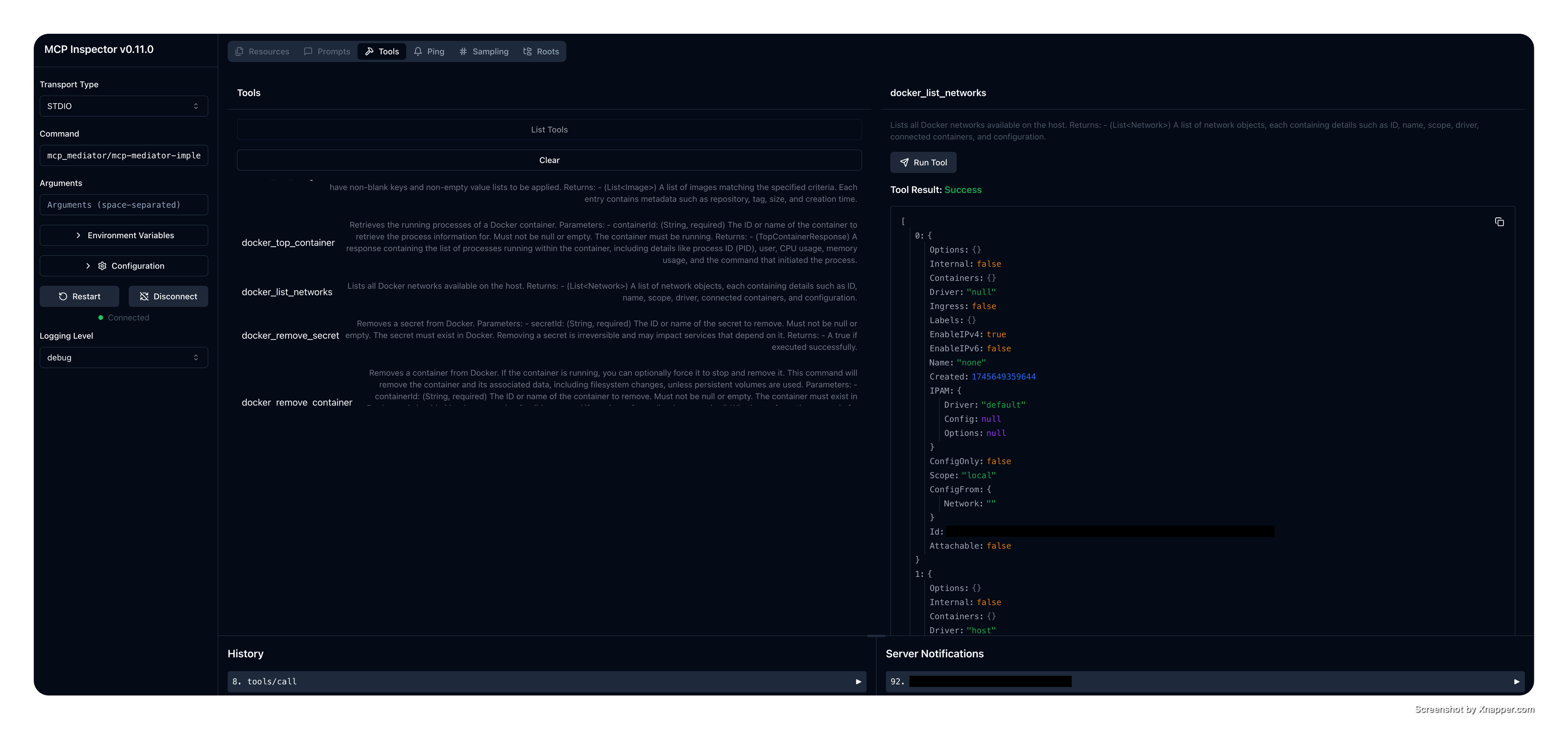
Docker MCP Server

[!IMPORTANT]
This is part of mcp_mediator project: https://github.com/makbn/docker_mcp_server To build or modify, clone the parent repository: git clone --recurse-submodules https://github.com/makbn/docker_mcp_server.git

Usage Examples

java -jar docker-mcp-server.jar \
  --docker-host=tcp://localhost:2376 \
  --tls-verify \
  --cert-path=/etc/docker/certs \
  --server-name=my-server \
  --server-version=1.0.0 \
  --max-connections=150 \
  --docker-config=/custom/docker/config

To run Docker MCP Server with Claude Desktop with java -jar:

{
  "mcpServers": {
    "my_java_mcp_server": {
      "command": "java",
      "args": [
        "-jar",
        "docker-mcp-server.jar"
        "--docker-host=tcp://localhost:2376",
        "--tls-verify", # not required
        "--cert-path=/etc/docker/certs", # required only if --tls-verify is available
        "--server-name=my-docker-mcp-server",
        "--server-version=1.0.0",
        "--max-connections=150",
        "--docker-config=/custom/docker/config"
      ]
    }
  }
}

Or create the native image (see the steps below) and use the standalone application:

{
  "mcpServers": {
    "my_java_mcp_server": {
      "command": "docker-mcp-server-executable",
      "args": [
        "--docker-host=tcp://localhost:2376" // rest of args
      ]
    }
  }
}

How to Build

To build the executable:

mvn clean compile package

This command creates a jar file under target folder mcp-mediator-implementation-docker-[version].jar. You can stop here and use the jar file and execute it using java -jar command. Or, you can create a standalone executable application using GraalVM native image:

 native-image -jar mcp-mediator-implementation-docker-[version].jar     

and this command creates an executable file: 'mcp-mediator-implementation-docker-[version] that can be executed.

Automatically Generate MCP Tools

This project integrates with MCP Mediator to automatically generate MCP Tools from existing Docker services.

Each method in the Docker service class can optionally be annotated with @McpTool to explicitly define the tool’s * name*, description, and other metadata.

However, annotation is not required—MCP Mediator supports automatic generation for non-annotated methods by inferring details from the method, class, and package names. To enable this behavior, set createForNonAnnotatedMethods to true:

DefaultMcpMediator mediator = new DefaultMcpMediator(McpMediatorConfigurationBuilder.builder()
        .createDefault()
        .serverName(serverName)
        .serverVersion(serverVersion)
        .build());

mediator.

registerHandler(McpServiceFactory.create(dockerClientService)
        .

createForNonAnnotatedMethods(true)); // Enables support for non-annotated methods

Check io.github.makbn.mcp.mediator.docker.server.DockerMcpServer for the full Mcp Mediator configuration.

Supported CLI Options

OptionDescriptionDefault
--docker-hostDocker daemon host URIunix:///var/run/docker.sock
--tls-verifyEnable TLS verification (used with --cert-path)false
--cert-pathPath to Docker TLS client certificates (required if TLS is enabled)none
--docker-configCustom Docker config directory~/.docker
--server-nameServer name for the MCP serverdocker_mcp_server
--server-versionServer version label1.0.0.0
--max-connectionsMaximum number of connections to Docker daemon100
--helpShow usage and available optionsn/a

Environment variables:

OptionDescriptionDefault
DOCKER_MCP_LOG_LEVELLogging level (TRACE, DEBUG, INFO, etc.)DEBUG
DOCKER_MCP_LOG_FILEPath to log output filelogs/docker_mcp_server.log

Supported Docker Commands as MCP Server Tools

MCP Tool NameDescription
docker_start_containerStart a Docker container by ID.
docker_stop_containerStop a Docker container by ID.
docker_leave_swarmRemove a node from Docker Swarm.
docker_container_diffShow changes made to a container’s filesystem.
docker_build_image_fileBuild an image from Dockerfile or directory.
docker_inspect_volumeGet details of a Docker volume.
docker_remove_serviceRemove a Docker service by ID.
docker_list_containersList containers with optional filters.
docker_inspect_swarmInspect Docker Swarm details.
docker_push_imagePush image to registry, supports auth.
docker_copy_archive_to_containerCopy a tar archive into a running container.
docker_stats_containerFetch container stats (CPU, memory, etc.).
docker_disconnect_container_from_networkDisconnect container from Docker network.
docker_remove_containerRemove a container, with optional force.
docker_inspect_serviceInspect a Docker service.
docker_remove_secretRemove a Docker secret by ID.
docker_pull_imagePull image from registry, supports auth.
docker_inspect_containerInspect container config and state.
docker_unpause_containerUnpause a paused container.
docker_list_imagesList Docker images with optional filters.
docker_list_servicesList all Docker services in the swarm.
docker_remove_imageRemove an image, with force and prune options.
docker_create_networkCreate a Docker network.
docker_tag_imageTag an image with a new repo and tag.
docker_authenticateAuthenticate to Docker registry.
docker_exec_commandExecute a command inside a container.
docker_remove_swarm_nodeRemove a swarm node, optionally forcibly.
docker_search_imagesSearch Docker Hub for images.
docker_list_networksList all Docker networks.
docker_remove_volumeRemove a Docker volume.
docker_create_containerCreate a container with custom settings.
docker_remove_networkRemove a Docker network.
docker_copy_archive_from_containerCopy files from a container to the host.
docker_rename_containerRename a Docker container.
docker_pause_containerPause a running container.
docker_versionGet Docker version information.
docker_list_swarm_nodesList all nodes in the Docker swarm.
docker_log_containerRetrieve logs from a container.
docker_prunePrune unused Docker resources.
docker_inspect_networkGet detailed info about a network.
docker_kill_containerSend a kill signal to a container.
docker_top_containerGet running processes in a container.
docker_list_volumesList Docker volumes with optional filters.
docker_update_swarm_nodeUpdate the config of a swarm node.
docker_infoShow Docker system-wide info.
docker_log_serviceGet logs from a Docker service.
docker_load_imageLoad an image from a tar archive.
docker_list_tasksLists the tasks in a Docker Swarm environment.
docker_save_imageSaves a Docker image to a local tar file.
docker_join_swarmJoins the node to an existing Swarm cluster.
docker_create_volumeCreates a new Docker volume.
docker_initialize_swarmInitializes a new Docker Swarm cluster.

Work in progress, more to be added.

DockerClientService Function Coverage

Check the DockerClientService class for the full list of available and planned tools (to be implemented)

[!IMPORTANT]
Almost all the MCP Tools' descriptions and names are generated automatically using AI agent!

🧩 Repository Structure and Git Subtree Setup

This project is a Git subtree module of the parent repository makbn/mcp_mediator. It is kept in its own repository to support independent versioning, CI, and release processes, while remaining integrated into the main mcp_mediator mono-repo.

🔀 Cloning Structure

If you're working in the context of the full mcp_mediator system:

`git clone --recurse-submodules https://github.com/makbn/docker_mcp_server.git`

Contributing

Contributions are welcome! Please feel free to submit a Pull Request. Read this first!

License

This project is licensed under the GPL3 License—see the LICENSE file for details.

Install configuration

Are you the maintainer?

Claim this server with your GitHub account to request manual ownership verification.

README Embed Badge
Markdown

Link to the catalog listing for Docker MCP Server from your README. This badge does not certify ownership, compatibility or security.

[![MCP catalog listing](https://img.shields.io/badge/MCP-awesome--mcp-orange?style=flat-square)](https://awesome-mcp.com/servers/docker_mcp_server)

REPOSITORY STATS

GitHub StarsUnavailable
ForksUnavailable

Public repository statistics could not be verified. Check the configured source address; unavailable counts are not zero.

下载与拉取统计

来源、范围和时段分别列出;不相加,不代表安装人数、活跃用户或安全审核。

尚无已审核的包 / 镜像标识,暂不展示下载统计。

Related cloud devops MCP Servers

Alternative and complementary servers in the same category

View all in cloud devops →
Huawei MCP Server
mcp-server-huaweiclouddeveloper•huaweiclouddeveloper

A Model Context Protocol server built on Huawei Cloud services that enables AI assistants to operate Huawei Cloud resources within conversational workflows, supporting ECS, OBS, GaussDB, and other cloud products.

Repository stats unavailable
Cloud & DevOps
Coolify MCP Server
coolify-mcp-server•wrediam

An MCP server that exposes the Coolify v4.3.1 REST API so AI clients can manage applications, databases, services, servers, deployments, and more.

Repository stats unavailable
Cloud & DevOps

A deprecated Model Context Protocol server for interacting with Kong Konnect APIs, enabling AI assistants to query and analyze Kong Gateway configurations, traffic, and analytics.

Repository stats unavailable
Cloud & DevOps