Documentation MCP Server

Documentation MCP Server

documentation-mcp•bysagacious-satadru

An MCP server that lets Claude search and retrieve documentation excerpts from LangChain, LlamaIndex, and OpenAI sources within conversations.

License: Not specified•Runtime: Awaiting documentation review•Category: search web

WHAT IT DOES

  • •Provides a get_docs tool that searches documentation for a specified library and returns relevant text.
  • •Uses the Serper API for site-specific Google searches, fetches result pages, and extracts main content with BeautifulSoup.
  • •Supports searching LangChain, LlamaIndex, and OpenAI documentation.
  • •Allows limiting the amount of returned text via a max_chars parameter.

BEST FOR

  • •Looking up information about vector stores or other topics in LangChain documentation during a conversation.
  • •Retrieving concise documentation excerpts from supported AI libraries inside Claude Desktop.

ABOUT DOCUMENTATION-MCP

Documentation MCP Server is cataloged as an MCP server attributed to sagacious-satadru. An MCP server that lets Claude search and retrieve documentation excerpts from LangChain, LlamaIndex, and OpenAI sources within conversations. It is categorized under search web. See the capability inspector for recorded interfaces and their independent review status; consult upstream documentation for the current interface.

HOW TO INSTALL

Installation configuration is not reviewed. No executable setup is offered for this entry; inspect the source repository before proceeding.

LICENSE

Catalog license label: Not specified. Check the source repository's current license and terms before using, modifying or distributing this software.

能力检查器

能力定义尚未审核。未核验的采集内容不会作为可信接口展示。

Tools (0)

暂无可展示的已审核记录。这不表示上游不支持此能力。

Resources (0)

暂无可展示的已审核记录。这不表示上游不支持此能力。

Prompts (0)

暂无可展示的已审核记录。这不表示上游不支持此能力。

NEWSLETTER - COMING LATER

Newsletter subscriptions are not open yet

Email delivery is not connected. This page does not collect email addresses or create subscriptions.

Browse the registry for current listings instead.

Community Reviews

Coming later

Reviews for Documentation MCP Server are not available yet

Review publishing and storage are not connected. This page does not collect or publish ratings or comments, including after sign-in.

FREQUENTLY ASKED QUESTIONS

Which libraries can the documentation tool search?

It supports LangChain, LlamaIndex, and OpenAI documentation.

What service does the server use to find documentation pages?

It uses the Serper API to run Google searches with site-specific queries.

上游原版 README

在 GitHub 查看同一版本原文

README.md · 5c7650daacdf · 采集于 2026-11-13 10:40:35 UTC

保留上游原文,不做 AI 改写。为安全起见过滤脚本、表单和不安全链接。

当前显示最后一次成功采集的文档快照,请以来源页面为准。

Documentation MCP Server 📚🔍

A Model Context Protocol (MCP) server that enables Claude to search and access documentation from popular libraries like LangChain, LlamaIndex, and OpenAI directly within conversations.

What is MCP? 🤔

MCP (Model Context Protocol) is an open protocol that standardizes how applications provide context to Large Language Models. Think of it as a universal connector that lets AI assistants like Claude access external data sources and tools.
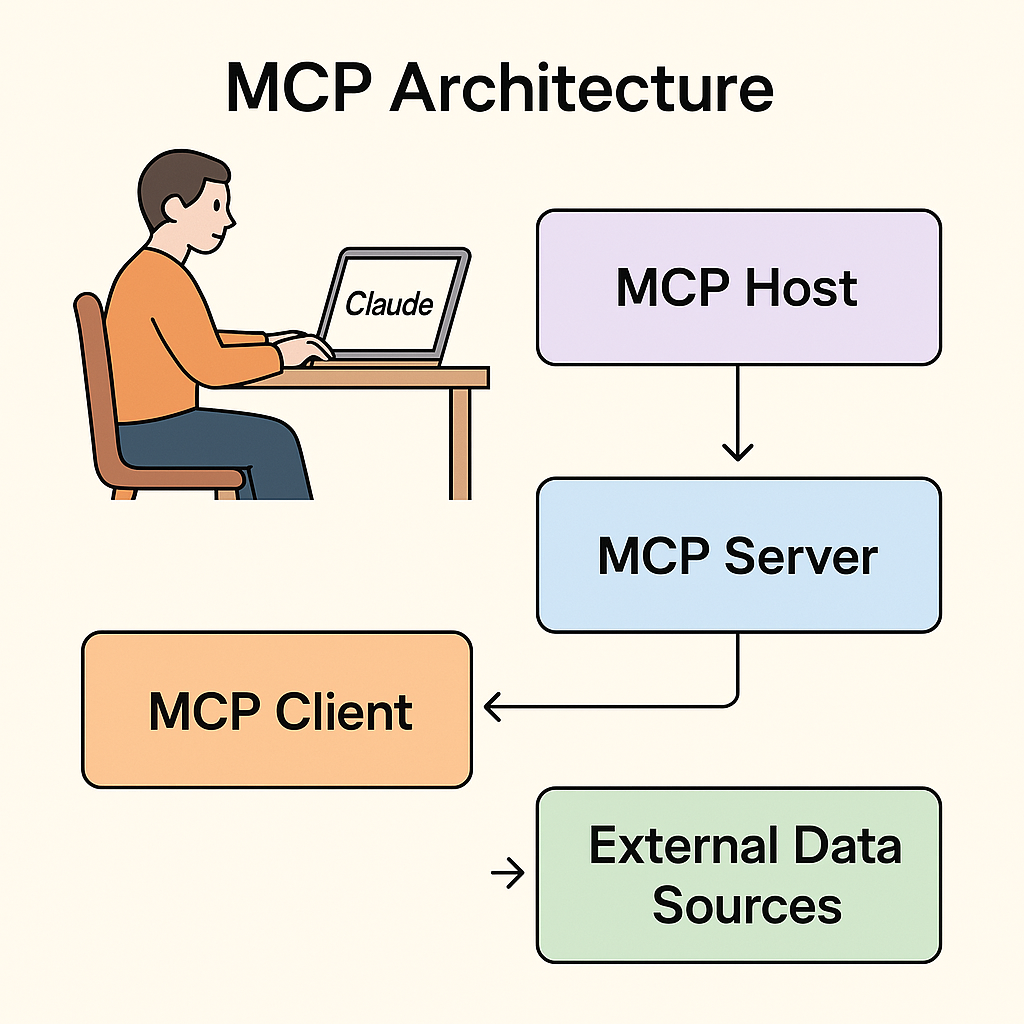
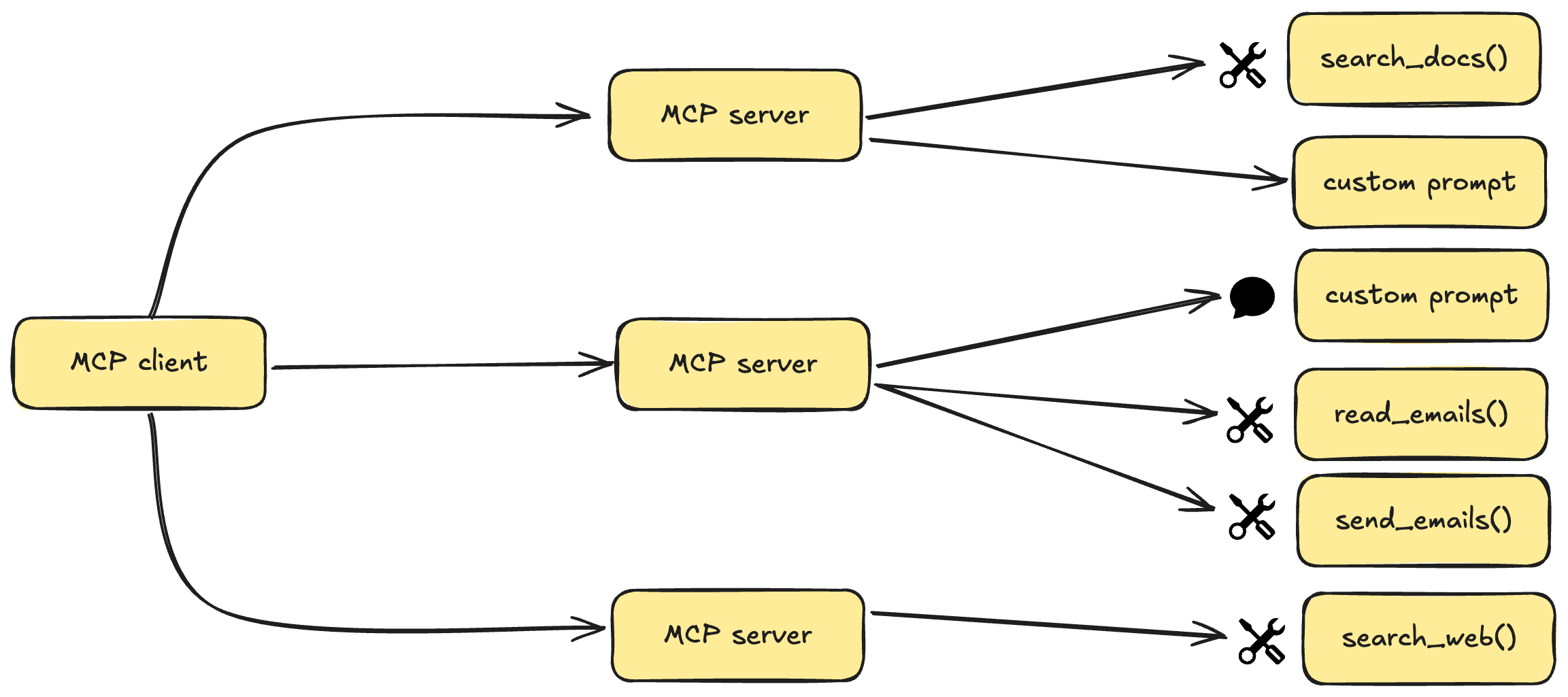
MCP Architecture

MCP Architecture

Features ✨

  • Documentation Search Tool: Search through documentation of popular AI libraries
  • Supported Libraries:
  • Smart Extraction: Intelligently parses HTML content to extract the most relevant information
  • Configurable Results: Limit the amount of text returned based on your needs

How It Works 🛠️

  1. The server uses the Serper API to perform Google searches with site-specific queries
  2. It fetches the content from the search results
  3. BeautifulSoup extracts the most relevant text from main content areas
  4. Claude can access this information through the get_docs tool

System Requirements 🖥️

  • Python 3.11 or higher
  • uv package manager
  • A Serper API key

Setup Instructions 🚀

1. Install uv Package Manager

curl -LsSf https://astral.sh/uv/install.sh | sh

2. Clone and Set Up the Project

# Clone or download the project
cd documentation

# Create and activate virtual environment
uv venv
# On Windows:
.venv\Scripts\activate
# On macOS/Linux:
source .venv/bin/activate

# Install dependencies
uv pip install -e .

3. Configure the Serper API Key

Create a .env file in the project directory with your Serper API key:

SERPER_API_KEY=your_serper_api_key_here

You can get a Serper API key by signing up at serper.dev.

4. Configure Claude Desktop

Edit your Claude Desktop configuration file at:

  • Windows: /C:/Users/[Your Username]/AppData/Roaming/Claude/claude_desktop_config.json

  • macOS: ~/Library/Application Support/Claude/claude_desktop_config.json

Add the following to the mcpServers section:

"documentation": {
  "command": "uv",
  "args": [
    "--directory",
    "/ABSOLUTE/PATH/TO/YOUR/documentation",
    "run",
    "main.py"
  ]
}

Replace /ABSOLUTE/PATH/TO/YOUR/documentation with the absolute path to your project directory.

5. Restart Claude Desktop

Close and reopen Claude Desktop to apply the new configuration.

Using the Documentation Tool 🧩

Once connected, you can ask Claude to use the documentation tool:

"Can you look up information about vector stores in LangChain documentation?"

Claude will use the get_docs tool to search for relevant information and provide you with documentation excerpts.

Tool Parameters 📋

The get_docs tool accepts the following parameters:

  • query: The search term (e.g., "vector stores", "embedding models")
  • library: Which library to search (langchain, llama-index, or openai)
  • max_chars: Maximum characters to return (default: 1000)

Troubleshooting 🛠️

  • Claude can't find the server: Verify the path in /C:/Users/fcbsa/AppData/Roaming/Claude/claude_desktop_config.json is correct
  • Search returns no results: Check your Serper API key and internet connection
  • Timeout errors: The server might be experiencing connectivity issues or rate limits

License 📜

This project is provided as an educational example of MCP server implementation.

Acknowledgements 🙏


This MCP server enhances Claude's capabilities by providing direct access to documentation resources. Explore, learn, and build better AI applications with contextual knowledge from the docs!


Install configuration

Are you the maintainer?

Claim this server with your GitHub account to request manual ownership verification.

README Embed Badge
Markdown

Link to the catalog listing for Documentation MCP Server from your README. This badge does not certify ownership, compatibility or security.

[![MCP catalog listing](https://img.shields.io/badge/MCP-awesome--mcp-orange?style=flat-square)](https://awesome-mcp.com/servers/documentation-mcp)

REPOSITORY STATS

GitHub StarsUnavailable
ForksUnavailable

Public repository statistics could not be verified. Check the configured source address; unavailable counts are not zero.

下载与拉取统计

来源、范围和时段分别列出;不相加,不代表安装人数、活跃用户或安全审核。

尚无已审核的包 / 镜像标识,暂不展示下载统计。

Related search web MCP Servers

Alternative and complementary servers in the same category

View all in search web →

An MCP server that merges Google Search Console history with a live first-party crawl of your site to produce a prioritised, evidence-backed technical SEO audit inside Claude, complete with paste-ready fixes.

Repository stats unavailable
Search & Web Research

An MCP server that offers intelligent web search using OpenAI reasoning models, with support for fast iterations and deep research.

94
Search & Web Research
