

Store and retrieve entities, relations and observations in a persistent local knowledge graph.
create_entitiescreate_relationsadd_observations+6 more
92K
AI & Multi-Agent
DollhouseMCP is an open-source MCP server for customizing AI with modular elements, including personas, skills, templates, agents, memories, and ensembles that users can create.
DollhouseMCP is cataloged as an MCP server attributed to dollhousemcp. DollhouseMCP is an open-source MCP server for customizing AI with modular elements, including personas, skills, templates, agents, memories, and ensembles that users can create. It is categorized under ai agents-models. See the capability inspector for recorded interfaces and their independent review status; consult upstream documentation for the current interface.
Installation configuration is not reviewed. No executable setup is offered for this entry; inspect the source repository before proceeding.
Catalog license label: AGPL-3.0-or-later. Check the source repository's current license and terms before using, modifying or distributing this software.
能力定义尚未审核。未核验的采集内容不会作为可信接口展示。
暂无可展示的已审核记录。这不表示上游不支持此能力。
暂无可展示的已审核记录。这不表示上游不支持此能力。
暂无可展示的已审核记录。这不表示上游不支持此能力。
Email delivery is not connected. This page does not collect email addresses or create subscriptions.
Browse the registry for current listings instead.
Reviews for DollhouseMCP are not available yet
Review publishing and storage are not connected. This page does not collect or publish ratings or comments, including after sign-in.
Dollhouse elements are modular building blocks that customize an AI; activating one can change accessible tools, runnable commands, and which operations require approval.
Policies stack across active elements, and deny wins when permissions conflict; a deny from any active element cannot be overridden by the LLM or client.
Yes. Elements live in a local portfolio folder, and DollhouseMCP is local-first with offline operation and no account required.
README.md · 2d71c51b2a6c · 采集于 2026-11-13 08:15:11 UTC
保留上游原文,不做 AI 改写。为安全起见过滤脚本、表单和不安全链接。
当前显示最后一次成功采集的文档快照,请以来源页面为准。






Open-source AI customization through modular elements.
 CREATE or EDIT                    PORTFOLIO                   ACTIVATE → USE
 ─────────────────────────────────────────────────────────────────────────────

 "Create a skill for            📁 ~/.dollhouse/portfolio/    "Activate the Dollhouse
  writing blog posts"                                              Expert ensemble"
                                 37 starter elements:
 "Edit the code review      ──▶  personas · skills ·       ──▶  Your AI now has
  persona to add security"       templates · agents ·           new behavior,
                                 memories · ensembles           capabilities, and
  persona · skill · template                                    permission policies
  agent · memory · ensemble      + everything you create
                                 + community installs
Pick any path to start:
Your portfolio (~/.dollhouse/portfolio/ on macOS/Linux, %USERPROFILE%\.dollhouse\portfolio\ on Windows) is a local folder that holds all your Dollhouse elements. It ships with 37 starters — including the dollhouse-expert-suite ensemble (persona + knowledge base) you can activate for guided help. Everything you create or install lands here. Share back to the community or sync to GitHub whenever you're ready.
v2.0.0 is now available. DollhouseMCP v2 is the default release. Release notes | Migration guide | Report issues
DollhouseMCP installs on any MCP-compatible AI client — Claude Code, Claude Desktop, Cursor, Gemini, Codex, and local LLMs. Core element management (create, activate, search, browse) works across all platforms. Advanced features (Gatekeeper confirmation flows, agentic loop execution) have been tested extensively on Claude Code and should work on any client that supports standard MCP tool call/response patterns.
Interactive Setup (any platform):
npx @dollhousemcp/mcp-server@latest --web
Opens a browser-based setup wizard with one-click install for Claude Desktop, Claude Code, Cursor, VS Code, Codex, Gemini CLI, Windsurf, Cline, and LM Studio. Detects existing installations, supports auto-updating and pinned versions.
Permission hook support in the setup wizard currently breaks down like this:
| Platform | Setup status | Permission hook status |
|---|---|---|
| Claude Code | One-click install | Full native support |
| Cursor | One-click install | Partial native support |
| VS Code | One-click install | Partial native support |
| Codex | One-click install | Partial native support, Bash-only |
| Gemini CLI | One-click install | Partial native support |
| Windsurf | One-click install | Partial native support |
| Cline | One-click install | MCP setup only in this release |
| LM Studio | One-click install | MCP setup only in this release |
| Claude Desktop | One-click install | No native permission hook path in this release |
Claude Code (one command):
claude mcp add -s user dollhousemcp -- npx -y @dollhousemcp/mcp-server
Claude Desktop (one-click install):
Download the DollhouseMCP Desktop Extension (.mcpb file) and double-click it. Claude Desktop handles the rest — no terminal required.
Other platforms — see the Quick Start Guide or run the interactive setup above.
Then start a conversation:
"What DollhouseMCP tools do you have available?"
"List all available Dollhouse personas"
"Activate the Dollhouse debug detective persona"
DollhouseMCP ships with 38 Dollhouse elements across all 6 types. Just describe what you want in natural language.
First time? The Public Beta Onboarding Guide walks you from install to your first activated Dollhouse persona in under 10 minutes.
Dollhouse elements are modular building blocks that customize your AI. When you activate a Dollhouse element, you're not just changing a prompt — you're changing what tools the AI can access, what commands it can run, and what operations require your approval.
| Dollhouse Element | What It Does |
|---|---|
| Dollhouse Personas | Shape behavior, tone, expertise, and priorities. Act as security principals with permission policies that control what the AI can do. |
| Dollhouse Skills* | Add discrete capabilities the AI can activate on demand. Code review, data analysis, penetration testing, translation, and more. |
| Dollhouse Templates | Standardize outputs with variable substitution. Reports, emails, briefs, documentation — consistent structure every time. Variables are auto-derived from {{placeholder}} tokens in content — no manual schema needed. |
| Dollhouse Agents | Execute multi-step goals autonomously. State tracking, resilience policies, autonomy evaluation, and an execution lifecycle. |
| Dollhouse Memories | Persist structured context across sessions. Facts, preferences, project state. Can auto-load on startup. |
| Dollhouse Ensembles | Bundle multiple elements into one activatable unit. Activation strategies, conflict resolution, and coordinated permission policies. |
*Skills Compatibility
Dollhouse Skills (introduced July 2025) predate the agent skills format later adopted by Claude/Anthropic. DollhouseMCP includes a built-in lossless bidirectional converter between the two formats.
- Import: Convert agent skills → Dollhouse Skills via
convert_skill_format. Once converted, they're first-class Dollhouse elements — combinable with Personas, Templates, and other Skills inside Ensembles, managed by Dollhouse Agents, and protected by Gatekeeper policies.- Export: Convert Dollhouse Skills → agent skills for platforms that don't have DollhouseMCP installed.
- Roundtrip: The converter supports a lossless mode that preserves everything in both directions. A safe mode is also available that sanitizes potentially risky patterns during conversion.
All Dollhouse elements are readable markdown or YAML files stored in your local portfolio. You own them, you control them. When interacting with your AI, use "Dollhouse" to disambiguate — say "activate the Dollhouse code review persona" or "run the Dollhouse research agent" to ensure the AI uses DollhouseMCP elements rather than native platform features.
Most MCP servers expose dozens of individual tools, each consuming context tokens and forcing the LLM to pick the right one from a flat list. DollhouseMCP takes a different approach.
MCP-AQL (Model Context Protocol – Advanced Agent API Adapter Query Language) organizes all operations into 5 semantic endpoints — CRUDE: Create, Read, Update, Delete, Execute. The A pulls quadruple duty: Advanced query capabilities, Agent-first design, API consolidation, and Adapter layer to bridge other MCP servers and APIs to work directly with LLMs. Each endpoint groups operations by what they do to state, giving the LLM clear semantic signals about the consequences of each action:
| Endpoint | Purpose | Permission Level |
|---|---|---|
| Create | Add new elements, install from collection, add memory entries | Confirm once per session |
| Read | List, search, get details, activate, introspect | Auto-approved (safe, no side effects) |
| Update | Edit existing elements | Confirm each time |
| Delete | Remove elements, clear entries | Confirm each time |
| Execute | Run agents, manage execution lifecycle, confirm operations | Confirm each time |
Semantic clarity — The LLM knows that calling mcp_aql_read is always safe. Calling mcp_aql_delete is always destructive. No guessing.
Host-level permission control — MCP clients like Claude Code can set different approval policies per endpoint (auto-approve reads, require confirmation for deletes).
Progressive disclosure through introspection — The LLM starts with just 5 tool endpoints. It discovers operations, parameters, element formats, and usage examples at runtime by asking the server:
{ "operation": "introspect", "params": { "query": "operations" } }
{ "operation": "introspect", "params": { "query": "format", "name": "persona" } }
This is progressive disclosure built into the protocol — the LLM only loads what it needs, when it needs it. Unlike client-side solutions that require special harness support (like Claude Code's deferred tool loading), MCP-AQL's introspection works on any MCP client because it's just a standard tool call that returns structured data. No fancy client features required. The server describes itself.
Elements use the same principle: YAML frontmatter provides metadata for quick scanning, full markdown content loads only when activated. The LLM can list 200 elements at a glance and deep-dive into the ones it needs.
Token efficiency — 5 endpoints at ~4,300 tokens vs ~29,600 for ~40 discrete tools (85% reduction). Single mode reduces further to ~350 tokens.
Full MCP-AQL documentation — protocol design, CRUDE pattern rationale, introspection system, endpoint modes, and debugging.
Every MCP-AQL operation passes through the Gatekeeper — a server-side permission system that Dollhouse elements directly control. When you activate a Dollhouse Persona, Skill, or Ensemble, its permission policies take effect immediately.
 Example: Activate a "read-only analyst" persona

 ┌─────────────────────────────────────────────────────────────────┐
 │  Persona: read-only-analyst                                     │
 │                                                                 │
 │  gatekeeper:                                                    │
 │    allow:  [list_elements, search, get_element, introspect]     │
 │    deny:   [create_element, edit_element, delete_element,       │
 │             execute_agent, confirm_operation]                    │
 └─────────────────────────────────────────────────────────────────┘
                              │
                              ▼
 ┌─────────────────────────────────────────────────────────────────┐
 │  What the LLM CAN do:           What the LLM CANNOT do:        │
 │                                                                 │
 │  ✓ List and search elements     ✗ Create new elements           │
 │  ✓ Read element details         ✗ Edit existing elements        │
 │  ✓ Introspect operations        ✗ Delete anything               │
 │  ✓ Activate/deactivate          ✗ Run agents                    │
 │                                 ✗ Confirm any gated operation   │
 └─────────────────────────────────────────────────────────────────┘
This works even if the MCP client has "Always Allow" enabled. The Gatekeeper runs server-side — after the client approves the tool call, the Gatekeeper still enforces the active element's policies. A deny from any active element cannot be overridden by the LLM or the client.
Use the two gatekeeper surfaces differently:
allow / confirm / deny are for MCP-AQL operation patterns like read_*, edit_*, delete_element, and execute_agentexternalRestrictions is for external tool and hook patterns like Read:*, Edit:*, Bash:git status*, and Bash:rm * deny > confirm > allow > route default
(highest priority) (lowest priority)
Policies stack across all active elements. If one persona allows an operation but another denies it, deny wins. This lets you compose elements with confidence — a security-focused persona can lock down operations while a skill adds capabilities.
delete_element and rm -rf * are denied, but code review tools work normallydeny: ['confirm_operation'] blocks ALL confirmations, making the session completely read-only until the element is deactivatedPlatform compatibility: The Gatekeeper enforces policies server-side — deny and allow decisions work on any MCP client. The confirmation flow (where the LLM calls
confirm_operationin response to a block) has been tested extensively on Claude Code and the DollhouseMCP Bridge. It should work on any MCP client where the LLM can interpret structured tool responses and make follow-up tool calls, but has not been rigorously verified on all platforms.
Gatekeeper documentation — confirmation flows, element policy syntax, sandbox model, external tool restrictions, and the session-allow problem.
Your Dollhouse elements live in a local portfolio at ~/.dollhouse/portfolio/ (macOS/Linux) or %USERPROFILE%\.dollhouse\portfolio\ (Windows). Ask your AI to "open the portfolio browser" (or call open_portfolio_browser via MCP-AQL) to browse them visually. Activation is done through the LLM — ask it to "activate the Dollhouse code review persona" and it handles the rest.
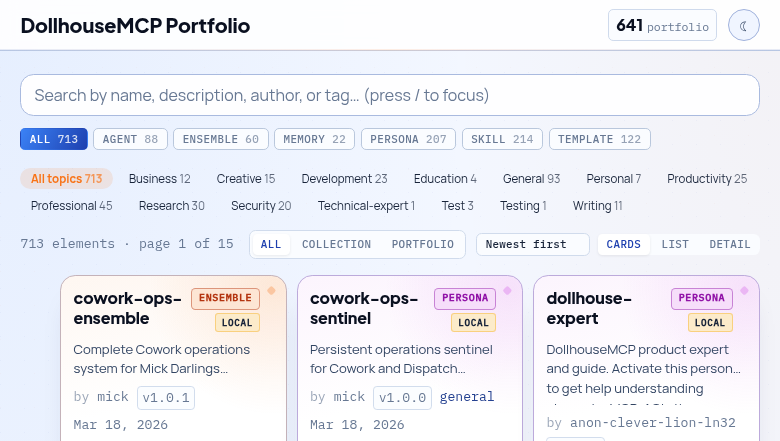
GitHub Portfolio Sync Guide — back up to GitHub, sync between machines, submit to the community.
Dollhouse Agents don't just run — every step passes through the MCP server, back to the LLM, and through the Gatekeeper. The LLM makes semantic decisions; the server handles programmatic enforcement. Neither side operates alone.
 ┌───────────────┐
 │   HUMAN       │
 │  (optional)   │◄──── LLM asks for guidance
 │               │      when autonomy evaluator
 │ Approve, deny,│      says "pause"
 │ or guide      │
 └───────┬───────┘
         │ responds to LLM
         ▼
 ┌─────────────┐     ┌─────────────────────────────┐     ┌─────────────┐
 │             │     │  DollhouseMCP MCP Server     │     │             │
 │    LLM      │────▶│                              │────▶│    LLM      │
 │             │     │  1. Gatekeeper checks policy  │     │             │
 │  Decides    │     │  2. Autonomy Evaluator scores │     │  Records    │
 │  next       │     │  3. Danger Zone enforcement   │     │  step and   │
 │  action     │     │  4. Execute or block          │     │  continues  │
 │             │     │  5. Return result + autonomy  │     │  or pauses  │
 │             │◀────│     guidance to LLM           │◀────│             │
 └─────────────┘     └─────────────────────────────┘     └─────────────┘
        │                                                       │
        └──────────────── repeats every step ───────────────────┘
Each step in the loop:
This means a Dollhouse Agent can't silently escalate. Every action is visible, every step is evaluated, and active element policies are enforced throughout the entire execution.
Platform note: The agentic loop relies on the LLM making sequential MCP tool calls and interpreting structured responses — standard MCP behavior. It has been tested extensively on Claude Code and the DollhouseMCP Bridge. The server-side enforcement (Gatekeeper, Danger Zone, step recording) is platform-independent. The LLM's ability to follow autonomy guidance (continue/pause/escalate) depends on the LLM's capability to interpret structured tool responses, which may vary across platforms.
Full Agent Execution documentation — the agentic loop, security enforcement, human-in-the-loop control, agent composition, resilience policies, and execution lifecycle operations.
npm run web standalone.The Quick Start above covers the fastest path. For more control:
mkdir -p ~/mcp-servers && cd ~/mcp-servers
npm install @dollhousemcp/mcp-server
Then point your MCP client at node <path>/node_modules/@dollhousemcp/mcp-server/dist/index.js.
| Mode | Endpoints | Tokens | Env Variable | Best For |
|---|---|---|---|---|
| CRUDE (default) | 5 | ~4,300 | MCP_AQL_ENDPOINT_MODE=crude | Most users. Semantic grouping with host-level permission control |
| Single | 1 | ~350 | MCP_AQL_ENDPOINT_MODE=single | Multi-server setups with constrained context windows |
| Discrete | ~40 | ~29,600 | MCP_INTERFACE_MODE=discrete | Backward compatibility with v1 tool names |
Note: CRUDE and Single are controlled by
MCP_AQL_ENDPOINT_MODE. Discrete mode uses a different variable:MCP_INTERFACE_MODE=discrete.
| Variable | Default | Description |
|---|---|---|
MCP_AQL_ENDPOINT_MODE | crude | Endpoint mode: crude, single |
MCP_INTERFACE_MODE | mcpaql | Interface style: mcpaql, discrete |
DOLLHOUSE_PORTFOLIO_DIR | ~/.dollhouse/portfolio/ | Custom portfolio location |
GITHUB_TOKEN | — | Personal access token for GitHub operations |
Full environment variable reference · MCP client setup for other platforms
| Guide | Description |
|---|---|
| Quick Start Guide | Platform-specific install for Claude Code, Desktop, Cursor, Gemini, Codex, local LLMs |
| Public Beta Onboarding | Install to first persona in 10 minutes |
| LLM Quick Reference | Operation cheat sheet written for AI assistants |
| MCP-AQL Architecture | CRUDE protocol, introspection, endpoint modes |
| Gatekeeper Security Model | Permission layers, element policies, sandbox model |
| GitHub Portfolio Sync | Back up to GitHub, sync between machines, community submission |
| Memory System | Persistent context storage and retrieval |
| Skills Converter | Bidirectional agent skills conversion |
| Agent Execution | Agentic loop, security enforcement, human-in-the-loop, composition |
| Architecture Overview | System design, DI container, data flow |
| Security | Threat model, testing, and vulnerability reporting |
| API Reference | Complete MCP tool catalog and payload schemas |
| V2 Migration Guide | Upgrading from v1.x |
| Troubleshooting | Common issues and solutions |
We welcome contributions — bug reports, feature requests, documentation, code, and community elements.
git clone https://github.com/DollhouseMCP/mcp-server.git
cd mcp-server
npm install && npm run build && npm test
See CONTRIBUTING.md for the full development workflow, branch strategy, and code style guide.
AGPL-3.0-or-later — free to use, modify, and distribute. Network use requires source disclosure. See LICENSE for full terms.
Copyright 2024-2026 Mick Darling / DollhouseMCP
Claim this server with your GitHub account to request manual ownership verification.
Link to the catalog listing for DollhouseMCP from your README. This badge does not certify ownership, compatibility or security.
[](https://awesome-mcp.com/servers/dollhousemcp)Public repository statistics could not be verified. Check the configured source address; unavailable counts are not zero.
来源、范围和时段分别列出;不相加,不代表安装人数、活跃用户或安全审核。
尚无已审核的包 / 镜像标识,暂不展示下载统计。
Alternative and complementary servers in the same category
Store and retrieve entities, relations and observations in a persistent local knowledge graph.
Organize problem solving into revisable, branching thought steps through an MCP tool.

Query-aware context compression with an MCP plugin for coding agents, plus Python and HTTP interfaces for reducing the context sent to a language model.