
This is a Model Context Protocol (MCP) server for interacting with AIStor object stores.
Repository stats unavailable
Databases & Storage
An MCP server for Dremio that can run locally with an LLM frontend or use remote streaming HTTP deployment.
Dremio MCP server is cataloged as an MCP server attributed to dremio. An MCP server for Dremio that can run locally with an LLM frontend or use remote streaming HTTP deployment. It is categorized under databases storage. See the capability inspector for recorded interfaces and their independent review status; consult upstream documentation for the current interface.
Installation configuration is not reviewed. No executable setup is offered for this entry; inspect the source repository before proceeding.
Catalog license label: Not specified. Check the source repository's current license and terms before using, modifying or distributing this software.
能力定义尚未审核。未核验的采集内容不会作为可信接口展示。
暂无可展示的已审核记录。这不表示上游不支持此能力。
暂无可展示的已审核记录。这不表示上游不支持此能力。
暂无可展示的已审核记录。这不表示上游不支持此能力。
Email delivery is not connected. This page does not collect email addresses or create subscriptions.
Browse the registry for current listings instead.
Reviews for Dremio MCP server are not available yet
Review publishing and storage are not connected. This page does not collect or publish ratings or comments, including after sign-in.
It can run locally on the machine that runs the LLM frontend or use remote streaming HTTP deployment.
It lets the LLM look at Dremio tables and data for pattern discovery and other use cases.
Multiple modes can be specified together, separated by commas.
README.md · 48e3a818ed8b · 采集于 2026-11-13 08:09:48 UTC
保留上游原文,不做 AI 改写。为安全起见过滤脚本、表单和不安全链接。
当前显示最后一次成功采集的文档快照,请以来源页面为准。
Table of Contents
This repo provides an Model Context Protocol (MCP) server for easing LLM integration with Dremio. If you are new to MCP and MCP Servers take our Dremio MCP Server course on Dremio University (DremioU). If you are familiar with these concepts already please proceed below.
%%{init:
{
    "themeVariables": {
        "fontFamily": "Inter"
    }
}
}%%

architecture-beta
    group ws(cloud)[Workstation]

    service cf(database)[Config] in ws
    service mcp(server)[Dremio MCP Server] in ws
    service claude(cloud)[Claude Desktop] in ws

    mcp:B <-- T:cf
    claude:R <--> L:mcp


    group dremio(cloud)[Dremio]
    service de(server)[Dremio Engine] in dremio

    mcp:R <--> L:de
The Dremio MCP server can be deployed in two ways:
For production deployments in Kubernetes environments, use the Helm chart:
# Build Docker image
docker build -t dremio-mcp:0.1.0 .

# Production deployment with OAuth (Recommended)
helm install my-dremio-mcp ./helm/dremio-mcp \
  --set dremio.uri=https://dremio.example.com:9047

# Development/Testing with PAT (Not for production)
helm install my-dremio-mcp ./helm/dremio-mcp \
  --set dremio.uri=https://dremio.example.com:9047 \
  --set dremio.pat=<your-pat>
The MCP server runs locally on the machine that runs the LLM frontend (eg Claude). The installation steps are simple:
uv python install)$ uv python find
# cd <toplevel git dir> or add `--directory <toplevel git dir>`
# to the command below

$ uv run dremio-mcp-server --help

 Usage: dremio-mcp-server [OPTIONS] COMMAND [ARGS]...

╭─ Options ────────────────────────────────────────────────────────────────────────╮
│ --install-completion            Install completion for the current shell.        │
│ --show-completion               Show completion for the current shell, to copy   │
│                                 it or customize the installation.                │
│ --help                -h        Show this message and exit.                      │
╰──────────────────────────────────────────────────────────────────────────────────╯
╭─ Commands ───────────────────────────────────────────────────────────────────────╮
│ run      Run the DremioAI MCP server                                             │
│ tools    Support for testing tools directly                                      │
│ config   Configuration management                                                │
╰──────────────────────────────────────────────────────────────────────────────────╯
There are two configurations necessary before the MCP server can be invoked.
The quickest way to do this setup is -
$ uv run dremio-mcp-server config create dremioai \
    --uri <dremio uri> \
    # the endpoint portion of the URL for your environment
    --pat <dremio pat> \
    # https://docs.dremio.com/current/security/authentication/personal-access-tokens/#using-a-pat
    # required for cloud: add your project ID if setting up for dremio cloud
    # --project-id <dremio project id>
Note: the uri is api endpoint associated with your environment:
https://api.dremio.cloud or use the short hand prodhttps://api.eu.dremio.cloud or use the short hand prodemeaNote: For security purposes, if you don't want the PAT to leak into your shell history file, create a file with your PAT in it and give it as an argument to the dremio config.
Example:
$ uv run dremio-mcp-server config create dremioai \
    --uri <dremio uri> \
    --pat @/path/to/tokenfile \
Note: Claude has system requirements, such as node.js, please validate your system requirements with Claude official documentation.
$ uv run dremio-mcp-server config create claude
$ uv run dremio-mcp-server config list --type claude

Default config file: '/Users/..../Library/Application Support/Claude/claude_desktop_config.json' (exists = True)
{
    'globalShortcut': '',
    'mcpServers': {
        'Dremio': {
            'command': '/opt/homebrew/Cellar/uv/0.6.14/bin/uv',
            'args': [
                'run',
                '--directory',
                '...../dremio-mcp',
                'dremio-mcp-server',
                'run'
            ]
        }
    }
}

$ uv run dremio-mcp-server config list --type dremioai
Default config file: /Users/..../.config/dremioai/config.yaml (exists = True)
dremio:
  enable_search: false
  pat: ....
  uri: ....
tools:
  server_mode: FOR_DATA_PATTERNS
You are done!. You can start Claude and start using the MCP server
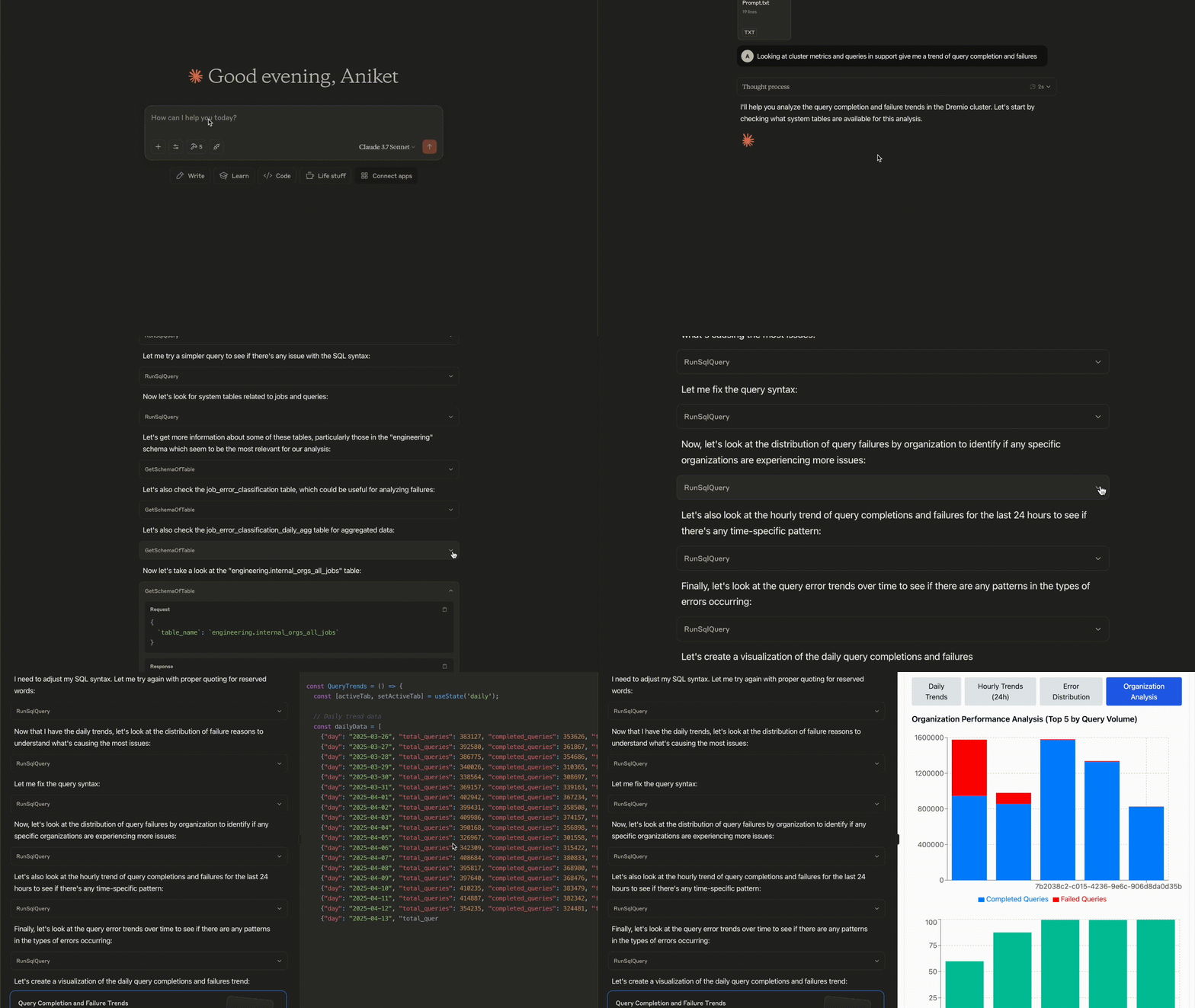
The rest of the documentation below provides details of the config files
This file is located by default at $HOME/.config/dremioai/config.yaml but can be overriden using the --cfg option at runtime for dremio-mcp-server
# The dremio section contains 3 main things - the URI to connect, PAT to use
# and optionally the project_id if using with Dremio Cloud
dremio:
    uri: https://.... # the Dremio URI
    pat: "@~/ws/tokens/idl.token" # PAT can be put in a file and used here with @ prefix
    project_id: <string> Project ID required for Dremio Cloud
    enable_search: <bool> # Optional: Enable semantic search
    allow_dml: <bool> # Optional: Allow MCP Server to create views in Dremio
tools:
    server_mode: FOR_DATA_PATTERNS # the serverm

# Optionally the MCP server can also connect and use a prometheus configuration if it
# has been enabled for your Dremio cluster (typically useful for SW installations)
#prometheus:
#uri: ...
#token: ...
There are 3 modes
FOR_DATA_PATTERNS - the normal mode where MCP server will allow LLM to look at tables and data to allow pattern discovery and other use casesFOR_SELF - a mode which allows the MCP server to introspect Dremio system, including workload analysis and so on.FOR_PROMETHEUS - a mode that allow MCP server to connect to your prometheus setup, if one exists, to enhance insights with Dremio related metricsMultiple modes can be specified with separated by ,
Note: This is applicable only for local installs
To setup the Claude config file (refer to this as an example) edit the Claude desktop config file
~/Library/Application Support/Claude/claude_desktop_config.json%APPDATA%\Claude\claude_desktop_config.jsonAnd then add this section
{
  "globalShortcut": "",
  "mcpServers": {
    "Dremio": {
      "command": "uv",
      "args": [
        "run",
        "--directory", "<toplevel git directory>"
        "dremio-mcp-server",
        "run"
      ]
    }
  }
}
This will pickup the default location of MCP server config file. It can also be passed in the args section above as "--config-file", "<custom config file>" after run
The Dremio MCP server automatically writes log files to platform-specific directories following operating system conventions. This helps with troubleshooting and monitoring the server's operation.
The log files are stored in the following locations based on your operating system:
~/.local/share/dremioai/logs/~/.local/share/dremioai/logs/dremioai.log$XDG_DATA_HOME environment variable if set~/Library/Logs/dremioai/~/Library/Logs/dremioai/dremioai.log%LOCALAPPDATA%\dremioai\logs\%LOCALAPPDATA%\dremioai\logs\dremioai.logC:\Users\<username>\AppData\Local\dremioai\logs\dremioai.logBy default, the MCP server logs to the logfile mentioned above. To control it further, you can use the following environment variables and command line options:
JSON_LOGGING=1 or pass --enable-json-logging for structured JSON logs--no-log-to-file to disable writing logs to fileExample:
$ uv run dremio-mcp-server run --no-log-to-file --enable-json-logging

# OR

$ uv run dremio-mcp-server run --enable-json-logging
The log directory is automatically created if it doesn't exist, so no manual setup is required.
Architecture: Detailed overview of the Dremio MCP server architecture, including component interactions and data flows.
Tools: Comprehensive guide to available tools, including:
Settings: Complete configuration reference covering:
This repository is intended to be open source software that encourages contributions of any kind, like adding features, reporting issues and contributing fixes. This is not a part of Dremio product support.
The project uses pytest for testing. To run the tests:
# Run all tests
$ uv run pytest tests
GitHub Actions automatically runs tests on pull requests and pushes to the main branch.
Please see our Contributing Guide for details on:
Claim this server with your GitHub account to request manual ownership verification.
Link to the catalog listing for Dremio MCP server from your README. This badge does not certify ownership, compatibility or security.
[](https://awesome-mcp.com/servers/dremio-mcp)Public repository statistics could not be verified. Check the configured source address; unavailable counts are not zero.
来源、范围和时段分别列出;不相加,不代表安装人数、活跃用户或安全审核。
尚无已审核的包 / 镜像标识,暂不展示下载统计。
Alternative and complementary servers in the same category
This is a Model Context Protocol (MCP) server for interacting with AIStor object stores.

A Model Context Protocol server that lets AI assistants run SQL queries against AWS Athena databases and retrieve results.

A Model Context Protocol (MCP) server that exposes access to an InfluxDB v2 instance using the InfluxDB OSS API v2.