

Store and retrieve entities, relations and observations in a persistent local knowledge graph.
create_entitiescreate_relationsadd_observations+6 more
92K
AI & Multi-Agent
A Model Context Protocol server that queues non-urgent LLM tasks and dispatches them at the cleanest grid hour before a deadline, tracking carbon receipts.
Tidegap MCP server for deferring LLM tasks to low-carbon grid hours is cataloged as an MCP server attributed to tidegap. A Model Context Protocol server that queues non-urgent LLM tasks and dispatches them at the cleanest grid hour before a deadline, tracking carbon receipts. It is categorized under ai agents-models. See the capability inspector for recorded interfaces and their independent review status; consult upstream documentation for the current interface.
Installation configuration is not reviewed. No executable setup is offered for this entry; inspect the source repository before proceeding.
Catalog license label: Not specified. Check the source repository's current license and terms before using, modifying or distributing this software.
能力定义尚未审核。未核验的采集内容不会作为可信接口展示。
暂无可展示的已审核记录。这不表示上游不支持此能力。
暂无可展示的已审核记录。这不表示上游不支持此能力。
暂无可展示的已审核记录。这不表示上游不支持此能力。
Email delivery is not connected. This page does not collect email addresses or create subscriptions.
Browse the registry for current listings instead.
Reviews for Tidegap MCP server for deferring LLM tasks to low-carbon grid hours are not available yet
Review publishing and storage are not connected. This page does not collect or publish ratings or comments, including after sign-in.
README.md · 8c6333ab8cb1 · 采集于 2026-11-13 11:43:27 UTC
保留上游原文,不做 AI 改写。为安全起见过滤脚本、表单和不安全链接。
当前显示最后一次成功采集的文档快照,请以来源页面为准。

Run non-urgent LLM tasks at the cleanest grid hour before your deadline.
Tidegap takes the LLM tasks your agent does not need right now, runs them at the lowest-carbon grid hour before a deadline you set, and sends them through the provider Batch API when the deadline allows.
tidegap verify checks it offline.



npm install @tidegap/core                                  # TypeScript / Node
pip install "tidegap[anthropic,openai,signing]"            # Python 3.11+
claude plugin marketplace add tidegap/tidegap && claude plugin install tidegap   # Claude Code
npx -y @tidegap/mcp                                        # any other MCP host
// save as plan.mjs, run: node plan.mjs   (GB uses the free UK feed, no API key)
import { recommendWindow, ukCarbonIntensityFeed } from "@tidegap/core";
const deadline = new Date(Date.now() + 24 * 3600 * 1000).toISOString();
const plan = await recommendWindow({ region: "GB", deadline }, { feed: ukCarbonIntensityFeed(), rng: () => 0 });
console.log(plan.scheduledFor, plan.intensityGCo2PerKwh, plan.band);
// 2026-10-16T11:00:00.000Z 66 very_clean   (forecast value on 2026-10-15; yours will differ)
import asyncio; from datetime import datetime, timedelta, timezone
from tidegap import recommend_window, uk_carbon_intensity_feed
deadline = datetime.now(timezone.utc) + timedelta(hours=24)
plan = asyncio.run(recommend_window(region="GB", deadline=deadline, feed=uk_carbon_intensity_feed(), rng=lambda: 0))
print(plan.scheduled_for, plan.intensity_g_co2_per_kwh, plan.band)
# 2026-10-16T11:00:00.000Z 66 very_clean   (forecast value on 2026-10-15; yours will differ)
Without rng, Tidegap picks at random among the cleanest band of near-equal hours, so repeated runs spread load and can return different hours; an rng that returns 0 gives the strict minimum.
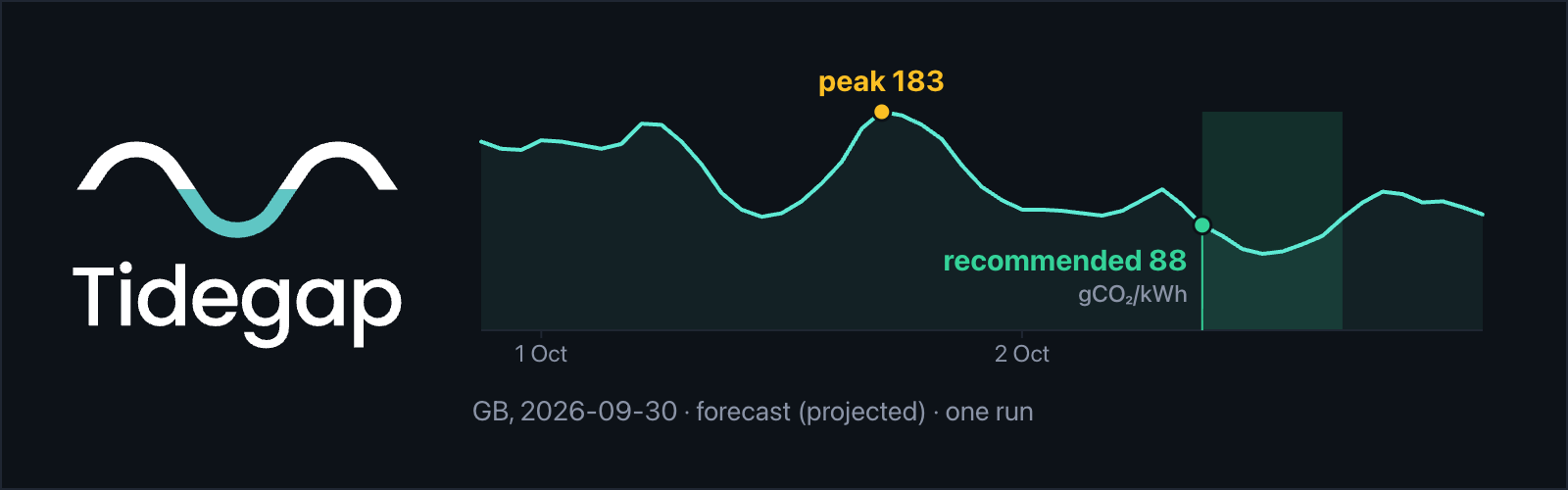
Proof: one real run (GB, 2026-09-30, live National Grid ESO forecast). Forecast peak 183 gCO2/kWh, recommended window 88 gCO2/kWh: about 52 % lower, for this run only (forecast, projected). The test task had a 5-minute deadline, so it ran at once; its signed receipt records 158 gCO2/kWh (measured). Raw output and reproducer · every number and its source
In an agent: in Claude Code, /tidegap:defer "Summarize today's notifications" --by 4h. In any other MCP host, the agent calls recommend_window and schedule_task (12 MCP tools, 12 hosts — host configs).
Until 0.17 this project was Ebb AI (@ebb-ai/*, ebb-ai on PyPI, the ebb command). 0.18.0 renames it to Tidegap, because "Ebb" conflicts with an existing software trademark. Your queue, receipts, signing key and daemon keep working. The old names worked for one release (0.18) and were removed in 0.19. Coming from 0.17? Upgrade through 0.18 once before 0.19 (or move ~/.ebb-ai to ~/.tidegap by hand): 0.19 no longer moves the old data directory. If 0.19 already ran, stop tidegap, move ~/.tidegap aside, then rename ~/.ebb-ai to ~/.tidegap.
| What you have from 0.17 | What happens on 0.19 | What you do |
|---|---|---|
Ledger, key and config in ~/.ebb-ai/ | Not read since 0.19; one stderr line names ~/.ebb-ai. 0.18 moved it to ~/.tidegap/ and left a link | Before 0.19: run any 0.18 command once. After: stop tidegap, move ~/.tidegap aside, rename ~/.ebb-ai to ~/.tidegap |
EBB_* variables (shell, MCP host config) | Not read since 0.19; one stderr line names each one | Rename them to TIDEGAP_* |
EBB_* keys in ~/.tidegap/config | Not read since 0.19; one stderr line names each one | Rename the keys to TIDEGAP_* |
Secrets in ~/.config/ebb/env | Not read since 0.19; one stderr line names the file. 0.18 tidegap install copied it to ~/.config/tidegap/env | Move it to ~/.config/tidegap/env and rename its EBB_* keys to TIDEGAP_* |
Daemon com.ebb-ai.tick / ebb-tick.timer | Keeps running while @ebb-ai/cli is installed | npm i -g @tidegap/cli (uninstall @ebb-ai/cli first if npm reports EEXIST), tidegap install, run the unload commands it prints, then npm uninstall -g @ebb-ai/cli |
ebb <command>, ebb-mcp | Removed in 0.19 | Use tidegap <command>, tidegap-mcp |
npx -y @ebb-ai/mcp in a host config | Runs a 0.17.1 shim that starts @tidegap/mcp | Switch to npx -y @tidegap/mcp under the key tidegap (tools become mcp__tidegap__*) |
Claude Code plugin ebb-ai@ebb-ai, /ebb-ai:* commands | No in-place update: the marketplace and plugin names changed | claude plugin uninstall ebb-ai, claude plugin marketplace remove ebb-ai, claude plugin marketplace add tidegap/tidegap, claude plugin install tidegap; then use /tidegap:* |
OpenClaw clawhub:@vitalini/ebb, config plugins.entries.ebb | The old plugin stays on 0.17; the new plugin id is tidegap | openclaw plugins install clawhub:@vitalini/tidegap, move your config block to plugins.entries.tidegap, remove the old plugin |
pip install ebb-ai, import ebb_ai | A 0.17.1 shim installs tidegap; the old import works with a warning | pip install tidegap, import tidegap |
Links to github.com/Vitalini/ebb-ai and www.ebb-ai.com | GitHub redirects; the site redirects to www.tidegap.com | Nothing |
US data centers are projected to consume 6.7–12% of national electricity
grid load by 2028 (DOE 2024), driven primarily by AI compute.
Most agent workload that lands on that load is deferrable (overnight
summaries, batch analyses, scheduled compliance scans, multi-step
report generation) — agent code just dispatches it synchronously by
default. tidegap makes the choice automatic. Four parallel wins:
tidegap verify (B2B ESG export path).tidegap is the same code that would have fired a sync LLM call —
now deferred to the cleanest, cheapest, fastest hour inside the
deadline. Apache-2.0.
A real run, excerpted (GB, 2026-09-30T21:03:30Z, live National Grid ESO
feed, local Ollama llama3.2:1b; raw output and reproducer in
docs/examples/2026-09-30-GB-tick/):
$ bash docs/examples/2026-09-30-GB-tick/command.sh
forecast source: ukCarbonIntensity (forecast)
forecast now:  2026-09-30T21:00:00.000Z  158 gCO2/kWh
forecast peak: 2026-10-01T17:00:00.000Z  183 gCO2/kWh

recommendWindow({ region: "GB", model: "llama3.2:1b", ... }):
  "scheduledFor": "2026-10-02T09:00:00.000Z",
  "intensityGCo2PerKwh": 88,
  "band": "very_clean",

$ tidegap tick --db <temp> --region GB
tick: 1 inspected, 1 dispatched, 0 failed

$ tidegap verify t-ef2354ee-eff0-431c-b11e-6edfcb8299b0 --db <temp>
✓ VALID
intensity_g_kwh   158
grid_source       ukCarbonIntensity
signer_public_key tTpsWuAS52easY0sgqz5E42aen7tdE5otdfLN6F+kxg=
| UTC hour | Carbon intensity | |
|---|---|---|
| Forecast peak | 2026-10-01T17:00 | 183 gCO2/kWh |
| Recommended window (72h deadline) | 2026-10-02T09:00 | 88 gCO2/kWh |
(forecast (projected), one GB run, 2026-09-30 — 88 vs 183 gCO2/kWh is ~52% lower for this run only; not a general or typical figure. The 158 gCO2/kWh the receipt records at dispatch is the measured value. See docs/claims.md.)
Price: not available for this run. Tidegap has no electricity-price feed, and its sync vs Batch list-price comparison needs at least two candidate models; this run used one unpriced local Ollama model.
recommendWindow() surfaces as an MCP tool to any compatible agent host
(Claude Desktop, Claude Code, Cursor, Cline, Continue, Zed,
Windsurf, OpenClaw, OpenAI Codex CLI, Pi). The agent asks
recommend_window, sees the plan, then commits via schedule_task
— or doesn't.
[](#tests)Status: v0.21.0 (this release) · 2026-11-12 · published on npm and PyPI ·
@tidegap/{core,mcp,cli}on npm under the@tidegaporg;tidegapon PyPI;@vitalini/tidegapOpenClaw plugin on ClawHub (openclaw plugins install clawhub:@vitalini/tidegap), not npm, and shares the queue. One-command Claude Code plugin via/plugin marketplace add tidegap/tidegap && /plugin install tidegap. Five real-data grid feeds across 31 regions (NA/EU/APAC) — measured against the code, see docs/claims.md: UK National Grid ESO Carbon Intensity API (GB, free no key), US EIA Open Data (CAISO / ERCOT / ISO-NE / PJM, free with key), ENTSO-E Transparency Platform (FR / DE / ES / IT / NL / …, free with token), WattTime v3 marginal-emissions forecasts (US ISOs, free with account — takes precedence over EIA where covered), and Electricity Maps as universal fallback. v0.10: per-model Wh/token coefficients across 59 LLMs (measured, count grows with each catalogue refresh; Patterson 2021, Luccioni 2024, HF AI Energy Score) replace the v0.1–v0.9 flat placeholder. v0.11: Ed25519-signed carbon receipts (offline verifiable viatidegap verify) plus WAL multi-writer SQLite sotidegap tickand the MCP server can share~/.tidegap/queue.db. v0.12 ("trust repairs"): Batch API routing is real — deferrable tasks (deadline > 24h) are submitted to the provider's Batch API and polled to completion (submittedstatus), instead of the previous dead-code gate; receipts record grid-data provenance (intensity, feed source — synthetic mock is disclosed, not silently signed) and the energy-coefficient confidence tier; Python- and TS-signed receipts verify in either language (one canonical signing form, JCS numbers); daemons installed bytidegap installactually dispatch (real node/script paths,~/.config/tidegap/envsecrets); hardened ledger (0600, redactedbody_json); honest feed labeling (forecast vs persistence). Anthropic + OpenAI Batch adapters, Python port at parity, live dashboard,recommend_windowplanning endpoint, always-ontidegap tickCLI with macOS launchd + Linux systemd + pmset/rtcwake wake events, full control surface (cancel_task/expedite_task/update_deadline/retry_task/cancel_all), receipt redaction, file output, retry-with-backoff. 4,587 automated tests (1638 core-ts + 1661 cli + 163 mcp-server + 115 openclaw-plugin + 117 extension + 15 web + 878 core-py) across 7 packages. See QUICKSTART.md.


Or visit the maintainer-hosted dashboard at www.tidegap.com to see live grid-load and carbon-intensity forecasts across 31 grid regions (NA / EU / APAC — CAISO, ERCOT, ISO-NE, PJM, Great Britain, France, Germany, and more) and to try the best-window planner without installing anything. Great Britain is powered by the free National Grid ESO Carbon Intensity API (real data, no key required); US ISOs use WattTime v3 marginal-emissions forecasts when a WattTime account is configured (falling through to the EIA open-data feed otherwise), EU zones ENTSO-E, with Electricity Maps as the universal fallback and a clearly-labelled deterministic mock when no key is configured.
AI inference is becoming a major load on US grid infrastructure. Data-center electricity demand has doubled since 2020 and is projected to keep rising as agentic workloads scale. But the same agent code that triggers this load dispatches it synchronously by default — even when the task is "summarize my inbox overnight" or "rewrite these 5,000 product descriptions by Friday." Three things follow:
tidegap makes the choice automatic — and routes deadline-tolerant
work through the cheaper path.tidegap writes an
auditable receipt for every dispatch — useful for ESG reporting,
cost-accounting, and upcoming compute-disclosure regulations.tidegap automates the choice for any task that is not "answer me
right now."
| Package | Purpose |
|---|---|
@tidegap/core | TypeScript core library. defer() API, AnthropicAdapter, OpenAIAdapter, GeminiAdapter, OllamaAdapter, opt-in SQLite-backed durable queue, per-model energy coefficients (estimateEnergyKwh, MODEL_ENERGY_COEFFICIENTS). |
@tidegap/mcp | Model Context Protocol server. Drop-in for Claude Desktop, Claude Code, OpenClaw, Cursor. schedule_task with repeat creates a recurring job that runs at the cleanest hour of each period. |
tidegap (Python) | Python 3.11+ port. asyncio scheduler, aiosqlite persistence, Anthropic + OpenAI + Gemini + Ollama adapters, mirrored tidegap.energy module. |
apps/web | Next.js 15 website at https://www.tidegap.com — install picker (12 hosts), live carbon-intensity map, best-window planner, docs. |
packages/claude-code-plugin | Claude Code plugin tree (10 /tidegap:* slash commands + auto-invocation skill + MCP wiring). |
packages/openclaw-plugin | OpenClaw plugin (@vitalini/tidegap-ai on ClawHub). Native OpenClaw tools mirroring the MCP surface. |
docs/spec | Upstream MCP spec proposal for priority, deadline, carbon_budget fields. |

The MCP server is a thin stdio process the agent host (Claude Code,
Claude Desktop, Cursor, Cline, Zed, OpenClaw) spawns. It enqueues
work to a SQLite-backed queue at ~/.tidegap/queue.db; an off-process
tidegap tick daemon (launchd / systemd / cron) reads scheduled rows
and dispatches them to the LLM provider at the chosen window. The
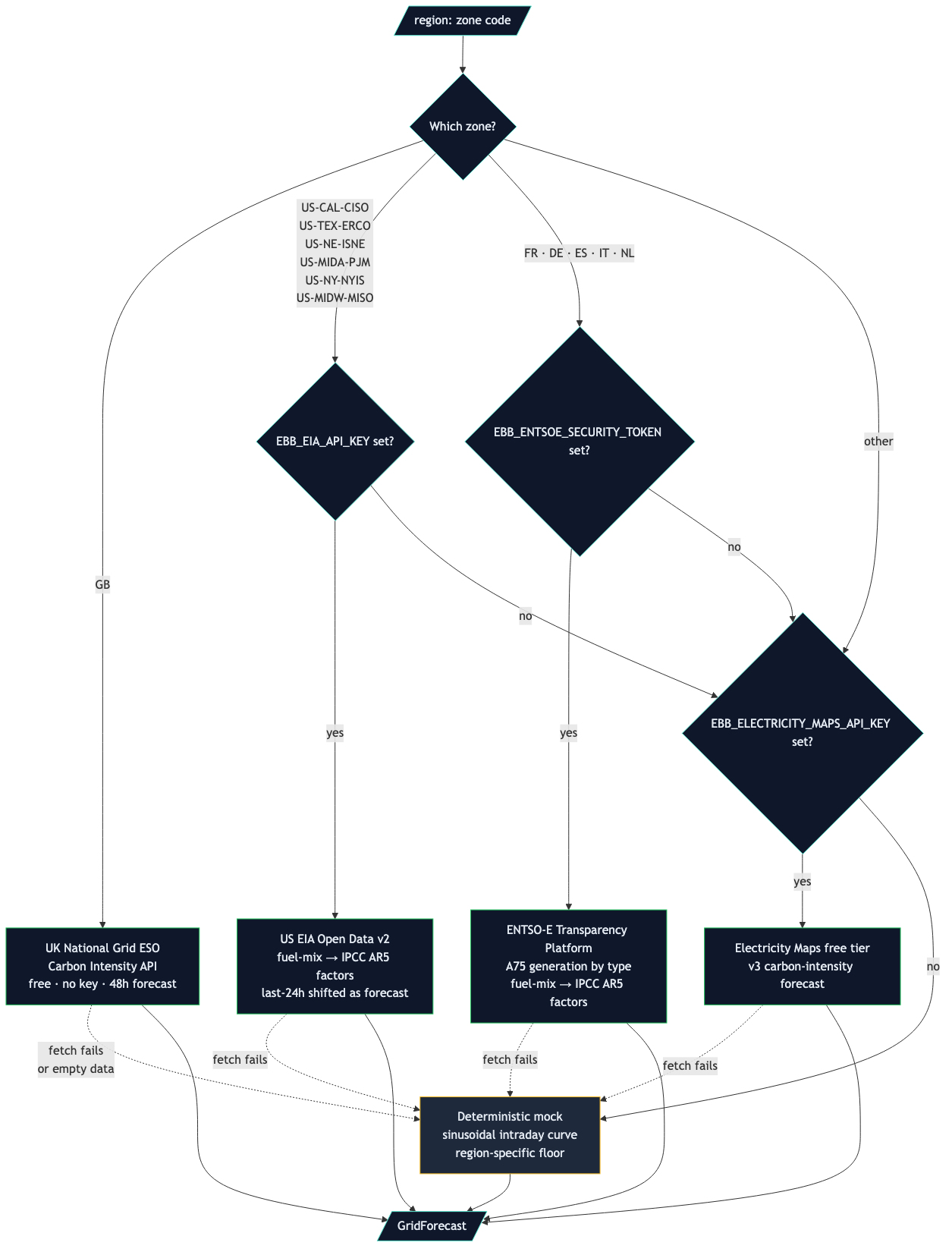
grid feed is a side-channel — the router picks per-zone between four
real-data sources before falling back to mock.
See QUICKSTART.md — four steps, five minutes.
claude plugin marketplace add tidegap/tidegap
claude plugin install tidegap
That ships ten slash commands (/tidegap:defer, /tidegap:plan,
/tidegap:check, /tidegap:cancel, /tidegap:expedite, /tidegap:reschedule,
/tidegap:retry, /tidegap:grid, /tidegap:later, /tidegap:usage), an tidegap skill, and auto-wires the
@tidegap/mcp MCP server. Full plugin reference: packages/claude-code-plugin/README.md.
> /tidegap:defer "Summarize today's GitHub notifications" --by 4h
Deferred ✓ scheduled for 22:15 UTC (cleanest window inside the deadline)

> /tidegap:check
2 tasks queued · oldest in 1h · cleanest at 03:00 UTC
Full command surface: /tidegap:{defer, plan, check, cancel, expedite, reschedule, retry, grid}. Tasks persist to ~/.tidegap/queue.db and
survive Claude Code restarts.
npm install -g @tidegap/mcp # or run via npx -y @tidegap/mcp
Then add to Claude Desktop's MCP config
(~/Library/Application Support/Claude/claude_desktop_config.json on
macOS):
{
  "mcpServers": {
    "tidegap": {
      "command": "npx",
      "args": ["-y", "@tidegap/mcp"],
      "env": {
        "TIDEGAP_ELECTRICITY_MAPS_API_KEY": "optional; falls back to mock data without it. GB is always live via the free UK Carbon Intensity API.",
        "TIDEGAP_EIA_API_KEY": "optional; US ISO fuel-mix (average) intensity.",
        "TIDEGAP_ENTSOE_SECURITY_TOKEN": "optional; EU zone intensity.",
        "WATTTIME_USERNAME": "optional; with WATTTIME_PASSWORD, enables WattTime v3 marginal-emissions forecasts for US ISOs (takes precedence over EIA where covered).",
        "WATTTIME_PASSWORD": "optional; pairs with WATTTIME_USERNAME."
      }
    }
  }
}
The MCP server exposes twelve tools to the agent (measured, toolsForHost("mcp") in
packages/core-ts/src/tool-surface.ts):
get_grid_forecast(region, hours?) — returns the next N hours of
carbon intensity for a grid region (e.g. US-CAL-CISO).recommend_window(deadline, region?, ...) — plans the cleanest window
inside the deadline without queueing anything.schedule_task(prompt, deadline, model?, carbon_budget_g?) — queues a
task for execution at the cleanest window inside the deadline;
deadline_kind: "quota_reset" sets the deadline to the next configured
quota reset minus a margin.check_queue_status(task_id?) — lists pending tasks and any
completed receipts; viewing one finished task marks it read.cancel_task, expedite_task, update_deadline, retry_task,
cancel_all — control a queued task (or the whole queue).reply_task(task_id, text) — continue a completed task as a new task.import { defer } from "@tidegap/core";
const result = await defer(
() => anthropic.messages.create({ /* … */ }),
{
deadline: new Date(Date.now() + 12 * 3600 * 1000).toISOString(), // 12 h from now
carbonBudgetG: 5,
region: "US-CAL-CISO",
},
);
import { Scheduler, AnthropicAdapter } from "@tidegap/core";

const scheduler = new Scheduler({ dbPath: "/var/lib/tidegap/queue.sqlite" });
const adapter = new AnthropicAdapter();

await scheduler.defer(
  () => adapter.dispatch("claude-sonnet-5", "Summarize today's git commits."),
  { deadline: new Date(Date.now() + 12 * 3600 * 1000).toISOString(), region: "US-CAL-CISO" },
);

// or — submit 100 prompts via Anthropic Message Batches for a 50% discount:
const handle = await adapter.dispatchBatch("claude-sonnet-5", prompts);
console.log(handle.batchId);
The SQLite-backed queue is opt-in via dbPath; without it the
scheduler runs in-memory as in v0.1. The Anthropic and OpenAI SDKs are
peer dependencies — install them only if you use the corresponding
adapter.
tidegap tick can run tasks through the local claude CLI. It uses your Claude Code subscription quota and login, so you need no API key.
Requirements. Install Claude Code and log in once (claude, then /login) as the user who runs the tick daemon. If a task fails with an "unknown option" message, update Claude Code.
Which tasks use it.
provider: "claude-code" always runs through Claude Code. schedule_task (MCP) and quick add in tidegap ui accept this provider. The OpenClaw plugin does not.schedule_task queues from a Claude Code session gets provider: "claude-code" when the call names no provider, and runs in a copy of that session (see "Run in the session that asked" below).anthropic task runs through Claude Code when ANTHROPIC_API_KEY is not set. When the key is set, it uses the Anthropic API as before.openai, gemini and ollama tasks never run through Claude Code. When the tick finds Claude Code and one of these tasks is due without its key, the task fails with "no adapter configured" and does not wait.How the tick finds claude. First TIDEGAP_CLAUDE_BIN, then each directory on PATH, then ~/.local/bin, ~/.claude/local, /opt/homebrew/bin and /usr/local/bin. On macOS, as a last step, it asks your login shell (zsh -ilc 'command -v claude'). It does this only when a pending task needs Claude Code. This step finds claude under launchd, whose PATH does not include ~/.local/bin.
What a run can do. The tick runs:
claude -p --output-format json --tools "WebSearch,WebFetch" \
  --allowedTools "WebSearch,WebFetch" --permission-mode dontAsk \
  --max-budget-usd 1 --safe-mode --strict-mcp-config --no-session-persistence \
  [--model <model>] [--system-prompt-file <file>]
ps.--tools and --allowedTools name the same tools. --permission-mode dontAsk denies every other tool. By default the model can search the web and fetch pages, and nothing else.--safe-mode and --strict-mcp-config turn off your CLAUDE.md, skills, plugins, hooks and MCP servers.--no-session-persistence keeps these runs out of your Claude Code session history.ANTHROPIC_API_KEY or ANTHROPIC_AUTH_TOKEN, so it uses your subscription login. It also does not get your other provider keys, the WattTime login or any TIDEGAP_* variable.claude it finds on PATH or in a known location only when neither the file nor its directory is world-writable.Tools. A run gets WebSearch and WebFetch by default, so a task such as "what is the weather forecast for Kyiv tomorrow" gets a real answer. To change the set for one task, pass tools (an array of tool names) to schedule_task or POST /api/tasks; [] means no tools, and a reply keeps the tools of its parent. To change the default, set TIDEGAP_CLAUDE_TOOLS (a comma list; an empty value means no tools). Only WebSearch, WebFetch, Read, Grep and Glob are allowed. Any other name, such as Bash, Write or Edit, is rejected when you queue the task. Web pages are untrusted input: a page can contain text that tries to give the model instructions (prompt injection). For this reason a run never gets a tool that runs commands or writes files. Read, Grep and Glob can read files that your user can read, so add them only for prompts you trust. A set cannot combine a file tool with a web tool, because a fetched page could make the run send a local file out. The receipt records the tool set of the run, and tidegap queue show <id> prints it as tools:.
Model. The tick passes the task's model to --model when it is a claude-* id or one of opus, sonnet, haiku, fable, opusplan (optionally with [1m]). Otherwise Claude Code uses its own default. A claude-code task queued without a model gets "default". The receipt records the model that Claude Code reports. maxTokens and temperature have no effect, because the CLI has no flags for them.
Settings (environment or ~/.config/tidegap/env):
| Variable | Effect |
|---|---|
TIDEGAP_CLAUDE_BIN | Path of the claude binary. Skips the lookup. |
TIDEGAP_CLAUDE_CODE=0 | Do not look for Claude Code (false, off and no also work). |
TIDEGAP_CLAUDE_CODE_MAX_BUDGET_USD | --max-budget-usd cap per run. Default 1. An invalid value falls back to 1 with a warning. |
TIDEGAP_CLAUDE_TOOLS | Default tool set, a comma list from the allowlist. Default WebSearch,WebFetch; an empty value means no tools. An invalid value keeps the default with a warning. Tasks queued from a Claude Code session do not use it (see below). |
TIDEGAP_RESUME=off | Run every task fresh, also a task queued from a Claude Code session (0, false and no also work). |
TIDEGAP_RESUME_MAX_TOKENS | Context cap of a run that resumes a session. Default 150000. A larger session runs fresh. |
TIDEGAP_CLAUDE_CODE_RESUME_MAX_BUDGET_USD | --max-budget-usd cap of a run that resumes a session. Default 3. |
Cost and quota. Tasks use the same Claude Code quota as your interactive sessions. A night of queued tasks can use up the limit you expect to have in the morning. Claude Code's list-price estimate for each run is in tidegap queue show <id> --raw (total_cost_usd, next to session_id). Your subscription is not billed per run. The budget cap uses this estimate.
Carbon receipt. The receipt has provider claude-code. Its token count includes the system prompt that Claude Code adds to each run (about 3k tokens) when Claude Code writes it to the prompt cache. Cache reads are not counted. Thus a receipt can show more tokens than an API call with the same prompt. A run that uses several models, for example a subagent, is billed model by model, and the receipt lists each model's tokens and grams in models.
Usage limit. A run that hits the subscription limit does not fail. The task goes back to the queue and does not start before the limit resets; then it runs at the cleanest hour. The reset time comes from your limit state (see "Usage and limits" below) when a window is used up, else from the time in Claude Code's message, else one hour later. After the first limit result in a tick, the other due tasks wait for the same time without a run. A task fails with the limit message when the reset is more than 8 days after the task was queued. tidegap tick prints N deferred until HH:MM.
Failures. Any other failed run fails the task once, with no retry. The error names the cause:
claude not found or not executable: install Claude Code or set TIDEGAP_CLAUDE_BIN.claude once as this user and complete /login.error_max_budget_usd.retry_task and expedite_task do not run claude-code tasks: they dispatch inside the MCP server, which has no Claude Code adapter. They leave the task as it is and name tidegap queue run-now <id>, which runs it on the next tick.
A task that you queue from a Claude Code session runs with that session's conversation as context, in that session's project directory. "Review the diff in queue.ts tonight" can then read the repository and knows what you discussed.
How Tidegap knows the session. The Claude Code plugin has a session hook. At each session start (also after /clear and /resume) it writes ~/.tidegap/sessions/claude-<pid>.json (mode 0600) with the session id, the transcript path and the project directory, and it deletes the file when the session ends. When the agent calls schedule_task, the MCP server reads the file of the Claude Code process that runs it. Without the plugin, the server uses the session id from its environment, which does not change after /clear. A /tidegap:defer call passes the id directly. The server uses a passed id only when it names this process's session (the hook file's or the environment's); another id is ignored, and the reply has a warning: line. The hook only takes a claude process that runs as you. When no session is found, the task runs as before.
What runs. At the clean hour, tidegap tick runs a copy (fork) of the session:
cd <project directory> && claude -p --output-format json --tools "Read,Grep,Glob" \
  --allowedTools "Read(//<project directory>/**)" --permission-mode dontAsk \
  --max-budget-usd 3 --safe-mode --strict-mcp-config \
  --resume <session id> --fork-session
Bash, Write or Edit, so it answers with text (a plan, a diff in the reply) and does not change files.tidegap queue show <id> prints open: cd <dir> && claude --resume <fork id>. Forks of -p runs do not show in the claude --resume picker; open them by id.tidegap queue reply, the page, or that same session. A reply_task call from another session, or from OpenClaw, runs fresh.tools keeps them. A task with WebSearch or WebFetch runs fresh, because session context and web tools together could send a local file out.When it runs fresh instead. The run starts a new session without the conversation when the task has web tools, the project directory or the transcript is gone, the project directory is /, your home directory or not yours, the session's last turn used more than TIDEGAP_RESUME_MAX_TOKENS tokens (default 150 000), or TIDEGAP_RESUME=off. The tick then puts a short header before the prompt: where the task was queued and why it runs fresh. The schedule_task reply says where the task is expected to run (runs_in: a copy of this Claude Code session (11111111) in /work/app, file tools Read, Grep, Glob), and the receipt records what ran (session: fork with the fork id, or fresh with the reason).
Cost. A fork reads the whole session again, hours later, with a cold cache. A 150k-token session costs much more quota than a short fresh prompt. The cap keeps large sessions out, and a resumed run has its own budget cap (TIDEGAP_CLAUDE_CODE_RESUME_MAX_BUDGET_USD, default 3), because a run over budget returns no answer.
Back in the session. When you return to the session (claude --resume <id>), the plugin's session-start hook tells Claude which of its tasks finished: task ids, status, fork or fresh, and the command that opens the fork. No task text and no reply enters the session. Claude reads a result with check_queue_status, which also prints ran: (fork or fresh) and, for a fork, open:.
Provider default. A task queued from a Claude Code session uses claude-code when the call names no provider, also when ANTHROPIC_API_KEY is set. It then uses your subscription quota, not API credit. Pass provider: "anthropic" for the API; an anthropic task never resumes a session.
OpenClaw. Nothing changes: OpenClaw already runs a task on its gateway runtime and delivers the result to the chat it came from.
Tidegap shows how much of your Claude Code 5-hour and weekly limits you used and when they reset. It can start a task after the reset.
Where the numbers come from. Claude Code gives the limits to its status line command. tidegap usage hook is a status line command: it writes the limits to ~/.tidegap/usage.json (mode 0600, no token) and prints nothing. Connect it once:
tidegap usage install-hook            # register the hook in ~/.claude/settings.json
tidegap usage install-hook --dry-run  # print the state and the command it would store; write nothing
tidegap usage install-hook --remove   # take the hook out and restore your own status line command
If you already have a status line command, the hook wraps it: your command gets the same input and its output shows as before. The stored command checks that this Tidegap install still exists and runs your command alone when it does not, so moving or removing Tidegap never blanks your status line. The previous file is kept as settings.json.tidegap.bak. In tidegap ui and the Mac app, the Usage popover offers the same step as Connect Claude Code when there is no reading. tidegap install asks first, in a terminal only; without a terminal it prints the state and the command and writes nothing. Claude Code sends the limits for Pro and Max logins, after the first reply of a session. The values are as old as your last Claude Code reply; tidegap usage shows their age.
Read the limits.
tidegap usage            # one row per window: used, resets; Codex limits when Codex is installed
tidegap usage --json     # the usage/v1 document
tidegap usage --spend    # also tokens and a cost estimate of the current 5-hour window
The MCP tool tidegap_usage returns the same document (include_spend: true for the spend). It is read-only. tidegap ui shows the limit in a header pill ("Claude 5h 72% · resets 16:30"); click it for every window and a "Show spend" button. The Mac menu bar tooltip and the browser extension popup show the same limit as one line (Claude 5h: 72%, resets 16:30), and nothing when there is no reading. GET /api/usage serves the document to other clients (see docs/spec/ui-client-api.md).
Spend. --spend reads the Claude Code session logs (~/.claude/projects, or $CLAUDE_CONFIG_DIR/projects) for the current 5-hour window: input, output, cache-write and cache-read tokens, total, by model and for the five most recent sessions. The cost is an API list-price estimate, not what your subscription bills. The window starts 5 hours before the 5-hour limit resets; with no limit reading it is the last 5 hours. The scan reads only the logs written in that window, newest first, and can take a few seconds when you used Claude Code a lot, so Tidegap runs it only when you ask. It stops at 2,000 files, 4 GiB or 15 seconds and then says the result is partial. It keeps only token counts and model names, never prompt or reply text, and writes nothing. Runs of Tidegap's own claude-code tasks are not in these logs.
Codex. When ~/.codex (or $CODEX_HOME) has session logs, Tidegap shows the Codex 5-hour and weekly limits from the newest one, with the time Codex last reported them. --spend adds the tokens of recent Codex sessions. Tidegap reads only sessions/; it never opens Codex's auth.json.
Run after the limit resets. tidegap queue later <id> --until after-limit-reset (add --reset-at <HH:MM|ISO> when Tidegap has no limit state), tidegap queue reschedule <id> --after-limit-reset, or after_limit_reset: true on MCP schedule_task. The task does not start before the reset, and runs at the cleanest hour after it. The reset is the latest reset of a used-up window; when no window is used up, it is the reset of the fuller window. With no limit state, the command fails and names the cause.
Optional: the usage API. TIDEGAP_USAGE_OAUTH=1 makes Tidegap also read Anthropic's usage endpoint (api.anthropic.com/api/oauth/usage) with your Claude Code login. It is off by default. Read this before you turn it on:
/usr/bin/security, which can ask for permission once) or ~/.claude/.credentials.json. It never stores, logs or refreshes the token, and never writes to ~/.claude or the Keychain.~/.tidegap/usage.json: a reading is reused for 5 minutes (1 minute after a limit result in a tick), and no request is sent for at least 60 minutes after a rate-limit answer.Settings (environment or ~/.tidegap/config; the environment wins):
| Variable | Effect |
|---|---|
TIDEGAP_USAGE=off | Do not read limits at all (0, false and no also work). The hook writes nothing. |
TIDEGAP_USAGE_OAUTH=1 | Also read the usage API (see above). Default off. |
The Mac app and the launchd tick do not see your shell variables, so put these in ~/.tidegap/config.
pip install "tidegap[anthropic,openai,signing]"
From a clone, see Install (development).
The Python package is a library with no CLI. Jobs run only on the Node daemon: a Python tick leaves every job run for it and says so. See Mixed versions and the Python ticker.
import asyncio
from datetime import datetime, timedelta, timezone
from tidegap import defer

asyncio.run(defer(
    lambda: do_work(),
    deadline=datetime.now(timezone.utc) + timedelta(hours=12),
    carbon_budget_g=5,
    region="US-CAL-CISO",
))
tidegap ui, notifications, session linetidegap install # write and load the tick daemon (picks --laptop on a Mac with a battery)
tidegap status # will queued tasks run? one line per fact, exit 1 when not
tidegap ui # opens the local task page in your browser
tidegap queue list --unread # the same inbox in the terminal
tidegap queue show <id> # one task: prompt, result, receipt, events (who changed it, when)
tidegap queue later <id> --until tonight # push a task later; never earlier than planned
tidegap queue later takes --until (+2h, tonight, tomorrow,
tomorrow 9:00, HH:MM, an ISO time, after-limit-reset with an optional
--reset-at), --preset (1h, tonight, tomorrow_morning,
after_limit_reset) or --delay <minutes>. A target at or before the
task's planned start is refused with the planned time.
tidegap queue reschedule --by is now an alias of later --until.
tidegap ui serves a local task manager. Agenda (the default) lists pending
tasks by day with the carbon band of each run hour; overdue tasks and unread
failures sit in "Needs attention". Journal lists finished tasks with
status, provider and kind filters. Timeline shows the forecast curve with
tasks at their scheduled hour. A task's drawer shows the result, the
conversation with a reply box, the receipt and the claude --resume line of
the session that queued it. From the page you can cancel (with a 5 s Undo),
reschedule, move a task to another day (drag it onto a day, or use the
move-to list), run it now, reply, mark it read or unread, stop a series, and
start a dispatcher when none is running. Actions change the ledger; tasks
still run on the dispatcher's next tick (tidegap tick), and the page shows when
that last ran. It listens on 127.0.0.1 only, and every API request needs
a random token that is printed once with the link and changes on every start.
tidegap tick posts a desktop notification for each task that completes or
fails (macOS, Linux with notify-send, Windows). Turn it off with
tidegap tick --no-notify, TIDEGAP_NO_NOTIFY=1 in the environment, or TIDEGAP_NOTIFY=0 in ~/.tidegap/config. The Claude
Code plugin adds one line at session start when finished tasks are unread.
These switches turn off the desktop notification only; the other channels keep sending.
Besides the desktop notification, tidegap tick can send task events to
Telegram, email (SMTP), Slack, Discord, ntfy, Pushover, a webhook (Teams,
Google Chat, Home Assistant, n8n), a macOS Shortcut or a program on your
computer. Set one up in Settings → Integrations in tidegap ui or the Mac
app: follow the card's steps, fill in the fields and press Connect, which
sends a test message. From a terminal:
tidegap channels kinds                    # what each kind needs here
tidegap channels add slack                # prompts for the webhook URL, hidden
tidegap channels set slack --events task_failed,digest --quiet night
tidegap channels digest --at 08:00        # daily summary time (default 09:00)
tidegap channels list                     # state, last delivery, target
Each channel picks its events (task finished, task failed, clean window,
tasks cannot run, daily summary) and can be quiet from 22:00 to 09:00. The
daily summary lists what ran since the last one and skips empty days.
Secrets stay in ~/.config/tidegap/channel-secrets.json (0600). Steps, fields
and the security rules for each kind:
tidegap.com/docs#notifications.
Every surface plans against one grid region. See it and set it once:
tidegap region show      # zone, where it came from, data source
tidegap region set FR    # store a supported zone; `set auto` clears it
tidegap region list      # the 31 supported zones
Or use Settings → Grid region in tidegap ui and the Mac app. The first rule
that gives a region wins: a --region flag or tool argument, then
TIDEGAP_DEFAULT_REGION in the environment, then the stored setting
(TIDEGAP_DEFAULT_REGION in ~/.tidegap/config), then a guess from the time
zone, then GB. The CLI (tick, ui, the Telegram listener) also reads
TIDEGAP_DEFAULT_REGION from ~/.config/tidegap/env, live; the MCP server
reads only its own process environment. A change applies on the next tick or
call, with no restart, and replies name the rule in region_source. An
unknown zone fails with the closest ones (Unknown zone UA. Closest: PL.). A
Ukrainian time zone maps to PL with the note "No Ukrainian grid data yet".
Full rules and the zone table: tidegap.com/docs#region.
Tidegap can send the same events to a Telegram chat and take commands from it.
The quick way: open Settings → Integrations in the tidegap ui page (the
Settings button) or the Mac app (Integrations… in the menu). Paste a bot
token from @BotFather, press Connect, then open the
link or scan the QR code on the phone. The card shows whether the listener
runs and offers Send test message and Disconnect. Only the page and the Mac
app can open it; the browser extensions cannot.
From a terminal:
~/.config/tidegap/env (mode 0600):
TIDEGAP_TELEGRAM_BOT_TOKEN=<token>. TELEGRAM_BOT_TOKEN is read when the
first one is not set.tidegap channels add telegram. It prints a 6-digit code. Send
/pair <code> to the bot from a private chat (groups are ignored). Five
wrong codes stop the pairing.com.tidegap.channels on macOS or the systemd user unit
tidegap-channels.service on Linux. Both run tidegap channels serve and
restart it when it exits. --no-load pairs without it. On Windows, keep
tidegap channels serve running yourself.tidegap channels add telegram # pair a private chat
tidegap channels list # paired channels (--json)
tidegap channels remove <id> # unpair; the last telegram channel unloads the listener
tidegap channels serve --once # one poll cycle (for checks)
The bot answers only the paired chat. Commands: /queue (the next tasks,
numbered), /later <n|id> <1h|tonight|tomorrow|reset [HH:MM]|HH:MM>,
/run <n|id>, /cancel <n|id>, /result <n|id>, /jobs [pause|resume|run <n|id>]
(recurring jobs) and /help. A task number refers to the last /queue listing,
a job number to the last /jobs; both expire after 10 minutes. The buttons under a
message do the same as the page's actions.
tidegap tick sends a message when a task is done (with a Result button) or
fails, when a clean window starts, and when queued tasks cannot run (once per
change). The listener also reports a stopped tick daemon.
Privacy: a done message includes the first 600 characters of the result, so
model output goes to Telegram's servers. A task with redact_in_receipt gets
no preview; use tidegap queue show <id> for it. The token never appears in
logs or errors.
pnpm --filter @tidegap/web dev
# → http://localhost:3000
Pages: live carbon-intensity map (31 regions, NA/EU/APAC — measured,
see docs/claims.md), 72-hour forecast charts,
best-window planner, and a queue explainer (/queue). The site never
sees your queue; open your own with tidegap ui (below).
Grid data sources (per zone, falls back to mock on failure):
Where do the keys go? The environment variables in the
Authcolumn configure the hosts — thetidegapCLI, the@tidegap/mcpserver, and this dashboard. Each host reads them at its own entry point and injects them into@tidegap/core, which is environment-pure and reads nothing ambient. The@vitalini/tidegapOpenClaw plugin reads no environment variables at all: configure it underplugins.entries.tidegap.configin your gateway config, usingeiaApiKey,entsoeSecurityToken,electricityMapsApiKey,wattTimeUsername/wattTimePassword(plusanthropicApiKey,openaiApiKey,geminiApiKey/googleApiKey,ollamaHost,ollamaModels,carbonBudgetG,carbonBudgetWindow,defaultRegion,dbPath). OpenClaw resolves the"${ENV_VAR}"shorthand in the credential fields, so you can keep exporting the same variables and let the gateway read them on the plugin's behalf.
| Zone | Source | Auth (CLI / MCP / dashboard) | Notes |
|---|---|---|---|
GB | UK National Grid ESO Carbon Intensity API | None | Real 48h forecast, always on |
US-CAL-CISO, US-TEX-ERCO, US-NE-ISNE, US-NY-NYIS, US-MIDA-PJM, US-MIDW-MISO | WattTime v3 marginal (co2_moer) | Free account (WATTTIME_USERNAME + WATTTIME_PASSWORD) | Marginal-emissions FORECAST (lbs/MWh → gCO2/kWh). Takes precedence over EIA where covered; falls through to EIA on any error. Signal disclosed as signalType: "marginal" on forecasts/receipts |
US-CAL-CISO, US-TEX-ERCO, US-NE-ISNE, US-MIDA-PJM (+US-NY-NYIS, US-MIDW-MISO) | US EIA Open Data | Free API key (TIDEGAP_EIA_API_KEY) | Hourly fuel-mix → carbon intensity via IPCC AR5 factors (average signal; used when WattTime is unconfigured) |
FR, DE (plus ES, IT, NL opt-in) | ENTSO-E Transparency Platform | Free token (TIDEGAP_ENTSOE_SECURITY_TOKEN) | Realised generation by type → carbon intensity |
| any zone (universal fallback) | Electricity Maps free-tier | TIDEGAP_ELECTRICITY_MAPS_API_KEY | Used when zone-specific source missing |
| anything else | Deterministic mock curve | None | Used when no key set or upstream fails |
WattTime v3 uses granular sub-BA region codes; only US-CAL-CISO → CAISO_NORTH is verified against WattTime's live public docs — the other
US mappings are best-effort and marked unverified in
packages/core-ts/src/grid.ts, degrading safely to EIA if a code is
rejected. Want to add another free public source? Each adapter is a single
function in packages/core-ts/src/grid.ts — open a PR.
# from the repo root
pnpm install        # installs all workspace packages
pnpm build          # builds @tidegap/core and @tidegap/mcp
pnpm test           # runs vitest across packages
Python package from the clone (editable):
pip install -e "packages/core-py[anthropic,openai,signing]"
Requirements: Node 20.18.1+, pnpm 9+. Python 3.11+ if working on the Python package.
docs/ — design docs, MCP spec proposals (forthcoming).examples/ — OpenClaw demo skill, Claude Code config.Apache License 2.0 — patent grant included.
This project is in active early development. Issues and PRs welcome;
see CHANGELOG.md for what has shipped. Major new features should
be discussed in an issue first to avoid duplicate effort.
Built by Vitalii Borovyk.
Claim this server with your GitHub account to request manual ownership verification.
Link to the catalog listing for Tidegap MCP server for deferring LLM tasks to low-carbon grid hours from your README. This badge does not certify ownership, compatibility or security.
[](https://awesome-mcp.com/servers/ebb-ai)Public repository statistics could not be verified. Check the configured source address; unavailable counts are not zero.
来源、范围和时段分别列出;不相加,不代表安装人数、活跃用户或安全审核。
尚无已审核的包 / 镜像标识,暂不展示下载统计。
Alternative and complementary servers in the same category
Store and retrieve entities, relations and observations in a persistent local knowledge graph.
Organize problem solving into revisable, branching thought steps through an MCP tool.

Query-aware context compression with an MCP plugin for coding agents, plus Python and HTTP interfaces for reducing the context sent to a language model.