




A directory listing describing a cancellation-letter and mailing-address service. The configured public GitHub repository returned 404 during source verification.
Repository stats unavailable
Developer Tools
A set of reference .NET eCommerce sample applications that include Model Context Protocol server and client scenarios, including one that exposes store capabilities as MCP tools.
eShopLite MCP scenarios is cataloged as an MCP server attributed to azure-samples. A set of reference .NET eCommerce sample applications that include Model Context Protocol server and client scenarios, including one that exposes store capabilities as MCP tools. It is categorized under developer tools. See the capability inspector for recorded interfaces and their independent review status; consult upstream documentation for the current interface.
Installation configuration is not reviewed. No executable setup is offered for this entry; inspect the source repository before proceeding.
Catalog license label: Not specified. Check the source repository's current license and terms before using, modifying or distributing this software.
能力定义尚未审核。未核验的采集内容不会作为可信接口展示。
暂无可展示的已审核记录。这不表示上游不支持此能力。
暂无可展示的已审核记录。这不表示上游不支持此能力。
暂无可展示的已审核记录。这不表示上游不支持此能力。
Email delivery is not connected. This page does not collect email addresses or create subscriptions.
Browse the registry for current listings instead.
Reviews for eShopLite MCP scenarios are not available yet
Review publishing and storage are not connected. This page does not collect or publish ratings or comments, including after sign-in.
Yes. The project lists a Model Context Protocol server and client implementation among its features and includes MCP-focused scenarios.
It exposes safe store capabilities as MCP tools for agent use, using MCP, Aspire, app APIs, and tool calling.
README.md · e11458c659d5 · 采集于 2026-11-13 09:32:56 UTC
保留上游原文,不做 AI 改写。为安全起见过滤脚本、表单和不安全链接。
当前显示最后一次成功采集的文档快照,请以来源页面为准。


eShopLite is a set of reference .NET applications implementing an eCommerce site with features like Semantic Search, Model Context Protocol (MCP), Reasoning models, vector databases, and more.
- ☁️ Scenarios use .NET and Aspire, with a stable .NET 10 baseline and an isolated .NET 11 RC2 scenario for experimental Blazor AI components. See the dependency baseline below for compatibility exceptions.
- 🌟 Don't forget to star (🌟) this repo to find it easier later.
- ➡️ Get your own copy by Forking this repo and find it next in your own repositories.
- ❓ Have a question? Besides creating issues or pull requests, the best option for questions is to join the Azure AI Discord channel, where a team of AI experts can help you.
This project framework provides the following features:
The project includes several scenarios demonstrating different capabilities:
| Scenario | Description | Key Technologies |
|---|---|---|
| 01 - Semantic Search | A reference .NET application implementing an eCommerce site with Search features using Keyword Search and Semantic Search. | Aspire, OpenAI GPT-4.1-mini, In-memory Vector DB |
| 02 - Azure AI Search | Implements an eCommerce site with Keyword Search using SQL queries and Semantic Search with Vector Database and Azure AI Search. | Azure AI Search, OpenAI Embeddings, SQL Server |
| 03 - Realtime Audio | Extends the eCommerce site with advanced search features and real-time audio capabilities powered by the GPT-4o Realtime Audio API. | GPT-4o Realtime Audio API, Audio in Blazor, Aspire |
| 04 - Chroma DB | Implements semantic search functionality using Chroma DB, an open-source database designed for AI applications. | Chroma DB, OpenAI Embeddings, .NET SDK |
| 05 - DeepSeek-R1 | Demonstrates integration of the DeepSeek-R1 model for enhanced semantic understanding and search capabilities. | DeepSeek-R1, Aspire, Vector Embeddings |
| 06 - Model Context Protocol (MCP) | Implements the Model Context Protocol (MCP) for advanced AI interactions with MCP Servers and MCP Clients. | Model Context Protocol, Function Calling, SSE Events |
| 07 - Agents Concurrent | Demonstrates concurrent agent orchestration and advanced AI agent collaboration patterns. | Aspire, Multi-Agent Systems, Orchestration |
| 08 - SQL Server 2025 | Demonstrates the use of vector search and vector indexes in the SQL Database Engine | SQL Server 2025, Vector Search, Vector Indexes |
| 09 - Azure App Service | Shows how to deploy an Aspire multi-service eCommerce app to Azure App Service, using SQLite for data and integrating AI search. | Azure App Service, Aspire, OpenAI, SQLite |
| 10 - A2A Network | Demonstrates advanced agent-to-agent (A2A) communication and orchestration patterns in Aspire, including multi-agent collaboration and reasoning. | Aspire, Multi-Agent Systems, A2A Protocol |
| 11 - GitHub Models | Local-first AI development using GitHub Models during local runs, with automatic switch to Azure OpenAI when deployed. | Aspire, GitHub Models, Azure OpenAI |
| 12 - Azure Functions | Optional Azure Functions façade for semantic search and an alternate deployment boundary for vector search. | Azure Functions, Aspire, Azure OpenAI |
| 13 - Observability Assistant with Foundry Local | Summarizes logs, traces, and incidents with a local-first observability assistant. | Aspire, OpenTelemetry, Foundry Local, Microsoft.Extensions.AI |
| 14 - Product Discovery Copilot | Turns search into natural-language product discovery with grounded explanations. | Semantic search, vector search, Microsoft.Extensions.AI |
| 15 - Store Intelligence Report | Generates daily business and operational store intelligence reports. | App data, telemetry, AI summarization, reports |
| 16 - MCP Store Operations Tools | Exposes safe store capabilities as MCP tools for agent use. | MCP, Aspire, app APIs, tool calling |
| 17 - A2A Store Operations Network | Shows specialized agents collaborating around the store app through A2A. | A2A, Microsoft Agent Framework, hosted agents |
| 18 - Blazor Agentic UI | Experimental streaming shopping assistant with catalog cards and human-approved cart actions. | .NET 11 RC2, Blazor AI components, AG-UI, Microsoft Agent Framework, Aspire |
New to Scenario 18? Start with its three-step quick start, then explore the screenshots and blog-to-code walkthrough.
global.jsondotnet tool install -g Aspire.Cli --version 13.6.1 (used for setting local secrets via aspire secret set)The October 14, 2026 refresh updates the 17 existing scenarios other than 14-MAFDevUI
to Aspire 13.6.1 and the latest compatible NuGet releases. The root SDK stays on stable
.NET 10; Scenario 18 overrides it with .NET 11 RC2
for the experimental Blazor components. Install both SDKs to work on all scenarios.
The refresh includes Microsoft.Extensions.AI 10.11.0, OpenTelemetry 1.19, Microsoft Agent Framework 1.24.0, MCP 2.2.0, and A2A 1.0.0-preview3 where used. Existing prerelease dependencies remain prerelease where no stable replacement provides the required functionality. MCP SSE transports and A2A text parts have been migrated to the current APIs rather than merely changing package versions.
Scenarios 08 and 12 deliberately retain the latest EF Core 9 servicing release, 9.0.21:
their EFCore.SqlServer.VectorSearch 9.0.0 provider requires that EF major. The other
EF-backed scenarios use 10.0.13. Local dotnet-ef tool manifests follow the matching
EF major. Upgrading the SQL vector provider to native EF 10 requires a separate vector
entity/query migration, not mixing EF 9 relational assemblies with EF 10 tests.
Direct PKCS references select patched 10.0.13 instead of vulnerable transitive versions.
The MAFDevUI scenario subsequently completed its
compatible dependency and API migration after the Azure MCP prerequisite was supplied.
Its build and 27 tests pass, including offline DevUI/Responses integration coverage.
Live validation with both Azure CLI identity and the updated saved API key passed
embeddings, stock tools, streaming workflows, and all three checkout tiers.
Identity-mode orchestrator checks also confirmed no fallback.
Optional Foundry-hosted agents remain unverified. Builds and
existing tests passed for
the other 17 existing scenario solutions (80 existing tests), and Scenario 18 has 29
passing tests. Scenario 18 was also validated locally with SQL Server 2025, real Foundry
embeddings, and gpt-6-luna via Responses: streamed catalog cards, cart rejection/approval,
missing product specifications, and restart against existing data. These checks do not
establish cloud deployability or validate every other scenario against real models.
See CHANGELOG.md for the new scenario, dependency migrations, setup scripts, and known upgrade boundaries.
Each scenario has its own aspire.config.json, so Aspire selects that scenario's AppHost
instead of inheriting the repository-root selection:
cd .\scenarios\18-BlazorAgenticUI
aspire start
Use aspire run for a foreground session, and aspire stop to stop the selected app.
Install the SDK requested by that scenario's nearest global.json: .NET 10.0.402 for
stable scenarios, or .NET 11 RC2 for Scenario 18. A .NET 11 installation does not satisfy
the stable .NET 10 pin. AppHost selection does not install SDKs or configure credentials.
To verify every scenario's local selection without starting services:
pwsh .\scripts\Tests\Test-ScenarioAppHosts.ps1
Clone the repository:
git clone https://github.com/Azure-Samples/eShopLite.git
Navigate to the scenario directory of interest:
cd eShopLite/scenarios/[scenario-folder]
Login to Azure:
azd auth login
Provision and deploy all the resources:
azd up
It will prompt you to provide an azd environment name (like "eShopLite"), select a subscription from your Azure account, and select a location where the necessary models, like gpt-4.1-mini and ADA-002 are available, a sample region can be "eastus2".
Use PowerShell 7 and sign in with az login. The new setup script creates or reuses an
AIServices account, deploys the common chat and embedding models, then configures local
AppHost user-secrets through the Aspire CLI. Supply your own subscription, resource group,
globally unique account name, and region:
pwsh .\scripts\Initialize-FoundryModels.ps1 `
  -SubscriptionId '<subscription-id>' `
  -ResourceGroupName 'rg-eshoplite' `
  -AccountName '<globally-unique-account-name>' `
  -Location 'eastus2' `
  -DryRun
Remove -DryRun to provision resources and write secrets. This can incur Azure charges.
-DryRun and -WhatIf make no Azure calls and do not establish model availability.
The default chat model and deployment name are gpt-6-luna; embeddings use
text-embedding-3-small. The script resolves model versions from the regional catalog
and checks SKU support and quota before provisioning. It stops if the requested model is
unavailable, with no automatic substitution. Override model/version, deployment name, SKU,
or capacity with the corresponding -Chat* and -Embeddings* parameters.
It reuses matching deployments and refuses to overwrite conflicting deployments or enable
key authentication on an account that disables it.
This provisions common model dependencies for local development, not every scenario's
infrastructure. SQL/containers remain managed by each AppHost; Azure AI Search, realtime
audio, DeepSeek, GitHub Models, and other specialized dependencies still need their
scenario-specific setup. It does not change model declarations used by azd up.
Secret setup requires the SDK selected by each AppHost's nearest global.json.
The script checks SDK availability before requesting a key. If using a nonstandard SDK
installation, pass -DotNetRoot "<SDK installation directory>"; the override applies
only to child commands. An Aspire exit code 7 can indicate a missing SDK, not an Azure
authentication problem. Scenario 18 specifically requires .NET 11 RC2.
The existing scripts\Set-AzureOpenAISecrets.ps1 configures secrets only, without creating
Azure resources. It discovers every eShopAppHost.csproj, including layouts without src,
and automatically includes future scenarios. Scenario 18 (18-BlazorAgenticUI) has its own
AppHost and independent user-secrets store, and is included automatically. Directories
without an AppHost are reported as skipped. Run from the repo root:
pwsh .\scripts\Set-AzureOpenAISecrets.ps1
The script interactively prompts for four values:
| Prompt | Parameter set |
|---|---|
| Azure OpenAI endpoint | Parameters:AzureOpenAIEndpoint |
| Azure OpenAI API key (masked) | Parameters:AzureOpenAIApiKey |
Chat deployment name (default gpt-6-luna) | Parameters:AzureOpenAIDeploymentName |
Embeddings deployment name (default text-embedding-3-small) | Parameters:AzureOpenAIEmbeddingsDeploymentName |
Use -DryRun to preview the commands without executing them:
pwsh .\scripts\Set-AzureOpenAISecrets.ps1 -DryRun
For a preview without prompts or an API key:
pwsh .\scripts\Set-AzureOpenAISecrets.ps1 `
  -Endpoint 'https://<your-resource>.openai.azure.com/' -NonInteractive -DryRun
Non-interactive writes additionally require -ApiKey as a SecureString, supplied from a
masked prompt or a secure credential source, not a plaintext key in command history.
Local .NET user-secrets are not an encrypted production secret store.
Internally, the script calls the Aspire CLI (aspire secret set) for each AppHost it discovers. To set a single value manually, use the same command directly:
aspire secret set Parameters:AzureOpenAIEndpoint "https://<your-resource>.openai.azure.com/" \
  --apphost scenarios/01-SemanticSearch/src/eShopAppHost/eShopAppHost.csproj
Note: Scenario-specific extra parameters (e.g.,
Parameters:AzureOpenAIRealtimeDeploymentNamein 03-RealtimeAudio,Parameters:DeepSeekEndpointin 05-deepseek,Parameters:GitHubModelsTokenin 11-GitHubModels) must still be set manually. See each scenario's README for details.
scenarios/01-SemanticSearch/)dotnet run in the appropriate host project folderTo run the demo, follow these steps:
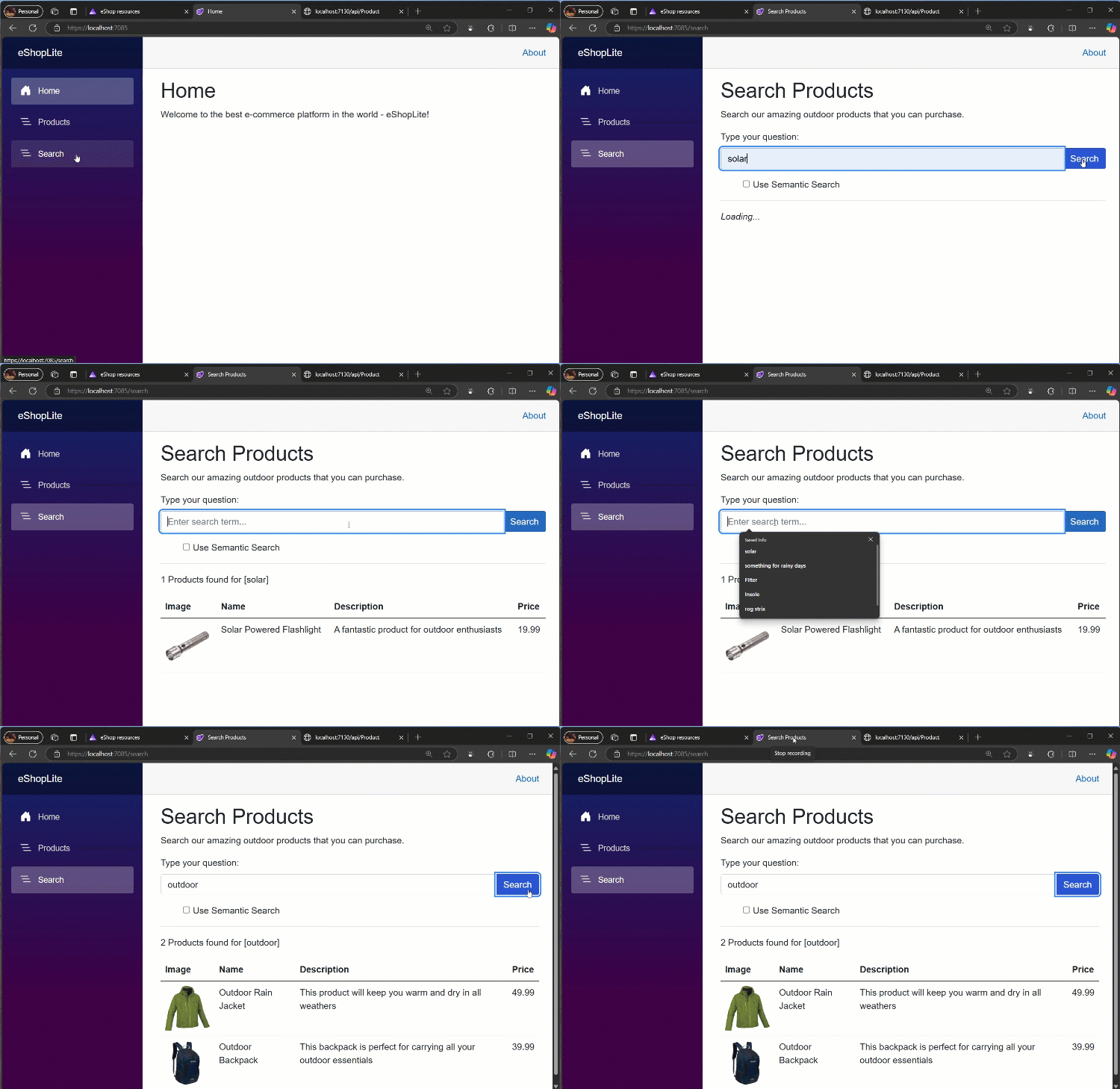
This is the eShopLite Aplication running, performing a Keyword Search:
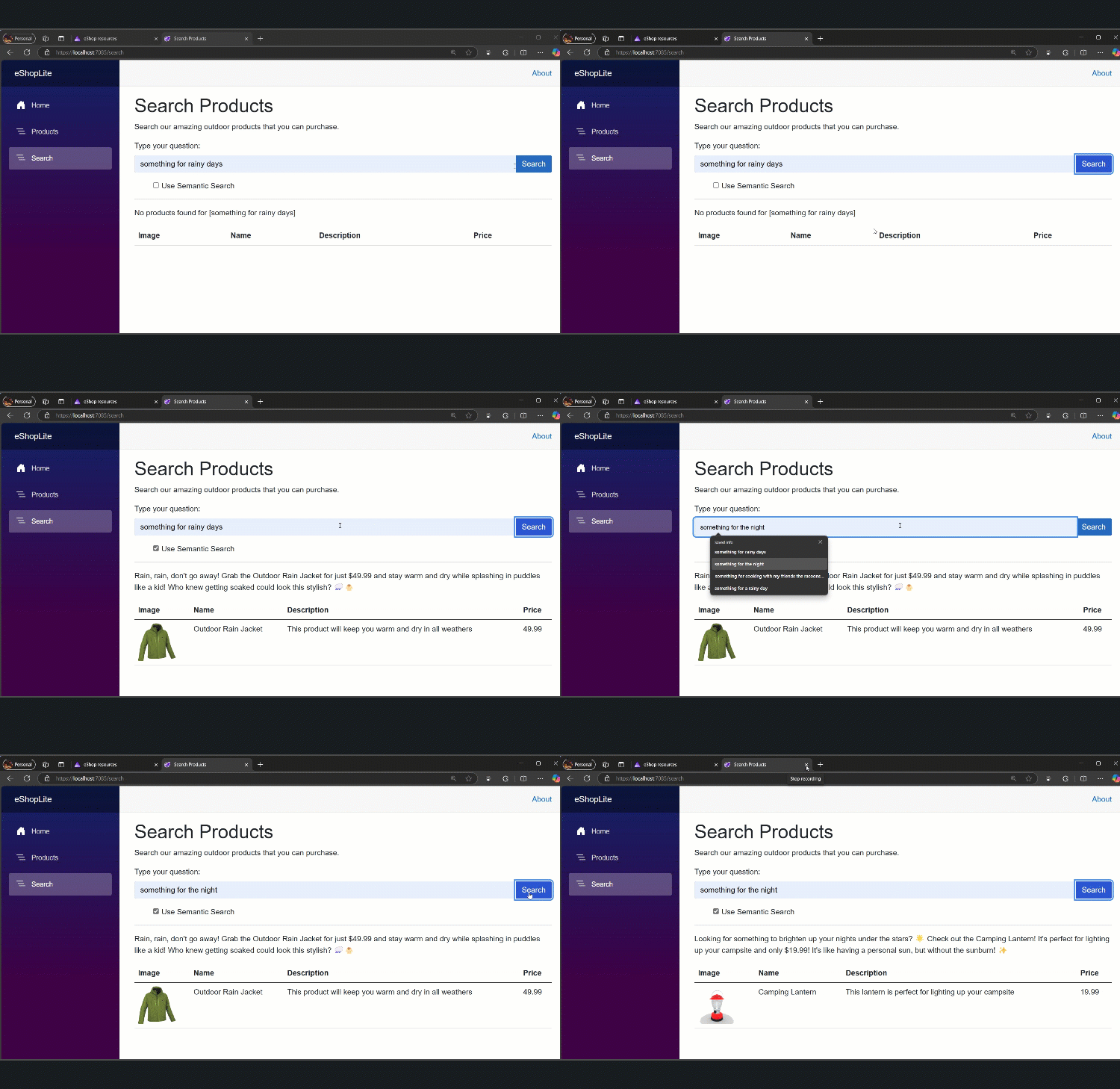
This is the eShopLite Aplication running, performing a Semantic Search:
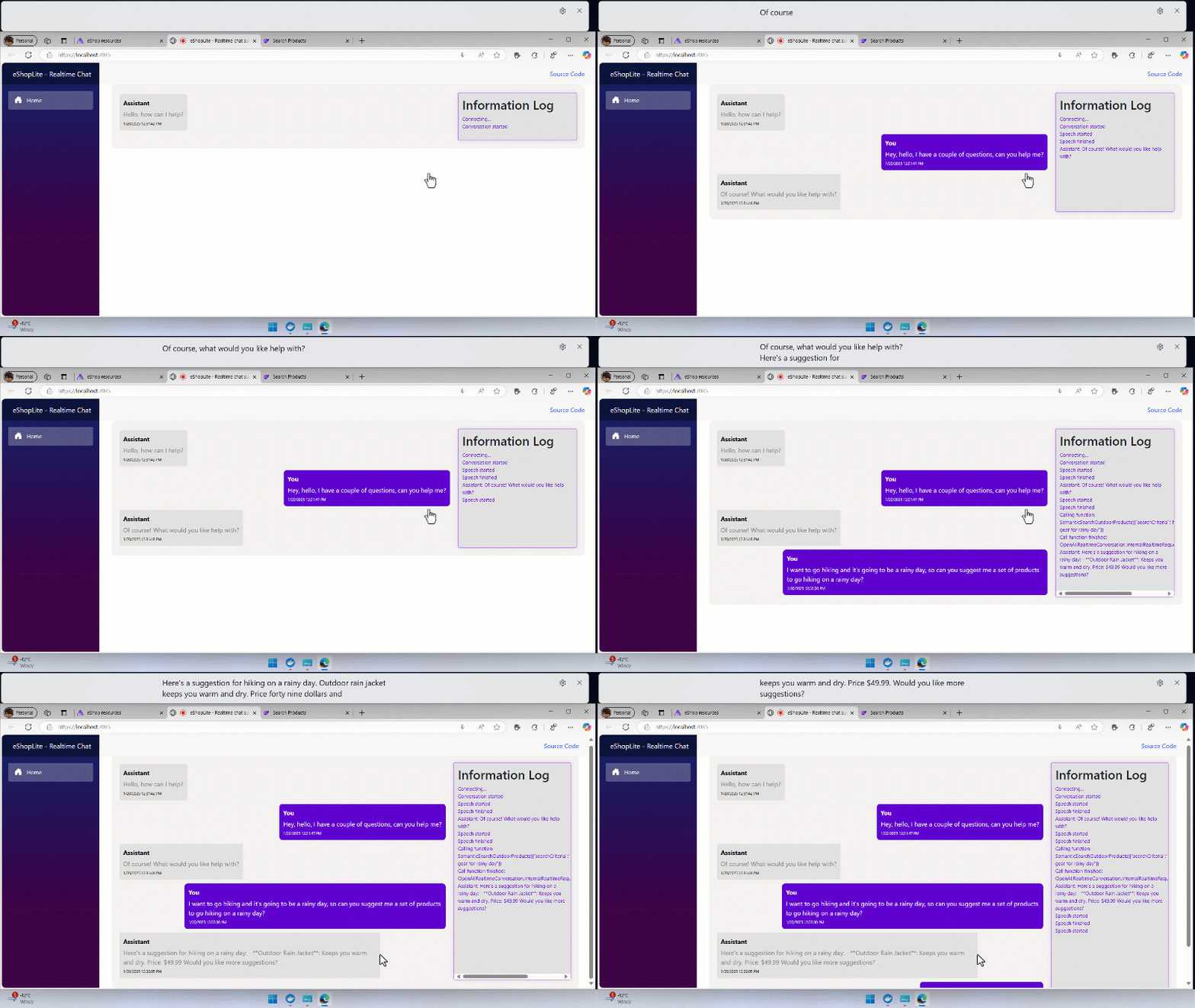
This is the eShopLite Application running the Realtime Audio feature:
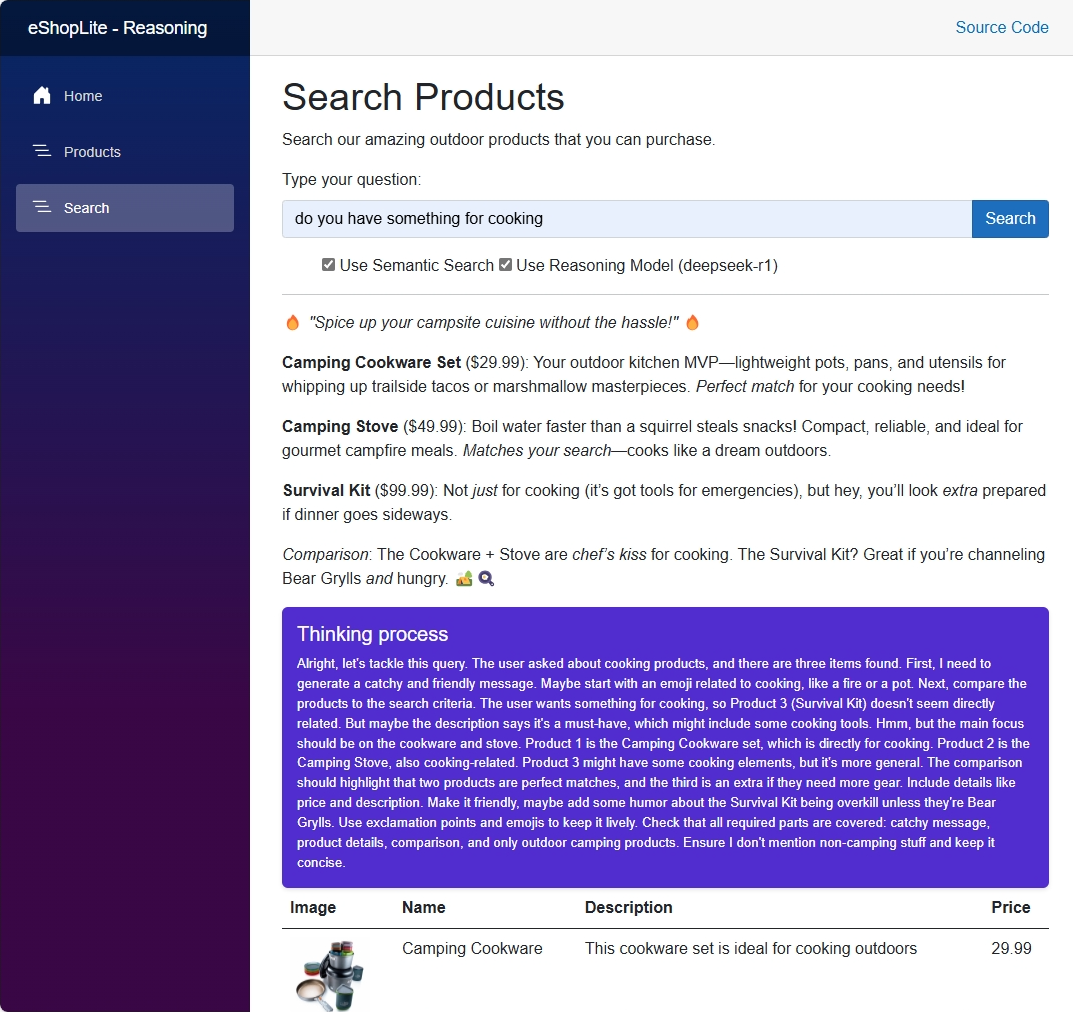
This is the eShopLite Application using the DeepSeek-R1 Reasoning Model:
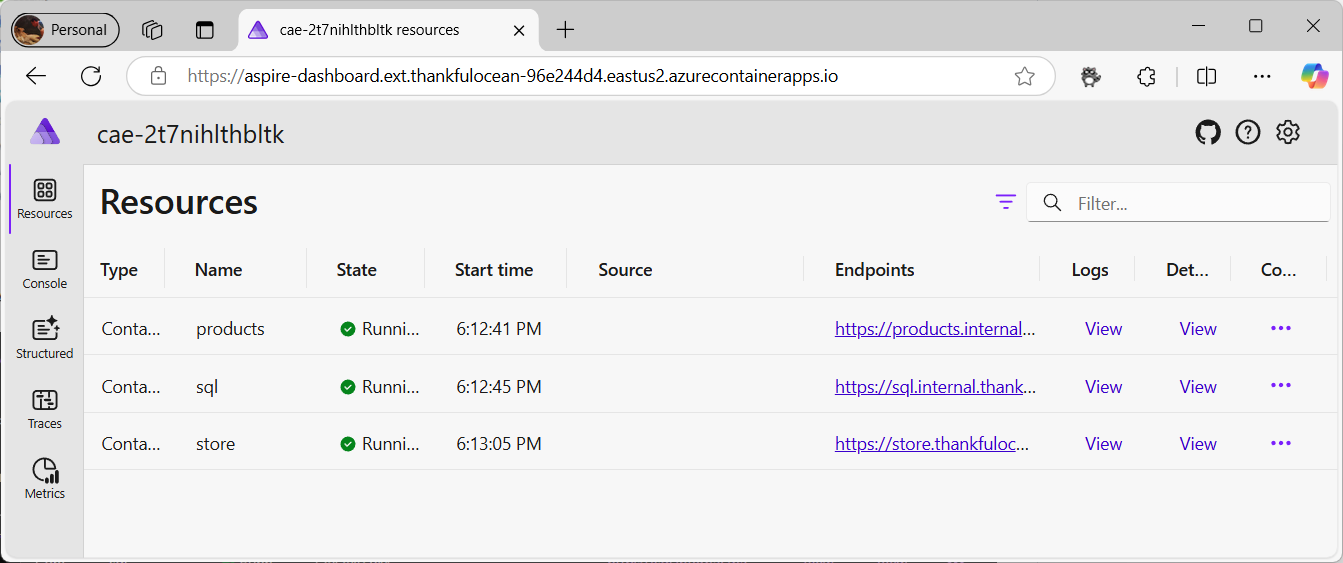
The Aspire Dashboard to check the running services:
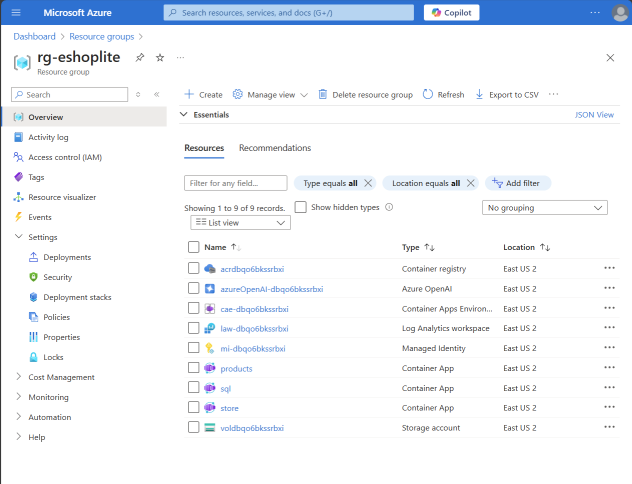
The Azure Resource Group with all the deployed services:
If you get stuck or have questions about building AI apps, join:
If you have product feedback or errors while building, visit:
Claim this server with your GitHub account to request manual ownership verification.
Link to the catalog listing for eShopLite MCP scenarios from your README. This badge does not certify ownership, compatibility or security.
[](https://awesome-mcp.com/servers/eshoplite)Public repository statistics could not be verified. Check the configured source address; unavailable counts are not zero.
来源、范围和时段分别列出;不相加,不代表安装人数、活跃用户或安全审核。
尚无已审核的包 / 镜像标识,暂不展示下载统计。
Alternative and complementary servers in the same category
A directory listing describing a cancellation-letter and mailing-address service. The configured public GitHub repository returned 404 during source verification.

A hosted MCP service for browsing and searching through Singapore mobile-network proxies.

A directory listing describing a Markdown-to-PDF service. The configured public GitHub repository returned 404 during source verification.