

Oleafly is a live collaborative LaTeX, Typst and Markdown editor for research that offers a local MCP server and an oleafly mcp stdio command so outside AI clients can use its project tools.
Repository stats unavailable
Productivity & Ops
An MCP server that turns AI-described components, actors, and data points into editable hand-drawn Excalidraw diagrams across 25 diagram types.
Excalidraw Architect MCP server is cataloged as an MCP server attributed to bv-venky. An MCP server that turns AI-described components, actors, and data points into editable hand-drawn Excalidraw diagrams across 25 diagram types. It is categorized under productivity work. See the capability inspector for recorded interfaces and their independent review status; consult upstream documentation for the current interface.
Installation configuration is not reviewed. No executable setup is offered for this entry; inspect the source repository before proceeding.
Catalog license label: MIT. Check the source repository's current license and terms before using, modifying or distributing this software.
能力定义尚未审核。未核验的采集内容不会作为可信接口展示。
暂无可展示的已审核记录。这不表示上游不支持此能力。
暂无可展示的已审核记录。这不表示上游不支持此能力。
暂无可展示的已审核记录。这不表示上游不支持此能力。
Email delivery is not connected. This page does not collect email addresses or create subscriptions.
Browse the registry for current listings instead.
Reviews for Excalidraw Architect MCP server are not available yet
Review publishing and storage are not connected. This page does not collect or publish ratings or comments, including after sign-in.
No; the README states it runs fully offline in Cursor, Claude Code, and Windsurf without API keys.
Yes; diagram metadata is embedded in the .excalidraw file, so the AI can read the current state, apply modifications, and re-render with proper layout.
Yes; a mermaid_to_excalidraw tool converts Mermaid flowchart syntax into .excalidraw files.
README.md · 6280bb323e04 · 采集于 2026-11-13 11:25:03 UTC
保留上游原文,不做 AI 改写。为安全起见过滤脚本、表单和不安全链接。
当前显示最后一次成功采集的文档快照,请以来源页面为准。



Every diagram your engineering docs need — as hand-drawn Excalidraw, generated by your AI.
Twenty-five diagram types. Architecture and flowcharts, but also sequence diagrams, state machines, ER models, swimlanes, timelines, Gantt charts, quadrants, funnels, and hand-sketched bar/line/scatter charts. No coordinates to hallucinate, no Figma, no stale PNGs.
When you're onboarding onto a codebase, designing a new system, or documenting how something works, a diagram communicates in seconds what pages of text can't. But the options aren't great.
Mermaid is quick to generate and locked down — you can't drag a node, group things visually, or annotate it afterwards. Figma means thirty minutes of manual work per picture. And when an LLM writes Excalidraw JSON directly it hallucinates coordinates: boxes overlap, arrows tangle, and you fix it by hand.
Worse, most tools only cover one diagram type well. The moment your doc needs a sequence diagram next to the architecture sketch, you're switching tools and the two look nothing alike.
excalidraw-architect-mcp separates the what from the where — the AI describes structure, the engine does the pixel math.
Your LLM says what the components, actors, tiers, or data points are. The MCP picks the layout algorithm for that diagram type, styles it, and writes a real .excalidraw file you can open and keep editing. 50+ technologies (Kafka, PostgreSQL, Redis…) get auto-styled, every diagram can be revised in natural language, and it runs fully offline in Cursor/Claude Code/Windsurf — no API keys.
Every image below is a real
.excalidrawfile generated by this MCP — zero manual positioning. Click any one to see it full size.
 Architecture Components + connections |  DP integration Sources → core → consumers |  Sequence Messages over time |
 Timeline Events on an axis |  Gantt Tasks and phases |  Quadrant Two-axis positioning |
 Pyramid / funnel Ranked tiers or drop-off |  Venn Set overlap |  Loop Flywheel around a hub |
 Bar chart Categorical comparison |  Line chart Trends over time |  Scatter plot Distribution + correlation |
 Nested Hierarchy by containment |  Layer stack Stacked abstractions |  Medallion Data quality tiers |
 ER / data model Entities + fields |  High-level Stack inside a boundary |  IT current-state Legacy landscape |
 Swimlane Cross-functional flow |  Process Multi-actor workflow |  Data flow Role-scoped pipeline |
 Flowchart Decision logic with branches |  Tree Parent → children |  Org chart Ownership + escalation |
 State machine States + transitions |
The gallery above is ordered by how often you'll reach for each type. Internally they fall into five families, which is what decides the layout engine:
| Family | Types |
|---|---|
| Graph | architecture · flowchart |
| Structural | tree · org_chart · state · nested · layers · medallion · er · high_level · it_state |
| Flow | swimlane · process · data_flow · dp_integration · sequence |
| Geometric | timeline · quadrant · pyramid (+ funnel) · venn · loop · gantt |
| Charts | bar · line · scatter |
architecture and flowchart are graphs and take nodes + connections. Every other type takes a diagram_type and a spec shaped for it:
create_diagram(
    output_path="./checkout.excalidraw",
    diagram_type="sequence",
    spec={
        "title": "Checkout authorization",
        "actors": [{"id": "web", "label": "Web app"}, {"id": "psp", "label": "Payment PSP"}],
        "messages": [
            {"from_id": "web", "to_id": "psp", "label": "authorize"},
            {"from_id": "psp", "to_id": "web", "label": "approved",
             "kind": "return", "focal": True},
        ],
    },
)
Call list_diagram_types() for when-to-use guidance on each, and get_diagram_schema("<type>") for the exact spec shape. Or just ask: "draw the PR review flow as a swimlane".
Two conventions worth knowing. Mark one or two elements "focal": true — that earns the accent color, and marking five spends the signal. And chrome (axes, gridlines, lane dividers) deliberately renders crisp while shapes and data marks render hand-drawn; that contrast is what keeps a sketchy chart legible instead of noisy.
Editing works on every type. The validated spec is stored inside the .excalidraw file, so you patch it rather than rebuild it:
modify_diagram(path, [{"op": "update_spec", "patch": {"title": "Revised plan"}}])
Lists are replaced wholesale — to change one tier, send the whole tiers list.
Regenerate every image above with python scripts/generate_showcase.py --png.
Every frame below is generated entirely by AI using this MCP - zero manual positioning.


.excalidraw file and revise it in natural language as the system changes. No more stale diagrams from six sprints ago.pip install excalidraw-architect-mcp
For PNG export support (SVG works out of the box):
pip install excalidraw-architect-mcp[png]
Or run without installing (requires uv):
uvx excalidraw-architect-mcp
Cursor - Add to .cursor/mcp.json:
{
  "mcpServers": {
    "excalidraw-architect": {
      "command": "excalidraw-architect-mcp",
      "transport": "stdio"
    }
  }
}
Claude Code - Run this one-liner:
claude mcp add-json excalidraw-architect '{"type":"stdio","command":"excalidraw-architect-mcp"}' --scope user
Or add manually to .mcp.json in your project root:
{
  "mcpServers": {
    "excalidraw-architect": {
      "type": "stdio",
      "command": "excalidraw-architect-mcp"
    }
  }
}
Windsurf / Other IDEs - Same pattern; point to the excalidraw-architect-mcp command over stdio.
skills/excalidraw-architect/ teaches the AI which of the 25 types to pick and how much to put in one — the selection table, the density budget, the reserved-accent rule, and a worked example of every spec.
ln -s "$PWD/skills/excalidraw-architect" ~/.claude/skills/excalidraw-architect
The same guidance also ships inside the server via list_diagram_types() and get_diagram_schema(), so Cursor, Windsurf, and Zed get it without installing anything — the skill just puts it in context up front instead of one call later. Both are generated from a single source (src/excalidraw_mcp/diagrams/registry.py); a test fails the build if they drift.
This repo includes a Diagram Design Skill that teaches the AI how to structure diagrams for the best results - node count limits, topology rules, edge label guidelines, and common patterns.
For Cursor users:
mkdir -p ~/.cursor/skills/excalidraw-diagram-design && \
curl -o ~/.cursor/skills/excalidraw-diagram-design/SKILL.md \
  https://raw.githubusercontent.com/BV-Venky/excalidraw-architect-mcp/main/.skills/excalidraw-diagram-design/SKILL.md
For other IDEs: Download the SKILL.md file and add it to your IDE's prompt context or system instructions.
The AI will automatically pick up the skill and apply it when generating diagrams. Feel free to modify the rules to suit your preferences - tweak node limits, add your own patterns, or adjust styling guidelines.
For the architecture knowledge graph, this repo also includes an Architecture Knowledge Graph Skill. It teaches the AI how to read a codebase well — identify service boundaries, map communication signals (HTTP / gRPC / Kafka / DB) to the right labelled links, match producers and consumers across repos, and keep the graph clean (stable ids, every edge labelled, lint before render).
For Cursor users:
mkdir -p ~/.cursor/skills/architecture-knowledge-graph && \
curl -o ~/.cursor/skills/architecture-knowledge-graph/SKILL.md \
  https://raw.githubusercontent.com/BV-Venky/excalidraw-architect-mcp/main/.skills/architecture-knowledge-graph/SKILL.md
For other IDEs: Download the SKILL.md file and add it to your IDE's prompt context or system instructions.
A note on diagram complexity: As the number of components and connections grows, diagrams inevitably become harder to read - this is true for humans drawing by hand too, not just automated layout. For best results, aim for 6-15 nodes in architecture diagrams and 10-25 nodes in detailed flows. If your system is larger, split it into multiple focused diagrams rather than cramming everything into one.
Just ask your AI IDE naturally:
"Create a high-level architecture diagram of this codebase"
"Create an architecture diagram for a microservices system with an API Gateway, Auth Service, User Service, Order Service, PostgreSQL, Redis cache, and Kafka event bus"
"Convert this mermaid diagram to excalidraw diagram"
"Add a Caching layer to the Order Service in the High Level architecture diagram"
"Export the architecture diagram to SVG"
"Export the diagram as a PNG at 3x resolution"
The AI calls the MCP tool with the relationship map. The MCP handles layout, styling, and output. Open the resulting .excalidraw file with the Excalidraw VS Code extension or drag it into excalidraw.com.
Uses the Sugiyama hierarchical layout algorithm with:
50+ technology mappings with automatic visual styling:
| Category | Technologies |
|---|---|
| Database | PostgreSQL, MySQL, MongoDB, DynamoDB, Cassandra, ClickHouse, SQLite, CockroachDB |
| Message Queue | Kafka, RabbitMQ, SQS, Redis Streams, NATS |
| Cache | Redis, Memcached, Varnish |
| Load Balancer | Nginx, HAProxy, ALB/ELB, Traefik, Envoy |
| Compute | Docker, Kubernetes, Lambda, ECS, Fargate |
| Storage | S3, GCS, Azure Blob, MinIO |
| API | REST, GraphQL, gRPC, WebSocket |
| CDN | CloudFront, Cloudflare |
| Monitoring | Prometheus, Grafana, Datadog, ELK |
| Client | Browser, Mobile, Desktop, CLI |
Diagram metadata is embedded in the .excalidraw file. Ask the AI:
"Add a Redis cache in front of the database in the existing diagram"
The MCP reads the current state, applies the modification, and re-renders with proper layout.
Already have a Mermaid flowchart? Convert it:
"Convert this Mermaid diagram to Excalidraw" (paste your Mermaid syntax)
Excalidraw's sketchy look is not stored in the file — it is produced at render time by roughjs, which redraws every shape as two jittered strokes seeded from the element. An exporter that emits a plain <rect> reproduces the geometry perfectly and the character not at all.
So this one ports the roughjs stroke generator to Python: same seeded PRNG, same line/curve/ellipse/fill routines. Exports match the canvas — doubled pencil strokes, overshooting circles, V-shaped arrowheads, and fills that sit slightly inside their outlines.
cairosvg package (pip install excalidraw-architect-mcp[png]); configurable resolution multiplier (default 2×)Chrome renders crisp on purpose. Axes, gridlines, and lane dividers are drawn at roughness: 0, because a 1px hairline with hand-drawn jitter is indistinguishable from noise.
Fonts. Excalidraw's Excalifont is a bundled webfont, so a standalone SVG has nothing to resolve it to. Exports name a stack of real handwriting faces (Excalifont → Virgil → Segoe Print → Bradley Hand → Chalkboard) instead of the generic CSS cursive, which on macOS resolves to the calligraphic Apple Chancery. For output that looks identical everywhere, pass a font file to embed it:
export_to_svg("arch.excalidraw", "arch.svg", embed_font="Excalifont.woff2")
"Export the architecture diagram as an SVG"
| Tool | Description |
|---|---|
create_diagram | Create a diagram of any of the 25 supported types |
list_diagram_types | Every type with when-to-use / when-not-to guidance |
get_diagram_schema | Spec schema + worked example for one type |
mermaid_to_excalidraw | Convert Mermaid flowchart syntax to .excalidraw |
modify_diagram | Patch an existing diagram — nodes/connections, or the stored spec |
get_diagram_info | Read current diagram state (call before modifying) |
export_diagram | Export .excalidraw to SVG or PNG image |
kg_*)Optional. For the architecture-documentation workflow only — the knowledge graph (default .claude/architecture.md) becomes the source of truth and diagrams become rendered views of it. See Architecture Knowledge Graph below.
| Tool | Description |
|---|---|
kg_init | Create a new knowledge graph file |
kg_add_service / kg_remove_service | Add/update or remove a service (with type, domain, owner, tags, links) |
kg_link / kg_unlink | Add/remove a dependency (parallel edges supported — e.g. REST and Kafka between the same pair) |
kg_set_domain | Group a service into a domain / bounded context |
kg_info | Summarize services, domains, and topology |
kg_render | Render the whole architecture to .excalidraw |
kg_render_view | Render a focused diagram of specific services |
kg_render_around | Render everything within N hops of a service |
kg_render_domain | Render a single domain |
kg_import | Bootstrap the graph from an existing .excalidraw diagram |
whats_connected_to | Impact analysis — upstream/downstream blast radius |
kg_path | Trace the dependency path between two services |
kg_lint | Health check: cycles, single points of failure, orphans, dangling refs |
kg_export | Export the graph to Mermaid, Graphviz DOT, or JSON |
kg_diff | Show how the architecture changed since a git ref |
kg_onboarding_doc | Generate a human onboarding guide from the graph |
kg_drift | Detect drift between the declared graph and Python imports |
Optional, and only for architecture. Everything above works without it. But if you document one system repeatedly, a one-off diagram goes stale the moment you close it — so architecture diagrams can instead be views of a persistent, version-controlled model the AI builds once and reuses everywhere.
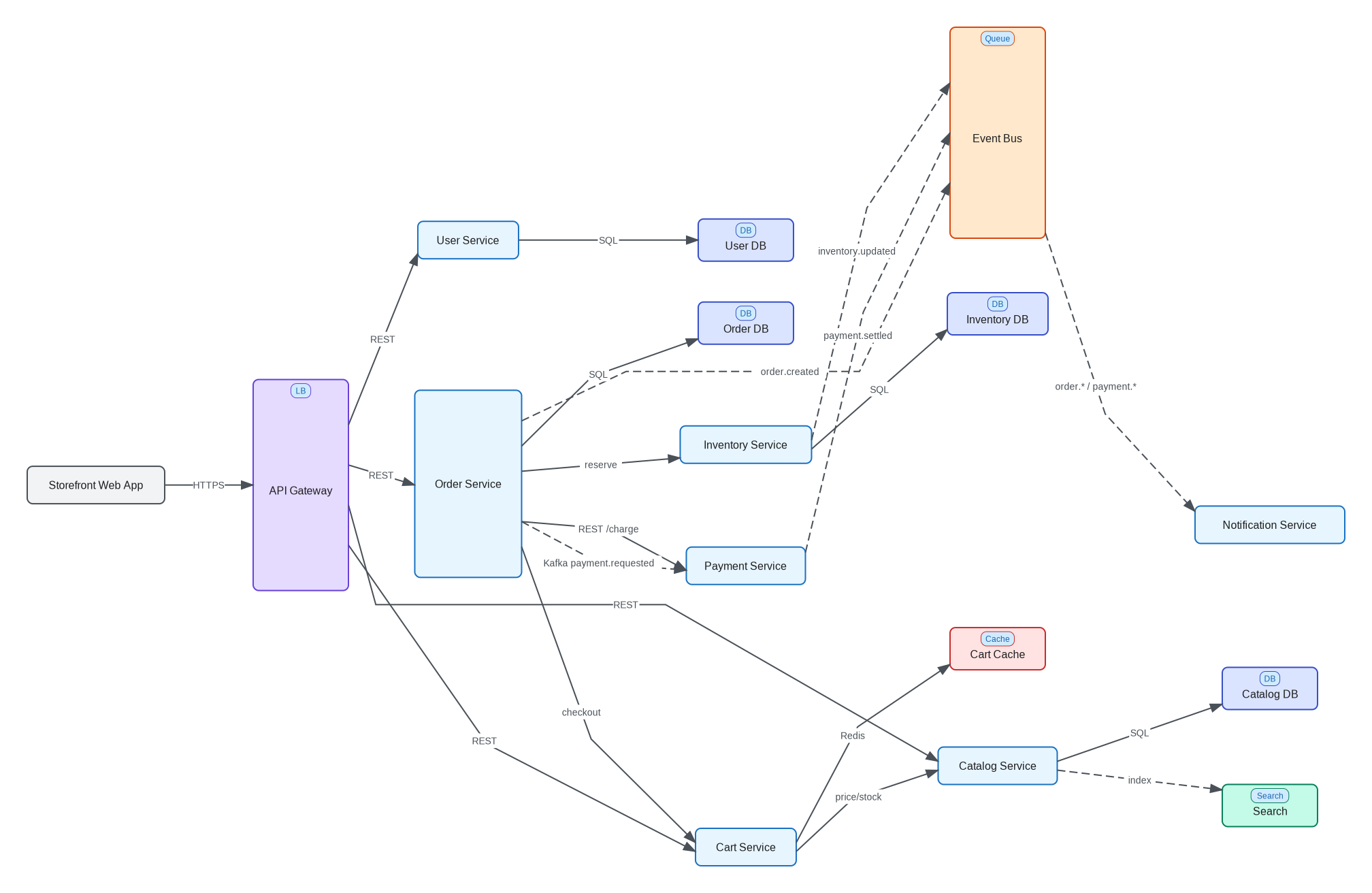
The diagram above was rendered from a knowledge graph — a single
.claude/architecture.mdfile. NoticeOrder Service → Payment Serviceappears twice: a solidREST /chargecall and a dashedKafka payment.requestedevent. Two communication modes, two arrows.
A one-off diagram goes stale the moment you close it. A knowledge graph is a living model:
The graph is a single markdown file (default .claude/architecture.md):
## Services
- order-service: Order Service [type: service] [domain: orders] [owner: @orders]
- payment-service: Payment Service [type: service] [domain: payments] [owner: @payments]

## Dependencies
- order-service -> payment-service : "REST /charge"
- order-service -> payment-service : "Kafka payment.requested" [style: dashed]
Edit it by hand or let the AI maintain it — it round-trips losslessly either way.
"Map this codebase into the architecture knowledge graph"
"Link the order service to payments over Kafka"
"What depends on the payment service? Render just its neighborhood"
"Render the orders domain as a focused diagram"
"Lint the architecture for cycles and single points of failure"
"Import my existing diagram.excalidraw into the knowledge graph"
"Generate an onboarding guide from the architecture"
See the Knowledge Graph tools for the full tool list.
See CONTRIBUTING.md for details.
MIT - see LICENSE.
Claim this server with your GitHub account to request manual ownership verification.
Link to the catalog listing for Excalidraw Architect MCP server from your README. This badge does not certify ownership, compatibility or security.
[](https://awesome-mcp.com/servers/excalidraw-architect-mcp)Public repository statistics could not be verified. Check the configured source address; unavailable counts are not zero.
来源、范围和时段分别列出;不相加,不代表安装人数、活跃用户或安全审核。
尚无已审核的包 / 镜像标识,暂不展示下载统计。
Alternative and complementary servers in the same category
Oleafly is a live collaborative LaTeX, Typst and Markdown editor for research that offers a local MCP server and an oleafly mcp stdio command so outside AI clients can use its project tools.
Buddy is an Android app that offers its phone tools through a local MCP server to Claude Code, Codex, OpenCode, Antigravity, and Grok sessions.

Tuqui is a hosted MCP server that connects Odoo with Claude and ChatGPT so users can ask about sales, stock, customers and overdue invoices in plain language.
