
A Model Context Protocol (MCP) server for controlling Chrome with debugging capabilities, userscript injection, and extension support.
Repository stats unavailable
Browser & Scraping
A stealth browser engine offered both as a Python library and an MCP server, letting LLM agents drive a hard-to-detect Chromium browser.
EyeBrowse is cataloged as an MCP server attributed to evil-bane. A stealth browser engine offered both as a Python library and an MCP server, letting LLM agents drive a hard-to-detect Chromium browser. It is categorized under browser automation. See the capability inspector for recorded interfaces and their independent review status; consult upstream documentation for the current interface.
Installation configuration is not reviewed. No executable setup is offered for this entry; inspect the source repository before proceeding.
Catalog license label: MIT. Check the source repository's current license and terms before using, modifying or distributing this software.
能力定义尚未审核。未核验的采集内容不会作为可信接口展示。
暂无可展示的已审核记录。这不表示上游不支持此能力。
暂无可展示的已审核记录。这不表示上游不支持此能力。
暂无可展示的已审核记录。这不表示上游不支持此能力。
Email delivery is not connected. This page does not collect email addresses or create subscriptions.
Browse the registry for current listings instead.
Reviews for EyeBrowse are not available yet
Review publishing and storage are not connected. This page does not collect or publish ratings or comments, including after sign-in.
Yes, it ships an MCP server named eyebrowse-mcp built on FastMCP over stdio.
No; the rendered HTML goes to Crawl4AI's raw feed and returns clean markdown without calling any LLM or reading LLM keys.
Native video is recorded as .webm and can be converted to GIF or MP4 with ffmpeg.
README.md · 52501738512a · 采集于 2026-11-13 10:59:25 UTC
保留上游原文,不做 AI 改写。为安全起见过滤脚本、表单和不安全链接。
当前显示最后一次成功采集的文档快照,请以来源页面为准。
A Python library and an MCP server for driving a real, hard-to-detect browser, so legitimate automation isn't false-flagged or IP-banned by Cloudflare, DataDome, Akamai, or PerimeterX. Built on CloakBrowser — a stealth Chromium (Chrome/146) that's a Playwright drop-in — so EyeBrowse gets the full Chrome DevTools Protocol: trusted cursorless clicks, deep network inspection, MHTML, PDF, and native video.








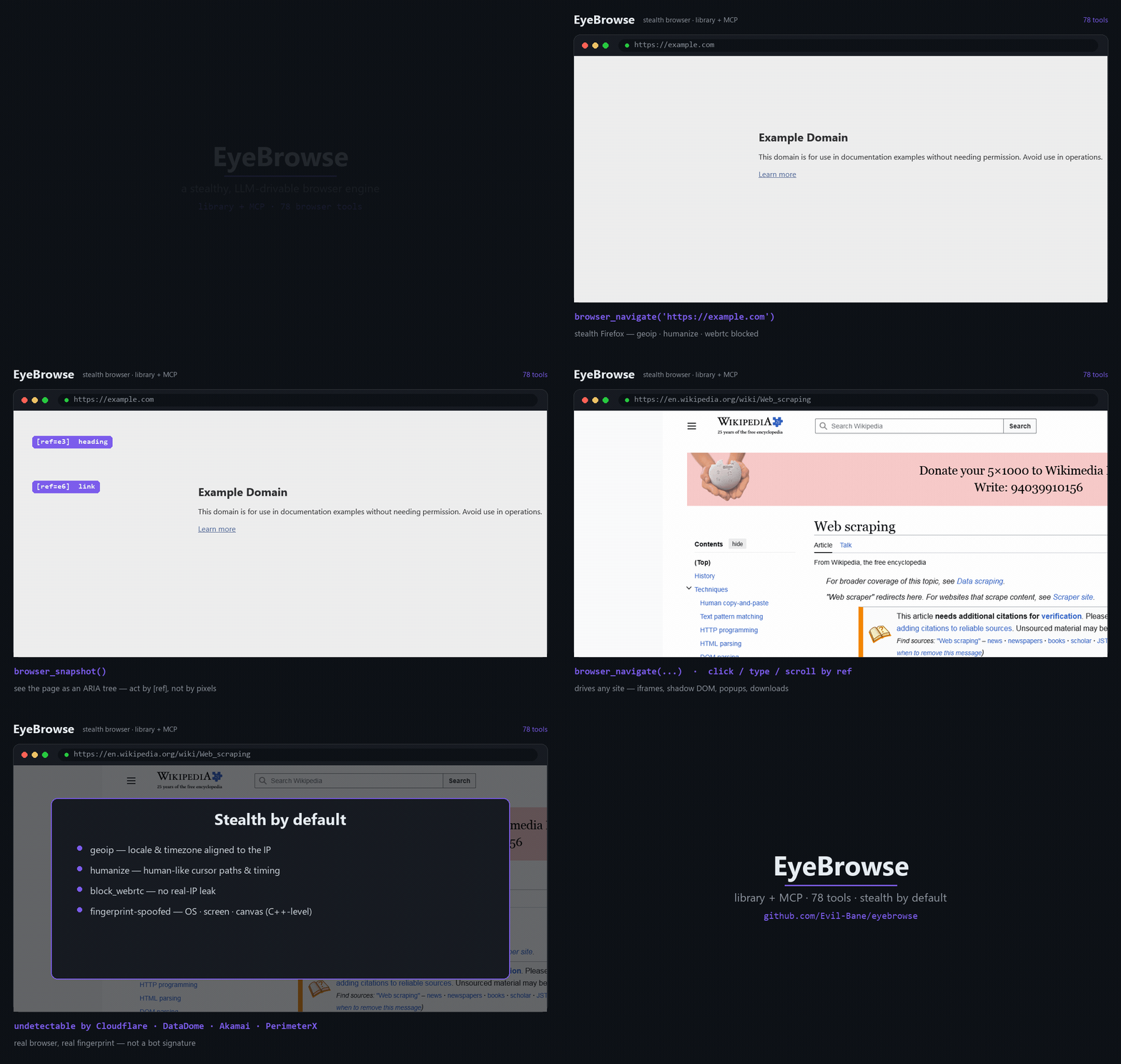
▶ Full-quality MP4: docs/demo.mp4 — an AI agent drives EyeBrowse over MCP: clears a Cloudflare check, then reads real docs (asyncio · httpx · MDN).
geoip + humanize on out of the box, novel fingerprint per launch); navigator.webdriver masked; viewport auto-sized to the spoofed screen. No puppeteer-extra band-aids — the anti-detection is compiled into the browser.[ref=…] handles; the model acts by ref (click/type/hover), not by brittle CSS or raw pixels. Cross-origin iframes, shadow DOM, popups — handled.Input.dispatchMouseEvent), raw Network/Performance/Emulation access, MHTML snapshots, PDF export, and native video — all reachable as tools.EyeBrowse + Session), mirrored 1:1 by a thin MCP server (85 browser_* tools) for Claude Code and any MCP client.session.page / .context / .browser for anything it doesn't wrap.Scope. EyeBrowse is a low-level browser engine — it holds no workflow logic. Consumers decide what to do; the engine provides what's possible.
Quickstart · Install · Features · Compare · Library · MCP · Proxy & identity · Extraction · Recording · How it works · Caveats · Tools · License
pip install eyebrowse
# The stealth-Chromium binary downloads automatically on first launch — nothing else to run.
import asyncio
from eyebrowse import EyeBrowse

async def main():
    eb = EyeBrowse()                          # stealth defaults: geoip · humanize
    async with eb.session() as s:
        await s.navigate("https://example.com")
        print(await s.snapshot())             # ARIA tree with [ref=...] handles
        await s.click("e6")                   # act on a ref from the snapshot
    await eb.aclose()

asyncio.run(main())
…or wire it into Claude Code (or any MCP client) — see Use over MCP.
From PyPI
pip install eyebrowse                 # or: uv pip install eyebrowse
# CloakBrowser fetches its Chromium binary lazily on first launch — nothing to run.
pip install "eyebrowse[extract]"     # optional: + Crawl4AI markdown extraction (heavier)
From source (development)
git clone https://github.com/Evil-Bane/eyebrowse && cd eyebrowse
uv sync                              # core engine  (add --extra extract for Crawl4AI)
cp .env.example .env                 # only if you use a proxy / captcha keys
Python 3.12 (pinned <3.13). Engine: cloakbrowser>=0.3 (stealth Chromium, Chrome/146), on
playwright 1.60 and mcp 1.27.
| 🥷 Stealth | CloakBrowser's patched-Chromium fingerprint spoofing (novel --fingerprint per launch); geoip + humanize by default; webdriver masked; viewport matched to the spoofed screen. |
| 🤖 LLM interaction | aria_snapshot(mode="ai") → ARIA tree + [ref] handles; click / type / hover / select / drag / file-upload / dialogs / keyboard; coordinate mouse too. |
| ⚡ CDP | trusted cursorless click by ref, raw CDP (Network / Performance / Emulation), MHTML capture, PDF export. |
| 🪟 Frames & DOM | cross-origin iframe routing by ref, shadow-DOM piercing, popup/new-tab switching, evaluate inside any frame. |
| 🗂 Multi-session | independent stealth sessions, each with its own context / identity / proxy. |
| 🌐 Network | inspect requests/responses (incl. XHR/fetch bodies & WebSocket frames), block URLs, mock responses, go offline, full HAR export. |
| 💾 State | cookies, localStorage & sessionStorage (CRUD), storage_state save/reload. |
| 🪪 Identity rotation | fresh fingerprint + isolated profile + paired proxy; pluggable residential ProxyProvider. |
| 🧩 Captcha | pluggable API-mode solvers (CapSolver / 2Captcha / CapMonster / NextCaptcha) + TOTP — no browser extension. |
| 📄 Extraction | Crawl4AI raw: feed → clean, token-efficient markdown (no LLM, no API keys). |
| 🎥 Capture | screenshots, Playwright tracing, and native video (.webm). |
| ✅ Verify & debug | assertions, element highlighting, locator generation, geolocation/header emulation. |
Full per-tool reference: docs/TOOLS.md (85 tools across 18 groups).
| EyeBrowse | Playwright MCP | browser-use | playwright-stealth | |
|---|---|---|---|---|
| Anti-detection compiled into the browser | ✅ | ❌ | ❌ | ⚠️ JS patches |
LLM-native ARIA [ref] interaction model | ✅ | ✅ | ✅ | ❌ |
| Ships an MCP server | ✅ (85 tools) | ✅ | ⚠️ partial | ❌ |
| One codebase: Python library and MCP | ✅ | MCP-only | lib-only | lib-only |
| Full CDP (trusted clicks · network · MHTML · PDF · video) | ✅ | ⚠️ partial | ❌ | ⚠️ partial |
| Captcha (API-mode) + TOTP | ✅ | ❌ | ❌ | ❌ |
| Proxy + identity rotation built in | ✅ | ❌ | ⚠️ partial | ❌ |
| Cross-origin iframes · shadow DOM · popups | ✅ | ✅ | ⚠️ partial | n/a |
Fair-use note: each project targets a different niche — this compares them on the axes EyeBrowse optimizes for (stealth + LLM-drivable + one library/MCP codebase), not as an overall ranking.
import asyncio
from eyebrowse import EyeBrowse

async def main():
    eb = EyeBrowse()                           # stealth defaults
    try:
        async with eb.session() as s:          # a stealth session (auto-closed)
            await s.navigate("https://example.com")
            print(await s.snapshot())          # ARIA tree with [ref=...] handles
            await s.click("e6")                # act on a ref
            await s.type("e8", "hello", submit=True)
            png = await s.screenshot(full_page=True)
            title = await s.page.title()        # full Playwright power when you need it
    finally:
        await eb.aclose()

asyncio.run(main())
Run the included proof: uv run python examples/direct_usage.py.
EyeBrowse ships an MCP server (eyebrowse-mcp, FastMCP over stdio). Add it to any MCP client.
Claude Code (CLI):
claude mcp add eyebrowse -- eyebrowse-mcp
Any MCP client (JSON config):
{
  "mcpServers": {
    "eyebrowse": {
      "command": "eyebrowse-mcp"
    }
  }
}
Then drive the loop: browser_navigate(url) → read the snapshot → act by ref
(browser_click / browser_type / …). A default session is auto-created, so most tools just
work. Full list: docs/TOOLS.md.
Runs proxyless by default (geoip still aligns locale/timezone to your real IP). Add a proxy
only when you want one:
await eb.new_session(proxy="http://user:pass@residential.example:8080")
await eb.rotate_identity(proxy="socks5://host:1080")   # fresh fingerprint + paired IP
await eb.new_session(no_proxy=True)                     # force proxyless
Set a default once via EYEBROWSE_PROXY_* in .env, eb.set_static_proxy(...), or a custom
ProxyProvider for rotation. Over MCP: browser_new_session(proxy_url=…) /
browser_new_identity(proxy_url=…) / browser_set_proxy(…).
reCAPTCHA v3 / reputation gates are score-based and key off IP + session reputation — a fresh browser on a flagged IP fails regardless of stealth. Pair EyeBrowse with a clean residential proxy.
eb.extract() (or browser_extract) hands the rendered HTML to Crawl4AI's raw: feed and
returns clean, pruned markdown — no LLM is called and no LLM keys are ever read; the
consuming agent does any structuring.
md  = await eb.extract()                            # markdown string
res = await eb.extract(output_path="data/page.md")  # → {"path": ..., "chars": ...}
Native video — Playwright records the whole session to a .webm, written on close. The path
is known up-front; the file finalizes when the session closes:
s = await eb.new_session(record_video=True)
# ... drive the browser ...
print(await s.video_path())          # path is known up-front; file finalizes on close
await eb.close_session(s.id)
Over MCP: browser_new_session(record_video=True) → browser_video_path. Want a GIF for a README?
Convert the .webm with ffmpeg (ffmpeg -i demo.webm demo.gif). The demo at the top was captured
this way — see examples/make_demo.py.
CONSUMERS                         ENGINE (library: eyebrowse/)
 Claude Code  ──MCP──▶  mcp/  ──▶  EyeBrowse façade (public API)
 your code   ─ import ──────────▶   ├─ BrowserEngine (CloakBrowser / stealth Chromium)
 any MCP client                     ├─ proxy / identity rotation (pluggable)
                                    ├─ captcha solvers (pluggable, API-mode)
                                    └─ Crawl4AI (raw: feed) → clean markdown
The façade (EyeBrowse + Session) is the product; the MCP adapter is a thin 1:1 wrapper over
it. The high-level API is curated and LLM-friendly — not a reimplementation of all of Playwright
— and the raw page / context / browser objects are always one attribute away. The launcher
is the only engine-specific layer; everything else is plain Playwright.
Worth knowing:
evaluate runs in the page's main world (page globals reachable). To override a page's
widget globals and fire a site callback (e.g. for captcha), EyeBrowse injects a <script> so the
code runs in the page world — see captcha/inject.py.browser_storage_state → browser_har_export →
browser_new_session(storage_state=...). For the initiator-rich Chrome HAR (JS call stacks),
reach the Network.* domain via browser_cdp_send..webm — convert to GIF/MP4 with ffmpeg if you need another format.eyebrowse/
api.py EyeBrowse façade — the single public entry point
config.py settings / secrets (pydantic-settings)
snapshot.py aria_snapshot(mode="ai") + aria-ref= resolution
proxy.py ProxyConfig + pluggable ProxyProvider
identity.py Identity + random_identity() (isolated profile dir)
extract.py Crawl4AI raw: feed → markdown (lazy, optional dep)
engine/ engine.py (CloakBrowser launch) + session.py (verbs + registry)
captcha/ solver ABC + 4 providers + DOM detect/inject
mcp/ FastMCP server + state + tools/ (18 groups · 85 tools)
examples/direct_usage.py library proof (no MCP)
examples/make_demo.py the native-video demo above
docs/TOOLS.md full tool reference
Build notes, version-pin rationale, and verified engine behavior live in CLAUDE.md.
EyeBrowse drives a real browser with anti-detection features. Use it only against sites you own or are explicitly authorized to automate, and within their terms and applicable law.
MIT © Evil-Bane
Found EyeBrowse useful? ⭐ Star the repo — it genuinely helps.
Built with Python · Playwright · CloakBrowser · FastMCP · the Model Context Protocol
Claim this server with your GitHub account to request manual ownership verification.
Link to the catalog listing for EyeBrowse from your README. This badge does not certify ownership, compatibility or security.
[](https://awesome-mcp.com/servers/eyebrowse)Public repository statistics could not be verified. Check the configured source address; unavailable counts are not zero.
来源、范围和时段分别列出;不相加,不代表安装人数、活跃用户或安全审核。
尚无已审核的包 / 镜像标识,暂不展示下载统计。
Alternative and complementary servers in the same category
A Model Context Protocol (MCP) server for controlling Chrome with debugging capabilities, userscript injection, and extension support.

An MCP server that lets AI assistants browse websites and extract content using optional CSS selectors.

An MCP server that reads pages, fills forms, takes screenshots, and hands the browser to a person for logins or CAPTCHAs.