
A directory listing describing a cancellation-letter and mailing-address service. The configured public GitHub repository returned 404 during source verification.
Repository stats unavailable
Developer Tools
A Model Context Protocol server that gives AI coding tools access to Figma files, extracting detailed CSS properties and generating design tokens.
Enhanced Figma MCP server for CSS extraction and design tokens is cataloged as an MCP server attributed to j4ckp0t85. A Model Context Protocol server that gives AI coding tools access to Figma files, extracting detailed CSS properties and generating design tokens. It is categorized under developer tools. See the capability inspector for recorded interfaces and their independent review status; consult upstream documentation for the current interface.
Installation configuration is not reviewed. No executable setup is offered for this entry; inspect the source repository before proceeding.
Catalog license label: Not specified. Check the source repository's current license and terms before using, modifying or distributing this software.
能力定义尚未审核。未核验的采集内容不会作为可信接口展示。
暂无可展示的已审核记录。这不表示上游不支持此能力。
暂无可展示的已审核记录。这不表示上游不支持此能力。
暂无可展示的已审核记录。这不表示上游不支持此能力。
Email delivery is not connected. This page does not collect email addresses or create subscriptions.
Browse the registry for current listings instead.
Reviews for Enhanced Figma MCP server for CSS extraction and design tokens are not available yet
Review publishing and storage are not connected. This page does not collect or publish ratings or comments, including after sign-in.
Yes; extractCssProperties defaults to true but can be set to false for a more lightweight response.
Design tokens can be exported as CSS, SCSS, TypeScript, or JSON.
Yes, an optional prefix can be applied to variable names.
README.md · 81b99e151b7f · 采集于 2026-11-13 11:08:46 UTC
保留上游原文,不做 AI 改写。为安全起见过滤脚本、表单和不安全链接。
当前显示最后一次成功采集的文档快照,请以来源页面为准。
Give Cursor, Windsurf, Cline, and other AI-powered coding tools access to your Figma files with this Model Context Protocol server.
When Cursor has access to Figma design data, it's way better at one-shotting designs accurately than alternative approaches like pasting screenshots.
Get started quickly, see Configuration for more details:
npx figma-developer-mcp --figma-api-key=<your-figma-api-key>
This enhanced version of the MCP server can extract and provide detailed CSS properties from Figma designs, making it more accurate when translating designs to code.
When requesting Figma data, you can specify whether to extract detailed CSS properties:
// With detailed CSS properties
const response = await fetch("http://localhost:3333/messages", {
  method: "POST",
  body: JSON.stringify({
    tool: "get_figma_data",
    params: {
      fileKey: "your-file-key",
      nodeId: "your-node-id",
      extractCssProperties: true // default is true
    }
  })
});

// Without detailed CSS properties (more lightweight)
const response = await fetch("http://localhost:3333/messages", {
  method: "POST",
  body: JSON.stringify({
    tool: "get_figma_data",
    params: {
      fileKey: "your-file-key",
      nodeId: "your-node-id",
      extractCssProperties: false
    }
  })
});
This enhanced version also includes tools to automatically generate design tokens from your Figma designs, which can be exported in various formats to use in your projects.
:root {} for direct use in CSS// Generate design tokens
const response = await fetch("http://localhost:3333/messages", {
method: "POST",
body: JSON.stringify({
tool: "generate_design_tokens",
params: {
fileKey: "your-file-key",
format: "css", // Options: "css", "scss", "ts", "json"
outputPath: "./src/styles/design-tokens.css", // Optional
prefix: "my-app-" // Optional prefix for variable names
}
})
});
Watch a demo of building a UI in Cursor with Figma design data
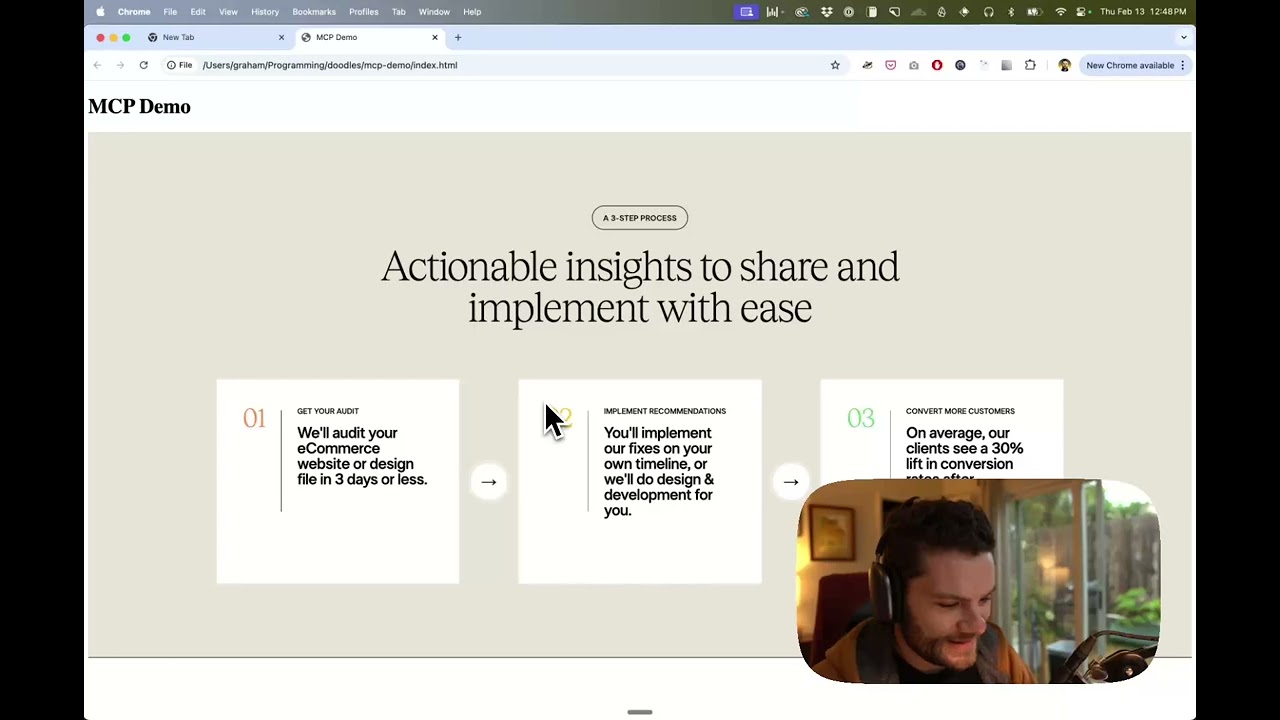
This MCP server is specifically designed for use with Cursor. Before responding with context from the Figma API, it simplifies and translates the response so only the most relevant layout and styling information is provided to the model.
Reducing the amount of context provided to the model helps make the AI more accurate and the responses more relevant.
You can run the server quickly without installing or building the repo using NPM:
npx figma-developer-mcp --figma-api-key=<your-figma-api-key>

# or
pnpx figma-developer-mcp --figma-api-key=<your-figma-api-key>

# or
yarn dlx figma-developer-mcp --figma-api-key=<your-figma-api-key>

# or
bunx figma-developer-mcp --figma-api-key=<your-figma-api-key>
Instructions on how to create a Figma API access token can be found here.
Many tools like Windsurf, Cline, and Claude Desktop use a configuration file to start the server.
The figma-developer-mcp server can be configured by adding the following to your configuration file:
{
  "mcpServers": {
    "figma-developer-mcp": {
      "command": "npx",
      "args": ["-y", "figma-developer-mcp", "--stdio"],
      "env": {
        "FIGMA_API_KEY": "<your-figma-api-key>"
      }
    }
  }
}
pnpm install.env.example to .env and fill in your Figma API access token. Only read access is required.pnpm run dev, along with any of the flags from the Command-line Arguments section.The server can be configured using either environment variables (via .env file) or command-line arguments. Command-line arguments take precedence over environment variables.
FIGMA_API_KEY: Your Figma API access token (required)PORT: The port to run the server on (default: 3333)--version: Show version number--figma-api-key: Your Figma API access token--port: The port to run the server on--stdio: Run the server in command mode, instead of default HTTP/SSE--help: Show help menu> npx figma-developer-mcp --figma-api-key=<your-figma-api-key>
# Initializing Figma MCP Server in HTTP mode on port 3333...
# HTTP server listening on port 3333
# SSE endpoint available at http://localhost:3333/sse
# Message endpoint available at http://localhost:3333/messages
Once the server is running, connect Cursor to the MCP server in Cursor's settings, under the features tab.
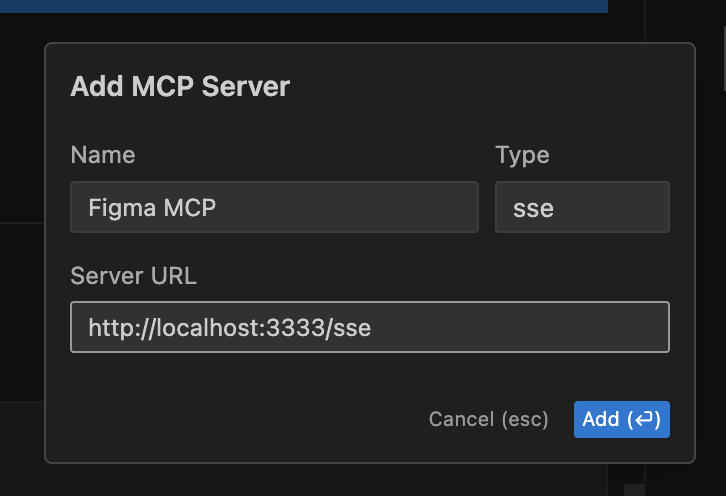
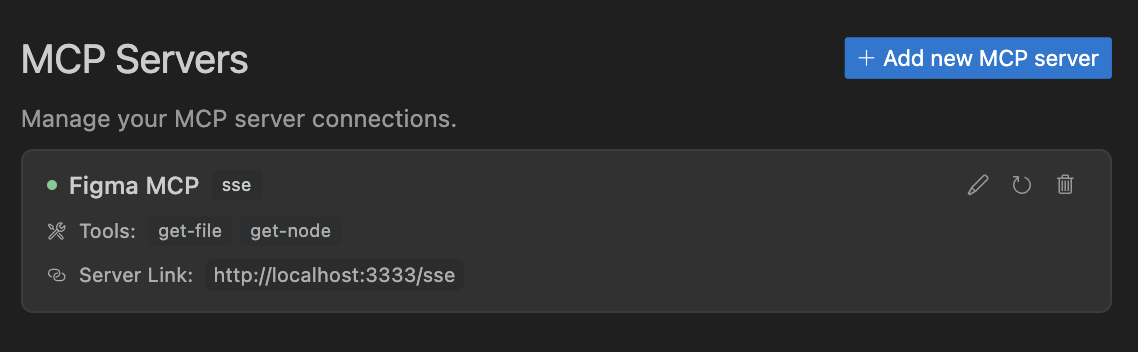
After the server has been connected, you can confirm Cursor's has a valid connection before getting started. If you get a green dot and the tools show up, you're good to go!
Once the MCP server is connected, you can start using the tools in Cursor's composer, as long as the composer is in agent mode.
Dropping a link to a Figma file in the composer and asking Cursor to do something with it should automatically trigger the get_figma_data tool.
Most Figma files end up being huge, so you'll probably want to link to a specific frame or group within the file. With a single element selected, you can hit CMD + L to copy the link to the element. You can also find it in the context menu:
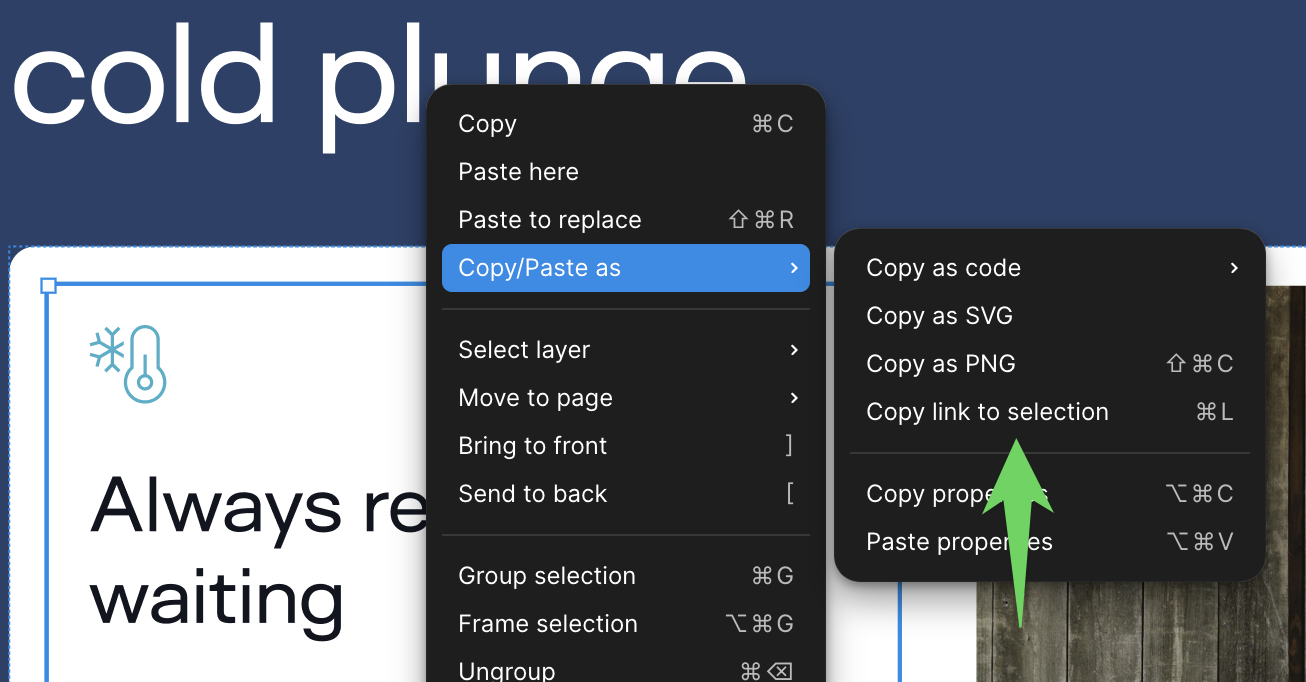
Once you have a link to a specific element, you can drop it in the composer and ask Cursor to do something with it.
To inspect responses from the MCP server more easily, you can run the inspect command, which launches the @modelcontextprotocol/inspector web UI for triggering tool calls and reviewing responses:
pnpm inspect
# > figma-mcp@0.1.7 inspect
# > pnpx @modelcontextprotocol/inspector
#
# Starting MCP inspector...
# Proxy server listening on port 3333
#
# 🔍 MCP Inspector is up and running at http://localhost:5173 🚀
The server provides the following MCP tools:
Fetches information about a Figma file.
Parameters:
fileKey (string): The key of the Figma file to fetchnodeId (string, optional): The ID of the node to fetchdepth (number, optional): How many levels deep to traverse the node treeextractCssProperties (boolean, optional): Whether to extract detailed CSS properties for each node (default: true)Generates design tokens from a Figma file and exports them to a specific format.
Parameters:
fileKey (string): The key of the Figma file to fetchnodeId (string, optional): The ID of the node to fetchdepth (number, optional): How many levels deep to traverse the node treeformat (string, optional): The output format for the design tokens (options: "css", "scss", "ts", "json", default: "css")outputPath (string, optional): The file path to save the design tokensprefix (string, optional): Optional prefix for variable names (e.g., "my-app-")Claim this server with your GitHub account to request manual ownership verification.
Link to the catalog listing for Enhanced Figma MCP server for CSS extraction and design tokens from your README. This badge does not certify ownership, compatibility or security.
[](https://awesome-mcp.com/servers/figma-context-mcp-tokens)Public repository statistics could not be verified. Check the configured source address; unavailable counts are not zero.
来源、范围和时段分别列出;不相加,不代表安装人数、活跃用户或安全审核。
尚无已审核的包 / 镜像标识,暂不展示下载统计。
Alternative and complementary servers in the same category
A directory listing describing a cancellation-letter and mailing-address service. The configured public GitHub repository returned 404 during source verification.

A hosted MCP service for browsing and searching through Singapore mobile-network proxies.

A directory listing describing a Markdown-to-PDF service. The configured public GitHub repository returned 404 during source verification.