File Operation MCP Server


一个基于 Model Context Protocol (MCP) 的文件操作服务器,提供文件统计、列表查询和图片压缩功能。
✨ 功能特性
- 📊 文件统计 - 统计指定文件夹中的文件数量
- 📋 文件列表 - 获取文件夹中所有文件的详细信息
- 🖼️ 图片压缩 - 高质量图片压缩,支持多种格式
- 🗜️ 文件压缩 - 创建ZIP、TAR、TAR.GZ格式的压缩文件
- 📦 文件解压 - 解压ZIP、TAR、TAR.GZ格式的压缩文件
- 📂 文件复制 - 复制文件或文件夹到指定位置
- 🔄 文件移动 - 移动文件或文件夹到指定位置
- 📄 PDF合并 - 将多个PDF文件合并成一个
- ✂️ PDF拆分 - 将PDF文件按页面或范围拆分
- 🖼️ PDF转图片 - 将PDF页面转换为JPEG/PNG图片
- 🔒 安全可靠 - 完整的错误处理和参数验证
- ⚡ 高性能 - 基于 Node.js 和 TypeScript 构建
🛠️ 技术栈
- TypeScript - 类型安全的 JavaScript
- MCP SDK - Model Context Protocol 官方 SDK
- Sharp - 高性能图像处理库
- PDF-lib - 纯JavaScript PDF处理库,支持合并拆分
- PDF2pic - PDF转图片转换工具
- Mammoth - Word文档处理库
- Puppeteer - 无头浏览器,用于PDF生成
- Archiver - 文件压缩库,支持ZIP、TAR等格式
- Extract-Zip - ZIP文件解压库
- TAR - TAR格式文件处理库
- fs-extra - 增强的文件系统操作
- Zod - TypeScript 优先的数据验证
📦 安装
环境要求
- Node.js >= 18.0.0
- pnpm (推荐) 或 npm
克隆项目
git clone https://github.com/lxKylin/file-operation-mcp.git
cd file-operation-mcp
安装依赖
pnpm install
构建项目
pnpm build
🔌 传输方式对比
本项目支持两种MCP传输方式,您可以根据使用场景选择合适的方式:
📊 Stdio vs SSE 对比表
🎯 使用场景推荐
选择 Stdio 当您需要:
- 🏠 本地开发: 简单的个人桌面工具
- 🔒 单用户: 仅自己使用的应用
- ⚡ 低延迟: 对响应时间要求极高
- 📦 简单部署: 不想配置HTTP服务器
- 💾 资源节约: 系统资源有限
选择 SSE 当您需要:
- 🌐 远程访问: 通过网络连接服务器
- 👥 多用户: 团队共享的服务器
- 🔄 高可用性: 需要负载均衡和故障转移
- 🐛 便于调试: 开发阶段需要方便的调试工具
- 📈 可扩展性: 未来可能需要横向扩展
- 🔍 监控需求: 需要详细的服务监控
🔧 性能对比
Stdio 架构
客户端 ←→ 服务器进程 (直接IPC)
延迟: 1-5ms | 内存: 低 | CPU: 低
SSE 架构
客户端 ←→ HTTP服务器 ←→ MCP服务器
延迟: 10-50ms | 内存: 中等 | CPU: 中等
🛠️ 代码差异示例
Stdio 启动方式
import { StdioServerTransport } from '@modelcontextprotocol/sdk/server/stdio.js';

const transport = new StdioServerTransport();
await server.connect(transport);
console.error('Stdio MCP服务器已启动');
SSE 启动方式
import { SSEServerTransport } from '@modelcontextprotocol/sdk/server/sse.js';
import express from 'express';

const app = express();
app.get('/sse', async (req, res) => {
  const transport = new SSEServerTransport('/messages', res);
  await server.connect(transport);
});

app.listen(3000, () => {
  console.error('SSE MCP服务器已启动在端口 3000');
});
💡 推荐: 如果您是个人用户且只需要本地使用,选择 Stdio;如果需要团队协作或远程访问,选择 SSE。
⚙️ Stdio配置
Claude Desktop 配置
将以下配置添加到 Claude Desktop 的配置文件中:
配置文件位置:
- macOS:
~/Library/Application Support/Claude/claude_desktop_config.json
- Windows:
%APPDATA%/Claude/claude_desktop_config.json
配置内容:
{
  "mcpServers": {
    "file-operation-mcp": {
      "command": "node",
      "args": ["path/to/file-operation-mcp/dist/index.js"],
      "cwd": "path/to/file-operation-mcp",
      "env": {
        "NODE_ENV": "production"
      }
    }
  }
}
⚠️ 注意: 请将 path/to/file-operation-mcp 替换为实际的项目路径
Cursor IDE 配置
{
  "mcpServers": {
    "file-operation-mcp": {
      "command": "node",
      "args": ["path/to/file-operation-mcp/dist/index.js"]
    }
  }
}
⚙️ SSE配置
启动SSE服务器
首先启动HTTP服务器:
# 启动服务器
pnpm start
# 或
node dist/index.js
服务器启动后会显示:
MCP文件操作服务器已启动在端口 3000
SSE端点: http://localhost:3000/sse
健康检查: http://localhost:3000/health
验证服务器状态
# 检查服务器健康状态
curl http://localhost:3000/health

# 返回示例
{
  "status": "ok",
  "message": "MCP文件操作服务器运行中",
  "timestamp": "2024-01-01T12:00:00.000Z"
}
Claude Desktop 配置
将以下配置添加到 Claude Desktop 的配置文件中:
{
  "mcpServers": {
    "file-operation-mcp": {
      "url": "http://localhost:3000/sse"
    }
  }
}
Cursor IDE 配置
{
  "mcpServers": {
    "file-operation-mcp": {
      "url": "http://localhost:3000/sse"
    }
  }
}
SSE端点说明
- SSE连接:
http://localhost:3000/sse - 主要的MCP连接端点
- 消息处理:
http://localhost:3000/messages - 处理JSON-RPC消息
- 健康检查:
http://localhost:3000/health - 服务器状态检查
- 端口配置: 可通过环境变量
PORT 修改,默认为 3000
⚠️ 注意: SSE模式需要先手动启动服务器,然后再配置客户端连接。
🚀 使用方法
配置完成后重启 Claude Desktop,即可在对话中使用以下功能:
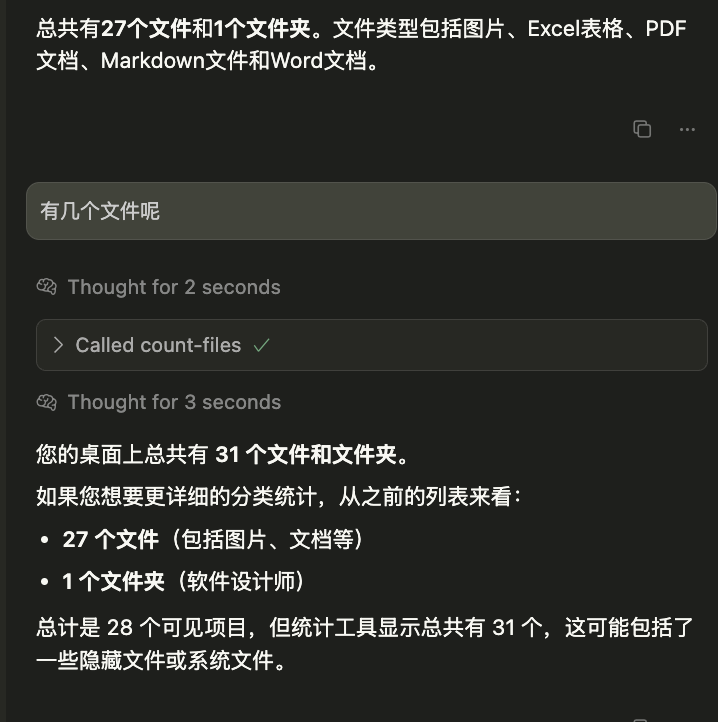
1. 文件统计 (count-files)
统计指定文件夹中的文件数量,默认统计桌面文件。
参数:
folderPath (可选): 文件夹路径,默认为桌面
示例:
请帮我统计一下桌面上有多少个文件
请统计 /Users/username/Documents 文件夹中的文件数量
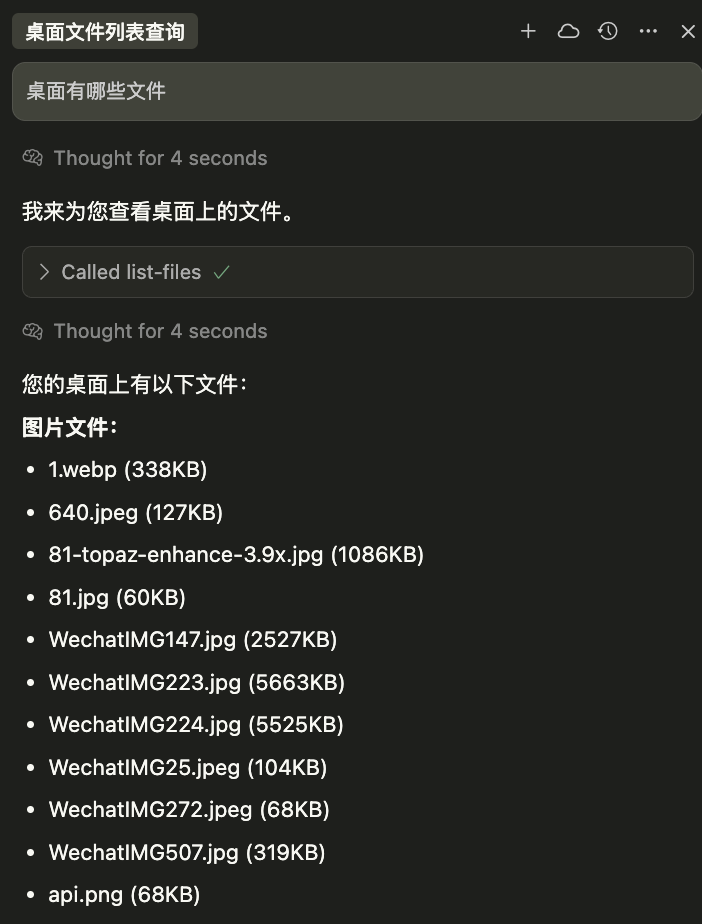
2. 文件列表 (list-files)
获取指定文件夹中所有文件的详细信息,包括文件名、类型和大小。
参数:
folderPath (可选): 文件夹路径,默认为桌面includeHidden (可选): 是否包含隐藏文件,默认为 false
示例:
请列出桌面上的所有文件
请显示 /Users/username/Downloads 文件夹中的内容,包括隐藏文件
3. 图片压缩 (compress-image)
压缩指定的图片文件,支持多种格式和自定义参数。
参数:
imagePath: 图片文件路径 (必需)quality (可选): 压缩质量 (1-100),默认为 80maxWidth (可选): 最大宽度限制maxHeight (可选): 最大高度限制outputPath (可选): 输出路径,默认为原文件名加 _compressed 后缀
支持格式:
- JPEG/JPG
- PNG
- WebP
- TIFF
- GIF
示例:
请将 /Users/username/Desktop/photo.jpg 压缩到 60% 质量
请压缩图片 /path/to/image.png,限制最大宽度为 1920 像素
4. 文件压缩 (create-archive)
将文件或文件夹压缩为ZIP、TAR或TAR.GZ格式。
参数:
files: 要压缩的文件/文件夹路径数组 (必需)outputPath: 输出压缩文件路径 (必需)format (可选): 压缩格式 (zip, tar, tar.gz),默认为zipcompressionLevel (可选): 压缩级别 (0-9),默认为6
支持格式:
- ZIP - 通用压缩格式,兼容性最好
- TAR - Unix/Linux常用格式,无压缩
- TAR.GZ - TAR格式+GZIP压缩,压缩率高
示例:
请将 /Users/username/Documents 文件夹压缩为ZIP格式
请压缩文件 ["/path/file1.txt", "/path/file2.txt"] 为 /backup/files.tar.gz 格式
请将项目文件夹压缩为高压缩级别的ZIP包
解压ZIP、TAR或TAR.GZ文件到指定目录。
参数:
archivePath: 压缩文件路径 (必需)extractTo: 解压目标目录 (必需)overwrite (可选): 是否覆盖已存在文件,默认为false
支持格式:
- ZIP - .zip文件
- TAR - .tar文件
- TAR.GZ - .tar.gz、.tgz文件
示例:
请解压 /Downloads/archive.zip 到 /Projects/ 目录
请解压 /backup/files.tar.gz 到 /restore/ 并覆盖现有文件
请将压缩包解压到临时文件夹
注意事项:
- 解压前会检查目标目录是否为空(除非设置overwrite=true)
- 支持自动检测压缩格式
- 会显示解压文件数量和总大小
- 解压过程中会保持原始文件结构
6. 文件复制 (copy-files)
复制文件或文件夹到指定位置,保持原文件不变。
参数:
sourcePath: 源文件/文件夹路径 (必需)targetPath: 目标路径 (必需)overwrite (可选): 是否覆盖已存在文件,默认为falsepreserveTimestamps (可选): 是否保留时间戳,默认为true
特性:
- 支持文件和文件夹复制
- 递归复制整个目录结构
- 可选择保留原始时间戳
- 安全检查防止意外覆盖
- 显示复制详情和文件统计
示例:
请复制 /Users/username/Documents/report.pdf 到 /backup/ 目录
请复制整个项目文件夹到备份目录,保留时间戳
请复制文件并覆盖已存在的目标文件
7. 文件移动 (move-files)
移动文件或文件夹到指定位置,相当于剪切操作。
参数:
sourcePath: 源文件/文件夹路径 (必需)targetPath: 目标路径 (必需)overwrite (可选): 是否覆盖已存在文件,默认为false
特性:
- 支持文件和文件夹移动
- 原子操作,确保数据安全
- 自动验证移动完成
- 防止源路径和目标路径相同
- 跨文件系统移动支持
示例:
请移动 /Downloads/archive.zip 到 /Projects/ 目录
请将临时文件夹移动到永久存储位置
请移动文件并覆盖目标位置的同名文件
注意事项:
- 移动操作会删除原始文件/文件夹
- 支持跨分区/驱动器移动
- 移动前会验证目标目录权限
- 操作完成后会验证结果
8. PDF合并 (merge-pdf)
将多个PDF文件合并成一个完整的PDF文档。
参数:
inputPaths: PDF文件路径数组 (必需)outputPath: 输出PDF文件路径 (必需)title (可选): 合并后PDF的标题
特性:
- 支持合并任意数量的PDF文件
- 保持原始页面格式和质量
- 自动设置文档元数据
- 详细的合并统计报告
- 自动添加.pdf扩展名
示例:
请合并这些PDF文件:["/reports/report1.pdf", "/reports/report2.pdf"] 到 "/merged/combined_report.pdf"
请将项目文档合并,标题设为 "完整项目文档"
9. PDF拆分 (split-pdf)
将PDF文件拆分成多个独立的文件,支持按页面或自定义范围拆分。
参数:
inputPath: 输入PDF文件路径 (必需)outputDir: 输出目录 (必需)splitMode (可选): 拆分模式 - pages(每页一个文件) 或 ranges(按范围拆分),默认pagesranges (可选): 页面范围数组,如 ["1-3", "4-6"],仅ranges模式需要prefix (可选): 输出文件名前缀,默认为原文件名
特性:
- 两种拆分模式:逐页拆分或范围拆分
- 灵活的页面范围设置
- 保持原始页面格式
- 自动文件命名和编号
- 详细的拆分统计
示例:
请将 "/documents/manual.pdf" 按页面拆分到 "/pages/" 目录
请将PDF按范围拆分:["1-5", "6-10", "11-15"]
请拆分PDF的第3页到第8页为单独文件
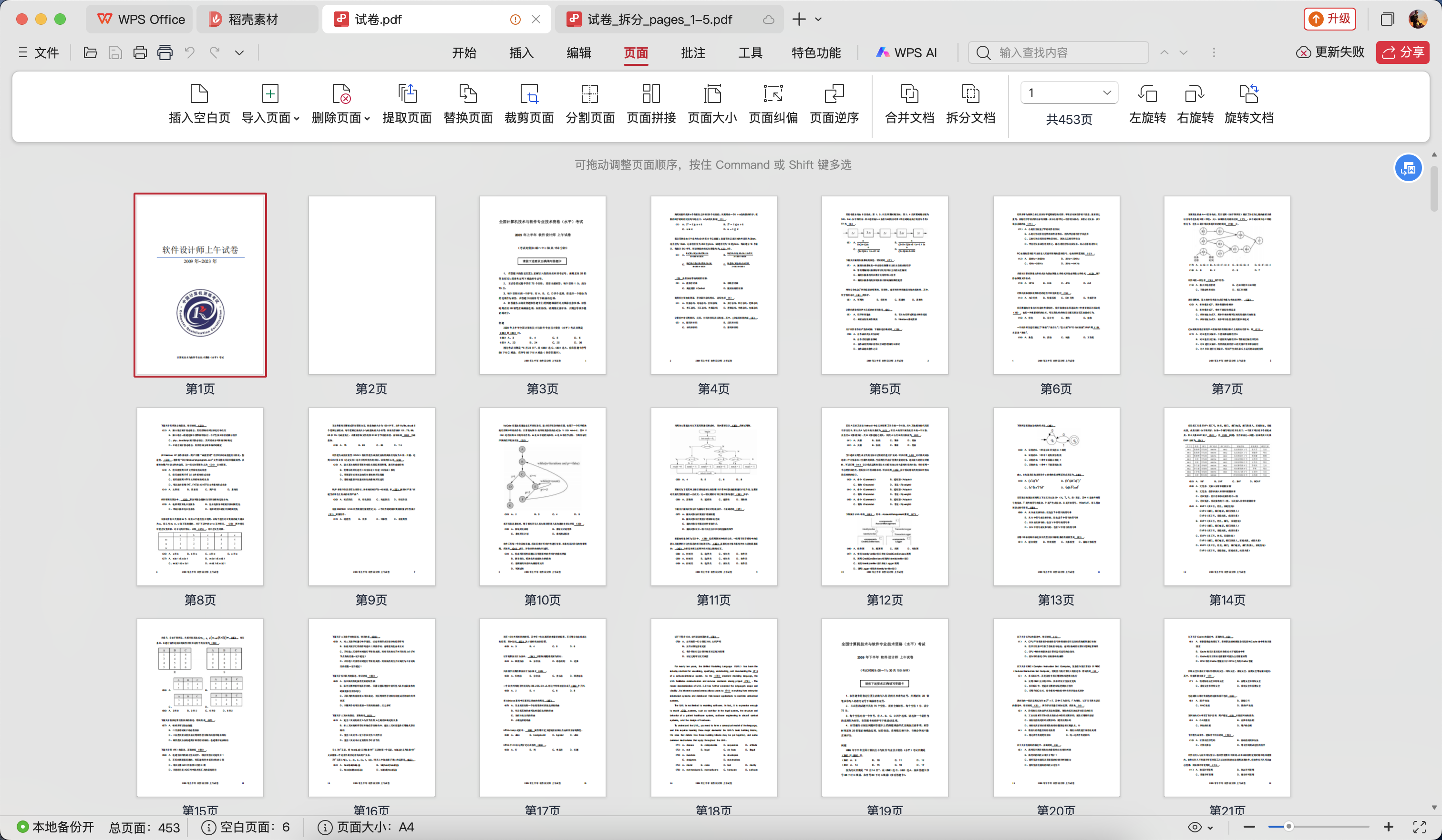
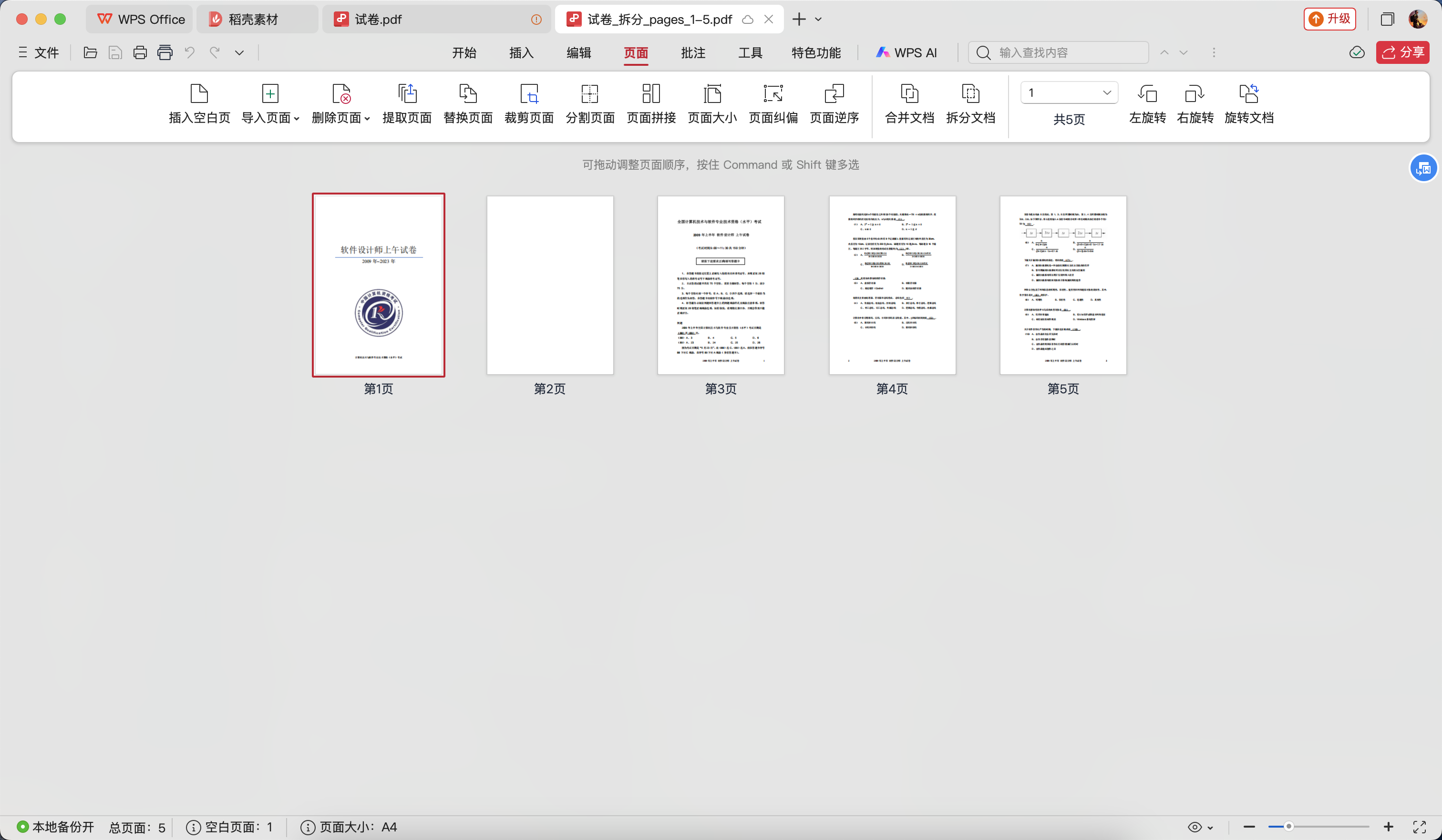
10. PDF转图片 (pdf-to-image)
将PDF页面转换为高质量的图片文件,支持多种格式和自定义设置。
参数:
inputPath: 输入PDF文件路径 (必需)outputDir: 输出目录 (必需)format (可选): 图片格式 - jpeg 或 png,默认jpegquality (可选): 图片质量 1-100,默认80dpi (可选): 分辨率DPI 50-600,默认150pages (可选): 页面范围,如 "1-3" 或 "1,3,5",默认全部页面prefix (可选): 输出文件名前缀
特性:
- 支持JPEG和PNG格式
- 可调节图片质量和分辨率
- 灵活的页面选择(范围、列表、单页)
- 批量处理所有页面
- 详细的转换统计信息
示例:
请将 "/docs/presentation.pdf" 转换为PNG图片,分辨率300 DPI
请只转换PDF的第1、3、5页为JPEG图片
请将PDF第10-20页转换为高质量图片
注意事项:
- PDF转图片需要系统支持ImageMagick或GraphicsMagick
- 高分辨率设置会增加文件大小和处理时间
- PNG格式文件较大但质量更好
- 分辨率推荐:屏幕显示150 DPI,打印300 DPI
📸 功能演示
文件列表查询
默认查询桌面文件,也可指定具体路径:
文件数量统计
快速统计指定目录的文件数量:
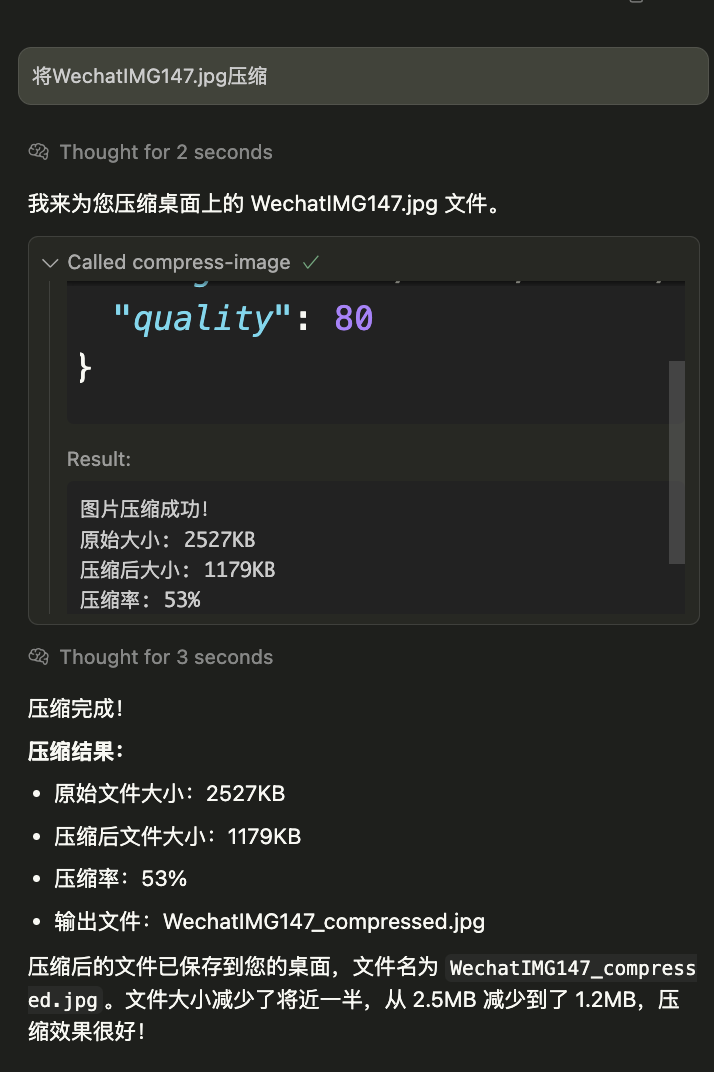
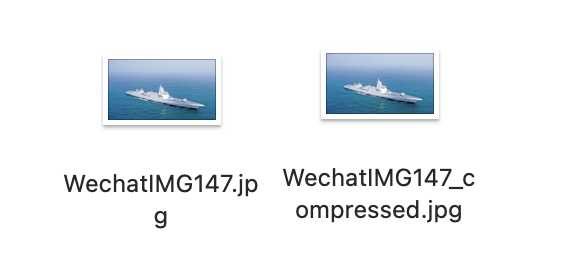
图片压缩功能
高质量图片压缩,支持自定义参数:
🔧 开发
开发模式
pnpm dev
代码格式化
pnpm format
代码检查
pnpm lint
启动服务器
pnpm start
⚠️ 注意事项
- 权限要求: 确保 Node.js 有访问目标文件夹的权限
- 路径格式:
- macOS/Linux:
/Users/username/path
- Windows:
C:\Users\username\path
- 图片格式: 仅支持常见的图片格式 (JPEG, PNG, WebP, TIFF, GIF)
- 压缩格式: 支持ZIP、TAR、TAR.GZ格式的压缩和解压
- 文件操作: 复制和移动操作支持文件和文件夹
- PDF处理: PDF合并、拆分和转图片功能完全基于纯JavaScript
- 图片转换: PDF转图片需要系统支持ImageMagick或GraphicsMagick
- 文件权限: 确保对源文件和目标目录有相应权限
- 覆盖保护: 默认不覆盖已存在文件,需要明确设置
- 文件大小: 大文件处理可能需要更长时间
- 调试输出: 使用
console.error() 而非 console.log() 避免干扰 MCP 协议
🐛 故障排除
常见问题
1. 服务器启动失败
Error: Cannot find module 'xxx'
解决方案: 确保运行了 pnpm install 和 pnpm build
2. 权限错误
Error: EACCES: permission denied
解决方案: 检查文件夹访问权限,或使用具有适当权限的路径
3. 路径不存在
错误:路径 /xxx 不存在
解决方案: 确认路径正确,使用绝对路径
4. 图片格式不支持
错误:不支持的图片格式 .xxx
解决方案: 使用支持的图片格式 (jpg, png, webp, tiff, gif)
5. 压缩文件创建失败
错误:创建压缩文件时发生错误
解决方案:
- 检查文件路径是否正确
- 确保对输出目录有写入权限
- 检查磁盘空间是否充足
6. 解压文件失败
错误:目标目录不为空
解决方案: 设置 overwrite=true 或清空目标目录
7. 不支持的压缩格式
错误:不支持的压缩格式
解决方案: 使用支持的格式 (.zip, .tar, .tar.gz, .tgz)
8. 文件复制失败
错误:目标路径已存在
解决方案: 设置 overwrite=true 或选择不同的目标路径
9. 文件移动失败
错误:源路径和目标路径不能相同
解决方案: 确保源路径和目标路径不同
10. 权限不足
Error: EACCES: permission denied
解决方案:
- 检查源文件和目标目录的访问权限
- 确保有足够的磁盘空间
- 避免移动系统关键文件
11. PDF文件损坏
错误:无法处理PDF文件
解决方案:
- 检查PDF文件是否完整且未损坏
- 确认PDF文件不是受密码保护的
- 尝试用其他PDF查看器验证文件
12. PDF转图片失败
错误:批量转换失败
解决方案:
- 确保系统已安装ImageMagick或GraphicsMagick
- 检查系统PATH环境变量配置
- 降低DPI设置或减少页面数量
13. 页面范围错误
错误:页面范围超出有效范围
解决方案:
- 检查PDF文件实际页数
- 确保页面范围格式正确(如 "1-5"、"1,3,5")
- 页面编号从1开始,不是0
调试技巧
- 查看 Claude Desktop 的开发者控制台
- 检查服务器日志输出
- 使用 MCP Inspector 进行调试


