
Store and retrieve entities, relations and observations in a persistent local knowledge graph.
create_entitiescreate_relationsadd_observations+6 more
92K
AI & Multi-Agent
An MCP server included in the Floom runtime that lets AI agent clients create, run, watch, inspect, and manage background AI workers.
Floom MCP server is cataloged as an MCP server attributed to floomhq. An MCP server included in the Floom runtime that lets AI agent clients create, run, watch, inspect, and manage background AI workers. It is categorized under ai agents-models. See the capability inspector for recorded interfaces and their independent review status; consult upstream documentation for the current interface.
Installation configuration is not reviewed. No executable setup is offered for this entry; inspect the source repository before proceeding.
Catalog license label: MIT. Check the source repository's current license and terms before using, modifying or distributing this software.
能力定义尚未审核。未核验的采集内容不会作为可信接口展示。
暂无可展示的已审核记录。这不表示上游不支持此能力。
暂无可展示的已审核记录。这不表示上游不支持此能力。
暂无可展示的已审核记录。这不表示上游不支持此能力。
Email delivery is not connected. This page does not collect email addresses or create subscriptions.
Browse the registry for current listings instead.
Reviews for Floom MCP server are not available yet
Review publishing and storage are not connected. This page does not collect or publish ratings or comments, including after sign-in.
Floom includes an MCP server but is more than one; the MCP endpoint lets agent clients create, run, watch, inspect, and manage workers, while the runtime executes them.
Floom can expose work through MCP without hand-rolling the whole app runtime; a hand-written MCP server gives tools, while Floom also adds runtime, UI, API, triggers, outputs, logs, and approvals.
README.md · 6f2102ae77b8 · 采集于 2026-11-13 12:33:21 UTC
保留上游原文,不做 AI 改写。为安全起见过滤脚本、表单和不安全链接。
当前显示最后一次成功采集的文档快照,请以来源页面为准。
The loop engineering harness. AI workers that run on a loop.
Schedule them, trigger them, require approvals, and keep every run on the record.
A worker is a folder: worker.yml + SKILL.md or run.py. Deploy it from Claude Code, Codex, or the CLI. Run it from the UI, REST, or MCP.
Get started · Build a worker · Try the hosted version · Read the docs




Most "AI automation" is a chat window you babysit, or a no-code graph that bills you per task and can't be audited. Floom is the loop engineering harness: a real runtime where a worker is a readable package, it runs on a loop without you watching, and every execution leaves logs, outputs, tool calls, approvals, and a replay you can trust. Used natively from Claude Code and Codex via MCP or CLI.
Floom lets an agent or developer turn a Python script into a worker that non-developers can run from a UI, other systems can call through REST, and AI agents can operate through MCP.
Start with three files:
workers/my-worker/
  worker.yml
  run.py
  requirements.txt
Then validate, deploy, and run:
floom workers validate ./workers/my-worker
floom workers push ./workers/my-worker
floom run my-worker --input key=value
Read BUILDING.md for the full copy-paste worker contract.
Floom turns repeatable knowledge-work automations into background AI workers. A worker can run manually, on a schedule, from a webhook, or from an app event. The runtime keeps the worker definition, input schema, output schema, logs, tool calls, approvals, and run history inspectable.
Use Floom when you want an AI agent to do recurring work without turning that work into an opaque chat thread, a hard-to-diff automation graph, or a one-off script with no supervision.
AI agents and developers can build a Floom worker from a folder:
workers/<worker-id>/
  worker.yml        # manifest: inputs, outputs, trigger, runtime, secrets
  run.py            # script entrypoint, or SKILL.md for agent mode
  requirements.txt  # optional Python dependencies
Deploy the worker with:
floom workers validate ./workers/<worker-id>
floom workers push ./workers/<worker-id>
floom run <worker-id> --input key=value
After deployment, Floom exposes the worker in the UI, through REST endpoints, and through the Floom MCP server for AI clients. For the complete copy-paste build contract, read BUILDING.md.
A worker is a folder-backed job definition. Describe the work in plain English (SKILL.md) or hand it a script (run.py), declare its tools, trigger, memory, and secrets in worker.yml, and Floom runs it.
# workers/github-digest/worker.yml  (abbreviated)
name: github-digest
description: "Every morning at 9am, send a digest of unread GitHub PRs and open issues."
exec:
  entry: SKILL.md          # plain-English agent; or run.py for a script
trigger:
  type: schedule
  cron: "0 9 * * *"        # also: manual, webhook, Composio event
connections:
  - app: github            # the only tools this agent is allowed to call
    allowed_tools: [GITHUB_FIND_PULL_REQUESTS, GITHUB_LIST_ASSIGNED_ISSUES]
<!-- workers/github-digest/SKILL.md -->
You are a GitHub assistant generating a daily PR + issues digest.
Fetch the user's open PRs and assigned issues, compile a markdown digest
with Action items, and finish_with_outputs({ "digest": "<markdown>" }).
It runs at 9am, calls only the two GitHub tools it declared, and writes digest.md to a run you can open, replay, or roll back:
run 7f3a · github-digest · finished 09:00:04 · 2 tool calls · output: digest.md
  ✓ GITHUB_FIND_PULL_REQUESTS    q="is:open is:pr author:@me"   → 4 PRs
  ✓ GITHUB_LIST_ASSIGNED_ISSUES  state=open                     → 2 issues
  → out/digest.md (text/markdown)   [open · replay · rollback]
The full manifest adds schema_version, title, version, and declared outputs. See workers/ for runnable examples, BUILDING.md for a minimal deployable worker, and the agent cookbook.
| runs in | host isolation | tools | side effects | |
|---|---|---|---|---|
Script (run.py / .sh / .js / .ts) | E2B sandbox microVM | isolated filesystem, env & process; platform secrets withheld | sandbox + declared connections | approval gate when declared |
Agent (SKILL.md) | AgentDriver in the API process (trusted bundles only) | not microVM-isolated by policy | declared connections, allow-listed | approval gate when declared |
Sandboxes allow public network egress by default and block private/internal ranges; a stricter allowlist is optional. Full trust model: ARCHITECTURE.md.
| What it is | Self-hosted runtime to create, run, and supervise background AI agents |
| Best for | Recurring agent work: inbox triage, digests, outreach drafting, enrichment, monitoring |
| Agent types | Script (run.py/.sh/.js/.ts) and plain-English agent (SKILL.md) |
| Isolation | Script workers run in E2B sandbox microVMs - isolated host filesystem, env & process; platform secrets withheld |
| Triggers | Manual, schedule (cron), webhook, Composio event |
| Safety | Human-in-the-loop approvals for side-effecting agents; tools allow-listed per agent |
| On the record | Every run records logs, outputs, tool calls, approval state, replay + rollback |
| Cost model | Floom adds no per-task fee - you pay E2B sandbox runtime (per second) plus your model/API provider usage |
| Stack | Next.js + Tailwind UI · FastAPI + SQLite API · MCP server + CLI |
| Runs on | Linux, macOS, Windows (Python 3.11+, Node 20+) |
| License | MIT · hosted version |
| raw scripts | Zapier / Make | hand-rolled MCP server | Floom | |
|---|---|---|---|---|
| Worker definition | ad-hoc prompt or code | visual graph, hard to diff | custom tool server code | a folder: worker.yml + SKILL.md or run.py |
| Runtime | cron, shell, or local process | vendor automation runtime | whatever the developer builds | agent runtime with triggers, runs, logs, outputs, approvals, replay, and rollback |
| Isolation | runs on your host | vendor cloud, opaque | depends on implementation | E2B sandbox microVM for script workers |
| Tool access | whatever the script can reach | per-connector | MCP tools only | declared and allow-listed per worker |
| Side effects | fire immediately | workflow-dependent | custom approval logic | human approval gate when declared |
| Observability | scrollback, if any | per-step logs | custom logs | logs, tool calls, outputs, artifacts, approval state, replay, and rollback |
| Agent access | custom wrapper needed | not an agent-native build target | agent can call tools, but app runtime is separate | MCP tools let agents create, run, watch, and inspect workers |
| Cost model | model tokens and infrastructure | per-task or per-execution fees | model tokens and infrastructure | no per-task fee; you pay runtime and provider usage |
| Hosting | your host | vendor only | your host | self-host, or hosted |
Linux / macOS
git clone https://github.com/floomhq/floom.git
cd floom
./scripts/setup.sh
# edit apps/api/.env: add a model provider key and E2B_API_KEY
./scripts/dev.sh
Windows PowerShell
git clone https://github.com/floomhq/floom.git; cd floom
.\scripts\setup.ps1
# edit apps\api\.env: add a model provider key and E2B_API_KEY
.\scripts\dev.ps1
Requires Python 3.11+, Node.js 20+, Git, a model provider key, and an E2B key from e2b.dev. Open http://localhost:3000 and sign in - no auth secret for local dev, and the example agents are seeded on first boot.
Full setup, model providers, optional integrations, and the safe self-hosting checklist: docs/GETTING-STARTED.md. Common issues: docs/TROUBLESHOOTING.md.
Not ready to self-host? floom.dev is the hosted version - hire AI agents with no setup. Hosted users can start from an MCP client with:
npx -y @floomhq/floom mcp install --target claude
The .env, model-provider, and E2B keys above are for running your own local or
self-hosted runtime, not for using Floom Cloud.
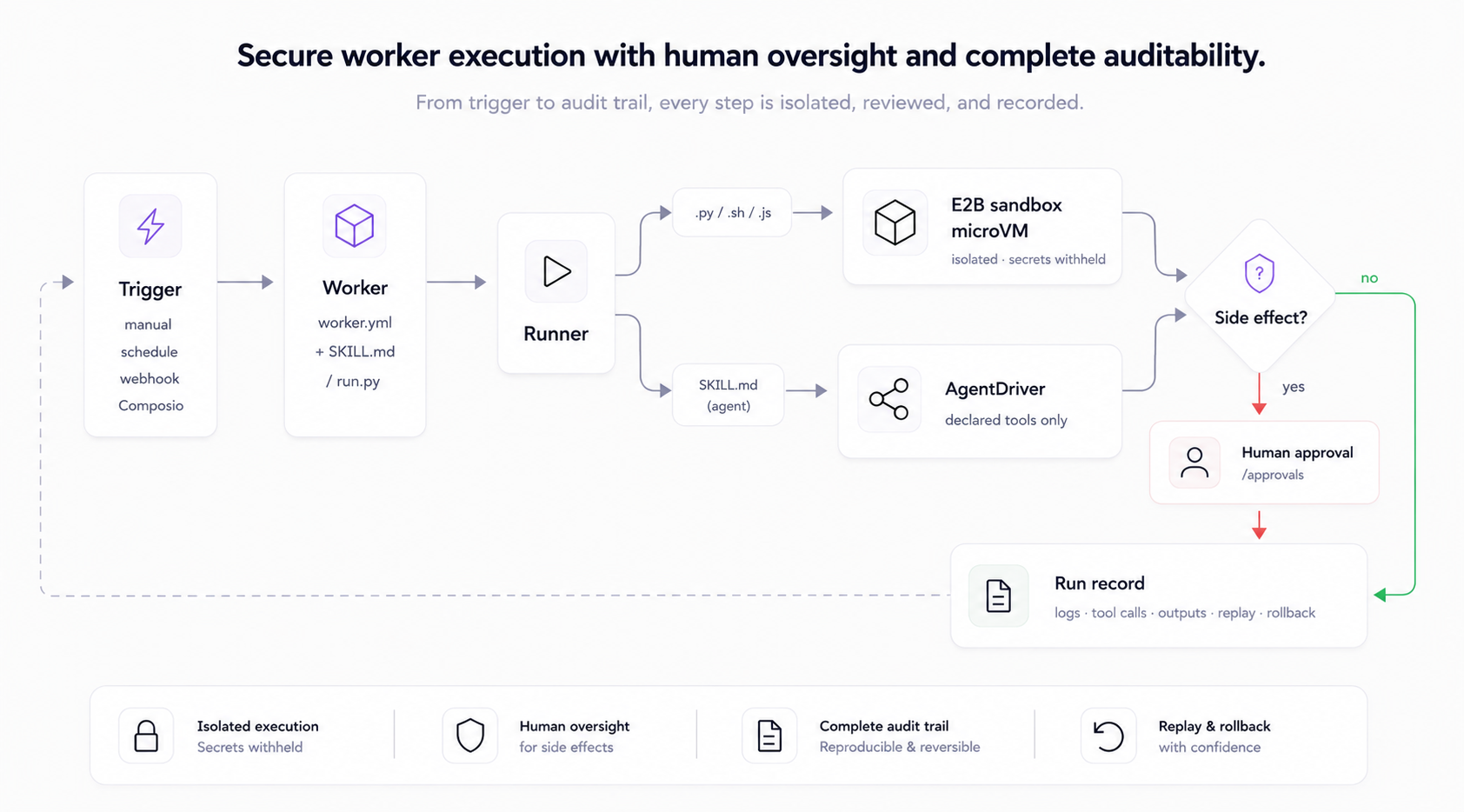
workers/<name>/ with worker.yml plus a script entrypoint (run.py) or an agent prompt (SKILL.md).Write your first agent in docs/GETTING-STARTED.md, then docs/AUTHORING.md for the full manifest and runtime contract.
Script workers (.py/.sh/.js/.ts) run in an E2B sandbox microVM by default: isolated dependencies, no host process access, contained resources. TypeScript workers use the Node runtime with tsx (npx --yes tsx run.ts) and the same inputs.json/result.json contract as Python workers. A bundle that dumps os.environ inside the sandbox sees only sandbox metadata - FLOOM_SECRET, provider keys, and E2B_API_KEY are all absent. Agent workers (SKILL.md) run through the API-hosted AgentDriver tool loop and are governed by their declared connections and the approval gate; the current single-tenant policy permits only trusted agent bundles on that path. There is no in-process local script runner. Full trust model: ARCHITECTURE.md.
Data handling, connected-account safeguards, retention boundaries, and hosted Cloud legal surfaces are summarized in docs/DATA-RETENTION.md.
apps/web      Next.js + TypeScript + Tailwind + shadcn/ui
apps/api      FastAPI + SQLite + Pydantic
apps/mcp      MCP server + CLI
workers/      Worker folders (worker.yml + run.py or SKILL.md)
data/         SQLite DB + run artifacts
Floom is an open-source runtime for background AI workers that run from versioned worker folders with declared inputs, outputs, triggers, tools, approvals, logs, REST API access, UI access, and MCP access.
Floom includes an MCP server, but it is more than an MCP server. The MCP endpoint lets agent clients create, run, watch, inspect, and manage Floom workers. The Floom runtime is the part that executes those workers, records runs, manages approvals, and exposes the UI and REST API.
Yes. Read BUILDING.md first. The build contract is a workers/<id>/ folder with worker.yml, run.py or SKILL.md, and optional requirements.txt, then floom workers validate and floom workers push.
Yes. Put the script in workers/<id>/run.py, declare its inputs and outputs in worker.yml, deploy it with floom workers push, and Floom makes it runnable from the UI, REST API, and MCP tools.
Script mode runs deterministic code such as Python, shell, or Node in the sandbox. Agent mode runs a SKILL.md prompt through the agent loop with declared tools and output writers.
Floom is for teams that want versioned worker folders, sandbox execution, approval gates, logs, outputs, replay, rollback, REST API access, and MCP access. Zapier and Make are visual automation products with their own vendor runtimes.
Floom can expose work through MCP without making you hand-roll the whole app runtime. A hand-written MCP server gives an agent tools; Floom gives the worker a runtime, UI, API, triggers, outputs, logs, approvals, and MCP tools.
worker.yml schema, execution modes, secrets, connections, triggers, approvals.http://localhost:8000/docs.Contributions are welcome. See CONTRIBUTING.md for local setup, the first-contribution map, and PR guidelines. Quick local checks from the repo root:
npm run test:api
npm run lint:web
npm run test:web
npm run test:mcp
To report a vulnerability, follow SECURITY.md and report it privately rather than opening a public issue.
MIT License (c) 2026 Floom contributors. You may use, copy, modify, merge, publish, distribute, sublicense, and sell copies of Floom, subject to the MIT license notice and warranty disclaimer.
Claim this server with your GitHub account to request manual ownership verification.
Link to the catalog listing for Floom MCP server from your README. This badge does not certify ownership, compatibility or security.
[](https://awesome-mcp.com/servers/floom)Public repository statistics could not be verified. Check the configured source address; unavailable counts are not zero.
来源、范围和时段分别列出;不相加,不代表安装人数、活跃用户或安全审核。
尚无已审核的包 / 镜像标识,暂不展示下载统计。
Alternative and complementary servers in the same category
Store and retrieve entities, relations and observations in a persistent local knowledge graph.
Organize problem solving into revisable, branching thought steps through an MCP tool.

Query-aware context compression with an MCP plugin for coding agents, plus Python and HTTP interfaces for reducing the context sent to a language model.