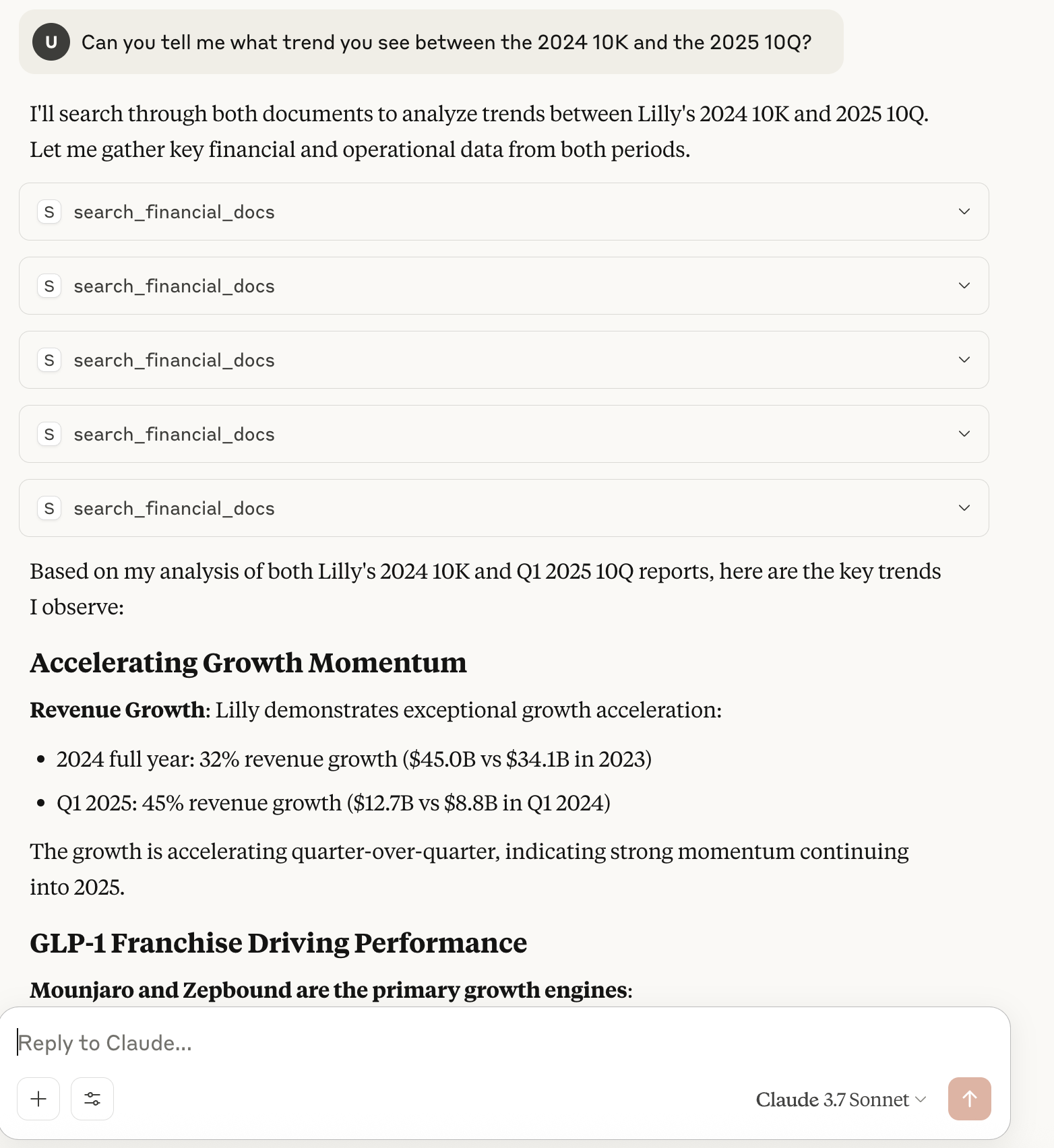
GemFireMCPServer
A Spring Boot–based Model Context Protocol (MCP) server that uses VMware GemFire and Spring AI to enable fast, vector-based search over financial documents.
Overview
This project demonstrates how an MCP client (like Claude Desktop) can interact with a GemFire-backed server to perform semantic search over documents. Financial files are chunked, embedded into vector representations, and stored in GemFire to support fast, intelligent querying using a Retrieval-Augmented Generation (RAG) workflow.
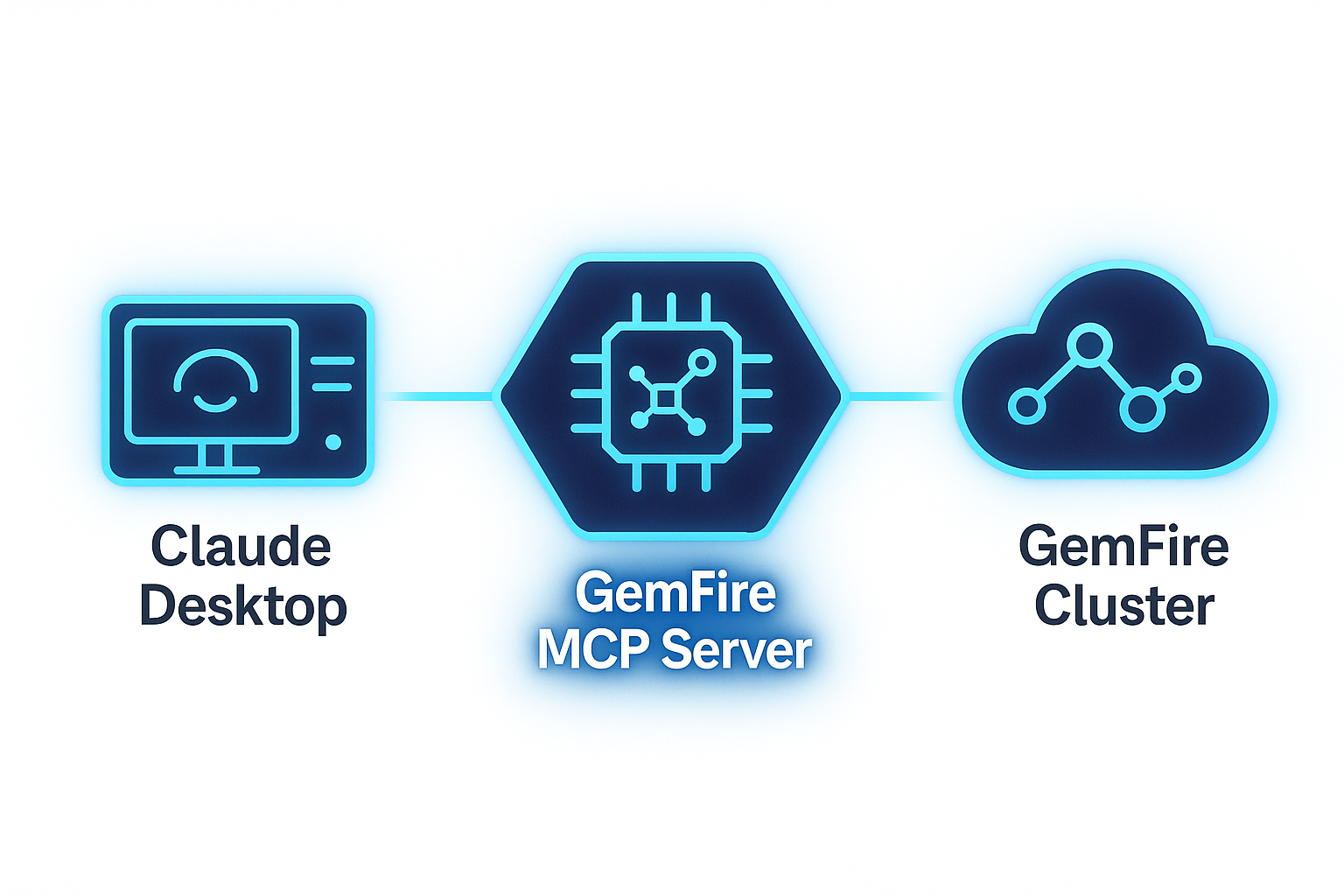
Users can:
- Upload documents — Files are chunked, embedded, and stored as vectors in GemFire. Metadata (such as file name and size) is stored separately in a dedicated GemFire region.
- Browse uploaded content — Retrieve and view metadata for all stored documents.
- Query documents (RAG) — Submit a natural language question from an MCP client. The server performs a vector similarity search and passes the top results to the language model for response generation.
Features
- 🔗 MCP-compliant endpoints for document ingestion, listing, and querying
- 🧠 Local, ONNX-based embeddings with Spring AI
- 💾 Vector and metadata storage in VMware GemFire
- 🧾 File metadata stored in a dedicated GemFire region
- 🔍 Fast, in-memory semantic search
What You'll Need
GemFire MCP Server Setup
Make sure your Java matches your machine (to avoid Unexpected flavor: cpu)
Some dependencies include native binaries that are architecture-specific. If your JDK architecture doesn’t match your machine’s architecture, those libraries can’t load correctly and you may see an error like Unexpected flavor: cpu.
- Check your JDK version and architecture
Run this in the same terminal where you’ll build the JAR:
java -XshowSettings:properties -version 2>&1 | grep -E 'java.vendor|java.runtime.version|os\.name|os\.arch'
Example output:
java.runtime.version = 17.0.5+8-LTS
java.vendor = BellSoft
os.arch = aarch64
os.name = Mac OS X
- Verify two things
(Optional) Confirm your machine’s architecture:
uname -m
# arm64 or x86_64
- If they don’t match
Install a JDK that matches your machine (e.g., an aarch64/arm64 JDK for Apple Silicon, or x86_64 for Intel). A mismatch can cause the build to fail with errors like Unexpected flavor: cpu.
Clone the Repository and Prepare the ONNX Embedding Model
To generate embeddings for PDF documents, Spring AI requires an embedding model.
This demo uses the ONNX-exported version of sentence-transformers/all-MiniLM-L6-v2 for local inference.
Refer to Spring AI’s ONNX documentation for full details, or follow the steps below:
-
Clone the GemFire Examples repository
git clone https://github.com/gemfire/gemfire-examples.git
cd extensions/gemfireVectorDatabase/gemfire-model-context-protocol-server
-
Open the project in your preferred IDE.
-
Navigate to the gemfire-model-context-protocol-server directory in a terminal (either in your IDE or separately).
-
Create a virtual environment
python3 -m venv venv
-
Activate the virtual environment
source ./venv/bin/activate
-
Upgrade pip and install build tools
pip install --upgrade pip setuptools wheel
-
Install the required Python packages
pip install optimum onnx onnxruntime sentence-transformers
-
Export the model to the resources/onnx directory
optimum-cli export onnx --model sentence-transformers/all-MiniLM-L6-v2 src/main/resources/onnx
This generates model.onnx and tokenizer.json in:
extensions/gemfireVectorDatabase/gemfire-model-context-protocol-server/src/main/resources/onnx
Spring AI will automatically load the model from this location.
-
Verify the files exist
   ls -lh src/main/resources/onnx
# Should see: model.onnx, tokenizer.json
- Deactivate the virtual environment
deactivate
Potential Issues
Missing Dependency During ONNX Export
If you see this error:
Weight deduplication check in the ONNX export requires accelerate. Please install accelerate to run it.
Install the missing dependency and rerun the export command from step 8:
pip install accelerate
optimum-cli export onnx --model sentence-transformers/all-MiniLM-L6-v2 src/main/resources/onnx
To resolve GemFire dependencies, you’ll need access credentials from Broadcom.
- Log in to the Broadcom Customer Support Portal with your customer credentials.
- Go to the VMware Tanzu GemFire downloads page, select VMware Tanzu GemFire, click Show All Releases.
- Find the release named Click Green Token for Repository Access and click the Token Download icon on the RIGHT. This opens the instructions on how to use the GemFire artifact repository. At the top, the Access Token is provided. Click Copy to Clipboard. You will use this Access Token as the password.
If using Gradle
Add credentials to your ~/.gradle/gradle.properties (or project-level gradle.properties):
gemfireRepoUsername=EXAMPLE-USERNAME
gemfireRepoPassword=MY-PASSWORD
EXAMPLE-USERNAME is your support.broadcom.com username.MY-PASSWORD is the Access Token you copied in step 3.
If using Maven:
Update your ~/.m2/settings.xml:
<settings>
  <servers>
    <server>
      <id>gemfire-release-repo</id>
      <username>EXAMPLE-USERNAME</username>
      <password>MY-PASSWORD</password>
    </server>
  </servers>
</settings>
EXAMPLE-USERNAME is your support.broadcom.com username.MY-PASSWORD is the Access Token you copied in step 3.
Open the application.properties file and configure the following properties:
spring.main.web-application-type=none — This example uses the STDIO connection with the MCP Client (Claude Desktop), so we must disable the embedded web server as it doesn't require handling HTTP requests.spring.main.banner-mode=off — Disables the application banner displayed on startup.logging.pattern.console= — Disables formatted log output to reduce console noise.spring.ai.mcp.server.stdio=true — Enables the MCP STDIO server.spring.ai.vectorstore.gemfire.port=7070 — Port used by the GemFire HTTP service; must match the --http-service-port used by your cluster.spring.ai.vectorstore.gemfire.initialize-schema=true — Automatically creates the vector index and region in GemFire. Set to false if you're managing the index manually.spring.ai.vectorstore.gemfire.index-name=financialDocuments — Name of the vector index in GemFire.spring.ai.embedding.transformer.onnx.model-uri=classpath:onnx/model.onnx — Path to the ONNX model file created earlier.spring.ai.embedding.transformer.tokenizer.uri=classpath:onnx/tokenizer.json — Path to the tokenizer file created earlier.spring.ai.embedding.transformer.onnx.modelOutputName=token_embeddings — Output node name used for embeddings.docs.path=/Path/To/FinancialDocs — Directory to load financial documents from.gemfire.region.docsMetadata= - Region that will store the metatdata about each document stored in the GemFire Vector DB.
The example currently tries to connect to a GemFire cluster running at localhost:10334. If your cluster is running at a different location:
- Open
GemfireMcpServerDemoApplication.java.
- Locate the
ClientCache configuration @Bean.
- Update the locator host/port to match your environment.
Build the MCP Server
./gradlew clean build
GemFire Cluster Setup
Make sure you have downloaded GemFire 10.x or later and the GemFire Vector DB extension from the Broadcom Customer Support Portal
-
Unzip GemFire and open the directory.
-
Locate the GemFire Vector DB .gfm file you downloaded from the Broadcom Support Portal and move it into the extensions directory of your GemFire installation.
This file is not included in the main GemFire download—you must download it separately.
For example:
vmware-gemfire-10.1.3/extensions/vmware-gemfire-vectordb-1.2.0.gfm
-
Open a terminal, navigate to the bin folder in the GemFire directory, and start GFSH:
./gfsh
-
In GFSH, confirm that the Vector DB extension is installed:
version --full
You should see output similar to:
gfsh>version --full
----------------------------------------
Tanzu GemFire
----------------------------------------
Build-Java-Vendor: BellSoft
GemFire-Source-Date: 2025-03-20 13:29:10 -0700
Build-Platform: Linux 4.18.0-553.el8_10.x86_64 amd64
Build-Java-Version: 1.8.0_442
GemFire-Source-Revision: 62f20538984ebd92beee00874104d8706c6e4719
Build-Id: gemfire 2511
Product-Name: Tanzu GemFire
GemFire-Version: 10.1.3
GemFire-Source-Repository: support/10.1
----------------------------------------
Tanzu GemFire Vector DB
----------------------------------------
GemFire-Vector-DB-Source-Repository: HEAD
GemFire-Vector-DB-Source-Date: 2025-04-10 09:22:32 -0700
GemFire-Vector-DB-Version: 1.2.0
GemFire-Vector-DB-Source-Revision: 9ad01268475449c40fd58491b373b30ce3c91522
-
Start a locator with the HTTP service enabled:
start locator --name locator1 --http-service-port 7070
-
Start a second server with a different HTTP service port:
start server --name server1 --http-service-port 7071
-
Create a region matching the name used in your gemfire.region.docsMetadata property. For example:
create region --name=FinancialDocumentsMetadata --type=PARTITION
The GemFire cluster is now ready to accept documents.
Claude Desktop Setup
The GemFire MCP Server will appear as a Tool in Claude Desktop once configured.
1.Download Claude Desktop
2. Start Claude Desktop and open the Developer settings:
Claude -> Settings -> Developer
3. Click on Edit Config
4. Open the claude_desktop_config.json file.
5. Add or update the mcpServers section as follows:
{
   "mcpServers": {
      "filesystem": {
         "command": "npx",
         "args": [
            "-y",
            "@modelcontextprotocol/server-filesystem",
            "/Path/To/financialDocs"
         ]
      },
      "gemfire-mcp-demo": {
         "command": "java",
         "args": [
            "-jar",
            "/Path/To/GEMFIRE/MCP/JAR"
         ]
      }
   }
}
This registers two MCP servers that will appear as tools in Claude Desktop:
-
Filesystem Tool — Enables Claude Desktop to access files in the specified directory. Be sure /Path/To/financialDocs matches the value of the docs.path= property in your application config.
-
GemFire MCP Server — Allows Claude Desktop to interact with the GemFire cluster. The JAR path must point to the output of the ./gradlew clean build command mentioned earlier.
- Restart Claude Desktop.
- When it restarts, click the tool selector button (next to the + button) to confirm that both tools are available (in version 0.9.3).
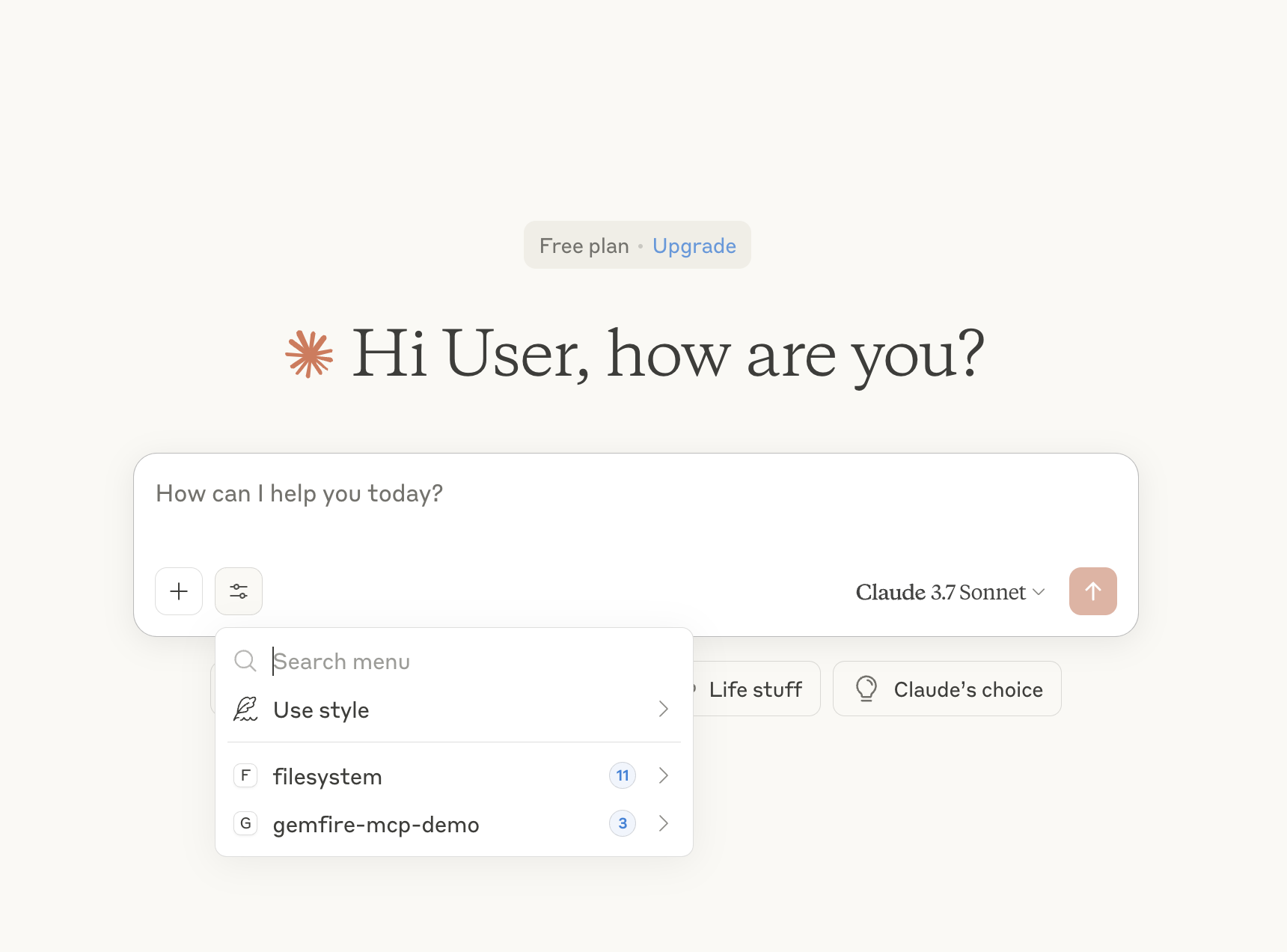
- Make sure you have documents in the
financialDocuments directory. This demo used the Eli Lilly 2024 10K and the Eli Lilly May 1, 2025 10Q documents.
Clicking on gemfire-mcp-demo in Claude Desktop will reveal three available tools:
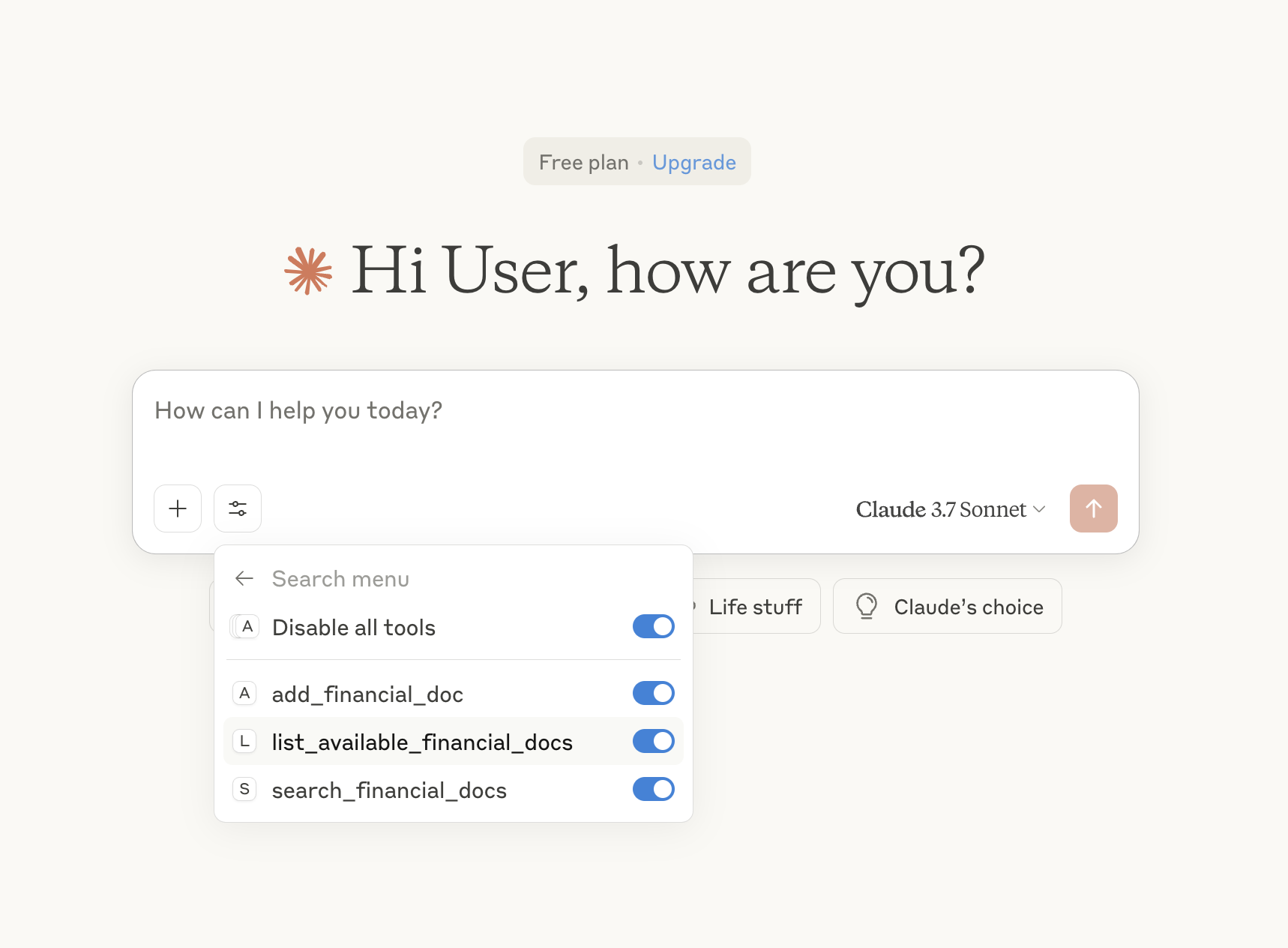
-
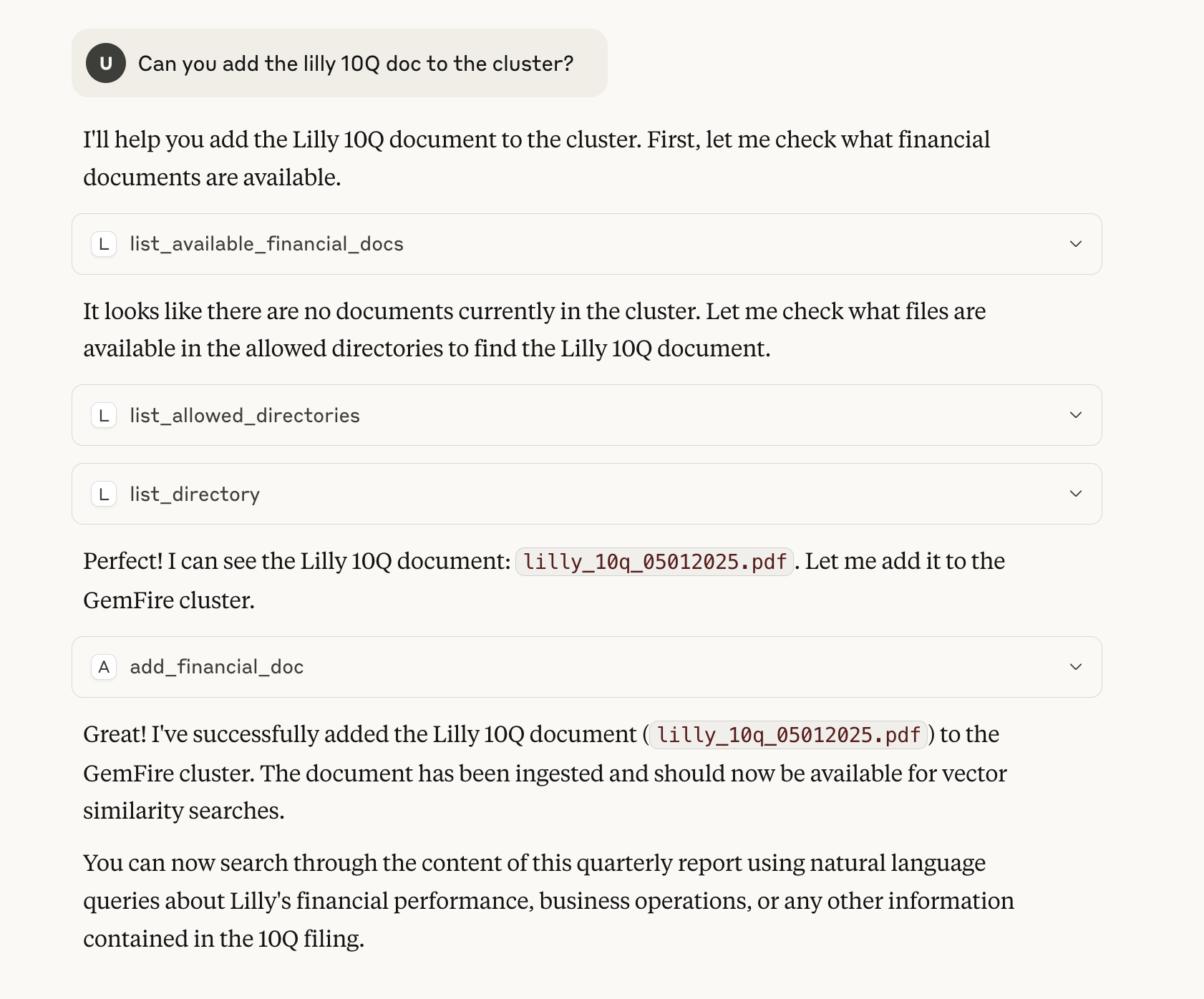
add_financial_doc
Claude will look for a specified document in the financialDocs directory and send it to the MCP server. The server will generate vector embeddings for the document, store them in GemFire Vector DB, and add the associated metadata to the metadata region.
-
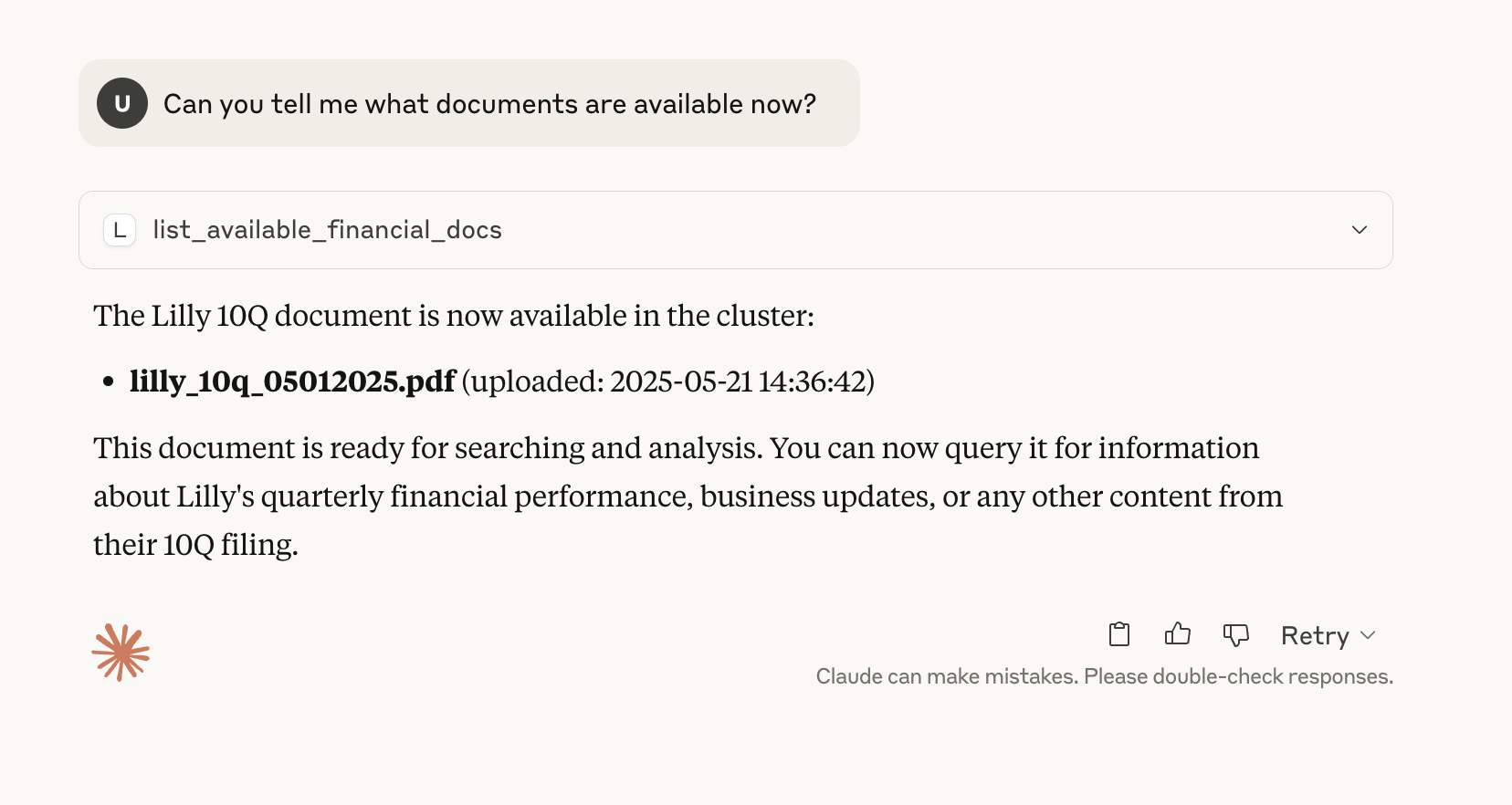
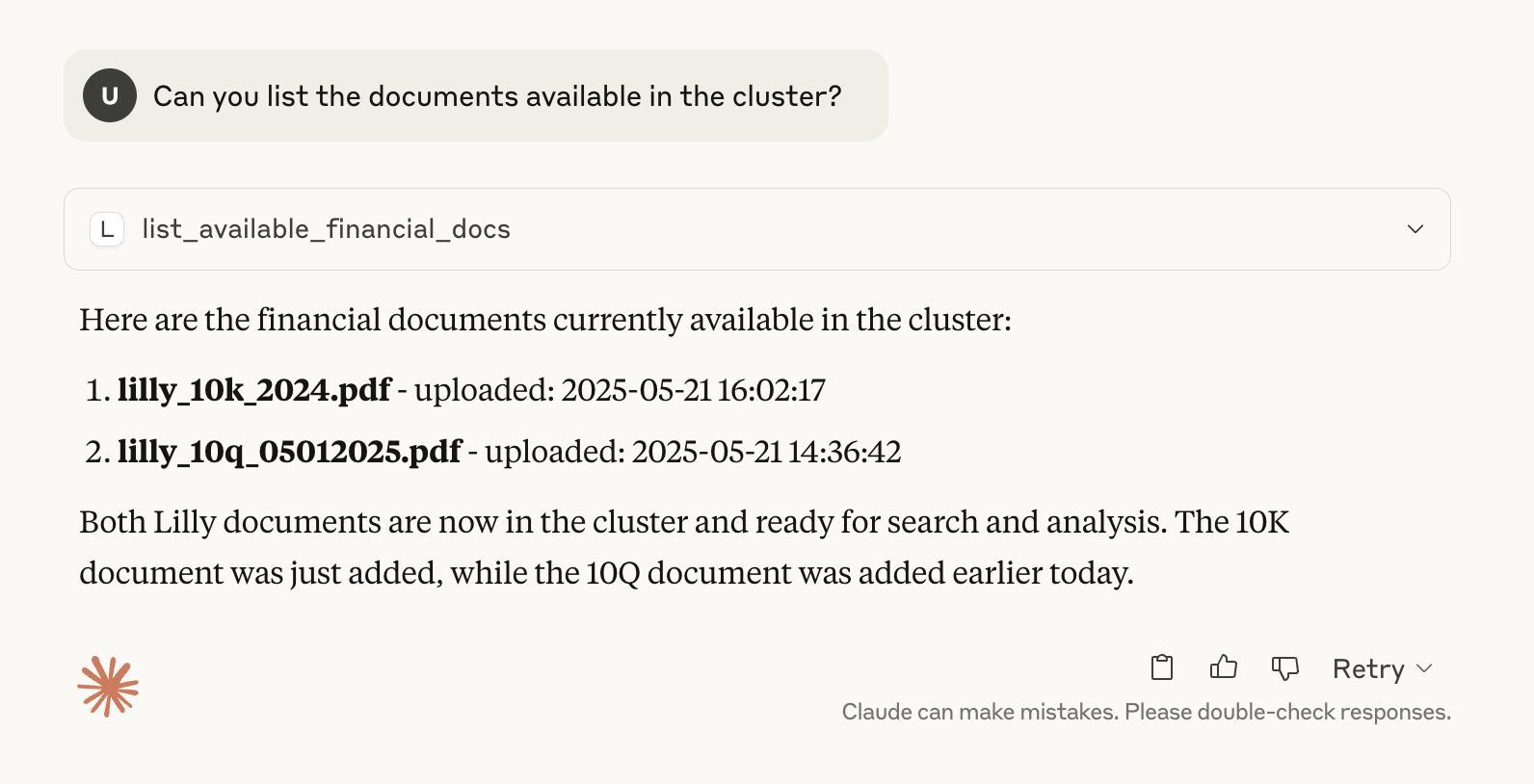
list_available_financial_docs
Claude asks the MCP server for a list of available documents. The server queries the GemFire metadata region and returns the list of documents.
-
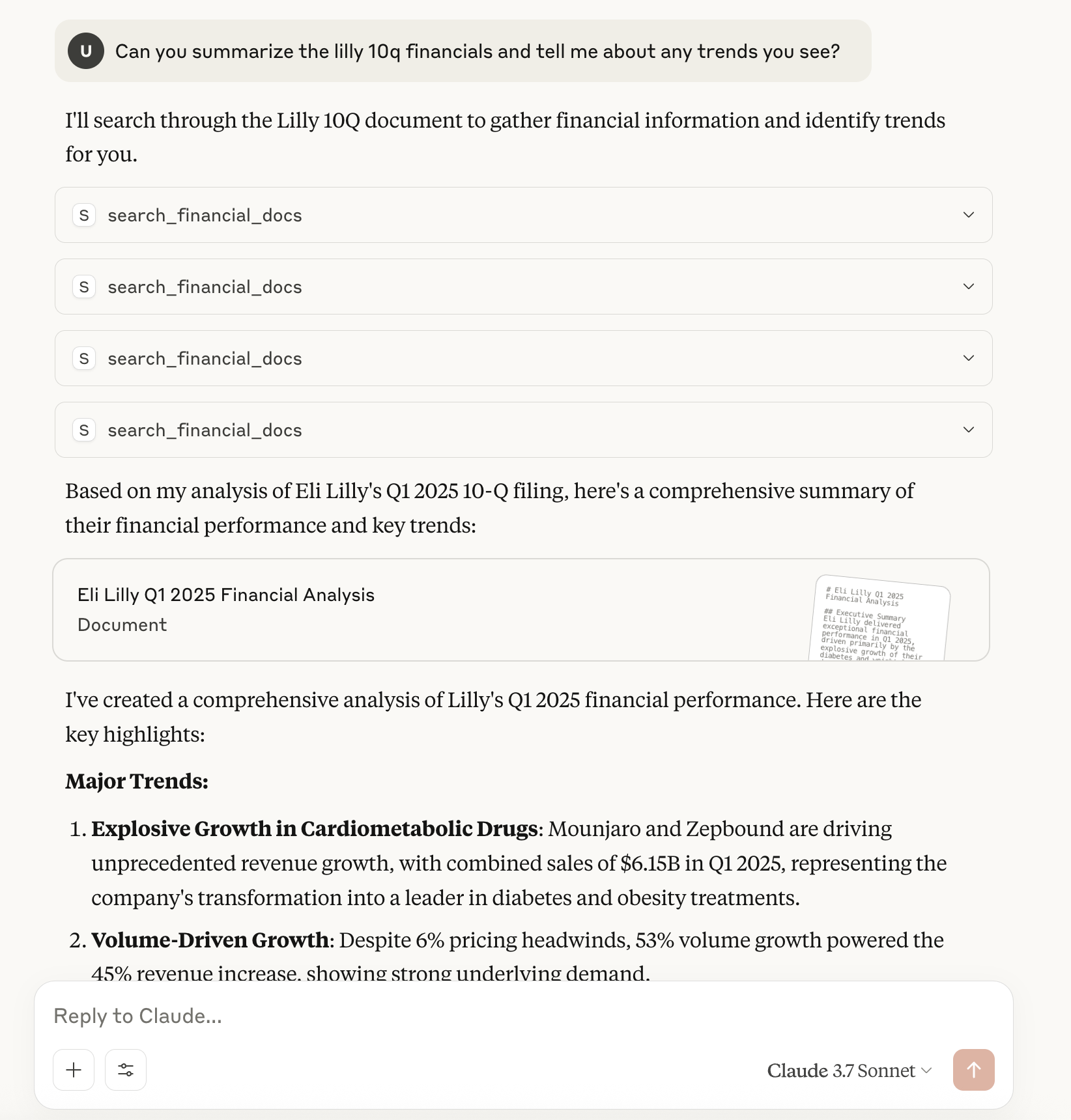
search_financial_docs
Ask Claude questions like:
“Summarize this financial document and tell me what trends are emerging.”
Claude will send a semantic search request to the MCP server, which retrieves the relevant content from GemFire Vector DB and responds accordingly.
Examples
Add a document
List the available documents
Summarize the specified document
List the available documents - more than 1
Summarize across two documents