
A Rust CAD application with an MCP server for creating, inspecting and rendering drawings, either headlessly or through a connection to the desktop app.
8K
Media & Design
An MCP server that enhances image prompts and generates or edits images through Gemini, OpenAI, or BytePlus Seedream, saving results to disk and returning them to the assistant as resources.
mcp-image: an MCP server for generating and editing images is cataloged as an MCP server attributed to shinpr. An MCP server that enhances image prompts and generates or edits images through Gemini, OpenAI, or BytePlus Seedream, saving results to disk and returning them to the assistant as resources. It is categorized under media design. See the capability inspector for recorded interfaces and their independent review status; consult upstream documentation for the current interface.
Installation configuration is not reviewed. No executable setup is offered for this entry; inspect the source repository before proceeding.
Catalog license label: MIT License. Check the source repository's current license and terms before using, modifying or distributing this software.
能力定义尚未审核。未核验的采集内容不会作为可信接口展示。
暂无可展示的已审核记录。这不表示上游不支持此能力。
暂无可展示的已审核记录。这不表示上游不支持此能力。
暂无可展示的已审核记录。这不表示上游不支持此能力。
Email delivery is not connected. This page does not collect email addresses or create subscriptions.
Browse the registry for current listings instead.
Reviews for mcp-image: an MCP server for generating and editing images are not available yet
Review publishing and storage are not connected. This page does not collect or publish ratings or comments, including after sign-in.
It supports Gemini as the default, plus OpenAI and BytePlus Seedream, selectable via configuration or per request.
Images are saved to the configured output directory, defaulting to ./output, and returned to the assistant as an MCP resource.
Yes, setting SKIP_PROMPT_ENHANCEMENT=true sends the original prompt to the image model unchanged.
README.md · 564289c6d2b6 · 采集于 2026-11-13 08:46:14 UTC
保留上游原文,不做 AI 改写。为安全起见过滤脚本、表单和不安全链接。
当前显示最后一次成功采集的文档快照,请以来源页面为准。
Generate and edit images from Codex, Cursor, Claude Code, or any MCP client. mcp-image adds visual direction to your request before sending it to Gemini, OpenAI, or BytePlus Seedream.



Tell it what image to create or what to change in an existing image, and what it is for. The result is saved to disk and returned to your assistant.
Before generating an image, mcp-image rewrites short requests into more specific prompts. It keeps what you asked for and fills in what the image needs for its use, such as lighting and camera angle for a photo or layout for a poster. Text you want in the image stays as you wrote it, in your language. The more detail you provide, the less it changes.
You ask:
"A photo of a roast chicken dinner for a recipe site. It should look like it was actually cooked, and it should be partway through being carved so you can tell how juicy it is."
mcp-image sends to the image model:
"... a freshly roasted whole chicken resting on a rustic, seasoned wooden carving board. The chicken features deeply bronzed, blistered, and crispy skin ... It is partway carved, with one breast cleanly sliced open to reveal tender, steaming-hot white meat glistening with natural juices pooling slightly onto the board ... shallow depth of field with a softly blurred background."
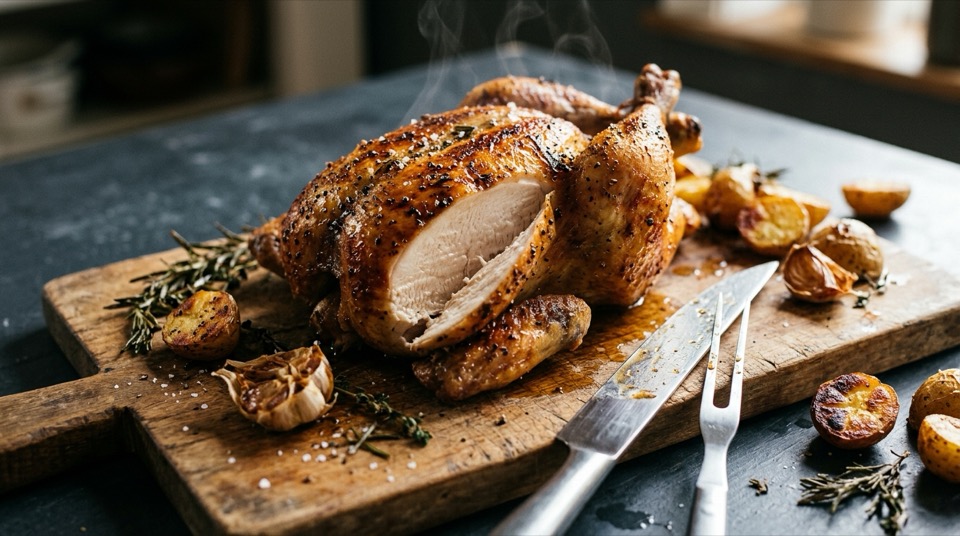
Generated with Gemini using the default fast quality preset.
What carried through:
for a recipe site: one clear subject, with everything else kept subordinateactually cooked: blistered, uneven browning, rising steam, and drippings on the knifepartway through being carved: one breast sliced open, with the cut piece still resting against the birdhow juicy it is: juices pooling on the board and shallow depth of field around the cut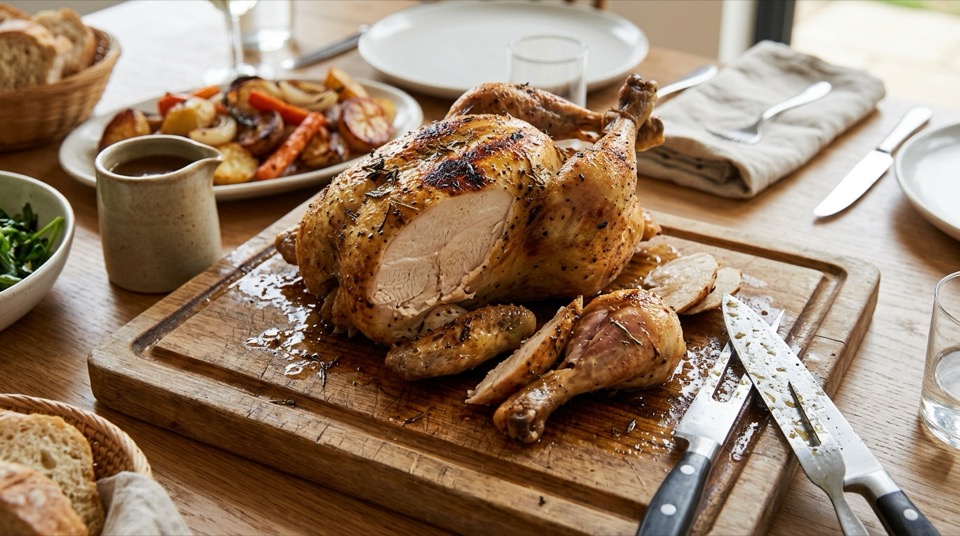
Baseline from the same request, with prompt enhancement disabled.
Set SKIP_PROMPT_ENHANCEMENT=true to send the original prompt to the image model unchanged.
You need Node.js 22 or later, an MCP-compatible client, and an API key for one image provider.
All three providers generate and edit images. Gemini is the default and requires the least configuration.
| Provider | Image size | Output format | Setup |
|---|---|---|---|
| Gemini (default) | 1K, 2K, 4K | Automatic | Get a key, then set GEMINI_API_KEY |
| OpenAI | 1K, 2K, 4K | PNG or JPEG | Get a key, then set IMAGE_PROVIDER=openai and OPENAI_API_KEY |
| BytePlus Seedream | 1K, 2K | PNG or JPEG | Get an AP region key, then set IMAGE_PROVIDER=seedream and ARK_API_KEY |
Google Search grounding is available with Gemini only. OpenAI may require organization verification before it can generate images.
The examples below use Gemini. Replace the provider settings if you prefer OpenAI or Seedream.
Add this to ~/.codex/config.toml:
[mcp_servers.mcp-image]
command = "npx"
args = ["-y", "mcp-image"]

[mcp_servers.mcp-image.env]
GEMINI_API_KEY = "your_gemini_api_key_here"
IMAGE_OUTPUT_DIR = "/absolute/path/to/images"
Add this to ~/.cursor/mcp.json for all projects, or .cursor/mcp.json in a project:
{
  "mcpServers": {
    "mcp-image": {
      "command": "npx",
      "args": ["-y", "mcp-image"],
      "env": {
        "GEMINI_API_KEY": "your_gemini_api_key_here",
        "IMAGE_OUTPUT_DIR": "/absolute/path/to/images"
      }
    }
  }
}
Run this in your project directory:
claude mcp add mcp-image --env GEMINI_API_KEY=your-api-key --env IMAGE_OUTPUT_DIR=/absolute/path/to/images -- npx -y mcp-image
Add --scope user after mcp-image to make it available in every project.
Never commit API keys to version control. Use an absolute IMAGE_OUTPUT_DIR in MCP configuration because the server's working directory depends on the client. If omitted, images are written to ./output relative to that working directory.
Restart your MCP client after changing its configuration, then ask your AI assistant:
Generate a product photo of a ceramic coffee mug on a wooden desk.
The generated file is saved in the configured output directory and returned to the assistant as an MCP resource.
pnpm install
pnpm run build
Configure the MCP client to run the local build instead of npx -y mcp-image:
node /absolute/path/to/mcp-image/dist/index.js
Give the assistant an absolute path to the source image:
Edit /path/to/image.jpg so the person is facing right.
Generate a high-quality product photo of a smartphone with clear text on the screen.Generate a cinematic desert landscape in a 21:9 aspect ratio.Keep the knight's appearance consistent with the previous image.See the tool reference for the options your assistant can pass explicitly.
Changing the provider changes both prompt enhancement and image generation. The way you ask for an image stays the same.
IMAGE_QUALITY accepts fast (default), balanced, or quality. Set it in the MCP server environment:
IMAGE_QUALITY=balanced
Use fast to try ideas quickly, balanced for everyday use, and quality for complex scenes or images where small details matter. Higher settings can take longer and cost more; results vary by provider.
All three providers support these presets for generation and editing. You can override the default with the quality option on each request.
| Variable | Default | Description |
|---|---|---|
IMAGE_PROVIDER | gemini | Default provider: gemini, openai, or seedream |
GEMINI_API_KEY | - | API key for Gemini |
OPENAI_API_KEY | - | API key for OpenAI |
ARK_API_KEY | - | ModelArk AP API key for Seedream |
IMAGE_OUTPUT_DIR | ./output | Directory where generated images are saved; use an absolute path in MCP configuration |
IMAGE_QUALITY | fast | Default quality preset: fast, balanced, or quality |
SKIP_PROMPT_ENHANCEMENT | false | Set to true to send prompts through unchanged |
You can configure keys for more than one provider and switch per request. A request-level provider option takes precedence over IMAGE_PROVIDER.
Your MCP client calls this tool for you. Open the reference when you need to check an option or provider limitation.
generate_image parameters| Parameter | Type | Required | Description |
|---|---|---|---|
prompt | string | Yes | Image description or editing instruction |
quality | string | No | fast, balanced, or quality; overrides IMAGE_QUALITY |
provider | string | No | gemini, openai, or seedream; overrides IMAGE_PROVIDER |
inputImagePaths | string[] | No | Absolute paths to input images for editing |
fileName | string | No | Output filename; .png, .jpg, or .jpeg selects the format for OpenAI and Seedream |
aspectRatio | string | No | 1:1 (default), 2:3, 3:2, 3:4, 4:3, 4:5, 5:4, 9:16, 16:9, 21:9, 1:4, 1:8, 4:1, or 8:1 |
imageSize | string | No | 1K, 2K, or 4K; availability depends on the provider |
blendImages | boolean | No | Add blending guidance when combining visual elements |
maintainCharacterConsistency | boolean | No | Keep a character's appearance consistent across images |
useWorldKnowledge | boolean | No | Add context for historical figures, landmarks, and factual scenes |
useGoogleSearch | boolean | No | Gemini only. Use Google Search grounding for current information |
purpose | string | No | Intended use, such as cookbook cover or social media post |
category | string | No | Kind of image: photo, illustration, asset, ui-screen, graphic-design, diagram, or pattern-texture. Your assistant sets it when the kind is clear |
Check that the key for the selected provider is present in the MCP server's environment:
GEMINI_API_KEYOPENAI_API_KEYARK_API_KEYRestart the MCP client after changing its configuration.
Use absolute paths and make sure the MCP server can read the files. Input images can be PNG, JPEG, or WebP and must be no larger than 10 MiB each. Seedream editing accepts PNG and JPEG only.
Check the requested size in the provider table. useGoogleSearch works with Gemini only, and Seedream does not support 4K. For OpenAI permission errors, check your organization settings. For quota or rate-limit errors, check the selected provider account.
This repository also includes an Agent Skill for assistants that already have access to an image generation tool. It teaches the prompt-writing approach used by mcp-image and works independently of this server.
Install it with:
npx mcp-image skills install --path <skills-directory>
For example, use ~/.codex/skills, ~/.cursor/skills, or ~/.claude/skills as the destination.
MIT License. See LICENSE for details.
Need help? Open an issue or check Troubleshooting.
Claim this server with your GitHub account to request manual ownership verification.
Link to the catalog listing for mcp-image: an MCP server for generating and editing images from your README. This badge does not certify ownership, compatibility or security.
[](https://awesome-mcp.com/servers/gemini-image-generator)Public repository statistics could not be verified. Check the configured source address; unavailable counts are not zero.
来源、范围和时段分别列出;不相加,不代表安装人数、活跃用户或安全审核。
尚无已审核的包 / 镜像标识,暂不展示下载统计。
Alternative and complementary servers in the same category
A Rust CAD application with an MCP server for creating, inspecting and rendering drawings, either headlessly or through a connection to the desktop app.

Liquid Composer is a browser-based Liquid Glass icon design tool that offers a local MCP server for agent-driven icon workflows.

agent-media makes short drama series and other short vertical videos from Claude, ChatGPT or Codex through one MCP connection, with OAuth sign-in and no API keys.