
A directory listing describing a cancellation-letter and mailing-address service. The configured public GitHub repository returned 404 during source verification.
Repository stats unavailable
Developer Tools
A lightweight MCP server that gives AI agents tools to interact with the Godot game engine, offering headless editing and full runtime control over a Godot 4.x project.
Godot MCP Runtime is cataloged as an MCP server attributed to erodenn. A lightweight MCP server that gives AI agents tools to interact with the Godot game engine, offering headless editing and full runtime control over a Godot 4.x project. It is categorized under developer tools. See the capability inspector for recorded interfaces and their independent review status; consult upstream documentation for the current interface.
Installation configuration is not reviewed. No executable setup is offered for this entry; inspect the source repository before proceeding.
Catalog license label: MIT. Check the source repository's current license and terms before using, modifying or distributing this software.
能力定义尚未审核。未核验的采集内容不会作为可信接口展示。
暂无可展示的已审核记录。这不表示上游不支持此能力。
暂无可展示的已审核记录。这不表示上游不支持此能力。
暂无可展示的已审核记录。这不表示上游不支持此能力。
Email delivery is not connected. This page does not collect email addresses or create subscriptions.
Browse the registry for current listings instead.
Reviews for Godot MCP Runtime are not available yet
Review publishing and storage are not connected. This page does not collect or publish ratings or comments, including after sign-in.
No addon is required; the server injects a bridge transiently and removes it on shutdown, with no project commits.
Yes, it can compile and run arbitrary GDScript with full SceneTree access while the game is running.
It requires Node.js v20 or later and Godot 4.5 or later, with no Godot addon or project modifications.
README.md · 3b8a4f311d29 · 采集于 2026-11-13 11:27:08 UTC
保留上游原文,不做 AI 改写。为安全起见过滤脚本、表单和不安全链接。
当前显示最后一次成功采集的文档快照,请以来源页面为准。



A lightweight MCP server that gives AI agents the tools to interact with the Godot game engine. Features comprehensive headless editing and full runtime control over a Godot 4.x project. Scene, node, autoload, and validation ops cover everything short of the most niche corners of the engine; the runtime bridge adds screenshots, input simulation, UI discovery, and live GDScript against the running scene tree.
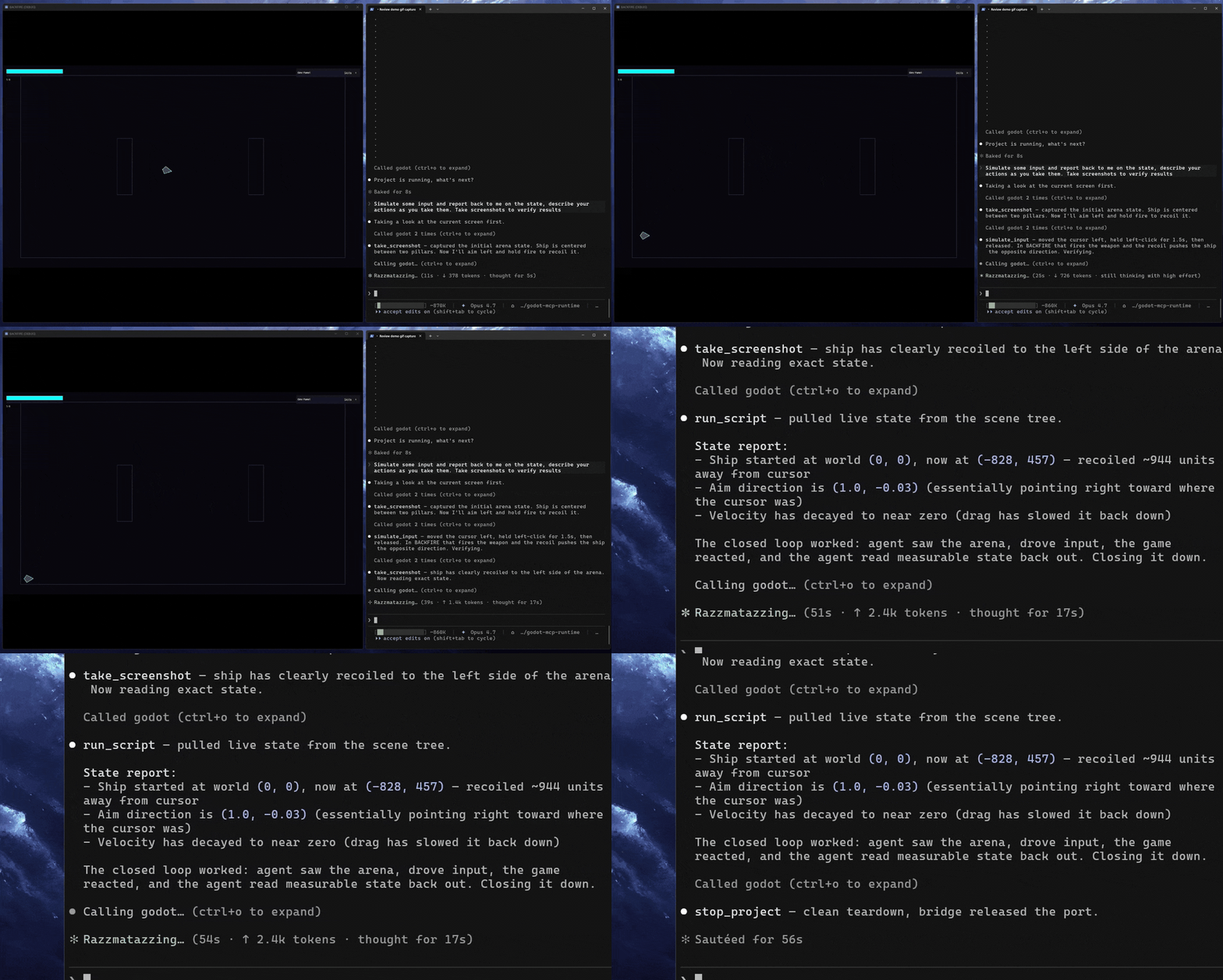
No addon required. Most Godot MCP servers that offer runtime support ship as a Godot addon, something you install into your project, commit to version control, and manage as a dependency. Use npx and there's no install or setup needed.
Think of it as Playwright MCP, but for Godot. This does the same thing for games: run the project, take a screenshot, simulate input, read what's on screen, execute a script against the live scene tree. The agent closes the loop on its own changes rather than handing off to you to verify.
[!NOTE] This is not a playtesting replacement. It doesn't catch the subtle feel issues that only a human notices, and it won't tell you if your game is fun. What it does is let an agent confirm that a scene loads, a button responds, a value updated, a script ran without errors. The ability to check work is crucial for AI driven workflows.
This server is the perfect tool kit for AI assisted game development with Godot. It provides a comprehensive suite of tools that allows agents to create scenes, nodes, scripts, and more. The runtime tool set provides the capabilities to check work by running the game and interacting with it in real time, all without becoming a cumbersome dependency on your project.
Built for agents. Every tool is purpose-built and self-documenting. When something fails, the response tells the agent how to fix it; when something succeeds, it points toward the next step. The result is an AI that stays unstuck and self-corrects without needing you to nudge it along. All 43 tools return one JSON object with a declared output schema, and a value the server could not measure comes back as null with a warning rather than a made-up number.
Headless editing. Create scenes, add nodes, set properties, attach scripts, connect signals, validate GDScript. All the standard operations, no editor window required.
Runtime bridge. When run_project is called, the server injects McpBridge as an autoload. This opens a localhost-only TCP listener (a free port is auto-selected when bridgePort is omitted; pass bridgePort to pin a specific port) and enables:
stats, with a likelyBlank verdict) measured from the full PNG, so a caller that cannot look at the image can still tell a rendered frame from a blank oneprofiling: true at launch, capture Godot's own profiler and rank the most expensive GDScript functions by own or inclusive time, with source locations and per-frame averages. Every capture also reports FPS, frames over a target frame rate, and engine monitors (draw calls, memory, node counts); visual: true adds the Visual Profiler's CPU and GPU time per render stage, and timeline: true the same over time, with the player position (track) on each interval, to find where a walk through the level drops framesBackground mode. Pass background: true to run_project and the Godot window is never shown on Windows; on other platforms it is moved off-screen (positioned at (-9999, -9999)) after startup. Mouse input passes through the window. It does not guarantee the game never takes keyboard focus. Programmatic input, screenshots, and all runtime tools work exactly the same. Useful for automated agent-driven testing where the window shouldn't be visible or interactive.
Manual attach mode. When something other than MCP launches the game (a CI pipeline, an external debugger, your own shell), call run_project with attach: true first. It injects the bridge and marks the project active without spawning Godot, so when you launch the game manually, runtime tools work against it. Call stop_project when done: it removes the bridge and leaves your Godot process running.
Render check. render_movie renders a fixed number of frames in a separate short Godot run under the engine's movie writer and reports what rendered: blank or not, moving or not. It injects no bridge, simulates no input and starts no session, so it works as a cheap checkpoint before a full run_project. It needs a display, asks for the same launch confirmation as run_project, and is refused while a runtime session is live on the same project.
Several projects at once. run_project on a second project adds a session instead of ending the first, which helps when a game and a small repro project run side by side. The runtime tools act on the current session and name it in every response as projectPath; switch_project moves them to another one. Nothing falls back silently: if the current session ends, the next call errors and lists the sessions still live. The server runs one runtime operation at a time, so calls issued in parallel wait their turn instead of interleaving.
[!IMPORTANT]
get_debug_outputhas nothing to return in attached mode. stdout and stderr only flow through processes MCP started itself, so for an externally launched Godot itsoutput,errorsandrunningarenullwith a warning, never empty lists. Letrun_projectspawn the game if you need the debug stream.
The bridge cleans itself up automatically - on stop_project, and also without a tool call when the game exits on its own, the bridge connection drops, or the server shuts down (including a client that just closes the connection). A game the server spawned also quits by itself within a few seconds if the server process is killed outright, and removes the autoload entry from project.godot on its way out. Its artifacts live under .mcp/godot-runtime/ in the project, which the server adds to .gitignore. No leftover autoloads, no modified project files.
The Godot MCP space splits on two axes: whether a server can drive a running game (runtime) or only edit files, and what it costs your project to do so. Most servers that offer real runtime control ship as a Godot addon you install and commit to version control, or as a custom engine you download. This one injects a bridge transiently and removes it on shutdown, so you get full live-game control against stock Godot with nothing left in your repo.
| Server | Live-game runtime | Footprint | License | Price |
|---|---|---|---|---|
| Godot MCP Runtime | Full: screenshots, input, live scene tree, script exec | Zero (npx, no committed addon) | MIT | Free |
| Summer Engine | Full | Custom engine download + sign-in | MIT layer / proprietary engine | Free core, paid cloud |
| tugcantopaloglu/godot-mcp | Full | Committed autoload addon | MIT | Free |
| Godot MCP Pro | Full | Committed editor addon | Proprietary | $15 |
| GDAI MCP | Editor-mediated | Committed editor addon | Proprietary | $19 |
| Coding-Solo/godot-mcp | No (launch + debug output) | Zero (npx) | MIT | Free |
Among servers with full live-game control, Godot MCP Runtime pairs a zero-footprint install (no addon committed to version control, no custom engine, no account) with a single npx command, and it has shipped this transient-autoload runtime bridge since February 2026. For the full field of ~20 servers with a source for every claim, see docs/comparison.md.
That's it. No Godot addon, no project modifications.
Add the following to your MCP client config. Works with Claude Code, Claude Desktop, Cursor, or any MCP-compatible client.
Ask your AI assistant to call check_project. If it returns a Godot version string (e.g., 4.5.stable), you're connected and working.
Zero-install via npx (recommended):
{
  "mcpServers": {
    "godot": {
      "command": "npx",
      "args": ["-y", "godot-mcp-runtime"],
      "env": {
        "GODOT_PATH": "<path-to-godot-executable>"
      }
    }
  }
}
Or install globally:
npm install -g godot-mcp-runtime
{
  "mcpServers": {
    "godot": {
      "command": "godot-mcp-runtime",
      "env": {
        "GODOT_PATH": "<path-to-godot-executable>"
      }
    }
  }
}
Or clone from source:
git clone https://github.com/Erodenn/godot-mcp-runtime.git
cd godot-mcp-runtime
npm install
npm run build
{
  "mcpServers": {
    "godot": {
      "command": "node",
      "args": ["<path-to>/godot-mcp-runtime/dist/index.js"],
      "env": {
        "GODOT_PATH": "<path-to-godot-executable>"
      }
    }
  }
}
[!TIP] Prefer pnpm? All three install paths work with pnpm. Substitute
pnpm dlx godot-mcp-runtimefornpx -y godot-mcp-runtime,pnpm add -g godot-mcp-runtimefor the global install, orpnpm install && pnpm run buildfor the source build. pnpm ships stronger defaults against npm supply-chain attacks; see pnpm's supply chain security guide.
If Godot is on your PATH, you can omit GODOT_PATH entirely. The server will auto-detect it.
All are set in the same env block as GODOT_PATH:
| Variable | Effect |
|---|---|
DEBUG | "true" enables verbose [DEBUG] logging. |
GODOT_MCP_DISABLE_ELICITATION - "true" skips the confirmation prompts for the first run_project launch, render_movie and run_script on a project. Use this if your client cannot display elicitation prompts (e.g. Claude Desktop, which auto-cancels them). The action proceeds with a warning.{
"mcpServers": {
"godot": {
"command": "npx",
"args": ["-y", "godot-mcp-runtime"],
"env": {
"GODOT_PATH": "<path-to-godot-executable>",
"GODOT_MCP_DISABLE_ELICITATION": "true"
}
}
}
}
[!IMPORTANT] Windows path gotchas.
GODOT_PATHmust point at the Godot executable itself, not its install folder. Backslashes in JSON must be escaped or replaced with forward slashes:"GODOT_PATH": "D:\\Godot\\Godot_v4.5-stable_win64.exe" // or equivalently "GODOT_PATH": "D:/Godot/Godot_v4.5-stable_win64.exe"Setting the variable from a wrapper
.batdoes not propagate to the MCP server - the path must live in the client'senvblock above.
The server does not sandbox anything. A launched project and run_script run with your user permissions, and the server asks you to confirm once per project per session before the first of each. SECURITY.md lists what runs code, what the agent can change and how to report a vulnerability.
docs/tools.md: full tool reference, grouped by categorydocs/tool-authoring.md: standards for adding or modifying toolsdocs/architecture.md: source layout, bridge sequence diagram, lifecycle steps, runtime artifact behaviorSECURITY.md: trust model, what runs code, what the confirmation prompts cover, how to report a vulnerabilitydocs/migration-4.0.md: every breaking change from 3.8.1 to 4.0, with its before and afterBuilt on the foundation laid by Coding-Solo/godot-mcp for headless Godot operations.
Developed with Claude Code.
Claim this server with your GitHub account to request manual ownership verification.
Link to the catalog listing for Godot MCP Runtime from your README. This badge does not certify ownership, compatibility or security.
[](https://awesome-mcp.com/servers/godot-mcp-runtime)Public repository statistics could not be verified. Check the configured source address; unavailable counts are not zero.
来源、范围和时段分别列出;不相加,不代表安装人数、活跃用户或安全审核。
尚无已审核的包 / 镜像标识,暂不展示下载统计。
Alternative and complementary servers in the same category
A directory listing describing a cancellation-letter and mailing-address service. The configured public GitHub repository returned 404 during source verification.

A hosted MCP service for browsing and searching through Singapore mobile-network proxies.

A directory listing describing a Markdown-to-PDF service. The configured public GitHub repository returned 404 during source verification.