
A directory listing describing a cancellation-letter and mailing-address service. The configured public GitHub repository returned 404 during source verification.
Repository stats unavailable
Developer Tools
An MCP server with a Godot editor plugin that lets AI clients read and manipulate scenes, scripts, nodes, and project settings, plus runtime control and an interactive project visualizer.
Godot MCP server bridging AI assistants to the Godot editor is cataloged as an MCP server attributed to tomyud1. An MCP server with a Godot editor plugin that lets AI clients read and manipulate scenes, scripts, nodes, and project settings, plus runtime control and an interactive project visualizer. It is categorized under developer tools. See the capability inspector for recorded interfaces and their independent review status; consult upstream documentation for the current interface.
Installation configuration is not reviewed. No executable setup is offered for this entry; inspect the source repository before proceeding.
Catalog license label: Not specified. Check the source repository's current license and terms before using, modifying or distributing this software.
能力定义尚未审核。未核验的采集内容不会作为可信接口展示。
暂无可展示的已审核记录。这不表示上游不支持此能力。
暂无可展示的已审核记录。这不表示上游不支持此能力。
暂无可展示的已审核记录。这不表示上游不支持此能力。
Email delivery is not connected. This page does not collect email addresses or create subscriptions.
Browse the registry for current listings instead.
Reviews for Godot MCP server bridging AI assistants to the Godot editor are not available yet
Review publishing and storage are not connected. This page does not collect or publish ratings or comments, including after sign-in.
It runs locally only, on localhost, with no remote connections.
Multiple AI clients can connect concurrently, but all share a single Godot editor instance.
The plugin writes to disk rather than the editor's live tree, so Godot's native undo has nothing to revert; the mcp_undo tool should be used instead.
README.md · 2c1f30088437 · 采集于 2026-11-13 13:25:49 UTC
保留上游原文,不做 AI 改写。为安全起见过滤脚本、表单和不安全链接。
当前显示最后一次成功采集的文档快照,请以来源页面为准。
Give your AI assistant full access to the Godot editor.
Build games faster with Claude, Cursor, or any MCP-compatible AI — no copy-pasting, no context switching. AI reads, writes, and manipulates your scenes, scripts, nodes, and project settings directly.
Godot 4.4+ · 69 tools · Undo/redo · Interactive project visualizer · MIT license
Now on the Godot Asset Store as Godlink MCP. If it helps you, please leave a review there. It's the main way other Godot developers find it.
Download and run the installer from nodejs.org (LTS version). It's a standard installer — no terminal needed.
Godot 4.7 and newer: inside the Godot editor, click the Asset Store tab at the top → search "Godlink" → find "Godlink MCP" → Install. (Store page)
Godot 4.6 and older: click the AssetLib tab instead → search "mcp" → find "Godot AI Assistant tools MCP" → Install.
Manual install: copy the addons/godot_mcp/ folder from this repo into your project's addons/ folder.
Then go to Project → Project Settings → Plugins and enable the Godot MCP plugin.
Claude Desktop — Settings → Developer → Edit Config → open the config file and paste:
Mac / Linux:
{
  "mcpServers": {
    "godot": {
      "command": "npx",
      "args": ["-y", "godot-mcp-server"]
    }
  }
}
Windows:
{
  "mcpServers": {
    "godot": {
      "command": "cmd",
      "args": ["/c", "npx", "-y", "godot-mcp-server"]
    }
  }
}
Cursor — Settings → MCP → Add Server:
Mac / Linux:
{
  "mcpServers": {
    "godot": {
      "command": "npx",
      "args": ["-y", "godot-mcp-server"]
    }
  }
}
Windows:
{
  "mcpServers": {
    "godot": {
      "command": "cmd",
      "args": ["/c", "npx", "-y", "godot-mcp-server"]
    }
  }
}
Claude Code — run in terminal:
claude mcp add godot -- npx -y godot-mcp-server
Works with any MCP-compatible client (Cline, Windsurf, etc.)
Close and reopen Claude Desktop / Cursor / your client so it picks up the new config.
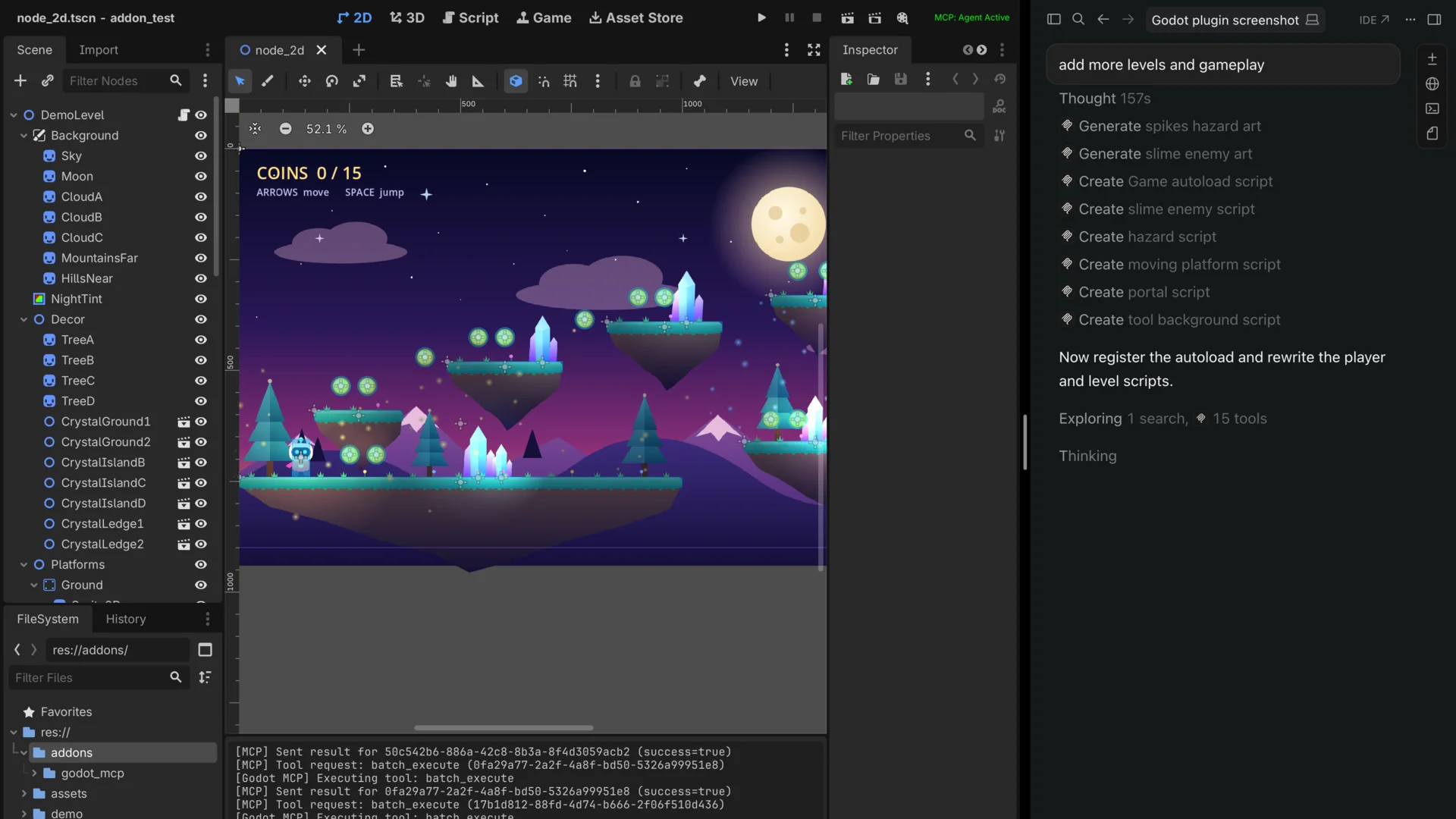
Hit Restart Project in the Godot editor. Check the top-right corner — once your AI client is running you should see MCP: Agent Active in green. You're ready to go.
If it shows MCP: No Agent in orange, Godot found the server but no AI client is using it yet. Restart your AI client. MCP: Disconnected in red means the server isn't running. Check that Node.js is installed and the config from step 2 is saved.
| Category | Tools | Examples |
|---|---|---|
| Scene Operations | 23 | Create whole node trees in one call, add/remove/move nodes, set any property including textures, shapes, meshes and materials (by file path or inline), attach scripts, signals, groups, call methods |
| Project & Runtime | 28 | Run/stop the game, send input, take screenshots, inspect live nodes, read errors and logs, project settings, input map, autoloads |
| Script & File Operations | 8 | Edit and validate scripts, write files, rename/move files with reference updates, create and delete folders |
| File Browsing | 4 | Browse directories, read files, search the project, create scripts |
| Undo & Batching | 4 | Undo/redo any AI change, run many changes as one all-or-nothing batch |
| Asset Generation | 1 | Generate 2D sprites from SVG |
| Visualization | 1 | Interactive browser-based project map and scene explorer |
Run map_project and get a browser-based explorer at localhost:6510:
AI cannot create 100% of a game by itself — it struggles with complex UI layouts, compositing scenes, and some node property manipulation. It's still in active development, so feedback is very welcome!
┌─────────────┐    MCP (stdio)   ┌──────────────┐   WebSocket   ┌──────────────┐
│  AI Client  │◄────────────────►│  MCP Server  │◄─────────────►│ Godot Editor │
│  (Claude,   │                  │  (Node.js)   │   port 6505   │  (Plugin)    │
│   Cursor)   │                  │              │               │              │
└─────────────┘                  │  Visualizer  │               │  69 tool     │
                                 │  HTTP :6510  │               │  handlers    │
                                 └──────┬───────┘               └──────────────┘
                                        │
                                 ┌──────▼───────┐
                                 │   Browser    │
                                 │  Visualizer  │
                                 └──────────────┘
mcp_undo tool instead (ask the agent to undo).To build from source instead of using npm:
cd mcp-server
npm install
npm run build
Then point your AI client at mcp-server/dist/index.js instead of using npx.
Narrative write-ups of each release live in release-notes/ (latest: v0.6.1). For the full change history, see CHANGELOG.md.
MIT
Claim this server with your GitHub account to request manual ownership verification.
Link to the catalog listing for Godot MCP server bridging AI assistants to the Godot editor from your README. This badge does not certify ownership, compatibility or security.
[](https://awesome-mcp.com/servers/godot-mcp-tomyud1)Public repository statistics could not be verified. Check the configured source address; unavailable counts are not zero.
来源、范围和时段分别列出;不相加,不代表安装人数、活跃用户或安全审核。
尚无已审核的包 / 镜像标识,暂不展示下载统计。
Alternative and complementary servers in the same category
A directory listing describing a cancellation-letter and mailing-address service. The configured public GitHub repository returned 404 during source verification.

A hosted MCP service for browsing and searching through Singapore mobile-network proxies.

A directory listing describing a Markdown-to-PDF service. The configured public GitHub repository returned 404 during source verification.