Google Trends MCP





让 AI 助手获得结构化 Google Trends 数据能力 — 支持单次 50 关键词批量调研、跨批次归一化、生产级 SaaS 部署。一次 Google 登录,Claude / ChatGPT / Cursor / Perplexity 等 7 大主流客户端即插即用。
🌐 Live Demo:https://easontrendmcp.dpdns.org/ | 📖 接入文档:https://easontrendmcp.dpdns.org/docs | 🔌 OpenAPI:https://easontrendmcp.dpdns.org/openapi.json
✨ Highlights
- 🧩 MCP 原生:基于 FastMCP,4 个工具开箱即用(
compare_keywords / research_keywords / research_keywords_async / get_research_task)
- 📊 跨批次归一化:单次最多 50 关键词,自动以 anchor 关键词拉通批次间可比性
- ⚡ 多端接入:MCP 协议、REST API、GPT Actions 三套接入方式,覆盖 7 大 AI 客户端
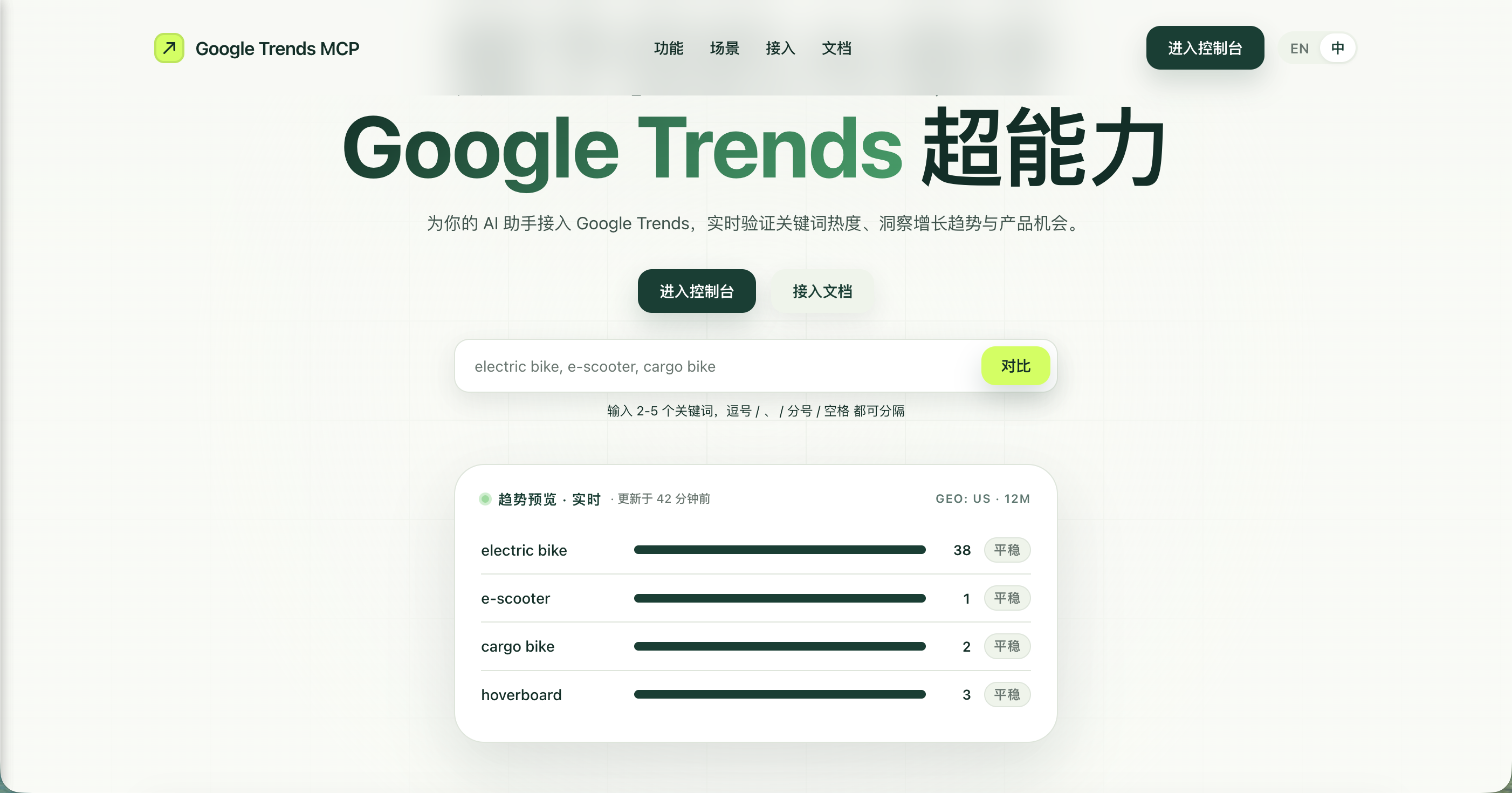
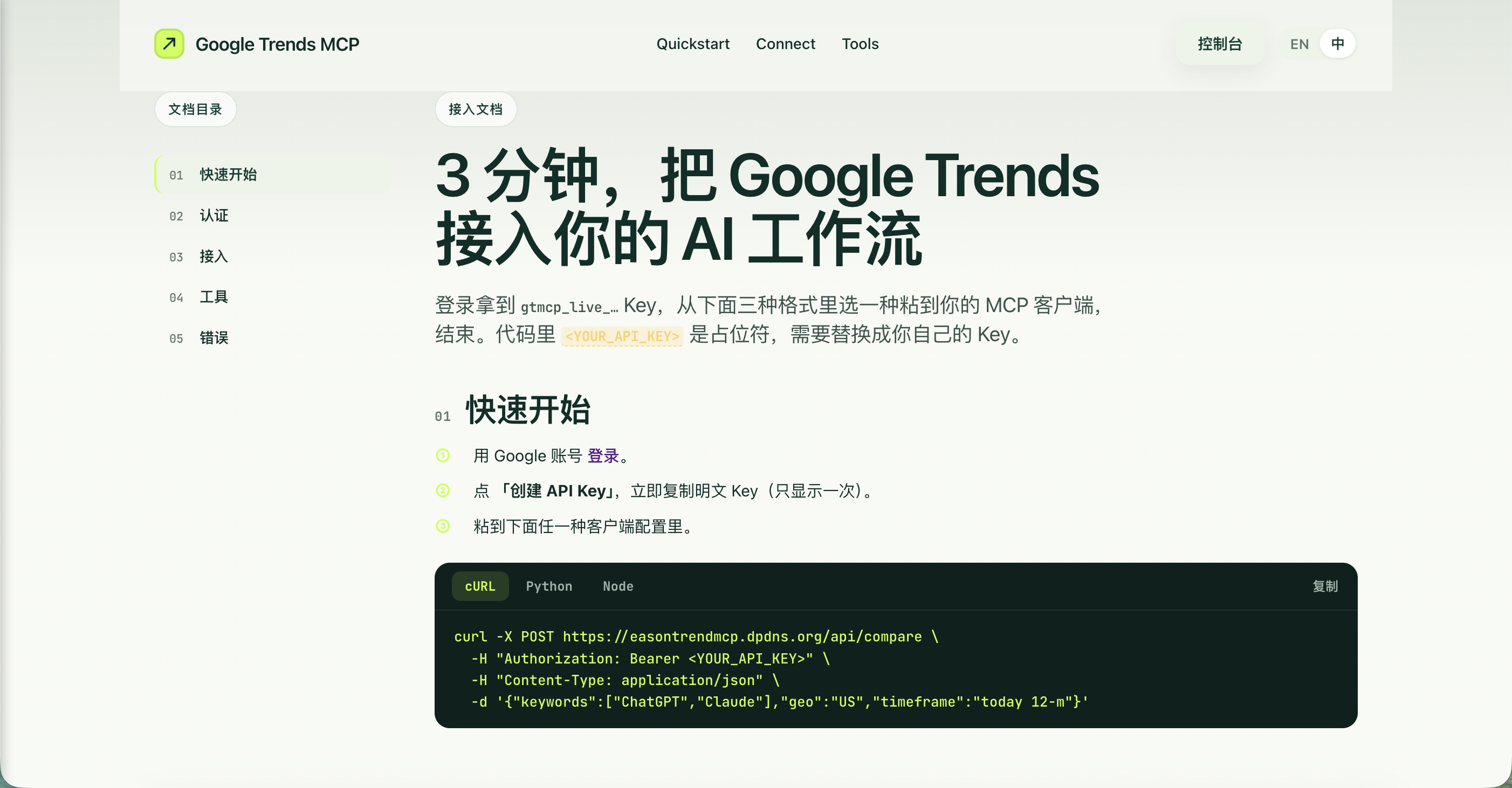
- 🎨 生产级前端:双语(中/英)SaaS 落地页 + 控制台 + 文档站,Apple 风格设计系统
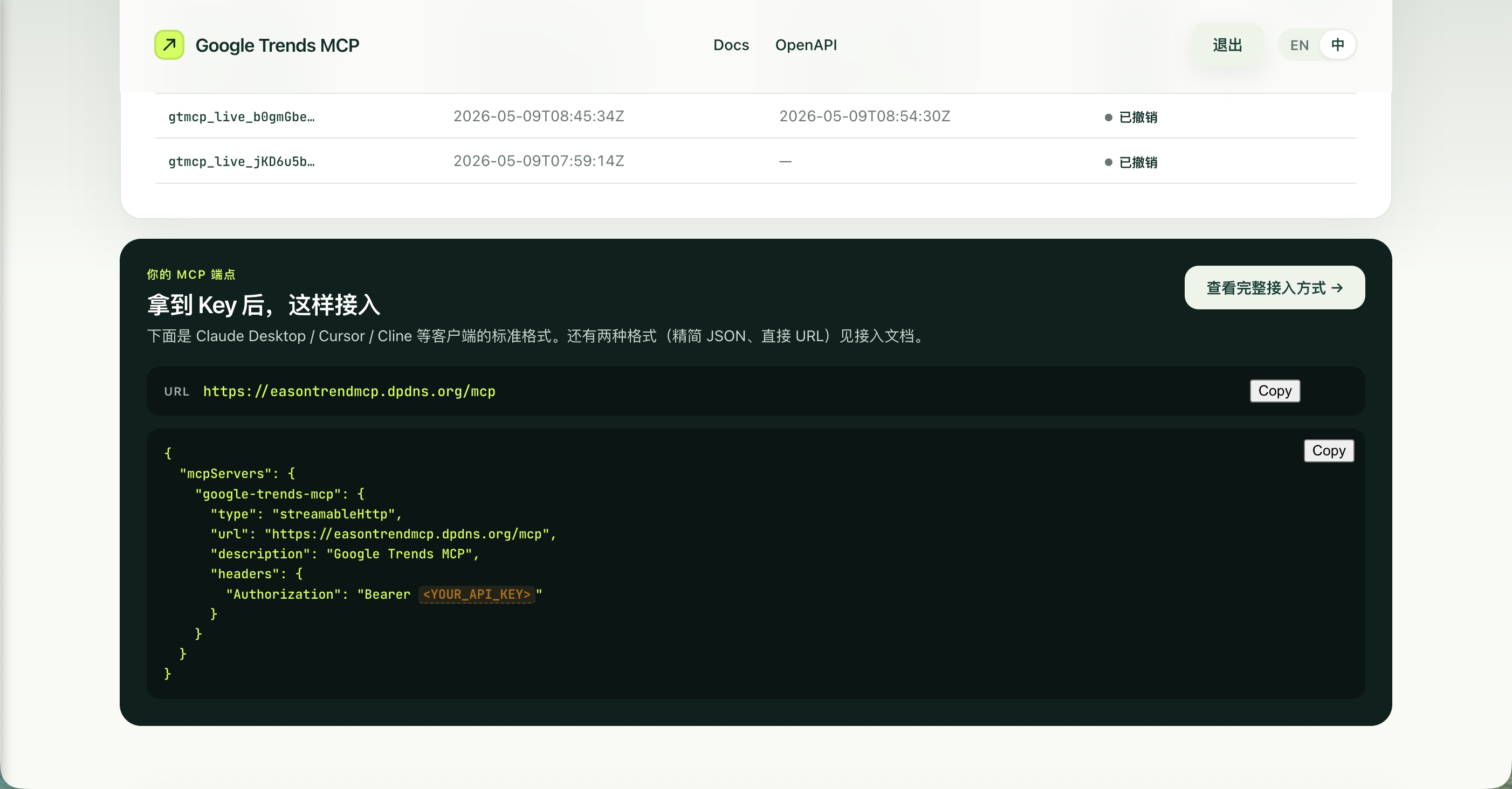
- 🐳 一键部署:Docker Compose + Caddy 自动 HTTPS,Google OAuth 用户系统 + 每用户 API Key 管理
项目结构
google-trends-mcp/
├── server.py                 # 主程序入口(3049 行),包含所有后端逻辑
├── requirements.txt          # Python 依赖列表
├── .env.example              # 环境变量模板(Docker 部署用)
├── AGENTS.md                 # AI Agent 工程契约
├── Dockerfile                # Docker 镜像构建文件
├── Caddyfile                 # Caddy 反向代理配置
├── docker-compose.yml        # Docker Compose 部署配置
├── README.md                 # 本文档
│
├── templates/                # 前端模板文件(独立于 server.py)
│   ├── base.html             # HTML 页面骨架
│   ├── styles.css            # 完整设计系统 CSS(~1721 行)
│   └── scripts.js            # 前端交互 JavaScript(~245 行)
│
├── data/                     # 运行时数据(SQLite 数据库)
│   └── google-trends-mcp.sqlite3
│
└── design-system/            # 设计系统参考文件(非运行时依赖)
    └── Google Trends MCP Design System (Remix) (Remix)/
        ├── colors_and_type.css        # 设计令牌
        ├── standalone/                # 可交互预览页面(marketing / dashboard / docs)
        └── ui_kits/                   # JSX 原型组件
            ├── _shared/               # Nav、Footer、Lang 共享组件
            ├── marketing/             # 营销落地页组件
            ├── dashboard/             # 控制台组件
            └── docs/                  # 文档页组件
功能概述
MCP 工具
REST API
Web 页面
安装步骤
环境要求
- Python 3.11+
- macOS / Linux
安装依赖
cd google-trends-mcp

# 创建虚拟环境
python3 -m venv .venv

# 激活虚拟环境
source .venv/bin/activate

# 安装依赖
pip install -r requirements.txt
运行方式
1. 本地 MCP stdio 模式(默认)
供 Claude Desktop / OpenCode 等本地 MCP 客户端使用:
.venv/bin/python server.py
注意:stdio 模式下 stdout 用于 MCP JSON-RPC 协议通信,禁止使用 print(),日志仅输出到 stderr。
2. 本地 Web 服务模式
启动 Web 服务和 REST API,可在浏览器中访问前端页面:
APP_SECRET_KEY=your-secret .venv/bin/python server.py --transport streamable-http --host 127.0.0.1 --port 8000
然后访问 http://127.0.0.1:8000 查看前端。
本地 Web 模式下 OAuth 不可用,可使用 /auth/dev-login 开发登录(无需 Google 账号)。
3. 自检模式(smoke-test)
快速验证工具是否正常工作:
# 对比模式
.venv/bin/python server.py \
  --smoke-test \
  --keywords "ChatGPT,DeepSeek" \
  --timeframe "today 12-m" \
  --geo "US"

# 批量调研模式
.venv/bin/python server.py \
  --smoke-test \
  --research \
  --keywords "ChatGPT,Claude,Gemini,DeepSeek,Perplexity,Kimi,Grok" \
  --timeframe "today 12-m" \
  --geo "US" \
  --anchor-keyword "ChatGPT"
4. Docker 公网部署
适用于多人使用的公网 SaaS 部署:
# 准备环境变量
cp .env.example .env
# 编辑 .env 填入 Google OAuth 凭证和域名

# 启动服务
docker compose up -d --build
Docker 部署包含:
- Python 应用:监听 Docker 内部 8000 端口
- Caddy:HTTPS 反向代理 + 自动证书管理
- Google OAuth:用户登录认证
- API Key 管理:每用户最多 3 个 Key,明文仅展示一次
- 限流控制:每用户 compare 每分钟 10 次,research 每小时 5 次
MCP 工具详解
compare_keywords — 关键词对比
对比最多 5 个关键词的 Google Trends 时间序列热度。
输入参数:
返回字段: rows、table_markdown、summary、meta
research_keywords — 批量调研
调研最多 50 个关键词,自动分批(每批 5 个),使用 anchor 关键词进行跨批次归一化。
输入参数:
返回字段:
keyword_metrics:每个关键词的指标(均值、最新值、峰值、斜率)及归一化值rankings:按 by_normalized_mean、by_normalized_latest、by_slope、by_peak 排序batches:每批次摘要(关键词、归一化系数、缓存状态)table_markdown:指标表格summary:中文调研总结meta:参数回显、缓存状态、耗时、归一化声明、警告
跨批次归一化说明
Google Trends 单次请求最多对比 5 个关键词,返回的 0-100 是批内相对热度,不同批次之间不能直接比较。
research_keywords 使用 anchor 关键词 解决跨批次可比性问题:
- 每批请求都带上 anchor 关键词
- 以第一批 anchor 的平均热度为基准,对其他批次缩放
- 归一化结果是估算可比值,适合方向性比较,不代表原始搜索量
如果 anchor 关键词在某些批次热度极低(均值 < 2.0),会在 meta.warnings 中提示可信度偏低。
客户端接入方式
支持 7 种主流 MCP 客户端,全部使用相同的远程端点:
Standard 配置(Claude Desktop / Cursor 等)
{
  "mcpServers": {
    "google-trends": {
      "url": "https://easontrendmcp.dpdns.org/mcp",
      "headers": {
        "Authorization": "Bearer gtmcp_live_your-api-key"
      }
    }
  }
}
Compact 配置(VS Code Copilot / Gemini CLI 等)
https://easontrendmcp.dpdns.org/mcp?key=gtmcp_live_your-api-key
本地 stdio 模式(Claude Desktop / OpenCode)
{
  "mcpServers": {
    "google-trends": {
      "command": "/path/to/.venv/bin/python",
      "args": ["/path/to/google-trends-mcp/server.py"]
    }
  }
}
ChatGPT GPT Actions 接入
ChatGPT MCP Connector 需要 OAuth 2.0,本服务暂不支持。建议使用 GPT Builder → Actions 方式:
- 在 GPT Builder → Configure → Actions → Import from URL 填入:
https://easontrendmcp.dpdns.org/openapi.json
- Authentication 选择 API Key / Bearer
- Header 使用
Authorization: Bearer gtmcp_live_...
配置说明
环境变量
Provider 切换
默认使用 pytrends。如果持续触发 429 限制,可切换到 trendspy:
export GOOGLE_TRENDS_PROVIDER=trendspy
或 smoke-test 时临时覆盖:
.venv/bin/python server.py --smoke-test --provider trendspy --keywords "ChatGPT,DeepSeek"
前端模板系统
前端文件位于 templates/ 目录,独立于 server.py:
server.py 启动时通过 _read_template() 加载并缓存模板文件,由 html_page() 函数组装页面。
设计系统
品牌设计规范和原型参考位于 design-system/ 目录(非运行时依赖,仅供设计参考)。
品牌色彩:
- 主色:
#073f33(森林绿 --forest)
- 强调色:
#c9ff3f(青柠绿 --lime)
- 墨色:
#062f26(最深深色 --deep)
- 背景:
#f8faf5(暖白底色 --soft)
- 薄荷:
#eaf5e6(浅绿卡片背景 --mint)
字体栈: SF Pro Display / SF Pro Text → Inter → 系统 sans-serif;等宽字体使用 JetBrains Mono。
常见问题
1. 触发 Google Trends 429 限制怎么办?
Server 已内置 1-3 秒随机请求延迟和退避重试。如果仍然频繁触发:
- 降低调用频率,缩小时间范围
- 配置 HTTPS 代理
- 切换到
trendspy provider 做 A/B 测试
2. 国内网络访问不稳定?
设置代理环境变量:
export HTTPS_PROXY=http://127.0.0.1:7890
3. 为什么 MCP 模式下不能 print?
stdio 模式下 stdout 用于 MCP JSON-RPC 协议通信,普通文本会破坏协议。日志必须写到 stderr。仅 --smoke-test 模式允许 JSON 输出到 stdout。
4. 为什么配置必须使用绝对路径?
桌面 GUI 客户端启动本地命令时,环境变量和终端不同,使用绝对路径能避免 "command not found" 或解释器路径不一致。
5. compare_keywords 和 research_keywords 结果为什么不同?
compare_keywords:返回原始 Google Trends 批内热度,适合精确对比research_keywords:返回跨批次归一化后的估算值,适合方向性调研
6. 批量调研速度如何?
- 内置 2-4 个并发线程拉取数据
- 每批次 1-3 秒随机延迟 + Google 请求耗时
- 10 个关键词(2-3 批)约 5-10 秒
- 50 个关键词(约 13 批)约 15-30 秒
- 进程内缓存(默认 15 分钟),重复请求跳过网络调用
7. 本地开发没有 Google OAuth 怎么办?
不设置 GOOGLE_CLIENT_ID 时,服务器自动进入 dev 模式,访问 /auth/dev-login 可直接登入开发用虚拟账号,无需 Google 账号。
APP_SECRET_KEY=dev-secret .venv/bin/python server.py --transport streamable-http --host 127.0.0.1 --port 8000
# 然后访问 http://127.0.0.1:8000/auth/dev-login



