GooseTeam MCP server for collaborative agents

GooseTeam MCP server for collaborative agents

gooseteam•bycliffhall

An MCP server extension that gives Goose agents tools for registering, messaging, coordinating tasks, and waiting, with a proxy so multiple agents can share one server.

License: Not specified•Runtime: Awaiting documentation review•Category: ai agents-models

WHAT IT DOES

  • •Enables agent registration, assigning each new agent a unique ID and a randomly assigned color.
  • •Stores messages sent by agents on the server and makes recent or all messages retrievable.
  • •Supports task creation, assignment to agents, and completion, with a Project Coordinator role creating and assigning tasks.
  • •Lets connected agents wait for a specified number of seconds before their next action.

BEST FOR

  • •Running a team of Goose agents under a Project Coordinator that delegates tasks to other agents.
  • •Coordinating multiple agents that exchange messages through a single shared MCP server.
  • •Testing whether a configured language model can follow a looping agent protocol with tool use.

ABOUT GOOSETEAM

GooseTeam MCP server for collaborative agents is cataloged as an MCP server attributed to cliffhall. An MCP server extension that gives Goose agents tools for registering, messaging, coordinating tasks, and waiting, with a proxy so multiple agents can share one server. It is categorized under ai agents-models. See the capability inspector for recorded interfaces and their independent review status; consult upstream documentation for the current interface.

HOW TO INSTALL

Installation configuration is not reviewed. No executable setup is offered for this entry; inspect the source repository before proceeding.

LICENSE

Catalog license label: Not specified. Check the source repository's current license and terms before using, modifying or distributing this software.

能力检查器

能力定义尚未审核。未核验的采集内容不会作为可信接口展示。

Tools (0)

暂无可展示的已审核记录。这不表示上游不支持此能力。

Resources (0)

暂无可展示的已审核记录。这不表示上游不支持此能力。

Prompts (0)

暂无可展示的已审核记录。这不表示上游不支持此能力。

NEWSLETTER - COMING LATER

Newsletter subscriptions are not open yet

Email delivery is not connected. This page does not collect email addresses or create subscriptions.

Browse the registry for current listings instead.

Community Reviews

Coming later

Reviews for GooseTeam MCP server for collaborative agents are not available yet

Review publishing and storage are not connected. This page does not collect or publish ratings or comments, including after sign-in.

FREQUENTLY ASKED QUESTIONS

What transport options does the GooseTeam MCP server offer?

It can run as a stdio-based server behind an SSE proxy, or directly as an SSE or StreamableHTTP server, with multiple clients sharing the same resources.

Can the protocol and MCP server be used with agent platforms other than Goose?

Yes; the protocol and MCP server are not tightly coupled to Goose, only the npm agent scripts and protocol preamble are.

上游原版 README

在 GitHub 查看同一版本原文

README.md · a67e5b23fa37 · 采集于 2026-11-13 09:05:13 UTC

保留上游原文,不做 AI 改写。为安全起见过滤脚本、表单和不安全链接。

当前显示最后一次成功采集的文档快照,请以来源页面为准。

GooseTeam

GooseTeam Logo

Enabling Goose Agents to Collaborate

Protocol:

An operational procedure for agents to follow, expressed in two flavors:

  • Natural Language: Streamlined, human-readable instructions about how to behave and use the tools.
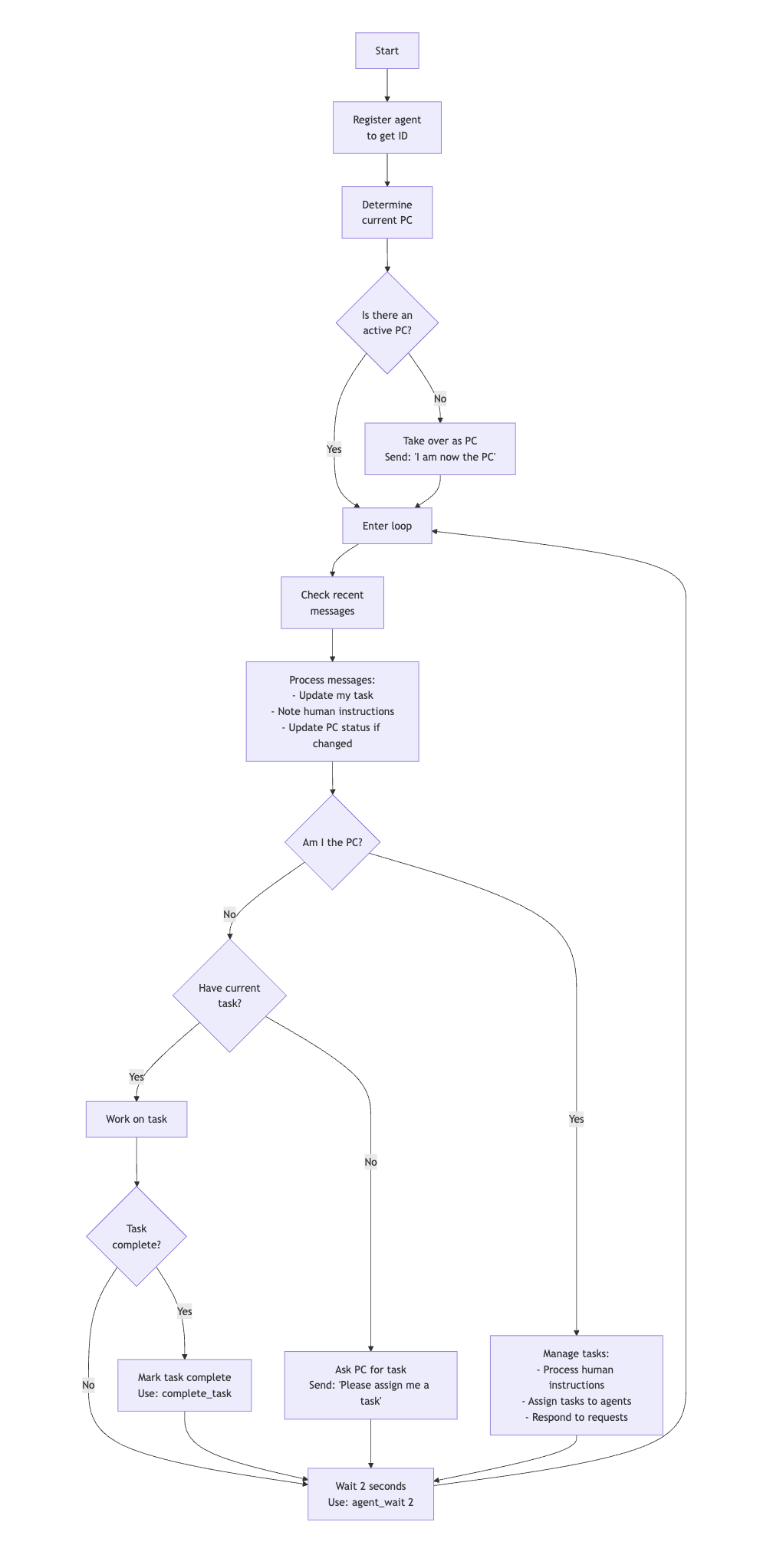
  • Mermaid Markdown: A concise flowchart for expected behavior, described in an efficient text format.

Extension:

Goose extension (MCP Server) that provides tools for the agents to use for tasks and messaging.

  • Agent Registration: Facilitates agent registration with unique ID assignments and message sending.
  • Message Management: Stores messages from agents, making them available for retrieval.
  • Task Management: Project Coordinator role creates and assigns tasks and roles to other agents.
  • Agent Waiting: Allows connected agents to wait for a specified period before taking another action.
  • Remote Server: With an MCP Proxy, multiple agents can connect to the same MCP server, necessary for collaboration.

Work in Progress

  • Current focus is on Goose CLI integration, so you must have it installed.
    • Other agent platforms could integrate with this project easily.
    • The protocol and the MCP server are not tightly coupled to goose, only the npm agent: scripts and in the protocol preamble.

NEW: Behavioral Control with Mermaid markdown!

  • Agent protocol expressed as a mermaid chart.

  • See if your favorite LLM can follow it using the agent:chart script to launch your agent!

Screenshots

GooseTeam Protocol as a Chart

goose-protocol-chart.png

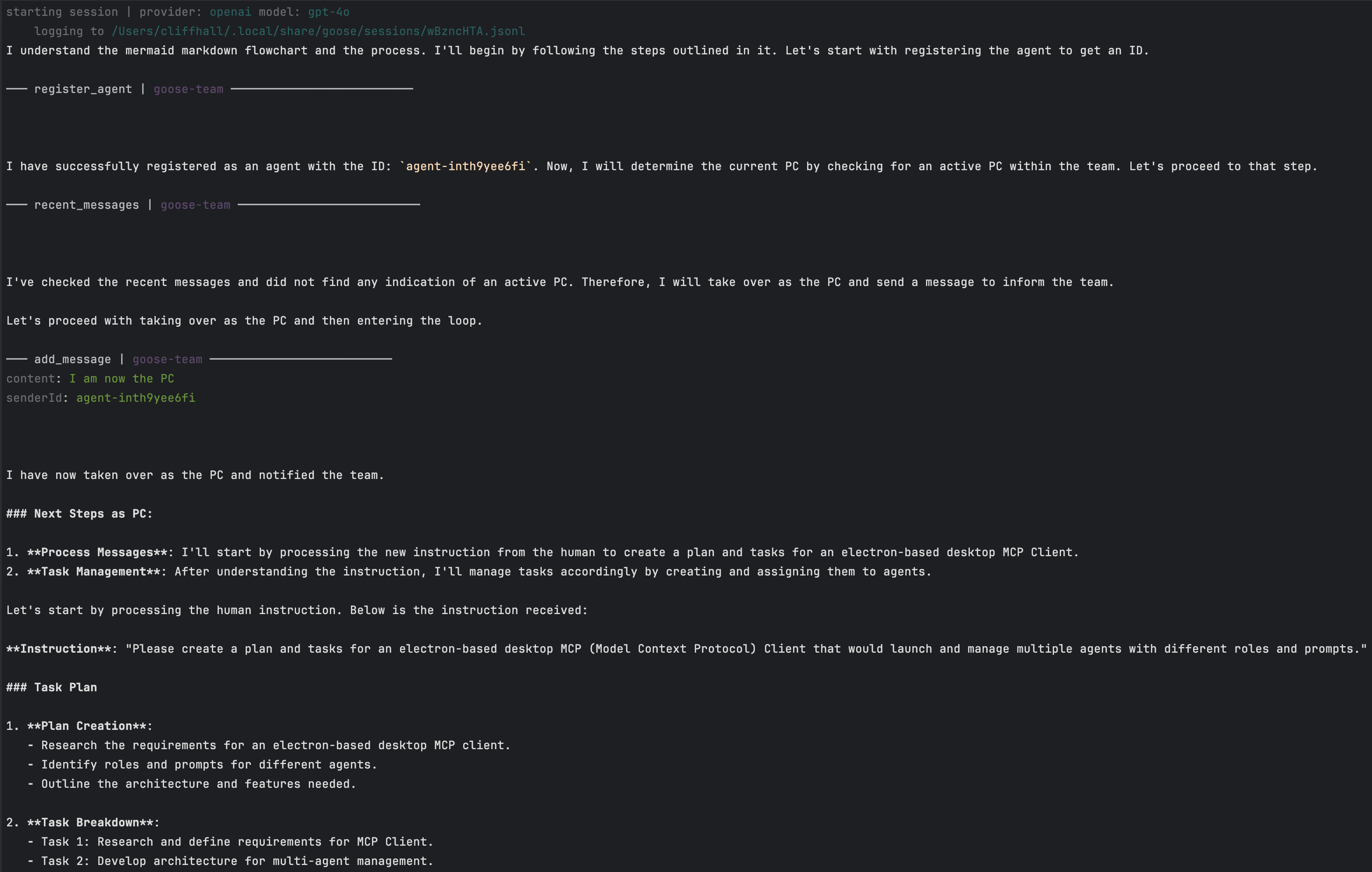
GPT-4o Says OK to this as a control mechanism

Goose PC Follows Mermaid

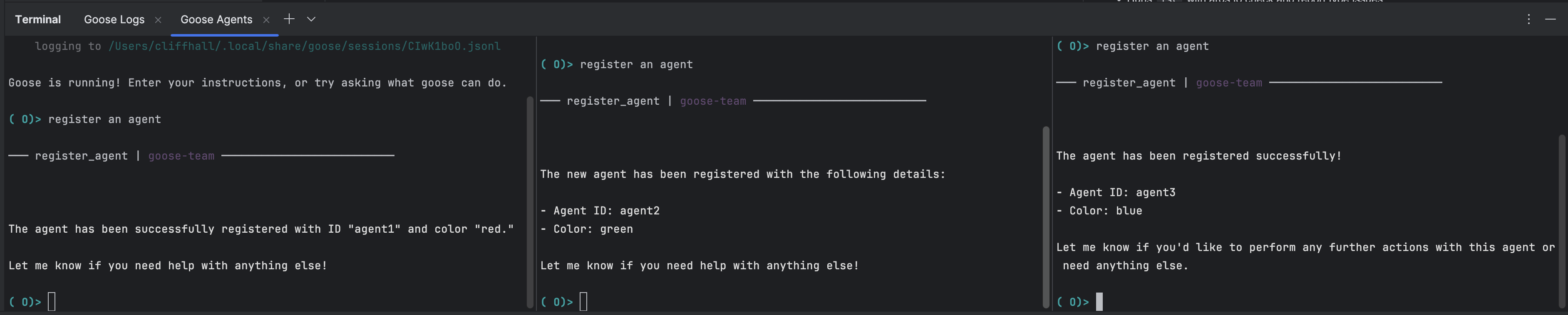
Goose Agents

Goose Agents

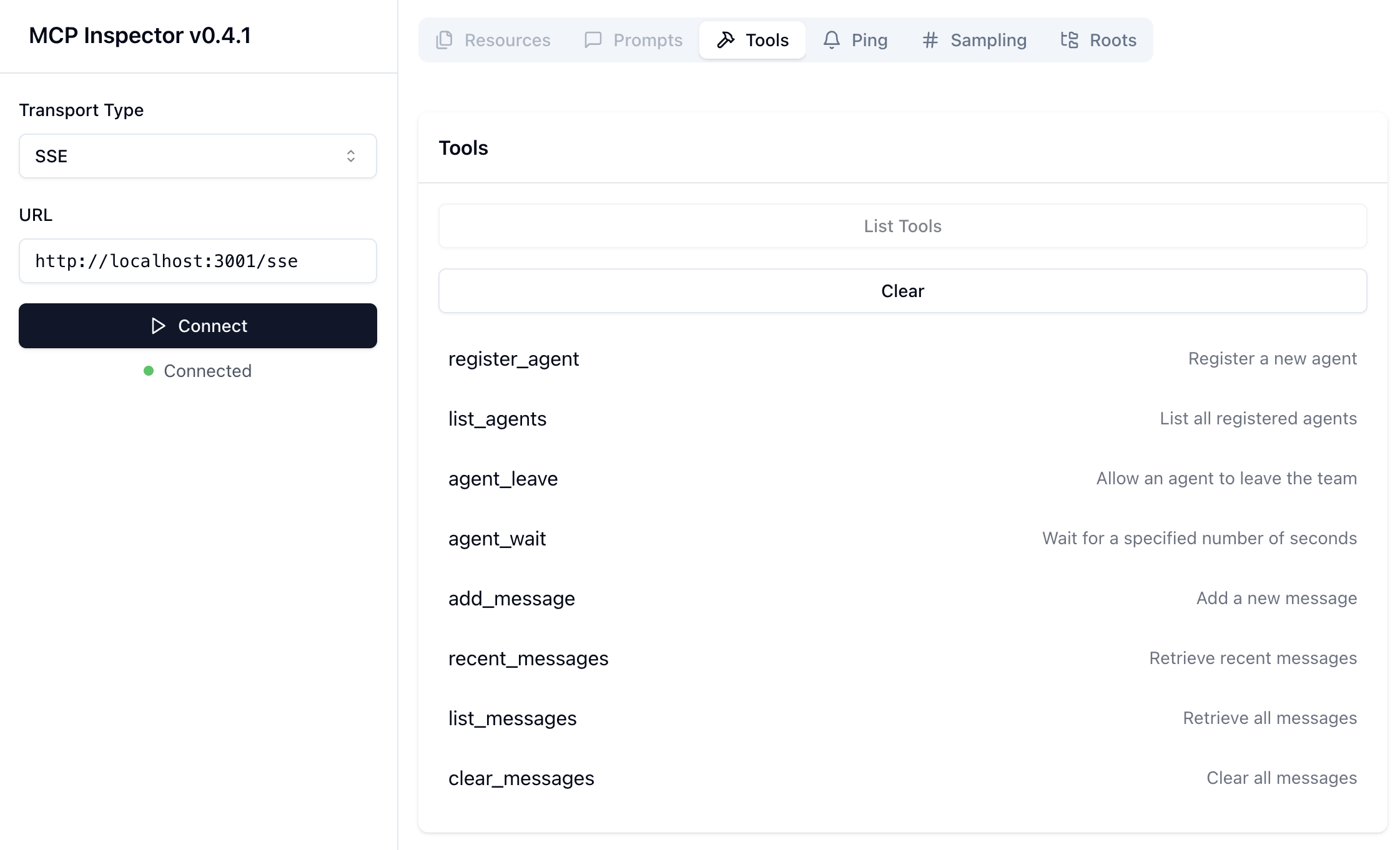
Inspector - List Tools

Inspector

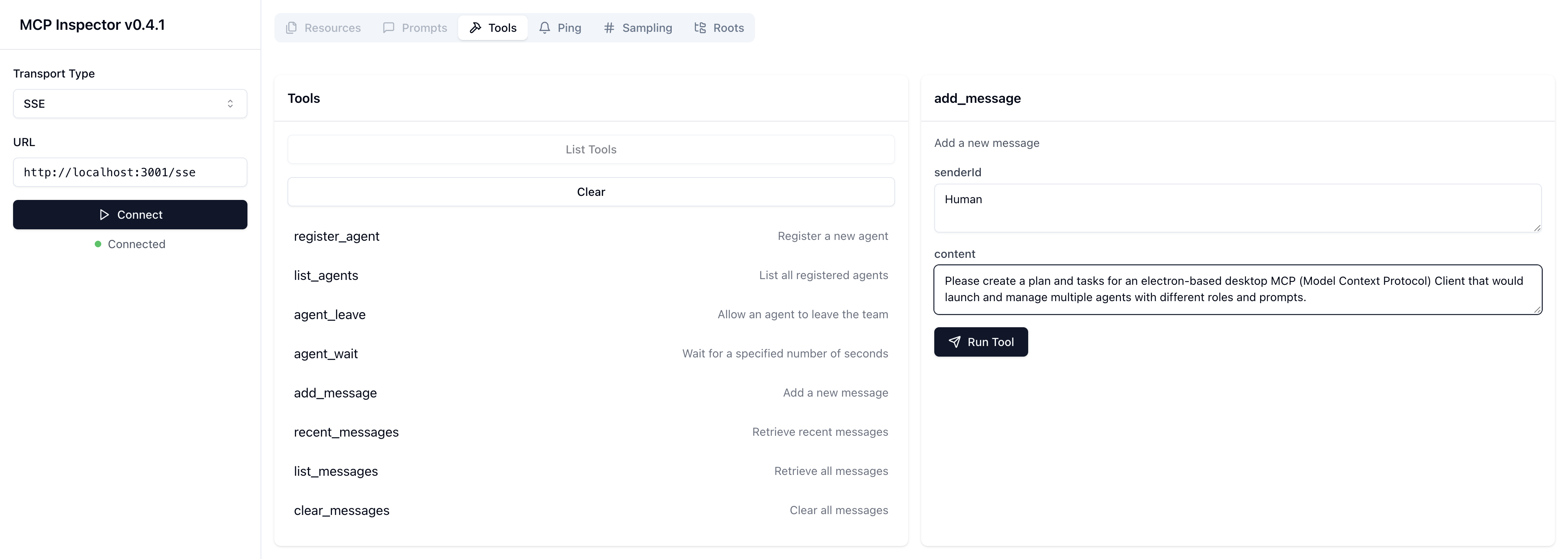
Inspector - Add Message

inspector-add-message.png

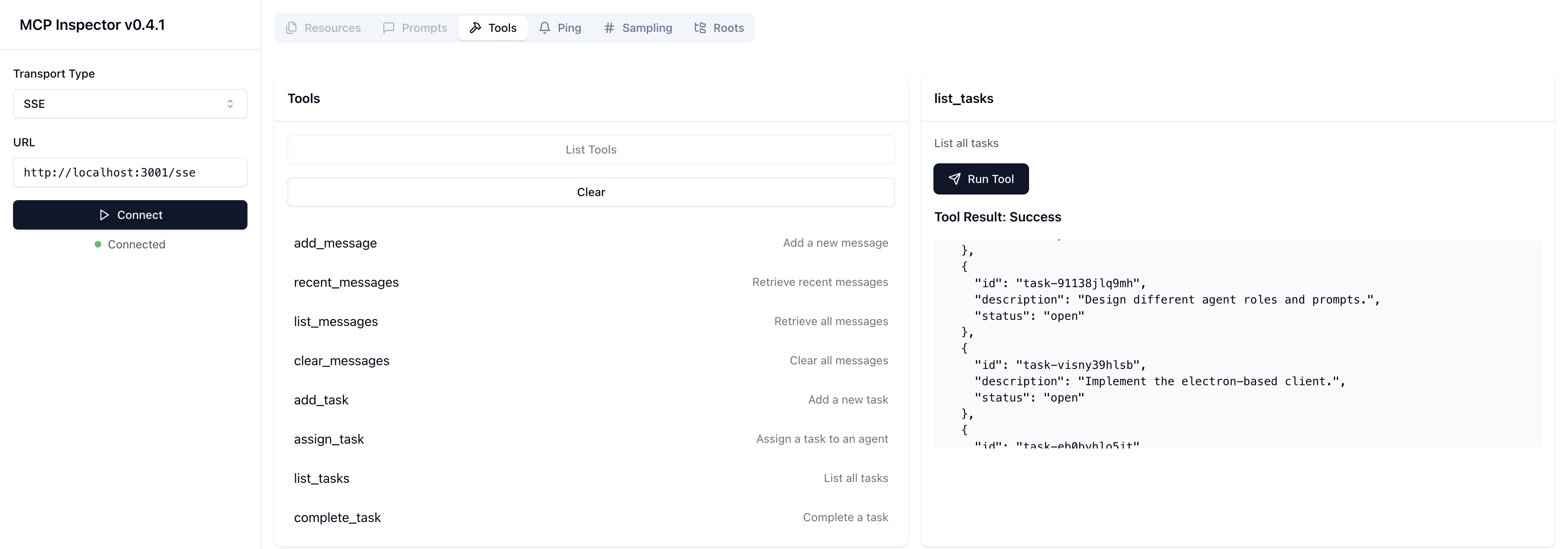
Inspector - List Tasks

inspector-list-tasks.png

How to Run

Tell Goose about the extension

Run these npm scripts in order:

  • First, clone this repo to your local machine and install dependencies
  • npm run build - to build the server from source.
  • npm run mcp-proxy to start an SSE proxy to talk to a single instance of the goose-team MCP server,
  • npm run inspector to launch the MCP inspector in a browser
    • Here you click connect, then list_tools, then add_message, then from Human send a message describing a task or project for the team to work on.
  • npm run agent to launch an agent that will read the protocol and instructions, connect to the goose-team server, assign itself as project coordinator, then begin creating tasks.
    • In the inspector window, click list_tasks to see the tasks it is adding,
    • When there are some tasks, you can npm run agent again and again to launch agents to be assigned tasks by the Project Coordinator.

Troubleshooting

HOW WELL GOOSE TEAM WORKS DEPENDS ON THE MODEL!!!

Follow these steps to test if you have a model that will work.

  • npm run build - to build the server from source.
  • npm run mcp-proxy to start an SSE proxy to talk to a single instance of the goose-team MCP server,
  • npm run agent:test This launches an agent hitting the same MCP, but it has a simpler protocol: Say hello in a different language, wait 2 seconds and do it again.
  • Here is a video of a successful agent:test run.

Currently, the only models I can get to stay in the loop with are google/gemini-2.0-flash-001 (via openrouter.ai to avoid rate limit shutdowns) and openai/gpt-4o. Others will fall out of the loop. It is important for the model to follow the protocol and stay in the loop, checking messages, sleeping, particularly for the Project Coordinator.

I suggest doing build, mcp-proxy, and agent:test and if the model you have configured does some work then stops with a "message loop ended" error, you have a model that just isn't very good at using tools. Try different models and see what works. If you get anything other than the above-mentioned models to actually stay on the job, then please let me know!

MCP Tools

Agents

  • register_agent

    • Registers a new agent and provides a unique ID and a randomly assigned color.
    • Inputs: None
    • Returns: JSON agent with unique id and assigned color.
  • list_agents

    • Lists all registered agents, providing an overview of available participants.
    • Inputs: None
    • Returns: JSON list of all agents connected to the server.
  • agent_leave

    • Allows an agent to leave the team.
    • Inputs: None.
    • Returns: JSON of the agent that left.
  • agent_wait

    • Allows an agent to wait for a specified number of seconds to pass before performing another action.
    • Inputs:
      • seconds: the number of seconds to wait.
    • Returns: Confirmation of time elapsed.

Messages

  • add_message

    • Allows an agent to send a new message, storing it within the server.
    • Inputs:
      • senderId: ID of the agent sending the message.
      • content: Content of the message.
    • Returns: Confirmation of message addition.
  • recent_messages

    • Retrieves the most recent messages stored on the server.
    • Inputs: None
    • Returns: JSON array containing the three most recent messages.
  • list_messages

    • Retrieves all messages stored on the server.
    • Inputs: None
    • Returns: JSON array containing all messages in the server.
  • clear_messages

    • Clears all messages stored on the server.
    • Inputs: None
    • Returns: Confirmation of messages cleared.

Tasks

  • add_task

    • Add a task to the server.
    • Inputs:
      • description: Description of the task.
    • Returns: The newly added task, with it's assigned id.
  • list_tasks

    • Lists all tasks in the server.
    • Inputs: None
    • Returns: JSON list of all tasks in the server.
  • assign_task

    • Assign a task to an agent.
    • Inputs:
      • taskId: ID of the task.
      • agentId: ID of the agent to assign the task to.
    • Returns: Confirmation of message addition.
  • complete_task

    • Complete a task.
    • Inputs:
      • taskId: ID of the task.
    • Returns: Confirmation of task completion.

Developer Setup

Install Dependencies

  • cd /path/to/GooseTeam/
  • npm install

Build

  • npm run build
  • Builds the stdio-based MCP server runtime at /dist/index.js

STDIO Server - Proxied

  • npm run stdio:proxy
  • Launches an SSE-based/MCP proxy on port :3001 with endpoint /sse
  • This proxy talks to a single instance of the STDIO-wrapped GooseTeam MCP server
  • Multiple clients can connect to the same server and see the same resources

SSE Server - Direct

  • npm run sse:direct
  • Launches an SSE-wrapped instance of the GooseTeam MCP server on port :3001 with endpoint /sse
  • Multiple clients can connect to the same server and see the same resources
  • Equivalent to the proxied STDIO approach, using our SSE version of the server.

StreamableHTTP Server - Direct

  • npm run streamableHttp:direct
  • Launches a StreamableHTTP-wrapped instance of the GooseTeam MCP server on port :3001 with endpoint /mcp
  • Multiple clients can connect to the same server and see the same resources
  • Equivalent to the proxied STDIO approach, using our SSE version of the server.

Inspector

  • npm run inspector
  • Runs the Model Context Protocol Inspector
  • The Inspector UI will be available at: http://localhost:5173
  • In the Inspector UI:
    • Make sure Transport Type is set to StreamableHttp
    • Make sure URL is set to http://localhost:3001/mcp
    • Click its "Connect" button
      • You should see Green light 🟢and "Connected" message.
    • Click its List Tools button
  • Multiple instances of the client can connect to the same server and share the same resources

Agent - Protocol as Text

  • npm run agent:text
  • Starts a new GooseTeam agent, with its waddling orders given in: instructions/protocol-as-text.md
    • This agent's protocol instructions are expressed in text markdown format, with headers, text, and bullets.
    • NOTE: It is a natural language prompt, but because it requires waiting and staying in a loop, some LLMs may balk
    • If the LLM won't stay in the loop, try the Agent Wait Test with different LLMs to find one that is suitable.
  • First agent will assume Project Coordinator Role
  • NOTE: It's best to connect to the server with the Inspector BEFORE launching the first agent
    • Send a message from "Human" telling it what you'd like the team to accomplish

Agent - Protocol as Chart

  • npm run agent:chart
  • Starts a new GooseTeam agent, with its waddling orders given in: instructions/protocol-as-chart.md
    • This agent's protocol instructions are expressed in mermaid markdown format, a compact way for expressing flowcharts.
    • NOTE: although this is an efficient way of expressing the protocol, some LLMs may not understand it
    • If the LLM doesn't understand mermaid markdown, it will say so and quit.
  • First agent will assume Project Coordinator Role
  • NOTE: It's best to connect to the server with the Inspector BEFORE launching the first agent
    • Send a message from "Human" telling it what you'd like the team to accomplish

Agent Wait Test

  • npm run agent:wait:test
  • Starts a new GooseTeam agent, with its waddling orders given in: instructions/wait-loop-test.md
  • This will test the configured model's ability to stay in the loop, checking messages periodically.
  • If it ends with an error saying "outgoing message queue empty" then it is not a good tool use model and therefore a poor candidate for use with GooseTeam.
  • NOTE: Make sure to have the MCP Proxy running first.

Format

  • npm run format
  • Runs prettier on the code, adjusting formatting

Typecheck

  • npm run typecheck
  • Runs tsc with args to check and report type issues

Lint

  • npm run lint
  • Runs eslint to non-destructively check for and report syntax problems

LintFix

  • npm run lint:fix
  • Runs eslint to check for and fix syntax problems

Test

  • npm run test
  • Run the unit tests
  • MCP Specification: The complete Model Context Protocol specifications can be found here.
  • Server Reference: We follow a simple but modular approach demonstrated in the GitHub MCP server.
  • Inspiration: Iterating from Aaron Goldsmith's Gist here.
  • Watch Aaron's "Building a team of AI agents" talk about his initial experiment.

Install configuration

Are you the maintainer?

Claim this server with your GitHub account to request manual ownership verification.

README Embed Badge
Markdown

Link to the catalog listing for GooseTeam MCP server for collaborative agents from your README. This badge does not certify ownership, compatibility or security.

[![MCP catalog listing](https://img.shields.io/badge/MCP-awesome--mcp-orange?style=flat-square)](https://awesome-mcp.com/servers/gooseteam)

REPOSITORY STATS

GitHub StarsUnavailable
ForksUnavailable

Public repository statistics could not be verified. Check the configured source address; unavailable counts are not zero.

下载与拉取统计

来源、范围和时段分别列出;不相加,不代表安装人数、活跃用户或安全审核。

尚无已审核的包 / 镜像标识,暂不展示下载统计。

Related ai agents-models MCP Servers

Alternative and complementary servers in the same category

View all in ai agents-models →
Knowledge Graph Memory
@modelcontextprotocol/server-memory•Model Context Protocol

Store and retrieve entities, relations and observations in a persistent local knowledge graph.

create_entitiescreate_relationsadd_observations+6 more
92K
AI & Multi-Agent
Sequential Thinking
@modelcontextprotocol/server-sequential-thinking•Model Context Protocol

Organize problem solving into revisable, branching thought steps through an MCP tool.

sequential_thinking
92K
AI & Multi-Agent

Query-aware context compression with an MCP plugin for coding agents, plus Python and HTTP interfaces for reducing the context sent to a language model.

146
AI & Multi-Agent