
A Rust CAD application with an MCP server for creating, inspecting and rendering drawings, either headlessly or through a connection to the desktop app.
8K
Media & Design
A Model Context Protocol server for interacting with the Hashnode API to access and search Hashnode content programmatically.
Hashnode MCP Server is cataloged as an MCP server attributed to sbmagar13. A Model Context Protocol server for interacting with the Hashnode API to access and search Hashnode content programmatically. It is categorized under media design. See the capability inspector for recorded interfaces and their independent review status; consult upstream documentation for the current interface.
Installation configuration is not reviewed. No executable setup is offered for this entry; inspect the source repository before proceeding.
Catalog license label: MIT License. Check the source repository's current license and terms before using, modifying or distributing this software.
能力定义尚未审核。未核验的采集内容不会作为可信接口展示。
暂无可展示的已审核记录。这不表示上游不支持此能力。
暂无可展示的已审核记录。这不表示上游不支持此能力。
暂无可展示的已审核记录。这不表示上游不支持此能力。
Email delivery is not connected. This page does not collect email addresses or create subscriptions.
Browse the registry for current listings instead.
Reviews for Hashnode MCP Server are not available yet
Review publishing and storage are not connected. This page does not collect or publish ratings or comments, including after sign-in.
It uses a Hashnode personal access token and the Hashnode GraphQL API URL, configurable via environment variables.
It runs on localhost:8000 using the Server-Sent Events (SSE) transport protocol by default.
README.md · 48cb64341969 · 采集于 2026-11-13 13:07:18 UTC
保留上游原文,不做 AI 改写。为安全起见过滤脚本、表单和不安全链接。
当前显示最后一次成功采集的文档快照,请以来源页面为准。
A Model Context Protocol (MCP) server for interacting with the Hashnode API. This server provides tools for accessing and searching Hashnode content programmatically.
Clone the repository:
git clone https://github.com/sbmagar13/hashnode-mcp-server.git
cd hashnode-mcp-server
Create a virtual environment and activate it:
python -m venv .venv
source .venv/bin/activate  # On Windows, use: .venv\Scripts\activate
Install the dependencies:
pip install -r requirements.txt
Create a .env file in the root directory with your Hashnode API credentials:
HASHNODE_PERSONAL_ACCESS_TOKEN=your_personal_access_token
HASHNODE_API_URL=https://gql.hashnode.com
You have two options for running the server:
python run_server.py
Or directly using the root file:
python mcp_server.py
The server will start and listen for connections from AI assistants. By default, it runs on localhost:8000 using the Server-Sent Events (SSE) transport protocol.
When properly configured in Claude Desktop or Cline VSCode extension, the MCP integration will automatically start and manage the server process for you.
When configuring your MCP server in Claude Desktop or Cline VSCode extension, you should use the root mcp_server.py file directly rather than the files in the hashnode_mcp directory. The hashnode_mcp directory is primarily for packaging purposes.
The server provides the following tools:
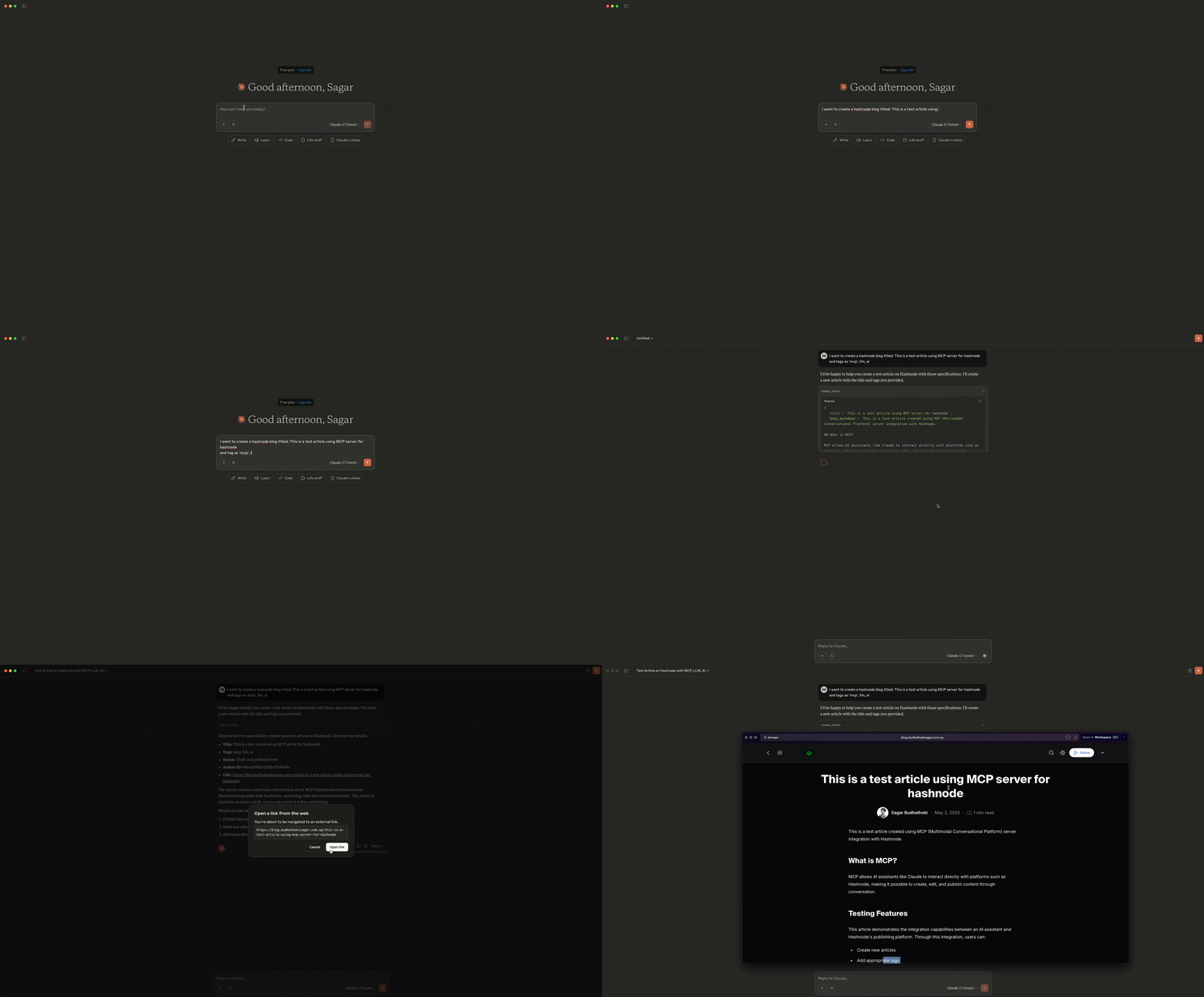
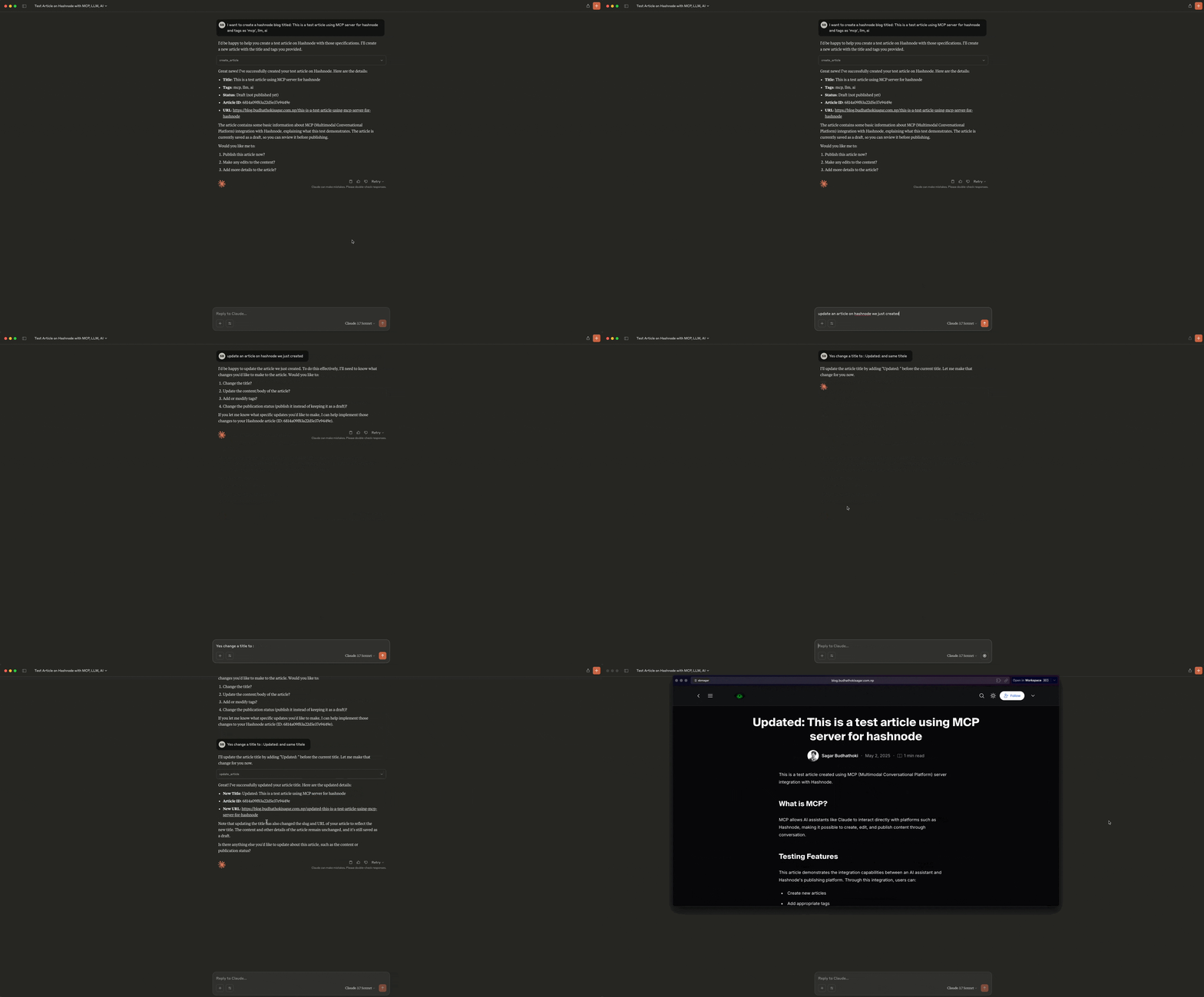
test_api_connection(): Test the connection to the Hashnode APIcreate_article(title, body_markdown, tags="", published=False): Create and publish a new article on Hashnodeupdate_article(article_id, title=None, body_markdown=None, tags=None, published=None): Update an existing article on Hashnodeget_latest_articles(hostname, limit=10): Get the latest articles from a Hashnode publication by hostnamesearch_articles(query, page=1): Search for articles on Hashnodeget_article_details(article_id): Get detailed information about a specific articleget_user_info(username): Get information about a Hashnode userOnce the server is running, you can use it with AI assistants that support the Model Context Protocol (MCP), such as Claude. The assistant will be able to use the tools provided by the server to interact with the Hashnode API.
The tools can be used to:
Navigate to the Cline MCP settings file:
%APPDATA%\Code\User\globalStorage\saoudrizwan.claude-dev\settings\cline_mcp_settings.json~/Library/Application Support/Code/User/globalStorage/saoudrizwan.claude-dev/settings\cline_mcp_settings.jsonUnfortunately, Claude Desktop is not available for Linux as of now (You can use Cline extension instead)Add your Hashnode MCP server configuration:
{
  "mcpServers": {
    "hashnode": {
      "command": "/path/to/your/venv/bin/python",
      "args": [
        "/path/to/your/hashnode-mcp-server/mcp_server.py"
      ],
      "env": {
        "HASHNODE_PERSONAL_ACCESS_TOKEN": "your-personal-access-token"
      }
    }
  }
}
Navigate to the configuration file:
%APPDATA%\Claude\claude_desktop_config.json~/Library/Application Support/Claude/claude_desktop_config.jsonAdd your Hashnode MCP server configuration using the same format as above.
If you encounter connection issues:
HASHNODE_PERSONAL_ACCESS_TOKEN: Your Hashnode personal access tokenHASHNODE_API_URL: The Hashnode GraphQL API URL (default: https://gql.hashnode.com)Contributions are welcome! Please feel free to submit a Pull Request.
git checkout -b feature/amazing-feature)git commit -m 'Add some amazing feature')git push origin feature/amazing-feature)This project is licensed under the MIT License - see the LICENSE file for details.
The source code for this project is available on GitHub: https://github.com/sbmagar13/hashnode-mcp-server
The project is organized with a clean, modular structure:
mcp_server.py: Root server implementation that can be run directlyhashnode_mcp/: Core package containing the modular functionality
mcp_server.py: Package version of the server implementationutils.py: Utility functions for formatting responses and GraphQL queriesrun_server.py: Entry point for running the server using the package versionThe server uses asynchronous programming with Python's asyncio and httpx libraries for efficient API communication. GraphQL queries and mutations are defined as constants, making them easy to maintain and update.
Planned future developments include:
Claim this server with your GitHub account to request manual ownership verification.
Link to the catalog listing for Hashnode MCP Server from your README. This badge does not certify ownership, compatibility or security.
[](https://awesome-mcp.com/servers/hashnode-mcp-server)Public repository statistics could not be verified. Check the configured source address; unavailable counts are not zero.
来源、范围和时段分别列出;不相加,不代表安装人数、活跃用户或安全审核。
尚无已审核的包 / 镜像标识,暂不展示下载统计。
Alternative and complementary servers in the same category
A Rust CAD application with an MCP server for creating, inspecting and rendering drawings, either headlessly or through a connection to the desktop app.

Liquid Composer is a browser-based Liquid Glass icon design tool that offers a local MCP server for agent-driven icon workflows.

agent-media makes short drama series and other short vertical videos from Claude, ChatGPT or Codex through one MCP connection, with OAuth sign-in and no API keys.