
A Rust CAD application with an MCP server for creating, inspecting and rendering drawings, either headlessly or through a connection to the desktop app.
8K
Media & Design
ComfyUI MCP 图像生成服务 is cataloged as an MCP server attributed to zjf2671. 一个基于 MCP 协议的服务器,调用本地 ComfyUI 实例生成图像,并支持动态替换工作流中的提示词与尺寸参数。 It is categorized under media design. See the capability inspector for recorded interfaces and their independent review status; consult upstream documentation for the current interface.
Installation configuration is not reviewed. No executable setup is offered for this entry; inspect the source repository before proceeding.
Catalog license label: MIT. Check the source repository's current license and terms before using, modifying or distributing this software.
能力定义尚未审核。未核验的采集内容不会作为可信接口展示。
暂无可展示的已审核记录。这不表示上游不支持此能力。
暂无可展示的已审核记录。这不表示上游不支持此能力。
暂无可展示的已审核记录。这不表示上游不支持此能力。
Email delivery is not connected. This page does not collect email addresses or create subscriptions.
Browse the registry for current listings instead.
Reviews for ComfyUI MCP 图像生成服务 are not available yet
Review publishing and storage are not connected. This page does not collect or publish ratings or comments, including after sign-in.
将导出的 API 格式工作流 JSON 文件放入 workflows 目录,然后重启服务即可自动加载新工作流。
默认工作流为 t2image_bizyair_flux,图片尺寸默认为 1024x1024。
README.md · b3a4349467a3 · 采集于 2026-11-13 12:29:31 UTC
保留上游原文,不做 AI 改写。为安全起见过滤脚本、表单和不安全链接。
当前显示最后一次成功采集的文档快照,请以来源页面为准。




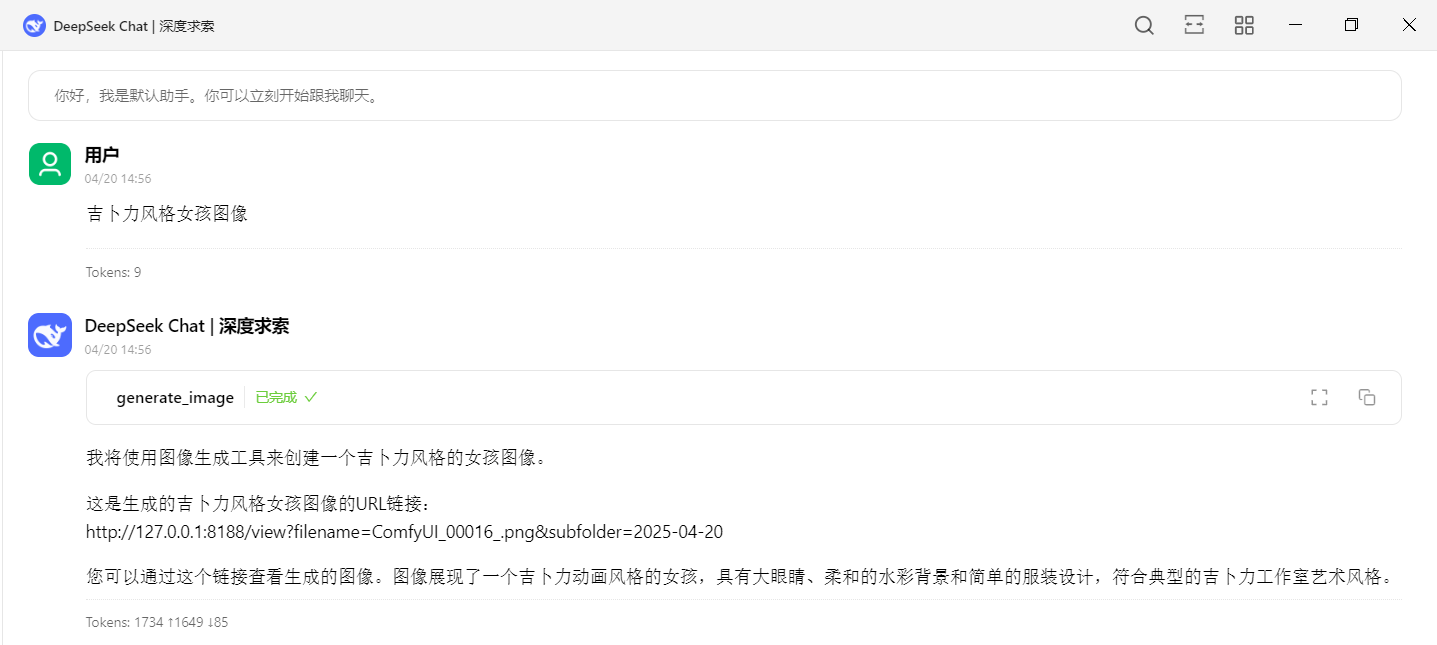
这是一个基于Model Context Protocol (MCP)的ComfyUI图像生成服务,通过API调用本地ComfyUI实例生成图片。

Cherry Studio中使用效果
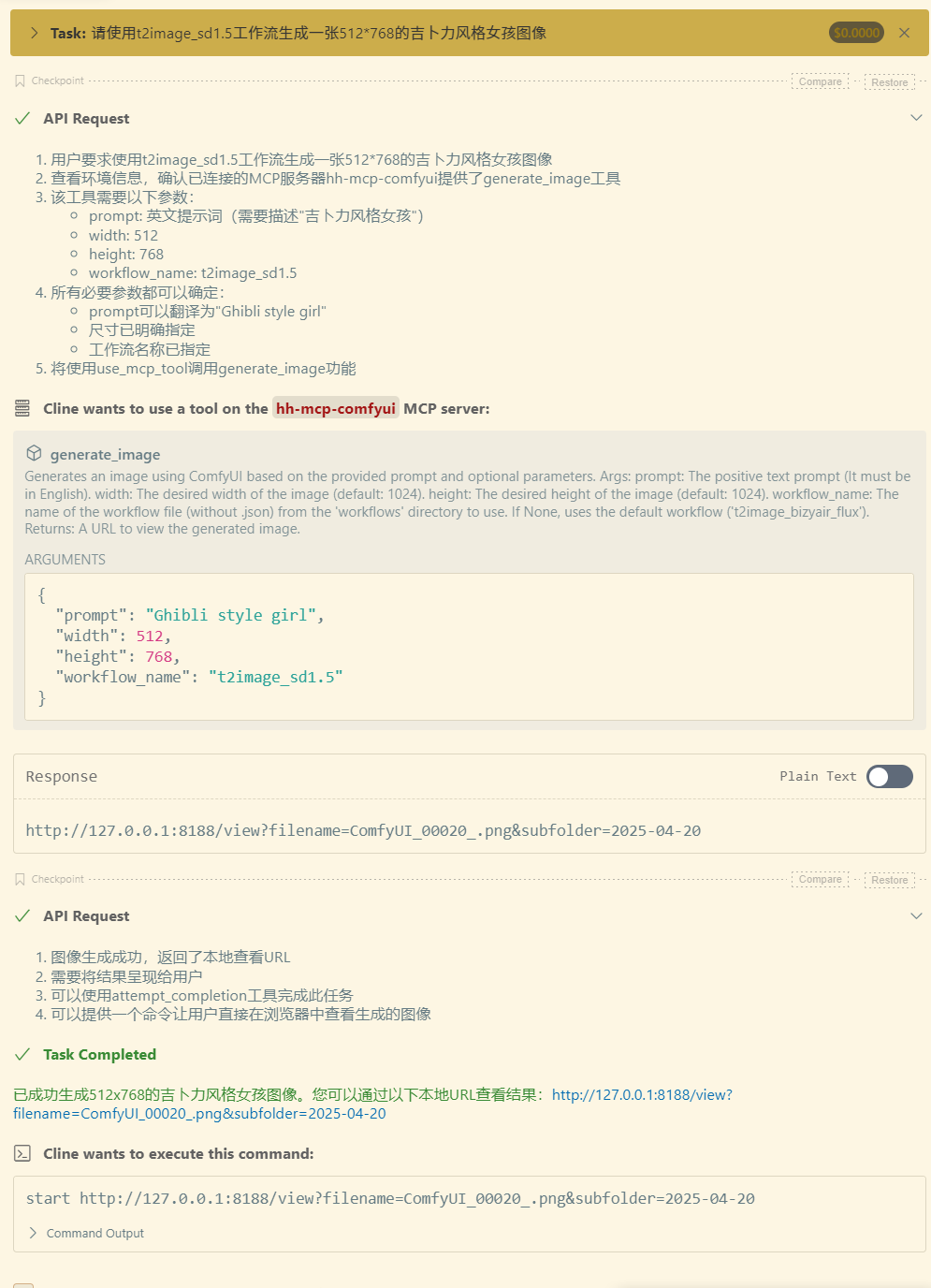
Cline中使用效果

1. 确保已安装Python 3.12+
2. 使用uv管理Python环境:
# On macOS and Linux.
$ curl -LsSf https://astral.sh/uv/install.sh | sh

# On Windows.
$ powershell -ExecutionPolicy ByPass -c "irm https://astral.sh/uv/install.ps1 | iex"

# 更新uv(非必要操作):
$ uv self update
$ uvx hh-mcp-comfyui

INFO:hh_mcp_comfyui.server:Scanning for workflows in: C:\Users\tianw\AppData\Local\uv\cache\archive-v0\dp4MTo0f1qL0DdYF_BYCL\Lib\site-packages\hh_mcp_comfyui\workflows
INFO:hh_mcp_comfyui.server:Starting ComfyUI MCP Server...
$ pip install hh_mcp_comfyui

$ python -m hh_mcp_comfyui

INFO:hh_mcp_comfyui.server:Scanning for workflows in: F:\Python\Python313\Lib\site-packages\hh_mcp_comfyui\workflows
INFO:hh_mcp_comfyui.server:Starting ComfyUI MCP Server...
出现上面的信息表示服务启动成功
必须确保本地ComfyUI实例正在运行(默认地址: http://127.0.0.1:8188) ComfyUI安装地址
{
  "mcpServers": {
    "hh-mcp-comfyui": {
      "command": "uvx",
      "args": [
        "hh-mcp-comfyui@latest"
      ],
      "env": {
        "COMFYUI_API_BASE": "http://127.0.0.1:8188",
        "COMFYUI_WORKFLOWS_DIR": "/path/hh-mcp-comfyui/workflows"
      }
    }
  }
}
需要先执行命令窗口先执行:pip install hh_mcp_comfyui
{
  "mcpServers": {
    "hh-mcp-comfyui": {
      "command": "python",
      "args": [
        "-m",
        "hh_mcp_comfyui"
      ],
      "env": {
        "COMFYUI_API_BASE": "http://127.0.0.1:8188",
        "COMFYUI_WORKFLOWS_DIR": "/path/hh-mcp-comfyui/workflows"
      }
    }
  }
}
前提是已安装docker
{
  "mcpServers": {
    "hh-mcp-comfyui": {
      "command": "docker",
      "args": [
          "run",
          "--net=host",
          "-v",
          "/path/hh-mcp-comfyui/workflows:/app/workflows",
          "-i",
          "--rm",
          "zjf2671/hh-mcp-comfyui:latest"
      ],
      "env": {
        "COMFYUI_API_BASE": "http://127.0.0.1:8188"
      }
    }
  }
}
(注意:使用下面uvx或pip方式找到你的安装工作流目录的位置把样例工作流添加进去,然后重启你的MCP服务)
uvx
$ uvx hh-mcp-comfyui

pip
#首先安装依赖
$ pip install hh_mcp_comfyui
$ python -m hh_mcp_comfyui

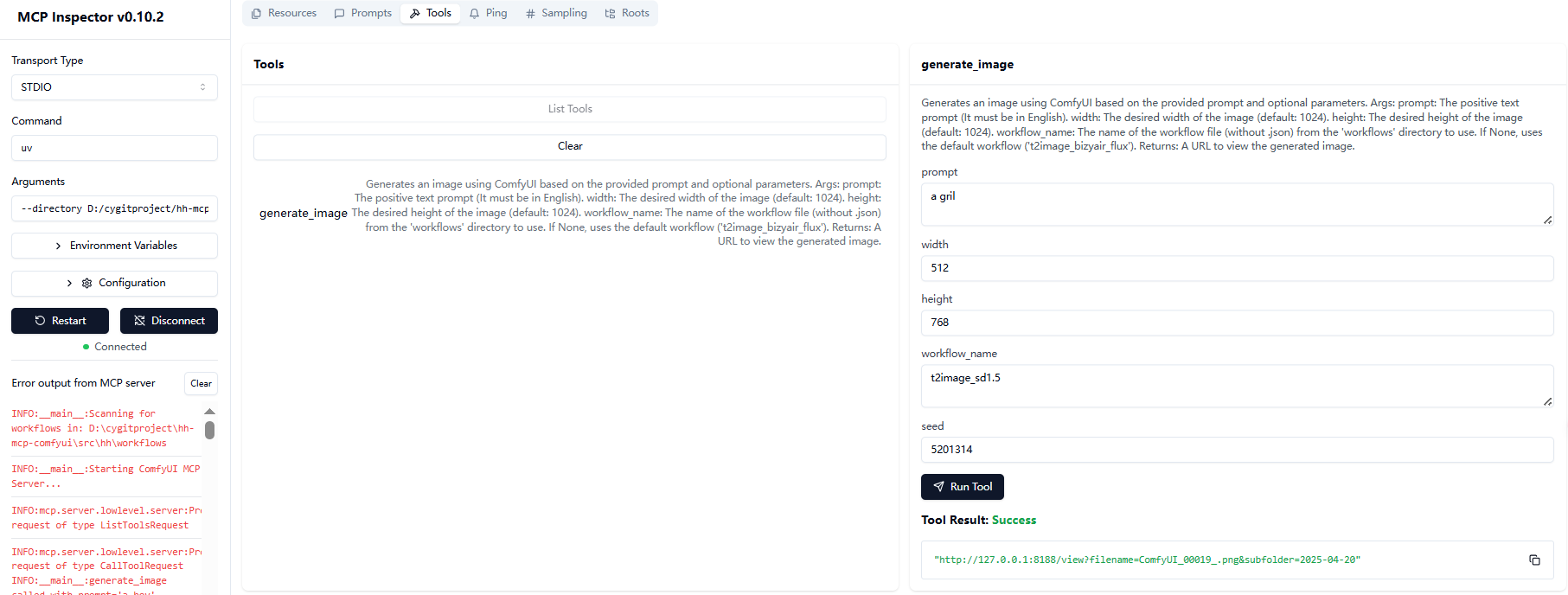
使用MCP Inspector测试服务端工具
$ npx @modelcontextprotocol/inspector uvx hh-mcp-comfyui
$ pip install hh_mcp_comfyui
$ npx @modelcontextprotocol/inspector python -m hh_mcp_comfyui
$ npx @modelcontextprotocol/inspector docker run --net=host -i --rm zjf2671/hh-mcp-comfyui
然后点击连接如图即可调试:
t2image_bizyair_flux/path/hh_mcp_comfyui/workflows目录中将工作流JSON文件放入/path/hh_mcp_comfyui/workflows目录中
如果是uvx和pip启动方式请看上面 《样例工作流copy到指定工作流目录》 的使用方式
重启服务自动加载新工作流
.
├── .gitignore
├── .python-version
├── pyproject.toml
├── README.md
├── uv.lock
├── example/              # 示例工作流目录
│   └── workflows/
│       ├── i2image_bizyair_sdxl.json
│       ├── t2image_bizyair_flux.json
│       ├── i2image_cogview4.json
│       └── t2image_sd1.5.json
├── src/                  # 源代码目录
│   └── hh_mcp_comfyui/
│       ├── comfyui_client.py    # ComfyUI客户端实现
│       ├── server.py            # MCP服务主文件
│       └── workflows/           # 工作流文件目录
# Clone the repository.
$ git clone https://github.com/zjf2671/hh-mcp-comfyui.git

$ cd hh-mcp-comfyui

# Initialized venv
$ uv venv

# Activate the virtual environment.
$ .venv\Scripts\activate

# Install dependencies.
$ uv lock
Resolved 30 packages in 1ms

# sync dependencies.
$ uv sync
Resolved 30 packages in 2.54s
Audited 29 package in 0.02ms
$ uv --directory 你本地安装目录/hh-mcp-comfyui run hh-mcp-comfyui

INFO:__main__:Scanning for workflows in: D:\cygitproject\hh-mcp-comfyui\src\hh_mcp_comfyui\workflows
INFO:__main__:Registered resource: workflow://t2image_bizyair_flux -> t2image_bizyair_flux.json
INFO:__main__:Starting ComfyUI MCP Server...
$ npx @modelcontextprotocol/inspector uv --directory 你本地安装目录/hh-mcp-comfyui run hh-mcp-comfyui
{
  "mcpServers": {
    "hh-mcp-comfyui": {
      "command": "uv",
      "args": [
        "--directory",
        "项目绝对路径(例如:D:/hh-mcp-comfyui)",
        "run",
        "hh-mcp-comfyui"
      ],
      "env": {
        "COMFYUI_API_BASE": "http://127.0.0.1:8188",
        "COMFYUI_WORKFLOWS_DIR": "/path/hh-mcp-comfyui/workflows"
      }
    }
  }
}
git checkout -b feature/AmazingFeature)git commit -m 'Add some AmazingFeature')git push origin feature/AmazingFeature) 👆 扫码关注,发现更多好玩的!
Claim this server with your GitHub account to request manual ownership verification.
Link to the catalog listing for ComfyUI MCP 图像生成服务 from your README. This badge does not certify ownership, compatibility or security.
[](https://awesome-mcp.com/servers/hh-mcp-comfyui)Public repository statistics could not be verified. Check the configured source address; unavailable counts are not zero.
来源、范围和时段分别列出;不相加,不代表安装人数、活跃用户或安全审核。
尚无已审核的包 / 镜像标识,暂不展示下载统计。
Alternative and complementary servers in the same category
A Rust CAD application with an MCP server for creating, inspecting and rendering drawings, either headlessly or through a connection to the desktop app.

Liquid Composer is a browser-based Liquid Glass icon design tool that offers a local MCP server for agent-driven icon workflows.

agent-media makes short drama series and other short vertical videos from Claude, ChatGPT or Codex through one MCP connection, with OAuth sign-in and no API keys.