
A directory listing describing a cancellation-letter and mailing-address service. The configured public GitHub repository returned 404 during source verification.
Repository stats unavailable
Developer Tools
An MCP server that connects to many MCP servers and exposes curated, task-specific toolsets so an AI sees only the tools it needs.
HyperTool MCP server for focused AI toolsets is cataloged as an MCP server attributed to toolprint. An MCP server that connects to many MCP servers and exposes curated, task-specific toolsets so an AI sees only the tools it needs. It is categorized under developer tools. See the capability inspector for recorded interfaces and their independent review status; consult upstream documentation for the current interface.
Installation configuration is not reviewed. No executable setup is offered for this entry; inspect the source repository before proceeding.
Catalog license label: MIT License. Check the source repository's current license and terms before using, modifying or distributing this software.
能力定义尚未审核。未核验的采集内容不会作为可信接口展示。
暂无可展示的已审核记录。这不表示上游不支持此能力。
暂无可展示的已审核记录。这不表示上游不支持此能力。
暂无可展示的已审核记录。这不表示上游不支持此能力。
Email delivery is not connected. This page does not collect email addresses or create subscriptions.
Browse the registry for current listings instead.
Reviews for HyperTool MCP server for focused AI toolsets are not available yet
Review publishing and storage are not connected. This page does not collect or publish ratings or comments, including after sign-in.
It lets you use unlimited MCP servers without hitting the 100-tool limit and dynamically switches between focused toolsets for better AI performance.
Everything is stored locally in ~/.toolprint/hypertool-mcp/, including personas, toolsets, and preferences; you can edit these files when HyperTool is not running.
HyperTool monitors health and automatically reconnects when servers come back, keeping toolsets intact.
README.md · 5a5175c61b35 · 采集于 2026-11-13 08:56:10 UTC
保留上游原文,不做 AI 改写。为安全起见过滤脚本、表单和不安全链接。
当前显示最后一次成功采集的文档快照,请以来源页面为准。







Connect unlimited MCP servers. Use 10, 50, or 500+ tools total - your AI only sees what it needs.
Build "git-essentials" with 5 tools instead of drowning in 47 Git commands. Switch contexts instantly.
Enhance tools with examples and context. Watch your AI pick the right tool 89% more often.
# In your project directory
cp .mcp.json .mcp.hypertool.json
Replace your .mcp.json with:
{
  "mcpServers": {
    "hypertool": {
      "command": "npx",
      "args": ["-y", "@toolprint/hypertool-mcp", "mcp", "run", "--mcp-config", ".mcp.hypertool.json"]
    }
  }
}
Restart your AI and try:
You: "Create a toolset called 'coding' with git and docker tools"
AI: "Created 'coding' toolset with 15 focused tools"

You: "Switch to coding toolset"
AI: "Equipped! I now have just the tools needed for development"
That's it! Your AI is now focused and effective. 🎉
💡 Want automated setup? Try our interactive setup command - see Advanced Guide for details.
📚 Configuration Mode: HyperTool uses a smart Configuration Mode to keep toolset management separate from your operational tools. Learn more in the Configuration Mode Guide.
Don't want to configure from scratch? Use personas - ready-to-use MCP server bundles with pre-built toolsets.
Think of personas as "app bundles" for your AI - they come with:
# 1. Clone the persona collection
git clone https://github.com/toolprint/awesome-mcp-personas

# 2. Add a persona (e.g., web-dev persona)
hypertool-mcp persona add awesome-mcp-personas/personas/web-dev

# 3. Run with the persona
npx -y @toolprint/hypertool-mcp mcp run --persona web-dev
That's it! No server configuration needed. The persona brings its own servers and toolsets.
📦 Browse all available personas: awesome-mcp-personas
| Persona | Included Servers | Best For |
|---|---|---|
| web-dev | Git, Docker, Filesystem, Browser, Testing | Full-stack web development |
| data-scientist | Python, Jupyter, Database, Filesystem, Plotting | Data analysis & ML workflows |
| devops | Docker, Kubernetes, AWS, Terraform, Monitoring | Infrastructure & deployment |
| content-creator | Notion, Slack, Grammar, SEO, Social | Writing & content management |
| researcher | Perplexity, Arxiv, Wikipedia, Filesystem | Research & knowledge work |
# Standard Mode (use your existing MCP servers):
npx -y @toolprint/hypertool-mcp mcp run --mcp-config .mcp.hypertool.json

# Persona Mode (bundled servers + pre-built toolsets):
npx -y @toolprint/hypertool-mcp mcp run --persona web-dev

# Persona Mode with specific toolset:
npx -y @toolprint/hypertool-mcp mcp run --persona web-dev --equip-toolset frontend
💡 Pro tip: Personas can be mixed with your existing servers! Add --mcp-config to include your custom servers alongside the persona's servers.
📚 Learn more: See the complete Personas Guide for detailed instructions, creating custom personas, and troubleshooting.
See exactly how much context each tool consumes. Optimize your toolsets with token estimates for every tool.
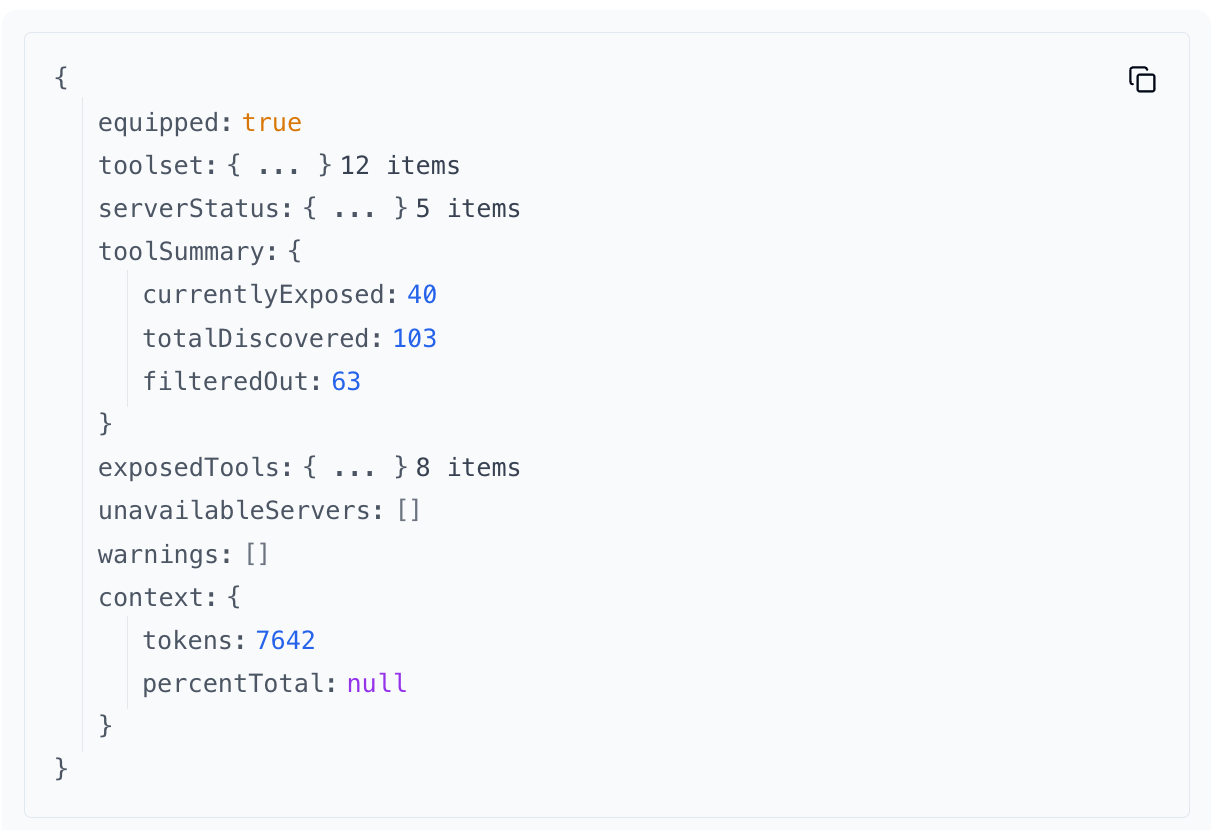
Active toolset showing token usage per tool
Why it matters:
How to use:
Ask your AI to use these MCP tools to see context information:
list-available-tools - Shows token estimates for all available toolsget-active-toolset - Shows token usage for your currently equipped toolsetEach tool displays estimated tokens and percentage of total context consumed. Perfect for building lean, efficient toolsets!
Targeted toolsets across any number of MCPs. Swap to the best toolset for a goal with a tool call. Dynamic tool registration.
Before: Tool Chaos 😵
┌─────────────┐   ┌─────────────────────────────┐
│ Claude/     │──▶│ 50+ tools from 8 servers   │
│ Cursor      │   │ ❌ Wrong picks             │
│             │   │ ❌ Slow decisions          │
│             │   │ ❌ Confused context        │
└─────────────┘   └─────────────────────────────┘

After: Expert Mode 🎯
┌─────────────┐   ┌──────────────┐   ┌─────────────────┐
│ Claude/     │──▶│ HyperTool    │──▶│ ALL Your Tools  │
│ Cursor      │   │ (Local)      │   │ (Same servers)  │
└─────────────┘   └──────────────┘   └─────────────────┘
                         │
                         ▼
                  ┌─────────────────┐
                  │ Smart Toolsets  │
                  │ 🔨 coding (5)   │ ← "I'm coding now"
                  │ 📝 writing (3)  │ ← "I'm writing now"
                  │ 📊 analysis (4) │ ← "I'm analyzing now"
                  └─────────────────┘
                  ✅ Expert picks every time
Just like Spotify playlists organize your music, toolsets organize your AI tools:
ALL YOUR TOOLS (64 total)              YOUR TOOLSETS
┌────────────────────────────┐         ┌──────────────────┐
│ 🐳 Docker (19 tools)       │         │ 🔨 "coding"      │
│  • build_image             │   ┌───▶ │  • git.status    │
│  • create_container        │   │     │  • git.commit    │
│  • run_container           │   │     │  • docker.build  │
│  • stop_container          │   │     │  • docker.run    │
│  • [... 15 more]           │   │     │  • github.pr     │
├────────────────────────────┤   │     └──────────────────┘
│ 🔀 Git (12 tools)          │───┤
│  • status                  │   │     ┌──────────────────┐
│  • commit                  │   │     │ 📝 "writing"     │
│  • push                    │   └───▶ │  • notion.create │
│  • [... 9 more]            │         │  • slack.send    │
├────────────────────────────┤         │  • grammarly.fix │
│ 📝 Notion (8 tools)        │─────┐   └──────────────────┘
│ 💬 Slack (6 tools)         │     │
│ 📊 Linear (10 tools)       │     │   ┌──────────────────┐
│ 🧪 Testing (9 tools)       │     └─▶ │ 🐛 "debugging"   │
└────────────────────────────┘         │  • logs.search   │
                                       │  • docker.logs   │
AI sees ALL 64 tools = confused 😵     │  • traces.view   │
                                       └──────────────────┘

                                       AI sees 3-5 tools = focused 🎯
Create focused toolsets for different workflows:
"deep-coding": git + docker + filesystem (12 tools)
→ Everything you need for feature development

"code-review": git + github + linear (10 tools)
→ Review PRs, update tickets, merge with confidence

"debugging": logs + docker + traces + alerts (8 tools)
→ Find and fix issues fast
"writing": notion + grammarly + slack (6 tools)
→ Blog posts, docs, and team updates

"research": perplexity + notion + filesystem (7 tools)
→ Deep dives with organized notes
You: "I need to debug our API"
AI: "I'll switch to the debugging toolset for better focus"
[Now has: logs, traces, curl, docker]

You: "Actually, let's write the incident report"
AI: "Switching to writing toolset"
[Now has: notion, slack, templates]
💡 Pro tip: Start with 3-5 tools per toolset. Your AI will thank you!
Explore everything HyperTool can do:
| Feature | Description | Guide |
|---|---|---|
| 🎭 Personas | Pre-configured MCP server bundles with curated toolsets. Get started instantly with ready-to-use workflows for web-dev, data science, DevOps, and more. | Personas Guide |
| 📁 Server Groups | Organize MCP servers into logical groups. Launch related servers together, switch between projects, and maintain focused contexts. | Advanced Guide |
| 📊 Context Measurement | See token estimates for every tool. Optimize your toolsets by understanding exactly how much context each tool consumes. | Context Measurement |
| 🔧 Configuration Mode | Smart separation of toolset management from operational tools. Keep your AI focused on work, not configuration. | Configuration Mode Guide |
| 🎯 Dynamic Toolsets | Build, modify, and switch between toolsets on the fly. Adapt your AI's capabilities to match your current task. | Examples & Recipes |
| 🧠 Tool Annotations | Enhance tools with custom descriptions, examples, and context. Improve your AI's tool selection accuracy by 89%. | Advanced Guide |
| 🚀 HTTP Mode | Run HyperTool as a long-lived HTTP server for persistent connections and faster response times. | Advanced Guide |
| 🔌 Unlimited Servers | Connect as many MCP servers as you need. Break free from the 100-tool limit without sacrificing performance. | Quick Start |
Q: How is this different from just using MCP servers directly? A: HyperTool lets you use unlimited MCP servers without hitting the 100-tool limit, and dynamically switches between focused toolsets for better AI performance.
Q: What's the difference between Personas and Standard Mode? A: Standard Mode uses your existing MCP server configurations. Personas are pre-packaged bundles that include both MCP servers AND curated toolsets - perfect for getting started quickly or trying new workflows.
Q: Can I use multiple toolsets at once?
A: In stdio mode (default), use --equip-toolset <name> when launching. HTTP mode supports one active toolset but you can switch anytime.
Q: Where are my toolsets and configurations stored?
A: Everything is stored locally in ~/.toolprint/hypertool-mcp/:
~/.toolprint/hypertool-mcp/personas/~/.toolprint/hypertool-mcp/toolsets/~/.toolprint/hypertool-mcp/config/
You can directly edit these files when HyperTool is not running.Q: Does this work with Claude Desktop / Cursor / Claude Code? A: Yes! Cursor has full hot-swapping support. Claude Desktop works with restart. Claude Code hot-swap coming soon.
Q: What if an MCP server goes down? A: HyperTool monitors health and automatically reconnects when servers come back. Your toolsets stay intact.
Q: Can I share toolsets with my team? A: Import/export is coming soon! For now, you can copy and share toolset files - they'll work if your team has the same MCP servers configured.
Q: How accurate are the token estimates in context measurement? A: The estimates use BPE-based approximation for consistent relative comparisons between tools. They're perfect for understanding which tools consume more context, but not exact counts since different LLMs use different tokenizers.
Q: Does context measurement slow down my toolsets? A: No! Token counts are cached and add less than 10ms overhead. You won't notice any performance impact.
Q: How do I add tools from a new MCP server?
A: Just add the server to your .mcp.hypertool.json config. It's automatically available for toolsets.
Q: Can I use this in production? A: Yes! For enterprise support, contact us.
Works with ANY MCP-compatible app! HyperTool is a standard MCP server, so if your app supports MCP, it supports HyperTool.
| App | Status | How to Switch Toolsets |
|---|---|---|
| Cursor/VSCode | ✅ Full support | Switch toolsets instantly - no restart needed! |
| Claude Code | ⏳ Coming soon | Use --equip-toolset <name> flag (track progress) |
| Claude Desktop | ⏳ In progress | Restart app after switching toolsets |
📚 Learn More
# Clone and install
git clone https://github.com/toolprint/hypertool-mcp.git
cd hypertool-mcp
just setup-dev  # Installs dependencies and pre-commit hooks
This project uses pre-commit hooks to ensure code quality:
# Install pre-commit hooks (included in setup-dev)
just setup-pre-commit

# Run hooks manually
just pre-commit-check        # On staged files
just pre-commit-check-all    # On all files

# Skip hooks for emergency commits (use sparingly)
SKIP=eslint,typescript git commit -m "emergency fix"
just build          # Build the project
just test           # Run tests
just lint           # Run linting
just format         # Format code
just typecheck      # Check types
just pre-publish-checks  # Run all quality checks
The hypertool-mcp service subcommand is currently disabled and will exit with a
notification when invoked.
Found a bug? Have an idea? We'd love your help!
MIT License - see LICENSE file for details.
Built by developers who got tired of watching AI pick the wrong tools 🎯

Built with ❤️ by Toolprint
© 2025 OneGrep, Inc.
Claim this server with your GitHub account to request manual ownership verification.
Link to the catalog listing for HyperTool MCP server for focused AI toolsets from your README. This badge does not certify ownership, compatibility or security.
[](https://awesome-mcp.com/servers/hypertool)Public repository statistics could not be verified. Check the configured source address; unavailable counts are not zero.
来源、范围和时段分别列出;不相加,不代表安装人数、活跃用户或安全审核。
尚无已审核的包 / 镜像标识,暂不展示下载统计。
Alternative and complementary servers in the same category
A directory listing describing a cancellation-letter and mailing-address service. The configured public GitHub repository returned 404 during source verification.

A hosted MCP service for browsing and searching through Singapore mobile-network proxies.

A directory listing describing a Markdown-to-PDF service. The configured public GitHub repository returned 404 during source verification.