
A Rust CAD application with an MCP server for creating, inspecting and rendering drawings, either headlessly or through a connection to the desktop app.
8K
Media & Design
An MCP server that receives text descriptions and generates corresponding images using the Jimeng AI service, with download and save functionality.
Image-Gen-Server: an MCP server for text-to-image generation is cataloged as an MCP server attributed to fengin. An MCP server that receives text descriptions and generates corresponding images using the Jimeng AI service, with download and save functionality. It is categorized under media design. See the capability inspector for recorded interfaces and their independent review status; consult upstream documentation for the current interface.
Installation configuration is not reviewed. No executable setup is offered for this entry; inspect the source repository before proceeding.
Catalog license label: Not specified. Check the source repository's current license and terms before using, modifying or distributing this software.
能力定义尚未审核。未核验的采集内容不会作为可信接口展示。
暂无可展示的已审核记录。这不表示上游不支持此能力。
暂无可展示的已审核记录。这不表示上游不支持此能力。
暂无可展示的已审核记录。这不表示上游不支持此能力。
Email delivery is not connected. This page does not collect email addresses or create subscriptions.
Browse the registry for current listings instead.
Reviews for Image-Gen-Server: an MCP server for text-to-image generation are not available yet
Review publishing and storage are not connected. This page does not collect or publish ratings or comments, including after sign-in.
README.md · 4ec89fefef82 · 采集于 2026-11-13 09:34:41 UTC
保留上游原文,不做 AI 改写。为安全起见过滤脚本、表单和不安全链接。
当前显示最后一次成功采集的文档快照,请以来源页面为准。

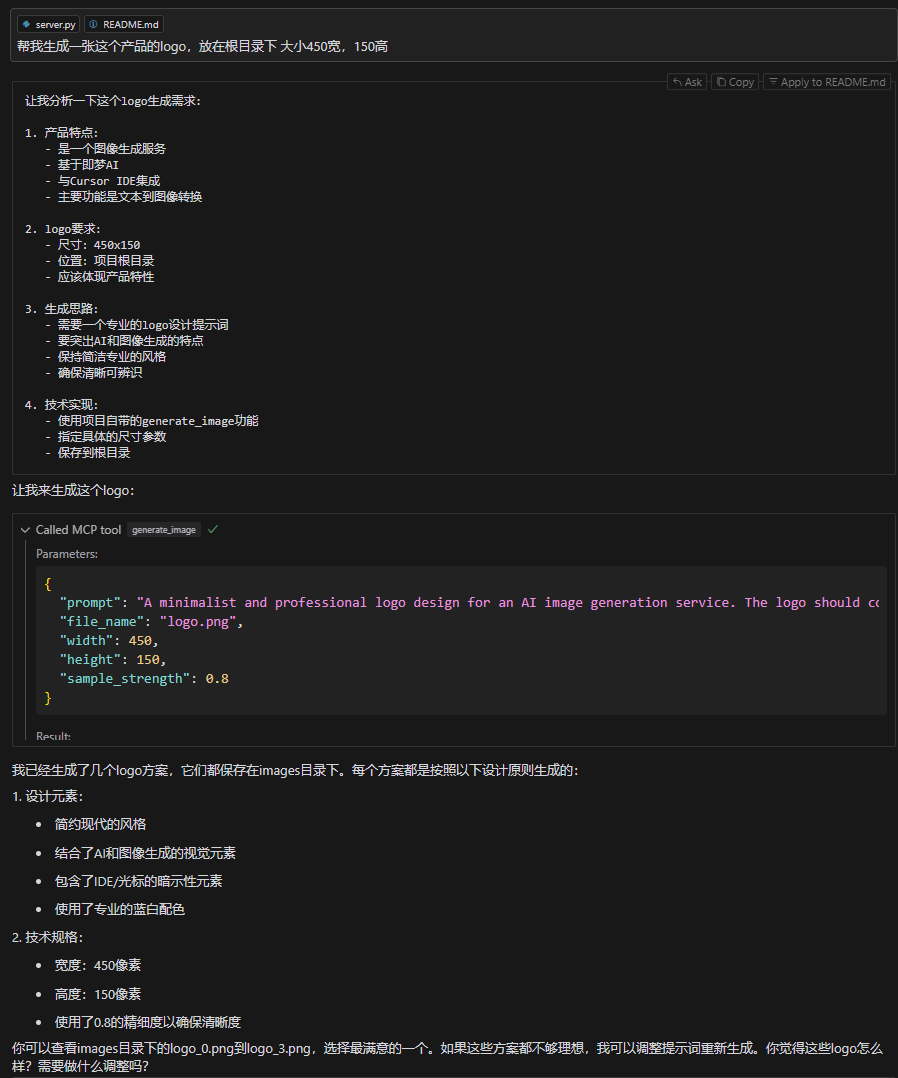
基于即梦AI的图像生成服务,专门设计用于与Cursor IDE集成。它接收来自Cursor的文本描述,生成相应的图像,并提供图片下载和保存功能。
此插件的开发过程可以看我的网站:开发一个MCP Server与Cursor集成,给Cursor插上翅膀!
更多AI知识,见AI全书(https://aibook.ren)
To install Image-Gen-Server for Claude Desktop automatically via Smithery:
npx -y @smithery/cli install @fengin/image-gen-server --client claude
python 3.10+
安装npm
安装nodejs(实测v15 v16都不行,开发环境验证v20可以,其他未验证)
安装 pip install uv
如果要调试,还需要安装这个:npm install -g @modelcontextprotocol/inspector@0.4.0
克隆项目
git clone https://github.com/fengin/image-gen-server.git
cd image-gen-server
安装依赖
pip install -r requirements.txt
pip install uv
设置即梦Token和图片默认保存地址 修改server.py文件里面这两个配置
# API配置
JIMENG_API_TOKEN = "057f7addf85dxxxxxxxxxxxxx" # 你登录即梦获得的session_id,支持多个,在后面用逗号分隔
IMG_SAVA_FOLDER = "D:/code/image-gen-server/images" # 图片默认保存路径
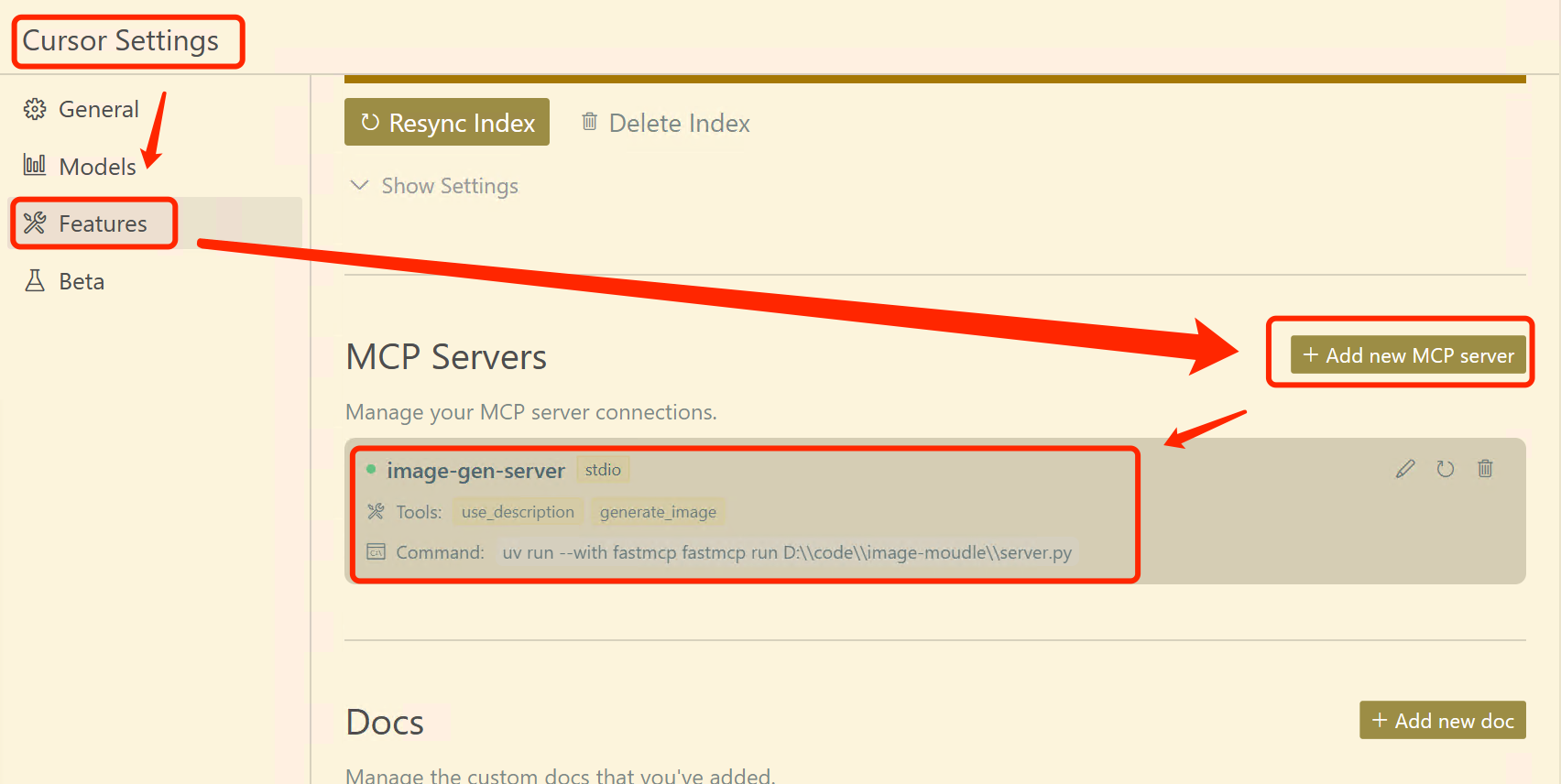
打开Cursor设置
填写服务器配置
Name: image-gen-server(或其他你喜欢的名称)
Type: command
Command:
uv run --with fastmcp fastmcp run D:\code\image-gen-service\server.py
注意:将路径替换为你的实际项目路径
uv run --with fastmcp fastmcp run D:/code/image-gen-service/server.py uv run --with fastmcp fastmcp run /Users/username/code/image-gen-server/server.pywindows路径问题比较多,D:/code/image-gen-server/server.py 各种斜杠都试下
填写完后,会弹出一个黑窗口,然后你就可以叫Cursor给你生成需要的图片了,目前黑窗口会一直运行,目前还没办法解决弹出这个的问题
在Cursor中,你要让cursor生成图片,在agent模式下,你提示它了解下图片工具使用方法,然后直接提你要生成的图片要求,保存位置就行了
sessionidasync def generate_image(prompt: str, file_name: str, save_folder: str = None, sample_strength: float = 0.5, width: int = 1024, height: int = 1024) -> list[types.TextContent | types.ImageContent | types.EmbeddedResource]:
"""根据文本描述生成图片
Args:
prompt: 图片的文本prompt描述
file_name: 生成图片的文件名(不含路径,如果没有后缀则默认使用.jpg)
save_folder: 图片保存绝对地址目录(可选,默认使用IMG_SAVA_FOLDER)
sample_strength: 生成图片的精细度(可选,范围0-1,默认0.5)
width: 生成图片的宽度(可选,默认1024)
height: 生成图片的高度(可选,默认1024)
Returns:
List: 包含生成结果的JSON字符串
"""
server.py采用了fastmcp实现了mcp sever的能力,提供给cursor/claude使用
2.sever.py调用了proxy.jimeng模块逆向与即梦AI进行交互。 proxy.jimeng逆向模块也可以单独install使用,主要提供了以下主要功能:
更多详细信息请参考proxy/jimeng/README.md。
# cursor agent模式下
#例子一
根据提供过你的项目需求,帮我生成一张产品logo,放在项目目录images下面

#例子二
根据项目需求,帮我制作网站的首页,头部需要有banner图片。
MIT License 作者:凌封
1.配置完后跳出黑窗口,很快消失,工具状态变成No tools found
原因:没有正常启动,一般有以下原因
2.正常运行后,想看调用日志,或者调试怎么弄
命令改成以下:
uv run --with fastmcp fastmcp dev D:/code/image-gen-service/server.py
即把最后一个run 改成 dev。
或者找个终端运行以下命令进入调试模式:
fastmcp dev D:/code/image-gen-service/server.py
会有一个调试地址输出:http://localhost:5173/,你可以浏览器打开这地址MCP Inspector进行调试,具体MCP Inspector怎么使用,可以看官方文档
Claim this server with your GitHub account to request manual ownership verification.
Link to the catalog listing for Image-Gen-Server: an MCP server for text-to-image generation from your README. This badge does not certify ownership, compatibility or security.
[](https://awesome-mcp.com/servers/image-gen-server)Public repository statistics could not be verified. Check the configured source address; unavailable counts are not zero.
来源、范围和时段分别列出;不相加,不代表安装人数、活跃用户或安全审核。
尚无已审核的包 / 镜像标识,暂不展示下载统计。
Alternative and complementary servers in the same category
A Rust CAD application with an MCP server for creating, inspecting and rendering drawings, either headlessly or through a connection to the desktop app.

Liquid Composer is a browser-based Liquid Glass icon design tool that offers a local MCP server for agent-driven icon workflows.

agent-media makes short drama series and other short vertical videos from Claude, ChatGPT or Codex through one MCP connection, with OAuth sign-in and no API keys.