

A Rust CAD application with an MCP server for creating, inspecting and rendering drawings, either headlessly or through a connection to the desktop app.
8K
Media & Design
An MCP server for AI image generation supporting OpenAI GPT-Image-1, Google Imagen 4, Flux 1.1, Qwen Image, SeedDream-4, and Nano Banana (Gemini 2.5 Flash Image).
ImageGen MCP Server is cataloged as an MCP server attributed to writingmate. An MCP server for AI image generation supporting OpenAI GPT-Image-1, Google Imagen 4, Flux 1.1, Qwen Image, SeedDream-4, and Nano Banana (Gemini 2.5 Flash Image). It is categorized under media design. See the capability inspector for recorded interfaces and their independent review status; consult upstream documentation for the current interface.
Installation configuration is not reviewed. No executable setup is offered for this entry; inspect the source repository before proceeding.
Catalog license label: MIT License. Check the source repository's current license and terms before using, modifying or distributing this software.
能力定义尚未审核。未核验的采集内容不会作为可信接口展示。
暂无可展示的已审核记录。这不表示上游不支持此能力。
暂无可展示的已审核记录。这不表示上游不支持此能力。
暂无可展示的已审核记录。这不表示上游不支持此能力。
Email delivery is not connected. This page does not collect email addresses or create subscriptions.
Browse the registry for current listings instead.
Reviews for ImageGen MCP Server are not available yet
Review publishing and storage are not connected. This page does not collect or publish ratings or comments, including after sign-in.
It supports OpenAI (GPT-Image-1, DALL-E), Google (Imagen 4 and Gemini 2.5 Flash Image/Nano Banana), and Replicate models (Flux 1.1 Pro, Qwen Image, SeedDream-4).
Images can be produced as PNG, JPEG, or WebP, and can be returned as base64 or saved to disk.
Yes, running it yourself requires at least one of OPENAI_API_KEY, GOOGLE_API_KEY, or REPLICATE_API_TOKEN, though WritingMate.ai is described as pre-configured.
README.md · 110d3a579d0a · 采集于 2026-11-13 09:09:41 UTC
保留上游原文,不做 AI 改写。为安全起见过滤脚本、表单和不安全链接。
当前显示最后一次成功采集的文档快照,请以来源页面为准。
A powerful MCP server for AI image generation with OpenAI GPT-Image-1, Google Imagen 4, Flux 1.1, Qwen Image, SeedDream-4, and Nano Banana (Gemini 2.5 Flash Image) support



GPT-Image-1 MCP • Nano Banana MCP • Google Imagen 4 MCP • Flux 1.1 MCP
npx imagegen-mcp-server

# Install and run in one command
npx imagegen-mcp-server
Then in your MCP client:
"Generate an image of a cyberpunk city using Flux 1.1"
✅ Result: High-quality image saved to outputs/ directory
An MCP (Model Context Protocol) server for AI image generation supporting:
Same prompt: "A serene mountain landscape with a crystal clear lake reflecting snow-capped peaks, golden hour lighting, highly detailed"
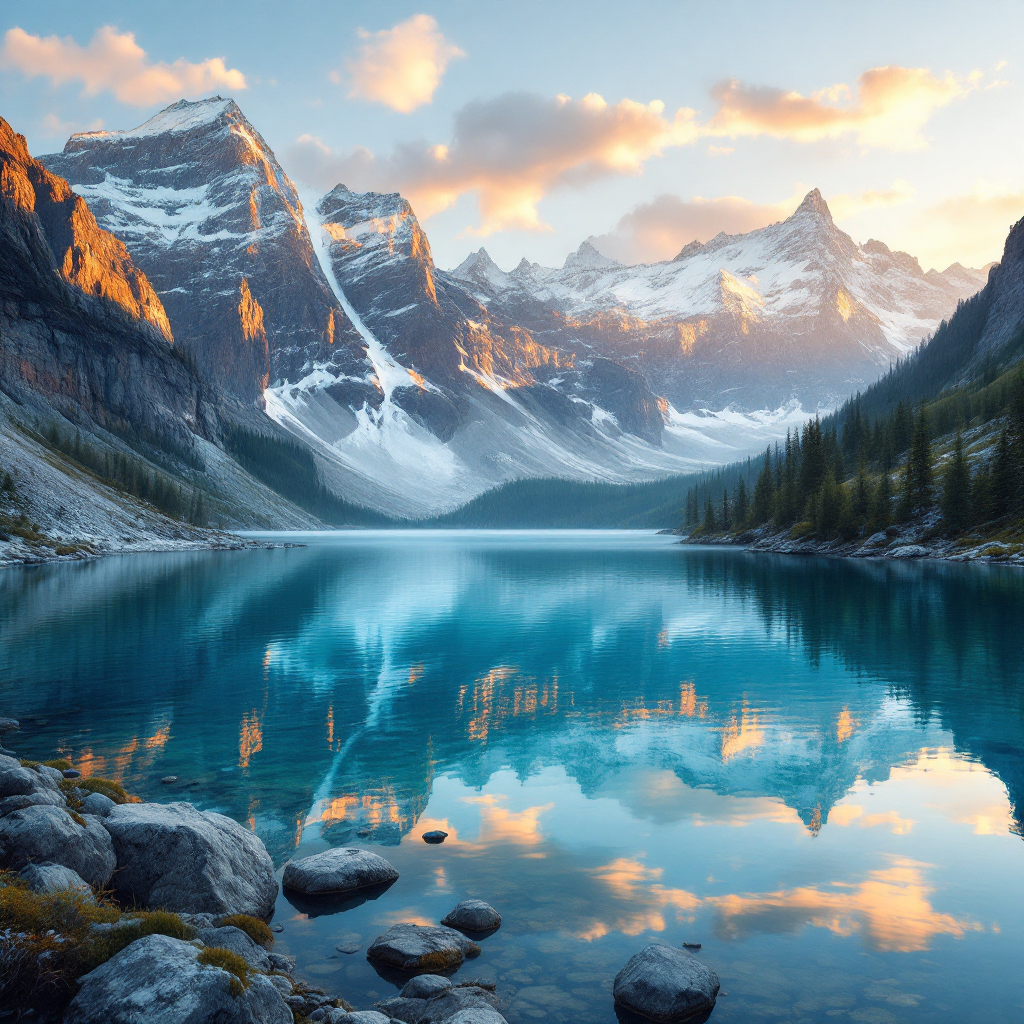
Flux 1.1 Pro MCP |
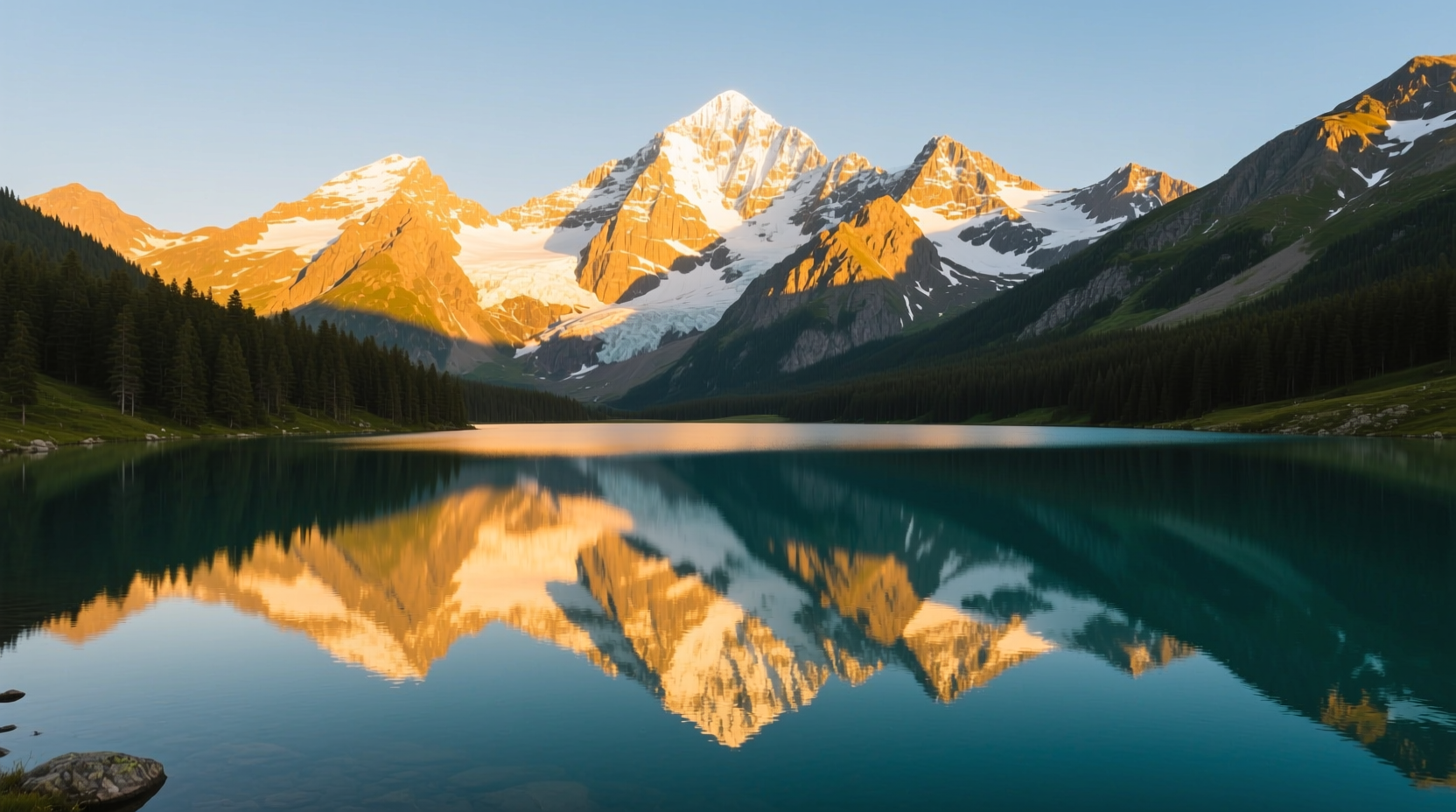
Qwen Image MCP |
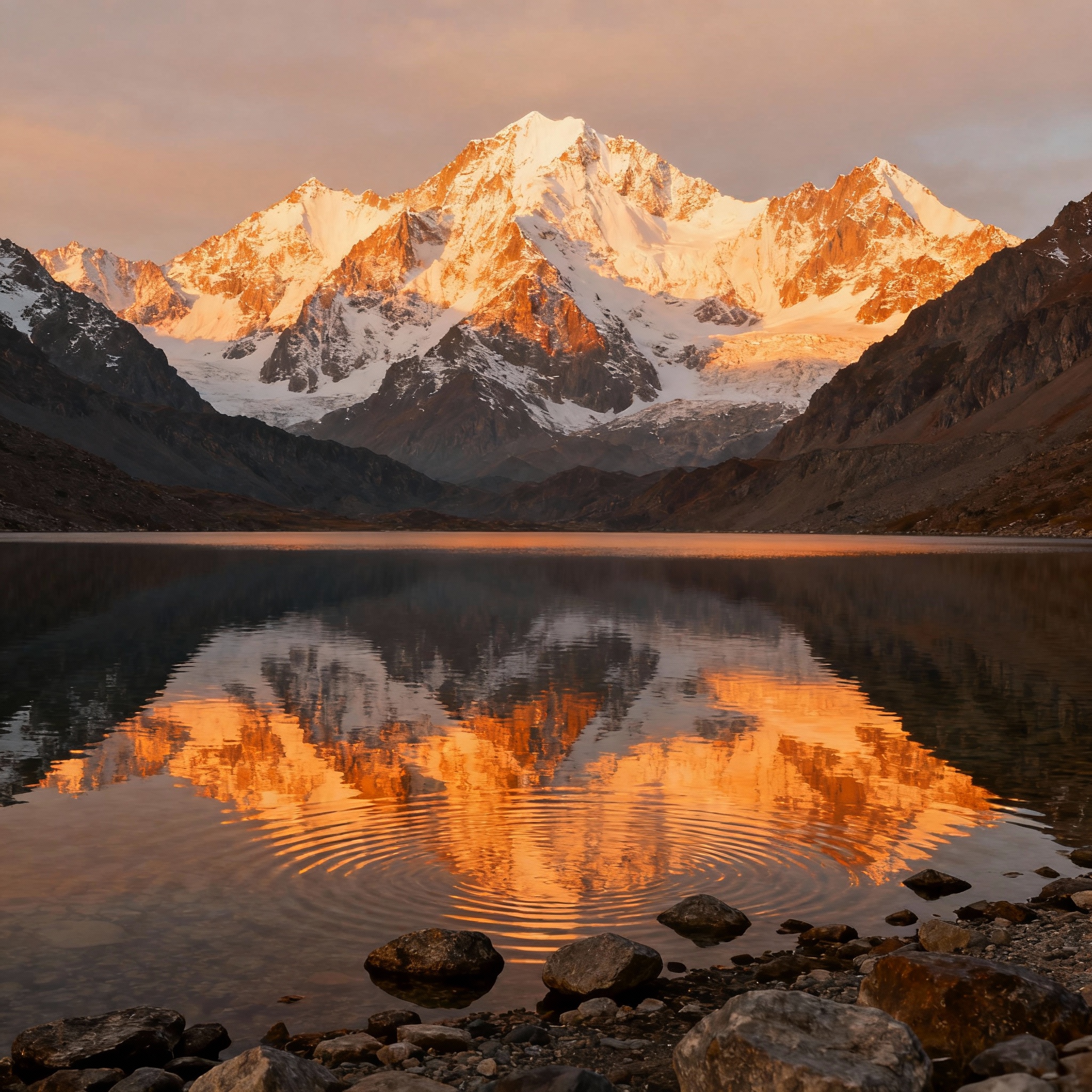
SeedDream-4 MCP |
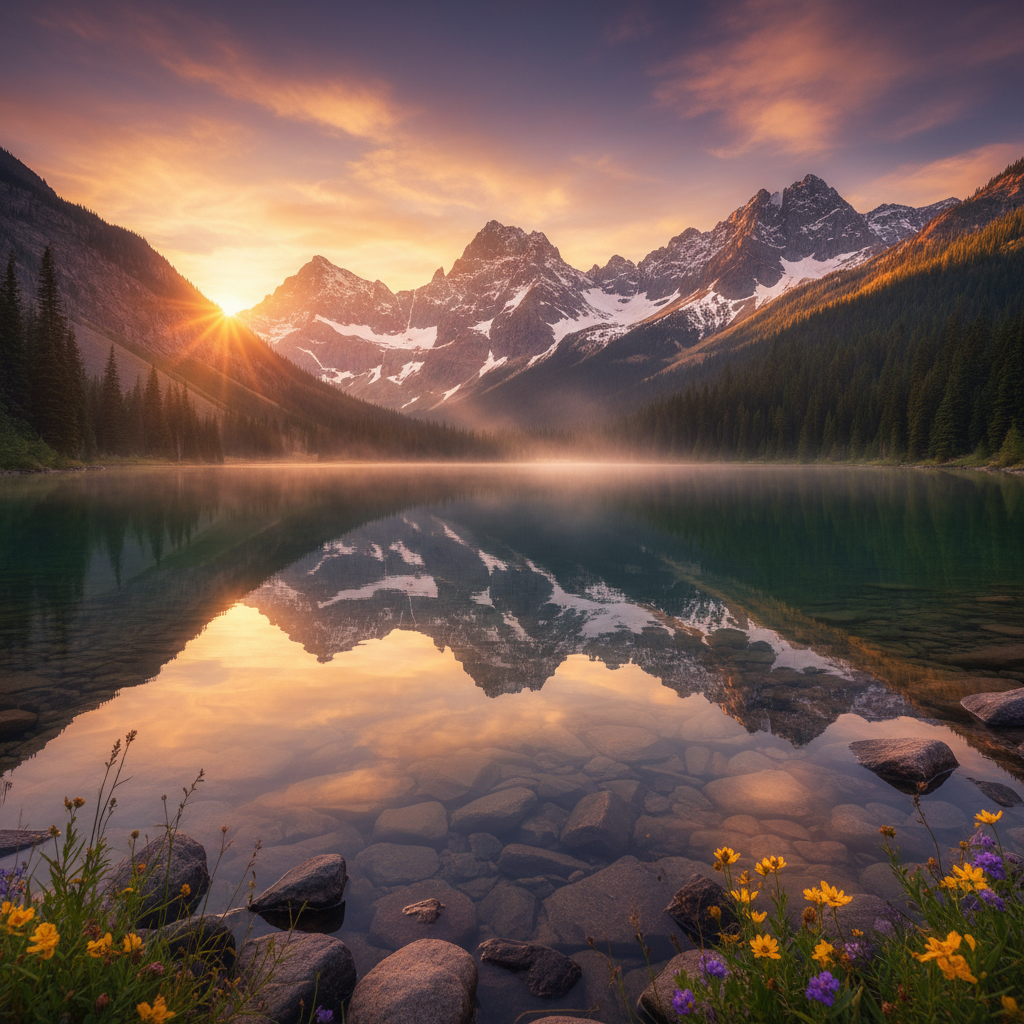
Nano Banana MCP |
| Provider | Models | Keywords | Highlights |
|---|---|---|---|
| 🤖 OpenAI | GPT-Image-1, DALL-E 3, DALL-E 2 | gpt-image-1 mcp, openai image gen | Latest GPT-Image-1 with background control |
| 🧠 Nano Banana | Gemini 2.5 Flash Image Preview | nano banana mcp | Fast generation via official Google SDK |
| 🎨 Google Imagen | Imagen 4 (custom endpoint) | google imagen 4 mcp | Advanced photorealistic image generation |
| ⚡ Replicate | Flux 1.1 Pro, Qwen Image, SeedDream-4 | flux 1.1 mcp, qwen image mcp, seedream-4 mcp | Multiple cutting-edge models via Replicate |
| Client | Setup Required | API Keys | Configuration | Ready Time |
|---|---|---|---|---|
| WritingMate.ai | ✅ None | ✅ Pre-configured | ✅ Built-in | Instant |
| Claude Desktop | Manual config | Your own keys | JSON editing | ~5 minutes |
| Claude Code CLI | Command/config | Your own keys | Manual setup | ~5 minutes |
| Other MCP clients | Manual setup | Your own keys | Client-specific | ~5-10 minutes |
# Install globally
npm install -g imagegen-mcp-server

# Or use with npx (no installation required)
npx imagegen-mcp-server
# Clone the repository
git clone https://github.com/writingmate/imagegen-mcp.git
cd imagegen-mcp

# Install dependencies
npm install

# Build the project
npm run build

# Run the server
npm start
OPENAI_API_KEY, GOOGLE_API_KEY, and/or REPLICATE_API_TOKENCreate a .env file in your project directory:
# Required: OpenAI API Key for DALL-E models
OPENAI_API_KEY=your-openai-api-key-here

# Required: Google API Key for Imagen and Gemini
GOOGLE_API_KEY=your-google-api-key-here

# Required: Replicate API Token for Flux models
REPLICATE_API_TOKEN=your-replicate-api-token-here

# Optional: Custom Google Imagen endpoint
GOOGLE_IMAGEN_ENDPOINT=

# Optional: Output directory for generated images (default: outputs)
OUTPUT_DIR=outputs
You'll need at least one of these API keys:
| Provider | How to Get API Key | Cost |
|---|---|---|
| OpenAI | Get OpenAI API Key | ~$0.02-0.08 per image |
| Get Google API Key | Free tier available | |
| Replicate | Get Replicate Token | ~$0.003-0.01 per image |
Create a .env file in your project directory:
# Add the API keys for the providers you want to use
OPENAI_API_KEY=your-openai-api-key-here
GOOGLE_API_KEY=your-google-api-key-here
REPLICATE_API_TOKEN=your-replicate-api-token-here

# Optional settings
OUTPUT_DIR=outputs
GOOGLE_IMAGEN_ENDPOINT=
Choose your preferred MCP client:
✨ Already installed and configured! No setup required.
💡 Why WritingMate.ai? ImageGen MCP Server comes pre-installed with all API keys configured. Just start creating!
macOS: ~/Library/Application Support/Claude/claude_desktop_config.json
Windows: %APPDATA%/Claude/claude_desktop_config.json
{
  "mcpServers": {
    "imagegen": {
      "command": "npx",
      "args": ["imagegen-mcp-server"]
    }
  }
}
Add to your MCP configuration:
# Add to Claude Code MCP settings
claude-code config mcp add imagegen npx imagegen-mcp-server
Or manually configure in your Claude Code settings file:
{
  "mcpServers": {
    "imagegen": {
      "command": "npx",
      "args": ["imagegen-mcp-server"]
    }
  }
}
Add to your Codeium MCP configuration:
{
  "mcp_servers": {
    "imagegen": {
      "command": "npx",
      "args": ["imagegen-mcp-server"],
      "env": {}
    }
  }
}
For any MCP-compatible client, use:
Command: npx imagegen-mcp-server
Environment: Ensure your .env file is in the working directory with your API keys.
# Test if the server starts correctly
npx imagegen-mcp-server

# Or if installed globally
imagegen-mcp-server
image.generate.openai)Generate images using OpenAI's latest GPT-Image-1 model and DALL-E series. This OpenAI image gen MCP tool supports the newest GPT-Image-1 with advanced background control.
Parameters:
{
  prompt: string;              // Required: Image description
  model?: string;              // "dall-e-2", "dall-e-3", "gpt-image-1" (default)
  size?: string;               // "1024x1024", "1792x1024", "1024x1792", etc.
  width?: number;              // Alternative to size
  height?: number;             // Alternative to size
  quality?: "standard" | "hd" | "low" | "medium" | "high" | "auto";
  format?: "png" | "jpeg" | "jpg" | "webp";
  background?: "transparent" | "opaque" | "auto"; // gpt-image-1 only
  style?: "vivid" | "natural";  // DALL-E 3 only
  returnBase64?: boolean;      // Include base64 in response
  filenameHint?: string;       // Custom filename prefix
}
Model-specific features:
image.generate.google)Generate images using Google's advanced Imagen 4 model via custom endpoint. This Google Imagen 4 MCP integration provides cutting-edge photorealistic image generation.
Parameters:
{
  prompt: string;              // Required: Image description
  model?: string;              // Model name
  size?: string;               // Image dimensions
  quality?: string;            // Quality setting
  format?: "png" | "jpeg" | "jpg" | "webp";
  returnBase64?: boolean;
  filenameHint?: string;
}
Requirements:
GOOGLE_IMAGEN_ENDPOINT in your .env file{ image: { base64: string, mimeType?: string } }image.generate.gemini)Generate images using Google's Gemini 2.5 Flash Image Preview model (also known as "Nano Banana MCP"). This nano banana implementation provides fast, efficient image generation via Google's official SDK.
Parameters:
{
  prompt: string;              // Required: Image description
  model?: string;              // Default: "gemini-2.5-flash-image-preview"
  returnBase64?: boolean;
  filenameHint?: string;
}
image.generate.replicate)Generate images using multiple cutting-edge models via Replicate API:
black-forest-labs/flux-1.1-pro (default) - State-of-the-art prompt followingqwen/qwen-image - Advanced AI image generationbytedance/seedream-4 - High-quality diffusion modelParameters:
{
  prompt: string;              // Required: Image description
  model?: string;              // Default: "black-forest-labs/flux-1.1-pro"
  width?: number;              // Image width (default: 1024)
  height?: number;             // Image height (default: 1024)
  size?: string;               // Alternative format: "1024x1024"
  format?: "png" | "jpeg" | "jpg" | "webp";
  seed?: number;               // Reproducible generation
  returnBase64?: boolean;
  filenameHint?: string;
}
Flux Model Features:
const result = await mcpClient.callTool("image.generate.openai", {
  prompt: "A serene mountain landscape at sunset",
  model: "gpt-image-1",
  size: "1536x1024",
  format: "webp",
  background: "transparent",
  quality: "high"
});
const result = await mcpClient.callTool("image.generate.gemini", {
  prompt: "A futuristic city with flying cars",
  returnBase64: true
});
const result = await mcpClient.callTool("image.generate.replicate", {
  prompt: "A detailed portrait of a robot in a cyberpunk setting",
  model: "black-forest-labs/flux-1.1-pro", // Default model
  width: 1024,
  height: 1536,
  seed: 12345,
  format: "png"
});
const result = await mcpClient.callTool("image.generate.replicate", {
  prompt: "A traditional Chinese landscape painting with mountains and rivers",
  model: "qwen/qwen-image",
  width: 1024,
  height: 1024
});
const result = await mcpClient.callTool("image.generate.replicate", {
  prompt: "A vibrant abstract art piece with flowing colors",
  model: "bytedance/seedream-4",
  width: 1024,
  height: 1024 // Minimum 1024x1024 required
});
All tools return a consistent response format:
{
  content: [
    {
      type: "text",
      text: "provider=openai model=gpt-image-1 saved=/path/to/image.png"
    },
    {
      type: "image",        // Only if returnBase64: true
      data: "base64data",
      mimeType: "image/png"
    }
  ]
}
Generated images are automatically saved to the configured output directory with timestamped filenames.
The package is ready for npm publishing:
# Update version
npm version patch|minor|major

# Publish
npm publish
.env as OPENAI_API_KEY.env as GOOGLE_API_KEY.env as REPLICATE_API_TOKENnpm install # Install dependencies
npm run dev # Development with hot reload
npm run build # Build for production
npm start # Start production server
This project is licensed under the MIT License - see the LICENSE file for details.
WritingMate.ai - All-in-One AI Platform
The team behind WritingMate.ai brings you powerful AI tools and integrations
Claim this server with your GitHub account to request manual ownership verification.
Link to the catalog listing for ImageGen MCP Server from your README. This badge does not certify ownership, compatibility or security.
[](https://awesome-mcp.com/servers/imagegen)Public repository statistics could not be verified. Check the configured source address; unavailable counts are not zero.
来源、范围和时段分别列出;不相加,不代表安装人数、活跃用户或安全审核。
尚无已审核的包 / 镜像标识,暂不展示下载统计。
Alternative and complementary servers in the same category
A Rust CAD application with an MCP server for creating, inspecting and rendering drawings, either headlessly or through a connection to the desktop app.

Liquid Composer is a browser-based Liquid Glass icon design tool that offers a local MCP server for agent-driven icon workflows.

agent-media makes short drama series and other short vertical videos from Claude, ChatGPT or Codex through one MCP connection, with OAuth sign-in and no API keys.