





A directory listing describing a cancellation-letter and mailing-address service. The configured public GitHub repository returned 404 during source verification.
Repository stats unavailable
Developer Tools
A JADX plugin plus standalone MCP server that lets LLMs communicate with a decompiled Android app context in real time.
JADX-AI-MCP is cataloged as an MCP server attributed to zinja-coder. A JADX plugin plus standalone MCP server that lets LLMs communicate with a decompiled Android app context in real time. It is categorized under developer tools. See the capability inspector for recorded interfaces and their independent review status; consult upstream documentation for the current interface.
Installation configuration is not reviewed. No executable setup is offered for this entry; inspect the source repository before proceeding.
Catalog license label: Apache 2.0 License. Check the source repository's current license and terms before using, modifying or distributing this software.
能力定义尚未审核。未核验的采集内容不会作为可信接口展示。
暂无可展示的已审核记录。这不表示上游不支持此能力。
暂无可展示的已审核记录。这不表示上游不支持此能力。
暂无可展示的已审核记录。这不表示上游不支持此能力。
Email delivery is not connected. This page does not collect email addresses or create subscriptions.
Browse the registry for current listings instead.
Reviews for JADX-AI-MCP are not available yet
Review publishing and storage are not connected. This page does not collect or publish ratings or comments, including after sign-in.
It can run in the default stdio mode or in HTTP stream mode.
README.md · 9f4fce6f4990 · 采集于 2026-11-13 09:42:25 UTC
保留上游原文,不做 AI 改写。为安全起见过滤脚本、表单和不安全链接。
当前显示最后一次成功采集的文档快照,请以来源页面为准。
⚡ Fully automated MCP server + JADX plugin built to communicate with LLM through MCP to analyze Android APKs using LLMs like Claude — uncover vulnerabilities, analyze APK, and reverse engineer effortlessly.
Thanks to these wonderful people for their contributions ⭐

JADX-AI-MCP is a plugin for the JADX decompiler that integrates directly with Model Context Protocol (MCP) to provide live reverse engineering support with LLMs like Claude.
Think: "Decompile → Context-Aware Code Review → AI Recommendations" — all in real time.
sequenceDiagram
LLM CLIENT->>JADX MCP SERVER: INVOKE MCP TOOL
JADX MCP SERVER->>JADX AI MCP PLUGIN: INVOKE HTTP REQUEST
JADX AI MCP PLUGIN->>REQUEST HANDLERS: INVOKE HTTP REQUEST HANDLER
REQUEST HANDLERS->>JADX GUI: PERFORM ACTION/GATHER DATA
JADX GUI->>REQUEST HANDLERS: ACTION PERFORMED/DATA GATHERED
REQUEST HANDLERS->>JADX AI MCP PLUGIN: CRAFT HTTP RESPONSE
JADX AI MCP PLUGIN->>JADX MCP SERVER:HTTP RESPONSE
JADX MCP SERVER->>LLM CLIENT: MCP TOOL RESULT
https://github.com/user-attachments/assets/b65c3041-fde3-4803-8d99-45ca77dbe30a
https://github.com/user-attachments/assets/c184afae-3713-4bc0-a1d0-546c1f4eb57f
https://github.com/user-attachments/assets/6342ea0f-fa8f-44e6-9b3a-4ceb8919a5b0
https://github.com/user-attachments/assets/b4a6b280-5aa9-4e76-ac72-a0abec73b809
https://github.com/user-attachments/assets/f42d8072-0e3e-4f03-93ea-121af4e66eb1
https://github.com/user-attachments/assets/2b0bd9b1-95c1-4f32-9b0c-38b864dd6aec
It is combination of two tools:
JADX MCP Server is a standalone Python server that interacts with a JADX-AI-MCP plugin (see: jadx-ai-mcp) via MCP (Model Context Protocol). It lets LLMs communicate with the decompiled Android app context live.
The following MCP tools are available:
fetch_current_class() — Get the class name and full source of selected classget_selected_text() — Get currently selected textget_all_classes() — List all classes in the projectget_class_source() — Get full source of a given classget_method_by_name() — Fetch a method's sourcesearch_method_by_name() — Search method across classessearch_classes_by_keyword() — Search for classes whose source code contains a specific keyword (supports pagination)get_methods_of_class() — List methods in a classget_fields_of_class() — List fields in a classget_smali_of_class() — Fetch smali of classget_main_activity_class() — Fetch main activity from jadx mentioned in AndroidManifest.xml file.get_main_application_classes_code() — Fetch all the main application classes' code based on the package name defined in the AndroidManifest.xml.get_main_application_classes_names() — Fetch all the main application classes' names based on the package name defined in the AndroidManifest.xml.get_android_manifest() — Retrieve and return the AndroidManifest.xml content.get_manifest_component - Retrieve specific manifest component instead of whole manifest fileget_strings() : Fetches the strings.xml fileget_all_resource_file_names() : Retrieve all resource files names that exists in applicationget_resource_file() : Retrieve resource file contentrename_class() : Renames the class namerename_method() : Renames the methodrename_field() : Renames the fieldrename_package() : Renames whole packagerename_variable() : Renames the variable within a methodadd_comment() : Adds a comment to a class, method, field, or a single code line (line=, the 1-based line number of the decompiled source), shown in JADX-GUI and saved with the project (re-commenting the same target updates it, an empty comment removes it)list_comments() : Lists the comments stored in the project, optionally filtered to one classdebug_get_stack_frames() : Get the stack frames from jadx debuggerdebug_get_threads() : Get the insights of threads from jadx debuggerdebug_get_variables() : Get the variables from jadx debuggerxrefs_to_class() : Find all references to a class (returns method-level and class-level references, supports pagination)xrefs_to_method() : Find all references to a method (includes override-related methods, supports pagination)xrefs_to_field() : Find all references to a field (returns methods that access the field, supports pagination)🔍 Basic Code Understanding
"Explain what this class does in one paragraph."

"Summarize the responsibilities of this method."

"Is there any obfuscation in this class?"

"List all Android permissions this class might require."
🛡️ Vulnerability Detection
"Are there any insecure API usages in this method?"

"Check this class for hardcoded secrets or credentials."

"Does this method sanitize user input before using it?"

"What security vulnerabilities might be introduced by this code?"
🛠️ Reverse Engineering Helpers
"Deobfuscate and rename the classes and methods to something readable."

"Can you infer the original purpose of this smali method?"

"What libraries or SDKs does this class appear to be part of?"

"Tell me which classes contains code related to 'encryption'?"
📦 Static Analysis
"List all network-related API calls in this class."

"Identify file I/O operations and their potential risks."

"Does this method leak device info or PII?"
🤖 AI Code Modification
"Refactor this method to improve readability."

"Add comments to this code explaining each step."

"Rewrite this Java method in Python for analysis."
📄 Documentation & Metadata
"Generate Javadoc-style comments for all methods."

"What package or app component does this class likely belong to?"

"Can you identify the Android component type (Activity, Service, etc.)?"
🐞 Debugger Assistant
   "Fetch stack frames, varirables and threads from debugger and provide summary"

   "Based the stack frames from debugger, explain the execution flow of the application"

   "Based on the state of variables, is there security threat?"
[!NOTE]
Download both
jadx-ai-mcp-<version>.jarandjadx-mcp-server-<version>.zipfiles.
# 0. Download the jadx-ai-mcp-<version>.jar and jadx-mcp-server-<version>.zip
https://github.com/zinja-coder/jadx-ai-mcp/releases

# 1.
unzip jadx-mcp-server-<version>.zip

├jadx-mcp-server/
  ├── jadx_mcp_server.py
  ├── requirements.txt
  ├── README.md
  ├── LICENSE
  ├── src/
  ├── static/
  ├── examples/
  └── test.sh

├jadx-ai-mcp-<version>.jar

# 2. Install the plugin

# For this you can follow two approaches:

## 1. One liner - execute below command in your shell
jadx plugins --install "github:zinja-coder:jadx-ai-mcp"

## The above one line code will install the latest version of the plugin directly into the jadx, no need to download the jadx-ai-mcp's .jar file.
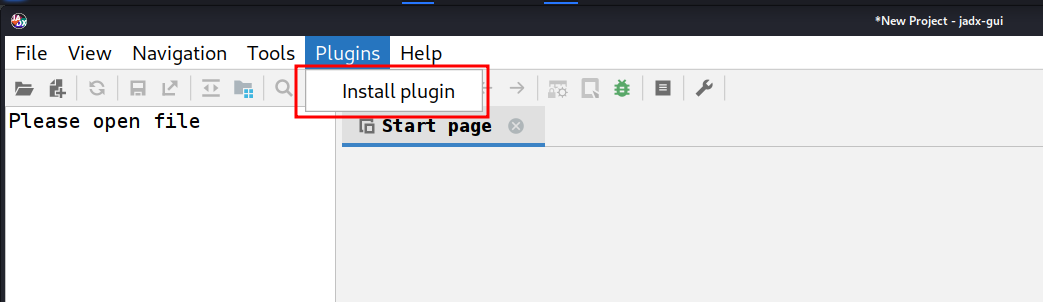
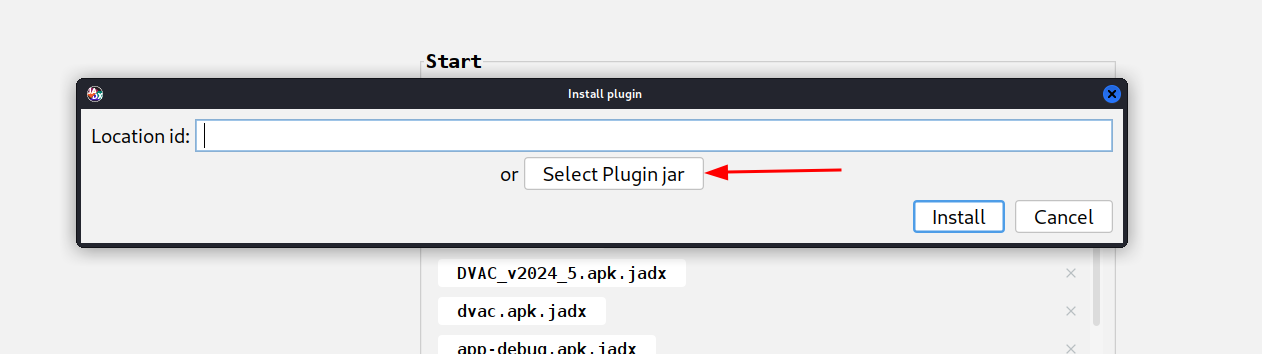
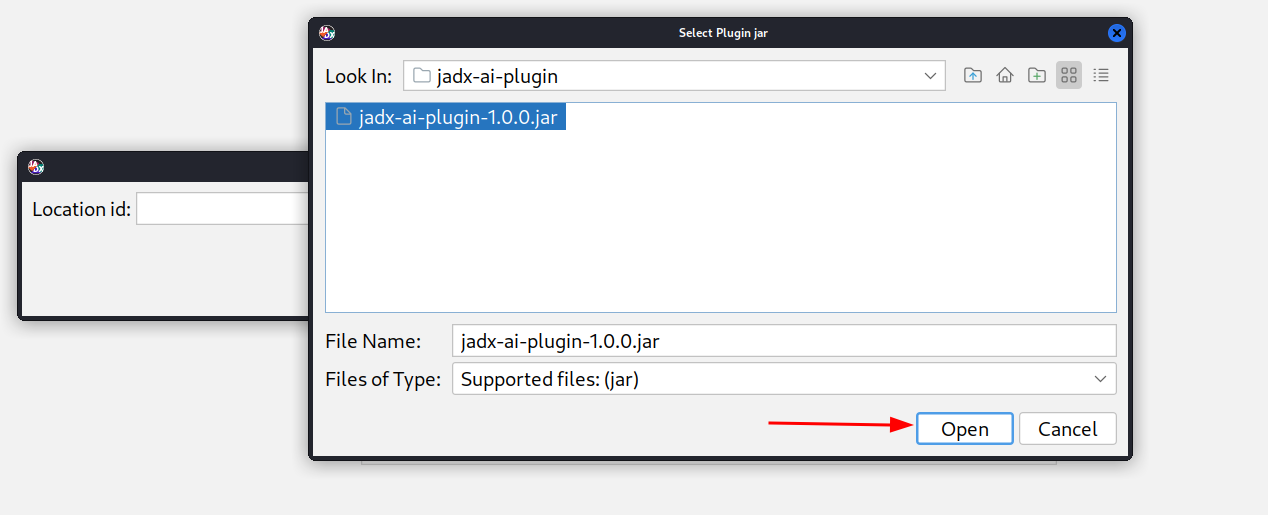
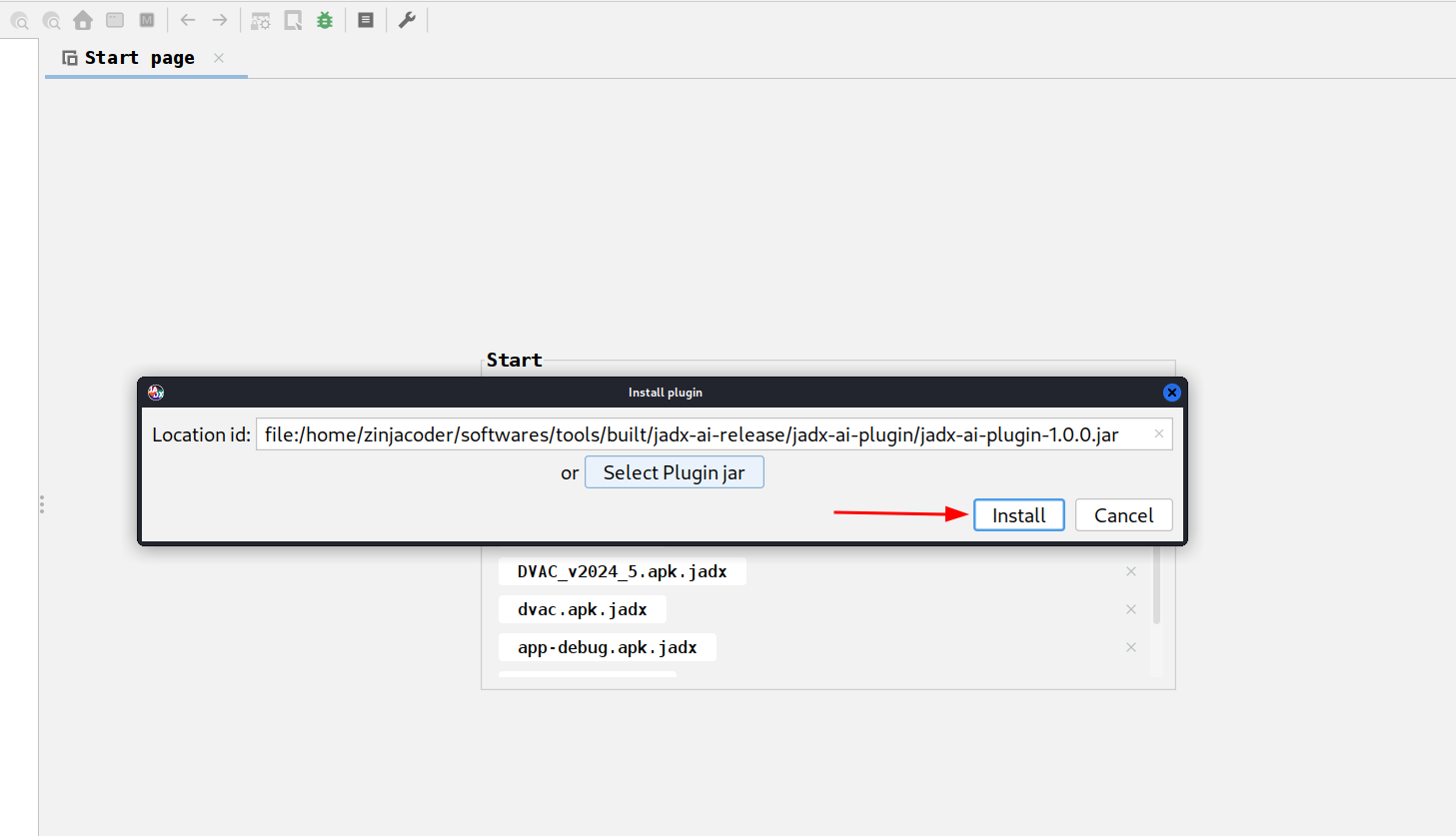
## 2. Or you can use JADX-GUI to install it by following images as shown below:
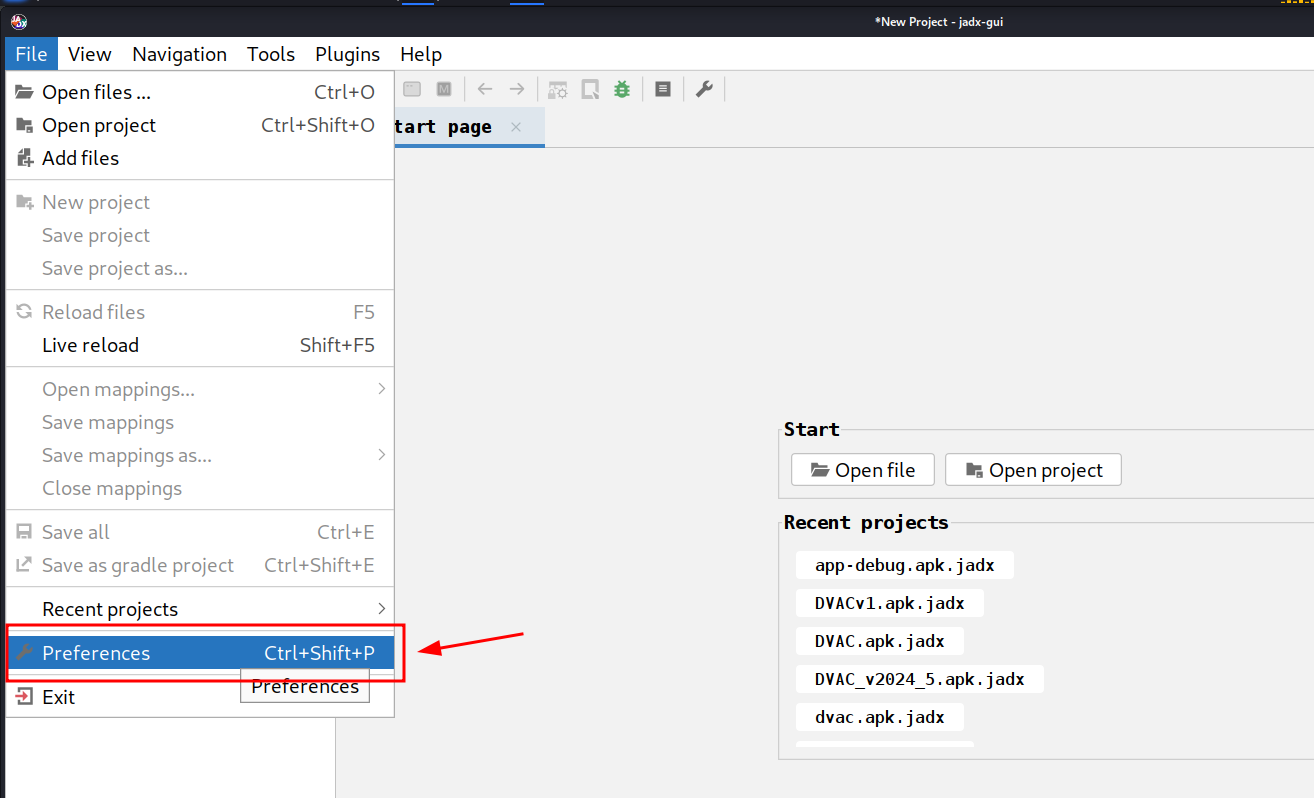
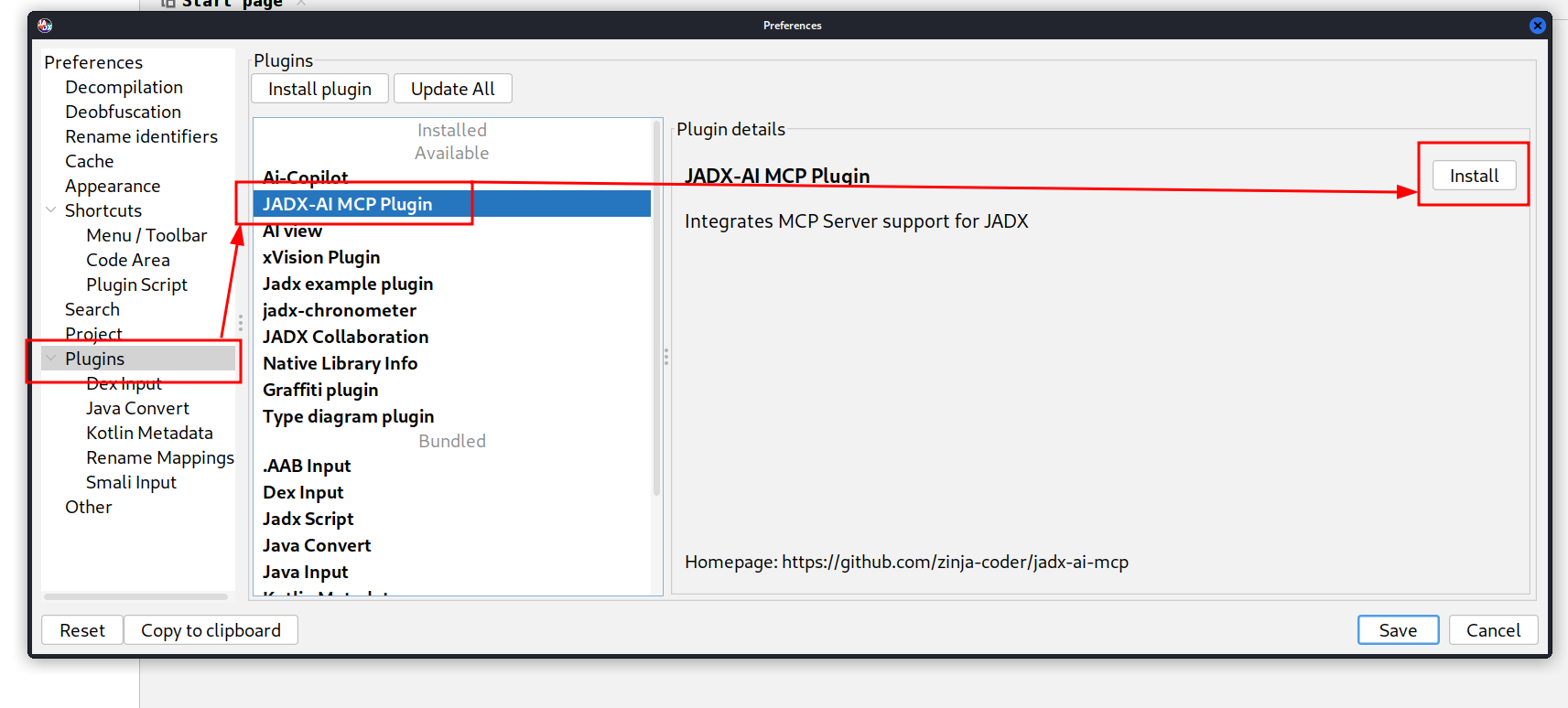
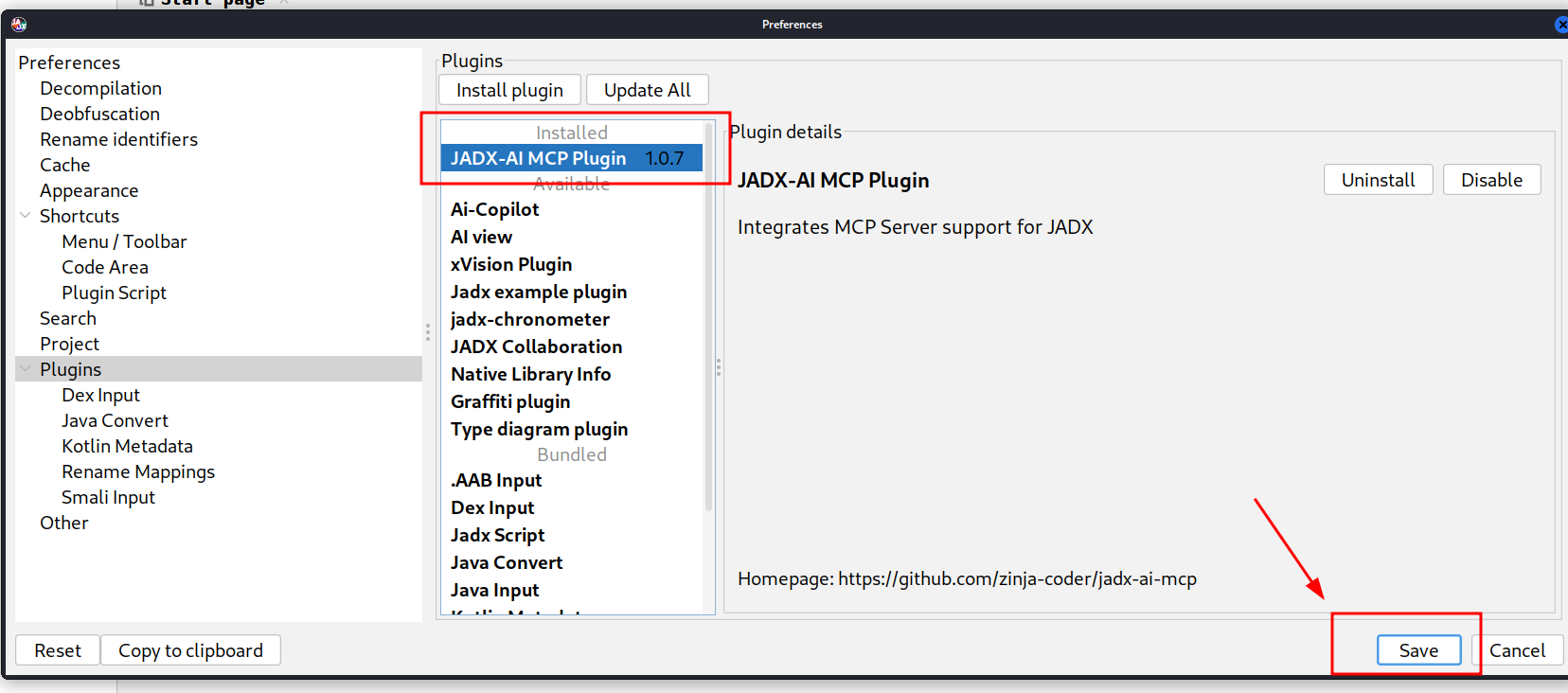
## 3. GUI method, download the .jar file and follow below steps shown in images
# 3. Navigate to jadx-mcp-server directory
cd jadx-mcp-server

# 4. This project uses uv - https://github.com/astral-sh/uv instead of pip for dependency management.
    ## a. Install uv (if you dont have it yet)
curl -LsSf https://astral.sh/uv/install.sh | sh
    ## b. OPTIONAL, if for any reasons, you get dependecy errors in jadx-mcp-server, Set up the environment
uv venv
source .venv/bin/activate  # or .venv\Scripts\activate on Windows
    ## c. OPTIONAL Install dependencies
uv pip install httpx fastmcp

# The setup for jadx-ai-mcp and jadx_mcp_server is done.
Make sure Claude Desktop is running with MCP enabled.
For instance, I have used following for Kali Linux: https://github.com/aaddrick/claude-desktop-debian
Configure and add MCP server to LLM file:
nano ~/.config/Claude/claude_desktop_config.json
For:
%APPDATA%\Claude\claude_desktop_config.json~/Library/Application Support/Claude/claude_desktop_config.jsonAnd following content in it:
{
    "mcpServers": {
        "jadx-mcp-server": {
            "command": "/<path>/<to>/uv",
            "args": [
                "--directory",
                "</PATH/TO/>jadx-mcp-server/",
                "run",
                "jadx_mcp_server.py"
            ]
        }
    }
}
Replace:
path/to/uv with the actual path to your uv executablepath/to/jadx-mcp-server with the absolute path to where you cloned this
repositoryThen, navigate code and interact via real-time code review prompts using the built-in integration.
OR
or you can install the jadx_mcp_server directly as executable directly using below command:
uv tool install git+https://github.com/zinja-coder/jadx-mcp-server
and then you can just provide jadx_mcp_server in command section of mcp configuration.
If you want to configure the MCP tool in Cherry Studio, you can refer to the following configuration.
--directory
path/to/jadx-mcp-server
run
jadx_mcp_server.py
path/to/jadx-mcp-server with the absolute path to where you cloned this
repositoryYou can also use JADX AI MCP Server with LM Studio by configuring it's mcp.json file. Here's the video guide.
https://github.com/user-attachments/assets/b4a6b280-5aa9-4e76-ac72-a0abec73b809
You can also use Jadx in HTTP Stream Mode using --http option with jadx_mcp_server.py as shown in following:
uv run jadx_mcp_server.py --http

OR

uv run jadx_mcp_server.py --http --port 9999
There are two separate connections and each has its own host/port:
┌─────────────┐    --host / --port     ┌──────────────────┐   --jadx-host / --jadx-port   ┌──────────────────┐
│  LLM Client │ ◄──────────────────►   │  jadx-mcp-server │ ──────────────────────────►   │  JADX-GUI Plugin │
│  (Claude,   │   Where the MCP server │                  │   Where the MCP server looks  │  (jadx-ai-mcp)   │
│   Codex..)  │   LISTENS for clients  │                  │   for the JADX plugin         │                  │
└─────────────┘                        └──────────────────┘                               └──────────────────┘
| Flag | Default | Controls |
|---|---|---|
--http | off | Use HTTP transport instead of stdio |
--host | 127.0.0.1 | Where the MCP server listens (bind address for LLM clients) |
--port | 8651 | Which port the MCP server listens on |
--jadx-host | 127.0.0.1 | Where to find the JADX plugin (the target JADX-GUI machine) |
--jadx-port | 8650 | Which port the JADX plugin is on |
Scenario 1 — Everything on the same machine (most common):
# Default: MCP server on localhost:8651, connects to JADX plugin on localhost:8650
uv run jadx_mcp_server.py --http
Scenario 2 — Docker container or WSL (MCP server accessible from host network):
# MCP server listens on ALL interfaces so the host can reach it
# JADX plugin is still on the same machine
uv run jadx_mcp_server.py --http --host 0.0.0.0
Scenario 3 — JADX-GUI running on a different machine (e.g., remote VM):
# MCP server runs locally, but connects to JADX plugin on a remote machine
uv run jadx_mcp_server.py --http --jadx-host 192.168.1.100
Scenario 4 — Full remote setup (everything on different machines):
# MCP server listens on all interfaces on port 9999
# JADX plugin is on a different machine at 192.168.1.100:8652
uv run jadx_mcp_server.py --http --host 0.0.0.0 --port 9999 --jadx-host 192.168.1.100 --jadx-port 8652
[!CAUTION]
⚠️ Security Warning — Remote Binding
When using
--host 0.0.0.0(or any non-localhost address), the MCP server binds to all network interfaces over plain HTTP with no authentication. This means:
- Anyone on the network can connect and invoke all MCP tools
- There is no TLS encryption — traffic can be intercepted
- An attacker can use the server to read decompiled code, rename classes/methods, and access debug info
Mitigations:
- Only bind to
0.0.0.0on trusted, isolated networks (e.g., Docker bridge, local VM)- Use a firewall to restrict access to the MCP port
- Consider an SSH tunnel instead:
ssh -L 8651:127.0.0.1:8651 remote-host
[!NOTE] When running in stdio mode (the default, without
--http), all human-readable output (banner, health check) is written to stderr to keep stdout reserved for the MCP JSON-RPC stream. This ensures compatibility with Codex, Claude Desktop, and other stdio-based MCP clients.
To connect with JADX AI MCP Plugin running on custom port, the --jadx-port option will be used as shown in following:
uv run jadx_mcp_server.py --jadx-port 8652
If the JADX AI MCP Plugin is running on a different machine (e.g., JADX on a remote VM, MCP server on your local host), use the --jadx-host option:
# Connect to JADX plugin on a remote host
uv run jadx_mcp_server.py --jadx-host 192.168.1.100 --jadx-port 8650
There are two separate connections and each has its own host/port:
┌─────────────┐    --host / --port     ┌──────────────────┐   --jadx-host / --jadx-port   ┌──────────────────┐
│  LLM Client │ ◄──────────────────►   │  jadx-mcp-server │ ──────────────────────────►   │  JADX-GUI Plugin │
│  (Claude,   │   Where the MCP server │                  │   Where the MCP server looks  │  (jadx-ai-mcp)   │
│   Codex..)  │   LISTENS for clients  │                  │   for the JADX plugin         │                  │
└─────────────┘                        └──────────────────┘                               └──────────────────┘
| Flag | Default | Controls |
|---|---|---|
--http | off | Use HTTP transport instead of stdio |
--host | 127.0.0.1 | Where the MCP server listens (bind address for LLM clients) |
--port | 8651 | Which port the MCP server listens on |
--jadx-host | 127.0.0.1 | Where to find the JADX plugin (the target JADX-GUI machine) |
--jadx-port | 8650 | Which port the JADX plugin is on |
Scenario 1 — Everything on the same machine (most common):
# Default: MCP server on localhost:8651, connects to JADX plugin on localhost:8650
uv run jadx_mcp_server.py --http
Scenario 2 — Docker container or WSL (MCP server accessible from host network):
# MCP server listens on ALL interfaces so the host can reach it
# JADX plugin is still on the same machine
uv run jadx_mcp_server.py --http --host 0.0.0.0
Scenario 3 — JADX-GUI running on a different machine (e.g., remote VM):
# MCP server runs locally, but connects to JADX plugin on a remote machine
uv run jadx_mcp_server.py --http --jadx-host 192.168.1.100
Scenario 4 — Full remote setup (everything on different machines):
# MCP server listens on all interfaces on port 9999
# JADX plugin is on a different machine at 192.168.1.100:8652
uv run jadx_mcp_server.py --http --host 0.0.0.0 --port 9999 --jadx-host 192.168.1.100 --jadx-port 8652
The MCP Configuration for custom jadx port will be as follows for claude:
{
  "mcpServers": {
    "jadx-mcp-server": {
      "command": "/path/to/uv",
      "args": [
        "--directory",
        "/path/to/jadx-mcp-server/",
        "run",
        "jadx_mcp_server.py",
        "--jadx-port",
        "8652"
      ]
    }
  }
}
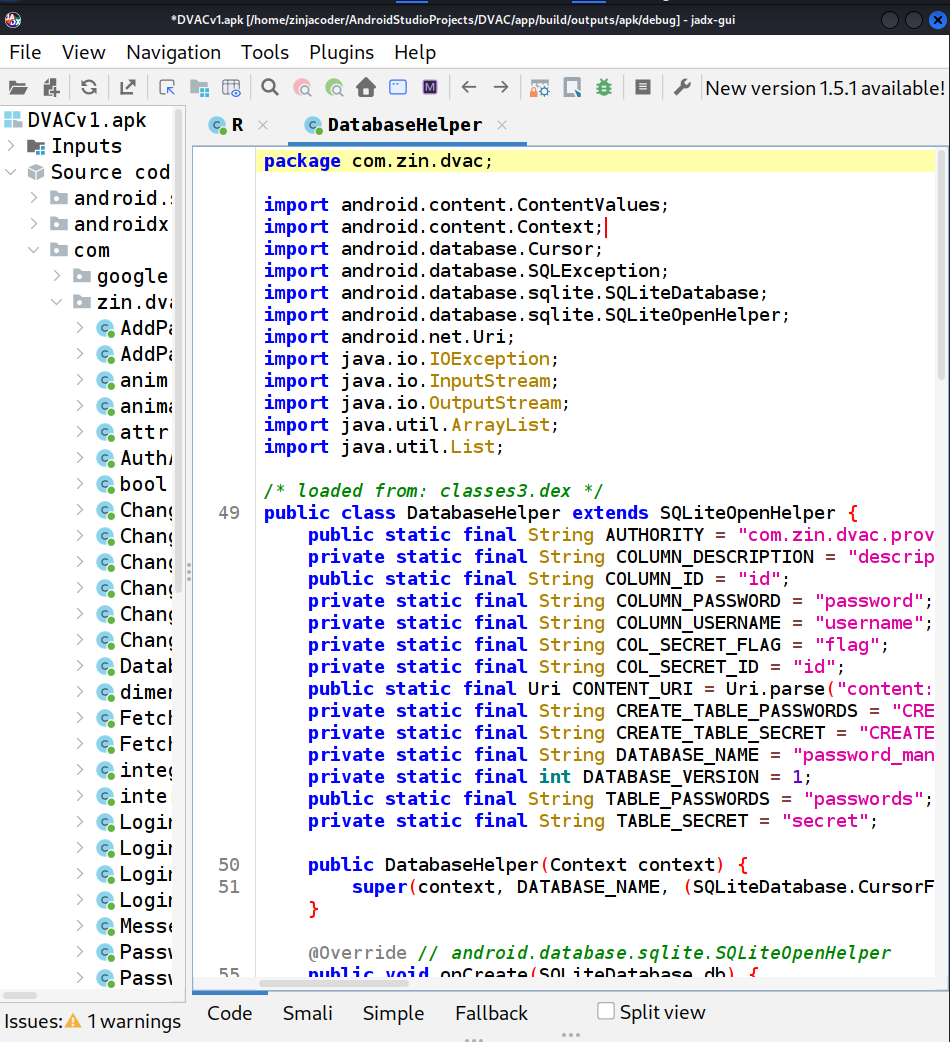
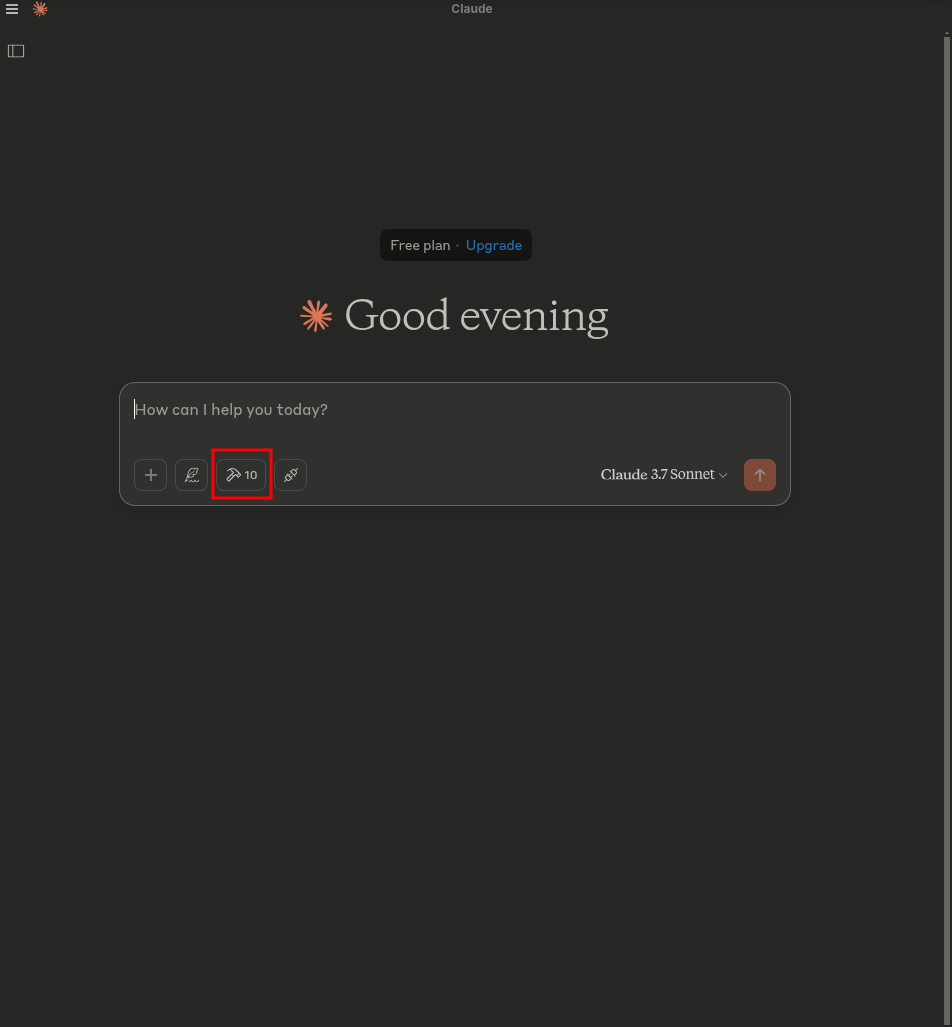
hammer symbol and you should you see somthing like following: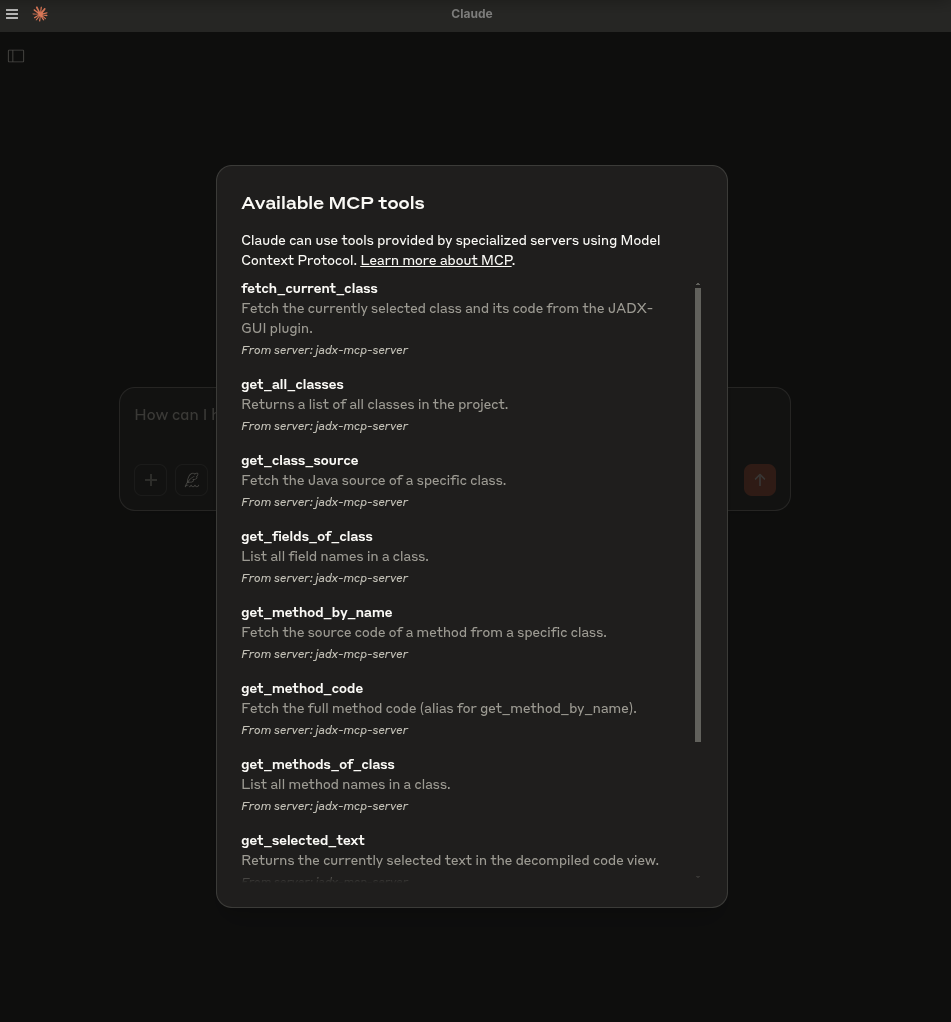
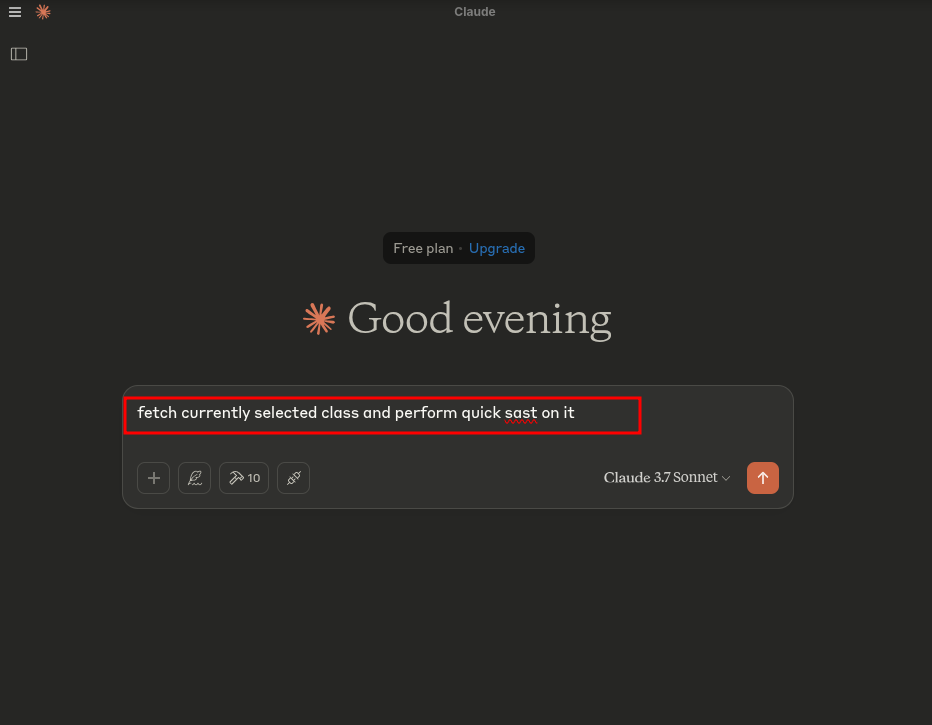
fetch currently selected class and perform quick sast on it
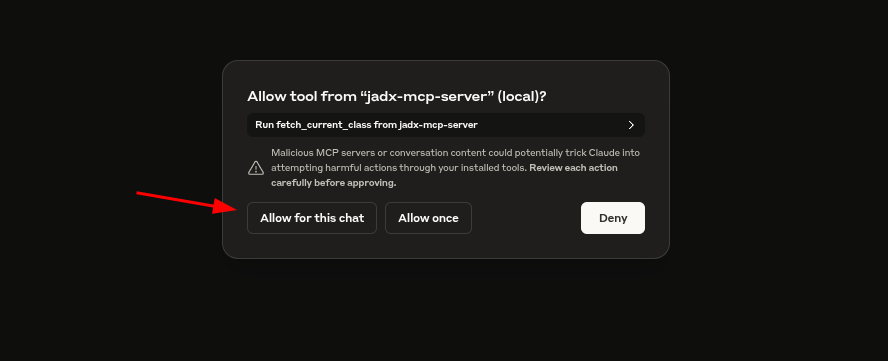
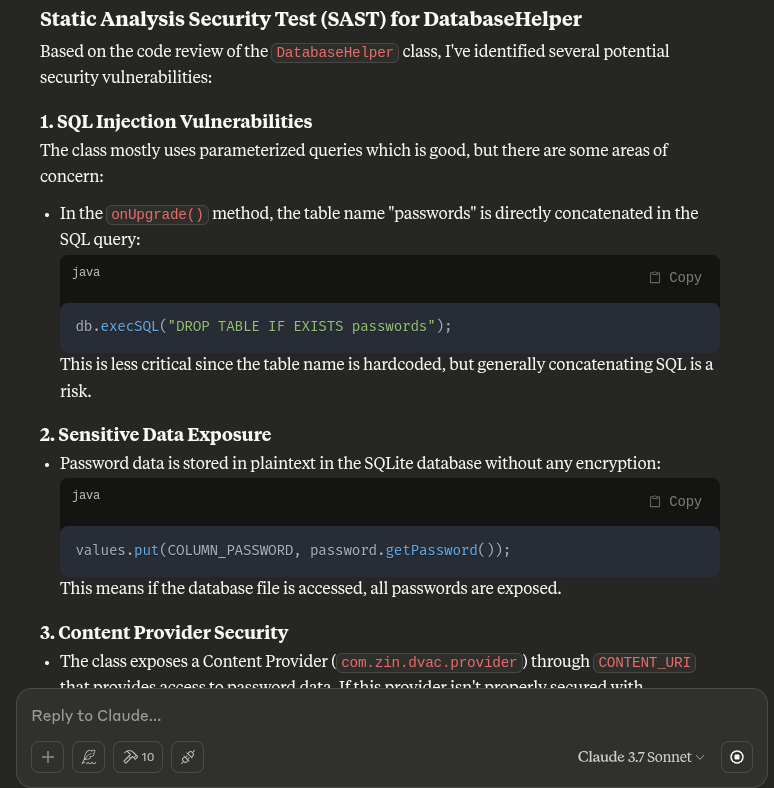
This plugin allows total control over the GUI and internal project model to support deeper LLM integration, including:
The files related to JADX-AI-MCP can be found under this repo.
The files related to jadx-mcp-server can be found here.
Kindly open an issue with respective template.
Tested on Claude Desktop Client, support for other AI will be tested soon!
This project is a plugin for JADX, an amazing open-source Android decompiler created and maintained by @skylot. All core decompilation logic belongs to them. I have only extended it to support my MCP server with AI capabilities.
The original README.md from jadx is included here in this repository for reference and credit.
This MCP server is made possible by the extensibility of JADX-GUI and the amazing Android reverse engineering community.
Also huge thanks to @aaddrick for developing Claude desktop for Debian based linux.
And in last thanks to @anthropics for developing the Model Context Protocol and @FastMCP team
Apart from this, huge thanks to all open source projects which serve as a dependencies for this project and which made this possible.
This project uses following awesome libraries.
Plugin - Java
MCP Server - Python
JADX-AI-MCP and all related projects inherits the Apache 2.0 License from the original JADX repository.
Disclaimer
The tools jadx-ai-mcp and jadx_mcp_server are intended strictly for educational, research, and ethical security assessment purposes. They are provided "as-is" without any warranties, expressed or implied. Users are solely responsible for ensuring that their use of these tools complies with all applicable laws, regulations, and ethical guidelines.
By using jadx-ai-mcp or jadx_mcp_server, you agree to use them only in environments you are authorized to test, such as applications you own or have explicit permission to analyze. Any misuse of these tools for unauthorized reverse engineering, infringement of intellectual property rights, or malicious activity is strictly prohibited.
The developers of jadx-ai-mcp and jadx_mcp_server shall not be held liable for any damage, data loss, legal consequences, or other consequences resulting from the use or misuse of these tools. Users assume full responsibility for their actions and any impact caused by their usage.
Use responsibly. Respect intellectual property. Follow ethical hacking practices.
Built with ❤️ for the reverse engineering and AI communities.
Claim this server with your GitHub account to request manual ownership verification.
Link to the catalog listing for JADX-AI-MCP from your README. This badge does not certify ownership, compatibility or security.
[](https://awesome-mcp.com/servers/jadx-ai-mcp)Public repository statistics could not be verified. Check the configured source address; unavailable counts are not zero.
来源、范围和时段分别列出;不相加,不代表安装人数、活跃用户或安全审核。
尚无已审核的包 / 镜像标识,暂不展示下载统计。
Alternative and complementary servers in the same category
A directory listing describing a cancellation-letter and mailing-address service. The configured public GitHub repository returned 404 during source verification.

A hosted MCP service for browsing and searching through Singapore mobile-network proxies.

A directory listing describing a Markdown-to-PDF service. The configured public GitHub repository returned 404 during source verification.