
A directory listing describing a cancellation-letter and mailing-address service. The configured public GitHub repository returned 404 during source verification.
Repository stats unavailable
Developer Tools
An MCP server that provides LLMs a consolidated, filtered view of relevant project files through a read_context tool.
Jinni MCP server is cataloged as an MCP server attributed to smat-dev. An MCP server that provides LLMs a consolidated, filtered view of relevant project files through a read_context tool. It is categorized under developer tools. See the capability inspector for recorded interfaces and their independent review status; consult upstream documentation for the current interface.
Installation configuration is not reviewed. No executable setup is offered for this entry; inspect the source repository before proceeding.
Catalog license label: Not specified. Check the source repository's current license and terms before using, modifying or distributing this software.
能力定义尚未审核。未核验的采集内容不会作为可信接口展示。
暂无可展示的已审核记录。这不表示上游不支持此能力。
暂无可展示的已审核记录。这不表示上游不支持此能力。
暂无可展示的已审核记录。这不表示上游不支持此能力。
Email delivery is not connected. This page does not collect email addresses or create subscriptions.
Browse the registry for current listings instead.
Reviews for Jinni MCP server are not available yet
Review publishing and storage are not connected. This page does not collect or publish ratings or comments, including after sign-in.
Yes, you can optionally constrain the server to only read within a tree by passing a root path, described as a security measure.
The server aborts with a DetailedContextSizeError listing the 10 largest files contributing to the size, with a default limit of 100MB.
The usage tool takes no arguments and returns the content of the README.md file as a string.
README.md · 1a26e8f2da60 · 采集于 2026-11-13 09:35:20 UTC
保留上游原文,不做 AI 改写。为安全起见过滤脚本、表单和不安全链接。
当前显示最后一次成功采集的文档快照,请以来源页面为准。

Jinni is a tool to efficiently provide Large Language Models the context of your projects. It gives a consolidated view of relevant project files, overcoming the limitations and inefficiencies of reading files one by one. Each file's content is preceded by a simple header indicating its path:
```path=src/app.py
print("hello")
The philosophy behind this tool is that LLM context windows are large, models are smart, and directly seeing your project best equips the model to help with anything you throw at it.
There is an MCP (Model Context Protocol) server for integration with AI tools and a command-line utility (CLI) for manual use that copies project context to the clipboard ready to paste wherever you need it.
These tools are opinionated about what counts as relevant project context to best work out of the box in most use cases, automatically excluding:
* Binary files
* Dotfiles and hidden directories
* Common naming conventions for logs, build directories, tempfiles, etc
Inclusions/exclusions are customizable with complete granularity if required using .contextfiles – this works like .gitignore except defining inclusions. .gitignore files themselves are also respected automatically, but any rules in .contextfiles take priority.
The MCP server can provide as much or as little of the project as desired. By default the scope is the whole project, but the model can ask for specific modules / matching patterns / etc.
MCP server config file for Cursor / Roo / Claude Desktop / client of choice:
{
    "mcpServers": {
        "jinni": {
            "command": "uvx",
            "args": ["jinni-server"]
        }
    }
}
You can optionally constrain the server to only read within a tree for security in case your LLM goes rogue: add "--root", "/absolute/path/" to the args list.
Install uv if it is not on your system: https://docs.astral.sh/uv/getting-started/installation/
Reload your IDE and you can now ask the agent to read in context.
If you want to restrict this to particular modules / paths just ask - e.g. "Read context for tests".
In action with Cursor:
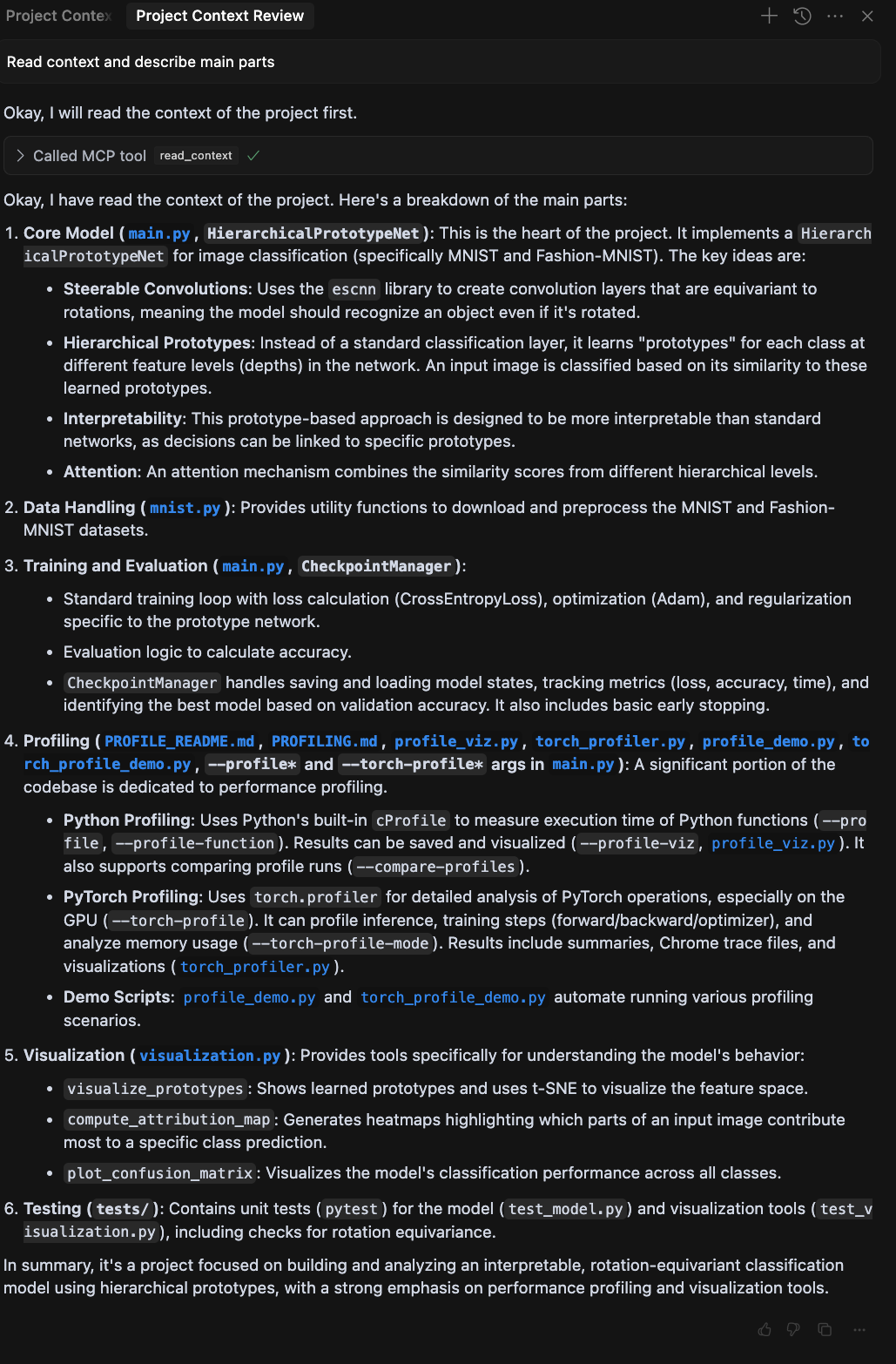
Cursor can silently drop context that is larger than the allowed maximum, so if you have a sizable project and the agent acts like the tool call never happened, try reducing what you are bringing in ("read context for xyz")
jinni MCP Server:
read_context tool that returns a concatenated string of relevant file contents from a specified project directory.jinni CLI:
.gitignore syntax (pathspec library's gitwildmatch)..gitignore files from the project root downward. These exclusions can be overridden by rules in .contextfiles..contextfiles placed within your project directories. Rules are applied dynamically based on the file/directory being processed.--overrides (CLI) or rules (MCP) to use a specific set of rules exclusively. When overrides are active, both built-in default rules and any .contextfiles are ignored. Path matching for overrides is still relative to the target directory..contextfiles / Overrides):
.gitignore-style patterns applied to the relative path.! negate the match (an exclusion pattern). (See Configuration section below).DetailedContextSizeError if the total size of included files exceeds a configurable limit (default: 100MB). The error message includes a list of the 10 largest files contributing to the size, helping you identify candidates for exclusion. See the Troubleshooting section for guidance on managing context size.). This can be disabled with list_only`.read_context tool)claude_desktop_config.json) to run the jinni server via uvx.read_context tool.
project_root (string, required): The absolute path to the project root directory. Rule discovery and output paths are relative to this root.targets (JSON array of strings, required): Specifies a mandatory list of file(s)/directory/ies within project_root to process. Must be a JSON array of string paths (e.g., ["path/to/file1", "path/to/dir2"]). Paths can be absolute or relative to CWD. All target paths must resolve to locations inside project_root. If an empty list [] is provided, the entire project_root is processed.rules (JSON array of strings, required): A mandatory list of inline filtering rules (using .gitignore-style syntax, e.g., ["src/**/*.py", "!*.tmp"]). Provide an empty list [] if no specific rules are needed (this will use built-in defaults). If non-empty, these rules are used exclusively, ignoring built-in defaults and .contextfiles.list_only (boolean, optional): If true, returns only the list of relative file paths instead of content.size_limit_mb (integer, optional): Override the context size limit in MB.debug_explain (boolean, optional): Enable debug logging on the server.exclusions (object, optional): Exclusion configuration with three optional fields:
global (array of strings): Keywords to exclude globally (e.g., ["tests", "deprecated"])scoped (object): Map of paths to keyword arrays for scoped exclusions (e.g., {"src/legacy": ["old", "deprecated"]})patterns (array of strings): File patterns to exclude (e.g., ["*.test.js", "*_old.*"])project_root. In case of a context size error, it returns a DetailedContextSizeError with details about the largest files.usage tool)usage tool (no arguments needed).README.md file as a string.(Detailed server setup instructions will vary depending on your MCP client. Generally, you need to configure the client to execute the Jinni server.)
Running the Server:
uvx to run the server entry point directly (requires the jinni package to be published on PyPI or findable by uvx):
uvx jinni-server [OPTIONS]
claude_desktop_config.json):
{
  "mcpServers": {
    "jinni": {
      "command": "uvx",
      "args": ["jinni-server"]
    }
  }
}
You can optionally constrain the server to only read within a tree for security in case your LLM goes rogue: add "--root", "/absolute/path/" to the args list.
See your specific MCP client's documentation for precise setup steps. Ensure uv is installed
jinni CLI)jinni [OPTIONS] [<PATH...>]
<PATH...> (optional): One or more paths to the project directories or files to analyze. Defaults to the current directory (.) if none are provided.-r <DIR> / --root <DIR> (optional): Specify the project root directory. If provided, rule discovery starts here, and output paths are relative to this directory. If omitted, the root is inferred from the common ancestor of the <PATH...> arguments (or CWD if only '.' is processed).--output <FILE> / -o <FILE> (optional): Write the output to <FILE> instead of printing to standard output.--list-only / -l (optional): Only list the relative paths of files that would be included.--overrides <FILE> (optional): Add rules from <FILE> as high-priority rules in addition to .contextfiles and .gitignore.--size-limit-mb <MB> / -s <MB> (optional): Override the maximum context size in MB.--debug-explain (optional): Print detailed inclusion/exclusion reasons to stderr and jinni_debug.log.--root <DIR> / -r <DIR> (optional): See above.--no-copy (optional): Prevent automatically copying the output content to the system clipboard when printing to standard output (the default is to copy).--not <keyword> (optional, repeatable): Exclude modules/directories matching keyword (e.g., --not tests --not vendor). Can be used multiple times.--not-in <path:keywords> (optional, repeatable): Exclude specific keywords within a path (e.g., --not-in src/legacy:old,deprecated). Can be used multiple times.--not-files <pattern> (optional, repeatable): Exclude files matching pattern (e.g., --not-files '*.test.js' --not-files '*_old.*'). Can be used multiple times.--keep-only <modules> (optional): Keep only specified modules/directories, exclude everything else (comma-separated, e.g., --keep-only src,lib,docs).CLI Examples:
# Exclude all test directories
jinni --not tests

# Exclude multiple keywords
jinni --not tests --not vendor --not deprecated

# Exclude old code only in specific paths
jinni --not-in src/legacy:old,deprecated --not-in lib/v1:legacy

# Exclude specific file patterns
jinni --not-files "*.test.js" --not-files "*_old.*"

# Keep only src and docs, exclude everything else
jinni --keep-only src,docs

# Combine different exclusion types
jinni --not tests --not-in src/experimental:wip --not-files "*.bak"
Note: Exclusion commands (--not* flags) work in addition to existing .gitignore and .contextfiles rules. They further filter down what would otherwise be included.
MCP Examples:
{
  "project_root": "/path/to/project",
  "targets": [],
  "rules": [],
  "exclusions": {
    "global": ["tests", "vendor"],
    "scoped": {
      "src/legacy": ["old", "deprecated"],
      "lib/experimental": ["wip", "unstable"]
    },
    "patterns": ["*.test.js", "*_backup.*"]
  }
}
You can install Jinni using pip or uv:
Using pip:
pip install jinni
Using uv:
uv pip install jinni
This will make the jinni CLI command available in your environment. See the "Running the Server" section above for how to start the MCP server depending on your installation method.
Jinni v0.1.7+ auto-converts WSL paths.
Provide either of these as project_root (CLI --root or MCP argument):
/home/user/project
vscode-remote://wsl+Ubuntu-22.04/home/user/project
No wrappers, mounts, or extra flags required—Jinni resolves the UNC path (\\wsl$\...) on Windows automatically.
UNC Path Format: Jinni always uses \\wsl$\<distro>\... for maximum compatibility with all Windows versions supporting WSL.
Distro Name Handling: Spaces and most special characters are allowed in the distro name. Only truly illegal UNC characters are replaced with _.
Caching: WSL path lookups and conversions are cached for performance. If you install WSL while Jinni is running, restart Jinni to pick up the new wslpath.
Opt-out: Set the environment variable JINNI_NO_WSL_TRANSLATE=1 to disable all WSL path translation logic.
Only wsl+<distro> URIs and absolute POSIX paths (starting with /) are translated; for SSH or container remotes, run Jinni inside that environment.
| Runtime OS | What you pass in | What _translate_wsl_path() returns |
|---|---|---|
| Windows | vscode-remote://wsl%2BUbuntu/home/a/b | \\wsl$\\Ubuntu\home\a\b |
| Windows | /home/a/b | \\wsl$\\Ubuntu\home\a\b (via wslpath) |
| Linux/WSL | vscode-remote://wsl+Ubuntu/home/a/b | /home/a/b |
| Linux/WSL | /home/a/b | /home/a/b (unchanged) |
Dump context of my_project/ to the console:
jinni ./my_project/ # Process a single directory
jinni ./src ./docs/README.md # Process multiple targets
jinni # Process current directory (.)
List files that would be included in my_project/ without content:
jinni -l ./my_project/
jinni --list-only ./src ./docs/README.md
Dump context of my_project/ to a file named context_dump.txt:
jinni -o context_dump.txt ./my_project/
Use override rules from custom.rules instead of .contextfiles:
jinni --overrides custom.rules ./my_project/
Show debug information:
jinni --debug-explain ./src
Dump context (output is automatically copied to clipboard by default):
jinni ./my_project/
Dump context but do not copy to clipboard:
jinni --no-copy ./my_project/
.contextfiles & Overrides)Jinni uses .contextfiles (or an override file) to determine which files and directories to include or exclude, based on .gitignore-style patterns.
.contextfiles): Place .contextfiles in any directory. Rule discovery starts from the rule root (project root for internal targets, target itself for external targets) and proceeds downward to the current directory being processed..gitignore pattern syntax (specifically pathspec's gitwildmatch implementation).
# are ignored.src/**/*.py, *.md, /config.yaml).! indicate that a matching file should be excluded (negates the pattern)./ anchors the pattern to the directory containing the .contextfiles./ matches directories only.*, **, ? work as in .gitignore.--overrides (CLI) or rules (MCP) are provided, these rules are used exclusively. All .contextfiles and built-in defaults are ignored. Path matching is relative to the target directory..gitignore and .contextfiles starting from the rule root down to the current item's directory..gitignore rules, .contextfiles rules (which take precedence).PathSpec).! negates the match. If no user-defined pattern matches, the item is included unless it matches a built-in default exclusion (like !.*).project_root..contextfiles)Example 1: Include Python Source and Root Config
Located at my_project/.contextfiles:
# Include all Python files in the src directory and subdirectories
src/**/*.py

# Include the main config file at the root of the project
/config.json

# Include all markdown files anywhere
*.md

# Exclude any test data directories found anywhere
!**/test_data/
Example 2: Overriding in a Subdirectory
Located at my_project/src/.contextfiles:
# In addition to rules inherited from parent .contextfiles...

# Include specific utility scripts in this directory
utils/*.sh

# Exclude a specific generated file within src, even if *.py is included elsewhere
!generated_parser.py
Design Details: DESIGN.md
Running Server Locally: During development (after installing with uv pip install -e . or similar), you can run the server module directly:
python -m jinni.server [OPTIONS]
Example MCP client configuration for local development:
{
  "mcpServers": {
    "jinni": {
      // Adjust python path if needed, or ensure the correct environment is active
      "command": "python -m jinni.server"
      // Optionally constrain the server to only read within a tree (recommended for security):
      // "command": "python -m jinni.server --root /absolute/path/to/repo"
    }
  }
}
DetailedContextSizeError)If you encounter an error indicating the context size limit was exceeded, Jinni will provide a list of the 10 largest files it attempted to include. This helps you identify potential candidates for exclusion.
To resolve this:
.contextfiles or the --overrides / rules options to exclude unnecessary files or directories.
.contextfiles): To exclude all .log files and a specific large data directory:
# Exclude all log files
!*.log

# Exclude a large data directory
!large_data_files/
--size-limit-mb (CLI) or size_limit_mb (MCP). Be mindful of LLM context window limits and processing costs.jinni usage / usage: If you need to refer back to these instructions or the configuration details while troubleshooting, use the jinni usage command or the usage MCP tool.Claim this server with your GitHub account to request manual ownership verification.
Link to the catalog listing for Jinni MCP server from your README. This badge does not certify ownership, compatibility or security.
[](https://awesome-mcp.com/servers/jinni)Public repository statistics could not be verified. Check the configured source address; unavailable counts are not zero.
来源、范围和时段分别列出;不相加,不代表安装人数、活跃用户或安全审核。
尚无已审核的包 / 镜像标识,暂不展示下载统计。
Alternative and complementary servers in the same category
A directory listing describing a cancellation-letter and mailing-address service. The configured public GitHub repository returned 404 during source verification.

A hosted MCP service for browsing and searching through Singapore mobile-network proxies.

A directory listing describing a Markdown-to-PDF service. The configured public GitHub repository returned 404 during source verification.