


A directory listing describing a cancellation-letter and mailing-address service. The configured public GitHub repository returned 404 during source verification.
Repository stats unavailable
Developer Tools
A hosted MCP server that lets AI agents publish and edit static websites hosted in the user's own Cloudflare account.
Jumper Publisher is cataloged as an MCP server attributed to jumpermcp. A hosted MCP server that lets AI agents publish and edit static websites hosted in the user's own Cloudflare account. It is categorized under developer tools. See the capability inspector for recorded interfaces and their independent review status; consult upstream documentation for the current interface.
Installation configuration is not reviewed. No executable setup is offered for this entry; inspect the source repository before proceeding.
Catalog license label: MIT. Check the source repository's current license and terms before using, modifying or distributing this software.
能力定义尚未审核。未核验的采集内容不会作为可信接口展示。
暂无可展示的已审核记录。这不表示上游不支持此能力。
暂无可展示的已审核记录。这不表示上游不支持此能力。
暂无可展示的已审核记录。这不表示上游不支持此能力。
Email delivery is not connected. This page does not collect email addresses or create subscriptions.
Browse the registry for current listings instead.
Reviews for Jumper Publisher are not available yet
Review publishing and storage are not connected. This page does not collect or publish ratings or comments, including after sign-in.
Sites are hosted as Workers in the user's own Cloudflare account, created by the Publisher plugin on the user's behalf.
Yes, the last 20 versions of each website are retained for undo, and an undo request puts the previous version back online.
Databases, large videos, and multi-user teams per Publisher are not supported.
README.md · fbca727ad482 · 采集于 2026-11-13 14:09:58 UTC
保留上游原文,不做 AI 改写。为安全起见过滤脚本、表单和不安全链接。
当前显示最后一次成功采集的文档快照,请以来源页面为准。
Ask Claude, ChatGPT or another AI agent to create a web page. Once done, you receive a public URL where it is hosted.
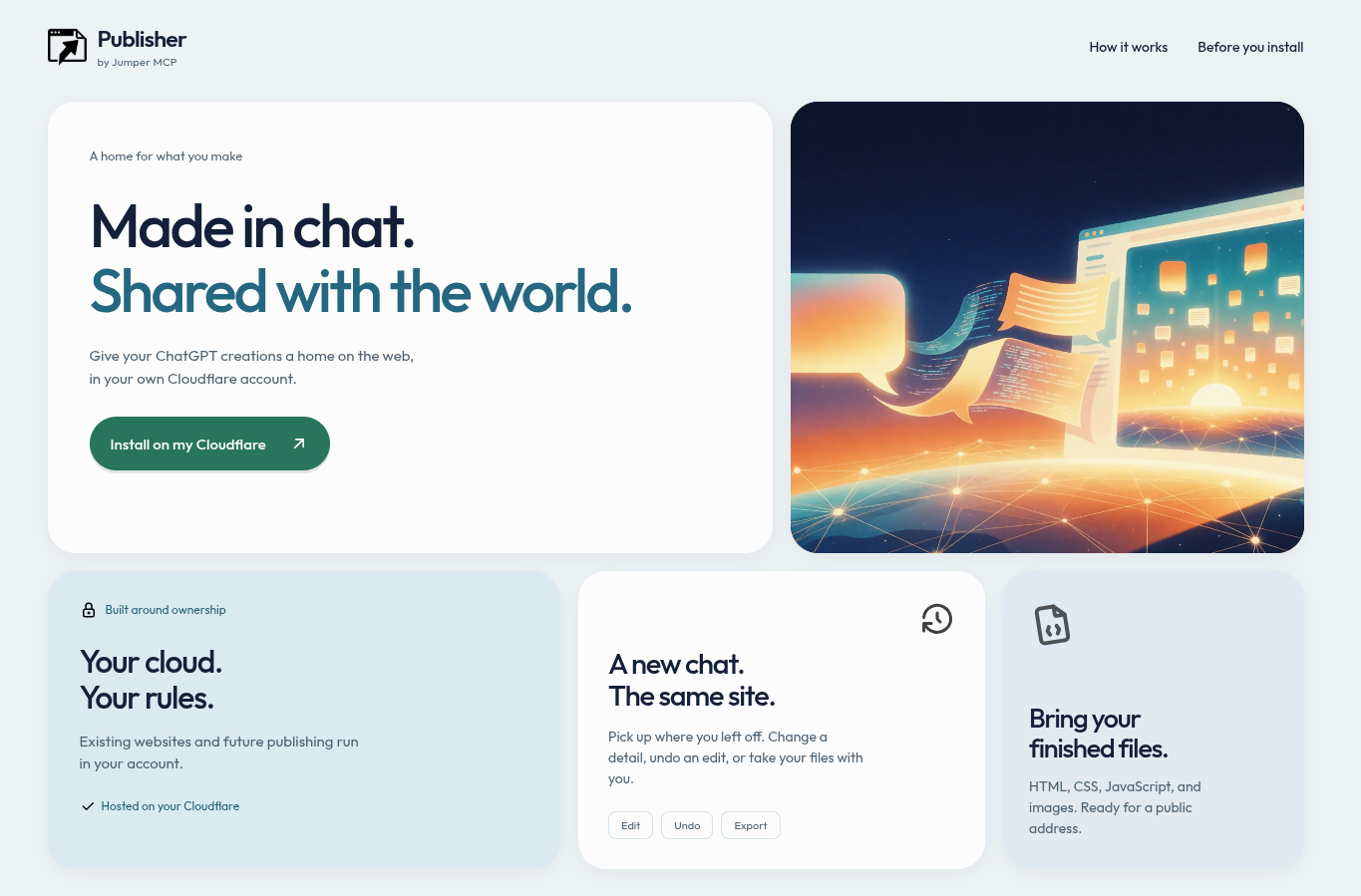
Come back weeks later in a new chat to make changes the the website, even in a different AI agent. The website lives in your own Cloudflare account (free or paid). Publisher is your perfect solution for personal pages and small projects that need to be visible right away.
You already swapped coding for prompting. Publisher drops the next chore: downloading files, finding a host, and uploading again for every small fix.
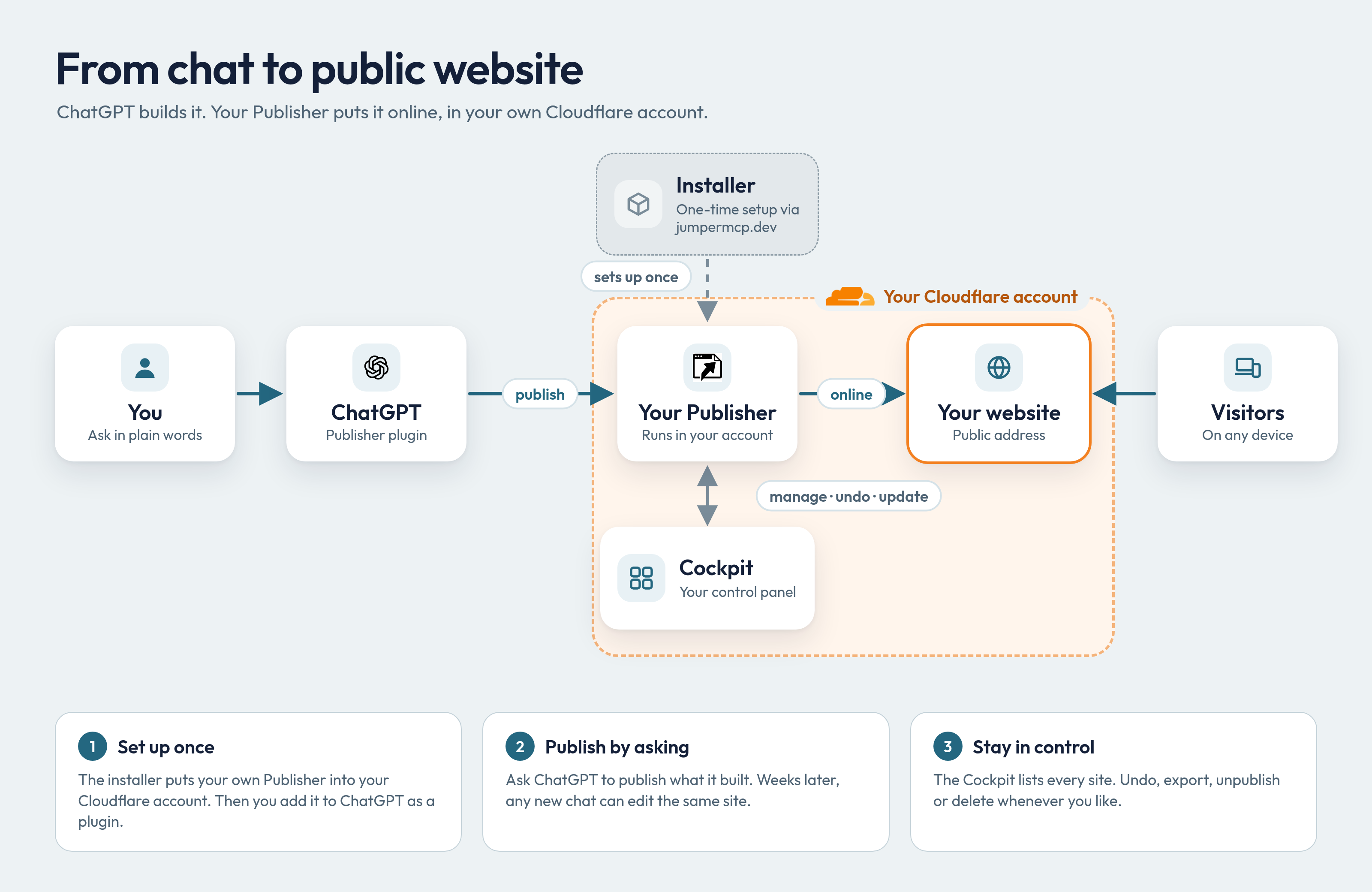
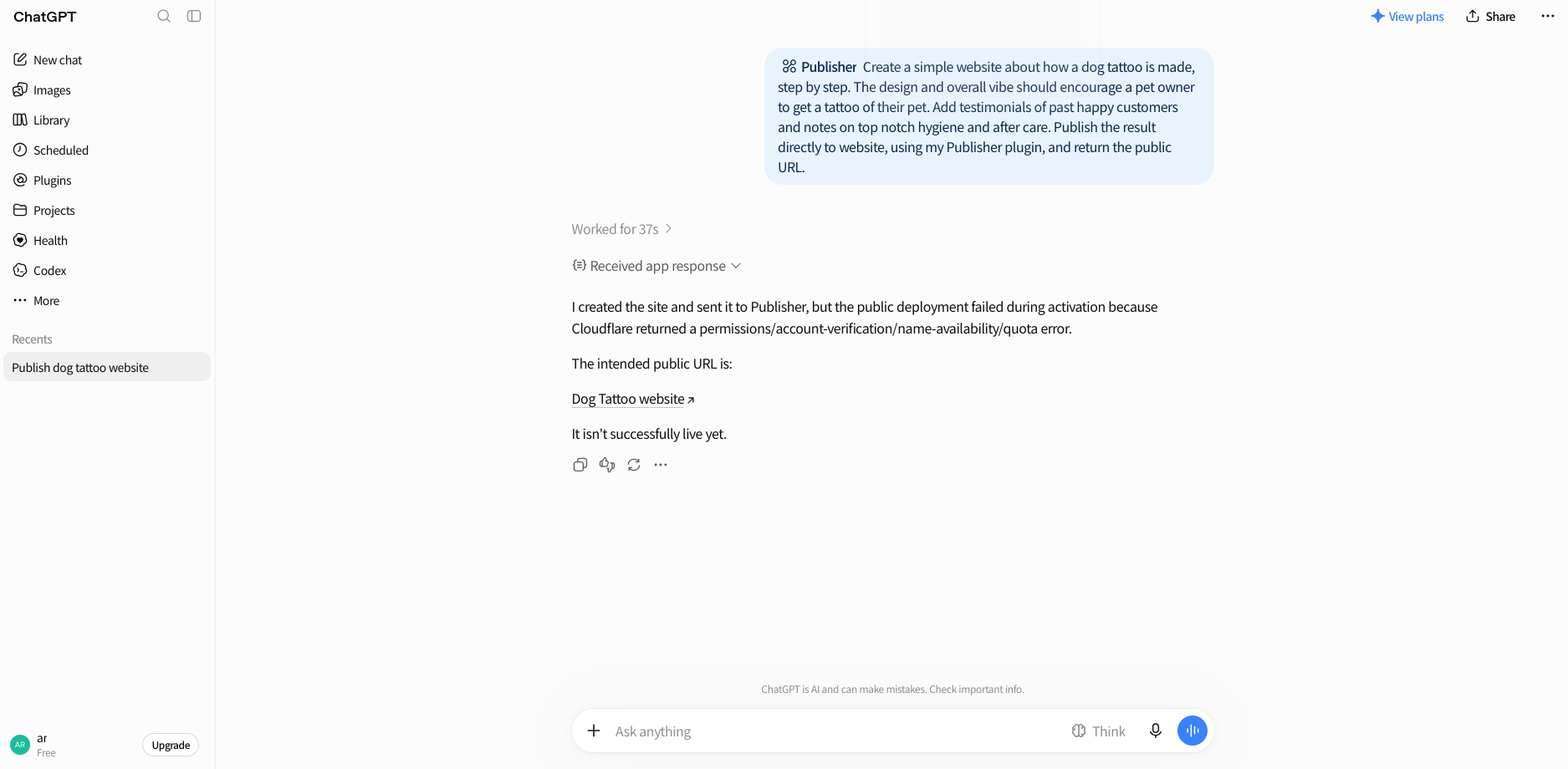
You ask your AI client: "Create a website about a new science called Pants Math, with a widget where visitors test pants hypotheses, and publish it." It creates the website, hands it to your Publisher, and replies to you with an address like https://pants-math.<your-name>.workers.dev
A month later, in a fresh chat, maybe on your phone, maybe in Claude instead of ChatGPT: "Make the pants-math background blue." The AI finds the site, changes only the background, and republishes at the same address. Don't like the background after all? Ask it to undo.
You're cutting out the middleman: No GitHub needed, or other file host, or terminal, or build step, or AI provider API key.
 |  |  | 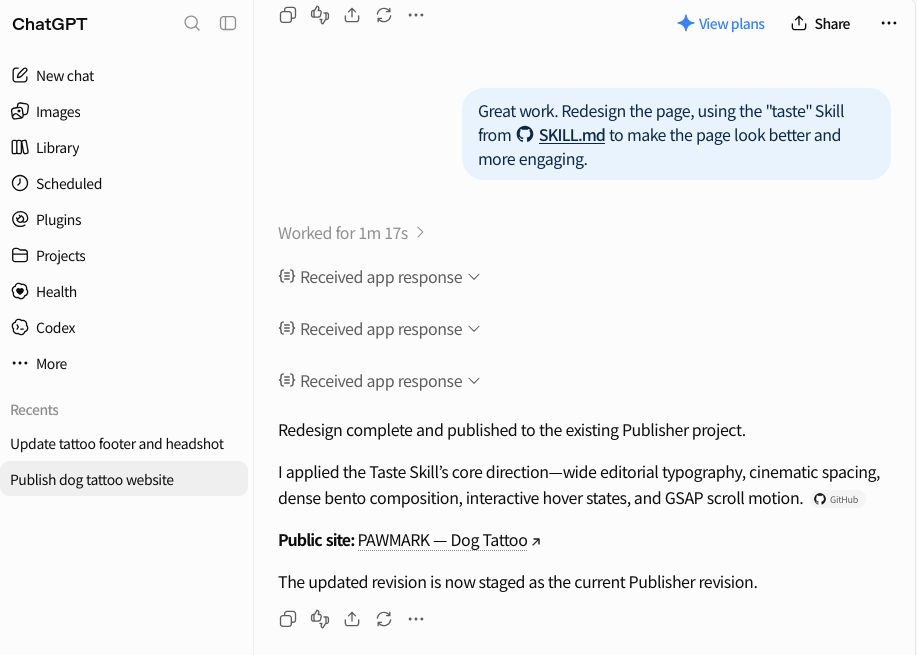 |
/mcp at the end. Your agent will prompt you to authenticate, using your owner password. Details below, per agent vendor.Prompt away to create new websites. Reference your Publisher plugin to have the result published. To find an old website, paste its name, project ID, or URL into any connected AI client. It will use Publisher to find the project, without you having to look for the original conversation. Ask to undo, and the previous version goes back online.
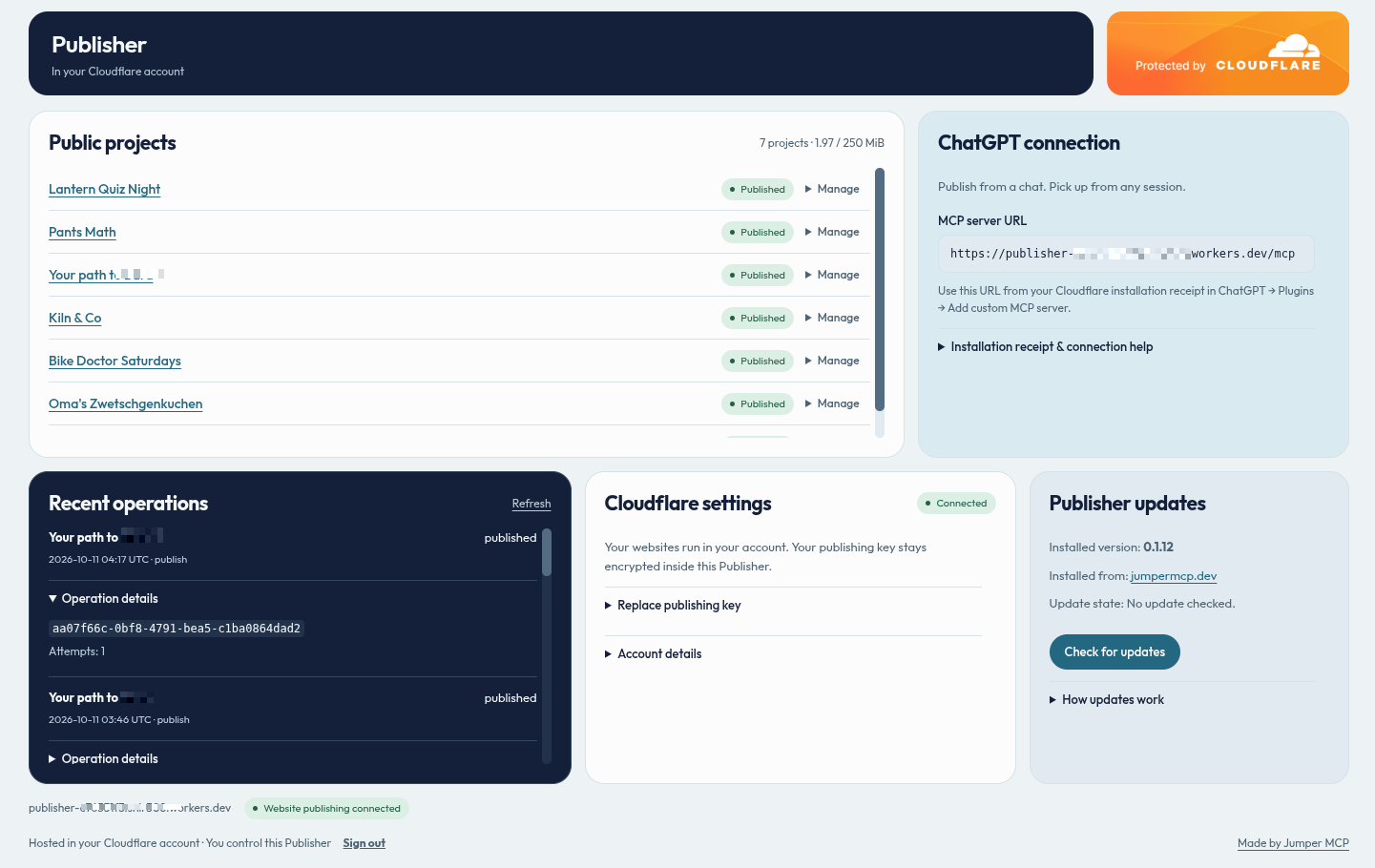
Your Publisher cockpit lists every site. From there you can unpublish (hide), export, delete, and update the Publisher itself. If the agent tries to rewrite far more or far less than you asked for (the classic "rest of the code unchanged"), Publisher flags it instead of publishing. Multiple chats editing the same site can't silently overwrite each other (use case: project open in phone session as well as desktop session).
The description above and the "daily use" video refer to chatgpt.com. Jumper Publisher is not found in OpenAI's official Plugin Directory. Tools are only accepted there that bring their own 3rd-party URL. However, Jumper Publisher does not direct your data to itself, it sends your data to your URL instead. This is why you are adding your Publisher plugin manually, as shown in the video:
publisher-xyz.xyz.workers.dev/mcp URL.localhost on your computer:
/plugin install jumper-publisher --marketplace JumperMCP/jumper-publisher(paste your MCP URL when asked). Then:/mcp to sign inpublisher-….workers.dev address).sdmntpreastus.oaiusercontent.com. Publisher approves all subdomains of oaiusercontent.com from 0.1.26 on. If you still see a "file host … has not been approved" error naming another host, report it. ChatGPT can also send site files as text, or use an upload link as with Claude: this needs a ChatGPT cloud environment whose network access is unrestricted or includes your publisher-….workers.dev address. A restricted environment cannot reach your Publisher. The upload-link route from ChatGPT is not yet verified.127.0.0.1 on your computer.codex mcp add publisher --url <your MCP URL>codex mcp login publisher, then sign in with your Publisher owner password and approve.https://github.com/JumperMCP/jumper-publisher/tree/main/cursor, choose Add, and set PUBLISHER_URL to your MCP URL.publish-website skill): clone this repository, run agy plugin install ./jumper-publisher/antigravity, then in the CLI /plugin → jumper-publisher → Configure MCP servers and paste your MCP URL. Open /mcp, select jumper-publisher_mcp → Authenticate, sign in, approve, and paste the code from Google's page back into Antigravity.publisher-xyz.xyz.workers.dev/mcp), that it uses OAuth, and a URL allow list: your publisher-xyz.xyz.workers.dev.index.html. React or Vue sites work if you upload the built output.workers.dev address may include part of your name or email. This is controlled in your Cloudflare.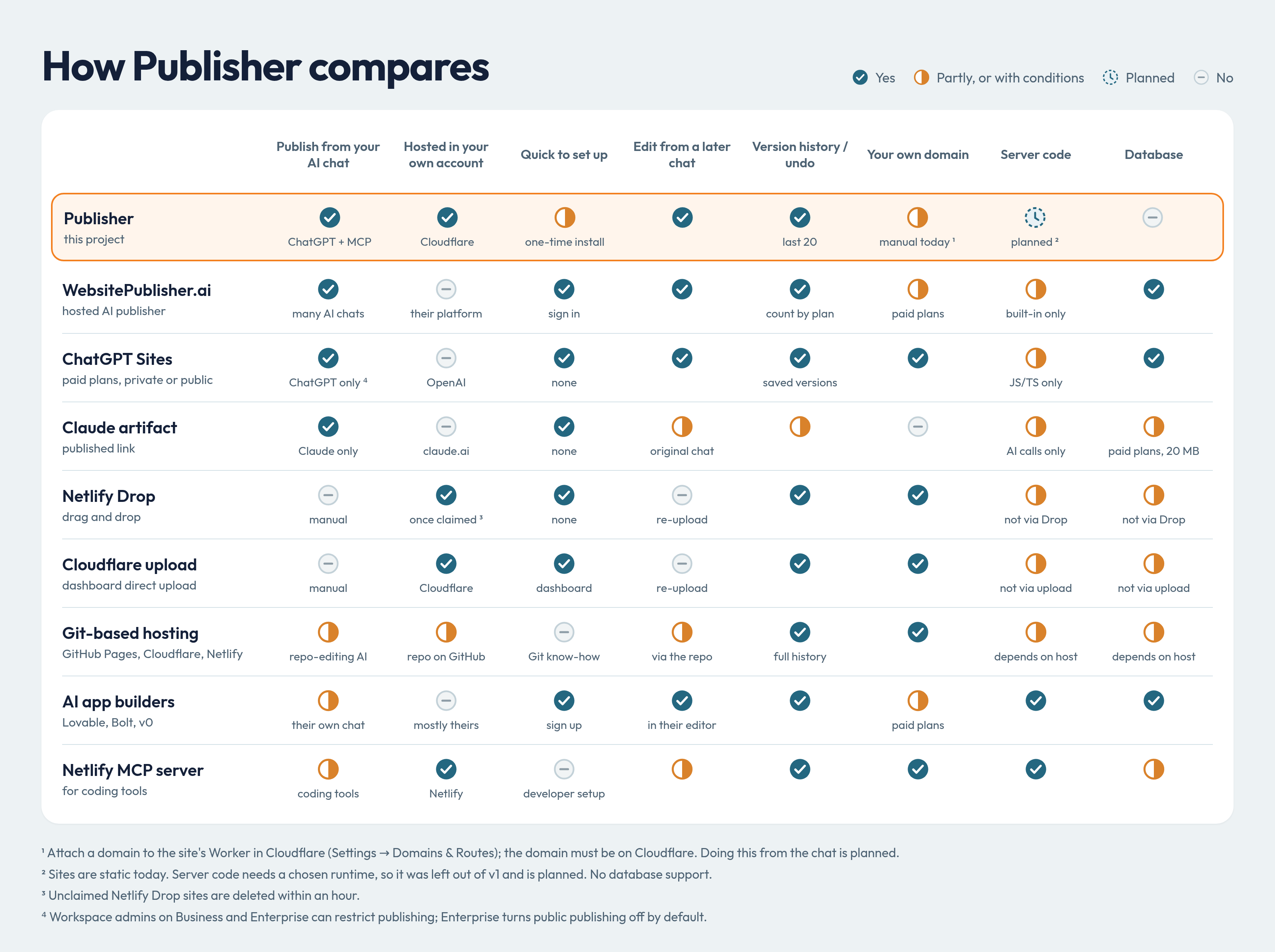
✅ yes · 🟡 partly, or with conditions · 🔜 planned · ❌ no
| Publish from your AI chat | Hosted in your own account | Quick to set up | Edit from a later chat | Version history / undo | Your own domain | Server code | Database | |
|---|---|---|---|---|---|---|---|---|
| Publisher (this project) | ✅ Claude, ChatGPT + MCP | ✅ Cloudflare | 🟡 one-time install | ✅ | ✅ last 20 | 🟡 manual today ¹ | 🔜 planned ² | ❌ |
| WebsitePublisher.ai (hosted AI publisher) | ✅ many AI chats | ❌ their platform | ✅ sign in | ✅ | ✅ count by plan | 🟡 paid plans | 🟡 built-in only | ✅ |
| ChatGPT Sites (paid plans, private or public) | ✅ ChatGPT only ⁴ | ❌ OpenAI | ✅ none | ✅ | ✅ saved versions | ✅ | 🟡 JS/TS only | ✅ |
| Claude artifact (published link) | ✅ Claude only | ❌ claude.ai | ✅ none | 🟡 original chat | 🟡 | ❌ | 🟡 AI calls only | 🟡 paid plans, 20 MB |
| Netlify Drop (drag and drop) | ❌ manual | ✅ once claimed ³ | ✅ none | ❌ re-upload | ✅ | ✅ | 🟡 not via Drop | 🟡 not via Drop |
| Cloudflare upload (dashboard direct upload) | ❌ manual | ✅ Cloudflare | ✅ dashboard | ❌ re-upload | ✅ | ✅ | 🟡 not via upload | 🟡 not via upload |
| Git-based hosting (GitHub Pages, Cloudflare, Netlify) | 🟡 repo-editing AI | 🟡 repo on GitHub | ❌ Git know-how | 🟡 via the repo | ✅ full history | ✅ | 🟡 depends on host | 🟡 depends on host |
| AI app builders (Lovable, Bolt, v0) | 🟡 their own chat | ❌ mostly theirs | ✅ sign up | ✅ in their editor | ✅ | 🟡 paid plans | ✅ | ✅ |
| Netlify MCP server (for coding tools) | 🟡 coding tools | ✅ Netlify | ❌ developer setup | 🟡 | ✅ | ✅ | ✅ | 🟡 |
¹ Attach a domain to the site's Worker in Cloudflare (Settings → Domains & Routes); the domain must be on Cloudflare. Doing this from the chat is planned.
² Sites are static today. Server code needs a chosen runtime, so it was left out of v1 and is planned. No database support.
³ Unclaimed Netlify Drop sites are deleted within an hour.
⁴ Workspace admins on Business and Enterprise can restrict publishing; Enterprise turns public publishing off by default.
Also see our getonup VS Publisher comparison
Releases are signed and served from the installer domain (release notes). An independent tester on a separate Cloudflare account completed installation, owner setup, ChatGPT connection, publishing, and discovery plus editing from an unrelated smartphone session, and updated through several releases. Not yet measured: file and generated-image transfer from ChatGPT attachments, Cloudflare OAuth refresh (hence the API token in setup step 3), and free-plan CPU and memory under the maximum limits. Details: acceptance ledger. To run your own installer: operator runbook.
flowchart LR
  Owner[Owner browser] -->|one-time Cloudflare OAuth| Installer[Jumper MCP installer]
  Installer -->|signed release + bounded credential handoff| Publisher[Owner Publisher Worker]
  ChatGPT -->|Publisher OAuth + selected artifacts| Publisher
  Owner -->|host-only session + origin + CSRF| Publisher
  Publisher --> DO[SQLite Durable Object: files, snapshots, operations, encrypted credential]
  Publisher --> KV[OAuth KV: client registrations and grants]
  DO -->|complete asset set, then activate| CF[Cloudflare API]
  CF --> Site[Separate public assets-only Worker]
  Visitors --> Site
Snapshots save to SQLite-backed Durable Object. KV holds only OAuth records. Each site is a separate assets-only Worker without Publisher credentials or bindings. Content and visitor traffic do not pass through the installer. Ordinary publishing does not call it. Revoking the Cloudflare OAuth app is different from installer downtime and can require reconnecting.
| Limit | Value |
|---|---|
| Projects / files per project | 20 / 100 |
| Uncompressed project / single file | 25 MiB / 10 MiB |
| Retained content incl. staging | 250 MiB, deduplicated |
| Publication history | Latest 20 successful snapshots |
| Abandoned candidate lifetime | 24 hours |
| Inline text per file / MCP request body | 256 KiB / 1 MiB |
| Text response | 16,000 characters, with continuation |
Static routing by default. 404.html enables 404 behavior. SPA fallback must be explicit. _headers (relative paths) and _redirects (up to 100 relative-source rules) are validated and passed as direct-upload config, and kept in snapshots and exports. Unsupported syntax and .assetsignore are rejected.
Report vulnerabilities privately; see SECURITY.md.
__Host- cookies, exact-origin and CSRF checks on writes (sibling sites are same-site). Credentials are AES-GCM encrypted with a key in Worker secrets; refreshes are serialized, replacements stored before use, and an interrupted rotation asks you to reconnect. Recovery invalidates sessions and MCP grants. Encryption at rest won't help against malicious Publisher code or a compromised account.MCP and the owner UI share one project layer. Storage keeps immutable SHA-256-addressed 512 KiB chunks; a revision captures files and serving settings together, and capacity is checked inside the transaction. Patches apply only if every old string matches exactly once. Candidate revisions stay private until published, and a combined stage-and-publish call is deduplicated by a payload-bound request key. Publication is serialized per project, rechecks its base revision, uploads all assets before activating, records version and deployment IDs, resumes via Durable Object alarms (closing the chat doesn't cancel it), and reconciles lost activation responses rather than reporting false failures. Cleanup never touches the live publication, retained history, or active operations. Confirmed deletion removes the installation-owned deployment and its stored files. Export links are five-minute bearer links: anyone holding one can download until it expires.
Releases are checked against an Ed25519 trust root, module checksums, compatibility, migration tag and class identity. Owner-approved updates persist before upload, re-verify the stored bundle, keep bindings and secrets, never replay creation migrations, and leave site content alone. The updater currently accepts schema/tag v1 only. Releases require a clean committed source tree, with pinned and locked dependencies. The release signer and installer remain trusted parties. A valid signature doesn't prove safety or what a hosted installer deployed; compare deployed modules with the numbered release, or have an agent audit the source before installing. Code rollback doesn't undo database changes, so keep a known-good release.
Node.js 24 or newer:
npm ci
npm run check
npm run build      # dry run, not a deployment
npm test
npm run format:check
Runtime tests need local workerd and loopback sockets. On NixOS set MINIFLARE_WORKERD_PATH to a compatible launcher, since the npm workerd binary expects the standard Linux dynamic linker; in restricted environments set WRANGLER_LOG_PATH. Use your own wrangler.jsonc copy, OAuth KV namespace, and secrets (ignored .dev.vars or Wrangler secrets); never deploy the placeholder config. The installer builds from wrangler.installer.jsonc (npm run build:installer, also a dry run). The operator runbook lists every required setting, the public OAuth client setup, release signing, and scope verification.
Tests: projects, runtime/OAuth/MCP, security, files, releases.
Take a peek at QUIRKS.md (running log of noteworthy issues).
Built by Jumper MCP
Claim this server with your GitHub account to request manual ownership verification.
Link to the catalog listing for Jumper Publisher from your README. This badge does not certify ownership, compatibility or security.
[](https://awesome-mcp.com/servers/jumper-publisher)Public repository statistics could not be verified. Check the configured source address; unavailable counts are not zero.
来源、范围和时段分别列出;不相加,不代表安装人数、活跃用户或安全审核。
尚无已审核的包 / 镜像标识,暂不展示下载统计。
Alternative and complementary servers in the same category
A directory listing describing a cancellation-letter and mailing-address service. The configured public GitHub repository returned 404 during source verification.

A hosted MCP service for browsing and searching through Singapore mobile-network proxies.

A directory listing describing a Markdown-to-PDF service. The configured public GitHub repository returned 404 during source verification.