
A modular FastMCP server for interacting with Microsoft Graph API, supporting advanced queries for users, sign-in logs, MFA status, and privileged users.
Repository stats unavailable
Security & Secrets
A Model Context Protocol server that lets an AI assistant administer Keycloak realms through the Keycloak Admin REST API, with least-privilege authentication and guardrails around writes.
Keycloak MCP Server is cataloged as an MCP server attributed to christophenglisch. A Model Context Protocol server that lets an AI assistant administer Keycloak realms through the Keycloak Admin REST API, with least-privilege authentication and guardrails around writes. It is categorized under auth security. See the capability inspector for recorded interfaces and their independent review status; consult upstream documentation for the current interface.
Installation configuration is not reviewed. No executable setup is offered for this entry; inspect the source repository before proceeding.
Catalog license label: MIT. Check the source repository's current license and terms before using, modifying or distributing this software.
能力定义尚未审核。未核验的采集内容不会作为可信接口展示。
暂无可展示的已审核记录。这不表示上游不支持此能力。
暂无可展示的已审核记录。这不表示上游不支持此能力。
暂无可展示的已审核记录。这不表示上游不支持此能力。
Email delivery is not connected. This page does not collect email addresses or create subscriptions.
Browse the registry for current listings instead.
Reviews for Keycloak MCP Server are not available yet
Review publishing and storage are not connected. This page does not collect or publish ratings or comments, including after sign-in.
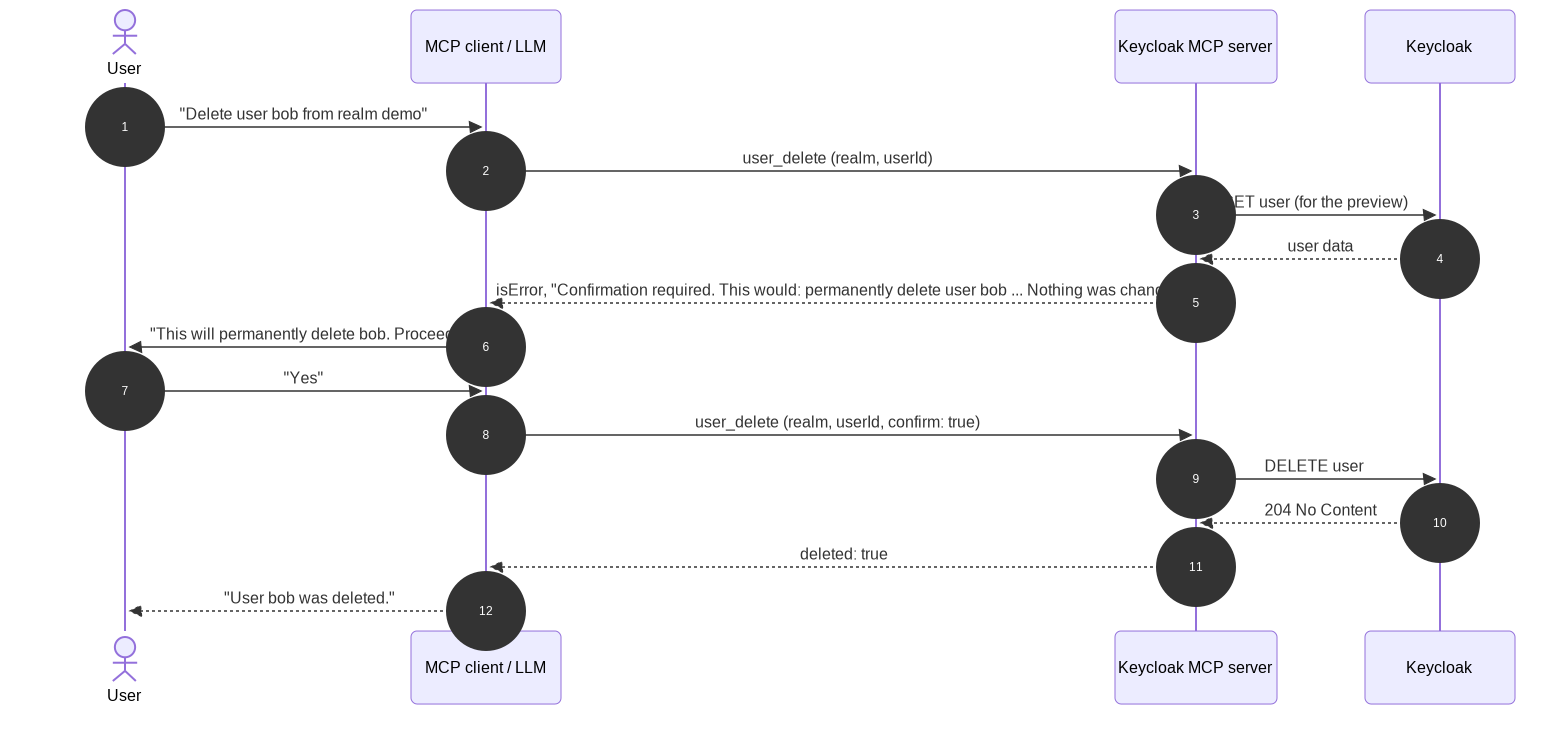
It only returns a preview of what would happen and changes nothing; after approval the call is repeated with confirm: true.
The core, groups and roles toolsets are enabled by default; everything else is opt-in through configuration.
Credentials are masked on stderr, and tools never return client secrets, user credentials or attributes.
README.md · b2c37f711960 · 采集于 2026-11-13 08:56:58 UTC
保留上游原文,不做 AI 改写。为安全起见过滤脚本、表单和不安全链接。
当前显示最后一次成功采集的文档快照,请以来源页面为准。


A Model Context Protocol (MCP) server for Keycloak administration. It lets an AI assistant such as Claude manage users, groups, roles and sessions, and inspect clients, events and the security posture of your realms, through the Keycloak Admin REST API, with least-privilege authentication and guardrails around every write.
[!WARNING] This server acts with the permissions of the Keycloak account you give it. Use a dedicated service-account client with only the roles you need, never the bootstrap admin. Every tool that changes data asks for confirmation by default, and a read-only mode is available. See Security.
core, groups, roles) is small; everything else is opt-in.client_credentials with a service account is the recommended grant; the password grant stays available. No credential defaults, so a missing setting fails fast.master realm, and a preview-then-confirm: true flow for every change. Grants of administrative rights are detected through composite roles and parent groups.Your MCP client starts the server as a local child process and talks to it over stdio. Every tool call passes the guards, then goes through a single gateway that owns the Keycloak login and caches the access token.
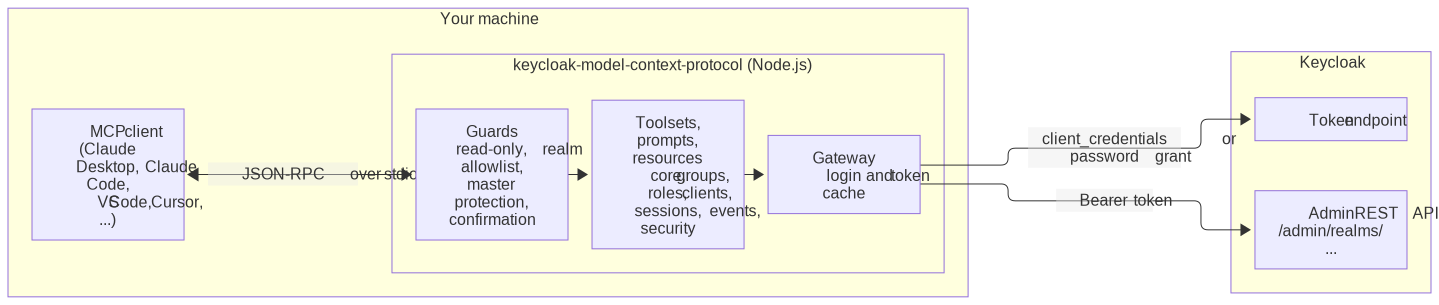
Every tool that changes data is destructive (it deletes or revokes) or sensitive (it changes identity, credentials, rights or protection mechanisms, for example user_update or user_role_assign). Called without confirm: true, such a tool only returns a preview of what would happen and changes nothing. After you approve, the assistant repeats the call with confirm: true.
The model can set confirm: true itself, even on its first call. The server then still computes the preview and returns it with the result, but only your client's approval prompt proves that a human agreed. All these tools carry destructiveHint, so clients that ask before destructive calls ask here too.
Requirements: Node.js 22 or newer, a Keycloak server your machine can reach (tested with Keycloak 24.0 to 26.8), and an MCP client.
In the realm you want to administer (here demo):
mcp-admin with Client authentication on and only Service accounts roles enabled (turn off Standard flow and Direct access grants).realm-management. For a first read-only trial: view-users, query-users, query-groups, view-realm.Step-by-step instructions with Admin Console click paths, kcadm.sh commands and a local Docker Keycloak: docs/getting-started.md.
Example for Claude Code (other clients: docs/clients.md):
claude mcp add --transport stdio \
  --env KEYCLOAK_URL=https://keycloak.example.com \
  --env KEYCLOAK_AUTH_REALM=demo \
  --env KEYCLOAK_CLIENT_ID=mcp-admin \
  --env KEYCLOAK_CLIENT_SECRET="$KEYCLOAK_CLIENT_SECRET" \
  keycloak -- npx -y keycloak-model-context-protocol@1
Or as JSON (Claude Desktop, claude_desktop_config.json):
{
  "mcpServers": {
    "keycloak": {
      "command": "npx",
      "args": ["-y", "keycloak-model-context-protocol@1"],
      "env": {
        "KEYCLOAK_URL": "https://keycloak.example.com",
        "KEYCLOAK_AUTH_REALM": "demo",
        "KEYCLOAK_CLIENT_ID": "mcp-admin",
        "KEYCLOAK_CLIENT_SECRET": "<client-secret>"
      }
    }
  }
}
List the realms you can access, then show me the first 10 users of realm demo.
If you get an answer, you are done. If not, see docs/troubleshooting.md.
All settings are environment variables. Only KEYCLOAK_URL and one set of credentials are required.
| Variable | Default | Purpose |
|---|---|---|
KEYCLOAK_URL | (required) | Base URL of the Keycloak server |
KEYCLOAK_AUTH_REALM | master | Realm where the login account or client lives |
KEYCLOAK_CLIENT_ID / KEYCLOAK_CLIENT_SECRET | none | client_credentials login (recommended) |
KEYCLOAK_USERNAME / KEYCLOAK_PASSWORD | none | Password grant login (client defaults to admin-cli) |
KEYCLOAK_GRANT_TYPE | auto | client_credentials or password; detected from what you set |
KEYCLOAK_MCP_TOOLSETS | core,groups,roles | Enabled toolsets, or all |
KEYCLOAK_MCP_READ_ONLY | false | Register read-only tools only |
KEYCLOAK_MCP_REALMS | all | Comma-separated allowlist of target realms |
KEYCLOAK_MCP_ALLOW_MASTER_WRITE | false | Allow write tools in the master realm |
KEYCLOAK_MCP_REQUIRE_CONFIRMATION | true | Destructive and sensitive tools need confirm: true |
KEYCLOAK_MCP_TIMEOUT_MS | 30000 | HTTP timeout for Keycloak requests |
KEYCLOAK_MCP_LOG_LEVEL | info | debug, info, warn or error (stderr) |
Full reference with examples, validation rules and the tool-to-role matrix: docs/configuration.md.
Tools are named <domain>_<verb>. Only the default toolsets are enabled unless you set KEYCLOAK_MCP_TOOLSETS. In read-only mode only tools of kind read are registered.
| Toolset | Default | Tools |
|---|---|---|
core | yes | realm_list, realm_get, user_search, user_get, user_create (sensitive), user_update (sensitive), user_delete (destructive), user_send_actions_email (sensitive) |
groups | yes | group_list, group_members_list, user_group_add (sensitive), user_group_remove (destructive) |
roles | yes | role_list, user_roles_list, user_role_assign (sensitive), user_role_revoke (destructive) |
clients | no | client_list, client_get |
sessions | no | user_sessions_list, user_logout (destructive) |
events | no | event_list, admin_event_list |
security | no | user_brute_force_status, user_brute_force_unlock (sensitive) |
Details for every tool (parameters, outputs, required roles): docs/tools-reference.md.
Prompts are guided workflows built on the tools. They appear in your client's prompt picker (in Claude Code as slash commands). The realm argument autocompletes.
| Prompt | What it does |
|---|---|
onboard_employee | Create a user, add groups and roles, send the welcome e-mail |
offboard_employee | Review, end sessions and disable a departing employee's account (does not delete) |
audit_realm_security | Read-only security review with prioritized findings |
investigate_failed_logins | Analyze failed logins and lockout status without changing anything |
Resources are read-only JSON documents, filtered by the same realm allowlist:
| URI | Content |
|---|---|
keycloak://realms | Names of accessible realms |
keycloak://realms/{realm} | Safe subset of the realm settings |
keycloak://realms/{realm}/security-summary | Brute-force, password policy, SSL, OTP, event flags, client exposure counts (no secrets) |
keycloak://realms/{realm}/users/{userId} | One user's basic fields (no attributes, no credentials) |
realm-management roles you need. A role matrix is in docs/configuration.md.KEYCLOAK_MCP_REQUIRE_CONFIRMATION=true): destructive and sensitive tools show a preview first. Grants of administrative rights, also through composite roles and parent groups, profile changes and action e-mails for accounts with administrative rights, and changes to the server's own account need a confirmation that KEYCLOAK_MCP_REQUIRE_CONFIRMATION=false does not turn off. Role and group grants, profile changes and action e-mails for the server's own account are refused.KEYCLOAK_MCP_READ_ONLY, KEYCLOAK_MCP_REALMS, and write protection for master (off by default).Threat model, hardening checklist and how to report a vulnerability: docs/security.md and SECURITY.md.
demo."demo whose e-mail ends with @example.com and who are disabled."jdoe (Jane Doe, jane@example.com) in demo, add her to group engineering and send her an e-mail to set a password."ops, and which roles does alice have, including composite roles?"audit_realm_security prompt for demo." (needs clients and events toolsets for the full audit)demo."bob in demo: end his sessions and disable the account."| Document | Content |
|---|---|
| docs/getting-started.md | Local Keycloak, service-account setup, first run, MCP Inspector |
| docs/configuration.md | Environment reference, role matrix, role profiles, TLS |
| docs/clients.md | Claude Desktop, Claude Code, VS Code, Cursor, generic clients |
| docs/tools-reference.md | Every tool in detail |
| docs/security.md | Threat model and hardening |
| docs/troubleshooting.md | Symptoms, causes, fixes |
| docs/architecture.md | Components, flows, design decisions |
| CHANGELOG.md | Release notes |
Version 1.0 changes the defaults: credentials are required (no admin/admin fallback), destructive tools ask for confirmation, and the tools were renamed to <domain>_<verb> (for example create-user became user_create, delete-user became user_delete). The old KEYCLOAK_ADMIN and KEYCLOAK_ADMIN_PASSWORD variables still work but are deprecated. See the migration guide.
Contributions are welcome. See CONTRIBUTING.md and the Code of Conduct. Released under the MIT License.
Claim this server with your GitHub account to request manual ownership verification.
Link to the catalog listing for Keycloak MCP Server from your README. This badge does not certify ownership, compatibility or security.
[](https://awesome-mcp.com/servers/keycloak-admin)Public repository statistics could not be verified. Check the configured source address; unavailable counts are not zero.
来源、范围和时段分别列出;不相加,不代表安装人数、活跃用户或安全审核。
尚无已审核的包 / 镜像标识,暂不展示下载统计。
Alternative and complementary servers in the same category
A modular FastMCP server for interacting with Microsoft Graph API, supporting advanced queries for users, sign-in logs, MFA status, and privileged users.

A Model Context Protocol (MCP) server that provides programmatic access to Keycloak administration functionality.

An MCP server for LLM-driven penetration testing that wraps Kali tools and adds scope enforcement, engagement tracking, and structured output.