
Oleafly is a live collaborative LaTeX, Typst and Markdown editor for research that offers a local MCP server and an oleafly mcp stdio command so outside AI clients can use its project tools.
Repository stats unavailable
Productivity & Ops
konbu is a self-hostable personal planner that binds memos, todos, schedules, and structured tables into one notebook and offers a built-in MCP server so AI clients can read and write that data.
konbu — personal digital planner with a built-in MCP server is cataloged as an MCP server attributed to krtw00. konbu is a self-hostable personal planner that binds memos, todos, schedules, and structured tables into one notebook and offers a built-in MCP server so AI clients can read and write that data. It is categorized under productivity work. See the capability inspector for recorded interfaces and their independent review status; consult upstream documentation for the current interface.
Installation configuration is not reviewed. No executable setup is offered for this entry; inspect the source repository before proceeding.
Catalog license label: MIT. Check the source repository's current license and terms before using, modifying or distributing this software.
能力定义尚未审核。未核验的采集内容不会作为可信接口展示。
暂无可展示的已审核记录。这不表示上游不支持此能力。
暂无可展示的已审核记录。这不表示上游不支持此能力。
暂无可展示的已审核记录。这不表示上游不支持此能力。
Email delivery is not connected. This page does not collect email addresses or create subscriptions.
Browse the registry for current listings instead.
Reviews for konbu — personal digital planner with a built-in MCP server are not available yet
Review publishing and storage are not connected. This page does not collect or publish ratings or comments, including after sign-in.
No. Reminders are a server-only feature that runs inside the API server with PostgreSQL; standalone SQLite mode does not send them.
By default data is persisted at ~/.konbu/konbu.db, and the location can be overridden with the --db flag.
README.md · 9c2412a348d7 · 采集于 2026-11-13 12:36:50 UTC
保留上游原文,不做 AI 改写。为安全起见过滤脚本、表单和不安全链接。
当前显示最后一次成功采集的文档快照,请以来源页面为准。

Your personal digital planner, kept by an AI butler.
CLI · MCP · Self-hostable · AI-native
One Go binary that binds your memos, todos, schedule, and tables into a single planner — searchable from one place, kept by AI.
Connect Claude, Cursor, or any MCP client to your data.


日本語 | English
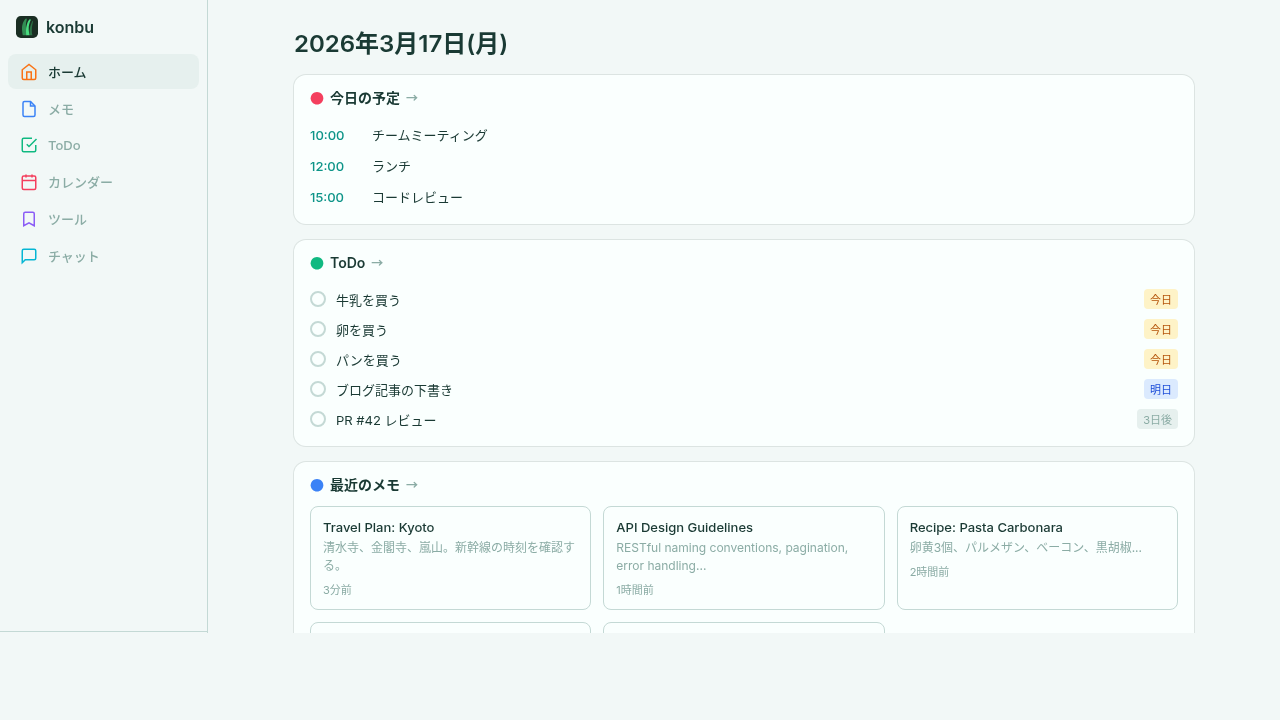
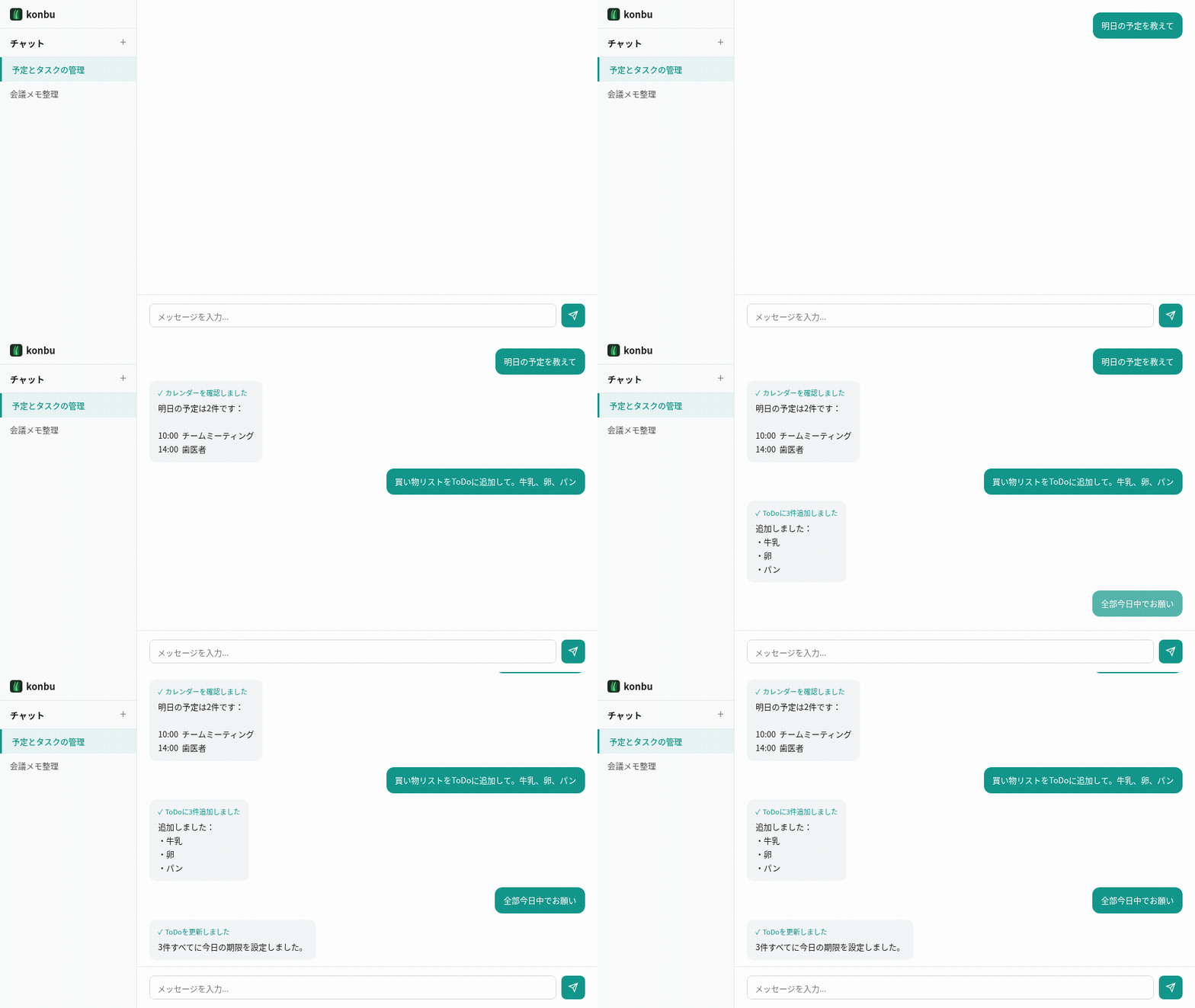
konbu is a personal digital planner — a Filofax-style system planner, digitized. A self-hostable Go binary that binds your memos, todos, schedule, and structured tables into one notebook, kept by an AI butler, and surfaces everything from a single search interface. It's yours alone — nothing is ever shared out. Not a replacement for Notion + Todoist + Calendar — a replacement for the act of searching four apps to find one thing.
What's different:
End the state of having your day scattered across four different apps.
cp .env.example .env
docker compose up -d
Open http://localhost:8080 and create your account. The dev compose file sets DEV_USER=dev@local to skip registration.
# Edit .env with real credentials and your domain
docker compose -f docker-compose.prod.yml up -d
# Prerequisites: Go 1.25+, Node.js 22+, PostgreSQL 16+

# Build frontend
cd web/frontend && npm ci && npm run build && cd ../..

# Build server
go build -o bin/server ./cmd/server

# Start (runs all SQL migrations automatically on boot)
DATABASE_URL="postgres://..." SESSION_SECRET="..." ./bin/server
| Variable | Required | Default | Description |
|---|---|---|---|
DATABASE_URL | Yes | -- | PostgreSQL connection string |
SESSION_SECRET | Yes | dev fallback | Session signing key |
PORT | No | 8080 | Server port |
DEV_USER | No | -- | Auto-login as this email (dev only) |
OPEN_REGISTRATION | No | -- | Set true to allow anyone to register (for Cloud) |
BASE_URL | No | -- | Public app URL used for OAuth callbacks |
GOOGLE_CLIENT_ID | No | -- | Enable Google OAuth login |
GOOGLE_CLIENT_SECRET | No | -- | Enable Google OAuth login |
WEBHOOK_SECRET | No | -- | GitHub Sponsors webhook secret |
STRIPE_SECRET_KEY | No | -- | Enable Stripe checkout and subscription billing |
STRIPE_WEBHOOK_SECRET | No | -- | Verify incoming Stripe webhook events |
STRIPE_PRICE_MONTHLY | No | -- | Stripe Price ID used for monthly Pro checkout |
STRIPE_PRICE_YEARLY | No | -- | Stripe Price ID used for yearly Pro checkout |
GITHUB_FEEDBACK_TOKEN | No | -- | GitHub token used to create anonymized feedback issues |
GITHUB_FEEDBACK_REPO | No | -- | Repository to receive feedback issues, e.g. krtw00/konbu |
GITHUB_FEEDBACK_LABELS | No | -- | Comma-separated labels added to forwarded feedback issues |
AI_ENCRYPTION_KEY | No | -- | 64 hex chars used to encrypt BYOK AI keys |
DEFAULT_AI_PROVIDER | No | openai | Server-side free-tier AI provider |
DEFAULT_AI_API_KEY | No | -- | Server-side free-tier AI key |
DEFAULT_AI_ENDPOINT | No | -- | Override free-tier provider endpoint |
DEFAULT_AI_MODEL | No | -- | Override free-tier provider model |
R2_ACCESS_KEY_ID | No | -- | Attachment upload credentials |
R2_SECRET_ACCESS_KEY | No | -- | Attachment upload credentials |
R2_ENDPOINT | No | Cloudflare R2 default | Attachment storage endpoint |
R2_BUCKET | No | konbu-attachments | Attachment storage bucket |
R2_PUBLIC_URL | No | -- | Optional public base URL for attachments |
SMTP_HOST | No | -- | SMTP relay host for reminder emails (e.g. smtp-relay.brevo.com). Notifications are disabled unless all five SMTP_* variables are set. |
SMTP_PORT | No | -- | SMTP relay port (typically 587 for STARTTLS) |
SMTP_USERNAME | No | -- | SMTP relay login |
SMTP_PASSWORD | No | -- | SMTP relay password / API key |
SMTP_FROM | No | -- | From address for outgoing reminder emails |
NOTIFICATION_TICK_INTERVAL | No | 1m | Notification sweep interval (Go duration, e.g. 30s, 2m) |
When the SMTP_* variables above are all set, the server starts a single in-process sweep loop that sends email reminders for upcoming events and due ToDos. Each user opts in via Settings (user_settings.notifications.enabled = true) and can override the recipient email, lead time, due-time, and timezone.
Notifications are a server-only feature — they run inside the API server process and require PostgreSQL. The MCP --standalone mode (SQLite) does not send reminders.
| Variable | Description |
|---|---|
POSTGRES_PASSWORD | PostgreSQL password |
KONBU_DOMAIN | Domain for Traefik TLS routing |
The CLI is a standalone client that connects to a remote konbu server via API. Server code is not included in the CLI binary.
go install github.com/krtw00/konbu/cmd/konbu@latest
# Set environment variables (recommended: add to ~/.zshrc or ~/.bashrc)
export KONBU_API=https://konbu.example.com
export KONBU_API_KEY=your-api-key

# Or pass as flags
konbu --api https://... --api-key your-key memo list
Generate an API key in Settings > Security on the web UI.
All commands support --json flag for machine-readable output.
konbu memo list                        # List memos
konbu memo show <id>                   # Show memo content
konbu memo add "title" -c "content"    # Create memo (-c - for stdin)
konbu memo edit <id> --title "new"     # Update memo
konbu memo rm <id>                     # Delete memo

konbu todo list                        # List todos
konbu todo show <id>                   # Show todo details
konbu todo add "task" -t "tag1,tag2"   # Create todo
konbu todo add "task" -d 2025-04-01    # Create with due date
konbu todo edit <id> --desc "notes"    # Update todo
konbu todo done <id>                   # Mark done
konbu todo reopen <id>                 # Reopen
konbu todo rm <id>                     # Delete

konbu event list                       # List events
konbu event show <id>                  # Show event details
konbu event add "title" -s <RFC3339>   # Create event
konbu event edit <id> --title "new"    # Update event
konbu event rm <id>                    # Delete

konbu tag list                         # List tags
konbu tag rm <id>                      # Delete tag

konbu search "query"                   # Cross-search

konbu api-key list                     # List API keys
konbu api-key create "key-name"        # Create API key
konbu api-key rm <id>                  # Delete API key

konbu export json -o backup.json       # Export as JSON
konbu export markdown -o backup.zip    # Export as Markdown ZIP
konbu import ical calendar.ics         # Import iCal file
Short IDs (first 8 chars) can be used in place of full UUIDs.
konbu can run as a built-in MCP (Model Context Protocol) server in two modes — pick whichever fits.
If you just want konbu as a local MCP backend for Claude Desktop, Cursor, or any MCP client, install the CLI and run it with --standalone. No PostgreSQL, no web server, no API key — everything is stored in a local SQLite file.
go install github.com/krtw00/konbu/cmd/konbu@latest
konbu mcp --standalone
Data is persisted at ~/.konbu/konbu.db by default. Override with --db /path/to/db.sqlite if needed.
Claude Desktop (~/Library/Application Support/Claude/claude_desktop_config.json on macOS, %APPDATA%\Claude\claude_desktop_config.json on Windows):
{
  "mcpServers": {
    "konbu": {
      "command": "konbu",
      "args": ["mcp", "--standalone"]
    }
  }
}
Cursor accepts the same config at ~/.cursor/mcp.json (or via the settings UI).
A multi-arch image (linux/amd64, linux/arm64) is published to GitHub Container Registry. Pull it directly — no build step needed:
docker pull ghcr.io/krtw00/konbu-mcp:latest
For reproducible setups, pin to a release tag instead — e.g. docker pull ghcr.io/krtw00/konbu-mcp:v0.2.0.
Then point your MCP client at it. Data persists in a named volume:
{
  "mcpServers": {
    "konbu": {
      "command": "docker",
      "args": ["run", "--rm", "-i", "-v", "konbu-data:/data", "ghcr.io/krtw00/konbu-mcp:latest"]
    }
  }
}
Prefer building from source? docker build -f docker/Dockerfile.mcp -t konbu-mcp . from the repo root produces the same image (CGO-free, distroless static, ~22 MB).
Standalone mode exposes memo / todo / calendar event CRUD plus cross-resource search. Tags, attachments, and AI chat are server-only (use the connected mode below for those).
If you're running a konbu server (self-hosted or konbu Cloud), point the MCP server at it over HTTP. You get the full feature set: tags, attachments, and AI chat.
konbu CLI binary (see CLI section above){
"mcpServers": {
"konbu": {
"command": "konbu",
"args": ["mcp"],
"env": {
"KONBU_API": "http://localhost:8080",
"KONBU_API_KEY": "your-api-key"
}
}
}
}
After restarting your MCP client, interact with konbu in natural language:
Base path: /api/v1
| Resource | Endpoints |
|---|---|
| Auth | POST /auth/register, POST /auth/login, POST /auth/logout, GET /auth/setup-status, GET /auth/providers, GET /auth/google/login, GET /auth/google/callback |
| User | GET/PUT /auth/me, GET/PUT /auth/settings, POST /auth/change-password, POST /auth/delete-account |
| API Keys | GET/POST /api-keys, DELETE /api-keys/:id |
| Memos | GET/POST /memos, GET/PUT/DELETE /memos/:id, GET/POST /memos/:id/rows, POST /memos/:id/rows/batch, GET /memos/:id/rows/export, PUT/DELETE /memos/:id/rows/:rowId |
| ToDos | GET/POST /todos, GET/PUT/DELETE /todos/:id, PATCH /todos/:id/done, PATCH /todos/:id/reopen |
| Events | GET/POST /events, GET/PUT/DELETE /events/:id |
| Calendars | GET/POST /calendars, GET/PUT/DELETE /calendars/:id (owner-only) |
| Tags | GET/POST /tags, PUT/DELETE /tags/:id |
| Search | GET /search?q=... |
| Chat | GET/POST /chat/sessions, GET/PUT/DELETE /chat/sessions/:id, POST /chat/sessions/:id/messages, GET/PUT /chat/config |
| Attachments | POST /attachments, GET /attachments/* |
| Export | GET /export/json, GET /export/markdown |
| Import | POST /import/ical |
# Start PostgreSQL
docker compose up -d postgres

# Frontend dev server
cd web/frontend && npm run dev

# Run server
DEV_USER=dev@local go run ./cmd/server

# Build CLI
go build -o bin/konbu ./cmd/konbu

# Run tests
go test ./...
cd web/frontend && npm test
cd web/frontend && npm run test:e2e
cmd/
  server/       # API server
  konbu/        # CLI client
internal/
  handler/      # HTTP handlers
  service/      # Business logic
  repository/   # DB access (sqlc)
  middleware/   # Auth, logging
  client/       # API client (used by CLI)
  mcp/          # MCP server
web/frontend/   # React + Vite SPA
sql/            # Schema and migrations
docker/         # Dockerfile
SMTP_* env is configured)If you find konbu useful, consider sponsoring the project.
Claim this server with your GitHub account to request manual ownership verification.
Link to the catalog listing for konbu — personal digital planner with a built-in MCP server from your README. This badge does not certify ownership, compatibility or security.
[](https://awesome-mcp.com/servers/konbu)Public repository statistics could not be verified. Check the configured source address; unavailable counts are not zero.
来源、范围和时段分别列出;不相加,不代表安装人数、活跃用户或安全审核。
尚无已审核的包 / 镜像标识,暂不展示下载统计。
Alternative and complementary servers in the same category
Oleafly is a live collaborative LaTeX, Typst and Markdown editor for research that offers a local MCP server and an oleafly mcp stdio command so outside AI clients can use its project tools.
Buddy is an Android app that offers its phone tools through a local MCP server to Claude Code, Codex, OpenCode, Antigravity, and Grok sessions.

Tuqui is a hosted MCP server that connects Odoo with Claude and ChatGPT so users can ask about sales, stock, customers and overdue invoices in plain language.
