
This is a Model Context Protocol (MCP) server for interacting with AIStor object stores.
Repository stats unavailable
Databases & Storage
An MCP server implementation that provides tools and resources for interacting with the KWDB database, including reading, writing, querying, and DDL operations.
KWDB MCP Server is cataloged as an MCP server attributed to kwdb. An MCP server implementation that provides tools and resources for interacting with the KWDB database, including reading, writing, querying, and DDL operations. It is categorized under databases storage. See the capability inspector for recorded interfaces and their independent review status; consult upstream documentation for the current interface.
Installation configuration is not reviewed. No executable setup is offered for this entry; inspect the source repository before proceeding.
Catalog license label: MIT License. Check the source repository's current license and terms before using, modifying or distributing this software.
能力定义尚未审核。未核验的采集内容不会作为可信接口展示。
暂无可展示的已审核记录。这不表示上游不支持此能力。
暂无可展示的已审核记录。这不表示上游不支持此能力。
暂无可展示的已审核记录。这不表示上游不支持此能力。
Email delivery is not connected. This page does not collect email addresses or create subscriptions.
Browse the registry for current listings instead.
Reviews for KWDB MCP Server are not available yet
Review publishing and storage are not connected. This page does not collect or publish ratings or comments, including after sign-in.
It supports StdIO mode (default), HTTP mode (recommended for production), and SSE mode (deprecated).
It automatically adds a LIMIT 20 clause to SELECT queries that do not already have a LIMIT clause.
Yes, started without a connection string it runs stateless multi-tenant, requiring each read or write query to send the X-Database-URI header.
README.md · a3a7e37bdce5 · 采集于 2026-11-13 10:34:22 UTC
保留上游原文,不做 AI 改写。为安全起见过滤脚本、表单和不安全链接。
当前显示最后一次成功采集的文档快照,请以来源页面为准。
The KWDB MCP Server is a server implementation based on the MCP (Model Context Protocol) protocol, which provides a set of tools and resources for interacting with the KWDB database and providing business intelligence functionality through the MCP protocol. The KWDB MCP Server supports reading, writing, querying, modifying data, and performing DDL operations.
The core process of the KWDB MCP Server consists of the following components:
LIMIT 20 clause for SQL queries without a LIMIT clause.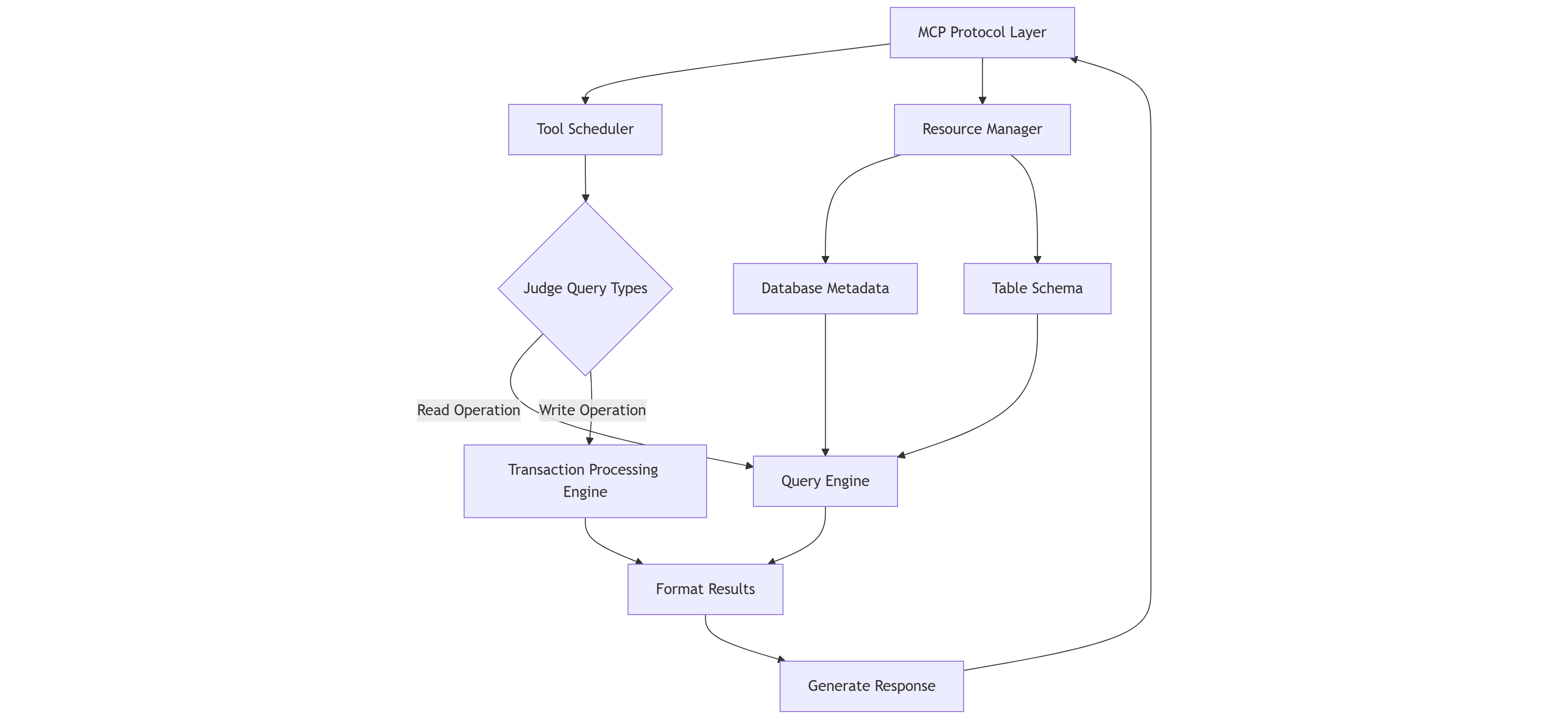
SELECT, SHOW, EXPLAIN, and other read-only queries.INSERT, UPDATE, DELETE, and CREATE, DROP, ALTER DDL operations.query-metrics (fixed catalog of 32 runtime metrics against the admin /restapi/ts/query endpoint) and query-slow-sql (top-N slow SQL statements via a SELECT against kwdb_internal.node_statement_statistics) — both derive credentials from the existing DB URL, supporting both TLS and insecure KaiwuDB deployments.isError flag.{
"content": [{"type": "text", "text": "Query error: error details"}],
"isError": true
}
{
  "jsonrpc": "2.0",
  "id": 1,
  "error": {
    "code": -32002,  // RESOURCE_NOT_FOUND: resource does not exist
    "message": "handler not found for resource URI 'kwdb://table/nonexistent': resource not found"
  }
}
{
  "jsonrpc": "2.0",
  "id": 1,
  "error": {
    "code": -32603,  // INTERNAL_ERROR: internal resource processing error
    "message": "failed to get table schema for 'tablename': database connection error"
  }
}
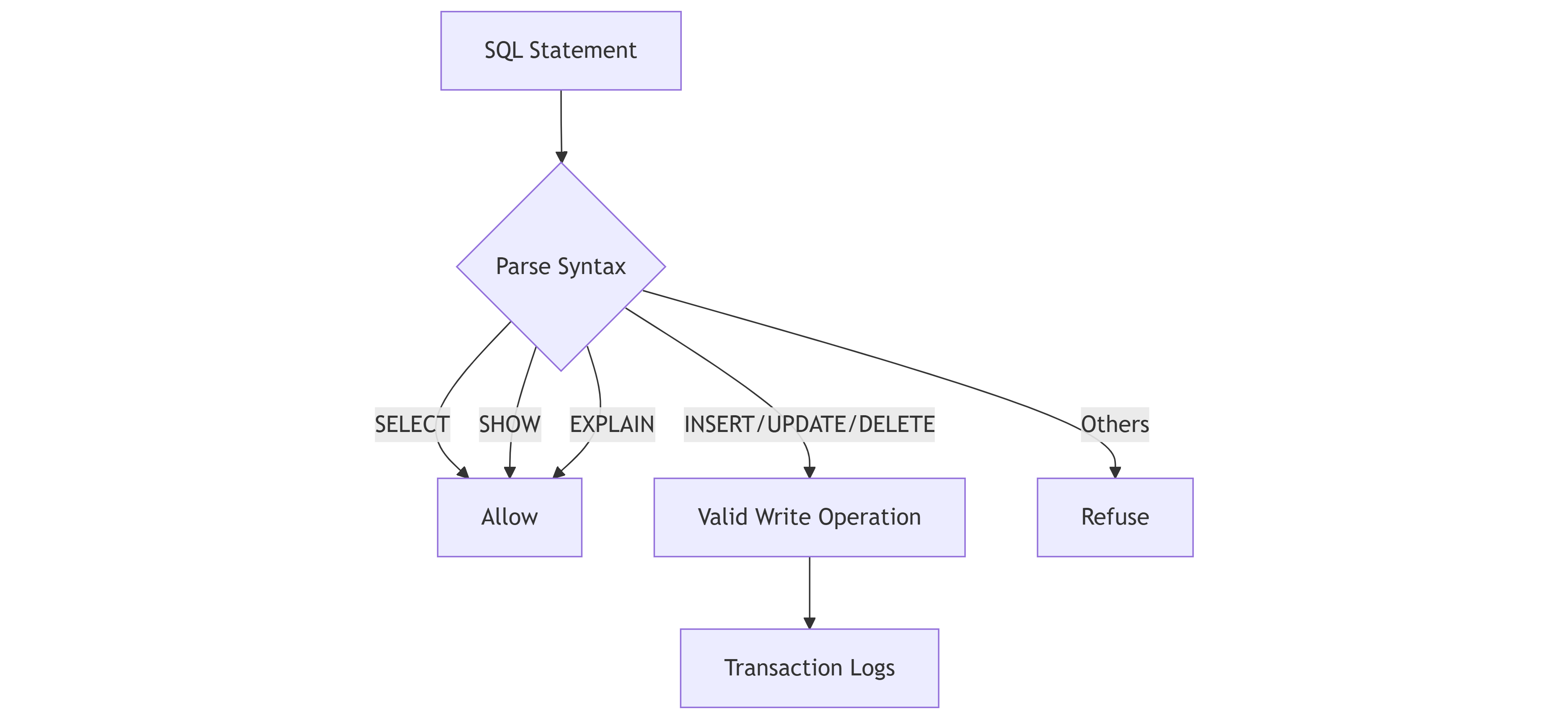
LIMIT 20 clause to SELECT queries without a LIMIT clause.The KWDB MCP Server provides the following security measures:
MCP Resources allow the KWDB MCP Server to expose data and content that can be read by MCP clients and used as context for LLM interactions. The KWDB MCP Server provides the following MCP Resources:
| Resources | URI Format | Description | Example |
|---|---|---|---|
| Product information | kwdb://product_info | Product information, including the version and supported features | kwdb://product_info/ |
| Database metadata | kwdb://db_info/{database_name} | Information about a specific database, including the engine type, comments, and tables | kwdb://db_info/db_shig |
| Table schema | kwdb://table/{table_name} | Schema of a specific table, including columns and example queries | kwdb://table/user_profile |
The MCP Tools enable the KWDB MCP Server to expose executable functionality to MCP clients. Through MCP Tools, LLMs can interact with external systems. The KWDB MCP Server provides the following MCP Tools.
The KWDB MCP Server executes the SELECT, SHOW, EXPLAIN statements, and other read-only queries to read data from the database. The read_query function returns the query results in a format of array for your SQL statement. In addition, the KWDB MCP Server will automatically add the LIMIT 20 clause to SELECT queries without a LIMIT clause to prevent large result sets.
Examples:
-- Query table data.
SELECT * FROM users LIMIT 10;

-- List all created tables.
SHOW TABLES;

-- Execute a SQL query and generate details about the SQL query.
EXPLAIN ANALYZE SELECT * FROM orders WHERE user_id = 1;
The KWDB MCP Server executes data modification queries, including DML and DDL operations.
Examples:
-- Insert data into the table.
INSERT INTO users (name, email) VALUES ('John Doe', 'john@example.com');

-- Update data in the table.
UPDATE users SET email = 'new-email@example.com' WHERE id = 1;

-- Remove data from the table.
DELETE FROM users WHERE id = 1;

-- Create a table.
CREATE TABLE products (id SERIAL PRIMARY KEY, name TEXT, price DECIMAL);

-- Add a column to a table.
ALTER TABLE products ADD COLUMN description TEXT;

-- Remove a table.
DROP TABLE products;
The KWDB MCP Server can query historical runtime metrics through the database admin /ts/query API. The tool accepts a fixed catalog of 32 inspection metrics (QPS, CPU, memory, latency, storage, cluster, network) defined in docs/design-tls-inspection-tools.md. Each call requires metric_names, start_ms, end_ms, and sample_ms. Basic Auth credentials are derived from the connection string's user:password.
The 32-metric catalog spans these categories (all derivative: "none"):
| Category | Examples |
|---|---|
| Basic | cr.node.liveness.livenodes, cr.node.sys.uptime |
| System | cr.node.sys.cpu.user.percent, cr.store.capacity, cr.node.sys.rss |
| SQL workload | cr.node.sql.query.count, cr.node.exec.latency-p99 |
| Storage | cr.store.totalbytes, cr.store.livebytes |
| Cluster | cr.store.replicas, cr.store.ranges.unavailable |
| Network | cr.node.clock-offset.meannanos |
Examples:
{
  "metric_names": ["cr.node.sql.query.count", "cr.node.sys.cpu.user.percent"],
  "start_ms": 1775035140000,
  "end_ms": 1775035740000,
  "sample_ms": 60000
}
Successful response (the upstream /ts/query returns code: 0 on success):
{
  "status": "success",
  "type": "metrics_inspection",
  "data": {
    "code": 0,
    "desc": ""
  },
  "error": null
}
The KWDB MCP Server can query slow SQL statements by running a SELECT against the cluster-side system table kwdb_internal.node_statement_statistics. The tool accepts optional limit (default 10), min_latency_ms (default 0), and sort_by (default service_lat; supports run_lat, plan_lat, count). Results include query text, four latency fields (in milliseconds), and execution count.
Filtering always runs against service_latency_ms, regardless of the chosen sort_by. The default call returns the top 10 statements sorted by mean service latency.
Examples:
{
  "limit": 10,
  "min_latency_ms": 100,
  "sort_by": "service_lat"
}
Successful response (truncated for brevity):
{
  "data": [
    {
      "id": "1",
      "fingerprint": "1",
      "query": "SELECT count(_), max(\"timestamp\") FROM [DELETE FROM system.rangelog WHERE ...]",
      "service_latency_ms": 3.805022,
      "run_latency_ms": 0.649384,
      "plan_latency_ms": 1.041746,
      "count": 1
    }
  ],
  "status": "success",
  "type": "slow_sql_inspection"
}
Both query-metrics and query-slow-sql reuse the same X-Database-URI header (or default pool) and derive their Basic Auth from the saved credentials; the admin endpoint URL is auto-derived from the DB URL's host. TLS endpoints skip certificate verification to match the KaiwuDB self-signed convention.
MCP Prompts enable the KWDB MCP Server to define reusable prompt templates and workflows that MCP clients can easily surface to users and LLMs. They provide a powerful way to standardize and share common LLM interactions. The KWDB MCP Server provides the following MCP Prompts:
| Type | Prompt Name | Description |
|---|---|---|
| Database description | db_description | A comprehensive description of KWDB database, including core functions, supported features, and use cases. |
| Syntax guide | syntax_guide | A comprehensive syntax guide for KWDB, including examples of common queries and best practices. |
| Cluster management | cluster_management | A comprehensive guide for managing KWDB clusters, including node management, load balancing, and monitoring. |
| Data migration | data_migration | A guide for migrating data to and from KWDB, including import/export methods and best practices. |
| Installation | installation | A step-by-step guide for installing and deploying KWDB in various environments. |
| Performance tunning | performance_tuning | A guide for optimizing KWDB performance, including query optimization, indexing strategies, and system-level tuning. |
| Troubleshooting | troubleshooting | A guide for diagnosing and resolving common KWDB issues and errors. |
| Backup and restore | backup_restore | A comprehensive guide for backing up and restoring KWDB databases, including strategies, tools, and best practices. |
| DBA templates | dba_template | Templates and guidelines for MCP Prompts writing. |
The MCP Prompts are Markdown files stored in the pkg/prompts/docs/ directory. These files are embedded into the binary when compiling the KWDB MCP Server using Go's embed package. Currently, the KWDB MCP Server provides the following Prompts files:
pkg/prompts/docs/ReadExamples.md: contain read query examples (using the SELECT statement).pkg/prompts/docs/WriteExamples.md: contain write query examples (using the INSERT, UPDATE, DELETE, CREATE, ALTER statements).pkg/prompts/docs/DBDescription.md: contain the database description.pkg/prompts/docs/SyntaxGuide.md: contain the SQL syntax guide.pkg/prompts/docs/ClusterManagementGuide.md: contain the cluster management guide.pkg/prompts/docs/DataMigrationGuide.md: contain the data migration guide.pkg/prompts/docs/InstallationGuide.md: contain the installation guide.pkg/prompts/docs/PerformanceTuningGuide.md: contain the performance tuning guide.pkg/prompts/docs/TroubleShootingGuide.md: contain the troubleshooting guide.pkg/prompts/docs/BackupRestoreGuide.md: contain the backup and restore guide.pkg/prompts/docs/DBATemplate.md: contain the database administration template.To add MCP Prompts, follow these steps:
pkg/prompts/docs/ directory, such as new_usecase.md.pkg/prompts/prompts.go file.registerUseCasePrompts() in the pkg/prompts/prompts.go file.README file.For details about how to add MCP Prompts, see comments in the pkg/prompts/prompts.go file.
To modify MCP Prompts, follow these steps:
pkg/prompts/docs/ directory.make build command to rebuild the application. The updated MCP Prompts will be embedded in the binary.lib/pq.Clone the repository.
git clone https://gitee.com/kwdb/kwdb-mcp-server
cd kwdb-mcp-server
Install dependencies.
make deps
Build the application.
make build
If you succeed, the application adopts the following structure.
kwdb-mcp-server/
├── bin/
│   └── kwdb-mcp-server      # Binary executable file
├── cmd/
│   └── kwdb-mcp-server/
│       └── main.go           # The main application
├── pkg/
│   ├── db/
│   │   └── db.go             # Database operations
│   ├── prompts/
│   │   ├── prompts.go        # MCP Prompts
│   │   └── docs/             # MCP Prompts files
│   │       ├── ReadExamples.md     # Read query examples
│   │       ├── WriteExamples.md    # Write query examples
│   │       ├── DBDescription.md    # Database descriptions
│   │       ├── SyntaxGuide.md      # SQL Syntax guide
│   │       ├── ClusterManagementGuide.md # Cluster management guide
│   │       ├── DataMigrationGuide.md    # Data migration guide
│   │       ├── InstallationGuide.md      # Installation guide
│   │       ├── PerformanceTuningGuide.md # Performance tunning
│   │       ├── TroubleShootingGuide.md   # Troubleshooting guide
│   │       ├── BackupRestoreGuide.md     # Backup and restore guide
│   │       └── DBATemplate.md            # DBA templates
│   ├── resources/
│   │   └── resources.go      # MCP Resources
│   ├── server/
│   │   └── server.go         # KWDB MCP Server configurations
│   ├── tools/
│   │   └── tools.go          # MCP Tools
│   └── version/
│       └── version.go        # Version information
├── Makefile                  # Commands for building and running the KWDB MCP Server
└── README.md                 # README file
The KWDB MCP Server supports three transport modes:
Operating modes
CONNECTION_STRING in the Makefile). The server initializes a default connection pool. Tools read-query and write-query may be called without the X-Database-URI header; they use this default pool../bin/kwdb-mcp-server or ./bin/kwdb-mcp-server -t http -p 8080). The server does not open any database until a tool is invoked. Every read-query and write-query call must send the request header X-Database-URI with a full PostgreSQL connection string; otherwise the tool returns an error: missing X-Database-URI header.query-metrics, query-slow-sql) derive the admin endpoint URL from the connection string's host (default port 8080) and derive Basic Auth credentials from the same connection string. No separate admin configuration is needed; the connection string's sslmode and cert paths determine whether the admin endpoint is reached over http or https. To override the derived admin URL on a per-request basis, send X-Admin-Base-URL.Run the KWDB MCP Server (with an optional connection string for single-DB mode):
./bin/kwdb-mcp-server "postgresql://<username>:<password>@<hostname>:<port>/<database_name>?sslmode=disable"
Or run without a connection string for stateless mode; then each read-query / write-query call must send the X-Database-URI header. Inspection tools (query-metrics, query-slow-sql) automatically derive the admin endpoint URL and Basic Auth from this same connection string; send X-Admin-Base-URL to override the derived URL.
./bin/kwdb-mcp-server
Run the KWDB MCP Server using the Makefile:
CONNECTION_STRING="postgresql://<username>:<password>@<hostname>:<port>/<database_name>?sslmode=disable" make run
Parameters:
username: Username for connecting to the KWDB database.password: Password for authentication.hostname: IP address of the KWDB database.port: Port for connecting to the KWDB database.database_name: Name of the KWDB database to access.sslmode: SSL mode. Supported values: disable, allow, prefer, require, verify-ca, verify-full. For details, see SSL Mode Parameters.Run the KWDB MCP Server in HTTP mode:
CONNECTION_STRING="postgresql://<username>:<password>@<hostname>:<port>/<database_name>?sslmode=disable" PORT=8080 make run-http
The HTTP service listens on 0.0.0.0:<port> by default, and the MCP endpoint is http://<host>:<port>/mcp. When started without a connection string (stateless mode), clients must send the X-Database-URI request header with each read-query / write-query call.
The inspection tools (query-metrics, query-slow-sql) derive Basic Auth and the admin endpoint URL from the X-Database-URI connection string; send X-Admin-Base-URL to override the derived URL.
HTTPS (TLS) is optional: pass both --tls-cert and --tls-key with PEM file paths. The server then listens with TLS; the MCP endpoint is https://<host>:<port>/mcp. If only one of the two flags is set, the process exits with an error. TLS is implemented via mcp-go WithTLSCert (requires mcp-go v0.39+).
./bin/kwdb-mcp-server -t http -p 8443 --tls-cert /path/to/cert.pem --tls-key /path/to/key.pem "postgresql://..."
Parameters:
-t or --transport: Transport type, supports stdio, sse, http.
stdio: Standard input/output modesse: SSE mode (deprecated)http: HTTP mode (recommended)-p or --port: Listening port for KWDB MCP Server, default is 8080.--tls-cert / --tls-key: Optional. PEM certificate and private key for HTTP mode HTTPS. Both must be set together; only applies when -t http.username: Username for connecting to the KWDB database.password: Password for authentication.hostname: IP address of the KWDB database.port: Port for connecting to the KWDB database.database_name: Name of the KWDB database to access.sslmode: SSL mode. Supported values: disable, allow, prefer, require, verify-ca, verify-full. For details, see SSL Mode Parameters.Note
SSE mode is deprecated and will be removed in future releases. Please use HTTP mode if possible.
Run the KWDB MCP Server in SSE mode (or omit CONNECTION_STRING for stateless mode; then clients must send X-Database-URI with each tool call):
CONNECTION_STRING="postgresql://<username>:<password>@<hostname>:<port>/<database_name>?sslmode=disable" PORT=8080 make run-sse
Parameters:
-t or --transport: Transport type, supports stdio, sse, http.
stdio: Standard input/output modesse: SSE mode (deprecated)http: HTTP mode (recommended)-p or --port: Listening port for KWDB MCP Server, default is 8080.username: Username for connecting to the KWDB database.password: Password for authentication.hostname: IP address of the KWDB database.port: Port for connecting to the KWDB database.database_name: Name of the KWDB database to access.sslmode: SSL mode. Supported values: disable, allow, prefer, require, verify-ca, verify-full. For details, see SSL Mode Parameters.For details about how the KWDB MCP Server integerates with LLM Agents, see Integrate with LLM Agents.
For details about how to troubleshoot the KWDB MCP Server, see Troubleshooting.
For documentation about the KWDB MCP Server, see the KWDB Documentation Website.
Contributions are welcome! Please feel free to submit issues and pull requests.
This project is licensed under the MIT License.
kwdb-mcp-server is indexed and certified by MCP Review
Claim this server with your GitHub account to request manual ownership verification.
Link to the catalog listing for KWDB MCP Server from your README. This badge does not certify ownership, compatibility or security.
[](https://awesome-mcp.com/servers/kwdb-mcp-server)Public repository statistics could not be verified. Check the configured source address; unavailable counts are not zero.
来源、范围和时段分别列出;不相加,不代表安装人数、活跃用户或安全审核。
尚无已审核的包 / 镜像标识,暂不展示下载统计。
Alternative and complementary servers in the same category
This is a Model Context Protocol (MCP) server for interacting with AIStor object stores.

A Model Context Protocol server that lets AI assistants run SQL queries against AWS Athena databases and retrieve results.

A Model Context Protocol (MCP) server that exposes access to an InfluxDB v2 instance using the InfluxDB OSS API v2.