
A directory listing describing a cancellation-letter and mailing-address service. The configured public GitHub repository returned 404 during source verification.
Repository stats unavailable
Developer Tools
An Android device control platform whose on-device service exposes a streamable-http MCP server for AI agents alongside UI automation, capture, Frida, and remote desktop tools.
FIRERPA Android automation platform with a built-in MCP server is cataloged as an MCP server attributed to firerpa. An Android device control platform whose on-device service exposes a streamable-http MCP server for AI agents alongside UI automation, capture, Frida, and remote desktop tools. It is categorized under developer tools. See the capability inspector for recorded interfaces and their independent review status; consult upstream documentation for the current interface.
Installation configuration is not reviewed. No executable setup is offered for this entry; inspect the source repository before proceeding.
Catalog license label: Not specified. Check the source repository's current license and terms before using, modifying or distributing this software.
能力定义尚未审核。未核验的采集内容不会作为可信接口展示。
暂无可展示的已审核记录。这不表示上游不支持此能力。
暂无可展示的已审核记录。这不表示上游不支持此能力。
暂无可展示的已审核记录。这不表示上游不支持此能力。
Email delivery is not connected. This page does not collect email addresses or create subscriptions.
Browse the registry for current listings instead.
Reviews for FIRERPA Android automation platform with a built-in MCP server are not available yet
Review publishing and storage are not connected. This page does not collect or publish ratings or comments, including after sign-in.
It runs on streamable-http under the /mcp/ path.
The README states compatibility with Claude, Cursor, and other MCP clients.
README.md · a980a38130ba · 采集于 2026-11-13 09:43:01 UTC
保留上游原文,不做 AI 改写。为安全起见过滤脚本、表单和不安全链接。
当前显示最后一次成功采集的文档快照,请以来源页面为准。





Documentation | 使用文档 | TELEGRAM | QQ Group | SKILLS | llms-full.txt | 中文版本
FIRERPA is an all-in-one Android device control platform. The server runs directly on the device with no extra runtime dependencies; it supports multiple generations of Android and works with or without root. On the PC side, the Python client library orchestrates UI automation, remote operations, traffic capture, Hook-based reverse engineering, network proxying, distributed networking, AI agents, and MCP through a single service and API. Compared with stitching together Appium, mitmproxy, frida-server, adb, uiautomator2, and ad-hoc scripts and ops tools, FIRERPA offers one source of capabilities, unified configuration, connected workflows, and a stack built for multi-device, long-running, production use.
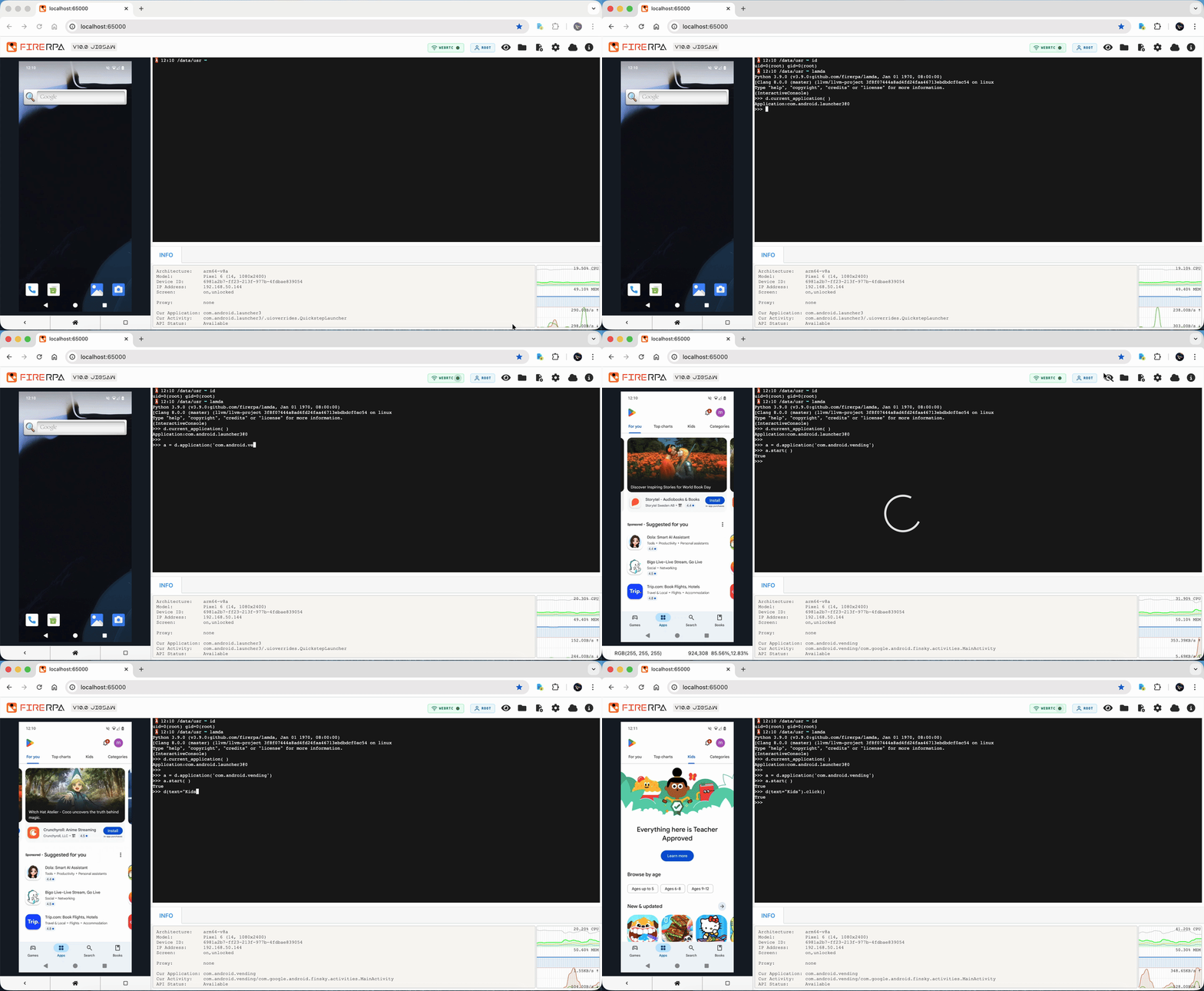
FIRERPA provides a browser-based remote desktop: view and control the device in real time without installing a dedicated PC client, over LAN or across networks. Streaming supports both MJPEG and H.264, with software and hardware encoding backends. Frame rate (up to 60fps), resolution scale, bitrate, and quality can be tuned to device capability and network conditions—reducing bandwidth and improving smoothness on weak links. WebRTC is also supported, with configurable STUN/TURN servers for better NAT traversal and lower end-to-end latency in public or cross-region setups.
The remote desktop supports multi-user concurrent access for collaborative debugging, demos, and training. Bidirectional clipboard sharing and live audio (Android 10+) are included, along with an integrated terminal, drag-and-drop uploads, and browser-based file browsing and downloads—all over a single port. Built-in visual layout inspection highlights elements, supports Tab traversal, shows coordinates and RGB values, and exports the XML layout tree so you can validate selectors and automation logic in the same UI, shortening the loop from screen to script.
Remote desktop and RPC support end-to-end TLS and service-certificate access control, with optional custom WebUI login passwords to reduce exposure on public networks. Remote desktop capabilities can also be embedded into your own web apps over WebSocket (live video, touch, terminal, keys, etc.), with allow_origin for cross-origin integration—suitable for productizing real-device control.
FIRERPA provides a full selector-based automation system: text, resourceId, description, scrollable, and other common matchers, plus child / sibling chaining for duplicate elements, deep hierarchies, or controls without distinctive attributes. At the element level: screenshots, wait for appear/disappear, corner/center coordinates, exists checks, Unicode input, stepped swipes, fling scrolling, scroll-to-end, and more. It can coexist with other accessibility services on Android 8.0+ and improves WebView node discovery for hybrid apps.
The UI Watcher listens for UI changes in real time and runs clicks, key events, or counters when conditions match—useful for auto-dismissing agreements, update prompts, ads, and other interruptions. Multiple selector conditions and per-event enable/disable are supported; transient screens can be counted.
Virtual Display is a differentiator: create isolated background displays on the device and run apps and automation there without affecting the main screen—e.g. auto-reply on a virtual display while you use the phone normally. The virtual-display API mirrors the main device API (d.xxx → vd.xxx); Watchers can be scoped to a virtual display. The WebUI supports multi-display view and switching in remote desktop—ideal for background tasks, parallel work, and human-in-the-loop plus machine automation.
For scenes without a standard view tree (games, custom-drawn UI), FIRERPA offers OCR and image matching. OCR supports paddleocr, easyocr, and custom HTTP backends; in clusters, recognition can run centrally instead of loading models on every PC, with GPU acceleration and flexible text matching. Image matching runs on the device (template or SIFT), without consuming PC resources; SIFT is robust to rotation, scale, and lighting. Multi-touch supports recording, replay, programmatic construction, and binary persistence for complex gestures and pressure.
Architecturally, FIRERPA uses a client/server model—better for centralized scheduling, versioning, and fleet control than on-device script runners like AutoJS; lighter than Appium; more stable than uiautomator2 in multi-device scenarios. The docs position it as a functional superset of common Android automation stacks—automation, capture, Hook, and ops can be chained in code on one platform without switching tools.
FIRERPA offers one-click MITM capture: automatic system root CA install, proxy setup, handling of Android version differences, and automatic network restore on exit—no manual cert or proxy toggling. Global capture, per-package capture, live request/response editing, shared mitmweb, and upstream HTTP proxy for international traffic are supported. Built-in QUIC downgrade reduces QUIC interference. Capture still works when PC and device only share a single FIRERPA port (e.g. ADB connect or frp forwarding).
Beyond one-click scripts, MITM is fully API-driven: install/uninstall system CAs compatible with mitmproxy, Fiddler, Charles, etc.; embed capture in automation pipelines alongside UI steps and Frida hooks. A Windows startmitm.exe is available without a Python install.
On the device, FIRERPA provides full proxy support: HTTP / HTTPS / SOCKS5 / Shadowsocks (multiple ciphers), per-app proxy (including multi-user clones), DNS proxy, UDP proxy, LAN bypass, coexistence with OpenVPN, and auto-connect to configured proxies at startup. Proxies support IPv6 and UDP for complex networks.
Device HTTP bridge proxy (tunnel2) provides reverse-proxy capability: point your PC or browser HTTP proxy at the phone and traffic is forwarded through the phone’s network egress; the outbound IP matches the phone. Wi‑Fi or cellular (rmnet) can be chosen as the egress interface—useful for joint debugging, international apps, and multi-device IP pools.
A built-in OpenVPN client supports certificate, username/password, and mixed auth, alongside system proxy; an OpenVPN Docker image and config generators produce device-side code and autostart settings. A built-in frp client forwards device services to a public server via fwd.*, with encryption and TLS.
mDNS discovery enables {device_id}.local access to remote desktop and other services, with optional TXT metadata (model, ABI, device ID) for LAN fleet discovery.
FIRERPA bundles the latest Frida—no separate frida-server. Use frida tooling from the remote desktop terminal without -U, -H, etc. Built-in hiding patches (open-source plus in-house) are maintained against detection; connections use token auth over the FIRERPA port. objection patches and Frida 17.x java-bridge helpers ease migration.
Persistent Frida scripts re-inject after app crash or exit; YAML offline persistence with directory watch and hot reload. Frida RPC maps to Python methods and HTTP + JSON-RPC 2.0 remote calls on JVM, UI main, or pure JS threads. Script emit data can go to HTTP / Redis / RabbitMQ (MQTT) with device/app metadata, zlib compression, HTTP retries, and MQTT TLS.
FIRERPA includes a standalone built-in ADB—wireless high-privilege ADB without enabling system Developer Options, useful when apps detect developer mode. Magisk modules can preinstall adb_keys for default authorization. Built-in SSH plus ssh.sh / scp.sh for remote shell and file transfer.
The built-in terminal ships with strace, ltrace, tcpdump, scapy, fsmon, frida-tools, MemDumper, and Python stacks such as Crypto, cv2, unicorn, capstone, keystone, redis, and grpc. sqlite3 supports wxsqlite / sqlcipher / sqlcrypto for reading encrypted databases from apps such as WeChat, WeCom, and Alibaba-family clients. One environment across remote desktop, SSH, and ADB—analyze and control on-device with less PC shuttling.
FIRERPA StarLink Platform (Hub + hub-bridge) provides centralized multi-device access for local and remote devices with unified management and P2P access—ideal for “device at home, operator elsewhere” and multi-device collaboration. hub v3 uses SAPI for unified requests to local and remote devices. Besides Hub, frp forwarding and OpenVPN mesh are also supported as self-hosted options, with full documentation and Docker support.
Since 9.0, P2P Bridge peer connectivity and a built-in distributed task system are supported; since 7.50, a networking subscription service is available so you need not self-host frp/OpenVPN. Designed for cloud phone pools, device farms, and emulator clusters—batch devices, always-on, unattended operation.
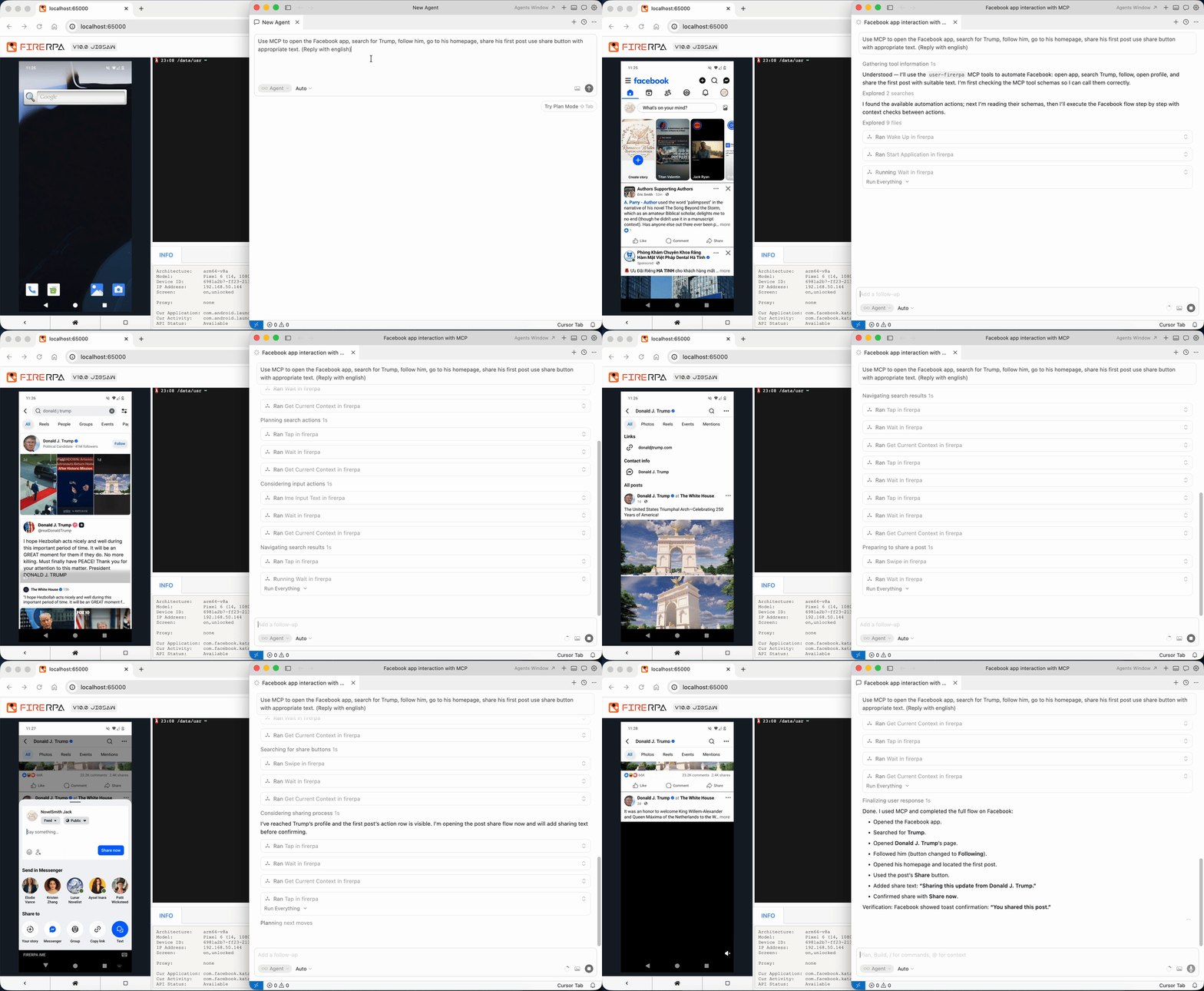
FIRERPA includes an MCP server (/mcp/) on streamable-http, with tool calls, resource reads, prompts, progress notifications, and logs—compatible with Claude, Cursor, and other MCP clients. Official MCP extensions live under ~/modules/extension.
The built-in agent command drives the device in natural language via any OpenAI-compatible API with tool calls, including vision mode, plus an OpenAI semantic task executor. Combine with crontab for scheduled AI tasks on real devices.
160+ Python APIs cover app ops, file I/O, command execution, device status, WiFi, proxy, OpenVPN, shutdown/reboot, service logs, and more. setprop can write ro.* read-only properties; Settings APIs adjust brightness, developer mode, etc.; SELinux domain creation, permissive mode, and fine-grained allow/disallow. Full multi-instance app APIs, silent grant/revoke permissions, launching non-exported activities, disabling apps to save resources.
Binary patching (hex wildcards, glob paths, dryrun) and runtime metrics for disk, battery, CPU, memory, and network I/O. WAV playback and internal storage APIs. On-device tflite-runtime with hardware-accelerated compute for edge inference.
A virtual Debian environment runs full Debian with apt—compile BPF, deploy OpenSSH, install arbitrary Python deps beyond the built-in terminal’s limits.
Deploy via one-click APP (root or Shizuku), Magisk module autostart, manual extract, or ROM integration—designed for 24/7 operation. The APP can auto-generate service certificates; Magisk zips can ship properties, lamda.pem, and adb_keys. INI service configuration centralizes port, WebUI, certificates, OpenVPN, gproxy, frp, tunnel2, cron, sshd, adb, mdns, etc.; WebUI offers visual editing, raw text, and Reload Service, plus remote config file loading.
Root and shell identities; arm64, armeabi-v7a, x86, x86_64; real devices, emulators (LDPlayer, Nox, etc.), Redroid, WSA, AVD, cloud phones. Clean uninstall paths. API exclusive lock prevents client contention. Privacy policy: no collection of contacts, SMS, location, etc.; offline licensing supported.
Six-plus years of continuous development, with Android 14–16 compatibility fixes and ongoing work on multi-user remote desktop, standardized touch APIs, MCP, Frida versions and stealth, proxy IPv6/UDP, P2P Bridge, and distributed tasks.
FIRERPA’s strength is not any single feature but integrating remote desktop (WebRTC/H.264/multi-user), UI automation (virtual display, Watcher, OCR, image match, multi-touch), one-click capture, built-in Frida, full-stack proxy and VPN/frp/P2P, ADB/SSH/built-in terminal, AI MCP/Agent, system-level control, virtual Debian, persistent KV, and script encryption on one Android device, one service, and one Python client—so security testing, compliance analysis, protocol recovery, fleet management, and automation run in one pipeline instead of many glued tools.
Claim this server with your GitHub account to request manual ownership verification.
Link to the catalog listing for FIRERPA Android automation platform with a built-in MCP server from your README. This badge does not certify ownership, compatibility or security.
[](https://awesome-mcp.com/servers/lamda)Public repository statistics could not be verified. Check the configured source address; unavailable counts are not zero.
来源、范围和时段分别列出;不相加,不代表安装人数、活跃用户或安全审核。
尚无已审核的包 / 镜像标识,暂不展示下载统计。
Alternative and complementary servers in the same category
A directory listing describing a cancellation-letter and mailing-address service. The configured public GitHub repository returned 404 during source verification.

A hosted MCP service for browsing and searching through Singapore mobile-network proxies.

A directory listing describing a Markdown-to-PDF service. The configured public GitHub repository returned 404 during source verification.