
A directory listing describing a cancellation-letter and mailing-address service. The configured public GitHub repository returned 404 during source verification.
Repository stats unavailable
Developer Tools
A Model Context Protocol server that connects Laravel applications with AI assistants, letting you expose custom and pre-built tools over multiple MCP transports.
MCP server for Laravel applications is cataloged as an MCP server attributed to kirschbaum-development. A Model Context Protocol server that connects Laravel applications with AI assistants, letting you expose custom and pre-built tools over multiple MCP transports. It is categorized under developer tools. See the capability inspector for recorded interfaces and their independent review status; consult upstream documentation for the current interface.
Installation configuration is not reviewed. No executable setup is offered for this entry; inspect the source repository before proceeding.
Catalog license label: MIT. Check the source repository's current license and terms before using, modifying or distributing this software.
能力定义尚未审核。未核验的采集内容不会作为可信接口展示。
暂无可展示的已审核记录。这不表示上游不支持此能力。
暂无可展示的已审核记录。这不表示上游不支持此能力。
暂无可展示的已审核记录。这不表示上游不支持此能力。
Email delivery is not connected. This page does not collect email addresses or create subscriptions.
Browse the registry for current listings instead.
Reviews for MCP server for Laravel applications are not available yet
Review publishing and storage are not connected. This page does not collect or publish ratings or comments, including after sign-in.
It supports STDIO, Streamable HTTP, and the deprecated HTTP+SSE transport.
Yes, you can configure middleware such as Sanctum on the streamable HTTP and SSE endpoints.
It is a beta version, and its pre-built tools are still in development.
README.md · 67e1be7e1fc8 · 采集于 2026-11-13 09:31:42 UTC
保留上游原文,不做 AI 改写。为安全起见过滤脚本、表单和不安全链接。
当前显示最后一次成功采集的文档快照,请以来源页面为准。




Laravel Loop is a powerful Model Context Protocol (MCP) server designed specifically for Laravel applications. It connects your Laravel application with AI assistants using the MCP protocol.
Laravel Loop uses Prism behind the scenes to build the tools.
[!IMPORTANT] Laravel Loop and its pre-built tools are still in development and this is a beta version.
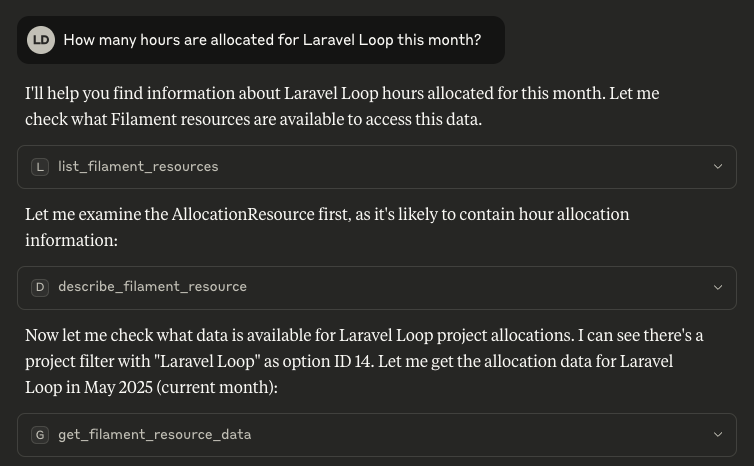
Laravel Loop allows you to:
Pre-built tools:
Kirschbaum\Loop\Toolkits\LaravelModelToolkit (Write operations to come)Kirschbaum\Loop\Toolkits\LaravelFactoriesToolkitKirschbaum\Loop\Tools\StripeToolYou can install the package via composer:
composer require kirschbaum-development/laravel-loop
Publish the configuration file:
php artisan vendor:publish --tag="loop-config"
First, you must register your tools (If you don't know where to put, put in app/Providers/AppServiceProvider).
use Illuminate\Support\ServiceProvider;
use Kirschbaum\Loop\Facades\Loop;
use Kirschbaum\Loop\Toolkits;
use Kirschbaum\Loop\Tools;

Loop::toolkit(Kirschbaum\Loop\Filament\FilamentToolkit::make());
To build your own tools, you can use the Loop::tool method.
use Kirschbaum\Loop\Facades\Loop;
use Kirschbaum\Loop\Tools\CustomTool;

Loop::tool(
    CustomTool::make(
        name: 'custom_tool',
        description: 'This is a custom tool',
    )
        ->withStringParameter(name: 'name', description: 'The name of the user', required: true)
        ->withNumberParameter(name: 'age', description: 'The age of the user')
        ->using(function (string $name, ?int $age = null) {
            return sprintf('Hello, %s! You are %d years old.', $name, $age ?? 'unknown');
        }),
    );
);
The available parameters types can be found in the Prism Tool Documentation.
You can also build your own tool classes. Each tool must implement the Tool contract, and return a Prism\Prism\Tool instance in the build method.
use Kirschbaum\Loop\Contracts\Tool;

class HelloTool implements Tool
{
    use \Kirschbaum\Loop\Concerns\Makeable;

    public function build(): \Prism\Prism\Tool
    {
        return app(\Prism\Prism\Tool::class)
            ->as($this->getName())
            ->for('Says hello to the user')
            ->withStringParameter('name', 'The name of the user to say hello to.', required: true)
            ->using(fn (string $name) => "Hello, $name!");
    }

    public function getName(): string
    {
        return 'hello';
    }
}
If you want to provide multiple similar tools, you can build a toolkit which returns a collection of tools.
use Kirschbaum\Loop\Collections\ToolCollection;
use Kirschbaum\Loop\Contracts\Toolkit;

class LaravelFactoriesToolkit implements Toolkit
{
    use \Kirschbaum\Loop\Concerns\Makeable;

    public function getTools(): ToolCollection
    {
        return new ToolCollection([
            HelloTool::make(),
            GoodbyeTool::make(),
        ]);
    }
}
For this to be really useful, you need to connect your MCP client (Claude Code, Claude Desktop, Cursor, Windsurf, etc) to the Laravel LoopMCP server.
The MCP protocol has two main transports to connect: STDIO and Streamable HTTP, and the deprecated HTTP+SSE transport. Laravel Loop supports all of them.
The easiest way to configure your MCP client is to use the php artisan loop:mcp:config command. This will guide you through the process of configuring your MCP client.
php artisan loop:mcp:generate-config
To run the MCP server using STDIO, we provide the following artisan command:
php artisan loop:mcp:start [--user-id=1 [--user-model=] [--auth-guard=] [--debug]
To connect Laravel Loop MCP server to Claude Code, for example, you can use the following command:
claude mcp add laravel-loop-mcp php /your/full/path/to/laravel/artisan loop:mcp:start

# with an authenticated user
claude mcp add laravel-loop-mcp php /your/full/path/to/laravel/artisan loop:mcp:start --user-id=1 --user-model=App\Models\User

# with debug mode
claude mcp add laravel-loop-mcp php /your/full/path/to/laravel/artisan loop:mcp:start --debug
To configure Laravel Loop in Cursor, Claude or any MCP clients with a JSON config file:
{
  "mcpServers": {
    "laravel-loop-mcp": {
      "command": "php",
      "args": [
        "/your/full/path/to/laravel/artisan",
        "loop:mcp:start",
        "--user-id=1"
      ]
    }
  }
}
Having to run PHP or Node to run the MCP server can be annoying. To avoid this, you can use the Streamable HTTP or SSE transport, which connects the MCP client directly to your application via HTTP.
Laravel Loop also supports the streamable HTTP transport and the deprecated HTTP+SSE transport.
[!IMPORTANT] NOTE: The Streamable HTTP transport is new and not yet supported by all MCP clients, while the SSE (supported by most MCP clients) is deprecated.
The following docs are for both transports. Please note you only need to enable one of them.
To enable the Streamable HTTP transport, update your .env file:
# streamable http
LOOP_STREAMABLE_HTTP_ENABLED=true

# sse
LOOP_SSE_ENABLED=true
Note: When using SSE, the default driver is file, which is the simplest and most convenient for local development. However, for production, we recommend using redis to avoid issues with file locking. You can change the driver and additional options in the config/loop.php file.
This will expose two MCP endpoints:
/mcp that supports the new Streamable HTTP transport./mcp/sse that supports the deprecated HTTP+SSE transport.Note: If you are running your application locally with https, most clients will fail due to the self-signed certificates. To avoid this, use the STDIO transport or use the http protocol locally.
Be aware that if you are exposing your endpoint publicly, you are exposing your data to the world. To ensure your MCP endpoints are secure, make sure to configure the streamable_http.middleware or sse.middleware config options. We recommend using something like Sanctum (configured by default) to protected the endpoint.
[
    'streamable_http' => [
        'middleware' => ['auth:sanctum'],
    ],

    'sse' => [
        'middleware' => ['auth:sanctum'],
    ],
]
Then, you just need to configure the MCP server endpoint in your client:
Claude Code
claude mcp add laravel-loop-mcp http://your-url.test/mcp/sse -t sse
From JSON config file
{
  "mcpServers": {
    "laravel-loop-mcp": {
      "url": "http://your-url.test/mcp/sse",
    }
  }
}
Please note that not all clients support direct SSE connections. For those situations, you can proxy it through the mcp-remote package. This requires you to have Node.js (> 20) installed. Below an example using the mcp-remote package.
{
  "mcpServers": {
    "laravel-loop-mcp": {
      "command": "npx",
      "args": [
        "mcp-remote",
        "https://your-remote-url.com/mcp",
        "--header",
        "Authorization: Bearer ${AUTH_TOKEN}"
      ]
    }
  }
}
Connection failed: MCP error -32000: Connection closed
If you get this error, it likely means there's some error happening in your application. Check your applicationlogs for more details.
Error: spawn php ENOENT
This can happen when your "php" binary is not in the PATH. This can be solved in a few ways:
.bashrc or .zshrc file. Sometimes it can be only in the .zshrc file but applications like Claude use .bashrc.which php in your terminal.
php will change depending on the selected version.Manually call tools and verify output
Sometimes when building tools, you may be getting unexpected results and debugging from the MCP client can be difficult. You can manually call tools and verify the output by running the following command:
php artisan loop:mcp:call
Make sure to check your application logs
If you are getting an unkown error, check your application logs for more details.
If you discover any security related issues, please email security@kirschbaumdevelopment.com instead of using the issue tracker.
Development of this package is sponsored by Kirschbaum Development Group, a developer driven company focused on problem solving, team building, and community. Learn more about us or join us!
The MIT License (MIT). Please see License File for more information.
Claim this server with your GitHub account to request manual ownership verification.
Link to the catalog listing for MCP server for Laravel applications from your README. This badge does not certify ownership, compatibility or security.
[](https://awesome-mcp.com/servers/laravel-loop)Public repository statistics could not be verified. Check the configured source address; unavailable counts are not zero.
来源、范围和时段分别列出;不相加,不代表安装人数、活跃用户或安全审核。
尚无已审核的包 / 镜像标识,暂不展示下载统计。
Alternative and complementary servers in the same category
A directory listing describing a cancellation-letter and mailing-address service. The configured public GitHub repository returned 404 during source verification.

A hosted MCP service for browsing and searching through Singapore mobile-network proxies.

A directory listing describing a Markdown-to-PDF service. The configured public GitHub repository returned 404 during source verification.