
Oleafly is a live collaborative LaTeX, Typst and Markdown editor for research that offers a local MCP server and an oleafly mcp stdio command so outside AI clients can use its project tools.
Repository stats unavailable
Productivity & Ops
A local-first meeting recorder and dictation tool for macOS that exposes a recorded, structured memory to AI tools through an MCP server.
Lavox MCP memory server is cataloged as an MCP server attributed to lavox-app. A local-first meeting recorder and dictation tool for macOS that exposes a recorded, structured memory to AI tools through an MCP server. It is categorized under productivity work. See the capability inspector for recorded interfaces and their independent review status; consult upstream documentation for the current interface.
Installation configuration is not reviewed. No executable setup is offered for this entry; inspect the source repository before proceeding.
Catalog license label: MIT. Check the source repository's current license and terms before using, modifying or distributing this software.
能力定义尚未审核。未核验的采集内容不会作为可信接口展示。
暂无可展示的已审核记录。这不表示上游不支持此能力。
暂无可展示的已审核记录。这不表示上游不支持此能力。
暂无可展示的已审核记录。这不表示上游不支持此能力。
Email delivery is not connected. This page does not collect email addresses or create subscriptions.
Browse the registry for current listings instead.
Reviews for Lavox MCP memory server are not available yet
Review publishing and storage are not connected. This page does not collect or publish ratings or comments, including after sign-in.
It exposes search, fetch, timeline, stats, remember, correct and profile.
It is optional; without a key the verbatim layer still provides search, timeline and full MCP access, and the LLM endpoint can be pointed at any OpenAI-compatible service.
It is a SQLite file in ~/Lavox/memory/ on your machine.
README.md · cc66a8633a76 · 采集于 2026-11-13 14:12:33 UTC
保留上游原文,不做 AI 改写。为安全起见过滤脚本、表单和不安全链接。
当前显示最后一次成功采集的文档快照,请以来源页面为准。

A local-first meeting recorder and dictation tool for macOS that turns everything you say into a memory any AI can read. Nothing leaves your machine by default.
lavox.app · Quick start · Architecture · MIT license

Ask your AI assistant:
"What did we decide about the pricing last month, and why not the other option?"
It answers from your own recorded meetings and voice notes, and backs the answer with the verbatim quote. That is what Lavox does.
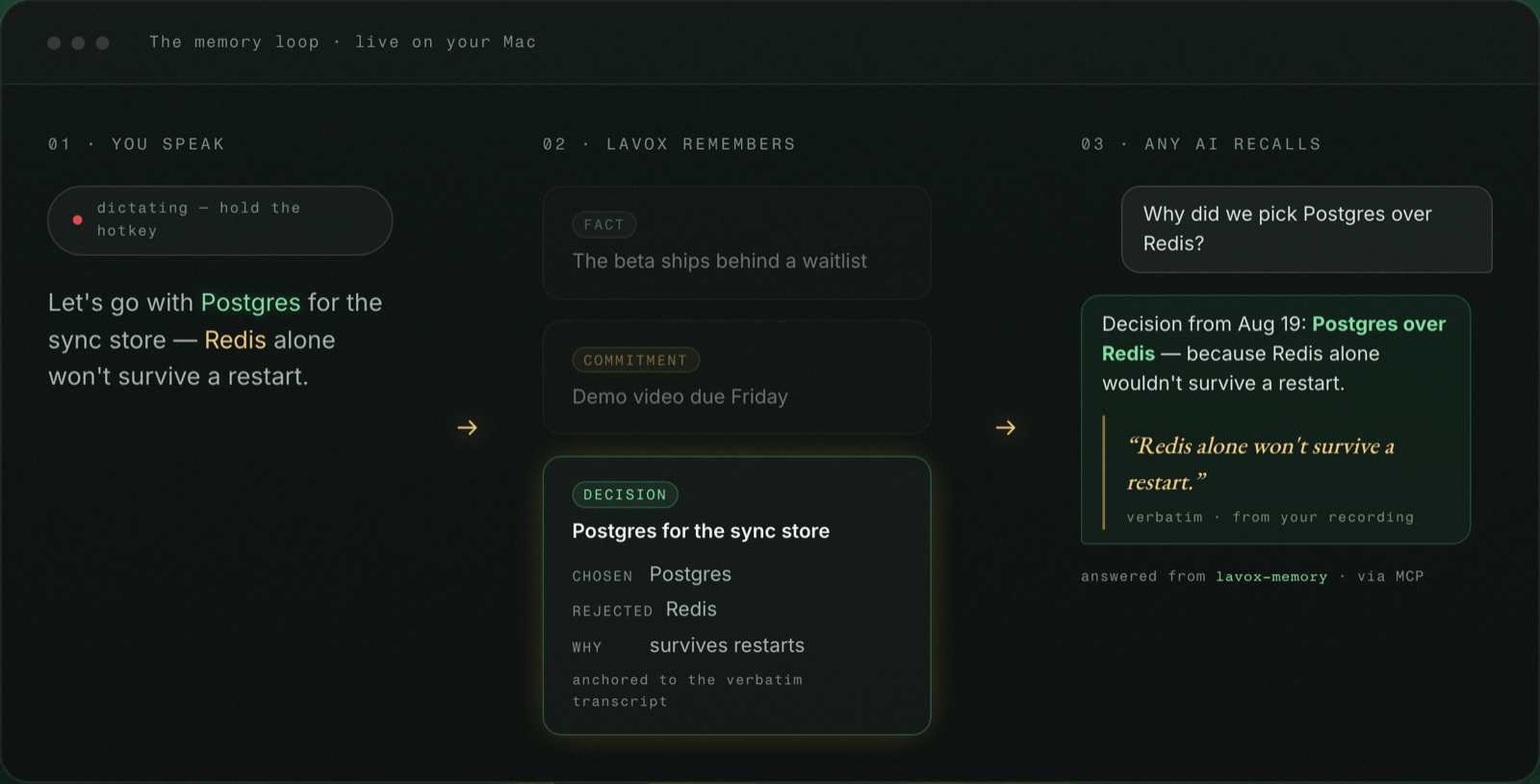
Two problems, one root cause.
Everything you say evaporates. Meetings, decisions, promises: spoken, then gone. Three months later nobody remembers why option A beat option B.
Your AI tools have amnesia. Every session starts from zero. You re-explain your projects, your clients, your constraints. Every day, to every tool.
Meeting notetakers solve neither: they upload your conversations to their cloud, summarize, and stop there. Lavox closes the loop instead: it records locally, transcribes locally, builds a structured memory, and serves that memory to every AI tool you use through the Model Context Protocol.
| Capability | How |
|---|---|
| Meeting recording | Microphone and system audio, captured on-device. No bot joins your calls. Works with Zoom, Meet, Teams, or a conversation at your desk. |
| Speaker identification | Layered diarization: voice profiles, two-track separation, and transcript evidence decide who said what. |
| Dictation anywhere | Hold a hotkey, speak, release: the text lands at your cursor. Whisper runs locally on Metal, with filtering for the phrases it hallucinates on silence. |
| Decision extraction | An LLM turns speech into typed records: decisions with the chosen option, the rejected alternatives, and the stated reasoning, plus facts, commitments, and tasks. |
| A memory with history | Corrections supersede; they never delete. "What did we believe in July?" is still answerable after you change your mind in August. |
| An interface for AI, not for you | No search UI to learn. An MCP server exposes search, fetch, timeline, stats, remember, correct, and profile to Claude Code, Claude Desktop, or any MCP client. |
   meetings · dictation
          │
          ▼  whisper + diarization (on-device)
 ┌─────────────────────────────────────────────┐
 │  VERBATIM LAYER: the canonical record       │
 │  ~400-token chunks with context headers:    │
 │  [date | kind | title | speaker] + text     │
 ├─────────────────────────────────────────────┤
 │  ASSERTION LAYER: the extracted index       │
 │  decision {chosen, alternatives, reasoning} │
 │  fact · commitment · preference · task      │
 │  bitemporal: occurred_at · invalidated_at · │
 │  superseded_by: corrections never delete    │
 └─────────────────────────────────────────────┘
          │
          ▼  four parallel searches: vector + full-text,
             on both layers → Reciprocal Rank Fusion (k=60)
             → per-recording cap → cross-linking
          │
          ▼  MCP server (stdio)
   Claude Code · Claude Desktop · local models
The design follows measured results, not fashion:
occurred_at, invalidated_at, and superseded_by, answer "what did we
believe then" without a graph database or an LLM call on every write.source
(extracted with a transcript anchor, user_stated, or agent), and
corrections are soft. That is the defense against memory poisoning: nothing
enters anonymously, and nothing disappears silently.Requirements: macOS 13 or later on Apple Silicon, Rust and pnpm for the app, Python 3.12 for the server. Building the app needs Xcode with the macOS 15 SDK (the system-audio helper uses the newer ScreenCaptureKit recording API).
git clone https://github.com/lavox-app/lavox.git && cd lavox

# 1 · The server: transcription, memory, MCP
cd server
python3 -m venv .venv && .venv/bin/pip install -r requirements.txt
.venv/bin/uvicorn app:app --host 127.0.0.1 --port 8040   # keep running

# 2 · The app: recorder and dictation bar
cd ../app
pnpm install
./build-and-install.command      # builds, signs (ad-hoc by default), installs

# 3 · Wire the memory into Claude Code
claude mcp add lavox-memory -- "$PWD/../bin/lavox-mcp.sh"
Record a meeting or dictate something, then ask Claude to search
lavox-memory for it.
The memory speaks MCP, so any MCP client can read it. bin/lavox-mcp.sh
creates its own small Python environment on first run; there is nothing to
set up by hand.
Claude Code, as a plugin: registers the server and adds the
/lavox-memory:memory-search, :decisions and :remember commands:
/plugin marketplace add lavox-app/lavox
/plugin install lavox-memory@lavox
Codex CLI, in ~/.codex/config.toml:
[mcp_servers.lavox-memory]
command = "/path/to/lavox/bin/lavox-mcp.sh"
Cursor, in .cursor/mcp.json (or the global one):
{ "mcpServers": { "lavox-memory": { "command": "/path/to/lavox/bin/lavox-mcp.sh" } } }
Decision extraction is optional. It uses OpenRouter by default;
LAVOX_LLM_URL points it at any OpenAI-compatible endpoint instead:
# run from the repo root
LAVOX_LLM_KEY=sk-or-... server/.venv/bin/python3 server/extract.py

# or bring your own endpoint (Ollama, vLLM, OpenAI, ...)
LAVOX_LLM_URL=http://localhost:11434/v1/chat/completions \
LAVOX_LLM_KEY=... server/.venv/bin/python3 server/extract.py
Without a key, the verbatim layer still does everything else: search, timeline, full MCP access. The LLM layer is an addition, never a requirement.
The optional Chrome extension in extension/ captures Meet
captions, participants and the active speaker, and hands them to Lavox Hub,
which fuses them with its own on-device recording. Load it unpacked from
chrome://extensions.
~/Lavox/memory/.Working today: meeting recording with diarization, on-device dictation with hallucination filtering, the full memory loop (ingest → extraction → fusion search → MCP), and share links through an optional self-hosted server.
Planned: notarized binary releases, a hosted sync option, a ChatGPT connector (remote MCP), Windows support.
MIT. Downloaded models (Whisper, embeddings) carry their own licenses.
Claim this server with your GitHub account to request manual ownership verification.
Link to the catalog listing for Lavox MCP memory server from your README. This badge does not certify ownership, compatibility or security.
[](https://awesome-mcp.com/servers/lavox)Public repository statistics could not be verified. Check the configured source address; unavailable counts are not zero.
来源、范围和时段分别列出;不相加,不代表安装人数、活跃用户或安全审核。
尚无已审核的包 / 镜像标识,暂不展示下载统计。
Alternative and complementary servers in the same category
Oleafly is a live collaborative LaTeX, Typst and Markdown editor for research that offers a local MCP server and an oleafly mcp stdio command so outside AI clients can use its project tools.
Buddy is an Android app that offers its phone tools through a local MCP server to Claude Code, Codex, OpenCode, Antigravity, and Grok sessions.

Tuqui is a hosted MCP server that connects Odoo with Claude and ChatGPT so users can ask about sales, stock, customers and overdue invoices in plain language.
