LogicMonitor MCP Server
Model Context Protocol (MCP) server for LogicMonitor - enables AI assistants to interact with your LogicMonitor.





[!IMPORTANT]
🛠️ Managed & Supported by Monitoring Artist
This MCP server is an independent, community-driven innovation by Monitoring Artist.
Official Support Disclaimer: This project is not an official LogicMonitor product and is not covered by LogicMonitor’s standard support tiers.
Need Enterprise-Grade Reliability? > Monitoring Artist provides professional implementation, custom feature development, and dedicated support for this integration. Partner with us for expert solutions.
Features
- 125 MCP Tools for comprehensive LogicMonitor operations (73 read-only, 52 write)
- Unified Server: Single server implementation supporting all transport modes (STDIO, SSE, HTTP)
- Multiple Transport Modes: STDIO for local use, SSE/HTTP for remote access
- Flexible Authentication: No auth (dev), bearer token, or OAuth/OIDC
- CSRF Protection: Automatic CSRF protection for session-based authentication
- Read-Only Mode: Safe monitoring without modification capabilities (enabled by default)
- Flexible Configuration: CLI flags, environment variables, or
.env file
- Debug Logging: JSON or human-readable formats with detailed request/response logging
- Tool Filtering: Enable specific tools or disable search functionality
- Rate Limiting: Automatic retry with exponential backoff
- Batch Operations: Process multiple resources efficiently
- Smart Batching: Adaptive concurrency that automatically adjusts to API rate limits
- TLS/HTTPS Support: Optional TLS for secure remote access
Images
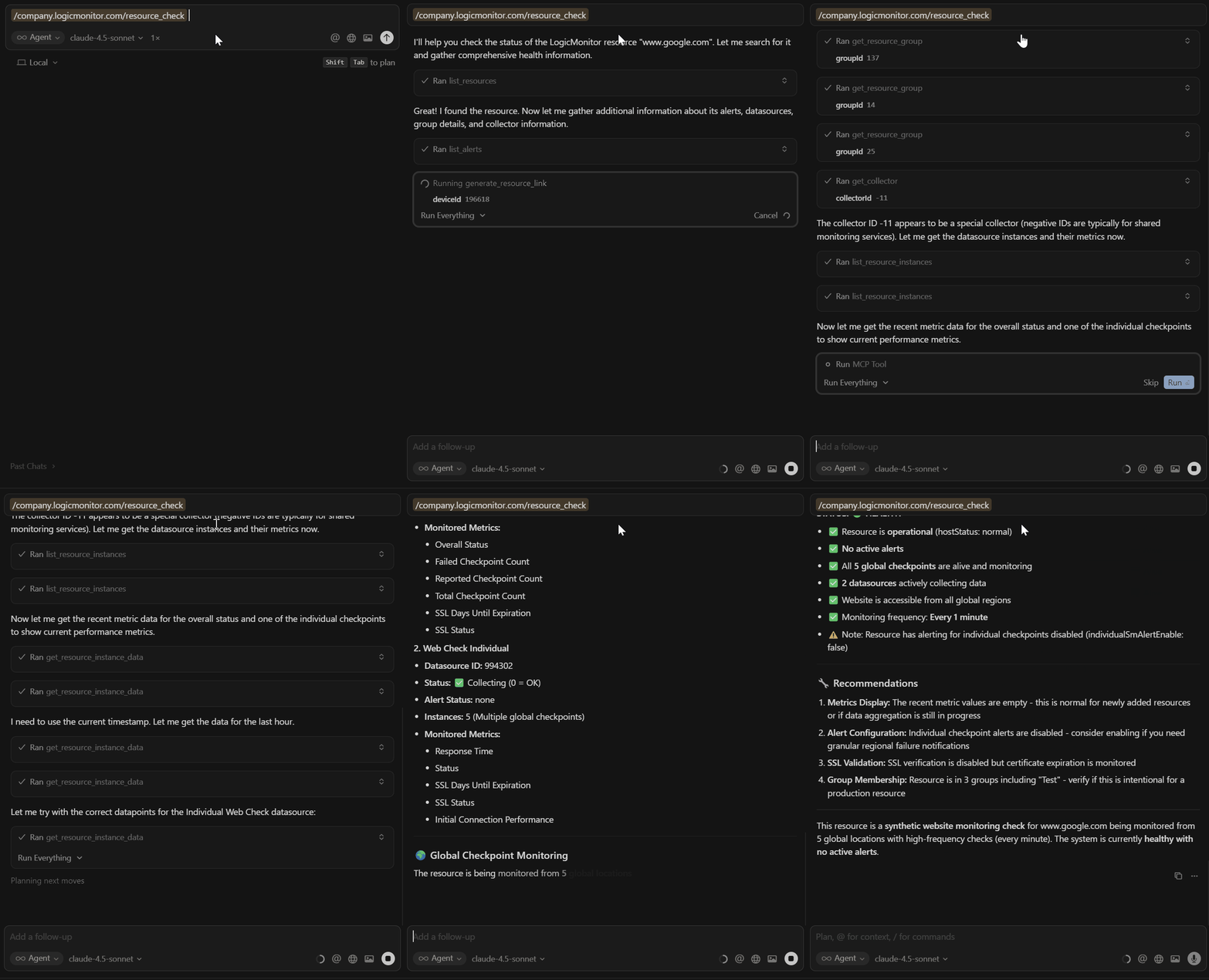
Cursor Prompt - Resource Check Demo
High‑level demonstration of using the LogicMonitor MCP server in Cursor, showing how to execute a
LogicMonitor resource check using an MCP prompt with the argument "www.google.com" (a resource in LogicMonitor).
The agent has knowledge about available MCP tools and uses them in a self‑correcting way:
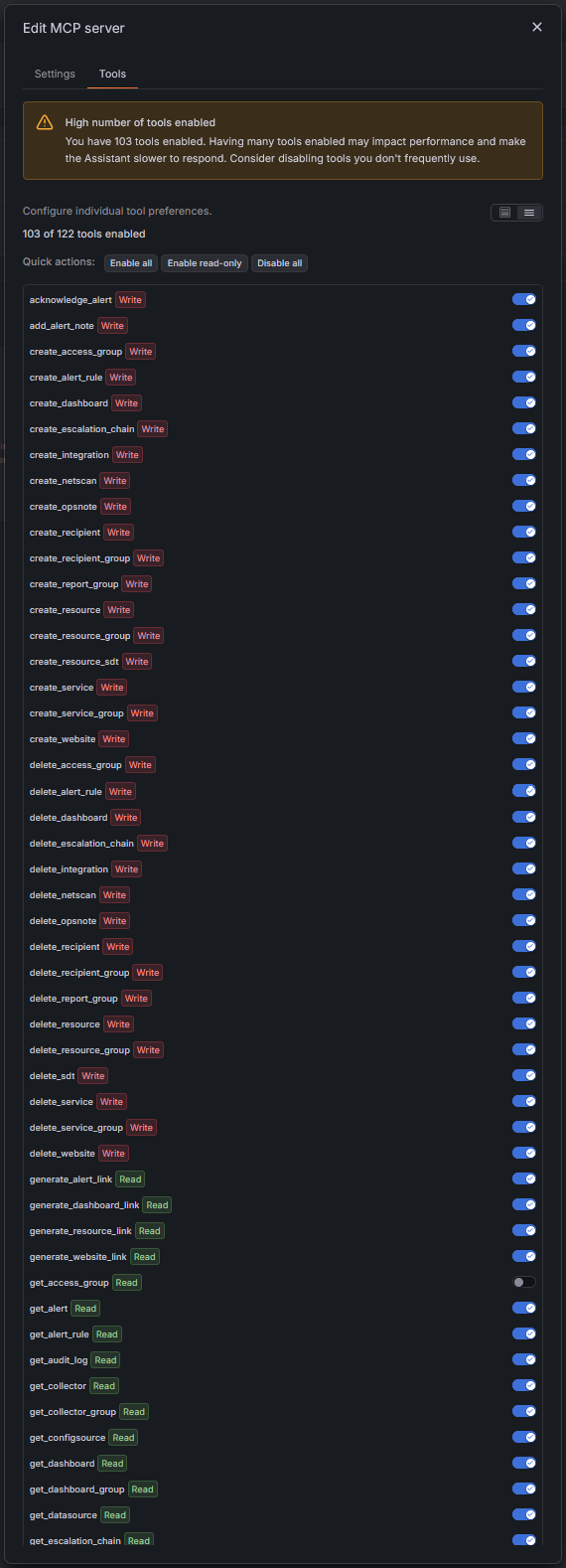
Screenshot showing the available LogicMonitor MCP tools within Cursor:
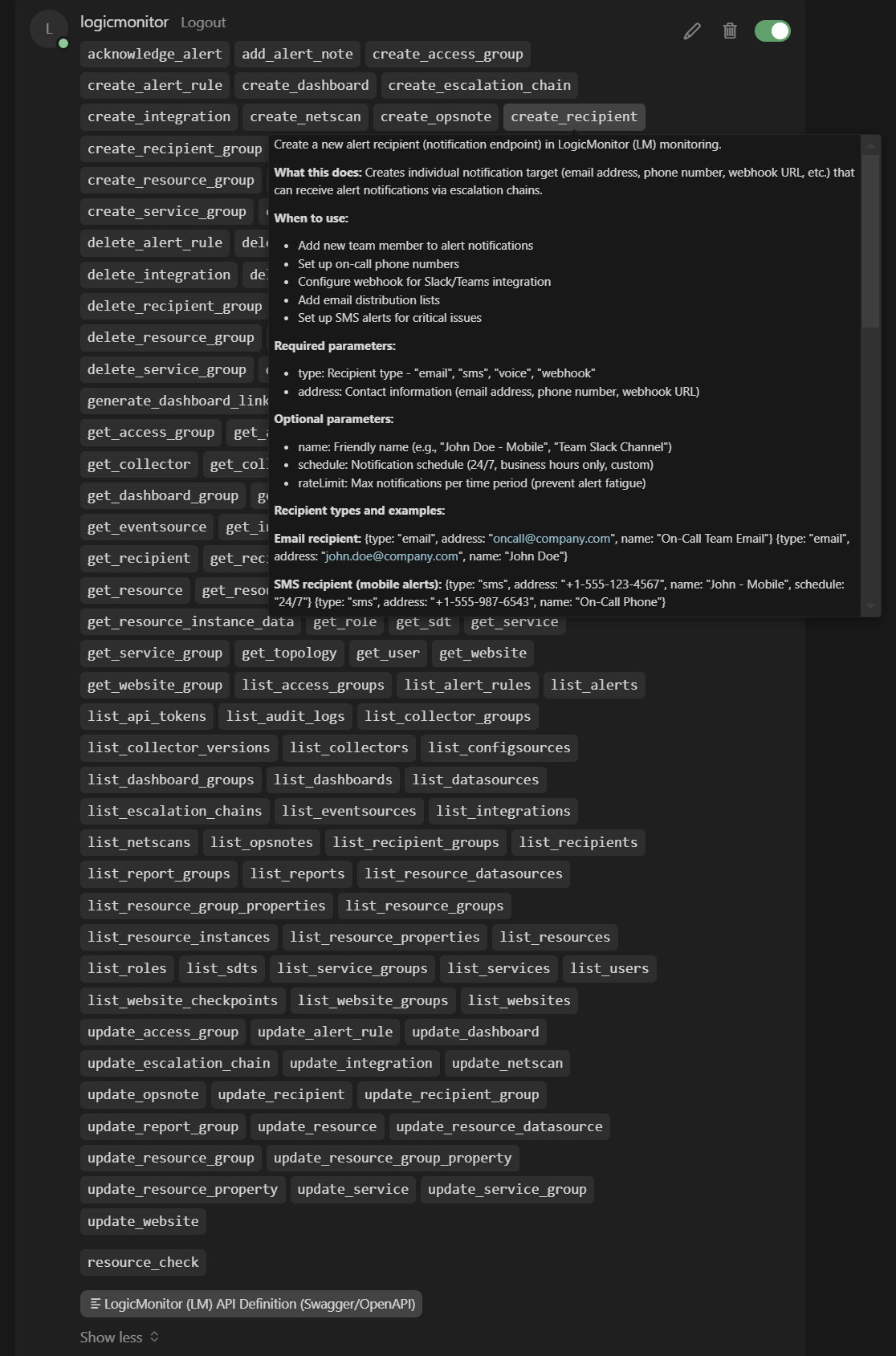
Screenshot showing the available LogicMonitor MCP tools within Grafana Assistant:
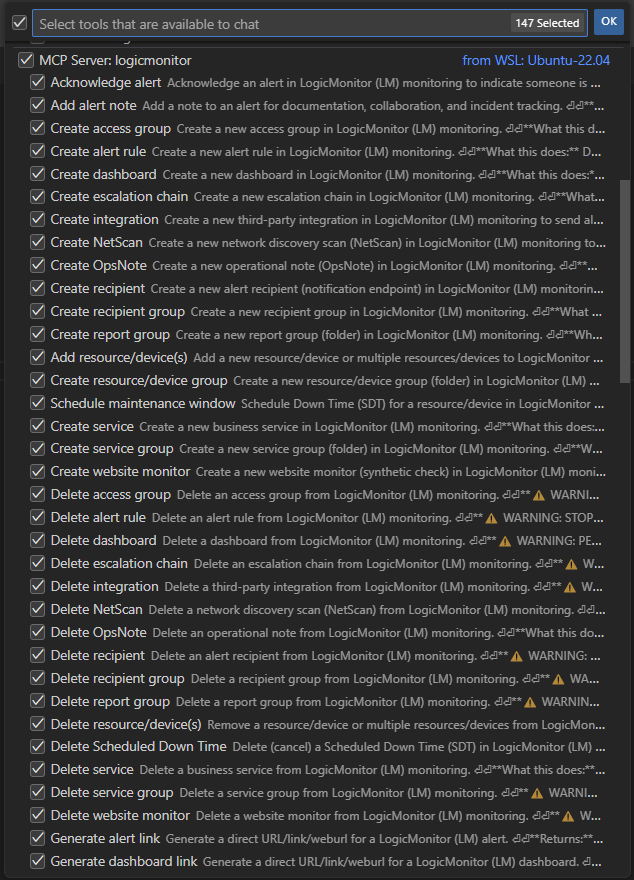
Screenshot showing the available LogicMonitor MCP tools within Visual Studio Code:
Installation Options
Local LogicMonitor MCP server
Run LogicMonitor MCP Server locally with STDIO transport for Claude Desktop:










# Quick start with npx (no installation needed)
npx logicmonitor-mcp-server

# Or install globally
npm install -g logicmonitor-mcp-server
logicmonitor-mcp-server
Add to Claude Desktop (~/Library/Application Support/Claude/claude_desktop_config.json on macOS):
{
  "mcpServers": {
    "logicmonitor": {
      "command": "npx",
      "args": ["-y", "logicmonitor-mcp-server"],
      "env": {
        "LM_COMPANY": "mycompany",
        "LM_BEARER_TOKEN": "your-bearer-token-here"
      },
      "type": "stdio"
    }
  }
}
Best for: Personal use, Claude Desktop integration, local development
Example Remote LogicMonitor MCP server
Run LogicMonitor MCP Server remotely with SSE or HTTP transport for web-based access:

# Quick start with Docker
docker run -d -p 3000:3000 \
  -e LM_COMPANY=mycompany \
  -e LM_BEARER_TOKEN=your-token \
  -e MCP_TRANSPORT=streamable-http \
  -e OAUTH_PROVIDER=none \
  monitoringartist/logicmonitor-mcp-server

# Available container images

| Registry | Pull command | Notes |
| --- | --- | --- |
| GitHub Container Registry | `docker pull ghcr.io/monitoringartist/logicmonitor-mcp-server:<tag>` | Tags include `latest`, `vX.Y.Z`, `X.Y`, and `X`. |
| Docker Hub | `docker pull monitoringartist/logicmonitor-mcp-server:<tag>` | Mirrors the same tags as GHCR. |

# Or use Docker Compose for production
curl -o docker-compose.yml https://raw.githubusercontent.com/monitoringartist/logicmonitor-mcp-server/main/docker-compose.yml
cp env.example .env  # Configure your credentials
docker-compose up -d logicmonitor-mcp-http
Best for: Web applications, remote access, multiple users, enterprise deployments, where admin controls access.
Quick Start
Prerequisites
- Node.js >= 18 (or Docker)
- LogicMonitor account with API access
- LogicMonitor API Bearer Token
Installation
Option A: Node.js
# Clone the repository
git clone https://github.com/monitoringartist/logicmonitor-mcp-server.git
cd logicmonitor-mcp-server

# Install dependencies
npm install

# Build the project
npm run build
Option B: Docker
# Clone the repository
git clone https://github.com/monitoringartist/logicmonitor-mcp-server.git
cd logicmonitor-mcp-server

# Build Docker image
docker build -t logicmonitor-mcp-server .

# Or use Docker Compose
cp env.example .env
# Edit .env with your credentials
docker-compose up -d logicmonitor-mcp-http
Configuration
Choose one of three methods to configure (listed in order of precedence):
Option 1: Environment Variables (Recommended)
export LM_COMPANY=mycompany
export LM_BEARER_TOKEN=your-bearer-token-here
npm start
Option 2: .env File
# Copy the example file
cp env.example .env

# Edit .env with your credentials
nano .env

# Run the server
npm start
Option 3: CLI Flags
npm start -- --lm-company mycompany --lm-bearer-token "your-token"
CLI Reference
Transport Options
TLS Configuration (streamable-http transport only)
Note: By default (when TLS is not configured), the server listens on HTTP protocol. When both certificate and key files are provided, the server automatically switches to HTTPS protocol only.
Debug and Logging
LogicMonitor API (Required)
MCP Server Authentication (Optional - for SSE/HTTP transports only)
Note: This is for authenticating to the MCP server, not for LogicMonitor API access.
Authentication Modes:
- No Authentication (default): If neither
MCP_BEARER_TOKEN nor OAuth is configured (OAUTH_PROVIDER=none), unauthenticated access is allowed. Suitable for development/testing only.
- Bearer Token: Simple static token authentication - set
MCP_BEARER_TOKEN
- OAuth/OIDC: Enterprise authentication - configure
OAUTH_PROVIDER and related settings (see env.example)
- Both: Both authentication methods can work simultaneously
Usage Examples
Claude Desktop (STDIO - Recommended)
Add to your Claude Desktop configuration (~/Library/Application Support/Claude/claude_desktop_config.json on macOS):
{
  "mcpServers": {
    "logicmonitor": {
      "command": "node",
      "args": [
        "/path/to/logicmonitor-mcp-server/build/servers/index.js"
      ],
      "env": {
        "LM_COMPANY": "mycompany",
        "LM_BEARER_TOKEN": "your-bearer-token",
        "MCP_TRANSPORT": "stdio"
      }
    }
  }
}
Note: The MCP_TRANSPORT=stdio is optional as it's the default, but included for clarity.
SSE Transport (Remote Access)
# Start SSE server with debug logging
npm start -- --transport sse --address localhost:3000 --debug

# Or using environment variables
export MCP_TRANSPORT=sse
export MCP_ADDRESS=localhost:3000
export MCP_DEBUG=true
npm start

# Or use the convenience script
npm run start:sse
Note: For SSE/HTTP transports, authentication is optional but recommended:
- Development/Testing: No authentication required (default with
OAUTH_PROVIDER=none)
- Production: Configure
MCP_BEARER_TOKEN or OAuth (see Authentication Modes below)
Health Check Endpoints: When using SSE or streamable HTTP transports, health check endpoints are available:
Simple Health Check (/healthz)
# Quick health check
curl http://localhost:3000/healthz
# Response: 200 OK with body "ok"
Detailed Health Check (/health)
# Detailed health information
curl http://localhost:3000/health
Response includes:
{
  "status": "healthy",
  "version": "1.0.0",
  "uptime": 3600.5,
  "memory": {
    "rss": 52428800,
    "heapTotal": 20971520,
    "heapUsed": 15728640,
    "external": 1048576,
    "arrayBuffers": 262144
  },
  "connections": {
    "mcp": 5,
    "http": 3
  },
  "timestamp": "2025-11-02T12:00:00.000Z",
  "transport": {
    "mode": "both",
    "http": true,
    "sse": true
  }
}
These endpoints can be used by:
- Load balancers (use
/healthz for simple checks)
- Monitoring systems (use
/health for detailed metrics)
- Orchestration platforms (Docker, Kubernetes)
- CI/CD health checks
- APM and observability tools
Note: Health check endpoints are not available when using the STDIO transport.
HTTPS/TLS Configuration (Secure Transport)
To enable HTTPS for the SSE or streamable HTTP transport, provide both certificate and key files:
# Using environment variables (recommended)
export MCP_TLS_CERT_FILE=/path/to/cert.pem
export MCP_TLS_KEY_FILE=/path/to/key.pem
export MCP_TRANSPORT=sse
npm start

# Using CLI flags
npm start -- --transport sse \
  --server.tls-cert-file /path/to/cert.pem \
  --server.tls-key-file /path/to/key.pem

# Access via HTTPS
curl https://localhost:3000/healthz
Behavior:
- TLS Not Configured (default): Server uses HTTP protocol
- TLS Configured (both cert and key files provided): Server uses HTTPS protocol only
- Partial TLS Config (only cert OR only key): Server uses HTTP protocol (both required)
Generate Self-Signed Certificate for Testing:
# Generate self-signed certificate (for development/testing only)
openssl req -x509 -newkey rsa:4096 -keyout key.pem -out cert.pem -days 365 -nodes \
  -subj "/CN=localhost"

# Start server with TLS
npm start -- --transport sse \
  --server.tls-cert-file ./cert.pem \
  --server.tls-key-file ./key.pem
Production Recommendations:
- Use certificates from a trusted Certificate Authority (Let's Encrypt, commercial CAs)
- Consider using a reverse proxy (nginx, Caddy) for TLS termination
- Rotate certificates before expiry
- Use strong TLS protocols (TLS 1.2+)
Read-Only Mode (Default - Safe Monitoring)
By default, the server runs in read-only mode for safety:
# Read-only mode (default)
npm start

# Explicitly enable write operations
npm start -- # with MCP_READ_ONLY=false in .env

# Or via environment
export MCP_READ_ONLY=false
npm start
# Enable specific tools only
npm start -- --enabled-tools "list_resources,get_resource,list_alerts,get_alert"

# Disable search functionality
npm start -- --disable-search
JSON Logging for Production
npm start -- --log-format json --log-level warn
Complete Example
npm start -- \
  --lm-company mycompany \
  --lm-bearer-token "your-token" \
  --transport sse \
  --address 0.0.0.0:8080 \
  --read-only \
  --log-format json \
  --log-level info
Transport Mode Shortcuts
The unified server supports convenient npm scripts for each transport:
# STDIO transport (default, for Claude Desktop)
npm start
npm run start:stdio

# SSE transport (for web/remote clients)
npm run start:sse

# HTTP transport (for advanced integrations)
npm run start:http
The server provides 122 tools for comprehensive LogicMonitor operations. Tools are categorized by functionality and marked as read-only (safe) or write (modifies data).
Resource/Device Management
Read-Only:
list_resources - List all monitored resources/devices with filtering (supports simple search via query parameter or advanced filtering via filter parameter)get_resource - Get detailed device information by IDgenerate_resource_link - Generate direct link to device in LM UI
Write Operations:
create_resource - Add new device(s) to monitoring (supports batch)update_resource - Modify existing device(s) (supports batch)delete_resource - Remove device(s) from monitoring (supports batch)
Resource/Device Groups
Read-Only:
list_resource_groups - List all device groups/foldersget_resource_group - Get device group details by ID
Write Operations:
create_resource_group - Create new device groupupdate_resource_group - Modify device groupdelete_resource_group - Delete device group
Alert Management
Read-Only:
list_alerts - List active alerts with filtering (supports simple search via query parameter or advanced filtering via filter parameter)get_alert - Get detailed alert informationgenerate_alert_link - Generate direct link to alert in LM UIlist_alert_rules - List alert routing rulesget_alert_rule - Get alert rule details
Write Operations:
acknowledge_alert - Acknowledge alert (stops escalation)add_alert_note - Add note to alert for documentationcreate_alert_rule - Create new alert routing ruleupdate_alert_rule - Modify alert ruledelete_alert_rule - Delete alert rule
DataSources & Monitoring
Read-Only:
list_datasources - List all available datasourcesget_datasource - Get datasource detailslist_resource_datasources - List datasources applied to deviceget_resource_datasource - Get device datasource detailslist_resource_instances - List datasource instances (disks, interfaces, etc.)get_resource_instance_data - Get time-series metrics datalist_eventsources - List all eventsourcesget_eventsource - Get eventsource detailslist_configsources - List configuration sourcesget_configsource - Get configsource details
Write Operations:
update_resource_datasource - Modify device datasource configuration
Dashboards & Reporting
Read-Only:
list_dashboards - List all dashboardsget_dashboard - Get dashboard detailsgenerate_dashboard_link - Generate direct link to dashboard in LM UIlist_dashboard_groups - List dashboard groupsget_dashboard_group - Get dashboard group detailslist_reports - List all reportsget_report - Get report detailslist_report_groups - List report groupsget_report_group - Get report group details
Write Operations:
create_dashboard - Create new dashboardupdate_dashboard - Modify dashboarddelete_dashboard - Delete dashboardcreate_report_group - Create report groupupdate_report_group - Modify report groupdelete_report_group - Delete report group
Collectors & Infrastructure
Read-Only:
list_collectors - List monitoring collectors (agents)get_collector - Get collector detailslist_collector_groups - List collector groupsget_collector_group - Get collector group detailslist_collector_versions - List available collector versionslist_netscans - List network discovery scansget_netscan - Get NetScan detailsget_topology - Get network topology information
Write Operations:
create_netscan - Create NetScanupdate_netscan - Modify NetScandelete_netscan - Delete netscan
Website Monitoring
Read-Only:
list_websites - List website monitorsget_website - Get website monitor detailsgenerate_website_link - Generate direct link to website in LM UIlist_website_groups - List website groupsget_website_group - Get website group detailslist_website_checkpoints - List available monitoring checkpoints
Write Operations:
create_website - Create new website monitorupdate_website - Modify website monitordelete_website - Delete website monitor
Services (Business Logic)
Read-Only:
list_services - List business servicesget_service - Get service detailslist_service_groups - List service groupsget_service_group - Get service group details
Write Operations:
create_service - Create new business serviceupdate_service - Modify servicedelete_service - Delete servicecreate_service_group - Create service groupupdate_service_group - Modify service groupdelete_service_group - Delete service group
Alert Configuration
Read-Only:
list_escalation_chains - List alert escalation chainsget_escalation_chain - Get escalation chain detailslist_recipients - List alert recipientsget_recipient - Get recipient detailslist_recipient_groups - List recipient groupsget_recipient_group - Get recipient group details
Write Operations:
create_escalation_chain - Create escalation chainupdate_escalation_chain - Modify escalation chaindelete_escalation_chain - Delete escalation chaincreate_recipient - Create alert recipientupdate_recipient - Modify recipientdelete_recipient - Delete recipientcreate_recipient_group - Create recipient groupupdate_recipient_group - Modify recipient groupdelete_recipient_group - Delete recipient group
Integrations
Read-Only:
list_integrations - List third-party integrationsget_integration - Get integration details
Write Operations:
create_integration - Create new integrationupdate_integration - Modify integrationdelete_integration - Delete integration
Administration & Security
Read-Only:
list_users - List users/adminsget_user - Get user detailslist_roles - List user rolesget_role - Get role detailslist_access_groups - List access groupsget_access_group - Get access group detailslist_api_tokens - List API tokens for user
Write Operations:
create_access_group - Create access groupupdate_access_group - Modify access groupdelete_access_group - Delete access group
Properties & Configuration
Read-Only:
list_resource_properties - List custom properties for devicelist_resource_group_properties - List properties for device group
Write Operations:
update_resource_property - Update device property valueupdate_resource_group_property - Update device group property value
Scheduled Down Time (SDT)
Read-Only:
list_sdts - List scheduled down timesget_sdt - Get SDT details
Write Operations:
create_resource_sdt - Create scheduled down timedelete_sdt - Delete scheduled down time
Operational Notes
Read-Only:
list_opsnotes - List operational notesget_opsnote - Get opsnote details
Write Operations:
create_opsnote - Create operational noteupdate_opsnote - Modify opsnotedelete_opsnote - Delete opsnote
Audit & Compliance
Read-Only:
list_audit_logs - List audit trail logs (supports simple search via query parameter or advanced filtering via filter parameter)get_audit_log - Get audit log entry details
Summary
- 70 read-only tools - Safe for production monitoring
- 52 write tools - Require caution (disabled by default with
--read-only)
- 122 total tools
Security Considerations
Authentication by Transport Mode
Read-Only Mode (Recommended)
For production monitoring, enable read-only mode to prevent accidental modifications:
npm start -- --read-only
# or
export MCP_READ_ONLY=true
npm start
This disables all 52 write operations, leaving only 73 safe read-only tools.
Authentication Setup
Development (No Authentication)
# Default configuration - no authentication required
export LM_COMPANY=mycompany
export LM_BEARER_TOKEN=your-lm-token
export MCP_TRANSPORT=sse
export OAUTH_PROVIDER=none  # or omit - this is the default
npm start
⚠️ Warning: Unauthenticated access allows anyone to connect. Use only in trusted environments.
Production - Bearer Token (Simple)
# Generate a strong token
export MCP_BEARER_TOKEN=$(openssl rand -base64 32)
export OAUTH_PROVIDER=none

# Enable TLS
export MCP_TLS_CERT_FILE=/path/to/cert.pem
export MCP_TLS_KEY_FILE=/path/to/key.pem

# Start server
npm start -- --transport sse
Clients must include the token:
curl -H "Authorization: Bearer YOUR_TOKEN" https://localhost:3000/health
Production - OAuth (Enterprise)
# Configure OAuth provider
export OAUTH_PROVIDER=github  # github, google, azure, okta, auth0, custom
export OAUTH_CLIENT_ID=your-client-id
export OAUTH_CLIENT_SECRET=your-client-secret
export OAUTH_SESSION_SECRET=$(openssl rand -hex 32)
export OAUTH_CALLBACK_URL=https://your-domain.com/auth/callback

# Enable TLS
export MCP_TLS_CERT_FILE=/path/to/cert.pem
export MCP_TLS_KEY_FILE=/path/to/key.pem

# Start server
npm start -- --transport sse
Users authenticate via browser at /auth/login.
Production - Combined (Flexible)
# Both OAuth and bearer token enabled
export OAUTH_PROVIDER=github
export OAUTH_CLIENT_ID=your-client-id
export OAUTH_CLIENT_SECRET=your-client-secret
export MCP_BEARER_TOKEN=$(openssl rand -base64 32)

# Users: OAuth login via browser
# APIs: Bearer token in Authorization header
API Token Security
LogicMonitor API Token (LM_BEARER_TOKEN):
- Never commit to version control
- Use environment variables or
.env files (.env is in .gitignore)
- Rotate regularly (monthly recommended)
- Use minimal required permissions in LogicMonitor portal
MCP Server Token (MCP_BEARER_TOKEN):
- Generate strong tokens (32+ bytes):
openssl rand -base64 32
- Store securely (environment variables, secrets management)
- Never expose in logs or error messages
- Rotate regularly
- Use different tokens for different environments
Network Security
Required for Production SSE/HTTP:
- ✅ HTTPS/TLS: Always use encrypted connections (
MCP_TLS_CERT_FILE, MCP_TLS_KEY_FILE)
- ✅ Authentication: Enable bearer token or OAuth (never run unauthenticated in production)
- ✅ Firewall: Restrict access by IP/network
- ✅ Rate Limiting: Built-in automatic rate limiting
- ⚡ Monitoring: Use
/health endpoint for health checks
Optional (Defense in Depth):
- Use reverse proxy (nginx, Caddy) for additional security layers
- Implement WAF (Web Application Firewall)
- Use VPN or bastion hosts for sensitive environments
- Enable audit logging (
--log-format json --log-level info)
Security Checklist for Production
Troubleshooting
"LogicMonitor credentials are required"
Ensure you've set LM_COMPANY and LM_BEARER_TOKEN:
export LM_COMPANY=mycompany
export LM_BEARER_TOKEN=your-token
Or use CLI flags:
npm start -- --lm-company mycompany --lm-bearer-token "your-token"
Rate Limiting
The server automatically handles rate limits with exponential backoff. If you encounter persistent rate limiting:
- Reduce concurrent requests
- Enable
--debug to see rate limit details
- Contact LogicMonitor support to increase your rate limits
Connection Issues
# Test with debug logging
npm start -- --debug --log-level debug

# Verify credentials
curl -H "Authorization: Bearer YOUR_TOKEN" \
  https://YOUR_COMPANY.logicmonitor.com/santaba/rest/device/devices?size=1
Enable specific tools:
npm start -- --enabled-tools "list_resources,get_resource"
Or check if read-only mode is excluding write operations:
# Show all tools (including write operations)
export MCP_READ_ONLY=false
npm start
Authentication Issues
"401 Unauthorized" when connecting to SSE/HTTP:
- Check that
MCP_BEARER_TOKEN is set and matches the token in your request
- For OAuth, ensure you've logged in at
/auth/login
- Verify token hasn't expired (OAuth tokens expire, static tokens don't)
"No authentication configured" warning:
- This is expected when
OAUTH_PROVIDER=none and MCP_BEARER_TOKEN is not set
- For development, this is fine - server allows unauthenticated access
- For production, configure authentication (see Security Considerations above)
OAuth login not working:
- Verify
OAUTH_PROVIDER, OAUTH_CLIENT_ID, OAUTH_CLIENT_SECRET are set correctly
- Check callback URL matches OAuth provider configuration
- Review server logs for detailed error messages (
--debug --log-level debug)
Contributing
Contributions are welcome! Please:
- Fork the repository
- Create a feature branch
- Make your changes
- Run
npm run lint and npm run build
- Submit a pull request


