
A directory listing describing a cancellation-letter and mailing-address service. The configured public GitHub repository returned 404 during source verification.
Repository stats unavailable
Developer Tools
An MCP server shipped inside the Maestro CLI that gives coding agents a live device to control apps and write end-to-end UI tests.
Maestro MCP for agentic UI testing is cataloged as an MCP server attributed to mobile-dev-inc. An MCP server shipped inside the Maestro CLI that gives coding agents a live device to control apps and write end-to-end UI tests. It is categorized under developer tools. See the capability inspector for recorded interfaces and their independent review status; consult upstream documentation for the current interface.
Installation configuration is not reviewed. No executable setup is offered for this entry; inspect the source repository before proceeding.
Catalog license label: Apache 2.0. Check the source repository's current license and terms before using, modifying or distributing this software.
能力定义尚未审核。未核验的采集内容不会作为可信接口展示。
暂无可展示的已审核记录。这不表示上游不支持此能力。
暂无可展示的已审核记录。这不表示上游不支持此能力。
暂无可展示的已审核记录。这不表示上游不支持此能力。
Email delivery is not connected. This page does not collect email addresses or create subscriptions.
Browse the registry for current listings instead.
Reviews for Maestro MCP for agentic UI testing are not available yet
Review publishing and storage are not connected. This page does not collect or publish ratings or comments, including after sign-in.
No, the MCP server ships inside the Maestro CLI, so there is nothing else to install.
It provides a live device: an emulator, simulator, or physical Android device.
README.md · c684e8c188ce · 采集于 2026-11-13 09:43:11 UTC
保留上游原文,不做 AI 改写。为安全起见过滤脚本、表单和不安全链接。
当前显示最后一次成功采集的文档快照,请以来源页面为准。
[!TIP] Great things happen when testers connect — Join the Maestro Community

Maestro is an open-source framework that makes UI and end-to-end testing for Android, iOS, and web apps simple and fast.
Hand-write your first YAML flow with the CLI in under 5 minutes, build flows visually in Maestro Studio, or add Maestro MCP to your coding agent for agentic UI testing.
Flows run on any emulator, simulator, browser, or physical Android device. Physical iOS devices are not yet supported.
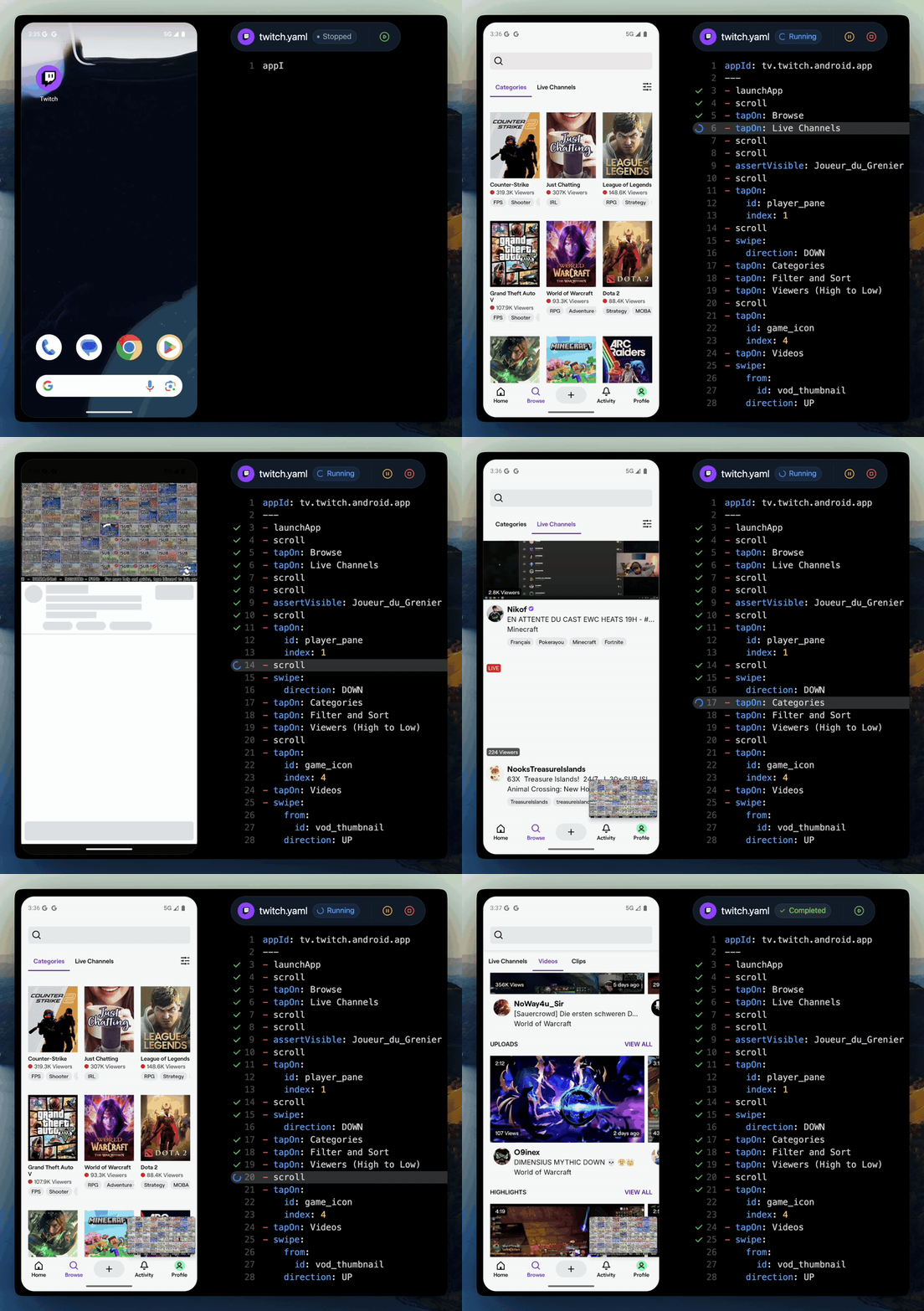
Maestro is built on learnings from its predecessors (Appium, Espresso, UIAutomator, XCTest, Selenium, Playwright), plus 3 decisions made early: drive the app through the platform's accessibility layer, install as a single binary with no drivers or SDK, and keep every test a flat list of YAML commands.
launchApp, tapOn, and assertVisible.maestro mcp, nothing else to install). Claude Code, Cursor, Codex, Grok Build, or any MCP client can control your app on a live device: inspect the screen, tap, scroll, assert, and check its own work while it builds. Ask for a flow when you want a repeatable test — that's agentic UI testing.sleep() calls.Simple Example:
# flow_contacts_android.yaml

appId: com.android.contacts
---
- launchApp
- tapOn: "Create new contact"
- tapOn: "First Name"
- inputText: "John"
- tapOn: "Last Name"
- inputText: "Snow"
- tapOn: "Save"
Maestro requires Java 17 or higher to be installed on your system. You can verify your Java version by running:
java -version
Installing the CLI:
Run the following command to install Maestro on macOS, Linux or Windows (WSL):
curl -fsSL "https://get.maestro.mobile.dev" | bash
The links below will guide you through the next steps.
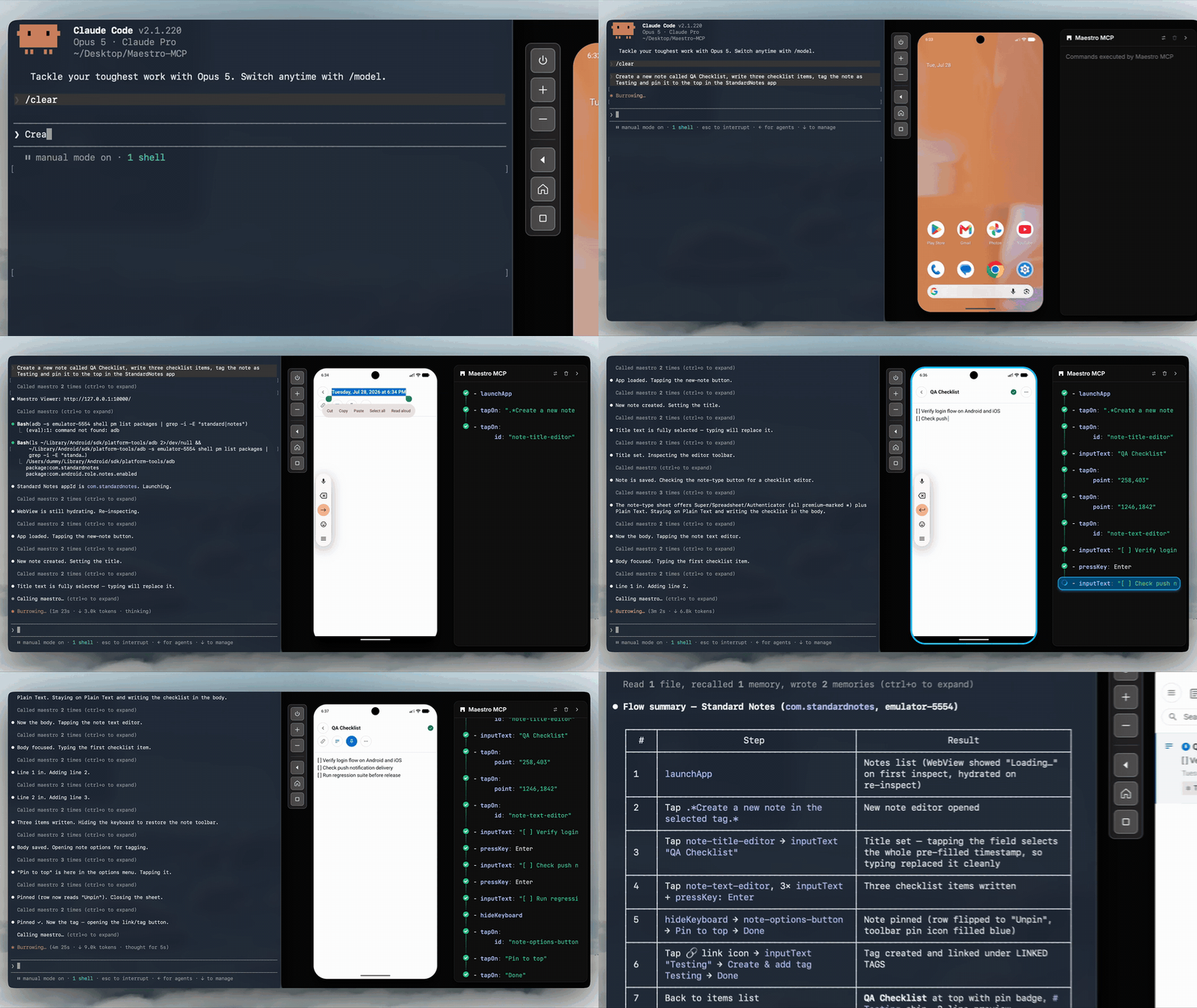
Maestro MCP ships inside the Maestro CLI and works with Claude Code, Cursor, Codex, Gemini CLI, Copilot, Grok Build, or any MCP client. It gives your agent a live device (an emulator, simulator, or physical Android device), and Maestro Viewer embeds that device inside your coding agent, showing every MCP command as it runs.
With Maestro MCP, your agent can control the app directly: inspect the screen, tap, scroll, and assert. While it builds or changes a feature, it checks its own work on the device.
Your agent can also write tests. Ask for an end-to-end flow and it writes plain YAML, runs it until it passes, and the flow stays in your repo as a deterministic test for CI.
Setup for each coding agent is in the Maestro MCP docs.
Maestro Studio Desktop is a lightweight IDE that lets you design and execute tests visually — no terminal needed. It is also free, even though Studio is not an open-source project. So you won't find the Maestro Studio code here.
When your test suite grows, run hundreds of tests in parallel on dedicated infrastructure, cutting execution times by up to 90%. Includes built-in notifications, deterministic environments, and complete debugging tools.
Pricing for Maestro Cloud is completely transparent and can be found on the pricing page.
Maestro is open-source under the Apache 2.0 license — contributions are welcome!
If you find Maestro useful, ⭐ star the repository to support the project.
Built with ❤️ by Maestro.dev
Claim this server with your GitHub account to request manual ownership verification.
Link to the catalog listing for Maestro MCP for agentic UI testing from your README. This badge does not certify ownership, compatibility or security.
[](https://awesome-mcp.com/servers/maestro)Public repository statistics could not be verified. Check the configured source address; unavailable counts are not zero.
来源、范围和时段分别列出;不相加,不代表安装人数、活跃用户或安全审核。
尚无已审核的包 / 镜像标识,暂不展示下载统计。
Alternative and complementary servers in the same category
A directory listing describing a cancellation-letter and mailing-address service. The configured public GitHub repository returned 404 during source verification.

A hosted MCP service for browsing and searching through Singapore mobile-network proxies.

A directory listing describing a Markdown-to-PDF service. The configured public GitHub repository returned 404 during source verification.