AdGuard Home MCP server

AdGuard Home MCP server

mcp-adguard-home•byfcannizzaro

An MCP server that lets AI agents manage AdGuard Home DNS rewrite records, filtering rules, and filter lists.

License: MIT License•Runtime: Awaiting documentation review•Category: cloud devops

WHAT IT DOES

  • •Lists, adds, and removes DNS rewrite records by domain and IP.
  • •Lists, blocks or allows, and removes custom DNS filtering rules.
  • •Lists filter lists, toggles their enabled state, and refreshes all filter lists.

BEST FOR

  • •AI agent workflows that add or remove local DNS rewrite entries in AdGuard Home.
  • •Managing custom blocking and allow rules for domains through an agent.
  • •Enabling, disabling, or refreshing AdGuard Home filter lists on request.

ABOUT MCP-ADGUARD-HOME

AdGuard Home MCP server is cataloged as an MCP server attributed to fcannizzaro. An MCP server that lets AI agents manage AdGuard Home DNS rewrite records, filtering rules, and filter lists. It is categorized under cloud devops. See the capability inspector for recorded interfaces and their independent review status; consult upstream documentation for the current interface.

HOW TO INSTALL

Installation configuration is not reviewed. No executable setup is offered for this entry; inspect the source repository before proceeding.

LICENSE

Catalog license label: MIT License. Check the source repository's current license and terms before using, modifying or distributing this software.

能力检查器

能力定义尚未审核。未核验的采集内容不会作为可信接口展示。

Tools (0)

暂无可展示的已审核记录。这不表示上游不支持此能力。

Resources (0)

暂无可展示的已审核记录。这不表示上游不支持此能力。

Prompts (0)

暂无可展示的已审核记录。这不表示上游不支持此能力。

NEWSLETTER - COMING LATER

Newsletter subscriptions are not open yet

Email delivery is not connected. This page does not collect email addresses or create subscriptions.

Browse the registry for current listings instead.

Community Reviews

Coming later

Reviews for AdGuard Home MCP server are not available yet

Review publishing and storage are not connected. This page does not collect or publish ratings or comments, including after sign-in.

FREQUENTLY ASKED QUESTIONS

Can I use it without an MCP client?

Yes. The package also installs a regular CLI for agents or scripts that do not use MCP, with commands for the same tools.

How are credentials provided?

The CLI login prompt saves the AdGuard Home URL, username, and password to a config file, which is loaded automatically on start; otherwise the package falls back to environment variables.

上游原版 README

在 GitHub 查看同一版本原文

README.md · 46ae6e351f0a · 采集于 2026-11-13 10:13:46 UTC

保留上游原文,不做 AI 改写。为安全起见过滤脚本、表单和不安全链接。

当前显示最后一次成功采集的文档快照,请以来源页面为准。

🛡️ AdGuard Home MCP

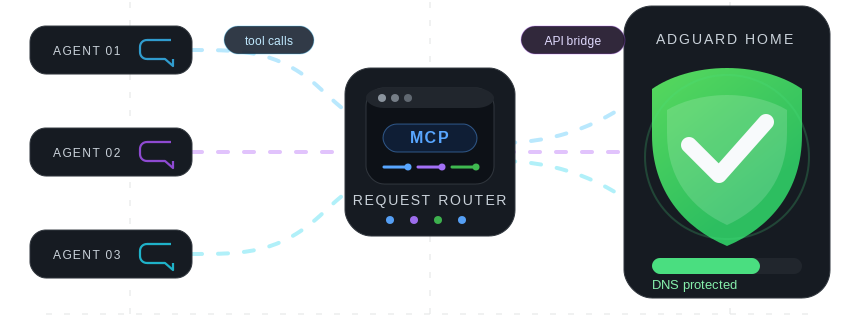
A Model Context Protocol (MCP) server for AdGuard Home. Manage DNS rewrite records, filtering rules, and filter lists via AI agents.

NPM Version CI: Publish Package

LLM agents interacting with AdGuard Home through MCP

📦 Installation

npm i -g @fcannizzaro/mcp-adguard-home

⚙️ Credentials

For the CLI, run:

adguard-cli login

This prompts for your AdGuard Home URL, username, and password, then saves them to ~/.config/mcp-adguard-home/config.json. Saved credentials are loaded automatically on start. If no saved credentials are available, the package falls back to these environment variables:

VariableDescription
ADGUARD_URLBase URL of your AdGuard Home instance (e.g. http://192.168.1.1)
ADGUARD_USERNAMEAdGuard Home username
ADGUARD_PASSWORDAdGuard Home password

🚀 Configuration

Claude Desktop

Edit ~/Library/Application Support/Claude/claude_desktop_config.json (macOS) or %APPDATA%\Claude\claude_desktop_config.json (Windows):

{
	"mcpServers": {
		"adguard-home": {
			"command": "npx",
			"args": ["-y", "@fcannizzaro/mcp-adguard-home"],
			"env": {
				"ADGUARD_URL": "http://192.168.1.1",
				"ADGUARD_USERNAME": "admin",
				"ADGUARD_PASSWORD": "your-password"
			}
		}
	}
}

Cursor

Edit .cursor/mcp.json in your project root (or ~/.cursor/mcp.json globally):

{
	"mcpServers": {
		"adguard-home": {
			"command": "npx",
			"args": ["-y", "@fcannizzaro/mcp-adguard-home"],
			"env": {
				"ADGUARD_URL": "http://192.168.1.1",
				"ADGUARD_USERNAME": "admin",
				"ADGUARD_PASSWORD": "your-password"
			}
		}
	}
}

VS Code

Edit .vscode/mcp.json in your project root:

{
	"servers": {
		"adguard-home": {
			"type": "stdio",
			"command": "npx",
			"args": ["-y", "@fcannizzaro/mcp-adguard-home"],
			"env": {
				"ADGUARD_URL": "http://192.168.1.1",
				"ADGUARD_USERNAME": "admin",
				"ADGUARD_PASSWORD": "your-password"
			}
		}
	}
}

Windsurf

Edit ~/.codeium/windsurf/mcp_config.json:

{
	"mcpServers": {
		"adguard-home": {
			"command": "npx",
			"args": ["-y", "@fcannizzaro/mcp-adguard-home"],
			"env": {
				"ADGUARD_URL": "http://192.168.1.1",
				"ADGUARD_USERNAME": "admin",
				"ADGUARD_PASSWORD": "your-password"
			}
		}
	}
}

Claude Code CLI

claude mcp add adguard-home \
  -e ADGUARD_URL=http://192.168.1.1 \
  -e ADGUARD_USERNAME=admin \
  -e ADGUARD_PASSWORD=your-password \
  -- npx -y @fcannizzaro/mcp-adguard-home

🧰 Available Tools

The package also installs a regular CLI for agents or scripts that do not use MCP:

adguard-cli login
adguard-cli list_rewrite_dns_records
adguard-cli add_rewrite_dns_record --domain example.test --ip 192.168.1.10
adguard-cli manage_dns_filtering_rules --domains ads.example --allowed false

CLI arguments can also be passed as a JSON object:

adguard-cli add_rewrite_dns_record '{"domain":"example.test","ip":"192.168.1.10"}'

DNS Rewrite Records

ToolDescriptionParameters
list_rewrite_dns_recordsList all DNS rewrite records—
add_rewrite_dns_recordAdd a DNS rewrite recorddomain: string, ip: string
remove_rewrite_dns_recordRemove a DNS rewrite recorddomain: string, ip: string

DNS Filtering Rules

ToolDescriptionParameters
list_dns_filtering_rulesList all custom DNS filtering rules—
manage_dns_filtering_rulesBlock or allow domainsdomains: string[], allowed: boolean
remove_rdns_filtering_rulesRemove custom filtering rulesdomains: string[]

Filter Lists

ToolDescriptionParameters
list_filter_listsList all configured filter lists—
toggle_filter_listEnable or disable a filter listid: number, enabled: boolean
refresh_filter_listsForce update of all filter lists—

📄 License

Licensed under the MIT License.

Install configuration

Are you the maintainer?

Claim this server with your GitHub account to request manual ownership verification.

README Embed Badge
Markdown

Link to the catalog listing for AdGuard Home MCP server from your README. This badge does not certify ownership, compatibility or security.

[![MCP catalog listing](https://img.shields.io/badge/MCP-awesome--mcp-orange?style=flat-square)](https://awesome-mcp.com/servers/mcp-adguard-home)

REPOSITORY STATS

GitHub StarsUnavailable
ForksUnavailable

Public repository statistics could not be verified. Check the configured source address; unavailable counts are not zero.

下载与拉取统计

来源、范围和时段分别列出;不相加,不代表安装人数、活跃用户或安全审核。

尚无已审核的包 / 镜像标识,暂不展示下载统计。

Related cloud devops MCP Servers

Alternative and complementary servers in the same category

View all in cloud devops →
Huawei MCP Server
mcp-server-huaweiclouddeveloper•huaweiclouddeveloper

A Model Context Protocol server built on Huawei Cloud services that enables AI assistants to operate Huawei Cloud resources within conversational workflows, supporting ECS, OBS, GaussDB, and other cloud products.

Repository stats unavailable
Cloud & DevOps
Coolify MCP Server
coolify-mcp-server•wrediam

An MCP server that exposes the Coolify v4.3.1 REST API so AI clients can manage applications, databases, services, servers, deployments, and more.

Repository stats unavailable
Cloud & DevOps

A deprecated Model Context Protocol server for interacting with Kong Konnect APIs, enabling AI assistants to query and analyze Kong Gateway configurations, traffic, and analytics.

Repository stats unavailable
Cloud & DevOps