
This is a Model Context Protocol (MCP) server for interacting with AIStor object stores.
Repository stats unavailable
Databases & Storage
An MCP server that connects Claude Desktop to SQLAlchemy-compatible databases to explore schema, write and validate SQL queries, and analyze datasets.
MCP Alchemy is cataloged as an MCP server attributed to runekaagaard. An MCP server that connects Claude Desktop to SQLAlchemy-compatible databases to explore schema, write and validate SQL queries, and analyze datasets. It is categorized under databases storage. See the capability inspector for recorded interfaces and their independent review status; consult upstream documentation for the current interface.
Installation configuration is not reviewed. No executable setup is offered for this entry; inspect the source repository before proceeding.
Catalog license label: Mozilla Public License Version 2.0. Check the source repository's current license and terms before using, modifying or distributing this software.
能力定义尚未审核。未核验的采集内容不会作为可信接口展示。
暂无可展示的已审核记录。这不表示上游不支持此能力。
暂无可展示的已审核记录。这不表示上游不支持此能力。
暂无可展示的已审核记录。这不表示上游不支持此能力。
Email delivery is not connected. This page does not collect email addresses or create subscriptions.
Browse the registry for current listings instead.
Reviews for MCP Alchemy are not available yet
Review publishing and storage are not connected. This page does not collect or publish ratings or comments, including after sign-in.
It applies smart truncation of large results, and when claude-local-files is configured via CLAUDE_LOCAL_FILES_PATH, complete result sets can be accessed beyond Claude's context window.
It works with PostgreSQL, MySQL, MariaDB, SQLite, Oracle, MS SQL Server, CrateDB, Vertica and other SQLAlchemy-compatible databases.
README.md · 8df3eb56773f · 采集于 2026-11-13 09:37:14 UTC
保留上游原文,不做 AI 改写。为安全起见过滤脚本、表单和不安全链接。
当前显示最后一次成功采集的文档快照,请以来源页面为准。
Status: Actively maintained and in daily use. Tested releases are published to PyPI with git tags, and issues and pull requests are triaged regularly.
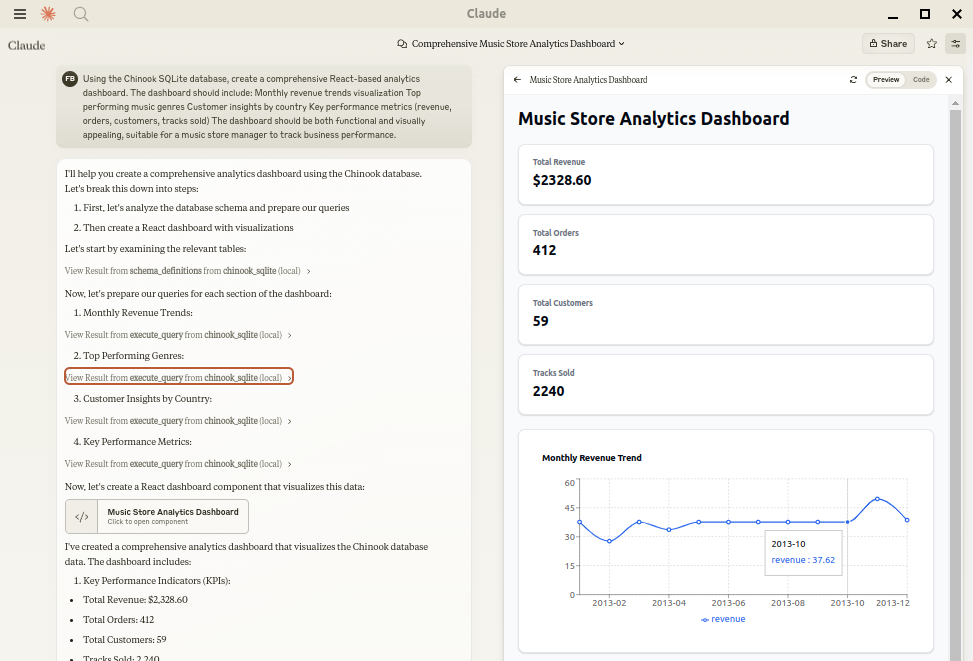
Let Claude be your database expert! MCP Alchemy connects Claude Desktop directly to your databases, allowing it to:
Works with PostgreSQL, MySQL, MariaDB, SQLite, Oracle, MS SQL Server, CrateDB, Vertica, and a host of other SQLAlchemy-compatible databases.
Ensure you have uv installed:
# Install uv if you haven't already
curl -LsSf https://astral.sh/uv/install.sh | sh
Add to your claude_desktop_config.json. You need to add the appropriate database driver in the --with parameter.
Note: After a new version release there might be a period of up to 600 seconds while the cache clears locally cached causing uv to raise a versioning error. Restarting the MCP client once again solves the error.
{
  "mcpServers": {
    "my_sqlite_db": {
      "command": "uvx",
      "args": ["--from", "mcp-alchemy==2026.10.15.202659",
               "--refresh-package", "mcp-alchemy", "mcp-alchemy"],
      "env": {
        "DB_URL": "sqlite:////absolute/path/to/database.db"
      }
    }
  }
}
{
  "mcpServers": {
    "my_postgres_db": {
      "command": "uvx",
      "args": ["--from", "mcp-alchemy==2026.10.15.202659", "--with", "psycopg2-binary",
               "--refresh-package", "mcp-alchemy", "mcp-alchemy"],
      "env": {
        "DB_URL": "postgresql://user:password@localhost/dbname"
      }
    }
  }
}
{
  "mcpServers": {
    "my_mysql_db": {
      "command": "uvx",
      "args": ["--from", "mcp-alchemy==2026.10.15.202659", "--with", "pymysql",
               "--refresh-package", "mcp-alchemy", "mcp-alchemy"],
      "env": {
        "DB_URL": "mysql+pymysql://user:password@localhost/dbname"
      }
    }
  }
}
{
  "mcpServers": {
    "my_mssql_db": {
      "command": "uvx",
      "args": ["--from", "mcp-alchemy==2026.10.15.202659", "--with", "pymssql",
               "--refresh-package", "mcp-alchemy", "mcp-alchemy"],
      "env": {
        "DB_URL": "mssql+pymssql://user:password@localhost/dbname"
      }
    }
  }
}
{
  "mcpServers": {
    "my_oracle_db": {
      "command": "uvx",
      "args": ["--from", "mcp-alchemy==2026.10.15.202659", "--with", "oracledb",
               "--refresh-package", "mcp-alchemy", "mcp-alchemy"],
      "env": {
        "DB_URL": "oracle+oracledb://user:password@localhost/dbname"
      }
    }
  }
}
{
  "mcpServers": {
    "my_cratedb": {
      "command": "uvx",
      "args": ["--from", "mcp-alchemy==2026.10.15.202659", "--with", "sqlalchemy-cratedb>=0.42.0.dev1",
               "--refresh-package", "mcp-alchemy", "mcp-alchemy"],
      "env": {
        "DB_URL": "crate://user:password@localhost:4200/?schema=testdrive"
      }
    }
  }
}
For connecting to CrateDB Cloud, use a URL like
crate://user:password@example.aks1.westeurope.azure.cratedb.net:4200?ssl=true.
{
  "mcpServers": {
    "my_vertica_db": {
      "command": "uvx",
      "args": ["--from", "mcp-alchemy==2026.10.15.202659", "--with", "vertica-python",
               "--refresh-package", "mcp-alchemy", "mcp-alchemy"],
      "env": {
        "DB_URL": "vertica+vertica_python://user:password@localhost:5433/dbname",
        "DB_ENGINE_OPTIONS": "{\"connect_args\": {\"ssl\": false}}"
      }
    }
  }
}
A container image is published to GitHub Container Registry with common database drivers (PostgreSQL, MySQL/MariaDB, MS SQL Server, Oracle) preinstalled:
{
  "mcpServers": {
    "my_db": {
      "command": "docker",
      "args": ["run", "-i", "--rm", "-e", "DB_URL",
               "ghcr.io/runekaagaard/mcp-alchemy:latest"],
      "env": {
        "DB_URL": "postgresql://user:password@host.docker.internal/dbname"
      }
    }
  }
}
Or build it yourself with docker build -t ghcr.io/runekaagaard/mcp-alchemy .
By default the server speaks stdio. It can also serve over HTTP for clients that connect that way:
# Recommended HTTP transport (serves on http://HOST:PORT/mcp)
mcp-alchemy --transport streamable-http --host 127.0.0.1 --port 7000

# Legacy SSE transport, for older clients (serves on http://HOST:PORT/sse)
mcp-alchemy --transport sse --host 127.0.0.1 --port 7000
DB_URL: SQLAlchemy database URL (required)CLAUDE_LOCAL_FILES_PATH: Directory for full result sets (optional)EXECUTE_QUERY_MAX_CHARS: Maximum output length (optional, default 4000)DB_ENGINE_OPTIONS: JSON string containing additional SQLAlchemy engine options (optional)MCP Alchemy uses connection pooling optimized for long-running MCP servers. The default settings are:
pool_pre_ping=True: Tests connections before use to handle database timeouts and network issuespool_size=1: Maintains 1 persistent connection (MCP servers typically handle one request at a time)max_overflow=2: Allows up to 2 additional connections for burst capacitypool_recycle=3600: Refreshes connections older than 1 hour (prevents timeout issues)isolation_level='AUTOCOMMIT': Ensures each query commits automaticallyThese defaults work well for most databases, but you can override them via DB_ENGINE_OPTIONS:
{
  "DB_ENGINE_OPTIONS": "{\"pool_size\": 5, \"max_overflow\": 10, \"pool_recycle\": 1800}"
}
For databases with aggressive timeout settings (like MySQL's 8-hour default), the combination of pool_pre_ping and pool_recycle ensures reliable connections.
all_table_names
users, orders, products, categories
filter_table_names
q (string)Input: "user"
Returns: "users, user_roles, user_permissions"
schema_definitions
table_names (string[])users:
id: INTEGER, primary key, autoincrement
email: VARCHAR(255), nullable
created_at: DATETIME
Relationships:
id -> orders.user_id
execute_query
query (string): SQL queryparams (object, optional): Query parameters1. row
id: 123
name: John Doe
created_at: 2024-03-15T14:30:00
email: NULL
Result: 1 rows
When claude-local-files is configured:
The integration automatically activates when CLAUDE_LOCAL_FILES_PATH is set.
First clone the github repository, install the dependencies and your database driver(s) of choice:
git clone git@github.com:runekaagaard/mcp-alchemy.git
cd mcp-alchemy
uv sync
uv pip install psycopg2-binary
Then set this in claude_desktop_config.json:
...
"command": "uv",
"args": ["run", "--directory", "/path/to/mcp-alchemy", "-m", "mcp_alchemy.server", "main"],
...
MCP Alchemy is listed in the following MCP directory sites and repositories:
Contributions are warmly welcomed! Whether it's bug reports, feature requests, documentation improvements, or code contributions - all input is valuable. Feel free to:
The goal is to make database interaction with Claude even better, and your insights and contributions help achieve that.
Mozilla Public License Version 2.0
Claim this server with your GitHub account to request manual ownership verification.
Link to the catalog listing for MCP Alchemy from your README. This badge does not certify ownership, compatibility or security.
[](https://awesome-mcp.com/servers/mcp-alchemy)Public repository statistics could not be verified. Check the configured source address; unavailable counts are not zero.
来源、范围和时段分别列出;不相加,不代表安装人数、活跃用户或安全审核。
尚无已审核的包 / 镜像标识,暂不展示下载统计。
Alternative and complementary servers in the same category
This is a Model Context Protocol (MCP) server for interacting with AIStor object stores.

A Model Context Protocol server that lets AI assistants run SQL queries against AWS Athena databases and retrieve results.

A Model Context Protocol (MCP) server that exposes access to an InfluxDB v2 instance using the InfluxDB OSS API v2.