
A directory listing describing a cancellation-letter and mailing-address service. The configured public GitHub repository returned 404 during source verification.
Repository stats unavailable
Developer Tools
A local MCP server built to fail on demand so developers can test MCP clients against auth failures, disappearing tools, flaky responses, and token expiry.
MCP Chaos Rig is cataloged as an MCP server attributed to typewise. A local MCP server built to fail on demand so developers can test MCP clients against auth failures, disappearing tools, flaky responses, and token expiry. It is categorized under developer tools. See the capability inspector for recorded interfaces and their independent review status; consult upstream documentation for the current interface.
Installation configuration is not reviewed. No executable setup is offered for this entry; inspect the source repository before proceeding.
Catalog license label: MIT License. Check the source repository's current license and terms before using, modifying or distributing this software.
能力定义尚未审核。未核验的采集内容不会作为可信接口展示。
暂无可展示的已审核记录。这不表示上游不支持此能力。
暂无可展示的已审核记录。这不表示上游不支持此能力。
暂无可展示的已审核记录。这不表示上游不支持此能力。
Email delivery is not connected. This page does not collect email addresses or create subscriptions.
Browse the registry for current listings instead.
Reviews for MCP Chaos Rig are not available yet
Review publishing and storage are not connected. This page does not collect or publish ratings or comments, including after sign-in.
All state is in-memory and resets on restart to the environment-seeded or built-in defaults.
The consent page offers Approve, Decline, Wrong Code, and Wrong State outcomes, where Decline returns access_denied and Wrong Code makes the token exchange fail.
Yes, a failure rate from 0-100% can be set, and failed calls return isError: true.
README.md · b33acbbde827 · 采集于 2026-11-13 10:12:45 UTC
保留上游原文,不做 AI 改写。为安全起见过滤脚本、表单和不安全链接。
当前显示最后一次成功采集的文档快照,请以来源页面为准。

A local MCP server that breaks on demand. Test your client against auth failures, disappearing tools, flaky responses, and token expiry, all from a web UI.



You're building an MCP client. You need to test OAuth flows, token refresh, tool discovery, error handling, and session lifecycle. Production servers don't fail on command. You need a server that does.
Run a local MCP server where you control everything:
tools/changed, switch schema versions live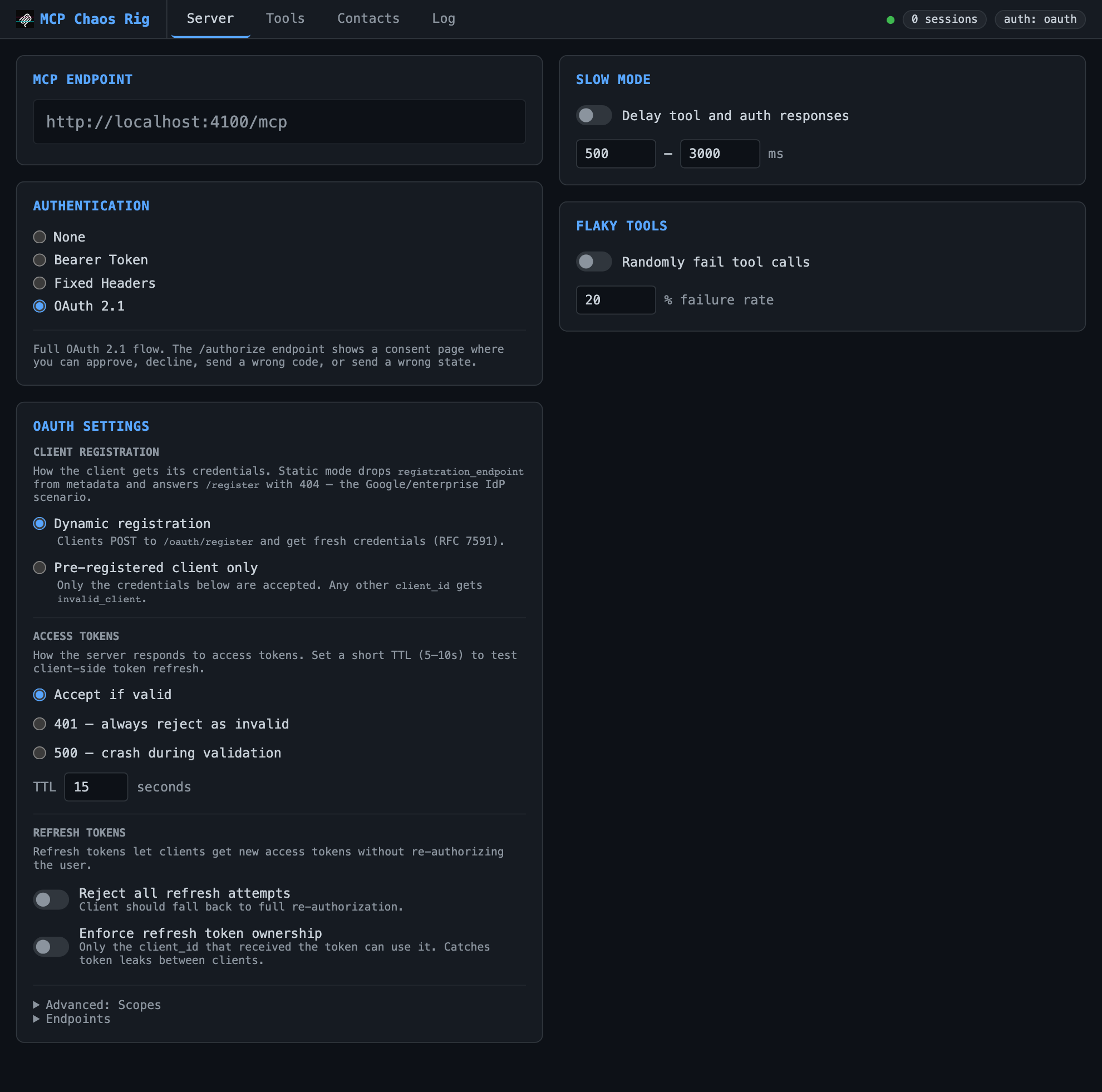
| Scenario | How to test it |
|---|---|
| OAuth 2.1 consent flow | Use the interactive consent page: approve, decline, invalid code, tampered state |
| Fixed header auth | Switch to Headers mode, configure key-value pairs, verify client sends them |
| Missing/wrong headers | Send requests with missing or mismatched headers — 401 with details |
| Token rejection mid-session | Toggle "Reject OAuth" to 401 or 500 while client is connected |
| Token expiry and refresh | Set access token TTL to a short value, watch the client refresh |
| Reject refresh tokens | Toggle "Reject refresh tokens" to force re-authentication |
| Wrong client refreshing | Enable "Enforce refresh token ownership" — catches clients that lose credentials and re-register |
| No dynamic registration | Switch to "Pre-registered client only" — /register 404s, only your client_id works |
| Rotated client credentials | Change the pre-registered client_id mid-session — the old one now fails with invalid_client |
| Scope discovery conflict | Set different scopes in metadata vs WWW-Authenticate header, test which the client trusts |
| Tool disappearing | Disable a tool in the Tools tab. Clients receive tools/changed |
| Tool schema changing | Switch echo or add between v1 and v2 schemas |
| Flaky tool calls | Set failure rate 0-100%. Failed calls return isError: true |
| Slow responses | Enable slow mode with configurable latency range |
| PKCE code exchange | OAuth consent page offers "Wrong Code" and "Wrong State" options |
| Database-backed tools | CRUD operations on a real SQLite contact database |
npx mcp-chaos-rig
Control panel at localhost:4100/ui, MCP endpoint at http://localhost:4100/mcp. Requires Node 20+.
If you prefer a global install:
npm install -g mcp-chaos-rig
mcp-chaos-rig
Or run from source:
git clone https://github.com/Typewise/mcp-chaos-rig.git
cd mcp-chaos-rig
npm install
npm run dev
If your production environment needs to reach Chaos Rig, expose it via a tunnel (ngrok, Cloudflare Tunnel, etc.) and set BASE_URL so OAuth redirects resolve correctly:
BASE_URL=https://your-tunnel.example.dev npx mcp-chaos-rig
Auth mode starts at Bearer, so a tunnel-facing rig usually wants AUTH_MODE too (none, bearer, headers, oauth). For OAuth with pre-registered credentials, see Client registration.
All state is in-memory and resets on restart, back to whatever the environment seeds (AUTH_MODE, OAUTH_CLIENT_MODE, STATIC_*) or to the built-in defaults. Bearer starts with token test-token-123 (valid until changed). OAuth tokens expire per TTL. Refresh tokens track ownership per client when enabled. After restart, do one refresh with ownership off to re-seed, then turn it on.
Configure auth mode, slow mode (random latency), and flaky tools (% failure rate).
| Auth mode | Behavior |
|---|---|
| None | All requests pass through |
| Bearer | Requires Authorization: Bearer test-token-123 |
| Fixed Headers | Requires configured key-value header pairs on every request |
| OAuth 2.1 | Full authorization flow with interactive consent page |
Bearer, Fixed Headers and OAuth modes support fault injection: force 401 or 500 responses to test error handling. The mode starts at Bearer unless AUTH_MODE says otherwise.
OAuth mode adds controls for client registration, access token TTL, refresh token rejection, and refresh token ownership enforcement. OAuth endpoints are listed in a collapsible section.
| Mode | Behavior |
|---|---|
| Dynamic registration | Clients register themselves at /oauth/register and get fresh credentials (RFC 7591) |
| Pre-registered client only | Only the configured client_id / client_secret is accepted; registration is turned off |
Static mode reproduces authorization servers that issue credentials out of band (Google, Atlassian, most enterprise IdPs):
registration_endpoint disappears from the well-known metadataPOST /oauth/register and POST /register return 404 registration_not_supportedclient_id gets invalid_client at /authorize and /tokenclient_secret makes it a public client, so the token endpoint accepts auth method noneThe shipped default redirect URI points at a local client. Testing against a deployed client means registering that client's callback instead, or /authorize returns 400 invalid_request — the response lists the URIs that are registered, since the port relaxation only applies to loopback hosts and https:// callbacks must match exactly.
Set the client at boot so a tunnel-facing rig starts ready:
AUTH_MODE=oauth \
OAUTH_CLIENT_MODE=static \
STATIC_CLIENT_ID=acme-client \
STATIC_CLIENT_SECRET=acme-secret \
STATIC_REDIRECT_URIS=https://platform-api.example.app/api/mcp/oauth/callback \
BASE_URL=https://your-tunnel.example.dev npx mcp-chaos-rig
AUTH_MODE is required here: it defaults to bearer, and the OAuth endpoints 404 until it is oauth (none, bearer, headers, oauth; anything else fails at startup). STATIC_REDIRECT_URIS is comma-separated. An empty STATIC_CLIENT_SECRET= boots a public client. Everything stays editable from the Server tab afterwards.
Changing the client_id drops the previous one, so you can test credential rotation against a live client. Set it from the API too:
curl -X POST localhost:4100/api/oauth-client -H 'Content-Type: application/json' \
  -d '{"mode":"static","clientId":"acme-client","clientSecret":"acme-secret","redirectUris":["http://localhost:3000/api/mcp/oauth/callback"]}'
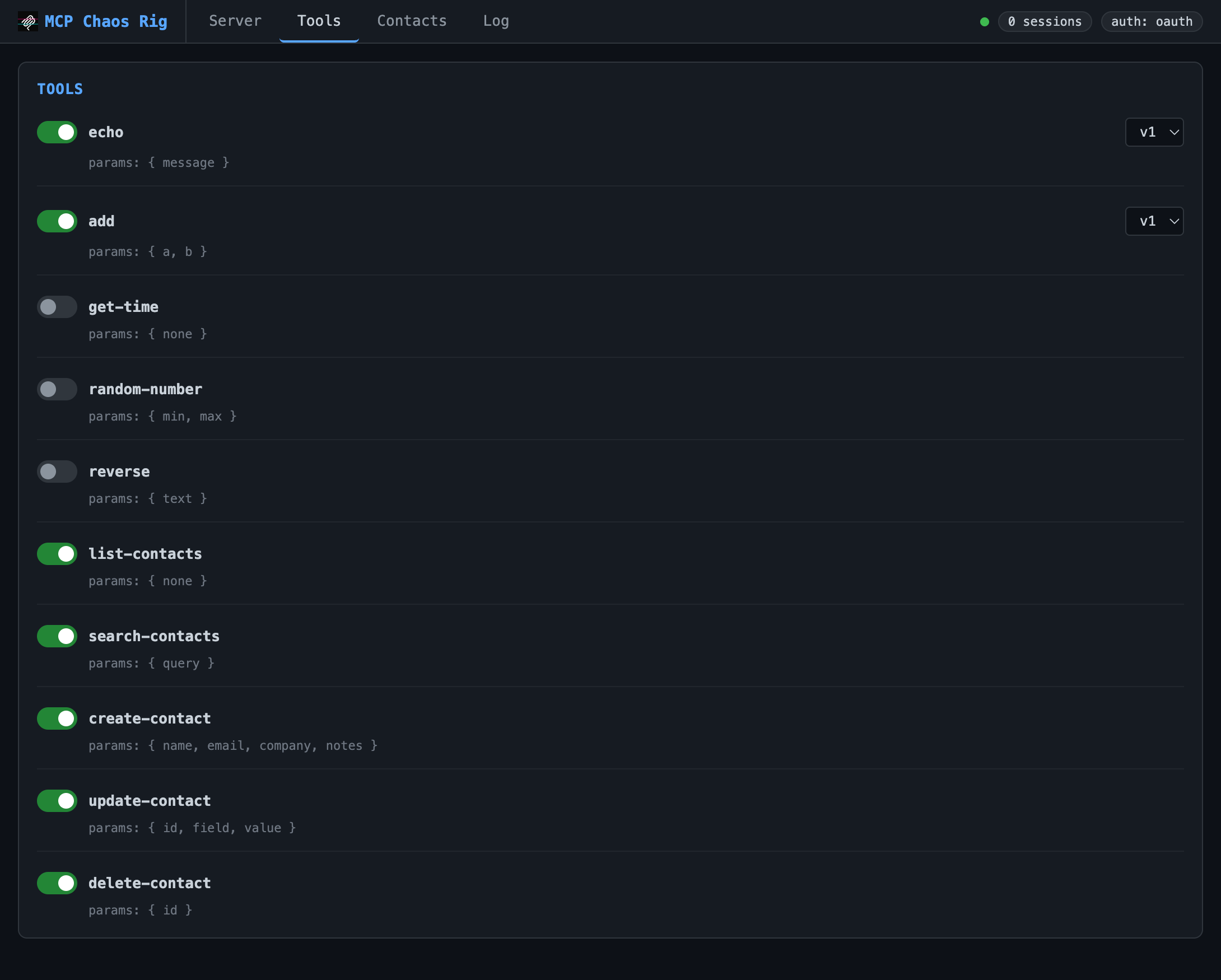
Toggle tools on/off. Disabling sends tools/changed to connected clients. Some tools (echo, add) support version switching.
Available tools:
echo: returns your message (v2 adds format options)add: sums two numbers (v2 accepts an array)get-time: current server time as ISO 8601random-number: random integer in a rangereverse: reverses a stringtypeEcho: echoes one optional parameter per JSON Schema primitive, to check a client round-trips every typedispute-charge: files a billing dispute, returns a JSON receiptlist-contacts, get-contact-by-id, get-contact-by-email, search-contacts, create-contact, update-contact, delete-contact: SQLite CRUDThree large-schema tools start disabled, for testing how a client handles wide inputs: submit-customs-declaration (all fields required), create-product-listing (25 required, 25 optional), search-properties (50 optional filters).
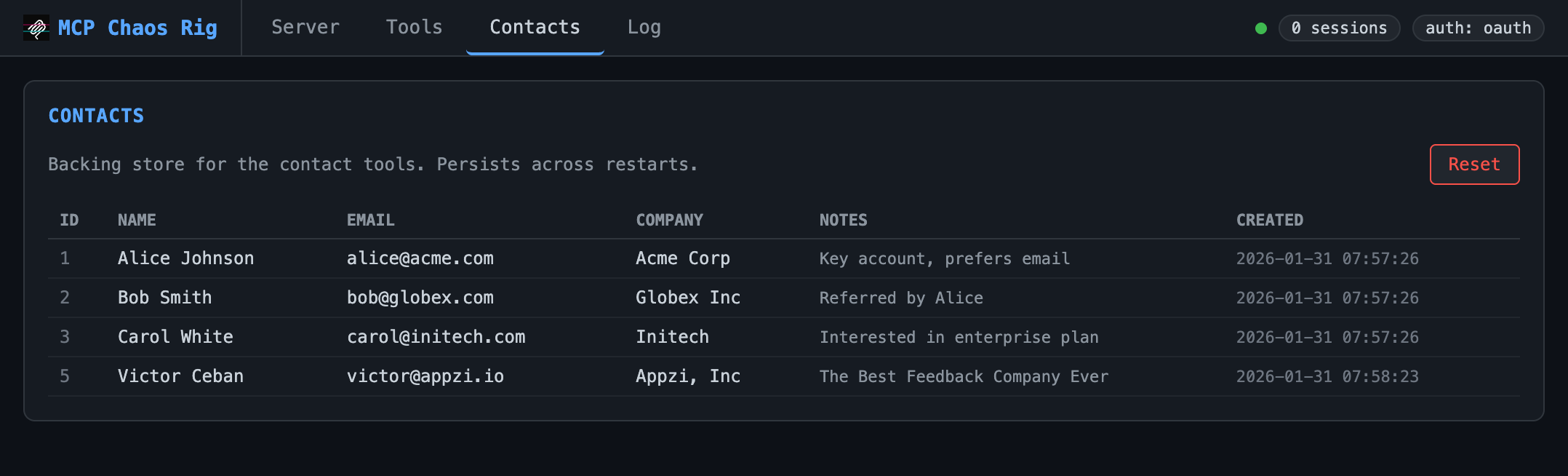
View and reset the SQLite database backing the contact tools. Starts with three seed records.
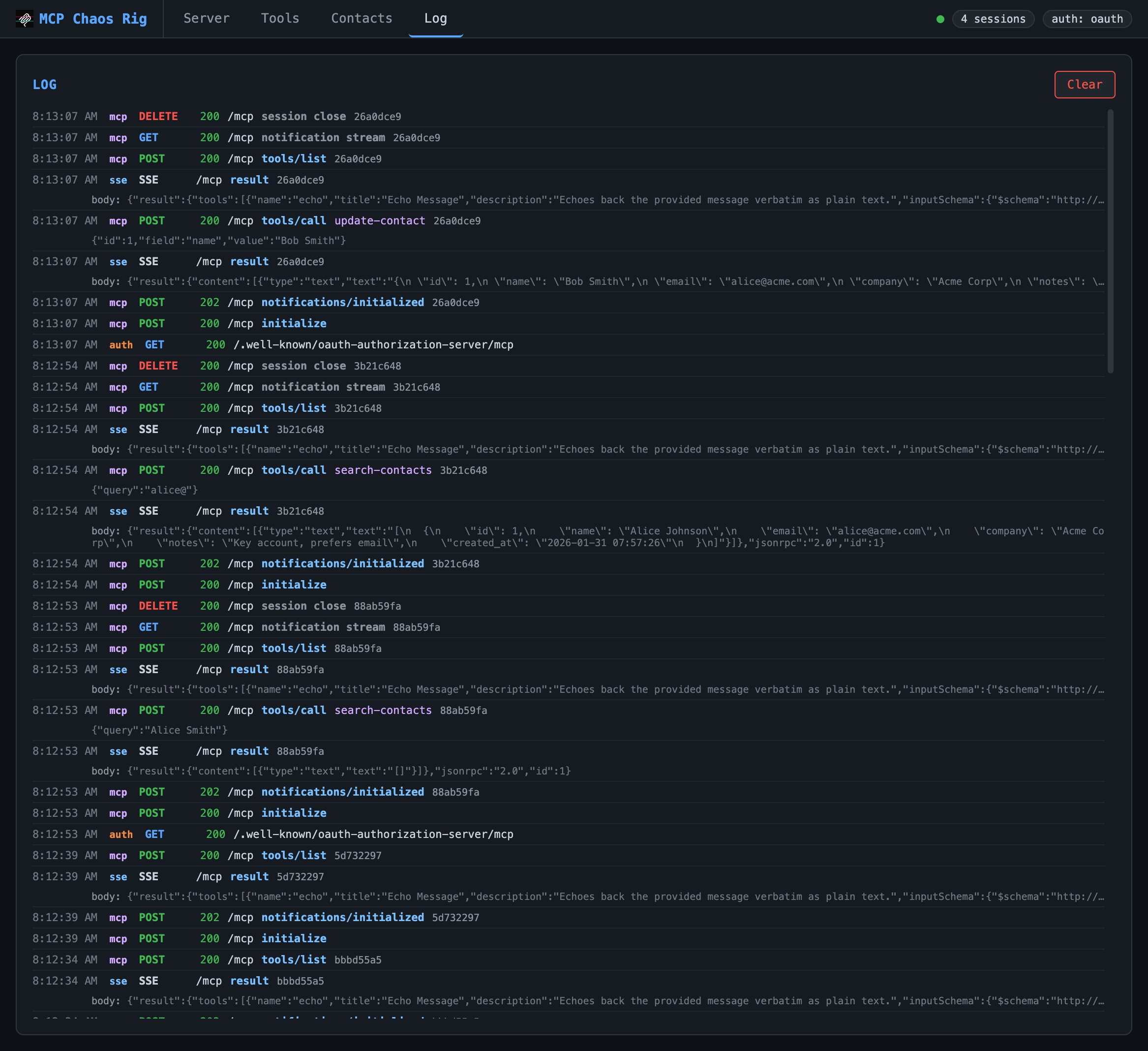
Live request log showing inbound requests and outbound SSE responses. Displays timestamp, source (mcp/auth/sse), method, status, JSON-RPC method, tool name, and arguments. Click any truncated body or args line to expand it. Keeps last 200 entries.
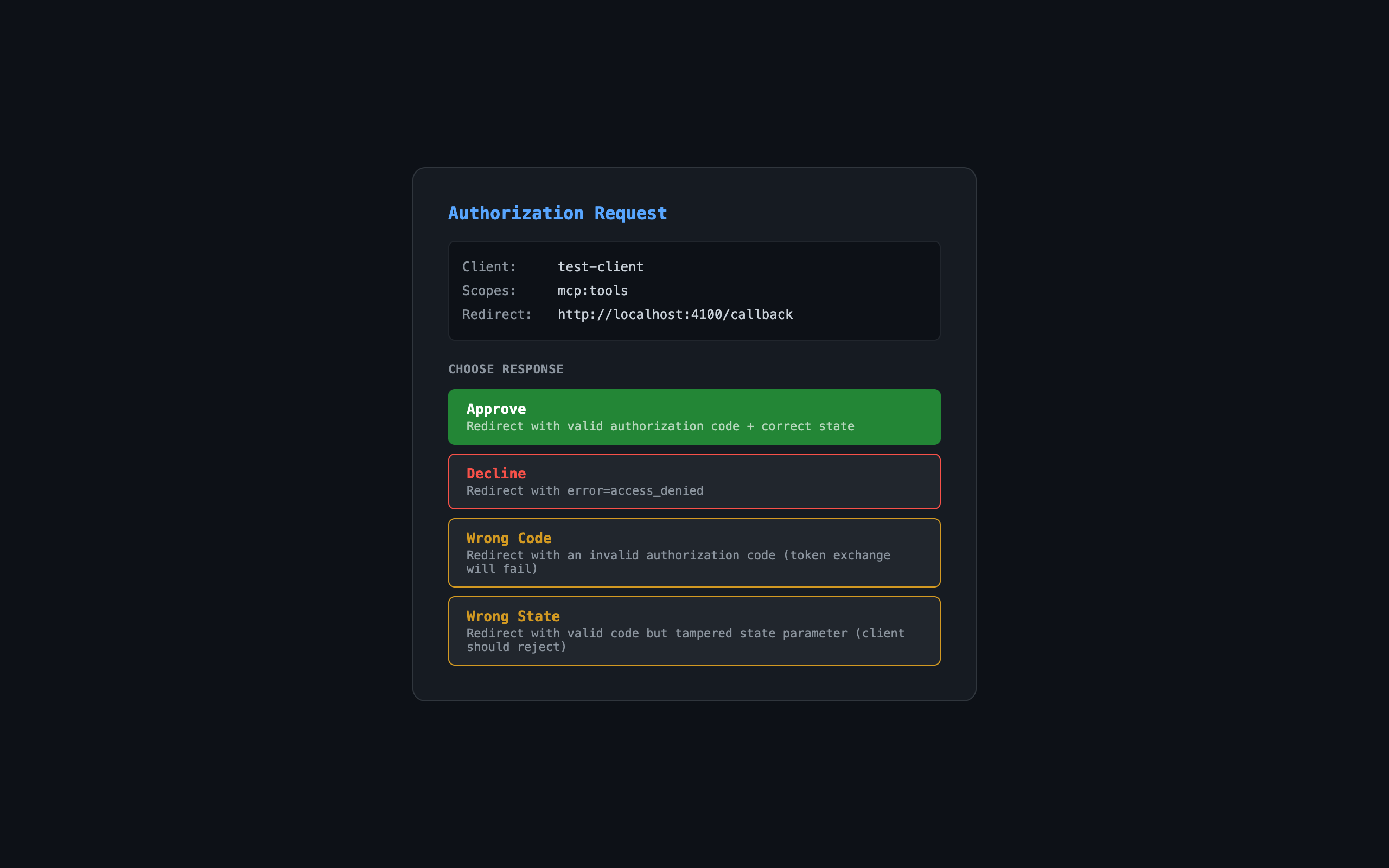
When auth mode is OAuth, the authorization endpoint shows an interactive consent page:
| Button | Result |
|---|---|
| Approve | Redirects with valid authorization code |
| Decline | Redirects with error=access_denied |
| Wrong Code | Redirects with invalid code (token exchange fails) |
| Wrong State | Redirects with tampered state parameter |
Claim this server with your GitHub account to request manual ownership verification.
Link to the catalog listing for MCP Chaos Rig from your README. This badge does not certify ownership, compatibility or security.
[](https://awesome-mcp.com/servers/mcp-chaos-rig)Public repository statistics could not be verified. Check the configured source address; unavailable counts are not zero.
来源、范围和时段分别列出;不相加,不代表安装人数、活跃用户或安全审核。
尚无已审核的包 / 镜像标识,暂不展示下载统计。
Alternative and complementary servers in the same category
A directory listing describing a cancellation-letter and mailing-address service. The configured public GitHub repository returned 404 during source verification.

A hosted MCP service for browsing and searching through Singapore mobile-network proxies.

A directory listing describing a Markdown-to-PDF service. The configured public GitHub repository returned 404 during source verification.