
Store and retrieve entities, relations and observations in a persistent local knowledge graph.
create_entitiescreate_relationsadd_observations+6 more
92K
AI & Multi-Agent
A gateway that centrally manages multiple MCP servers and exposes their combined capabilities through unified MCP endpoints.
MCP Composer gateway service is cataloged as an MCP server attributed to htkuan. A gateway that centrally manages multiple MCP servers and exposes their combined capabilities through unified MCP endpoints. It is categorized under ai agents-models. See the capability inspector for recorded interfaces and their independent review status; consult upstream documentation for the current interface.
Installation configuration is not reviewed. No executable setup is offered for this entry; inspect the source repository before proceeding.
Catalog license label: Not specified. Check the source repository's current license and terms before using, modifying or distributing this software.
能力定义尚未审核。未核验的采集内容不会作为可信接口展示。
暂无可展示的已审核记录。这不表示上游不支持此能力。
暂无可展示的已审核记录。这不表示上游不支持此能力。
暂无可展示的已审核记录。这不表示上游不支持此能力。
Email delivery is not connected. This page does not collect email addresses or create subscriptions.
Browse the registry for current listings instead.
Reviews for MCP Composer gateway service are not available yet
Review publishing and storage are not connected. This page does not collect or publish ratings or comments, including after sign-in.
Yes. Each gateway independently manages its own combination of MCP servers and tools, so each service can be given a customized set of capabilities.
Each gateway exposes a recommended Streamable HTTP endpoint and a legacy SSE endpoint for clients that do not support Streamable HTTP.
README.md · 4e377edc1166 · 采集于 2026-11-13 09:57:36 UTC
保留上游原文,不做 AI 改写。为安全起见过滤脚本、表单和不安全链接。
当前显示最后一次成功采集的文档快照,请以来源页面为准。
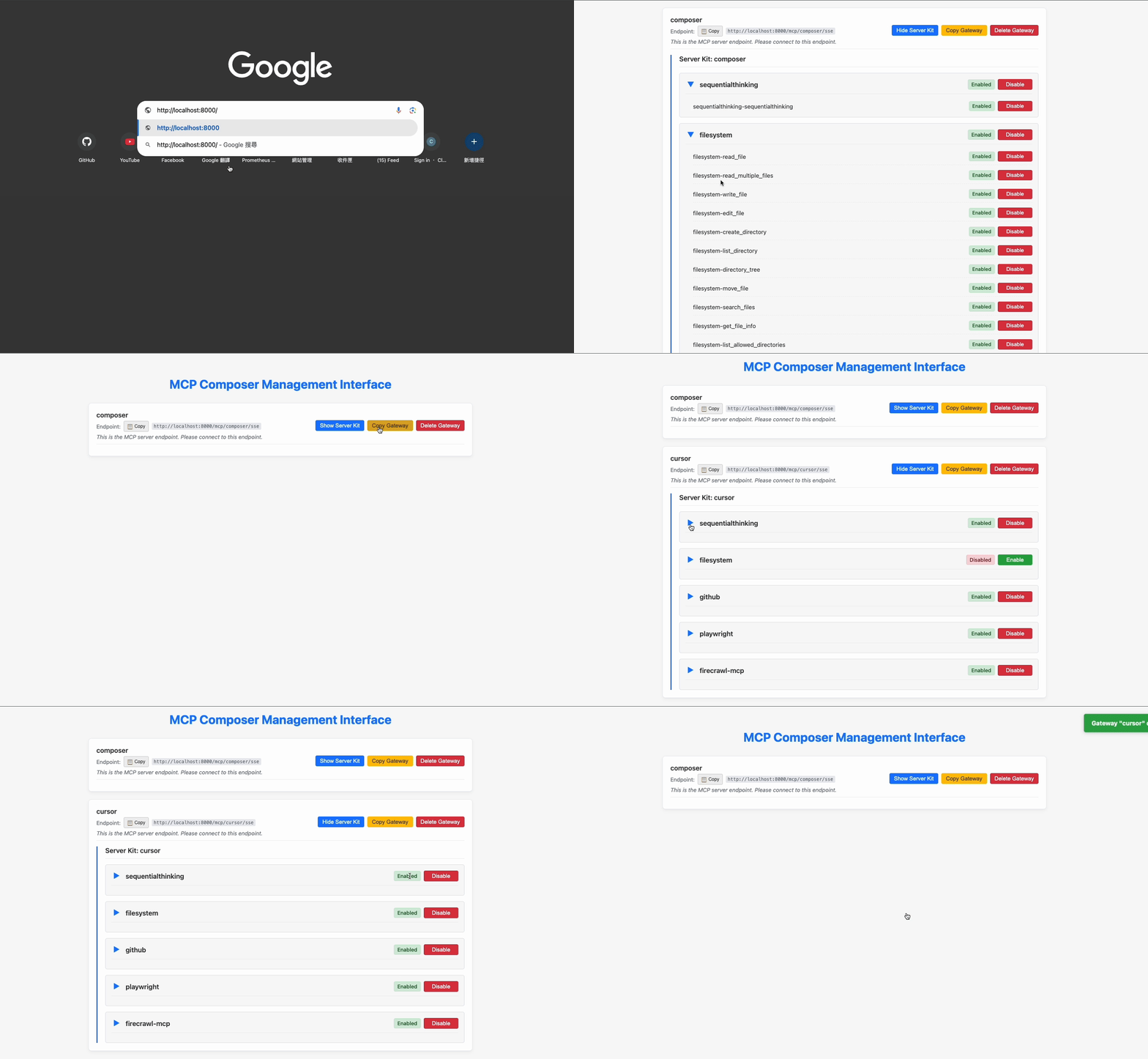
MCP Composer is a gateway service that centrally manages all your MCP servers. You can use it to consolidate all the MCP servers you need and open independent ports with different combinations of servers and tools for each service (like AI agents or tools) that requires access to MCP servers.
2026-07-28 as well as earlier revisions) that provides access to all capabilities of the managed MCP servers. A legacy SSE endpoint is also available for clients that do not support Streamable HTTP yet.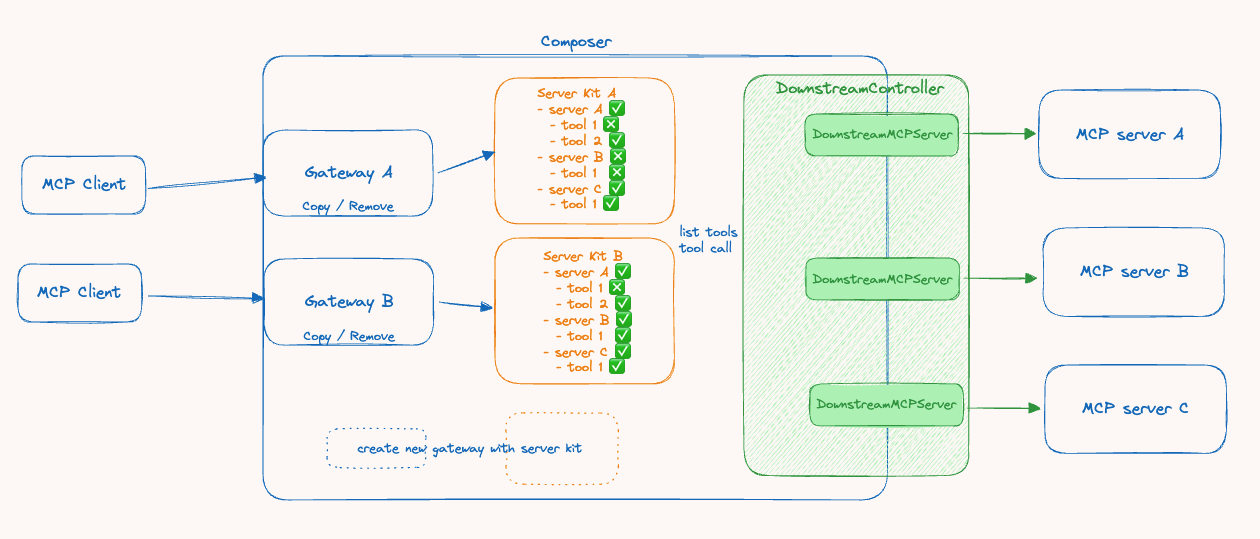
Clone the repository:
git clone https://github.com/htkuan/mcp-composer
cd mcp-composer
Install dependencies:
Use uv to sync the project dependencies.
make install
# or directly use uv
# uv sync
Use Docker Compose instead of a local Python/uv setup; see Running with Docker Compose.
Before running the application, you need to configure the target MCP servers.
Copy the example configuration file:
cp mcp_servers.example.json mcp_servers.json
Edit mcp_servers.json and enter the details of the MCP servers you want to connect to.
command / args / env (stdio transport).url. By default the Streamable HTTP transport is tried first, falling back to the legacy SSE transport. Set "type": "http" or "type": "sse" to force a specific transport.Set up environment variables:
cp .env.example .env
Edit the .env file to configure the following settings:
HOST: Server host address (default: 0.0.0.0)PORT: Server port (default: 8000)MCP_COMPOSER_PROXY_URL: MCP Composer proxy URL (default: http://localhost:8000)MCP_SERVERS_CONFIG_PATH: Path to the MCP servers configuration file (default: ./mcp_servers.json)Use uv to run the FastAPI application:
make run
# or directly use uv
# uv run src/main.py
After the service starts, you can interact with the API through the API documentation in your browser (typically at http://127.0.0.1:8000/docs).
Each gateway exposes two MCP endpoints (the default gateway is named composer):
http://127.0.0.1:8000/mcp/{gateway_name}/mcphttp://127.0.0.1:8000/mcp/{gateway_name}/sseThe Docker image bundles Python, uv/uvx, Node.js/npx, and the Docker CLI, so stdio servers started with uvx, npx, or docker run work inside the container.
Create mcp_servers.json as described in Configuration. The project directory is mounted into the container, so the file is read from /app/mcp_servers.json.
Build and start the service:
make run-docker
# or directly use docker compose
# docker compose up -d --build
After pulling new changes, run docker compose up -d --build to rebuild the image.
Check the status and logs:
docker compose ps                    # STATUS shows "(healthy)" once the service is ready
docker compose logs -f mcp-composer  # shows which downstream servers connected
The UI, API documentation, and gateway endpoints are available at the same URLs as in Running.
Stop the service:
docker compose down
Notes:
src/ is mounted from your working copy, so run docker compose restart to apply code or mcp_servers.json changes without rebuilding.localhost refers to the container itself. Use host.docker.internal instead, e.g. "url": "http://host.docker.internal:8001/mcp". This also applies to containers started by docker run entries. On Linux, add extra_hosts: ["host.docker.internal:host-gateway"] to the service in docker-compose.yml."command": "docker" entries start sibling containers on your host. This gives the container full access to your Docker daemon.MCP_SERVERS_CONFIG_PATH and MCP_COMPOSER_PROXY_URL are set in docker-compose.yml and take precedence over .env. The published port is fixed to 8000:8000; if you change PORT, update ports as well.The project includes a Makefile to simplify common development tasks:
make installmake format (using Ruff)make runmake run-dockerContributions to this project are welcome! Please follow the standard GitHub Fork & Pull Request workflow. It's recommended to create an Issue for discussion before submitting a Pull Request.
Claim this server with your GitHub account to request manual ownership verification.
Link to the catalog listing for MCP Composer gateway service from your README. This badge does not certify ownership, compatibility or security.
[](https://awesome-mcp.com/servers/mcp-composer)Public repository statistics could not be verified. Check the configured source address; unavailable counts are not zero.
来源、范围和时段分别列出;不相加,不代表安装人数、活跃用户或安全审核。
尚无已审核的包 / 镜像标识,暂不展示下载统计。
Alternative and complementary servers in the same category
Store and retrieve entities, relations and observations in a persistent local knowledge graph.
Organize problem solving into revisable, branching thought steps through an MCP tool.

Query-aware context compression with an MCP plugin for coding agents, plus Python and HTTP interfaces for reducing the context sent to a language model.