
This is a Model Context Protocol (MCP) server for interacting with AIStor object stores.
Repository stats unavailable
Databases & Storage
A Model Context Protocol server that gives LLM agents tools to explore Databricks Unity Catalog metadata and lineage and to execute SQL queries.
Databricks MCP Server is cataloged as an MCP server attributed to rafaelcartenet. A Model Context Protocol server that gives LLM agents tools to explore Databricks Unity Catalog metadata and lineage and to execute SQL queries. It is categorized under databases storage. See the capability inspector for recorded interfaces and their independent review status; consult upstream documentation for the current interface.
Installation configuration is not reviewed. No executable setup is offered for this entry; inspect the source repository before proceeding.
Catalog license label: Not specified. Check the source repository's current license and terms before using, modifying or distributing this software.
能力定义尚未审核。未核验的采集内容不会作为可信接口展示。
暂无可展示的已审核记录。这不表示上游不支持此能力。
暂无可展示的已审核记录。这不表示上游不支持此能力。
暂无可展示的已审核记录。这不表示上游不支持此能力。
Email delivery is not connected. This page does not collect email addresses or create subscriptions.
Browse the registry for current listings instead.
Reviews for Databricks MCP Server are not available yet
Review publishing and storage are not connected. This page does not collect or publish ratings or comments, including after sign-in.
Metadata browsing tools use the Databricks SDK's general Unity Catalog APIs and do not strictly require a SQL Warehouse ID unless lineage is requested, while SQL execution and lineage fetching use it.
The execute_sql_query tool uses the SDK's wait_timeout set to 50s, so very long-running queries might reach this timeout.
Running the server in standalone mode starts it using stdio transport, usable with MCP clients.
README.md · a57de0e133ea · 采集于 2026-11-13 09:43:38 UTC
保留上游原文,不做 AI 改写。为安全起见过滤脚本、表单和不安全链接。
当前显示最后一次成功采集的文档快照,请以来源页面为准。


Databricks Unity Catalog (UC) allows for detailed documentation of your data assets, including catalogs, schemas, tables, and columns. Documenting these assets thoroughly requires an investment of time. One common question is: what are the practical benefits of this detailed metadata entry?
This MCP server provides a strong justification for that effort. It enables Large Language Models (LLMs) to directly access and utilize this Unity Catalog metadata. The more comprehensively your data is described in UC, the more effectively an LLM agent can understand your Databricks environment. This deeper understanding is crucial for the agent to autonomously construct more intelligent and accurate SQL queries to fulfill data requests.
This Model Context Protocol (MCP) server is designed to interact with Databricks, with a strong focus on leveraging Unity Catalog (UC) metadata and enabling comprehensive data lineage exploration. The primary goal is to equip an AI agent with a comprehensive set of tools, enabling it to become independent in answering questions about your data. By autonomously exploring UC, understanding data structures, analyzing data lineage (including notebook and job dependencies), and executing SQL queries, the agent can fulfill data requests without direct human intervention for each step.
Beyond traditional catalog browsing, this server enables agents to discover and analyze the actual code that processes your data. Through enhanced lineage capabilities, agents can identify notebooks and jobs that read from or write to tables, then examine the actual transformation logic, business rules, and data quality checks implemented in those notebooks. This creates a powerful feedback loop where agents not only understand what data exists, but also how it's processed and transformed.
When used in an Agent mode, it can successfully iterate over a number of requests to perform complex tasks, including data discovery, impact analysis, and code exploration.
The tools provided by this MCP server are designed to parse and present the descriptions you've added to Unity Catalog, while also enabling deep exploration of your data processing code. This offers tangible advantages for LLM-based agents, directly impacting their ability to generate useful SQL and understand your data ecosystem:
Well-documented metadata in Unity Catalog, when accessed via this server, allows an LLM agent to operate with better information and make more informed decisions, culminating in the generation of more effective SQL queries. For instance, schema descriptions help the agent identify relevant data sources for a query:
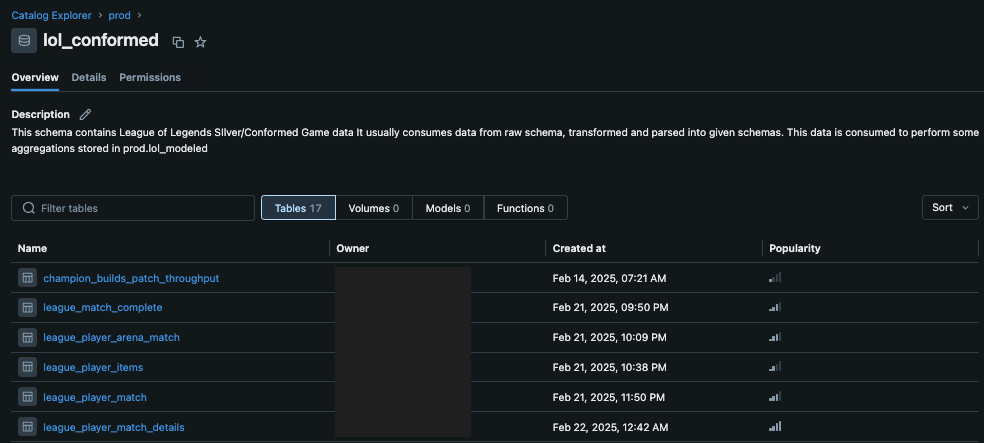 Fig 1: A schema in Unity Catalog with user-provided descriptions. This MCP server makes this information directly accessible to an LLM, informing its query strategy.
Similarly, detailed comments at the column level clarify the semantics of each field, which is crucial for constructing accurate SQL conditions and selections:
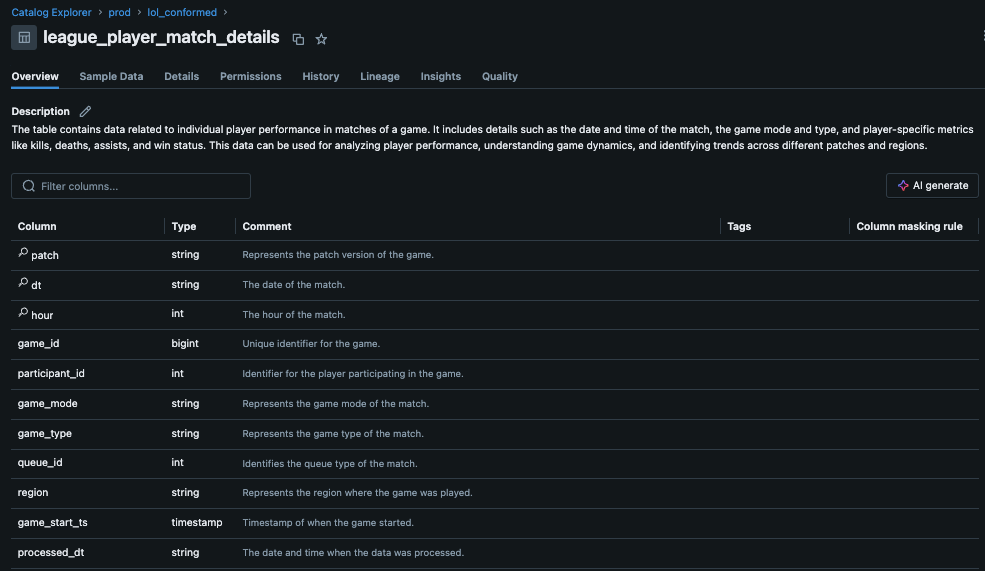 Fig 2: Column-level descriptions in Unity Catalog. These details are passed to the LLM, aiding its understanding of the data structure for precise SQL generation.
This MCP server provides a suite of tools designed to empower an LLM agent interacting with Databricks:
Core Capabilities:
execute_sql_query(sql: str) tool. This is ideal for targeted data retrieval or complex operations.Unity Catalog Exploration Tools:
The server provides the following tools for navigating and understanding your Unity Catalog assets. These are designed to be used by an LLM agent to gather context before constructing queries or making decisions, in an agentic way.
list_uc_catalogs() -> str
describe_uc_catalog(catalog_name: str) -> str
catalog_name: The name of the Unity Catalog to describe (e.g., prod, dev, system).describe_uc_schema(catalog_name: str, schema_name: str, include_columns: Optional[bool] = False) -> str
include_columns=True to get column information, crucial for query construction but makes the output longer. If include_columns=False, only table names and descriptions are shown, useful for a quicker overview.catalog_name: The name of the catalog containing the schema.schema_name: The name of the schema to describe.include_columns: If True, lists tables with their columns. Defaults to False for a briefer summary.describe_uc_table(full_table_name: str, include_lineage: Optional[bool] = False) -> str
full_table_name: The fully qualified three-part name of the table (e.g., catalog.schema.table).include_lineage: Set to True to fetch comprehensive lineage (tables, notebooks, jobs). Defaults to False. May take longer to retrieve but provides rich context for understanding data dependencies and enabling code exploration.execute_sql_query(sql: str) -> str
sql: The complete SQL query string to execute.uv, ensure it's installedpip install -r requirements.txt
Or if using uv:
uv pip install -r requirements.txt
Set up your environment variables:
Option 1: Using a .env file (recommended)
Create a .env file in the root directory of this project with your Databricks credentials:
DATABRICKS_HOST="your-databricks-instance.cloud.databricks.com"
DATABRICKS_TOKEN="your-databricks-personal-access-token"
DATABRICKS_SQL_WAREHOUSE_ID="your-sql-warehouse-id"
Option 2: Setting environment variables directly
export DATABRICKS_HOST="your-databricks-instance.cloud.databricks.com"
export DATABRICKS_TOKEN="your-databricks-personal-access-token"
export DATABRICKS_SQL_WAREHOUSE_ID="your-sql-warehouse-id"
You can find your SQL Warehouse ID in the Databricks UI under "SQL Warehouses".
The DATABRICKS_SQL_WAREHOUSE_ID is primarily used for fetching table lineage and executing SQL queries via the execute_sql_query tool.
Metadata browsing tools (listing/describing catalogs, schemas, tables) use the Databricks SDK's general UC APIs and do not strictly require a SQL Warehouse ID unless lineage is requested.
Before using this MCP server, ensure that the identity associated with the DATABRICKS_TOKEN (e.g., a user or service principal) has the necessary permissions:
USE CATALOG on catalogs to be accessed.USE SCHEMA on schemas to be accessed.SELECT on tables to be queried or described in detail (including column information).USE CATALOG.execute_sql_query and lineage fetching):
CAN_USE permission on the SQL Warehouse specified by DATABRICKS_SQL_WAREHOUSE_ID.For security best practices, consider regularly rotating your access tokens and auditing query history and UC audit logs to monitor usage.
To run the server in standalone mode (e.g., for testing with Agent Composer):
python main.py
This will start the MCP server using stdio transport, which can be used with Agent Composer or other MCP clients.
To use this MCP server with Cursor, configure it in your Cursor settings (~/.cursor/mcp.json):
.cursor directory in your home directory if it doesn't already existmcp.json file in that directory:mkdir -p ~/.cursor
touch ~/.cursor/mcp.json
mcp.json file, replacing the directory path with the actual path to where you've installed this server:{
"mcpServers": {
"databricks": {
"command": "uv",
"args": [
"--directory",
"/path/to/your/mcp-databricks-server",
"run",
"main.py"
]
}
}
}
Example using python:
{
    "mcpServers": {
        "databricks": {
            "command": "python",
            "args": [
                "/path/to/your/mcp-databricks-server/main.py"
            ]
        }
    }
}
Restart Cursor to apply the changes. You can then use the databricks agent in Cursor.
This MCP server empowers an LLM agent to autonomously navigate your Databricks environment. The following screenshot illustrates a typical interaction where the agent iteratively explores schemas and tables, adapting its approach even when initial queries don't yield results, until it successfully retrieves the requested data.
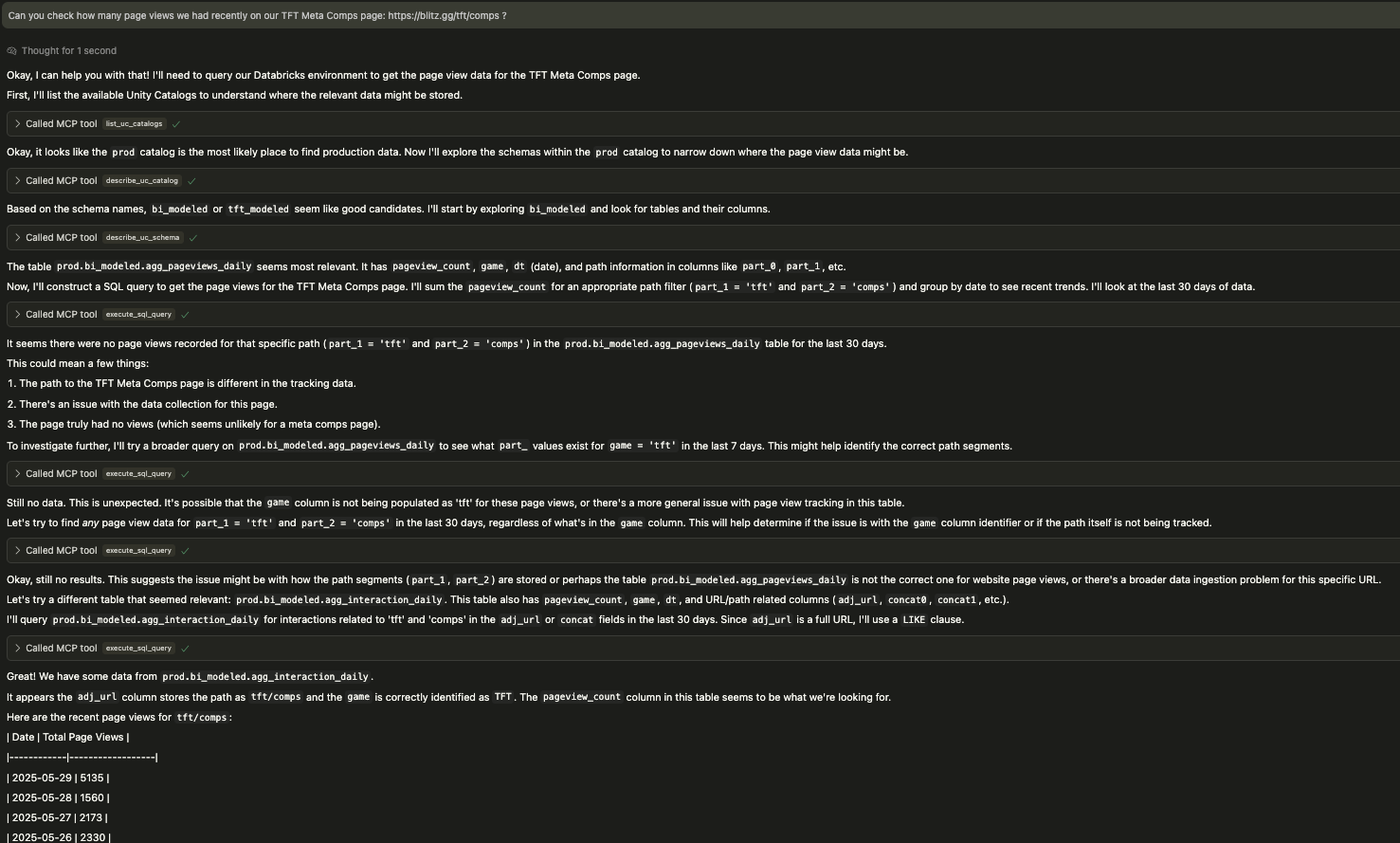 Fig 3: An LLM agent using the Databricks MCP tools, demonstrating iterative exploration and query refinement to locate specific page view data.
An agent might follow this kind of workflow:
list_uc_catalogs()
prod_catalog is relevant from the list.describe_uc_catalog(catalog_name="prod_catalog")
sales_schema and inventory_schema.describe_uc_schema(catalog_name="prod_catalog", schema_name="sales_schema")
orders, customers.describe_uc_schema(catalog_name="prod_catalog", schema_name="sales_schema", include_columns=True)
describe_uc_table(full_table_name="prod_catalog.sales_schema.orders")describe_uc_table(full_table_name="prod_catalog.sales_schema.orders", include_lineage=True)
/Repos/production/etl/sales_processing.py writes to this table/Repos/production/etl/sales_processing.py within the IDE/repo
execute_sql_query(sql="SELECT customer_id, order_date, SUM(order_total) FROM prod_catalog.sales_schema.orders WHERE order_date > '2023-01-01' GROUP BY customer_id, order_date ORDER BY order_date DESC LIMIT 100")While manually entering metadata through the Databricks UI is an option, a more robust and scalable approach is to define your Unity Catalog metadata as code. Tools like Terraform allow you to declaratively manage your data governance objects, including catalogs and schemas. This brings several advantages:
Here's an example of how you might define a catalog and its schemas using the Databricks provider for Terraform:
resource "databricks_catalog" "prod_catalog" {
  name          = "prod"
  comment       = "Main production catalog for all enterprise data."
  storage_root  = var.default_catalog_storage_root
  force_destroy = false
}

# Schemas within the 'prod' catalog
resource "databricks_schema" "prod_raw" {
  catalog_name = databricks_catalog.prod_catalog.name
  name         = "raw"
  comment      = "Raw data for all different projects, telemetry, game data etc., before any transformations. No schema enforcement."
}

resource "databricks_schema" "prod_bi_conformed" {
  catalog_name = databricks_catalog.prod_catalog.name
  name         = "bi_conformed"
  comment      = "Conformed (silver) schema for Business Intelligence, cleaned and well-formatted. Schema enforced."
}

resource "databricks_schema" "prod_bi_modeled" {
  catalog_name = databricks_catalog.prod_catalog.name
  name         = "bi_modeled"
  comment      = "Modeled (gold) schema for Business Intelligence, aggregated and ready for consumption. Schema enforced."
}
Fear not if you already have existing catalogs and schemas in Unity Catalog. You don't need to recreate them to manage their metadata as code. Terraform provides the terraform import command, which allows you to bring existing infrastructure (including Unity Catalog assets) under its management. Once imported, you can define the resource in your Terraform configuration and selectively update attributes like the comment field without affecting the asset itself. For example, after importing an existing schema, you could add or update its comment in your .tf file, and terraform apply would only apply that change.
Adopting a metadata-as-code strategy, especially for foundational elements like catalogs and schemas, greatly enhances the quality and reliability of the metadata that this MCP server leverages. This, in turn, further improves the effectiveness of AI agents interacting with your Databricks data.
For more details on using Terraform with Databricks Unity Catalog, refer to the official documentation:
The execute_sql_query tool utilizes the Databricks SDK's execute_statement method. The wait_timeout parameter in the underlying databricks_sdk_utils.execute_databricks_sql function is set to '50s'. If a query runs longer than this, the SDK may return a statement ID for polling, but the current implementation of the tool effectively waits up to this duration for a synchronous-like response. For very long-running queries, this timeout might be reached.
databricks-sdk: For interacting with the Databricks REST APIs and Unity Catalog.python-dotenv: For loading environment variables from a .env file.mcp[cli]: The Model Context Protocol library.asyncio: For asynchronous operations within the MCP server.httpx (typically a sub-dependency of databricks-sdk or mcp): For making HTTP requests.Claim this server with your GitHub account to request manual ownership verification.
Link to the catalog listing for Databricks MCP Server from your README. This badge does not certify ownership, compatibility or security.
[](https://awesome-mcp.com/servers/mcp-databricks-server-rafaelcartenet)Public repository statistics could not be verified. Check the configured source address; unavailable counts are not zero.
来源、范围和时段分别列出;不相加,不代表安装人数、活跃用户或安全审核。
尚无已审核的包 / 镜像标识,暂不展示下载统计。
Alternative and complementary servers in the same category
This is a Model Context Protocol (MCP) server for interacting with AIStor object stores.

A Model Context Protocol server that lets AI assistants run SQL queries against AWS Athena databases and retrieve results.

A Model Context Protocol (MCP) server that exposes access to an InfluxDB v2 instance using the InfluxDB OSS API v2.