

A directory listing describing a cancellation-letter and mailing-address service. The configured public GitHub repository returned 404 during source verification.
Repository stats unavailable
Developer Tools
An MCP server that lets AI assistants use Go's gopls language server and Go tooling for navigation, diagnostics, formatting, testing and more.
mcp-gopls is cataloged as an MCP server attributed to hloiseaufcms. An MCP server that lets AI assistants use Go's gopls language server and Go tooling for navigation, diagnostics, formatting, testing and more. It is categorized under developer tools. See the capability inspector for recorded interfaces and their independent review status; consult upstream documentation for the current interface.
Installation configuration is not reviewed. No executable setup is offered for this entry; inspect the source repository before proceeding.
Catalog license label: Apache License 2.0. Check the source repository's current license and terms before using, modifying or distributing this software.
能力定义尚未审核。未核验的采集内容不会作为可信接口展示。
暂无可展示的已审核记录。这不表示上游不支持此能力。
暂无可展示的已审核记录。这不表示上游不支持此能力。
暂无可展示的已审核记录。这不表示上游不支持此能力。
Email delivery is not connected. This page does not collect email addresses or create subscriptions.
Browse the registry for current listings instead.
Reviews for mcp-gopls are not available yet
Review publishing and storage are not connected. This page does not collect or publish ratings or comments, including after sign-in.
The README states mcp-gopls is richer for full LSP-like editing and tooling such as go to definition, hover, completion, formatting, rename, code actions, go test, coverage, go mod tidy and module graph, while the built-in gopls MCP suits read-only introspection without an extra binary.
The server can be configured via command-line flags such as workspace, gopls-path, log-level, rpc-timeout and shutdown-timeout, or equivalent environment variables with the MCP_GOPLS prefix; command-line flags take precedence.
README.md · 7a972faa8b8a · 采集于 2026-11-13 09:29:18 UTC
保留上游原文,不做 AI 改写。为安全起见过滤脚本、表单和不安全链接。
当前显示最后一次成功采集的文档快照,请以来源页面为准。



A Model Context Protocol (MCP) server that lets AI assistants use Go’s LSP (gopls) for navigation, diagnostics, testing, coverage, and more.
TL;DR: If you use Claude / Cursor / Copilot with Go,
mcp-goplsgives the AI full LSP powers: go-to-definition, references, hover, completion,go test, coverage,go mod tidy,govulncheck, etc.
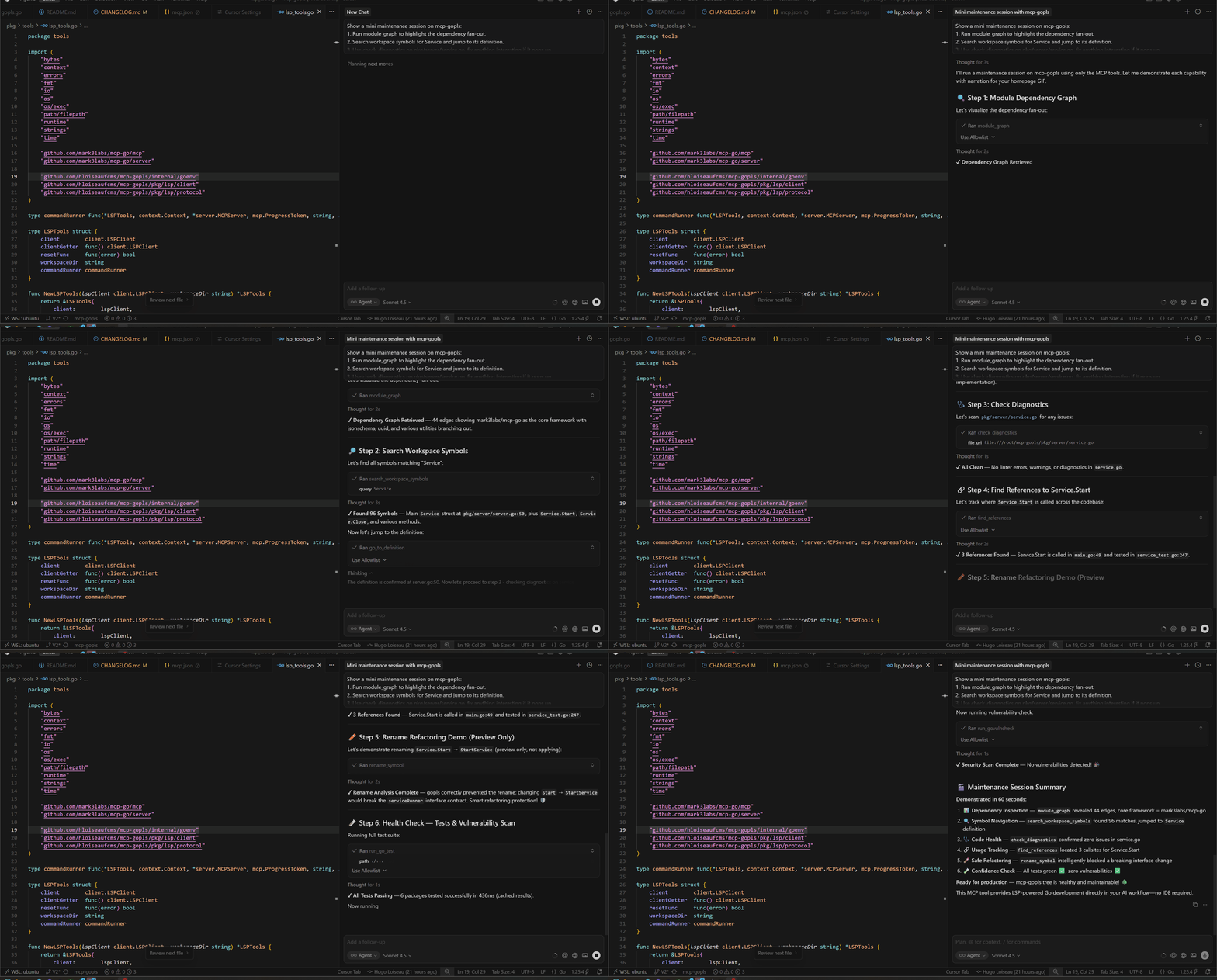
This MCP server helps AI assistants to:
go mod tidy, govulncheck, and module graph commands with structured resultsStatus: Actively developed – used in real projects.
Tested with Go 1.25.x andgopls@latest.
This project uses the mark3labs/mcp-go library to implement the Model Context Protocol. The MCP integration enables seamless communication between AI assistants and Go tools.
The server communicates with gopls, the official language server for Go, via the Language Server Protocol (LSP).
--workspace, --gopls-path, --log-level, --rpc-timeout, and --shutdown-timeout flags + env vars (MCP_GOPLS_*)go test, go mod tidy, govulncheck, go mod graphresource://workspace/overview, resource://workspace/go.mod) and prompts (summarize_diagnostics, refactor_plan)notifications/progress events so clients can surface status updatesmcp-gopls vs built-in gopls MCPAs of gopls v0.20.0, the built-in MCP server exposes these tools:
go_context, go_diagnostics, go_file_context, go_file_diagnostics,
go_file_metadata, go_package_api, go_references, go_rename_symbol,
go_search, go_symbol_references, go_workspace, go_vulncheck.
| Feature / capability | mcp-gopls (this project) | Built-in gopls MCP |
|---|---|---|
| Go-to-definition | Yes (go_to_definition tool) | No dedicated MCP tool (not in tool list) |
| Find references | Yes (find_references) | Yes (go_references, go_symbol_references) |
| Diagnostics (file / workspace) | Yes (check_diagnostics) | Yes (go_diagnostics, go_file_diagnostics) |
| Hover information | Yes (get_hover_info) | No dedicated MCP tool (not in tool list) |
| Completion | Yes (get_completion) | No dedicated MCP tool (not in tool list) |
| Formatting | Yes (format_document) | No dedicated MCP tool (not in tool list) |
| Rename symbol | Yes (rename_symbol) | Yes (go_rename_symbol) |
| Code actions | Yes (list_code_actions) | No dedicated MCP tool (not in tool list) |
| Workspace symbol search | Yes (search_workspace_symbols) | Yes (go_search) |
| Package / workspace API/context tools | No dedicated MCP tool | Yes (go_package_api, go_file_context, go_file_metadata, go_workspace, go_context) |
Run go test | Yes (run_go_test) | No MCP tool for running tests |
| Coverage analysis | Yes (analyze_coverage) | No MCP tool for coverage |
go mod tidy | Yes (run_go_mod_tidy) | No MCP tool for go mod tidy |
govulncheck | Yes (run_govulncheck) | Yes (go_vulncheck) |
Module graph (go mod graph) | Yes (module_graph) | No MCP tool for module graph |
| Extra MCP resources | Yes (resource://workspace/overview, resource://workspace/go.mod) | Not documented as MCP resources |
| Custom MCP prompts | Yes (summarize_diagnostics, refactor_plan) | Not exposed as MCP prompts (only model instructions) |
| Model instructions shipped with server | No special mechanism (documented in README/docs) | Yes: gopls mcp -instructions prints usage workflows |
If you want full LSP-like editing + tooling from MCP (definition, hover, completion, format, rename, code actions, go test, coverage, go mod tidy, module graph), mcp-gopls is strictly richer.
If you mostly want read-only/introspective tools (diagnostics, symbol search, references, package API, workspace/file context, vulncheck) with no extra binary, the built-in gopls MCP is enough.
Note: The built-in
goplsMCP server is still marked experimental and its tool set may change over time. This comparison is accurate as ofgoplsv0.20.x.
.
├── cmd
│   └── mcp-gopls        # Application entry point
├── pkg
│   ├── lsp             # LSP client to communicate with gopls
│   │   ├── client      # LSP client implementation
│   │   └── protocol    # LSP protocol types and features
│   ├── server          # MCP server
│   └── tools           # MCP tools exposing LSP features
go install github.com/hloiseau/mcp-gopls/v2/cmd/mcp-gopls@latest
go install github.com/hloiseau/mcp-gopls/v2/cmd/mcp-gopls@latest
$PATH:mcp-gopls --help
If you prefer to run mcp-gopls in a container (for Docker MCP Gateway or other containerized setups), use the official image.
docker run --rm -i \
  -v /absolute/path/to/your/go/project:/workspace \
  ghcr.io/hloiseau/mcp-gopls:latest \
  --workspace /workspace
Copy docs/docker-mcp.yaml, update the bind mount path, then run from that directory:
docker mcp gateway run
If your MCP catalog tooling requires a toolsUrl, use docs/tools.json as a static tool list.
Note: All clients point to the same command:
mcp-gopls --workspace /absolute/path/to/your/go/project
The configuration format differs slightly per client, but the binary and arguments remain identical.
mcp-gopls entry:{
"mcpServers": {
"mcp-gopls": {
"command": "mcp-gopls",
"args": ["--workspace", "/absolute/path/to/your/go/project"],
"env": {
"MCP_GOPLS_LOG_LEVEL": "info"
}
}
}
}
mcp-gopls.| Tool / Prompt | Example request inside Cursor Chat |
|---|---|
go_to_definition | “Use go_to_definition on pkg/server/server.go:42.” |
find_references | “Ask the tool for references to ServeStdio.” |
check_diagnostics | “Request diagnostics for cmd/mcp-gopls/main.go.” |
get_hover_info | “Call get_hover_info on pkg/tools/workspace.go:88.” |
get_completion | “Trigger completions at pkg/server/server.go:55.” |
format_document | “Run the formatter over pkg/tools/refactor.go.” |
rename_symbol | “Rename clientFactory to newClientFactory via the tool.” |
list_code_actions | “List code actions for pkg/server/server.go:80-90.” |
search_workspace_symbols | “Search workspace symbols for NewWorkspaceConfig.” |
analyze_coverage | “Run analyze_coverage for ./pkg/... with per-function stats.” |
run_go_test | “Execute run_go_test on ./cmd/....” |
run_go_mod_tidy | “Invoke run_go_mod_tidy to sync go.mod.” |
run_govulncheck | “Run run_govulncheck and stream findings.” |
module_graph | “Call module_graph to inspect dependencies.” |
summarize_diagnostics | “Use the summarize_diagnostics prompt on the latest diagnostics.” |
refactor_plan | “Feed refactor_plan the diagnostics JSON to plan fixes.” |
mcp-gopls and make sure it is on your $PATH.claude_desktop_config.json.
~/Library/Application Support/Claude/claude_desktop_config.json~/.config/Claude/claude_desktop_config.json%APPDATA%\Claude\claude_desktop_config.json{
"mcpServers": {
"mcp-gopls": {
"command": "mcp-gopls",
"args": ["--workspace", "/absolute/path/to/your/go/project"],
"env": {
"MCP_GOPLS_LOG_LEVEL": "info"
}
}
}
}
Restart Claude Desktop, open a chat, and ask it to connect to the mcp-gopls tool (Claude will show a “Tools” tab once the server is detected). Typical prompts include “list diagnostics for cmd/api/server.go” or “rename userService to accountService.”
In Cursor open Settings → MCP Servers → Edit JSON (this writes to ~/.cursor/config.json or the project-local override). Add:
{
  "mcpServers": {
    "mcp-gopls": {
      "command": "mcp-gopls",
      "args": ["--workspace", "/absolute/path/to/your/go/project"]
    }
  }
}
Reload Cursor (or run the Developer: Reload Window command) and the server will appear inside the “Tools” drawer. You can now ask Cursor Chat things like “run go test ./pkg/server with coverage” or “show hover info for pkg/tools/tests.go:42.”
GitHub Copilot’s Agent Mode can talk to local MCP servers across VS Code, JetBrains IDEs, Eclipse, and Xcode (docs). To wire mcp-gopls in VS Code:
.vscode/mcp.json in your workspace (or edit the global file shown in the Copilot “Edit config” dialog).{
"servers": {
"mcp-gopls": {
"type": "stdio",
"command": "mcp-gopls",
"args": ["--workspace", "/absolute/path/to/your/go/project"],
"env": {
"MCP_GOPLS_LOG_LEVEL": "warn"
}
}
}
}
run_go_test, run_govulncheck, etc.). JetBrains and other IDEs share the same JSON schema via their Copilot settings panel.For quick smoke tests or demos you can use mark3labs/mcp-inspector:
npx -y @mark3labs/mcp-inspector \
  --command mcp-gopls \
  --args "--workspace" "/absolute/path/to/your/go/project"
The inspector lets you call each tool/resource/prompt manually, which is handy for debugging server configuration before wiring it into an AI assistant.
| Tool | Description |
|---|---|
go_to_definition | Navigate to the definition of a symbol |
find_references | List all references for a symbol |
check_diagnostics | Fetch cached diagnostics for a file |
get_hover_info | Return hover markdown for a symbol |
get_completion | Return completion labels at a position |
format_document | Return formatting edits for an entire document |
rename_symbol | Return workspace edits for a rename |
list_code_actions | List available code actions for a range |
search_workspace_symbols | Search workspace-wide symbols |
analyze_coverage | Run go test with coverage + optional per-function report |
run_go_test | Execute go test for a package/pattern |
run_go_mod_tidy | Execute go mod tidy |
run_govulncheck | Execute govulncheck ./... |
module_graph | Return go mod graph output |
Long-running tools emit structured notifications/progress events so IDEs can show rich status indicators:
run_go_test, analyze_coverage, run_govulncheck, run_go_mod_tidy) forwards incremental log lines and percentage updates. Cursor displays these as a live log.go_to_definition, find_references, rename_symbol, etc.) fire a quick “started” event so the UI can show a spinner, followed by a completion payload with the final result.run_go_test/<rand>) to avoid “unknown token” errors when multiple tools run concurrently.When integrating new tools, opt into streaming mode only if the underlying LSP/golang command produces meaningful interim output; otherwise stick to the lightweight start/complete flow to minimize noise.
Both prompts are accessible from any MCP-aware client via the “Prompts” catalog.
summarize_diagnosticscheck_diagnostics or run_go_test to turn raw diagnostics into actionable steps.check_diagnostics → copy the returned array into the prompt input field (Cursor’s UI pastes it automatically when you select “Use last result”).refactor_plandiagnostics object containing the raw Go diagnostics (the same payload returned by check_diagnostics).{
"diagnostics": [
{
"uri": "file:///path/to/pkg/tools/workspace.go",
"range": {"start": {"line": 12, "character": 5}, "end": {"line": 12, "character": 25}},
"severity": 1,
"message": "unused variable testHelper"
}
]
}
The prompt responds with a numbered set of refactor steps plus suggested validation commands (go test, analyze_coverage, etc.).
The server supports various configuration options via command-line flags and environment variables:
| Flag | Default | Description |
|---|---|---|
--workspace | . | Absolute path to your Go project root |
--gopls-path | gopls | Path to the gopls binary |
--log-level | info | Log level (debug, info, warn, error) |
--rpc-timeout | 30s | RPC timeout for LSP calls |
--shutdown-timeout | 5s | Timeout for graceful shutdown |
All flags can be set via environment variables with the MCP_GOPLS_ prefix:
| Environment Variable | Equivalent Flag | Description |
|---|---|---|
MCP_GOPLS_WORKSPACE | --workspace | Absolute path to your Go project root |
MCP_GOPLS_GOPLS_PATH | --gopls-path | Path to the gopls binary |
MCP_GOPLS_LOG_LEVEL | --log-level | Log level (debug, info, warn, error) |
MCP_GOPLS_RPC_TIMEOUT | --rpc-timeout | RPC timeout for LSP calls (e.g., 30s, 1m) |
MCP_GOPLS_SHUTDOWN_TIMEOUT | --shutdown-timeout | Timeout for graceful shutdown |
Command-line flags take precedence over environment variables.
go fmt to ensure tabs vs. spaces align with gopls expectations.--workspace flag points to the module root and that go list ./... succeeds.workspace initialized log line or restart mcp-gopls after deleting stale .gopls caches.run_govulncheck missing binary – the tool now falls back to go run golang.org/x/vuln/cmd/govulncheck@latest, but the machine still needs outbound network access. Install the binary manually if the fallback is blocked.Using the server with AI assistants that support MCP:
# Ask the AI to get information about the code
Can you find the definition of the `ServeStdio` function in this project?

# Ask for diagnostics
Are there any errors in my main.go file?

# Ask for information about a symbol
What does the Context.WithTimeout function do in Go?
git clone https://github.com/hloiseau/mcp-gopls.git
cd mcp-gopls
go mod tidy
go test ./...
go build ./cmd/mcp-gopls
Table-driven tests live under pkg/tools and CI runs via .github/workflows/ci.yml.
docs/usage.md – quickstart and tool catalog walkthroughresource://workspace/overview and resource://workspace/go.modsummarize_diagnostics, refactor_plan) help assistants produce consistent outputsPRs and issues are welcome!
go test ./... before opening a PR.All contributions should maintain test coverage and adhere to Go best practices. See the Development section for setup instructions.
go1.25.4)gopls installed (go install golang.org/x/tools/gopls@latest)govulncheck (go install golang.org/x/vuln/cmd/govulncheck@latest)GOTOOLCHAIN=local for its nested gopls process. If you need a different toolchain, set GOTOOLCHAIN in the environment before launching mcp-gopls.This MCP server can be used with any tool that supports the MCP protocol. For Ollama integration:
Apache License 2.0
Claim this server with your GitHub account to request manual ownership verification.
Link to the catalog listing for mcp-gopls from your README. This badge does not certify ownership, compatibility or security.
[](https://awesome-mcp.com/servers/mcp-gopls)Public repository statistics could not be verified. Check the configured source address; unavailable counts are not zero.
来源、范围和时段分别列出;不相加,不代表安装人数、活跃用户或安全审核。
尚无已审核的包 / 镜像标识,暂不展示下载统计。
Alternative and complementary servers in the same category
A directory listing describing a cancellation-letter and mailing-address service. The configured public GitHub repository returned 404 during source verification.

A hosted MCP service for browsing and searching through Singapore mobile-network proxies.

A directory listing describing a Markdown-to-PDF service. The configured public GitHub repository returned 404 during source verification.