
A directory listing describing a cancellation-letter and mailing-address service. The configured public GitHub repository returned 404 during source verification.
Repository stats unavailable
Developer Tools
An interactive MCP server with an Electron interface that prompts users with questions and awaits responses, enhancing LLM coordination and reducing billable requests.
MCP Interactive is cataloged as an MCP server attributed to ivan-mezentsev. An interactive MCP server with an Electron interface that prompts users with questions and awaits responses, enhancing LLM coordination and reducing billable requests. It is categorized under developer tools. See the capability inspector for recorded interfaces and their independent review status; consult upstream documentation for the current interface.
Installation configuration is not reviewed. No executable setup is offered for this entry; inspect the source repository before proceeding.
Catalog license label: Not specified. Check the source repository's current license and terms before using, modifying or distributing this software.
能力定义尚未审核。未核验的采集内容不会作为可信接口展示。
暂无可展示的已审核记录。这不表示上游不支持此能力。
暂无可展示的已审核记录。这不表示上游不支持此能力。
暂无可展示的已审核记录。这不表示上游不支持此能力。
Email delivery is not connected. This page does not collect email addresses or create subscriptions.
Browse the registry for current listings instead.
Reviews for MCP Interactive are not available yet
Review publishing and storage are not connected. This page does not collect or publish ratings or comments, including after sign-in.
If no response is received within the specified timeout, the server sends the reply "User did not reply: Timeout occurred."
README.md · d9eb83c305fa · 采集于 2026-11-13 11:29:54 UTC
保留上游原文,不做 AI 改写。为安全起见过滤脚本、表单和不安全链接。
当前显示最后一次成功采集的文档快照,请以来源页面为准。




An interactive MCP (Model Context Protocol) server with an Electron interface for user interaction.
This MCP server enhances LLM coordination, offering greater control and predictability, and significantly reduces billable requests by minimizing user interactions within a single task.
For a detailed history of changes, see the Changelog.
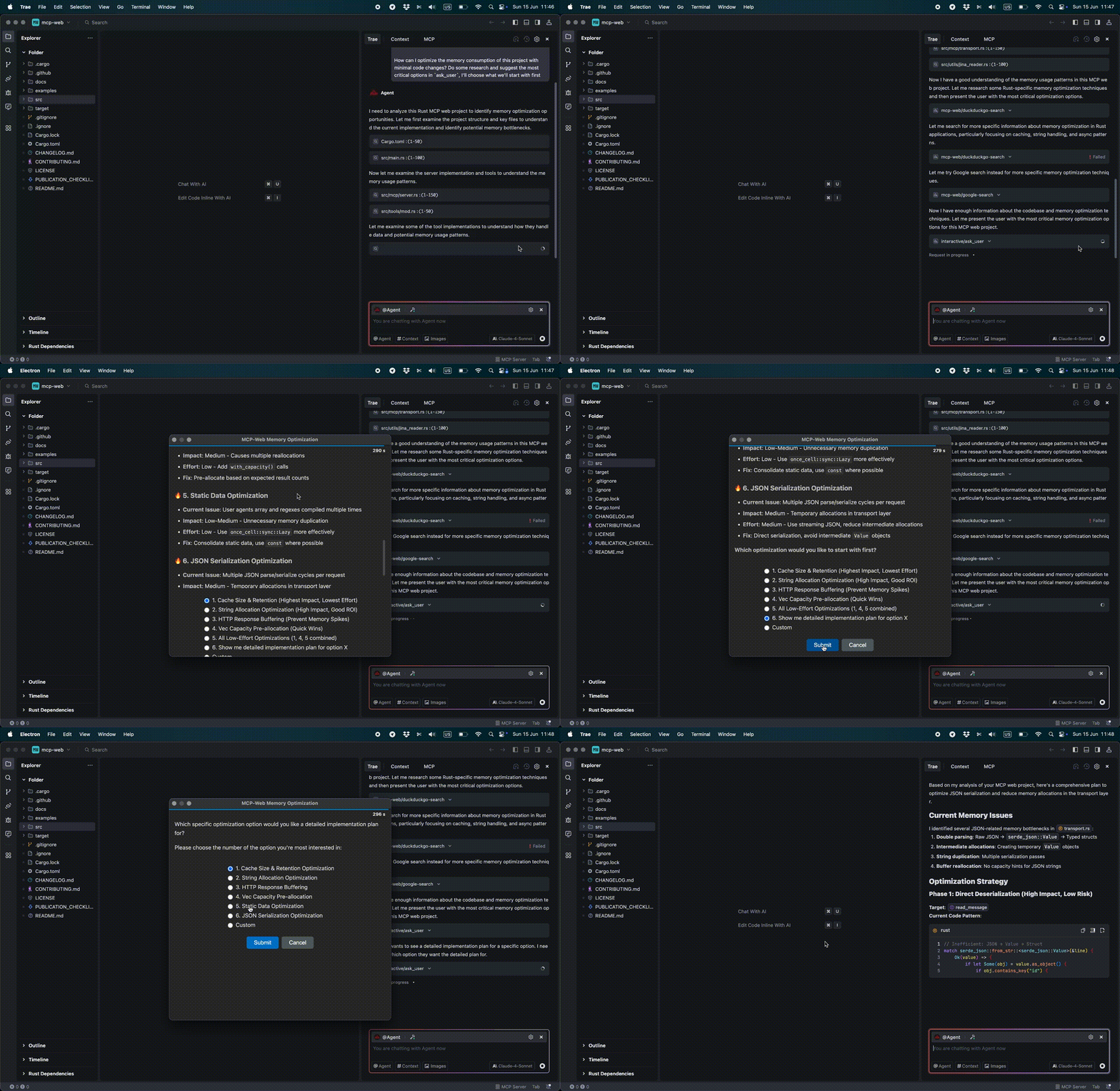
ask_user - Prompts the user with a question via a pop-up command prompt and awaits their interactive response.
Input Schema:
{
  "type": "object",
  "properties": {
    "projectName": {
      "type": "string",
      "description": "Identifies the context/project making the request"
    },
    "message": {
      "type": "string",
      "description": "The specific question for the user. Supports Markdown formatting."
    },
    "predefinedOptions": {
      "type": "array",
      "items": {
        "type": "string"
      },
      "description": "Predefined options for the user to choose from (optional)"
    }
  },
  "required": [
    "projectName",
    "message"
  ]
}
{
  "mcpServers": {
    "interactive": {
      "command": "npx",
      "args": [
        "mcp-interactive",
        "-t",
        "300"
      ]
    }
  }
}
Install dependencies:
npm install
Configure MCP server:
{
  "mcpServers": {
    "interactive": {
      "command": "node",
      "args": [
        "/path/to/project/mcp-interactive/index.js",
        "-t",
        "300"
      ]
    }
  }
}
## Decision Making
- **Ambiguous tasks**: ALWAYS clarify using `mcp_interactive_ask_user` tool
- **Requires decisions**: ALWAYS clarify using `mcp_interactive_ask_user` tool

## Code Development
- **Final confirmation**: MUST ask user if all requirements from specification are completed using `mcp_interactive_ask_user` tool with work report

## Final gate
- Before ANY final answer (after actions/edits/checks), it is **MANDATORY** to call `mcp_interactive_ask_user` with a report on the work done and the option ["Yes, everything is OK"].
- If the answer is not "Yes, everything is OK" — continue working until the comments are resolved and repeat every time `mcp_interactive_ask_user`.
- There are no exceptions (including minor edits).
Can you check the docs and explain how the project works? #interactive
This section outlines recommended guidelines for system prompts or rules for LLMs to ensure optimal interaction and task execution.
## Decision Making
- **Ambiguous tasks**: ALWAYS clarify using `ask_user` tool via MCP
- **Requires decisions**: ALWAYS clarify using `ask_user` tool via MCP

## Code Development
- **Final confirmation**: MUST ask user if all requirements from specification are completed using `ask_user` tool via MCP with work report

## Final gate
- Before ANY final answer (after actions/edits/checks), it is **MANDATORY** to call `ask_user` with a report on the work done and the option ["Yes, everything is OK"].
- If the answer is not "Yes, everything is OK" — continue working until the comments are resolved and repeat every time `ask_user`.
- There are no exceptions (including minor edits).
--timeout or -t (seconds): Specifies the waiting time for the user's response dialog. If no response is received within this period, the reply "User did not reply: Timeout occurred." will be sent.Electron not starting:
npm installTimeout issues for answer (progressbar):
-t parameterContributions are welcome! Please feel free to submit a Pull Request. For major changes, please open an issue first to discuss what you would like to change.
Please make sure to update tests as appropriate and follow the existing code style.
If you encounter any problems or have questions, please open an issue on GitHub.
This project includes a local copy of marked.js (marked.min.js) for Markdown parsing functionality. Marked is licensed under the MIT License and is maintained by the Marked.js team and contributors.
MIT
Claim this server with your GitHub account to request manual ownership verification.
Link to the catalog listing for MCP Interactive from your README. This badge does not certify ownership, compatibility or security.
[](https://awesome-mcp.com/servers/mcp-interactive)Public repository statistics could not be verified. Check the configured source address; unavailable counts are not zero.
来源、范围和时段分别列出;不相加,不代表安装人数、活跃用户或安全审核。
尚无已审核的包 / 镜像标识,暂不展示下载统计。
Alternative and complementary servers in the same category
A directory listing describing a cancellation-letter and mailing-address service. The configured public GitHub repository returned 404 during source verification.

A hosted MCP service for browsing and searching through Singapore mobile-network proxies.

A directory listing describing a Markdown-to-PDF service. The configured public GitHub repository returned 404 during source verification.