
MCP server bridging Jenkins with AI language models

MCP server bridging Jenkins with AI language models

mcp-jenkins•bylanbaoshen

An MCP server that connects AI language models to Jenkins and provides tools for inspecting and managing Jenkins items, builds, nodes, queues, views, plugins, and pipeline inputs.

License: MIT•Runtime: Awaiting documentation review•Category: cloud devops

WHAT IT DOES

  • •Exposes a read/write MCP toolset for listing and querying Jenkins items and triggering builds.
  • •Provides tools to inspect builds, console output, test reports, running builds, and artifacts.
  • •Supports interacting with pipeline input steps by reading pending inputs and proceeding or aborting them.
  • •Includes plugin and node inspection tools such as listing plugins with problems or updates and reading node configuration.

BEST FOR

  • •Letting coding assistants inspect Jenkins jobs, builds, and logs from within the editor.
  • •Diagnosing failing Jenkins builds by fetching test failures and console output.
  • •Triggering or stopping Jenkins builds and managing queue items through an AI client.

ABOUT MCP-JENKINS

MCP server bridging Jenkins with AI language models is cataloged as an MCP server attributed to lanbaoshen. An MCP server that connects AI language models to Jenkins and provides tools for inspecting and managing Jenkins items, builds, nodes, queues, views, plugins, and pipeline inputs. It is categorized under cloud devops. See the capability inspector for recorded interfaces and their independent review status; consult upstream documentation for the current interface.

HOW TO INSTALL

Installation configuration is not reviewed. No executable setup is offered for this entry; inspect the source repository before proceeding.

LICENSE

Catalog license label: MIT. Check the source repository's current license and terms before using, modifying or distributing this software.

能力检查器

能力定义尚未审核。未核验的采集内容不会作为可信接口展示。

Tools (0)

暂无可展示的已审核记录。这不表示上游不支持此能力。

Resources (0)

暂无可展示的已审核记录。这不表示上游不支持此能力。

Prompts (0)

暂无可展示的已审核记录。这不表示上游不支持此能力。

NEWSLETTER - COMING LATER

Newsletter subscriptions are not open yet

Email delivery is not connected. This page does not collect email addresses or create subscriptions.

Browse the registry for current listings instead.

Community Reviews

Coming later

Reviews for MCP server bridging Jenkins with AI language models are not available yet

Review publishing and storage are not connected. This page does not collect or publish ratings or comments, including after sign-in.

FREQUENTLY ASKED QUESTIONS

Can the server be restricted to read-only operations?

Yes, a --read-only mode is available and defaults to false.

Which transports can the server use?

It supports stdio, sse, and streamable-http transports, with stdio as the default.

How does the server handle Jenkins authentication credentials?

Credentials can be supplied via command-line flags or environment variables, and if username and password are both unset the server accesses Jenkins anonymously.

上游原版 README

在 GitHub 查看同一版本原文

README.md · 1d8587e034b9 · 采集于 2026-11-13 09:31:33 UTC

保留上游原文,不做 AI 改写。为安全起见过滤脚本、表单和不安全链接。

当前显示最后一次成功采集的文档快照,请以来源页面为准。

MCP Jenkins

PyPI Version PyPI Downloads test codecov License

The Model Context Protocol (MCP) is an open-source implementation that bridges Jenkins with AI language models following Anthropic's MCP specification. This project enables secure, contextual AI interactions with Jenkins tools while maintaining data privacy and security.

Installation

Choose one of these installation methods:

# Using uv (recommended)
pip install uv
uvx mcp-jenkins

# Using pip
pip install mcp-jenkins
mcp-jenkins

# Docker
docker pull ghcr.io/lanbaoshen/mcp-jenkins:latest
docker run -p 9887:9887 --rm ghcr.io/lanbaoshen/mcp-jenkins:latest --transport streamable-http

Line Arguments

When using command line arguments, you can specify the Jenkins server details as follows:

# Simple streamable-http example
uvx mcp-jenkins --transport streamable-http
ArgumentDescriptionRequired
--env-filePath to a .env file to load configuration from. See Environment Variables / .env file below.No
--jenkins-urlThe URL of the Jenkins server. (Http app can set it via headers x-jenkins-url)No
--jenkins-usernameThe username for Jenkins authentication. (Http app can set it via headers x-jenkins-username) Set it together with the password, or leave both unset to access Jenkins anonymously.No
--jenkins-passwordThe password or API token for Jenkins authentication. (Http app can set it via headers x-jenkins-password) Set it together with the username, or leave both unset to access Jenkins anonymously: what the server can then do is decided by the anonymous user's permissions in Jenkins.No
--jenkins-timeoutTimeout for Jenkins API requests in seconds. Default is 5 seconds.No
--jenkins-verify-ssl/--no-jenkins-verify-sslWhether to verify SSL certificates when connecting to Jenkins. Default is to verify.No
--jenkins-session-singleton/--no-jenkins-session-singletonWhether to use a singleton Jenkins client for all requests in the same session. Default is True.No
--read-onlyWhether to enable read-only mode. Default is FalseNo
--transportTransport method to use for communication. Options are stdio, sse or streamable-http. Default is stdio.No
--hostHost address for streamable-http transport. Default is 0.0.0.0No
--portPort number for streamable-http transport. Default is 9887.No

Environment Variables / .env file

Instead of passing credentials on the command line, you can set them as environment variables, or put them in a .env file:

JENKINS_URL=https://jenkins.example.com
JENKINS_USERNAME=alice
JENKINS_PASSWORD=xxxx
JENKINS_TIMEOUT=5
JENKINS_VERIFY_SSL=true

If a .env file is present in the current directory (or a parent directory), it is loaded automatically — no flag needed:

uvx mcp-jenkins --transport streamable-http

To load a .env file from a specific location, use --env-file:

uvx mcp-jenkins --env-file /path/to/.env --transport streamable-http

Values already set in the real environment take precedence over the .env file, and any --jenkins-* CLI flag takes precedence over both.

Configuration and Usage

Jetbrains Github Copilot

  1. Open Jetbrains Settings
  2. Navigate to Github Copilot > MCP > Configure
  3. Add the following configuration:
{
  "servers": {
    "my-mcp-server": {
      "type": "stdio",
      "command": "uvx",
      "args": [
        "mcp-jenkins",
        "--jenkins-url=xxx",
        "--jenkins-username=xxx",
        "--jenkins-password=xxx"
      ]
    }
  }
}

VSCode Copilot Chat

  1. Create .vscode folder with mcp.json file in you workspace for local setup or edit settings.json trough settings menu.
  2. Insert the following configuration:
  • SSE mode
{
    "servers": {
        "jenkins": {
            "url": "http://localhost:9887/sse",
            "type": "sse"
        }
    }
}
  • Streamable-Http mode
{
    "servers": {
        "mcp-jenkins-mcp": {
            "autoApprove": [],
            "disabled": false,
            "timeout": 60,
            "type": "streamableHttp",
            "url": "http://localhost:9887/mcp"
        }
    }
}

Run the Jenkins MCP server with the following command:

uvx mcp-jenkins \
  --jenkins-url xxx \
  --jenkins-username xxx  \
  --jenkins-password xxx \
  --transport sse

Health Check Endpoint

When running with --transport streamable-http or --transport sse, the server exposes a plain HTTP liveness endpoint:

GET /healthz  ->  200 OK

It always returns 200 and bypasses the x-jenkins-* auth headers, so it is safe to use directly as a Kubernetes liveness/readiness probe without any Jenkins credentials. Example probe:

livenessProbe:
  httpGet:
    path: /healthz
    port: 9887
  initialDelaySeconds: 5
  periodSeconds: 10

Note: this is a liveness check only — it does not verify connectivity to the upstream Jenkins server.

Available Tools

ToolDescription
get_itemGet a specific item by name.
get_item_configGet the configuration of a specific item.
get_item_parametersGet the parameters of a specific item.
get_all_itemsGet all items in Jenkins.
query_itemsQuery items based on pattern.
build_itemBuild a item.
get_all_nodesGet all nodes in Jenkins.
get_nodeGet a specific node by name.
get_node_configGet the configuration of a specific node.
get_all_queue_itemsGet all queue items in Jenkins.
get_queue_itemGet a specific queue item by ID.
cancel_queue_itemCancel a specific queue item by ID.
get_buildGet a specific build by job name and build number.
get_build_scriptsGet scripts associated with a specific build.
get_build_console_outputGet the console output of a specific build.
get_build_parametersGet the parameters of a specific build.
get_build_test_reportGet the test report of a specific build.
get_build_test_failuresGet the failing tests of a specific build.
get_running_buildsGet all currently running builds in Jenkins.
stop_buildStop a specific build by job name and build number.
get_pending_inputsGet the pending input steps of a build paused for input.
submit_inputProceed with or abort a pipeline input step of a build.
get_all_build_artifactsList the artifacts of a specific build.
get_build_artifactDownload an artifact from a specific build.
get_build_artifact_urlGet the direct URL of an artifact from a specific build.
get_viewGet a specific view by name.
get_all_viewsGet the configuration of a specific view.
get_all_pluginsGet all installed plugins.
get_pluginGet a specific plugin by short name.
get_plugins_with_problemsGet plugins with problems (missing dependencies, version mismatch, etc.).
get_plugins_with_backupGet plugins that can be downgraded.
get_plugins_with_updatesGet plugins that have available updates.
get_plugin_dependency_graphGet dependency graph for a plugin in Graphviz format.
run_groovy_scriptExecute an arbitrary Groovy script on Jenkins.

Note: get_pending_inputs reads the wfapi endpoint served by the pipeline-rest-api plugin (bundled with pipeline-stage-view). submit_input only needs that plugin when input_id is omitted — pass input_id explicitly and it works on any Jenkins with the pipeline-input-step plugin.

Contributing

CONTRIBUTING.md

License

Licensed under MIT - see LICENSE file. This is not an official Jenkins product.

Star History
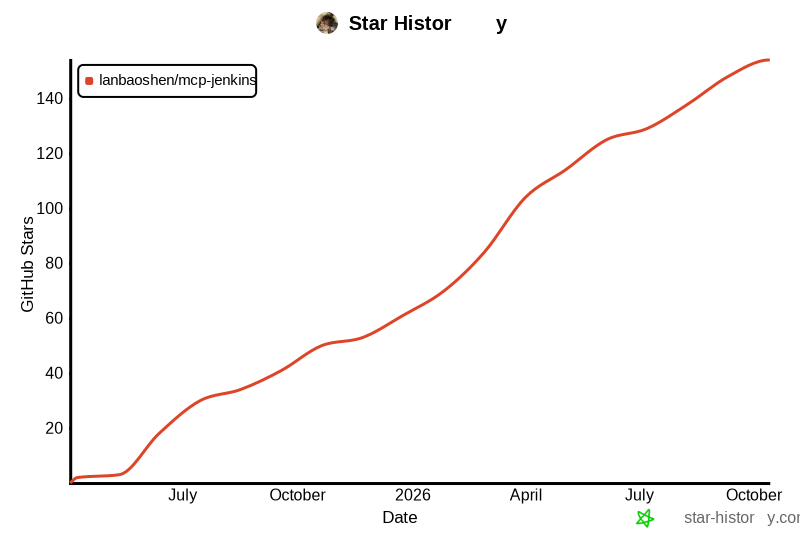
Star History Chart

Install configuration

Are you the maintainer?

Claim this server with your GitHub account to request manual ownership verification.

README Embed Badge
Markdown

Link to the catalog listing for MCP server bridging Jenkins with AI language models from your README. This badge does not certify ownership, compatibility or security.

[![MCP catalog listing](https://img.shields.io/badge/MCP-awesome--mcp-orange?style=flat-square)](https://awesome-mcp.com/servers/mcp-jenkins)

REPOSITORY STATS

GitHub StarsUnavailable
ForksUnavailable

Public repository statistics could not be verified. Check the configured source address; unavailable counts are not zero.

下载与拉取统计

来源、范围和时段分别列出;不相加,不代表安装人数、活跃用户或安全审核。

尚无已审核的包 / 镜像标识,暂不展示下载统计。

Related cloud devops MCP Servers

Alternative and complementary servers in the same category

View all in cloud devops →
Huawei MCP Server
mcp-server-huaweiclouddeveloper•huaweiclouddeveloper

A Model Context Protocol server built on Huawei Cloud services that enables AI assistants to operate Huawei Cloud resources within conversational workflows, supporting ECS, OBS, GaussDB, and other cloud products.

Repository stats unavailable
Cloud & DevOps
Coolify MCP Server
coolify-mcp-server•wrediam

An MCP server that exposes the Coolify v4.3.1 REST API so AI clients can manage applications, databases, services, servers, deployments, and more.

Repository stats unavailable
Cloud & DevOps

A deprecated Model Context Protocol server for interacting with Kong Konnect APIs, enabling AI assistants to query and analyze Kong Gateway configurations, traffic, and analytics.

Repository stats unavailable
Cloud & DevOps