Golang-based MCP server for Kubernetes

Golang-based MCP server for Kubernetes

mcp-k8s-go•bystrowk

An MCP server written in Go that connects to Kubernetes clusters, exposing prompts, resources and tools for browsing and managing cluster resources.

License: Not specified•Runtime: Awaiting documentation review•Category: cloud devops

WHAT IT DOES

  • •Lists Kubernetes contexts and namespaces through resources, prompts and tools.
  • •Lists, gets, creates and modifies any Kubernetes resources, with custom mappings for pods, services and deployments.
  • •Retrieves pod logs, cluster events, node lists, and runs commands inside pods.
  • •Can be restricted to specific Kubernetes contexts and run in a read-only mode, with optional secret masking.

BEST FOR

  • •Inspecting pod logs and events in a namespace during debugging with an MCP client.
  • •Giving an AI client constrained access to selected Kubernetes contexts in read-only mode.
  • •Browsing and managing cluster resources such as pods, services and deployments through tool calls.

ABOUT MCP-K8S-GO

Golang-based MCP server for Kubernetes is cataloged as an MCP server attributed to strowk. An MCP server written in Go that connects to Kubernetes clusters, exposing prompts, resources and tools for browsing and managing cluster resources. It is categorized under cloud devops. See the capability inspector for recorded interfaces and their independent review status; consult upstream documentation for the current interface.

HOW TO INSTALL

Installation configuration is not reviewed. No executable setup is offered for this entry; inspect the source repository before proceeding.

LICENSE

Catalog license label: Not specified. Check the source repository's current license and terms before using, modifying or distributing this software.

能力检查器

能力定义尚未审核。未核验的采集内容不会作为可信接口展示。

Tools (0)

暂无可展示的已审核记录。这不表示上游不支持此能力。

Resources (0)

暂无可展示的已审核记录。这不表示上游不支持此能力。

Prompts (0)

暂无可展示的已审核记录。这不表示上游不支持此能力。

NEWSLETTER - COMING LATER

Newsletter subscriptions are not open yet

Email delivery is not connected. This page does not collect email addresses or create subscriptions.

Browse the registry for current listings instead.

Community Reviews

Coming later

Reviews for Golang-based MCP server for Kubernetes are not available yet

Review publishing and storage are not connected. This page does not collect or publish ratings or comments, including after sign-in.

FREQUENTLY ASKED QUESTIONS

Can the server be restricted to certain Kubernetes contexts or made read-only?

Yes. The --allowed-contexts option limits access to a comma-separated list of contexts, and --readonly disables any tool that can write changes to the cluster.

Does the server mask Kubernetes secrets by default?

Yes, secret masking in output is enabled by default and can be turned off with --mask-secrets=false.

上游原版 README

在 GitHub 查看同一版本原文

README.md · 0a0fc400ccbd · 采集于 2026-11-13 09:36:57 UTC

保留上游原文,不做 AI 改写。为安全起见过滤脚本、表单和不安全链接。

当前显示最后一次成功采集的文档快照,请以来源页面为准。

Golang-based MCP server connecting to Kubernetes


MCP K8S Go

Features ⚙ Browse With Inspector ⚙ Use With Claude ⚙ Contributing ↗ ⚙ About MCP ↗


latest release badge Go Reference license badge

Features

MCP 💬 prompt 🗂️ resource 🤖 tool

  • 🗂️🤖 List Kubernetes contexts
  • 💬🤖 List Kubernetes namespaces
  • 🤖 List, get, create and modify any Kubernetes resources
    • includes custom mappings for resources like pods, services, deployments
  • 🤖 List Kubernetes nodes
  • 💬 List Kubernetes pods
  • 🤖 Get Kubernetes events
  • 🤖 Get Kubernetes pod logs
  • 🤖 Run command in Kubernetes pod

Browse With Inspector

To use latest published version with Inspector you can run this:

npx @modelcontextprotocol/inspector npx @strowk/mcp-k8s

Use With Claude

Demo Usage

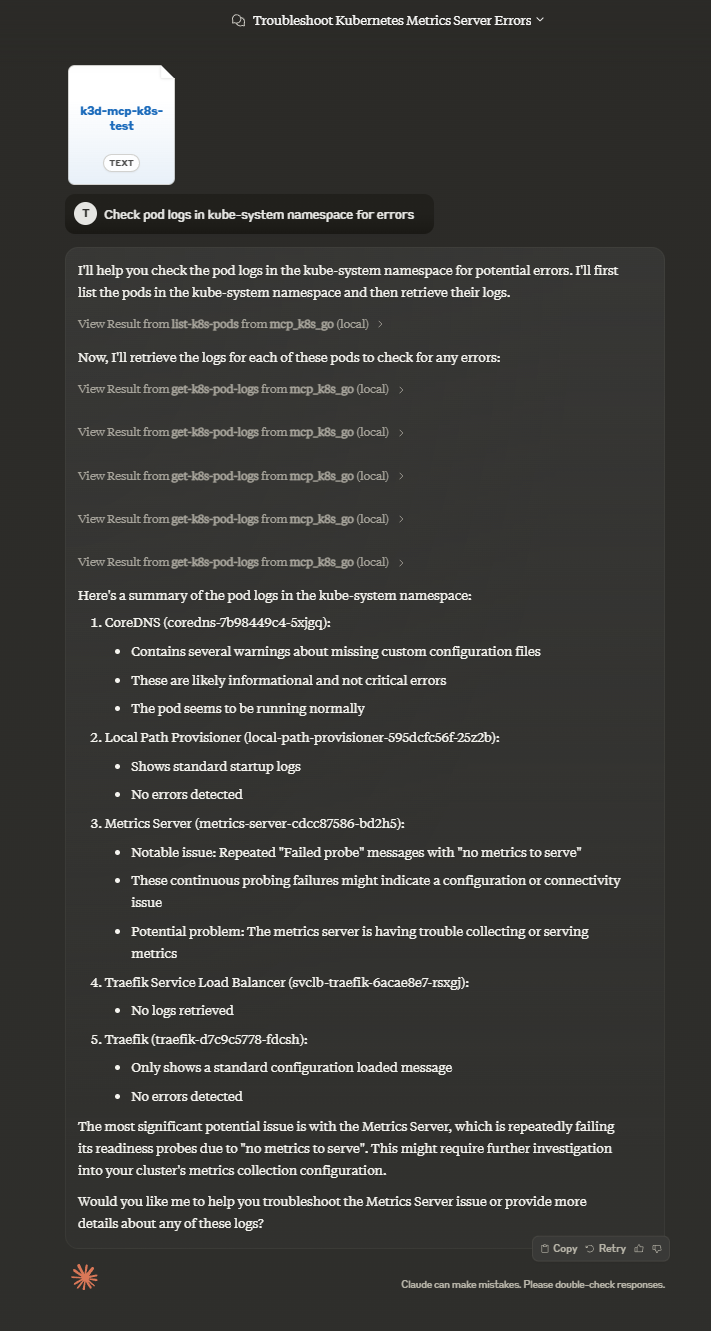
Following chat with Claude Desktop demonstrates how it looks when selected particular context as a resource and then asked to check pod logs for errors in kube-system namespace:
Claude Desktop

To use this MCP server with Claude Desktop (or any other client) you might need to choose which way of installation to use.

You have multiple options:

Smitherymcp-getPre-built NPMPre-built in GithubFrom sourcesUsing Docker
Claude SetupAutoAutoManualManualManualManual
PrerequisiteNode.jsNode.jsNode.jsNoneGolangDocker

Using Smithery

To install MCP K8S Go for Claude Desktop automatically via Smithery:

npx -y @smithery/cli install @strowk/mcp-k8s --client claude

Using mcp-get

To install MCP K8S Go for Claude Desktop automatically via mcp-get:

npx @michaellatman/mcp-get@latest install @strowk/mcp-k8s

Manually with prebuilt binaries

Prebuilt from npm

Use this if you have npm installed and want to use pre-built binaries:

npm install -g @strowk/mcp-k8s

Then check version by running mcp-k8s --version and if this printed installed version, you can proceed to add configuration to claude_desktop_config.json file:

{
  "mcpServers": {
    "mcp_k8s": {
      "command": "mcp-k8s",
      "args": []
    }
  }
}

, or using npx with any client:

npx @strowk/mcp-k8s

For example for Claude:

{
  "mcpServers": {
    "mcp_k8s": {
      "command": "npx",
      "args": [
        "@strowk/mcp-k8s"
      ]
    }
  }
}

From GitHub releases

Head to GitHub releases and download the latest release for your platform.

Unpack the archive, which would contain binary named mcp-k8s-go, put that binary somewhere in your PATH and then add the following configuration to the claude_desktop_config.json file:

{
  "mcpServers": {
    "mcp_k8s": {
      "command": "mcp-k8s-go",
      "args": []
    }
  }
}

Building from source

You would need Golang installed to build this project:

go get github.com/strowk/mcp-k8s-go
go install github.com/strowk/mcp-k8s-go

, and then add the following configuration to the claude_desktop_config.json file:

{
  "mcpServers": {
    "mcp_k8s_go": {
      "command": "mcp-k8s-go",
      "args": []
    }
  }
}

Using Docker

This server is built and published to Docker Hub since 0.3.1-beta.2 release with multi-arch images available for linux/amd64 and linux/arm64 architectures.

You can use latest tag f.e like this:

docker run -i -v ~/.kube/config:/home/nonroot/.kube/config --rm mcpk8s/server:latest

Windows users might need to replace ~/.kube/config with //c/Users/<username>/.kube/config at least in Git Bash.

For Claude:

{
  "mcpServers": {
    "mcp_k8s_go": {
      "command": "docker",
      "args": [
        "run",
        "-i",
        "-v",
        "~/.kube/config:/home/nonroot/.kube/config",
        "--rm",
        "mcpk8s/server:latest"
      ]
    }
  }
}

Environment Variables and Command-line Options

The following environment variables are used by the MCP server:

  • KUBECONFIG: Path to your Kubernetes configuration file (optional, defaults to ~/.kube/config)

The following command-line options are supported:

  • --allowed-contexts=<ctx1,ctx2,...>: Comma-separated list of allowed Kubernetes contexts that users can access. If not specified, all contexts are allowed.
  • --readonly: Disables any tool which can write changes to the cluster
  • --help: Display help information
  • --version: Display version information
  • --mask-secrets: Mask secrets in the output (default: true). Use --mask-secrets=false to disable masking

For example if you are configuring Claude Desktop, you can add the following configuration to claude_desktop_config.json file:

{
    "mcpServers": {
        "mcp_k8s": {
            "command": "mcp-k8s",
            "args": [
                "--allowed-contexts=dev,prod",
                "--readonly"
            ]
        }
    }
}

, which would allow only dev and prod contexts to be used and would disable any tool which can write changes to the cluster.

Install configuration

Are you the maintainer?

Claim this server with your GitHub account to request manual ownership verification.

README Embed Badge
Markdown

Link to the catalog listing for Golang-based MCP server for Kubernetes from your README. This badge does not certify ownership, compatibility or security.

[![MCP catalog listing](https://img.shields.io/badge/MCP-awesome--mcp-orange?style=flat-square)](https://awesome-mcp.com/servers/mcp-k8s-go)

REPOSITORY STATS

GitHub StarsUnavailable
ForksUnavailable

Public repository statistics could not be verified. Check the configured source address; unavailable counts are not zero.

下载与拉取统计

来源、范围和时段分别列出;不相加,不代表安装人数、活跃用户或安全审核。

尚无已审核的包 / 镜像标识,暂不展示下载统计。

Related cloud devops MCP Servers

Alternative and complementary servers in the same category

View all in cloud devops →
Huawei MCP Server
mcp-server-huaweiclouddeveloper•huaweiclouddeveloper

A Model Context Protocol server built on Huawei Cloud services that enables AI assistants to operate Huawei Cloud resources within conversational workflows, supporting ECS, OBS, GaussDB, and other cloud products.

Repository stats unavailable
Cloud & DevOps
Coolify MCP Server
coolify-mcp-server•wrediam

An MCP server that exposes the Coolify v4.3.1 REST API so AI clients can manage applications, databases, services, servers, deployments, and more.

Repository stats unavailable
Cloud & DevOps

A deprecated Model Context Protocol server for interacting with Kong Konnect APIs, enabling AI assistants to query and analyze Kong Gateway configurations, traffic, and analytics.

Repository stats unavailable
Cloud & DevOps

