Read-only MCP server for Kubernetes

Read-only MCP server for Kubernetes

mcp-k8s-ro•byyour-ko

A Go-based MCP server that communicates over stdio and gives Claude read-only access to Kubernetes clusters, including resource listing, describing, logs, events, and top metrics.

License: Not specified•Runtime: Awaiting documentation review•Category: cloud devops

WHAT IT DOES

  • •Exposes read-only Kubernetes operations limited to get, describe, logs, and top style actions, with no create, update, or delete.
  • •Masks secret values before sending data to the model and redacts additional fields such as managedFields.
  • •Locks to the active kubeconfig context at startup and includes the context and cluster name in every response.
  • •Provides tools for listing resources, describing a resource, listing resource types, fetching pod logs, listing events, and reporting pod and node CPU/memory usage.

BEST FOR

  • •Investigating cluster state during incidents without risking accidental mutations.
  • •Prompt-injection isolation by restricting each server instance to a single cluster context.
  • •Working with multiple clusters by registering a separate server instance per cluster.

ABOUT MCP-K8S-RO

Read-only MCP server for Kubernetes is cataloged as an MCP server attributed to your-ko. A Go-based MCP server that communicates over stdio and gives Claude read-only access to Kubernetes clusters, including resource listing, describing, logs, events, and top metrics. It is categorized under cloud devops. See the capability inspector for recorded interfaces and their independent review status; consult upstream documentation for the current interface.

HOW TO INSTALL

Installation configuration is not reviewed. No executable setup is offered for this entry; inspect the source repository before proceeding.

LICENSE

Catalog license label: Not specified. Check the source repository's current license and terms before using, modifying or distributing this software.

能力检查器

能力定义尚未审核。未核验的采集内容不会作为可信接口展示。

Tools (0)

暂无可展示的已审核记录。这不表示上游不支持此能力。

Resources (0)

暂无可展示的已审核记录。这不表示上游不支持此能力。

Prompts (0)

暂无可展示的已审核记录。这不表示上游不支持此能力。

NEWSLETTER - COMING LATER

Newsletter subscriptions are not open yet

Email delivery is not connected. This page does not collect email addresses or create subscriptions.

Browse the registry for current listings instead.

Community Reviews

Coming later

Reviews for Read-only MCP server for Kubernetes are not available yet

Review publishing and storage are not connected. This page does not collect or publish ratings or comments, including after sign-in.

FREQUENTLY ASKED QUESTIONS

Can the server modify my Kubernetes cluster?

No; it only performs read-only get, describe, logs, and top style operations, and prints the equivalent kubectl command for mutating operations instead.

How does the server handle Secrets?

Secret values are masked before being sent to the model, and Secret data and stringData fields are redacted.

上游原版 README

在 GitHub 查看同一版本原文

README.md · 355499af3af6 · 采集于 2026-11-13 11:34:30 UTC

保留上游原文,不做 AI 改写。为安全起见过滤脚本、表单和不安全链接。

当前显示最后一次成功采集的文档快照,请以来源页面为准。

Main golangci-lint Link validation

mcp-k8s-ro

A read-only MCP server that gives Claude access to Kubernetes clusters. Built in Go, it communicates over stdio using the MCP protocol.

Design

  • Read-only — only get, describe, logs, and top style operations. No create, update, or delete. If a mutating operation is needed, the server prints the equivalent kubectl command for you to run manually. Safe to use while on-call at night: Claude can never accidentally mutate your cluster, even under prompt fatigue.
  • Secret-safe — secret values are masked before being sent to the model, so your secrets cannot leak due to misconfiguration or prompt injection.
  • Token-efficient — responses include only relevant fields (name, status, restarts, etc.) rather than raw Kubernetes API objects, keeping context usage low.
  • Cluster-aware — every response includes the active context and cluster name, so Claude always knows which cluster it is talking to.
  • Context-pinned — the server locks to the active kubeconfig context at startup. Switching contexts in another terminal has no effect on the running server.
  • No extra infra — runs as a local binary or Docker container, connects to whatever kubeconfig context is active at startup.

Redacted fields

Object/FieldReason
Secret.dataSecret leak prevention
Secret.stringDataSecret leak prevention
CertificateSigningRequest.spec.requestLarge base64 PEM blob, no diagnostic value, saves tokens
Certificate (cert-manager) .spec.keystoresCert chain PEM blobs, no diagnostic value, saves tokens
Certificate (cert-manager) status.conditions[].messageCert chain PEM blobs, no diagnostic value, saves tokens
*.managedFieldsNo diagnostic value, saves tokens

Tools

ToolDescription
k8s_list_resourcesList any resource type by name — pods, deployments, CRDs, etc. Accepts optional namespace filter. Returns name, status, readiness, restarts, node, IP, and more depending on resource kind.
k8s_describe_resourceReturn the full YAML of a single resource. Secret data is masked.
k8s_list_resource_typesList all available resource types via the discovery API. Accepts optional API group filter.
k8s_get_logsFetch pod logs. Supports container selector, tail lines, and --previous for crashed containers.
k8s_get_eventsList Kubernetes events for a namespace or the whole cluster, sorted by most recent.
k8s_top_podsCPU and memory usage per pod, with per-container breakdown. Requires metrics-server.
k8s_top_nodesCPU and memory usage per node, with percentage of allocatable capacity. Requires metrics-server.

Configuration

Environment variableDefaultDescription
KUBECONFIG~/.kube/configPath to kubeconfig file

Usage with Claude

claude mcp add --scope user --transport stdio k8s-ro \
  -- docker run --rm -i -v ~/.kube:/home/nonroot/.kube:ro ghcr.io/your-ko/mcp-k8s-ro:latest

Pinning a specific version (check the latest release ) is recommended for production use:

claude mcp add --scope user --transport stdio k8s-ro \
  -- docker run --rm -i -v ~/.kube:/home/nonroot/.kube:ro ghcr.io/your-ko/mcp-k8s-ro:1.1.0

Binary

Download a pre-built binary from GitHub Releases:

# macOS Apple Silicon — change ARCH for other platforms: darwin-amd64, linux-amd64, linux-arm64
ARCH=darwin-arm64
VERSION=$(curl -fsSL https://api.github.com/repos/your-ko/mcp-k8s-ro/releases/latest | grep tag_name | cut -d'"' -f4)
curl -fsSL "https://github.com/your-ko/mcp-k8s-ro/releases/download/${VERSION}/mcp-k8s-ro-${VERSION}-${ARCH}" -o ~/.local/bin/mcp-k8s-ro
chmod +x ~/.local/bin/mcp-k8s-ro
xattr -d com.apple.quarantine ~/.local/bin/mcp-k8s-ro 2>/dev/null  # macOS only: remove Gatekeeper quarantine
claude mcp add --scope user --transport stdio k8s-ro ~/.local/bin/mcp-k8s-ro

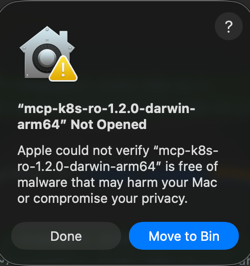
macOS Gatekeeper: The binary is not code-signed, so macOS will block it. The xattr command above removes the quarantine flag. Alternatively, go to System Settings → Privacy & Security and click "Allow Anyway" after the first blocked attempt. img.png
Or build from source:

make build
claude mcp add --scope user --transport stdio k8s-ro ./bin/mcp-k8s-ro

Custom kubeconfig location

If your kubeconfig is not at ~/.kube/config, set the KUBECONFIG environment variable:

# Binary
claude mcp add --scope user --transport stdio -e KUBECONFIG=/path/to/kubeconfig k8s-ro ~/.local/bin/mcp-k8s-ro

# Docker
claude mcp add --scope user --transport stdio k8s-ro \
  -- docker run --rm -i -e KUBECONFIG=/config/kubeconfig -v /path/to/kubeconfig:/config/kubeconfig:ro ghcr.io/your-ko/mcp-k8s-ro:latest

Single-cluster design

The server intentionally operates on one kubeconfig context and provides no tool to switch clusters at runtime. The reasons are:

  • Prompt injection isolation — a malicious value in one cluster's resources (e.g. a pod annotation) cannot instruct Claude to pivot to a different cluster, including production.
  • Explicit audit boundary — every tool response includes the context and cluster name, so there is never ambiguity about which cluster was queried.

To point the server at a different cluster, stop the server, switch context, and restart:

kubectl config use-context my-other-cluster
# then restart the MCP server / reload Claude Desktop

To work with multiple clusters simultaneously, register a separate server instance per cluster in your MCP config:

{
  "mcpServers": {
    "k8s-staging": {
      "type": "stdio",
      "command": "/path/to/bin/mcp-k8s-ro",
      "env": { "KUBECONFIG": "/path/to/.kube/config" }
    },
    "k8s-prod": {
      "type": "stdio",
      "command": "/path/to/bin/mcp-k8s-ro",
      "env": { "KUBECONFIG": "/path/to/.kube/config-prod" }
    }
  }
}

Claude will address each server by name and each instance only ever sees its own cluster.

MCP registry

This server is published on registry.modelcontextprotocol.io

Install configuration

Are you the maintainer?

Claim this server with your GitHub account to request manual ownership verification.

README Embed Badge
Markdown

Link to the catalog listing for Read-only MCP server for Kubernetes from your README. This badge does not certify ownership, compatibility or security.

[![MCP catalog listing](https://img.shields.io/badge/MCP-awesome--mcp-orange?style=flat-square)](https://awesome-mcp.com/servers/mcp-k8s-ro)

REPOSITORY STATS

GitHub StarsUnavailable
ForksUnavailable

Public repository statistics could not be verified. Check the configured source address; unavailable counts are not zero.

下载与拉取统计

来源、范围和时段分别列出;不相加,不代表安装人数、活跃用户或安全审核。

尚无已审核的包 / 镜像标识,暂不展示下载统计。

Related cloud devops MCP Servers

Alternative and complementary servers in the same category

View all in cloud devops →
Huawei MCP Server
mcp-server-huaweiclouddeveloper•huaweiclouddeveloper

A Model Context Protocol server built on Huawei Cloud services that enables AI assistants to operate Huawei Cloud resources within conversational workflows, supporting ECS, OBS, GaussDB, and other cloud products.

Repository stats unavailable
Cloud & DevOps
Coolify MCP Server
coolify-mcp-server•wrediam

An MCP server that exposes the Coolify v4.3.1 REST API so AI clients can manage applications, databases, services, servers, deployments, and more.

Repository stats unavailable
Cloud & DevOps

A deprecated Model Context Protocol server for interacting with Kong Konnect APIs, enabling AI assistants to query and analyze Kong Gateway configurations, traffic, and analytics.

Repository stats unavailable
Cloud & DevOps