MCP-PDF2MD

MCP-PDF2MD

mcp-pdf2md•byfutureunreal

An MCP-based PDF to Markdown conversion service that uses the MinerU API to process local files and URL links.

License: MIT License•Runtime: Awaiting documentation review•Category: file systems-docs

WHAT IT DOES

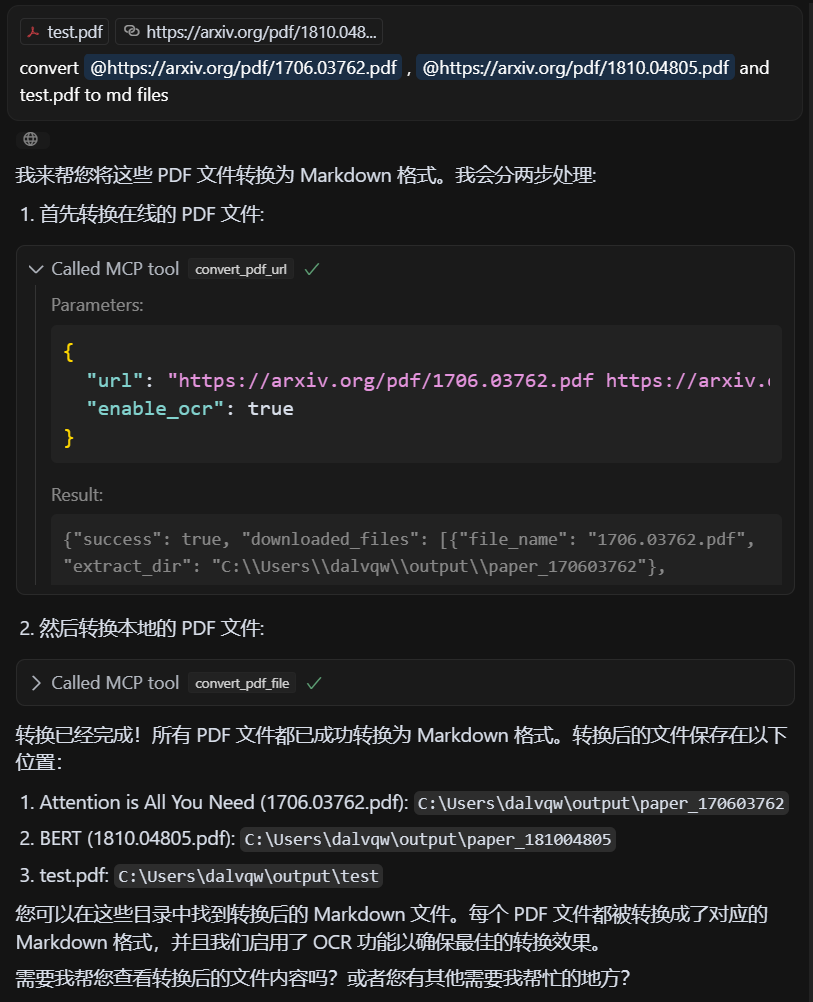
  • •Provides two MCP tools to convert a PDF from a URL or a local file into Markdown.
  • •Processes both local PDF files and URL links with automatic selection of the best processing method.
  • •Preserves document structure such as headings, paragraphs, and lists, and converts formulas to LaTeX and tables to structured format.
  • •Supports multi-file batch conversion and removes headers, footers, footnotes, and page numbers for semantic coherence.

BEST FOR

  • •Converting individual PDF documents from a URL into Markdown for use with LLM clients.
  • •Batch converting large volumes of local PDF files while preserving layout and structure.

ABOUT MCP-PDF2MD

MCP-PDF2MD is cataloged as an MCP server attributed to futureunreal. An MCP-based PDF to Markdown conversion service that uses the MinerU API to process local files and URL links. It is categorized under file systems-docs. See the capability inspector for recorded interfaces and their independent review status; consult upstream documentation for the current interface.

HOW TO INSTALL

Installation configuration is not reviewed. No executable setup is offered for this entry; inspect the source repository before proceeding.

LICENSE

Catalog license label: MIT License. Check the source repository's current license and terms before using, modifying or distributing this software.

能力检查器

能力定义尚未审核。未核验的采集内容不会作为可信接口展示。

Tools (0)

暂无可展示的已审核记录。这不表示上游不支持此能力。

Resources (0)

暂无可展示的已审核记录。这不表示上游不支持此能力。

Prompts (0)

暂无可展示的已审核记录。这不表示上游不支持此能力。

NEWSLETTER - COMING LATER

Newsletter subscriptions are not open yet

Email delivery is not connected. This page does not collect email addresses or create subscriptions.

Browse the registry for current listings instead.

Community Reviews

Coming later

Reviews for MCP-PDF2MD are not available yet

Review publishing and storage are not connected. This page does not collect or publish ratings or comments, including after sign-in.

FREQUENTLY ASKED QUESTIONS

Does the server require an API key?

Yes, it relies on the MinerU API and requires a MINERU_API_KEY to extract PDF content.

What kinds of PDF layouts can it handle?

It outputs text in human-readable order for single-column, multi-column, and complex layouts.

上游原版 README

在 GitHub 查看同一版本原文

README.md · 8a5945d3ff9f · 采集于 2026-11-13 13:21:22 UTC

保留上游原文,不做 AI 改写。为安全起见过滤脚本、表单和不安全链接。

当前显示最后一次成功采集的文档快照,请以来源页面为准。

MCP-PDF2MD

smithery badge English | 中文

MCP-PDF2MD Service

An MCP-based high-performance PDF to Markdown conversion service powered by MinerU API, supporting batch processing for local files and URL links with structured output.

Key Features

  • Format Conversion: Convert PDF files to structured Markdown format.
  • Multi-source Support: Process both local PDF files and URL links.
  • Intelligent Processing: Automatically select the best processing method.
  • Batch Processing: Support multi-file batch conversion for efficient handling of large volumes of PDF files.
  • MCP Integration: Seamless integration with LLM clients like Claude Desktop.
  • Structure Preservation: Maintain the original document structure, including headings, paragraphs, lists, etc.
  • Smart Layout: Output text in human-readable order, suitable for single-column, multi-column, and complex layouts.
  • Formula Conversion: Automatically recognize and convert formulas in the document to LaTeX format.
  • Table Extraction: Automatically recognize and convert tables in the document to structured format.
  • Cleanup Optimization: Remove headers, footers, footnotes, page numbers, etc., to ensure semantic coherence.
  • High-Quality Extraction: High-quality extraction of text, images, and layout information from PDF documents.

System Requirements

  • Software: Python 3.10+

Quick Start

  1. Clone the repository and enter the directory:

    git clone https://github.com/FutureUnreal/mcp-pdf2md.git
    cd mcp-pdf2md
    
  2. Create a virtual environment and install dependencies:

    Linux/macOS:

    uv venv
    source .venv/bin/activate
    uv pip install -e .
    

    Windows:

    uv venv
    .venv\Scripts\activate
    uv pip install -e .
    
  3. Configure environment variables:

    Create a .env file in the project root directory and set the following environment variables:

    MINERU_API_BASE=https://mineru.net/api/v4/extract/task
    MINERU_BATCH_API=https://mineru.net/api/v4/extract/task/batch
    MINERU_BATCH_RESULTS_API=https://mineru.net/api/v4/extract-results/batch
    MINERU_API_KEY=your_api_key_here
    
  4. Start the service:

    uv run pdf2md
    

Command Line Arguments

The server supports the following command line arguments:

Claude Desktop Configuration

Add the following configuration in Claude Desktop:

Windows:

{
    "mcpServers": {
        "pdf2md": {
            "command": "uv",
            "args": [
                "--directory",
                "C:\\path\\to\\mcp-pdf2md",
                "run",
                "pdf2md",
                "--output-dir",
                "C:\\path\\to\\output"
            ],
            "env": {
                "MINERU_API_KEY": "your_api_key_here"
            }
        }
    }
}

Linux/macOS:

{
    "mcpServers": {
        "pdf2md": {
            "command": "uv",
            "args": [
                "--directory",
                "/path/to/mcp-pdf2md",
                "run",
                "pdf2md",
                "--output-dir",
                "/path/to/output"
            ],
            "env": {
                "MINERU_API_KEY": "your_api_key_here"
            }
        }
    }
}

Note about API Key Configuration: You can set the API key in two ways:

  1. In the .env file within the project directory (recommended for development)
  2. In the Claude Desktop configuration as shown above (recommended for regular use)

If you set the API key in both places, the one in the Claude Desktop configuration will take precedence.

MCP Tools

The server provides the following MCP tools:

  • convert_pdf_url: Convert PDF URL to Markdown
  • convert_pdf_file: Convert local PDF file to Markdown

Getting MinerU API Key

This project relies on the MinerU API for PDF content extraction. To obtain an API key:

  1. Visit MinerU official website and register for an account
  2. After logging in, apply for API testing qualification at this link
  3. Once your application is approved, you can access the API Management page
  4. Generate your API key following the instructions provided
  5. Copy the generated API key
  6. Use this string as the value for MINERU_API_KEY

Note that access to the MinerU API is currently in testing phase and requires approval from the MinerU team. The approval process may take some time, so plan accordingly.

Demo
Input PDF

Input PDF

Output Markdown

Output Markdown

License

MIT License - see the LICENSE file for details.

Credits

This project is based on the API from MinerU.

Install configuration

Are you the maintainer?

Claim this server with your GitHub account to request manual ownership verification.

README Embed Badge
Markdown

Link to the catalog listing for MCP-PDF2MD from your README. This badge does not certify ownership, compatibility or security.

[![MCP catalog listing](https://img.shields.io/badge/MCP-awesome--mcp-orange?style=flat-square)](https://awesome-mcp.com/servers/mcp-pdf2md)

REPOSITORY STATS

GitHub StarsUnavailable
ForksUnavailable

Public repository statistics could not be verified. Check the configured source address; unavailable counts are not zero.

下载与拉取统计

来源、范围和时段分别列出;不相加,不代表安装人数、活跃用户或安全审核。

尚无已审核的包 / 镜像标识,暂不展示下载统计。

Related file systems-docs MCP Servers

Alternative and complementary servers in the same category

View all in file systems-docs →

A Model Context Protocol server for global law with read-only tools to find and read provisions by date, trace the law behind each word, search text and changes, and check cases or briefs against law in force.

Repository stats unavailable
Files & Documentation
LoreKeeper MCP server
lorekeeper-rpg-lorekeeper-com•lore-keeper

Hosted MCP server for tabletop RPG worlds that organizes messy notes and documents into a private store and lets MCP apps search lore, read documents, find characters, and optionally generate character or world pictures.

Repository stats unavailable
Files & Documentation

An MCP server that gives AI assistants scoped file system operations inside a project directory, with read-only reference projects plus git and GitHub tools.

Repository stats unavailable
Files & Documentation