
Store and retrieve entities, relations and observations in a persistent local knowledge graph.
create_entitiescreate_relationsadd_observations+6 more
92K
AI & Multi-Agent
A hosted MCP server for Perspective AI that lets an AI assistant design conversation agents, analyze conversations, deploy embeds, and automate follow-ups.
Perspective AI MCP Server is cataloged as an MCP server attributed to perspective-ai. A hosted MCP server for Perspective AI that lets an AI assistant design conversation agents, analyze conversations, deploy embeds, and automate follow-ups. It is categorized under ai agents-models. See the capability inspector for recorded interfaces and their independent review status; consult upstream documentation for the current interface.
Installation configuration is not reviewed. No executable setup is offered for this entry; inspect the source repository before proceeding.
Catalog license label: Not specified. Check the source repository's current license and terms before using, modifying or distributing this software.
能力定义尚未审核。未核验的采集内容不会作为可信接口展示。
暂无可展示的已审核记录。这不表示上游不支持此能力。
暂无可展示的已审核记录。这不表示上游不支持此能力。
暂无可展示的已审核记录。这不表示上游不支持此能力。
Email delivery is not connected. This page does not collect email addresses or create subscriptions.
Browse the registry for current listings instead.
Reviews for Perspective AI MCP Server are not available yet
Review publishing and storage are not connected. This page does not collect or publish ratings or comments, including after sign-in.
Perspective supports Interviewer, Concierge, Evaluator, and Advocate conversation agent types.
You can connect via OAuth with a one-time browser sign-in, or use a personal access token tied to your Perspective AI account.
README.md · 98225a0046dc · 采集于 2026-11-13 11:15:58 UTC
保留上游原文,不做 AI 改写。为安全起见过滤脚本、表单和不安全链接。
当前显示最后一次成功采集的文档快照,请以来源页面为准。

Forms are costing you business. An AI concierge turns them into conversations.
MCP server for Perspective AI. An AI Concierge replaces static forms with adaptive AI conversations that understand real situations, structure key information automatically, and trigger the right next step.
Rigid forms cause drop-off, weaken qualification, and strip away context. Perspective uses adaptive AI to capture structured data and trigger automation, so you understand what truly matters to your customers and can make decisions with conviction.
Once connected, your AI assistant can design conversation agents, analyze conversations, deploy embeds, and automate follow-ups directly from Claude Desktop, Claude Code, Cursor, or any MCP-compatible client. Try prompts like:
Design a Concierge that qualifies pricing-page leads by budget and timeline.
Why are people abandoning my lead-capture concierge this week?
Whenever a conversation scores above 80 on trust, push it to HubSpot and ping #sales in Slack.
See Use cases for the full workflow and Available tools for the tool surface.
Add the MCP URL to your client and complete a one-time browser sign-in. Tokens stay out of config files; every connected app shows up under Settings → Connected Apps in your workspace, and you can revoke access anytime.
The MCP URL is the same for everyone:
https://getperspective.ai/mcp
Install the official Perspective AI plugin from the Cursor Marketplace:
The plugin includes the MCP server configuration and a skill that helps your AI assistant know when to use Perspective tools.
Add to your mcp.json:
{
  "mcpServers": {
    "perspective": {
      "type": "http",
      "url": "https://getperspective.ai/mcp"
    }
  }
}
claude mcp add --transport http perspective https://getperspective.ai/mcp
Open the Add custom connector modal and fill:
| Field | Value |
|---|---|
| Name | Perspective AI |
| Remote MCP server URL | https://getperspective.ai/mcp |
Click Add, then complete the OAuth browser flow. (Manual path: Customize → Connectors → Add custom connector. See Anthropic's guide. Available on Free, Pro, Max, Team, and Enterprise plans.)
Stdio-only clients can use mcp-remote, which discovers OAuth metadata automatically:
{
  "mcpServers": {
    "perspective": {
      "command": "npx",
      "args": ["mcp-remote", "https://getperspective.ai/mcp"]
    }
  }
}
The first time you call a Perspective tool, your client opens a browser window to complete OAuth. Subsequent requests reuse the token.
If your client doesn't support OAuth or you'd rather authenticate with a long-lived token, generate one at Perspective AI Settings → MCP.
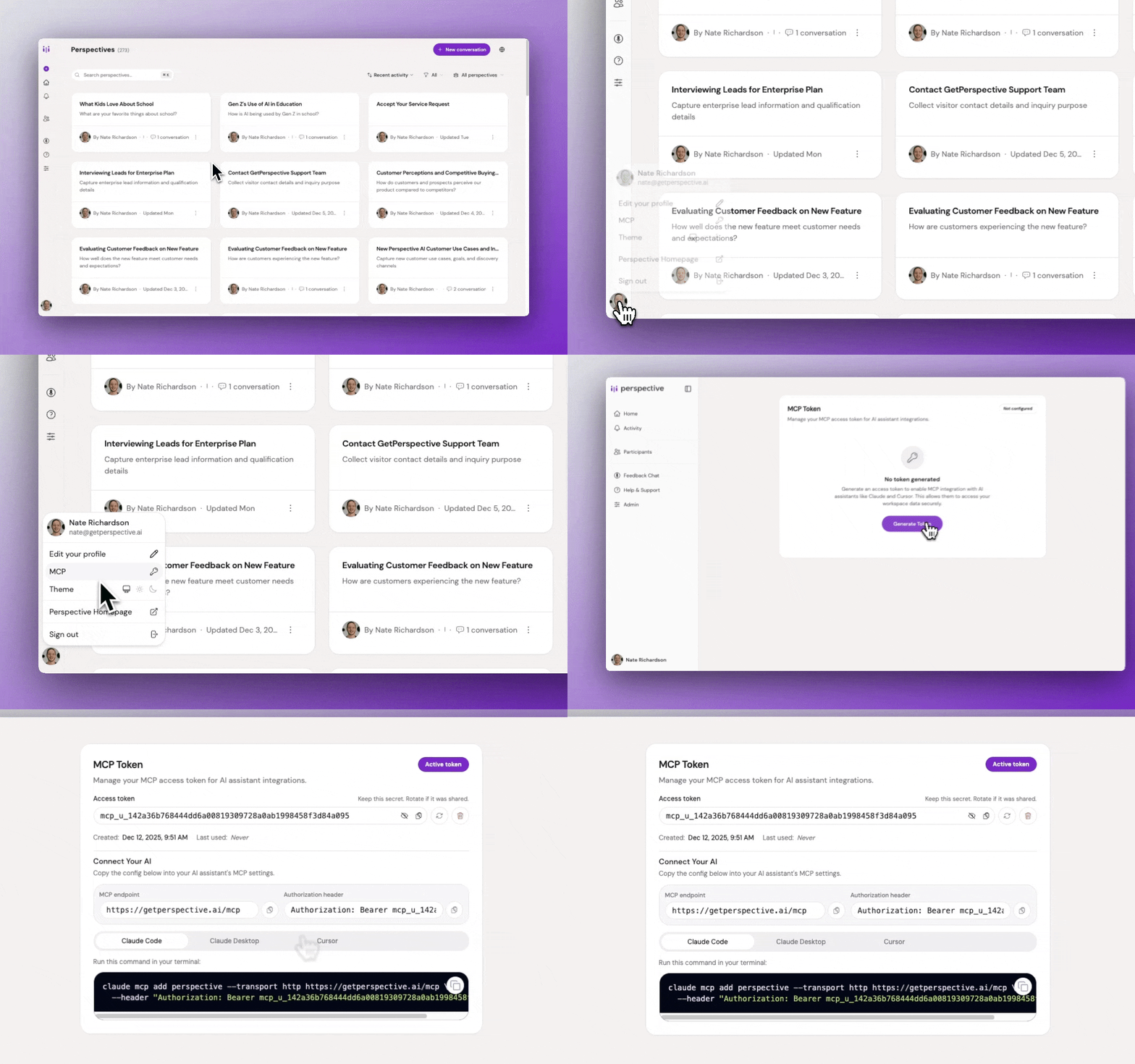
perspective.mcpbclaude mcp add perspective --transport http https://getperspective.ai/mcp --header "Authorization: Bearer YOUR_TOKEN"
Add to your mcp.json:
{
  "mcpServers": {
    "perspective": {
      "type": "http",
      "url": "https://getperspective.ai/mcp",
      "headers": {
        "Authorization": "Bearer YOUR_TOKEN"
      }
    }
  }
}
For stdio-only clients, use mcp-remote with an explicit Authorization header:
{
  "mcpServers": {
    "perspective": {
      "command": "npx",
      "args": [
        "mcp-remote",
        "https://getperspective.ai/mcp",
        "--header",
        "Authorization: Bearer YOUR_TOKEN"
      ]
    }
  }
}
See the full MCP documentation for troubleshooting and advanced setup.
Once connected, your AI assistant can call the following 22 tools, grouped by lifecycle stage:
Workspaces
Design & iterate
Deploy & distribute
Analyze
Automate
Once installed, ask your AI assistant to drive the full perspective lifecycle: design, deploy, analyze, and automate.
Design & iterate. Create any of four conversation agent types:
Browse 180+ templates or use cases by role and industry for inspiration. Example prompts:
Deploy & distribute. Embed on your site or send personalized invites to specific participants:
Analyze: "Why are people abandoning my lead-capture concierge this week? Pull the drop-off conversations and summarize the top reasons."
Automate: "Whenever a conversation scores above 80 on trust, push it to HubSpot as a contact and ping #sales in Slack."
Authorization header to https://getperspective.ai/mcp..mcpb bundle is a thin stdio-to-HTTP proxy; it does not store or cache responses locally.npm install
npm run pack
Outputs perspective.mcpb in the current directory.
npm run release
Bumps version, commits, tags, and pushes. GitHub Action creates the release.

Claim this server with your GitHub account to request manual ownership verification.
Link to the catalog listing for Perspective AI MCP Server from your README. This badge does not certify ownership, compatibility or security.
[](https://awesome-mcp.com/servers/mcp-perspective-ai)Public repository statistics could not be verified. Check the configured source address; unavailable counts are not zero.
来源、范围和时段分别列出;不相加,不代表安装人数、活跃用户或安全审核。
尚无已审核的包 / 镜像标识,暂不展示下载统计。
Alternative and complementary servers in the same category
Store and retrieve entities, relations and observations in a persistent local knowledge graph.
Organize problem solving into revisable, branching thought steps through an MCP tool.

Query-aware context compression with an MCP plugin for coding agents, plus Python and HTTP interfaces for reducing the context sent to a language model.