
Oleafly is a live collaborative LaTeX, Typst and Markdown editor for research that offers a local MCP server and an oleafly mcp stdio command so outside AI clients can use its project tools.
Repository stats unavailable
Productivity & Ops
An MCP server that connects Claude Desktop and other MCP clients to a Redmine instance for project and issue management.
MCP Redmine is cataloged as an MCP server attributed to runekaagaard. An MCP server that connects Claude Desktop and other MCP clients to a Redmine instance for project and issue management. It is categorized under productivity work. See the capability inspector for recorded interfaces and their independent review status; consult upstream documentation for the current interface.
Installation configuration is not reviewed. No executable setup is offered for this entry; inspect the source repository before proceeding.
Catalog license label: Mozilla Public License Version 2.0. Check the source repository's current license and terms before using, modifying or distributing this software.
能力定义尚未审核。未核验的采集内容不会作为可信接口展示。
暂无可展示的已审核记录。这不表示上游不支持此能力。
暂无可展示的已审核记录。这不表示上游不支持此能力。
暂无可展示的已审核记录。这不表示上游不支持此能力。
Email delivery is not connected. This page does not collect email addresses or create subscriptions.
Browse the registry for current listings instead.
Reviews for MCP Redmine are not available yet
Review publishing and storage are not connected. This page does not collect or publish ratings or comments, including after sign-in.
Yes. When running as a shared HTTP server, each client can send its own Redmine API key in an X-Redmine-API-Key header, which takes precedence over the configured key.
Yes. Setting REDMINE_READ_ONLY to 1 allows only GET requests and refuses all writing operations, including uploads.
README.md · 29e50d1de1be · 采集于 2026-11-13 09:34:35 UTC
保留上游原文,不做 AI 改写。为安全起见过滤脚本、表单和不安全链接。
当前显示最后一次成功采集的文档快照,请以来源页面为准。
Status: Maintained, in daily use.
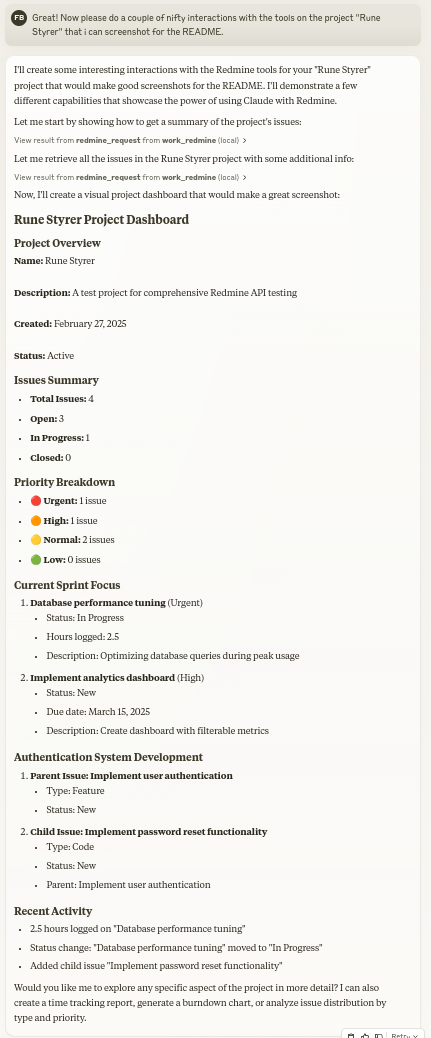
Let Claude be your Redmine assistant! MCP Redmine connects Claude Desktop to your Redmine instance, allowing it to:
Uses httpx for API requests and integrates with the Redmine OpenAPI specification for comprehensive API coverage.
uvEnsure you have uv installed.
uv --version
Install uv if you haven't already.
Linux
curl -LsSf https://astral.sh/uv/install.sh | sh
macOS
brew install uv
windows
powershell -ExecutionPolicy ByPass -c "irm https://astral.sh/uv/install.ps1 | iex"
Add to your claude_desktop_config.json:
  {
    "mcpServers": {
      "redmine": {
        "command": "uvx",
        "args": ["--from", "mcp-redmine==2026.10.15.204909",
                "--refresh-package", "mcp-redmine", "mcp-redmine"],
        "env": {
          "REDMINE_URL": "https://your-redmine-instance.example.com",
          "REDMINE_API_KEY": "your-api-key",
          "REDMINE_REQUEST_INSTRUCTIONS": "/path/to/instructions.md",
          "REDMINE_ALLOWED_DIRECTORIES": "/tmp,/home/user/uploads"
        }
      }
    }
  }
dockerEnsure you have docker installed.
docker --version
Pull the published image from GitHub Container Registry:
docker pull ghcr.io/runekaagaard/mcp-redmine:latest
Or build the image yourself:
git clone git@github.com:runekaagaard/mcp-redmine.git
cd mcp-redmine
docker build -t ghcr.io/runekaagaard/mcp-redmine .
Add to your claude_desktop_config.json:
{
  "mcpServers": {
    "redmine": {
      "command": "docker",
      "args":  [
          "run",
          "-i",
          "--rm",
          "-e", "REDMINE_URL",
          "-e", "REDMINE_API_KEY",
          "-e", "REDMINE_REQUEST_INSTRUCTIONS",
          "-e", "REDMINE_ALLOWED_DIRECTORIES",
          "-v", "/path/to/instructions.md:/app/INSTRUCTIONS.md",
          "-v", "/path/to/uploads:/app/uploads",
          "ghcr.io/runekaagaard/mcp-redmine:latest"
      ],
      "env": {
        "REDMINE_URL": "https://your-redmine-instance.example.com",
        "REDMINE_API_KEY": "your-api-key",
        "REDMINE_REQUEST_INSTRUCTIONS": "/app/INSTRUCTIONS.md",
        "REDMINE_ALLOWED_DIRECTORIES": "/app/uploads"
      }
    }
  }
}
MCP Redmine works with any MCP client (Claude Code, Cursor, IntelliJ-based IDEs, n8n, etc.) - point your client at the same command and environment variables as above, following your client's documentation for registering MCP servers.
By default the server speaks stdio. For clients or setups that connect over HTTP, start the server with one of the HTTP transports:
# Recommended HTTP transport (serves on http://HOST:PORT/mcp)
mcp-redmine --transport streamable-http --host 0.0.0.0 --port 8000

# Legacy SSE transport, for older clients (serves on http://HOST:PORT/sse)
mcp-redmine --transport sse --host 0.0.0.0 --port 8000
When running as a shared HTTP server, each client can send its own Redmine API key in an
X-Redmine-API-Key request header, so actions are attributed to the calling user instead
of one shared service account. The header takes precedence; REDMINE_API_KEY remains the
fallback (and the only option on stdio). Example with Claude Code:
claude mcp add --transport http --header "X-Redmine-API-Key: <your-personal-key>" \
  redmine http://shared-server:8000/mcp
Only do this over trusted networks or TLS - the header carries a credential.
| Variable | Required | Default | Description |
|---|---|---|---|
REDMINE_URL | Yes | - | URL of your Redmine instance. Subpaths are supported (e.g., http://localhost/redmine/) |
REDMINE_API_KEY | Yes* | - | Your Redmine API key (see below for how to get it). *Optional when every client sends X-Redmine-API-Key (see Multi-user below) |
REDMINE_REQUEST_INSTRUCTIONS | No | - | Path to a file containing additional instructions for the redmine_request tool. I've found it works great to have the LLM generate that file after a session. (example1 example2) |
REDMINE_HEADERS | No | (empty) | Custom HTTP headers to include in all requests. Format: "Header1: Value1, Header2: Value2". Useful for proxies that require additional authentication (e.g., X-Redmine-Username) |
REDMINE_RESPONSE_FORMAT | No | yaml | Response format: yaml or json. Controls how API responses are formatted |
REDMINE_ALLOWED_DIRECTORIES | For upload/download | (disabled) | Required for file operations. Comma-separated list of directories where upload/download are allowed (e.g., /tmp,/home/user/uploads). Upload/download are disabled if not set for security |
REDMINE_DANGEROUSLY_ACCEPT_INVALID_CERTS | No | (disabled) | Set to 1 to disable SSL certificate verification. Use only for self-signed certs in trusted environments |
REDMINE_CA_BUNDLE | No | (system CAs) | Path to a custom CA certificate bundle (e.g. /path/to/ca.crt) for Redmine instances using a private certificate chain. Prefer this over disabling verification |
REDMINE_READ_ONLY | No | (disabled) | Set to 1 to only allow GET requests. All writing operations (POST/PUT/DELETE, including uploads) are refused |
Note: When running via Docker, the
REDMINE_REQUEST_INSTRUCTIONSenvironment variable must point to a path inside the container, not a path on the host machine. Therefore, if you want to use a local file, you need to mount it into the container at the correct location.
Security Note: The
REDMINE_ALLOWED_DIRECTORIESsetting protects against path traversal attacks. Paths containing../are resolved before validation, ensuring files can only be accessed within the allowed directories.
redmine_paths_list
- /issues.json
- /projects.json
- /time_entries.json
...
redmine_paths_info
path_templates (list of strings)/issues.json:
get:
operationId: getIssues
parameters:
- $ref: '#/components/parameters/format'
...
redmine_request
path (string): API endpoint path (e.g. '/issues.json')method (string, optional): HTTP method to use (default: 'get')data (object, optional): Dictionary for request body (for POST/PUT)params (object, optional): Dictionary for query parametersstatus_code: 200
body:
issues:
- id: 1
subject: "Fix login page"
...
error: ""
redmine_upload
REDMINE_ALLOWED_DIRECTORIES to be setfile_path (string): Fully qualified path to the file to upload (must be within allowed directories)description (string, optional): Optional description for the filestatus_code: 201
body:
upload:
id: 7
token: "7.ed32257a2ab0f7526c0d72c32994c58b131bb2c0775f7aa84aae01ea8397ea54"
error: ""
redmine_attachment_image
!screenshot.png! in an issue
description) and return it as viewable image content, letting the LLM actually see itattachment_id (integer)redmine_download
REDMINE_ALLOWED_DIRECTORIES to be setattachment_id (integer): The ID of the attachment to downloadsave_path (string): Fully qualified file path (not directory) where the file should be saved (must be within allowed directories)filename (string, optional): Optional filename for the Redmine download URL (determined automatically from attachment metadata if not provided)status_code: 200
body:
saved_to: "/path/to/downloaded/file.pdf"
filename: "file.pdf"
error: ""
Let's create a new bug report in the "Website" project:

1. Title: "Homepage not loading on mobile devices"
2. Description: "When accessing the homepage from iOS or Android devices, the loading spinner appears but the content never loads. This issue started after the last deployment."
3. Priority: High
4. Assign to: John Smith
Can you find all high priority issues in the "Website" project that are currently unassigned?
Please mark issue #123 as "In Progress" and add a comment: "I've started working on this issue. Expect it to be completed by Friday."
Log 3.5 hours against issue #456 for "Implementing user authentication" done today.
MCP Redmine is listed in the following MCP directory sites and repositories:
First clone the github repository and install the dependencies:
git clone git@github.com:runekaagaard/mcp-redmine.git
cd mcp-redmine
uv sync
Then set this in claude_desktop_config.json:
...
"command": "uv",
"args": ["run", "--directory", "/path/to/mcp-redmine", "-m", "mcp_redmine.server"],
...
Contributions are warmly welcomed! Whether it's bug reports, feature requests, documentation improvements, or code contributions - all input is valuable. Feel free to:
The goal is to make Redmine project management with Claude even better, and your insights and contributions help achieve that.
This project builds on the excellent work of others:
Mozilla Public License Version 2.0
Claim this server with your GitHub account to request manual ownership verification.
Link to the catalog listing for MCP Redmine from your README. This badge does not certify ownership, compatibility or security.
[](https://awesome-mcp.com/servers/mcp-redmine)Public repository statistics could not be verified. Check the configured source address; unavailable counts are not zero.
来源、范围和时段分别列出;不相加,不代表安装人数、活跃用户或安全审核。
尚无已审核的包 / 镜像标识,暂不展示下载统计。
Alternative and complementary servers in the same category
Oleafly is a live collaborative LaTeX, Typst and Markdown editor for research that offers a local MCP server and an oleafly mcp stdio command so outside AI clients can use its project tools.
Buddy is an Android app that offers its phone tools through a local MCP server to Claude Code, Codex, OpenCode, Antigravity, and Grok sessions.

Tuqui is a hosted MCP server that connects Odoo with Claude and ChatGPT so users can ask about sales, stock, customers and overdue invoices in plain language.
