
This is a Model Context Protocol (MCP) server for interacting with AIStor object stores.
Repository stats unavailable
Databases & Storage
A TypeScript-based MCP server that provides database interaction capabilities and implements core database operations for ArangoDB.
MCP Server for ArangoDB is cataloged as an MCP server attributed to ravenwits. A TypeScript-based MCP server that provides database interaction capabilities and implements core database operations for ArangoDB. It is categorized under databases storage. See the capability inspector for recorded interfaces and their independent review status; consult upstream documentation for the current interface.
Installation configuration is not reviewed. No executable setup is offered for this entry; inspect the source repository before proceeding.
Catalog license label: MIT License. Check the source repository's current license and terms before using, modifying or distributing this software.
能力定义尚未审核。未核验的采集内容不会作为可信接口展示。
暂无可展示的已审核记录。这不表示上游不支持此能力。
暂无可展示的已审核记录。这不表示上游不支持此能力。
暂无可展示的已审核记录。这不表示上游不支持此能力。
Email delivery is not connected. This page does not collect email addresses or create subscriptions.
Browse the registry for current listings instead.
Reviews for MCP Server for ArangoDB are not available yet
Review publishing and storage are not connected. This page does not collect or publish ratings or comments, including after sign-in.
Yes. It executes read-only AQL and rejects write/DDL keywords.
Yes. It can back up collections to JSON files under `ARANGO_BACKUP_ROOT`.
No. It is designed for local development environments only, and connecting it to production is explicitly discouraged.
README.md · ffbf5ed646aa · 采集于 2026-11-13 07:56:53 UTC
保留上游原文,不做 AI 改写。为安全起见过滤脚本、表单和不安全链接。
当前显示最后一次成功采集的文档快照,请以来源页面为准。

A Model Context Protocol server for ArangoDB
This is a TypeScript-based MCP server that provides database interaction capabilities through ArangoDB. It implements core database operations and allows seamless integration with ArangoDB through MCP tools. You can use it wih Claude app and also extension for VSCode that works with mcp like Cline!
| Tool | Category | Read-only | Mutates data/schema | Purpose |
|---|---|---|---|---|
arango_query | Query | No | Maybe | Execute general AQL with bind variables, bounded results, and query guardrails. |
arango_read_query | Query | Yes | No | Execute read-only AQL and reject write/DDL keywords. |
arango_validate_query | Query | Yes | No | Parse and validate AQL without executing it. |
arango_explain_query | Query | Yes | No | Inspect AQL execution plans, index usage, and optimizer output. |
arango_describe_database | Discovery | Yes | No | Summarize collections, counts, indexes, and sample fields. |
arango_list_collections | Discovery | Yes | No | List collections in the configured database. |
arango_get_collection | Discovery | Yes | No | Return collection properties, count, and indexes. |
arango_create_collection | Collection | No | Yes | Create document or edge collections. |
arango_drop_collection | Collection | No | Yes | Drop a collection, requiring confirm: true. |
arango_get_document | Document | Yes | No | Fetch one document by collection and _key. |
arango_list_documents | Document | Yes | No | List documents with limit and offset pagination. |
arango_count_documents | Document | Yes | No | Count documents in a collection. |
arango_sample_documents | Document | Yes | No | Return a small random sample for schema discovery. |
arango_insert | Document | No | Yes | Insert one document into a collection. |
arango_bulk_insert | Document | No | Yes | Insert up to 1000 documents in one request. |
arango_update | Document | No | Yes | Partially update one document by _key. |
arango_bulk_update | Document | No | Yes | Patch up to 1000 documents by _key or _id. |
arango_remove | Document | No | Yes | Remove one document by _key. |
arango_list_indexes | Index | Yes | No | List indexes for a collection. |
arango_create_index | Index | No | Yes | Create persistent, geo, TTL, or inverted indexes. |
arango_list_views | ArangoSearch | Yes | No | List ArangoSearch and search-alias Views. |
arango_create_search_view | ArangoSearch | No | Yes | Create an ArangoSearch View linked to a collection. |
arango_search | ArangoSearch | Yes | No | Search an ArangoSearch View with analyzer-aware BM25 ranking. |
arango_list_analyzers | Analyzer | Yes | No | List ArangoSearch Analyzers. |
arango_create_analyzer | Analyzer | No | Yes | Create an ArangoSearch Analyzer. |
arango_list_graphs | Graph | Yes | No | List named graphs. |
arango_create_graph | Graph | No | Yes | Create a named graph with one edge definition. |
arango_insert_edge | Graph | No | Yes | Insert an edge document with _from and _to. |
arango_traverse | Graph | Yes | No | Traverse edges from a start vertex using an edge collection or named graph. |
arango_shortest_path | Graph | Yes | No | Find the shortest path between two vertices using an edge collection or named graph. |
arango_backup | Backup | No | Filesystem | Backup collections to JSON files under ARANGO_BACKUP_ROOT. |
All tools return JSON text and structuredContent when successful. Read-heavy tools expose bounded limit parameters to keep responses agent-friendly. Query tools also support guardrails such as memoryLimit, maxRuntime, and failOnWarning where applicable.
To install arango-server globally via NPM, run the following command:
npm install -g arango-server
To run arango-server directly without installation, use the following command:
npx -y arango-server
To use arango-server with the VSCode Copilot agent, you must have at least VSCode 1.99.0 installed and follow these steps:
Create or edit the MCP configuration file:
Workspace-specific configuration: Create or edit the .vscode/mcp.json file in your workspace.
User-specific configuration: Optionally, specify the server in the setting(mcp) VS Code user settings to enable the MCP server across all workspaces.
Tip: You can refer here to the MCP configuration documentation of VSCode for more details on how to set up the configuration file.
Add the following configuration:
{
  "servers": {
    "arango-mcp": {
      "type": "stdio",
      "command": "npx",
      "args": ["-y", "arango-server"],
      "env": {
        "ARANGO_URL": "http://localhost:8529",
        "ARANGO_DB": "your_database_name",
        "ARANGO_USERNAME": "your_username",
        "ARANGO_PASSWORD": "your_password"
      }
    }
  }
}
Start the MCP server:
Ctrl+Shift+P or Cmd+Shift+P on Mac).MCP: Start Server and select arango-mcp from the list.Verify the server:
Tools button to verify that the arango-server tools are available.Go to: Settings > Developer > Edit Config or
~/Library/Application Support/Claude/claude_desktop_config.json%APPDATA%/Claude/claude_desktop_config.jsonYou can check out mcp documentation to set it up too.
Add the following configuration to your OpenCode config file, such as opencode.json or opencode.jsonc:
{
  "$schema": "https://opencode.ai/config.json",
  "mcp": {
    "arango": {
      "type": "local",
      "command": ["npx", "-y", "arango-server"],
      "enabled": true,
      "environment": {
        "ARANGO_URL": "your_database_url",
        "ARANGO_DB": "your_database_name",
        "ARANGO_USERNAME": "your_username",
        "ARANGO_PASSWORD": "your_password"
      }
    }
  }
}
After restarting OpenCode, ask it to use the arango MCP tools for ArangoDB tasks.
Go to: Cline Extension > MCP Servers > Edit Configuration or
~/Library/Application Support/Code/User/globalStorage/cline.cline/config.json%APPDATA%/Code/User/globalStorage/cline.cline/config.jsonAdd the following configuration to the mcpServers section:
{
  "mcpServers": {
    "arango": {
      "command": "npx",
      "args": ["-y", "arango-server"],
      "env": {
        "ARANGO_URL": "your_database_url",
        "ARANGO_DB": "your_database_name",
        "ARANGO_USERNAME": "your_username",
        "ARANGO_PASSWORD": "your_password"
      }
    }
  }
}
You can also use the above configuration to get this server working with WARP
The server requires the following environment variables:
ARANGO_URL - ArangoDB server URL (note: 8529 is the default port for ArangoDB for local development)ARANGO_DB - Database nameARANGO_USERNAME - Database userARANGO_PASSWORD - Database passwordARANGO_BACKUP_ROOT - Optional root directory for arango_backup output. Defaults to ./backups.You can pretty much provide any meaningful prompt and Claude will try to execute the appropriate function.
Some example propmts:
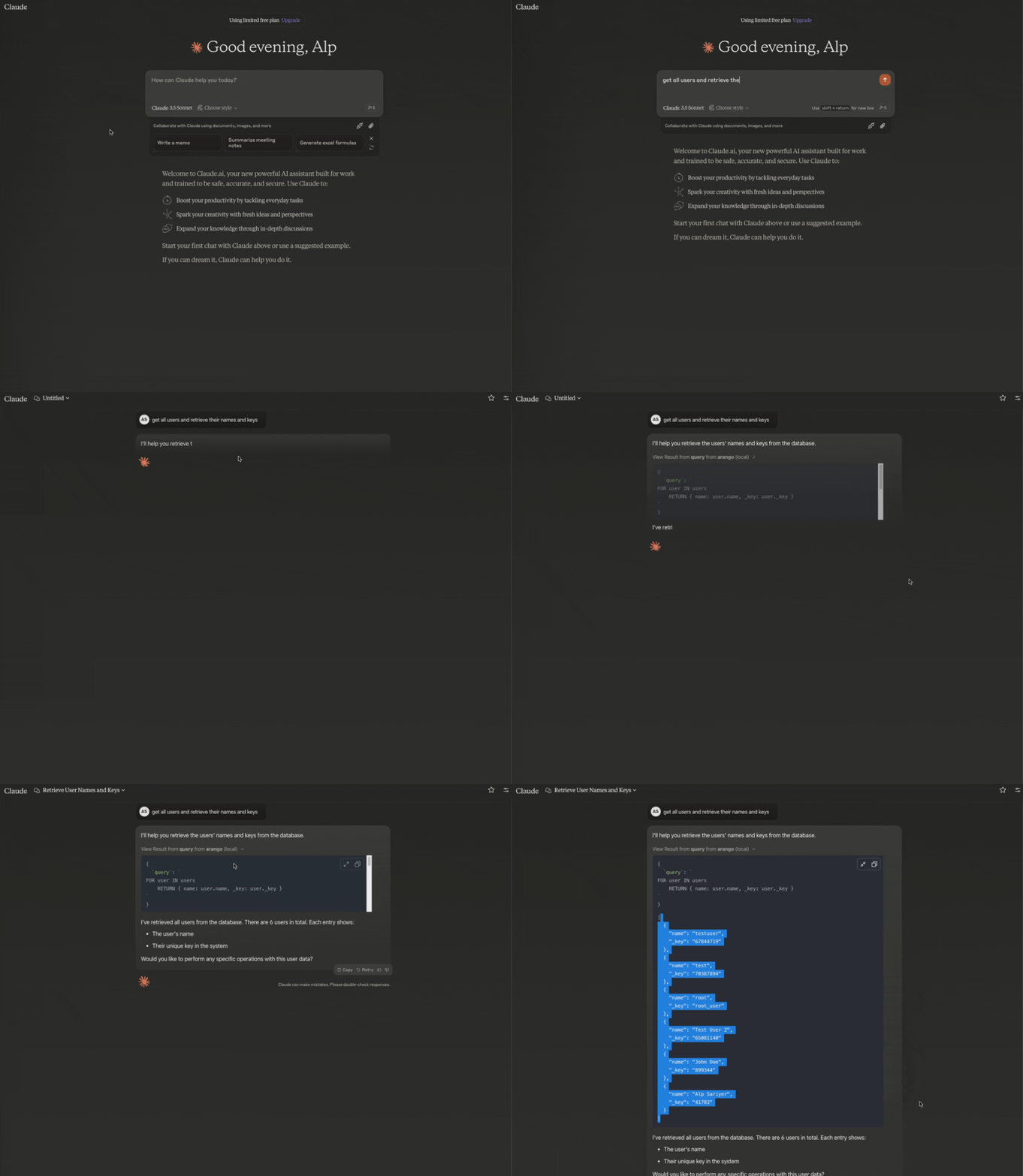
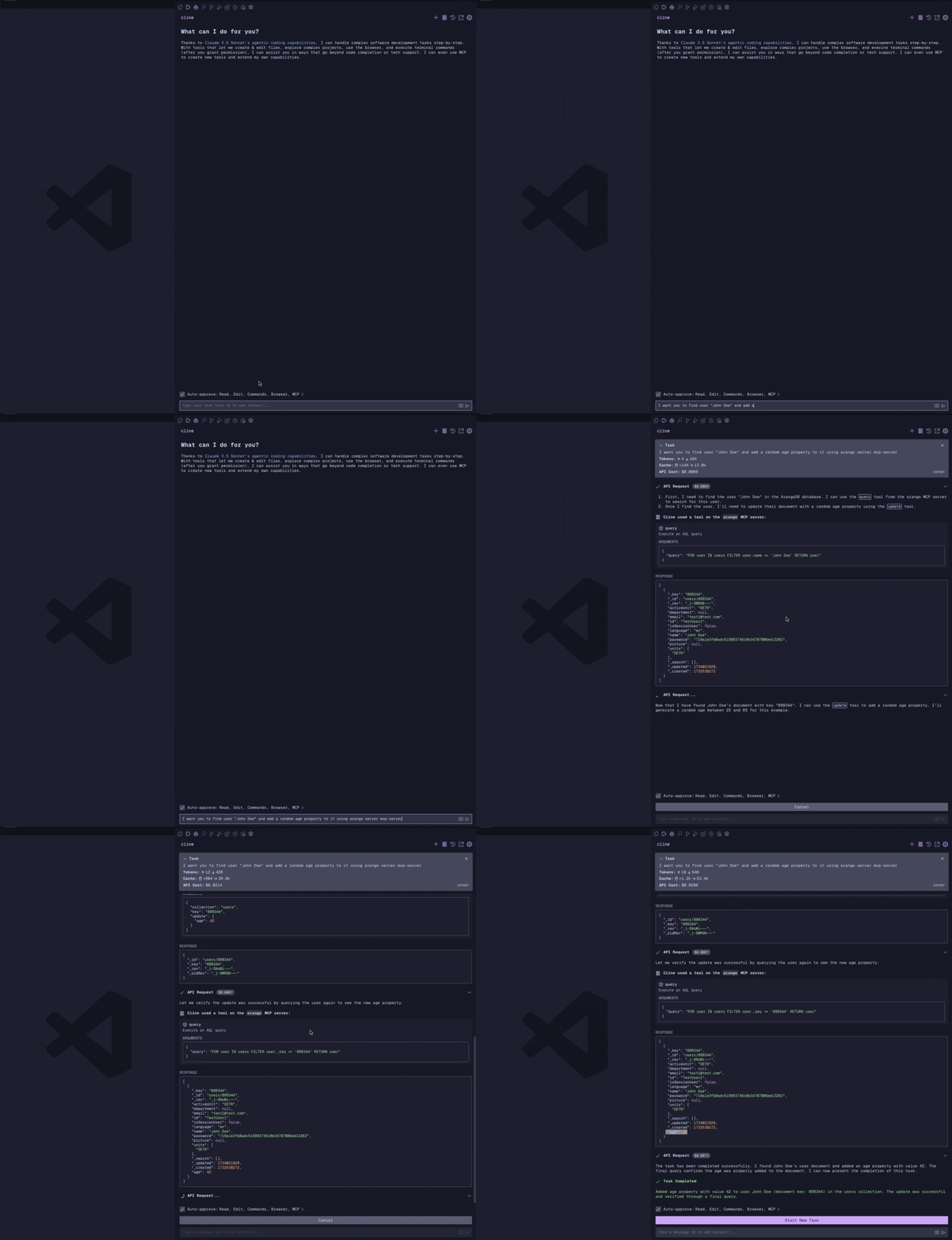
Query all users:
{
  "query": "FOR user IN users RETURN user",
  "limit": 100
}
Insert a new document:
{
  "collection": "users",
  "document": {
    "name": "John Doe",
    "email": "john@example.com"
  }
}
Update a document:
{
  "collection": "users",
  "key": "123456",
  "update": {
    "name": "Jane Doe"
  }
}
Remove a document:
{
  "collection": "users",
  "key": "123456"
}
List all collections:
{
} // No parameters required
Backup database collections:
{
  "outputDir": "nightly_1", // Safe subdirectory name under ARANGO_BACKUP_ROOT. Absolute paths and slashes are rejected.
  "collection": "users", // Optional. If omitted, all collections are backed up.
  "docLimit": 1000 // Optional. Maximum documents per collection. Defaults to 1000 and is capped at 10000.
}
Set ARANGO_BACKUP_ROOT to choose where backups are stored. The server rejects path traversal, absolute paths, symlink escapes, and existing output files to mitigate arbitrary file write risks.
Create a new collection:
{
  "name": "products",
  "type": "document", // "document" or "edge" (optional, defaults to "document")
  "waitForSync": false // Optional, defaults to false
}
Drop a collection:
{
  "name": "products",
  "confirm": true
}
Note: The server is database-structure agnostic and can work with any collection names or structures as long as they follow ArangoDB's document and edge collection models.
This tool is designed for local development environments only. While technically it could connect to a production database, this would create significant security risks and is explicitly discouraged. We use it exclusively with our development databases to maintain separation of concerns and protect production data.
Contributions are welcome. Please read CONTRIBUTING.md before opening a pull request.
Clone the repository
Install dependencies:
npm run build
For development with auto-rebuild:
npm run watch
Since MCP servers communicate over stdio, debugging can be challenging. recommended debugging can be done by using MCP Inspector for development:
npm run inspector
The Inspector will provide a URL to access debugging tools in your browser.
npm test
The test suite includes regression coverage for the arango_backup path handling that prevents absolute paths, traversal, and symlink escapes.
To run the integration smoke test with a local Docker ArangoDB instance:
npm run test:integration
The integration test starts a temporary Docker ArangoDB instance, starts the MCP server over stdio, lists tools, verifies outputSchema, creates a temporary collection, inserts documents, queries with limit, verifies backup output stays under ARANGO_BACKUP_ROOT, rejects an absolute backup path, cleans up the collection, and stops the container.
The test container uses host port 18529 by default to avoid conflicting with a local ArangoDB on 8529. Override it with ARANGO_PORT if needed.
This project is licensed under the MIT License - see the LICENSE file for details.
Claim this server with your GitHub account to request manual ownership verification.
Link to the catalog listing for MCP Server for ArangoDB from your README. This badge does not certify ownership, compatibility or security.
[](https://awesome-mcp.com/servers/mcp-server-arangodb)Public repository statistics could not be verified. Check the configured source address; unavailable counts are not zero.
来源、范围和时段分别列出;不相加,不代表安装人数、活跃用户或安全审核。
尚无已审核的包 / 镜像标识,暂不展示下载统计。
Alternative and complementary servers in the same category
This is a Model Context Protocol (MCP) server for interacting with AIStor object stores.

A Model Context Protocol server that lets AI assistants run SQL queries against AWS Athena databases and retrieve results.

A Model Context Protocol (MCP) server that exposes access to an InfluxDB v2 instance using the InfluxDB OSS API v2.