
A Model Context Protocol (MCP) server for controlling Chrome with debugging capabilities, userscript injection, and extension support.
Repository stats unavailable
Browser & Scraping
A hosted Model Context Protocol server from Browserbase that provides browser tools to MCP clients without installing anything or running a local browser.
Hosted Browserbase MCP server for browser automation is cataloged as an MCP server attributed to browserbase. A hosted Model Context Protocol server from Browserbase that provides browser tools to MCP clients without installing anything or running a local browser. It is categorized under browser automation. See the capability inspector for recorded interfaces and their independent review status; consult upstream documentation for the current interface.
Installation configuration is not reviewed. No executable setup is offered for this entry; inspect the source repository before proceeding.
Catalog license label: MIT License. Check the source repository's current license and terms before using, modifying or distributing this software.
能力定义尚未审核。未核验的采集内容不会作为可信接口展示。
暂无可展示的已审核记录。这不表示上游不支持此能力。
暂无可展示的已审核记录。这不表示上游不支持此能力。
暂无可展示的已审核记录。这不表示上游不支持此能力。
Email delivery is not connected. This page does not collect email addresses or create subscriptions.
Browse the registry for current listings instead.
Reviews for Hosted Browserbase MCP server for browser automation are not available yet
Review publishing and storage are not connected. This page does not collect or publish ratings or comments, including after sign-in.
No; it runs as a hosted service and requires no install or local browser, though a Browserbase API key is required.
README.md · 58a6cc149545 · 采集于 2026-11-13 11:45:24 UTC
保留上游原文,不做 AI 改写。为安全起见过滤脚本、表单和不安全链接。
当前显示最后一次成功采集的文档快照,请以来源页面为准。

Stagehand is the SDK for browser agents
Docs · Quickstart · ⭐ Star this repo



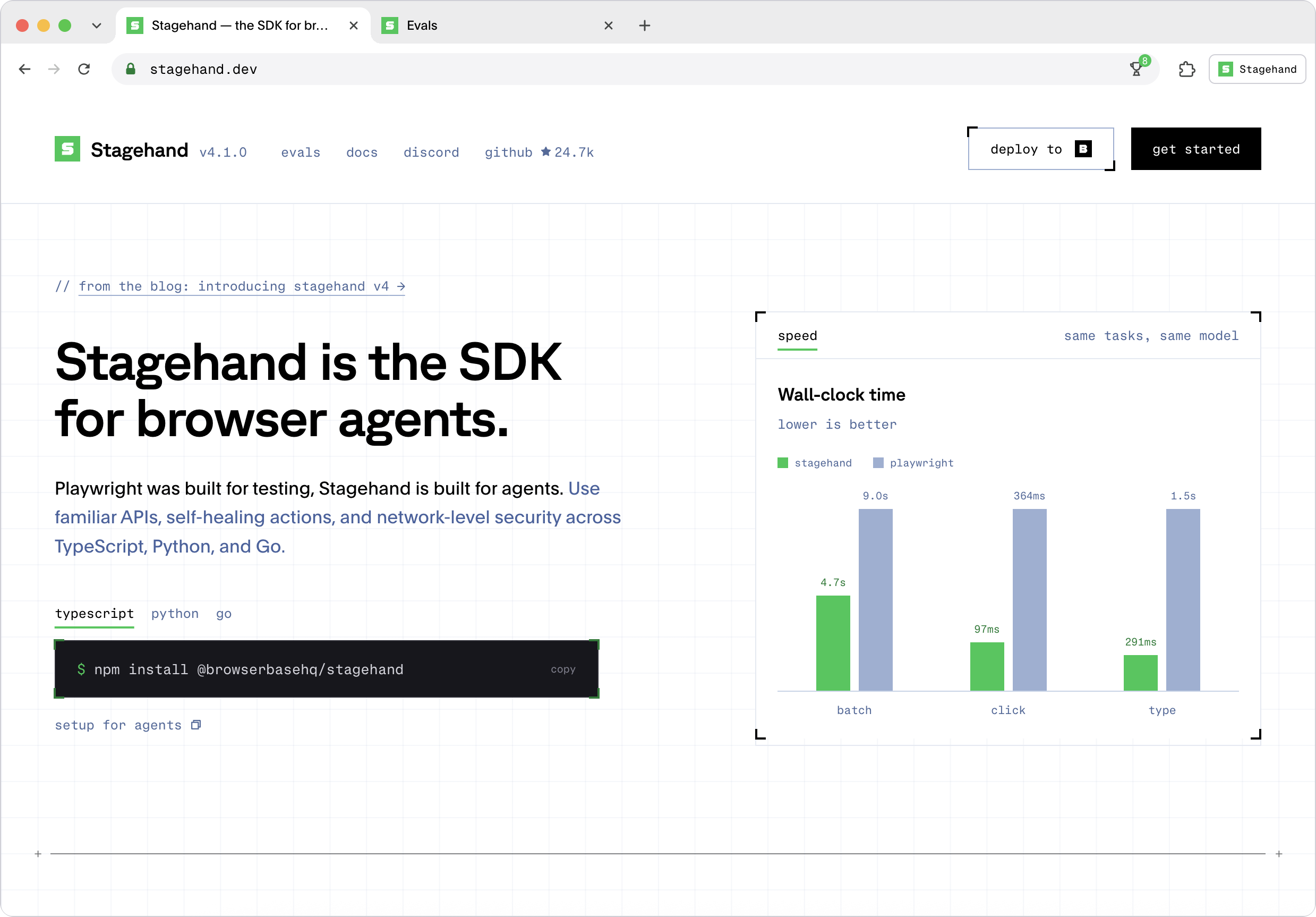
Sign in once, keep the session, and pull structured data out the other side.
import { localBrowser, Stagehand } from "@browserbasehq/stagehand";
import { z } from "zod/v4";

// Cookies persist in ./browser-data, so the next run starts already signed in
const browser = await localBrowser.launch({ userDataDir: "./browser-data" });
const stagehand = await Stagehand.create({
  browser,
  model: { modelName: "openai/gpt-5.4-mini", apiKey: process.env.OPENAI_API_KEY },
});

const [page] = await browser.context.pages();
await page.goto("https://app.example.com/login");

// observe() returns real selectors, so credentials never reach the model
const { data: email } = await stagehand.observe("find the email input");
const { data: password } = await stagehand.observe("find the password input");
await page.locator(email[0].selector).fill(process.env.APP_EMAIL!);
await page.locator(password[0].selector).fill(process.env.APP_PASSWORD!);

// act() self-heals when the site redesigns its form
await stagehand.act("click the sign in button");
await stagehand.act("open the billing page");

// extract() returns schema-validated data
const { data } = await stagehand.extract(
  "extract every invoice in the table",
  z.object({
    invoices: z.array(z.object({ number: z.string(), amount: z.number(), paid: z.boolean() })),
  }),
);

console.log(data.invoices);

await stagehand.close();
await browser.close();
import asyncio
import os

from pydantic import BaseModel
from stagehand import Stagehand, local_browser


class Invoice(BaseModel):
    number: str
    amount: float
    paid: bool


class Invoices(BaseModel):
    invoices: list[Invoice]


async def main() -> None:
    # Cookies persist in ./browser-data, so the next run starts already signed in
    browser = await local_browser.launch(user_data_dir="./browser-data")
    try:
        stagehand = await Stagehand.create(
            browser=browser,
            model="openai/gpt-5.4-mini",
            model_api_key=os.environ["OPENAI_API_KEY"],
        )
        try:
            page = (await browser.context.pages())[0]
            await page.goto("https://app.example.com/login")

            # observe() returns real selectors, so credentials never reach the model
            email = await stagehand.observe("find the email input")
            password = await stagehand.observe("find the password input")
            await page.locator(email.data[0].selector).fill(os.environ["APP_EMAIL"])
            await page.locator(password.data[0].selector).fill(os.environ["APP_PASSWORD"])

            # act() self-heals when the site redesigns its form
            await stagehand.act("click the sign in button")
            await stagehand.act("open the billing page")

            # extract() returns schema-validated data
            result = await stagehand.extract(
                "extract every invoice in the table",
                Invoices,
            )
            print(result.data.invoices)
        finally:
            await stagehand.close()
    finally:
        await browser.close()


asyncio.run(main())
package main

import (
	"context"
	"errors"
	"fmt"
	"log"
	"os"

	stagehand "github.com/browserbase/stagehand/packages/sdk-go/v4"
)

type invoice struct {
	Number string  `json:"number"`
	Amount float64 `json:"amount"`
	Paid   bool    `json:"paid"`
}

type invoices struct {
	Invoices []invoice `json:"invoices"`
}

func main() {
	if err := run(context.Background()); err != nil {
		log.Fatal(err)
	}
}

func run(ctx context.Context) (err error) {
	// Cookies persist in ./browser-data, so the next run starts already signed in
	browser, err := stagehand.LaunchLocalBrowser(ctx, &stagehand.LocalBrowserLaunchOptions{
		UserDataDir: "./browser-data",
	})
	if err != nil {
		return err
	}
	defer func() { err = errors.Join(err, browser.Close(ctx)) }()

	modelAPIKey := os.Getenv("OPENAI_API_KEY")
	client, err := stagehand.Create(ctx, stagehand.CreateOptions{
		Browser: browser,
		Model: &stagehand.ModelConfig{
			ModelName: "openai/gpt-5.4-mini",
			APIKey:    &modelAPIKey,
		},
	})
	if err != nil {
		return err
	}
	defer func() { err = errors.Join(err, client.Close(ctx)) }()

	browserContext, err := browser.Context()
	if err != nil {
		return err
	}
	pages, err := browserContext.Pages(ctx)
	if err != nil {
		return err
	}
	page := pages[0]
	if _, err := page.Goto(ctx, "https://app.example.com/login", nil); err != nil {
		return err
	}

	// Observe returns real selectors, so credentials never reach the model
	emailInstruction := "find the email input"
	email, err := client.Observe(ctx, &emailInstruction, nil)
	if err != nil {
		return err
	}
	if err := page.Locator(email.Data[0].Selector).Fill(ctx, os.Getenv("APP_EMAIL")); err != nil {
		return err
	}

	passwordInstruction := "find the password input"
	password, err := client.Observe(ctx, &passwordInstruction, nil)
	if err != nil {
		return err
	}
	if err := page.Locator(password.Data[0].Selector).Fill(ctx, os.Getenv("APP_PASSWORD")); err != nil {
		return err
	}

	// Act self-heals when the site redesigns its form
	if _, err := client.Act(ctx, stagehand.ActInstruction("click the sign in button"), nil); err != nil {
		return err
	}
	if _, err := client.Act(ctx, stagehand.ActInstruction("open the billing page"), nil); err != nil {
		return err
	}

	// Extract returns data decoded into a Go type
	extracted, err := stagehand.Extract[invoices](
		ctx,
		client,
		"extract every invoice in the table",
		nil,
	)
	if err != nil {
		return err
	}
	fmt.Println(extracted.Data.Invoices)

	return nil
}
pnpm add @browserbasehq/stagehand 'zod@~4.4.3'
pip install stagehand
go get github.com/browserbase/stagehand/packages/sdk-go/v4@v4.0.0
Local runs need Chrome installed. Full setup: Quickstart.
Install the browse CLI and skill instead of using the SDK directly:
npm install -g browse
npx skills add browserbase/stagehand --skill browse
browse open https://example.com --local
browse snapshot
browse get title
No LLM key or Browserbase account needed for local use. See CLI vs SDK vs hosted MCP for when to use each.
| Familiar APIs | The Playwright-style methods you and your agents already know: goto, click, locator, screenshot. |
| Token efficiency | Hybrid accessibility-tree trimming gives agents exactly the page context they need and nothing more. |
| Faster in production | Stagehand runs as an extension next to the browser, cutting round-trip latency on every action. |
| Self-healing | act, observe, and extract refresh how an action happens when the site changes underneath it. |
| Built for agents | WebMCP, clipboard support, batch commands, deep locators for nested iframes and closed Shadow DOMs, OTel traces. |
| Three languages | One complete browser driver across TypeScript, Python, and Go. |
Point the same script at Browserbase and get 2x faster execution than Playwright cloud equivalent browsers. Configure the Model Gateway so you never wire up a provider, and enable server-side caching to cache repeated actions.
import { browserbase, Stagehand } from "@browserbasehq/stagehand";

const browser = await browserbase.launch({ apiKey: process.env.BROWSERBASE_API_KEY! });

// No model configuration: the Model Gateway picks the cheapest model for each action
// cache: true: identical calls come back from Browserbase, no tokens spent
const stagehand = await Stagehand.create({ browser, cache: true });
import os

from stagehand import Stagehand, browserbase

browser = await browserbase.launch(api_key=os.environ["BROWSERBASE_API_KEY"])

# No model configuration: the Model Gateway picks the cheapest model for each action
# cache=True: identical calls come back from Browserbase, no tokens spent
stagehand = await Stagehand.create(browser=browser, cache=True)
browser, err := stagehand.LaunchBrowserbase(ctx, stagehand.BrowserbaseLaunchOptions{
	APIKey: os.Getenv("BROWSERBASE_API_KEY"),
})
if err != nil {
	return err
}

// No model configuration: the Model Gateway picks the cheapest model for each action
// CacheEnabled(true): identical calls come back from Browserbase, no tokens spent
cache := stagehand.CacheEnabled(true)
client, err := stagehand.Create(ctx, stagehand.CreateOptions{
	Browser: browser,
	Cache:   &cache,
})
if err != nil {
	return err
}
Verified mode, residential proxies, persistent contexts, and session recordings come with it. Get an API key and learn how to configure your browser here.
The hosted Browserbase MCP server puts navigate, act, observe, and extract in any MCP client — no install, no local browser. Requires a Browserbase API key.
claude mcp add --transport http browserbase https://mcp.browserbase.com/mcp \
  --header "Authorization: Bearer $BROWSERBASE_API_KEY"
{
  "mcpServers": {
    "browserbase": {
      "url": "https://mcp.browserbase.com/mcp",
      "headers": { "Authorization": "Bearer YOUR_BROWSERBASE_API_KEY" }
    }
  }
}
For local browsing without an API key, use the browse CLI instead.
Fetch lets you grab the content of any URL as markdown. Search provides fast, token-efficient web search results. Both as a lightweight complement to browser sessions.
import { browserbase } from "@browserbasehq/stagehand";

const { results } = await browserbase.search({
  apiKey: process.env.BROWSERBASE_API_KEY!,
  query: "browser agent frameworks",
  numResults: 5,
});

const fetched = await browserbase.fetch({
  apiKey: process.env.BROWSERBASE_API_KEY!,
  url: results[0].url,
  format: "markdown",
});

console.log(fetched.content);
| Quickstart | Empty directory to working automation in three steps |
| page · locator | Playwright-style browser and element APIs |
| WebMCP | Discover and invoke WebMCP tools exposed by web pages |
| act · extract · observe | Browser actions and data extraction with natural language |
| Search · Fetch | Web search and page content without a browser |
| Migrate from Playwright | Port an existing suite |
| Integrations | Mastra, Deep Agents, Vercel AI SDK, Claude Code, Codex |
| Python SDK · Go SDK | Language-specific guides |
| Ask DeepWiki | Ask questions about this codebase |
Stagehand is built in the open, and the fastest way to shape it is to show up.
We're focused on improving reliability, extensibility, speed, and cost, in that order. Bug fixes and small improvements are the best way to get started. For anything larger, reach out to Miguel Gonzalez or Paul Klein on Discord first so we can make sure it lands.
Stagehand is a TypeScript, Python, and Go monorepo driven by just:
git clone https://github.com/browserbase/stagehand.git
cd stagehand
just install
just generate
just build

export OPENAI_API_KEY="your-openai-api-key"
just example act # runs packages/sdk-ts/examples/act.ts
See CONTRIBUTING.md for the full TypeScript, Python, and Go setup.
We'd like to thank the following people for their major contributions to Stagehand:
Licensed under the MIT License.
Copyright 2026 Browserbase, Inc.
"Stagehand" is a trademark of Browserbase, Inc.
Claim this server with your GitHub account to request manual ownership verification.
Link to the catalog listing for Hosted Browserbase MCP server for browser automation from your README. This badge does not certify ownership, compatibility or security.
[](https://awesome-mcp.com/servers/mcp-server-browserbase-thesimsguy)Public repository statistics could not be verified. Check the configured source address; unavailable counts are not zero.
来源、范围和时段分别列出;不相加,不代表安装人数、活跃用户或安全审核。
尚无已审核的包 / 镜像标识,暂不展示下载统计。
Alternative and complementary servers in the same category
A Model Context Protocol (MCP) server for controlling Chrome with debugging capabilities, userscript injection, and extension support.

An MCP server that lets AI assistants browse websites and extract content using optional CSS selectors.

An MCP server that reads pages, fills forms, takes screenshots, and hands the browser to a person for logins or CAPTCHAs.