@bultcloud/mcp-server

Official Model Context Protocol (MCP) server for Bult.ai,
a DevOps platform and cloud hosting Platform-as-a-Service for deploying apps,
GitHub repositories, Docker images, databases, and services with AI agents.
Use Bult MCP with Claude Desktop, Claude Code, Cursor, Codex, and other
MCP-compatible clients to deploy apps, manage cloud infrastructure, inspect
logs, and troubleshoot deployments through the Bult API.
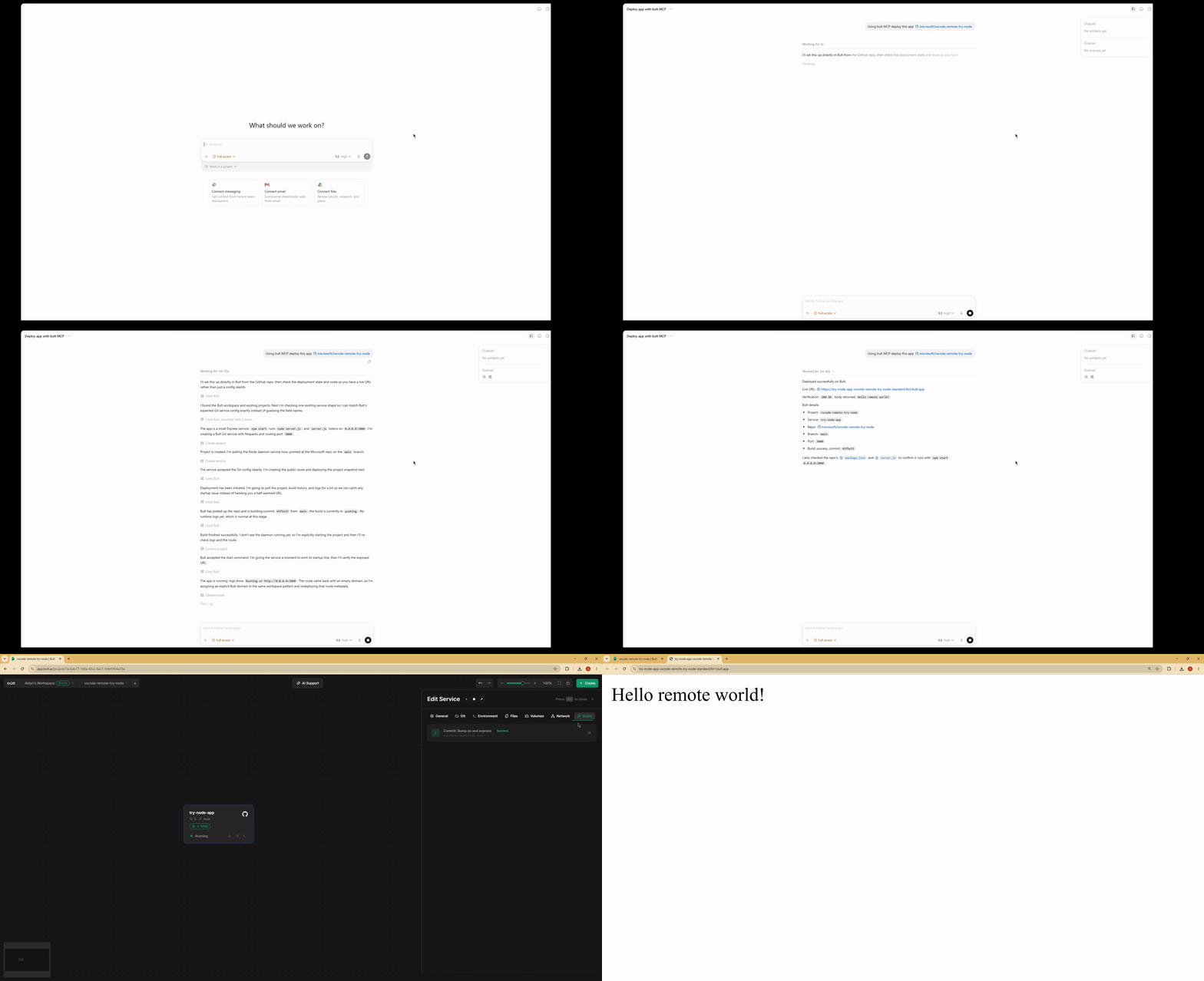
Demo
Features
- Deploy GitHub repositories, Docker images, databases, and app services from
MCP-compatible AI agents.
- Project lifecycle tools: list, inspect, create, update, delete, deploy, start,
stop, and discard changes.
- Service management for daemon and database services, including Docker image and
Git-based deployments.
- Persistent volumes, route/domain mappings, templates, service logs, and build
history.
- MCP tool annotations for read-only, idempotent, and destructive operations
where supported.
- Works over stdio with Claude Desktop, Claude Code, Cursor, Google Antigravity and other MCP-compatible
clients.
When to use Bult MCP
Use Bult MCP when you want an AI coding agent to deploy and operate cloud
hosting resources for you. Common workflows include deploying a GitHub repo from
Cursor, deploying the current project from Claude Code, launching a Docker image,
creating a database service, adding a public route, checking build logs, and
debugging failed deployments.
Requirements
- Node.js 18 or newer.
- Bult API token.
Installation
If you install the package globally, use the bult-mcp binary:
npm install -g @bultcloud/mcp-server
bult-mcp
You can also run it with npx from MCP client configs:
npx -y @bultcloud/mcp-server
Configuration
The server reads its configuration from environment variables.
The server exits during startup if either variable is missing.
MCP Client Setup
Claude Desktop
Add the server to claude_desktop_config.json.
Using npx:
{
  "mcpServers": {
    "bult": {
      "command": "npx",
      "args": ["-y", "@bultcloud/mcp-server"],
      "env": {
        "BULT_API_URL": "https://app.bult.ai",
        "BULT_API_TOKEN": "your-token"
      }
    }
  }
}
Claude Code
Using npx:
claude mcp add bult \
  -e BULT_API_URL=https://app.bult.ai \
  -e BULT_API_TOKEN=your-token \
  -- npx -y @bultcloud/mcp-server
Codex CLI
Using npx:
codex mcp add \
  --env BULT_API_URL=https://app.bult.ai \
  --env BULT_API_TOKEN=your-token \
  bult \
  -- npx -y @bultcloud/mcp-server
Projects
Services
Volumes
Routes
Templates
Logs and Builds
Example Prompts
- Deploy this GitHub repo to Bult and give me the public URL.
- Deploy the current project to Bult.
- Check why my deployment failed.
- Show the latest logs for my app.
- Set DATABASE_URL and restart the service.
- Deploy this Docker image to Bult.
- List my Bult projects and services.
Development
npm run dev      # run with tsx, no build step
npm run build    # compile TypeScript to dist/
npm run lint     # type-check without emitting files
Project layout:
src/index.ts          MCP server entrypoint
src/client.ts         Bult API client
src/tools/*.ts        MCP tool registrations by resource type
Security
BULT_API_TOKEN grants access to your Bult resources. Keep it out of
source control, shell history, issue reports, and screenshots. Prefer scoped or
rotatable tokens when available.
Some tools can create, delete, deploy, stop, or wipe resources. Review tool calls
from your MCP client before approving destructive actions.
Privacy Policy
This MCP server connects your MCP client to Bult.ai using the API token you
provide. Requests are sent to Bult.ai to perform actions such as listing
projects, deploying services, managing routes and volumes, and reading logs.
The server does not store your API token. Tokens are passed through your MCP
client configuration or extension settings. For Bult.ai data handling practices,
see the Bult.ai Privacy Policy.
Contributing
Issues and pull requests are welcome at
github.com/bultcloud/mcp-server.
Before opening a pull request, run:
npm run lint
npm run build
License
This project is licensed under the MIT License.


