
Azure AI Agent Service and Azure AI Search MCP Server

Azure AI Agent Service and Azure AI Search MCP Server

mcp-server-pekotidev•bypekotidev

An MCP server that lets Claude Desktop search indexed documents and the web through Azure AI services, using either Azure AI Agent Service or direct Azure AI Search integration.

License: MIT License•Runtime: Awaiting documentation review•Category: search web

WHAT IT DOES

  • •Offers an Azure AI Agent Service implementation combining an Azure AI Search tool for indexed documents with a Bing web grounding tool for web results.
  • •Provides a direct Azure AI Search implementation supporting keyword, vector, and hybrid search methods.
  • •Returns web search results with citations to original sources.
  • •Features can be customized, including adjusting web search parameters to focus on specific domains.

BEST FOR

  • •Searching your private indexed documents by asking Claude Desktop
  • •Searching the public web with source citations through Claude
  • •Running hybrid keyword and vector searches over indexed content

ABOUT MCP-SERVER-PEKOTIDEV

Azure AI Agent Service and Azure AI Search MCP Server is cataloged as an MCP server attributed to pekotidev. An MCP server that lets Claude Desktop search indexed documents and the web through Azure AI services, using either Azure AI Agent Service or direct Azure AI Search integration. It is categorized under search web. See the capability inspector for recorded interfaces and their independent review status; consult upstream documentation for the current interface.

HOW TO INSTALL

Installation configuration is not reviewed. No executable setup is offered for this entry; inspect the source repository before proceeding.

LICENSE

Catalog license label: MIT License. Check the source repository's current license and terms before using, modifying or distributing this software.

能力检查器

能力定义尚未审核。未核验的采集内容不会作为可信接口展示。

Tools (0)

暂无可展示的已审核记录。这不表示上游不支持此能力。

Resources (0)

暂无可展示的已审核记录。这不表示上游不支持此能力。

Prompts (0)

暂无可展示的已审核记录。这不表示上游不支持此能力。

NEWSLETTER - COMING LATER

Newsletter subscriptions are not open yet

Email delivery is not connected. This page does not collect email addresses or create subscriptions.

Browse the registry for current listings instead.

Community Reviews

Coming later

Reviews for Azure AI Agent Service and Azure AI Search MCP Server are not available yet

Review publishing and storage are not connected. This page does not collect or publish ratings or comments, including after sign-in.

FREQUENTLY ASKED QUESTIONS

What are the two implementation options provided?

It offers an Azure AI Agent Service implementation with document and web search, and a direct Azure AI Search implementation with keyword, vector, and hybrid search.

Does the web search include source citations?

Yes, web search results include citations to original sources.

上游原版 README

在 GitHub 查看同一版本原文

README.md · b863c72352fd · 采集于 2026-11-13 11:59:57 UTC

保留上游原文,不做 AI 改写。为安全起见过滤脚本、表单和不安全链接。

当前显示最后一次成功采集的文档快照,请以来源页面为准。

Azure AI Agent Service + Azure AI Search MCP Server

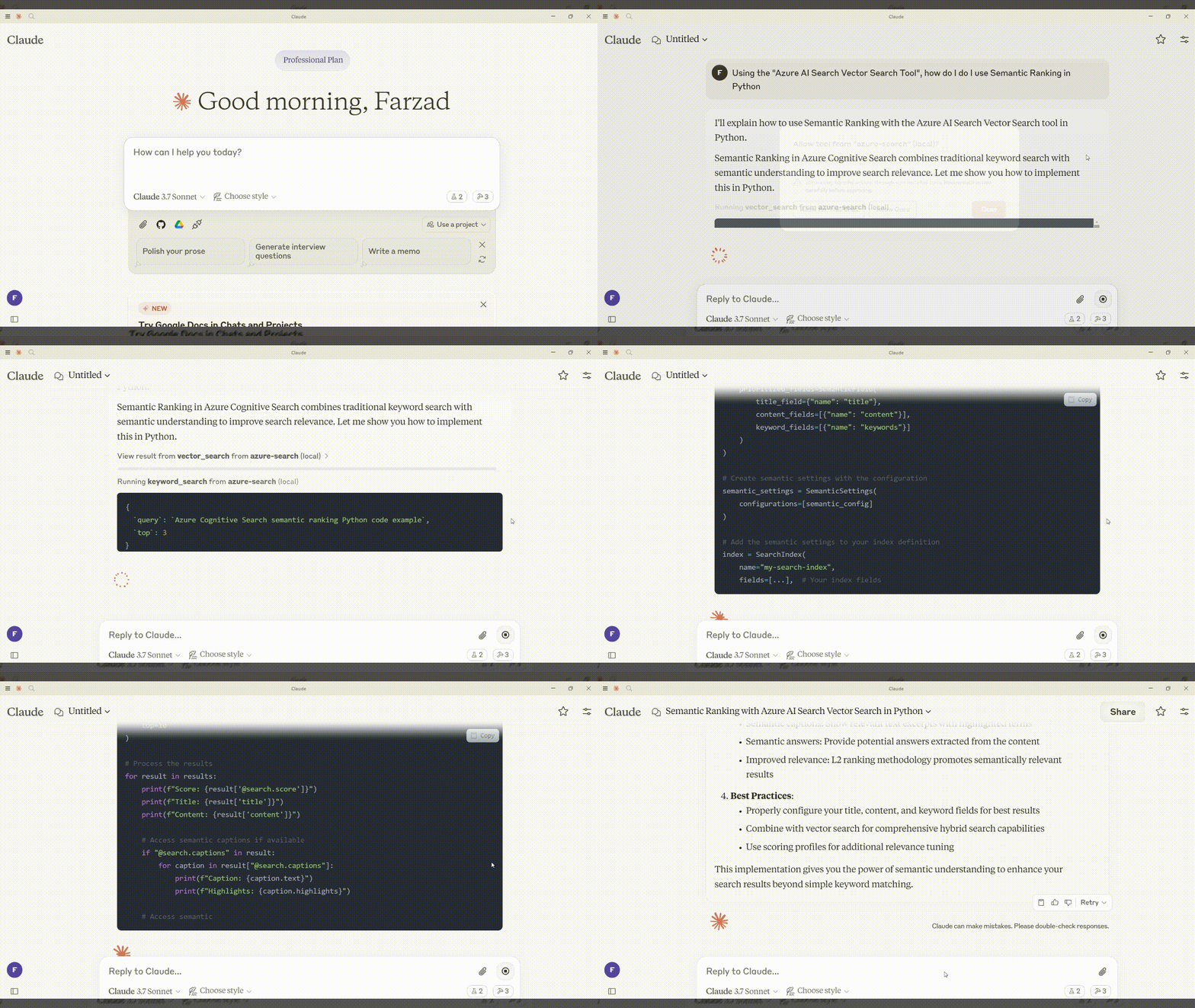
A Model Context Protocol (MCP) server that enables Claude Desktop to search your content using Azure AI services. Choose between Azure AI Agent Service (with both document search and web search) or direct Azure AI Search integration.

demo


Overview

This project provides two MCP server implementations to connect Claude Desktop with Azure search capabilities:

  1. Azure AI Agent Service Implementation (Recommended) - Uses the powerful Azure AI Agent Service to provide:

    • Azure AI Search Tool - Search your indexed documents with AI-enhanced results
    • Bing Web Grounding Tool - Search the web with source citations
  2. Direct Azure AI Search Implementation - Connects directly to Azure AI Search with three methods:

    • Keyword Search - Exact lexical matches
    • Vector Search - Semantic similarity using embeddings
    • Hybrid Search - Combination of keyword and vector searches

Features

  • AI-Enhanced Search - Azure AI Agent Service optimizes search results with intelligent processing
  • Multiple Data Sources - Search both your private documents and the public web
  • Source Citations - Web search results include citations to original sources
  • Flexible Implementation - Choose between Azure AI Agent Service or direct Azure AI Search integration
  • Seamless Claude Integration - All search capabilities accessible through Claude Desktop's interface
  • Customizable - Easy to extend or modify search behavior


Requirements

  • Python: Version 3.10 or higher
  • Claude Desktop: Latest version
  • Azure Resources:
    • Azure AI Search service with an index containing vectorized text data
    • For Agent Service: Azure AI Project with Azure AI Search and Bing connections
  • Operating System: Windows or macOS (instructions provided for Windows, but adaptable)

Setup Guide

  1. Project Directory:

    mkdir mcp-server-azure-ai-search
    cd mcp-server-azure-ai-search
    
  2. Create a .env File:

    echo "PROJECT_CONNECTION_STRING=your-project-connection-string" > .env
    echo "MODEL_DEPLOYMENT_NAME=your-model-deployment-name" >> .env
    echo "AI_SEARCH_CONNECTION_NAME=your-search-connection-name" >> .env
    echo "BING_CONNECTION_NAME=your-bing-connection-name" >> .env
    echo "AI_SEARCH_INDEX_NAME=your-index-name" >> .env
    
  3. Set Up Virtual Environment:

    uv venv
    .venv\Scripts\activate
    uv pip install "mcp[cli]" azure-identity python-dotenv azure-ai-projects
    
  4. Use the azure_ai_agent_service_server.py script for integration with Azure AI Agent Service.

Azure AI Agent Service Setup

Before using the implementation, you need to:

  1. Create an Azure AI Project:

    • Go to the Azure Portal and create a new Azure AI Project
    • Note the project connection string and model deployment name
  2. Create an Azure AI Search Connection:

    • In your Azure AI Project, add a connection to your Azure AI Search service
    • Note the connection name and index name
  3. Create a Bing Web Search Connection:

    • In your Azure AI Project, add a connection to Bing Search service
    • Note the connection name
  4. Authenticate with Azure:

    az login
    

Configuring Claude Desktop

{
  "mcpServers": {
    "azure-ai-agent": {
      "command": "C:\\path\\to\\.venv\\Scripts\\python.exe",
      "args": ["C:\\path\\to\\azure_ai_agent_service_server.py"],
      "env": {
        "PROJECT_CONNECTION_STRING": "your-project-connection-string",
        "MODEL_DEPLOYMENT_NAME": "your-model-deployment-name",
        "AI_SEARCH_CONNECTION_NAME": "your-search-connection-name",
        "BING_CONNECTION_NAME": "your-bing-connection-name",
        "AI_SEARCH_INDEX_NAME": "your-index-name"
      }
    }
  }
}

Note: Replace path placeholders with your actual project paths.


Direct Azure AI Search Implementation

For those who prefer direct Azure AI Search integration without the Agent Service:

  1. Create a different .env File:

    echo "AZURE_SEARCH_SERVICE_ENDPOINT=https://your-service-name.search.windows.net" > .env
    echo "AZURE_SEARCH_INDEX_NAME=your-index-name" >> .env
    echo "AZURE_SEARCH_API_KEY=your-api-key" >> .env
    
  2. Install Dependencies:

    uv pip install "mcp[cli]" azure-search-documents==11.5.2 azure-identity python-dotenv
    
  3. Use the azure_search_server.py script for direct integration with Azure AI Search.

  4. Configure Claude Desktop:

    {
      "mcpServers": {
        "azure-search": {
          "command": "C:\\path\\to\\.venv\\Scripts\\python.exe",
          "args": ["C:\\path\\to\\azure_search_server.py"],
          "env": {
            "AZURE_SEARCH_SERVICE_ENDPOINT": "https://your-service-name.search.windows.net",
            "AZURE_SEARCH_INDEX_NAME": "your-index-name",
            "AZURE_SEARCH_API_KEY": "your-api-key"
          }
        }
      }
    }
    

Testing the Server

  1. Restart Claude Desktop to load the new configuration
  2. Look for the MCP tools icon (hammer icon) in the bottom-right of the input field
  3. Try queries such as:
    • "Search for information about AI in my Azure Search index"
    • "Search the web for the latest developments in LLMs"
    • "Find information about neural networks using hybrid search"

Troubleshooting

  • Server Not Appearing:

    • Check Claude Desktop logs (located at %APPDATA%\Claude\logs\mcp*.log on Windows)
    • Verify file paths and environment variables in the configuration
    • Test running the server directly: python azure_ai_agent_service_server.py or uv run python azure_ai_agent_service_server.py
  • Azure AI Agent Service Issues:

    • Ensure your Azure AI Project is correctly configured
    • Verify that connections exist and are properly configured
    • Check your Azure authentication status

Customizing Your Server

  • Modify Tool Instructions: Adjust the instructions provided to each agent to change how they process queries
  • Add New Tools: Use the @mcp.tool() decorator to integrate additional tools
  • Customize Response Formatting: Edit how responses are formatted and returned to Claude Desktop
  • Adjust Web Search Parameters: Modify the web search tool to focus on specific domains

License

This project is licensed under the MIT License.

Install configuration

Are you the maintainer?

Claim this server with your GitHub account to request manual ownership verification.

README Embed Badge
Markdown

Link to the catalog listing for Azure AI Agent Service and Azure AI Search MCP Server from your README. This badge does not certify ownership, compatibility or security.

[![MCP catalog listing](https://img.shields.io/badge/MCP-awesome--mcp-orange?style=flat-square)](https://awesome-mcp.com/servers/mcp-server-pekotidev)

REPOSITORY STATS

GitHub StarsUnavailable
ForksUnavailable

Public repository statistics could not be verified. Check the configured source address; unavailable counts are not zero.

下载与拉取统计

来源、范围和时段分别列出;不相加,不代表安装人数、活跃用户或安全审核。

尚无已审核的包 / 镜像标识,暂不展示下载统计。

Related search web MCP Servers

Alternative and complementary servers in the same category

View all in search web →

An MCP server that merges Google Search Console history with a live first-party crawl of your site to produce a prioritised, evidence-backed technical SEO audit inside Claude, complete with paste-ready fixes.

Repository stats unavailable
Search & Web Research

An MCP server that offers intelligent web search using OpenAI reasoning models, with support for fast iterations and deep research.

94
Search & Web Research